[中文](../../README.md) · **English (UK)** · [English (US)](README_EN_US.md) · [Français](README_FR.md) · [Русский](README_RU.md)
dsh-claude-effort-slider
**A Claude Code–style six-stop reasoning-effort slider for [DeepSeek Harness](https://github.com/deepseek-ai/deepseek-harness).**
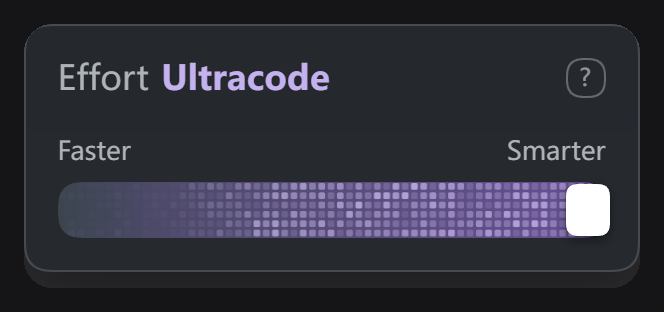
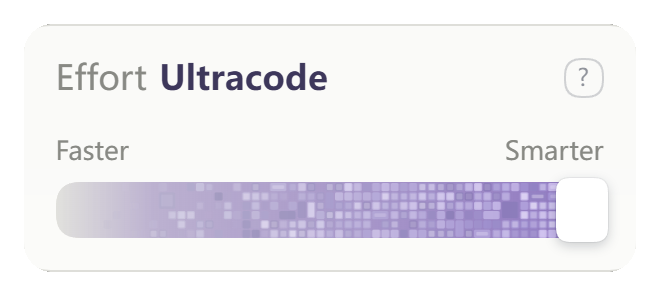
The sixth stop, **Ultracode**, turns the track into a leftward-flowing band of lavender pixels.
[](../../LICENSE)
[](https://github.com/deepseek-ai/deepseek-harness)
[](https://github.com/youqisibun/dsh-claude-effort-slider/releases)
[](https://github.com/topics/dsh-plugin)
---
> [!NOTE]
> **Disclaimer**
>
> This is an unofficial third-party plugin. It is **not affiliated with, endorsed by, or sponsored by Anthropic or DeepSeek**, and has received no authorisation or approval from them.
> Names such as "Claude", "Claude Code" and "Ultracode" appear only to describe the source of the design inspiration; **all related trademarks and intellectual property belong to their respective owners**.
> This project contains no official code or assets — every interface element and animation is drawn at runtime by the code in this repository.
>
> This document is a translation of the [Chinese original](../../README.md); where they differ, the Chinese version prevails.
---

---
## Features
- **Standalone chip**: an Effort chip sits to the right of the composer — click to open, click again to close. The model button only picks models.
- **Six-stop slider**: `Low / Medium / High / Extra / Max / Ultracode`. Dragging previews, releasing commits.
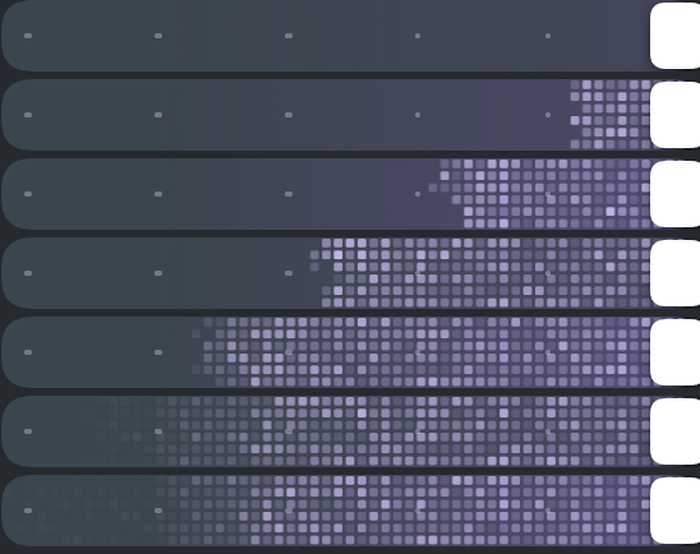
- **Ultracode texture**: sweeps in from right to left (1.6s), then keeps a per-row leftward pulse. Reopening the popover does **not** replay it — only dragging back to the last stop does.
- **Light / dark adaptive**: the popover and texture follow the interface theme — a lavender dot grid on dark, a lavender mosaic on light.
- **Keyboard support**: `←/→` and `Home/End` change stops, `Esc` closes.
- **Really writes**: every stop calls DSH's `directory.select({ reasoningEffort })` — it is not just a text swap.
- **Reversible**: disabling or uninstalling restores the native reasoning control. No host file is modified.
---
## Installation
Requirements: **DSH ≥ 0.2.1-rc.2**, **Node.js ≥ 22**.
### From GitHub (recommended)
```bash
dsh plugin --profile web add github:youqisibun/dsh-claude-effort-slider
```
After installing, **quit DSH completely and start it again** (closing the window is not enough — the process must exit).
### Into the desktop build (Electron)
`desktop` is an Electron-exclusive profile and cannot be installed from the CLI. Use the bundled script:
```powershell
.\install.cmd -Profile desktop
# Uninstall:
.\install.cmd -Profile desktop -Uninstall
```
The script backs up the profile's `package.json`, adds a `link:` dependency, writes the package name into `dsh.profile.bundles`, and links `node_modules`.
### From a tarball
```bash
dsh plugin --profile web add ./dsh-claude-effort-slider-0.9.4.tgz
```
---
## Usage
| Action | Behaviour |
|---|---|
| Click the chip | Open / close the popover |
| Drag the track | Live preview; **commits on release** (avoids repeated session writes and lock contention while dragging) |
| `←/→`, `Home/End` | Change stop with the keyboard |
| Right-click the track | Tick marks, texture strength, reset to default |
| Click outside / `Esc` | Close |
Writes are serialised: only one `select` is in flight at a time. If another plugin holds the write lock, the plugin retries automatically and only rolls back with a notice after 10 seconds.
---
## What the six stops map to
DSH exposes only four real `reasoning effort` values — **off / low / high / max**. The six stops are a visual mapping:
| Visual stop | Written to DSH | Notes |
|---|---|---|
| Low | `off` | Reasoning disabled |
| Medium | `low` | Low intensity |
| High | `high` | High intensity |
| Extra | `high` | Visual subdivision, same as High |
| Max | `high` | Visual subdivision, same as High |
| **Ultracode** | `max` | Highest intensity + pixel texture |
> Two of Medium / Extra / Max write the same value as a neighbouring stop — **that is a consequence of DSH having only four levels, not a bug**. Ultracode really is `max`; the plugin does not alter prompts and does not spawn sub-agents.
---
## Ultracode texture parameters
- Grid: **6 rows × 60 columns**, cell size 4.67px
- Dark theme: blocks fill 72% of a cell (≈3.36px), a lavender dot grid
- Light theme: blocks fill 88% (≈12% seam), a lavender mosaic over a continuous grey→purple base gradient
- Sweep-in: **1.6s**, the front retreats right to left with ±2.5% edge jitter
- Idle: two waves per row with **equal phase velocity**, so the whole texture only moves left; wavelength, speed and phase are randomised per row
- Motion: cells brighten as a crest passes and their core flashes white; the advancing front flashes cell by cell during a drag; the left "outer flame" flickers randomly
- The purple wash grows with the front and only covers the whole track once filled
- Tick marks hide automatically at the last stop
- Popover and texture follow the interface theme automatically — no manual setting
To change speed, density or brightness, see the parameter reference in [`ANIMATION.md`](../../ANIMATION.md).
---
## Compatibility
- Verified on **DSH 0.2.1-rc.2** (web + desktop); other versions may need re-verification.
- The plugin relies on the DOM shape of the official model seat. If an official redesign makes it unrecognisable, the plugin falls back to its own chip — functionality is unchanged and the official UI is never broken.
- Coexists with other plugins that rewrite the official reasoning control; both can be installed.
---
## FAQ
**Want to watch the animation again after maxing out?**
Closing and reopening the popover does not replay it (by design); drag the slider away from the last stop and back to replay it once.
**Native UI not restored after uninstalling?**
Run `install.cmd -Profile desktop -Uninstall` for a full removal, then restart.
---
## Nothing happens after installing? Check these in order
> **Read this first**: the slider only appears inside a **real session**.
> DSH renders the composer slots only when both `sessionId` and `input` exist, so seeing nothing on the
> home screen, welcome page or an empty new session is **expected**. Create a session, send one message,
> then look at the bottom-right of the composer.
### 1. Confirm it is installed
```bash
dsh plugin list --profile web # web
dsh plugin list --profile desktop # desktop (if the CLI is available)
```
`dsh-claude-effort-slider` should be in the list.
### 2. Confirm you installed into the right profile
| Client | profile | How to install |
|---|---|---|
| Web (`dsh web`) | `web` | `dsh plugin --profile web add ...` |
| Desktop (Electron) | `desktop` | **`dsh plugin` refuses it** — use `install.cmd -Profile desktop` |
Installing into the wrong profile is the most common cause: the plugin is in `web`, but you are looking for it in the desktop app.
### 3. Confirm you actually restarted
The client bundle is only injected at **process start**. Closing the window is not enough — make sure no dsh process is still running.
### 4. Look for this line in the startup log
DSH logs the client artifact self-check at startup. Search for `dsh-claude-effort-slider`:
| Log line | Meaning | Action |
|---|---|---|
| `客户端产物 lib/client.js 就绪(… 字节,静态检查通过)` | Host side is fine | Go to step 5 |
| `不可读` / `检查未通过` | Package is corrupt or incomplete | Reinstall |
| **Nothing at all** | The plugin was never loaded | Wrong profile — back to step 2 |
### 5. Open the browser console (F12 → Console)
Search for `claude-effort-slider`.
If a small dark-red notice briefly appeared in the bottom-left corner saying **"Effort 滑条未加载:…"**, it already states the cause:
| Notice text | Cause | Fix |
|---|---|---|
| `宿主没有提供 slots 服务` | DSH too old, no slot system | Upgrade to **≥ 0.2.1-rc.2** |
| `插槽 conversation.input.right 注册失败` | Slot missing or taken in that version | Use a verified version |
### Still stuck?
Open an [issue](https://github.com/youqisibun/dsh-claude-effort-slider/issues) with these four things:
1. Output of `node -v` and `dsh --version`
2. The **complete** terminal output of the install command
3. Console errors mentioning `claude-effort-slider`
4. Whether you use the **web or desktop** build, and the DSH version
---
## Development
```bash
npm test # 38 offline assertions: stop mapping / geometry / texture / settings / bundle shape
npm run pack # build into dist/
```
There is no build step: `lib/client.js` is the shipped artefact (`react` / `react-dom` are provided by the host).
```
lib/index.js Host half: empty apply + static check of the client artefact
lib/client.js Client half: chip bridge, popover, slider, pixel texture, directory I/O
cordis.patch.yml Mounts the package into the cordis plugin tree
```
---
## Licence
MIT