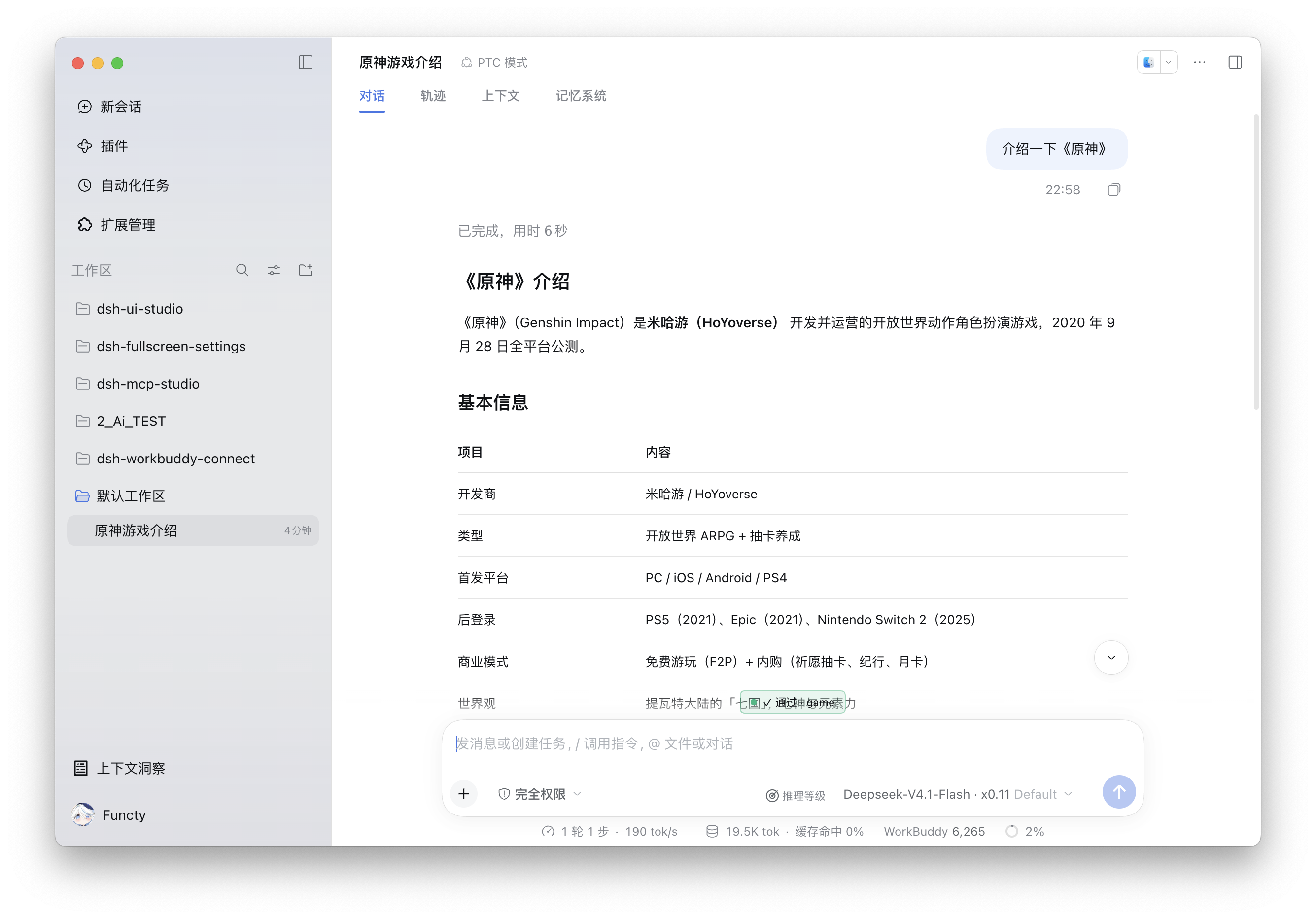
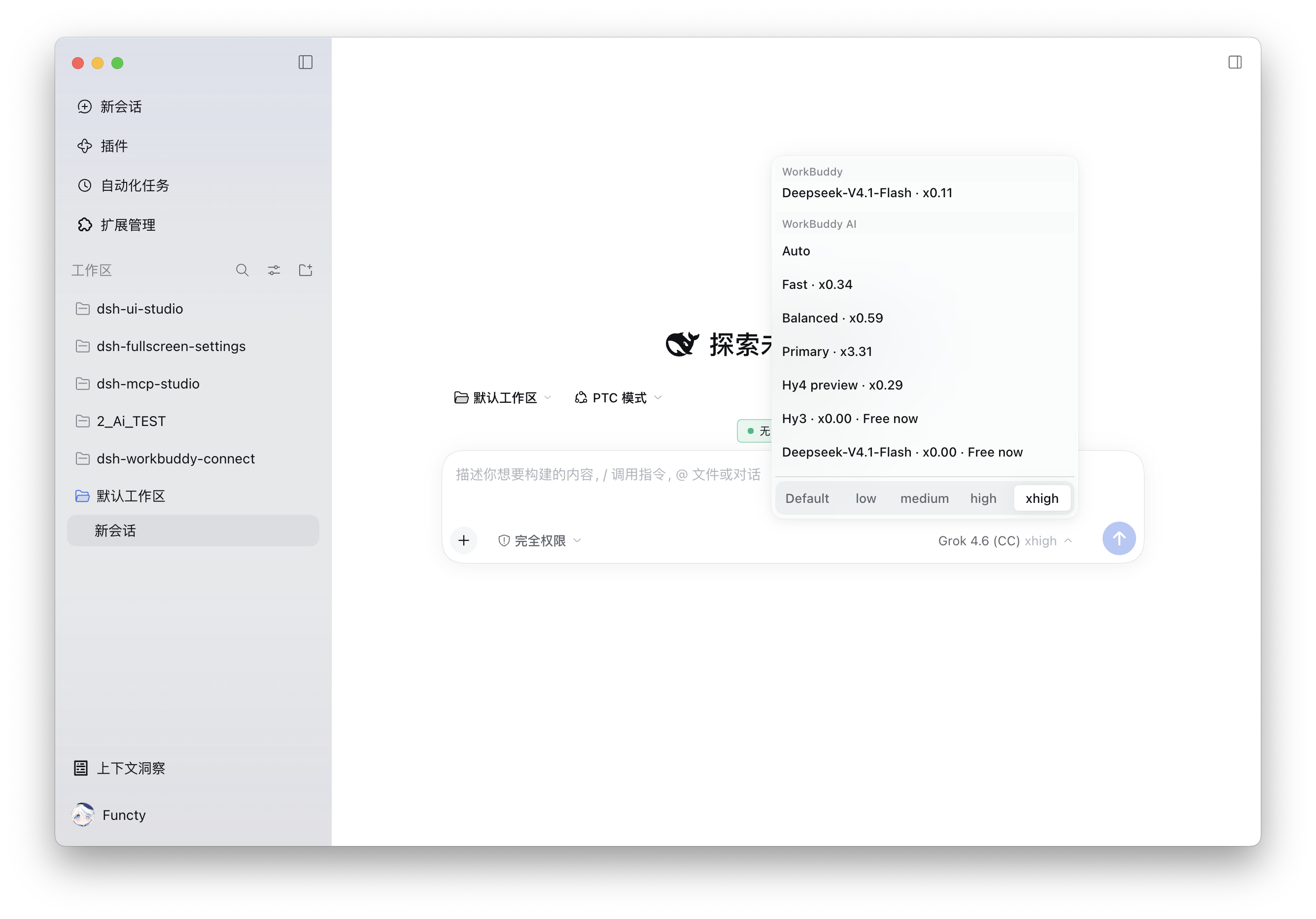
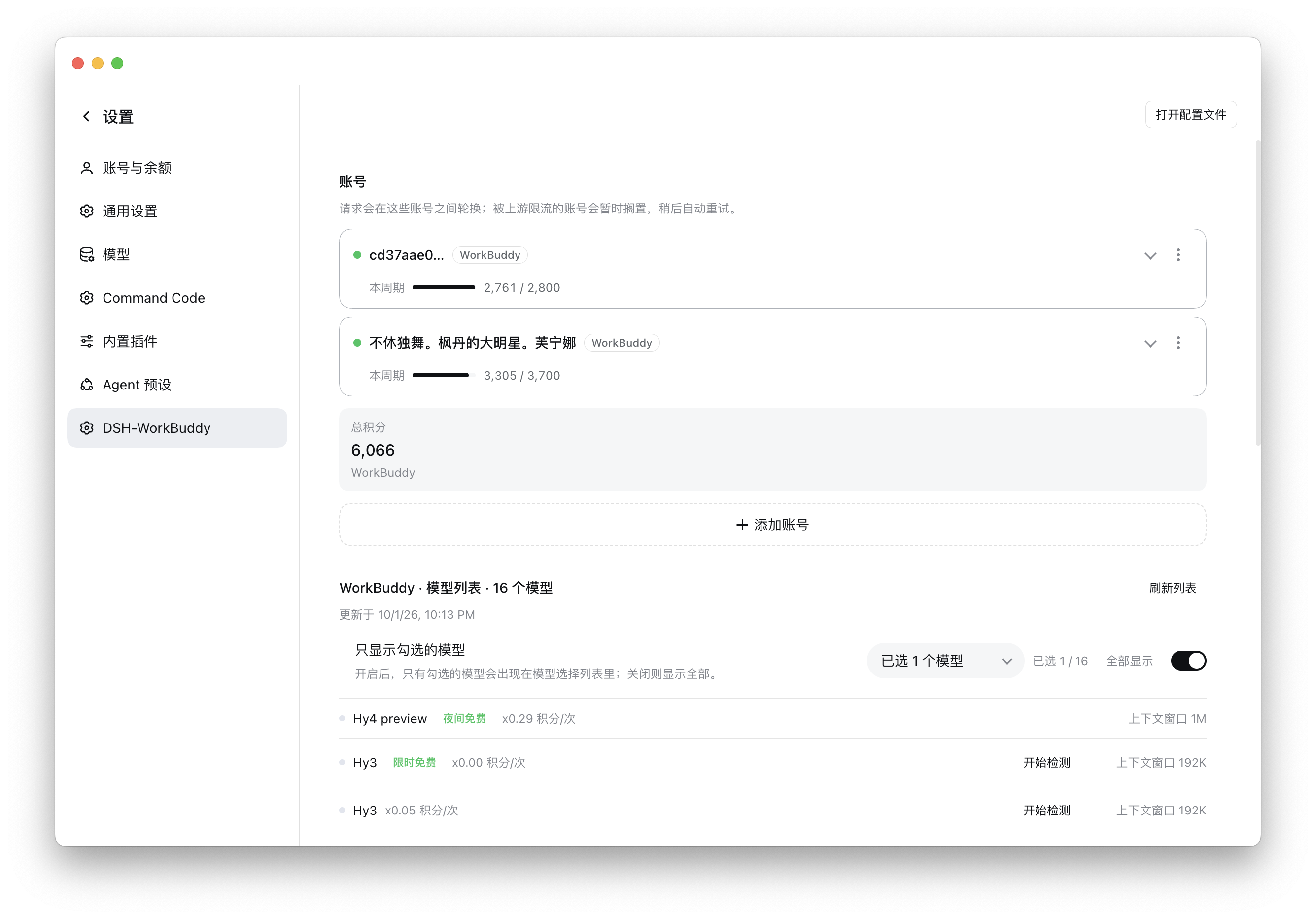
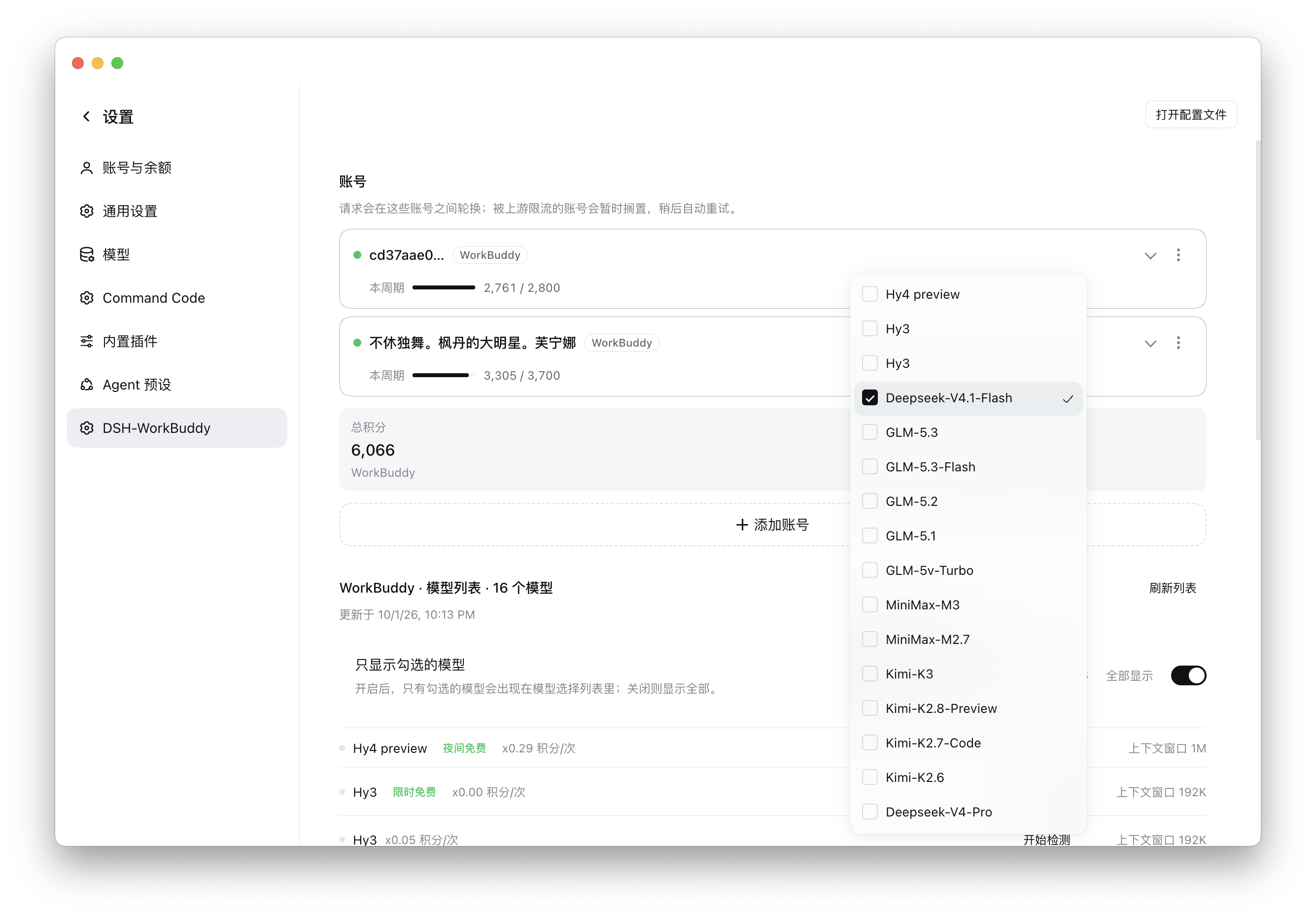
dsh-workbuddy-connect-next # dsh-workbuddy-connect-next **The maintained successor of corrinehu/dsh-workbuddy-connect: dashboard UI, multi-account rotation and credit in the sidebar, bringing WorkBuddy desktop-app models into DeepSeek Harness.** [![dsh-workbuddy-connect-next](https://img.shields.io/badge/dsh--workbuddy--connect--next-0.14.0-4F46E5)](https://github.com/yoyo636/dsh-workbuddy-connect-next) [![Language](https://img.shields.io/badge/language-TypeScript-3178C6?logo=typescript&logoColor=white)](https://www.typescriptlang.org/) [![Top Language](https://img.shields.io/github/languages/top/yoyo636/dsh-workbuddy-connect-next)](https://github.com/yoyo636/dsh-workbuddy-connect-next) [![Platform](https://img.shields.io/badge/platform-macOS%20%7C%20Windows%20%7C%20Linux-lightgrey)](https://github.com/yoyo636/dsh-workbuddy-connect-next) [![License: MIT](https://img.shields.io/badge/License-MIT-blue.svg)](./LICENSE) [![Downloads](https://img.shields.io/github/downloads/yoyo636/dsh-workbuddy-connect-next/total)](https://github.com/yoyo636/dsh-workbuddy-connect-next/releases) [![Stars](https://img.shields.io/github/stars/yoyo636/dsh-workbuddy-connect-next)](https://github.com/yoyo636/dsh-workbuddy-connect-next/stargazers) [![Repo Size](https://img.shields.io/github/repo-size/yoyo636/dsh-workbuddy-connect-next)](https://github.com/yoyo636/dsh-workbuddy-connect-next) [![Contributors](https://img.shields.io/github/contributors/yoyo636/dsh-workbuddy-connect-next)](https://github.com/yoyo636/dsh-workbuddy-connect-next/graphs/contributors) [Issues](https://github.com/yoyo636/dsh-workbuddy-connect-next/issues) • [Changelog](CHANGELOG.md) • [English](README.en.md) / [中文](README.md)



--- > ## ⚠️ Read this first: upstream is tightening, and it can break at any time > > **Since 2026-10-20 the WorkBuddy chat gateway enforces channel verification against third-party clients.** This plugin — and every other third-party integration — can be refused outright. > > - Typical failure: `400 / code 11128 / Illegal API invocation from an unapproved channel`, surfaced to users as 「请求被拦截,请重新发送」 / 「这次调用没通过渠道校验,可能不是官方客户端发出的」. > - The checks keep growing. Confirmed so far: the **fixed sentence at the start of the system prompt** (DSH core injects `You are an AI agent powered by DeepSeek Harness.`), and the **request-header shape** (`X-Conversation-*`, `acp-connection-id`, how `X-No-*` is used). Earlier releases of this plugin were already refused once for omitting the `X-Conversation-*` trio and once for sending `X-No-*` where the official client never does. > - **This plugin imitates the official client at the byte level**, which is a cat-and-mouse game: every upstream change can break it until someone adapts again. **No version can promise it keeps working.** > - **The account risk is real.** While diagnosing this, one CN account's refresh token was revoked by the upstream (`invalid_grant: User disabled`) and another was flagged 「账号存在异常行为,已被限制使用」 (`403 / 11140`). Retrying aggressively, rotating many accounts, or unusual request pacing all make that judgement more likely. > - Upstream [corrinehu/dsh-workbuddy-connect](https://github.com/corrinehu/dsh-workbuddy-connect) **stopped maintenance on 2026-10-20**, saying it respects that boundary and will not keep adapting to these checks; the repository is scheduled to go offline on 2026-10-22. This fork is independent and still maintained, but that does not mean the road continues. > > **Decide for yourself whether your account is worth that risk.** If not, use the official WorkBuddy client. --- The maintained successor of [corrinehu/dsh-workbuddy-connect](https://github.com/corrinehu/dsh-workbuddy-connect), not the upstream project. The upstream npm package is still `dsh-workbuddy-connect` (currently `0.7.8`, DSH `0.2.1-rc.2` only). This repository publishes as **`dsh-workbuddy-connect-next`**, with a different UI and account model. Both the CN **WorkBuddy** app and the international **WorkBuddy AI** app are supported: whichever you have installed shows up as its own model group; both installed shows both, each with its own account and credit. ## How this fork differs Compared with upstream **0.7.8** (2026-10-17). Features both trees share are not listed as ours. | | Upstream `dsh-workbuddy-connect` 0.7.8 | This tree 0.14.0 | |---|---|---| | UI | two legacy plugin cards in Settings | sidebar credit card + centre dashboard + settings section page (accounts merged into one card per product; balance / used / tokens / reset sit on the line under each name) | | Accounts | follows the desktop app's current sign-in | multi-account pool: rotation, QR, token, desktop adopt; a removed account is not swept back in; one card per product instead of one card per account | | Credit | on the settings card only | in the sidebar, remaining or used/total, can be hidden; each account row also states used, requests, tokens and when the allowance returns | | DSH | **`0.2.0-rc.2` only** | **`0.2.1-rc.x` only** (see “Supported DSH versions” below) | | Update notice | bottom-right reminder | not ported | | npm | `dsh-workbuddy-connect` | `dsh-workbuddy-connect-next` | Both trees have: CN/AI groups, image input, reasoning-effort detection, per-account model visibility, CN enterprise credit, picker rate/promo badges, Windows Electron discovery, per-region effort-rejection codes. **Request identity**: chat sends `WorkBuddy/ WorkBuddy/ CLI/` as the UA (**`WorkBuddy` twice in both regions, never `AI`** — both shipped apps' gateway proxies compose it that way), the `X-IDE-*` attribution family, `X-Agent-Intent: craft` / `X-Agent-Purpose: conversation` / `X-Agent-Type: main` / `x-codebuddy-request: 1` / `X-Private-Data: true`, and `traceparent` + B3 + `X-Trace-ID` sharing one trace id. The conversation headers follow the official three-tier lifetime: `X-Conversation-ID` stable per conversation, `X-Conversation-Request-ID` stable per turn, `X-Conversation-Message-ID` fresh per request — a new conversation after 30 idle minutes, a new turn after 10. Chat sends no `Origin`/`Referer` (neither does the native client); the console endpoints still do. The two regions' chat headers are **identical**; only the URL, `X-Domain`, and the version are region-scoped, and the only body differences are the international system-message prepend and the removal of `reasoning_effort: off`. ## Screenshots WorkBuddy models in chat (rate and reasoning level in the composer, usage and credit on the status bar): Chat using a WorkBuddy model, with usage and credit on the status bar Picker groups WorkBuddy / WorkBuddy AI, with rates and free badges: Model picker with WorkBuddy and WorkBuddy AI groups Settings page for the account pool, cycle credit and the model list: Settings: accounts, cycle credit, model list Choose which models appear in the picker: Settings: show only checked models ## Features - **Zero configuration**: after install, pick a WorkBuddy model in chat. The plugin reuses the desktop app's sign-in and follows account switches. - **Dashboard**: a credit card at the sidebar foot opens the centre-column panel; Settings → **DSH-WorkBuddy** manages accounts, models, context length and reasoning-level detection. The card itself can be switched off. - **Multi-account rotation**: several accounts per product. Requests rotate across available ones; a rate-limited account is benched and retried later. Add via QR, a pasted token, or the desktop app's own sign-in. - **Credit**: sidebar can show remaining credit or used/total; CN enterprise accounts use the enterprise billing endpoint. - **Images**: most models accept paste or drag-and-drop. - **Reasoning levels**: declared sets show up directly. Undeclared models can be probed from the picker on Web / Desktop (a few requests, may spend credit). - **Visibility**: saved per signed-in account. Hiding a model only affects the picker; existing chats keep working. ## Install Prerequisite: the WorkBuddy desktop app is installed and signed in (same for WorkBuddy AI). A mismatched DSH core fails to start. > **⚠️ This release spans a large amount of change and has NOT been fully tested.** Display problems, > and possibly more serious issues, may appear after upgrading. Back up `~/.dsh` before upgrading > (especially the `.workbuddy-*.json` stores and `profiles//cordis.patch.yml`). > > Two **breaking changes** ship with it: the Loader entry id is now `llm-workbuddy-next`, and the > locale namespaces are `settings.workbuddy.next` / `panel.workbuddy.next`. Installing alongside > upstream `dsh-workbuddy-connect` fails to send messages because both claim provider id `workbuddy`; > keep only one of the two. ### Supported DSH versions (**one line only**) | Version | Supported | Why | |---|---|---| | `0.2.1-rc.x` (verified on `0.2.1-rc.2`) | ✅ **yes** | this build is compiled and tested against that kernel and `pi-ai 1.1.0`; the peer range is `^0.2.1-rc.2`, so later rcs of the same line and the `0.2.1` release install cleanly | | `0.2.0-rc.x` | ❌ no | its `dsh-llm-pi-ai` targets `pi-ai ^0.87.1`; two generations in one process make **every request fail with `PI_AI_ERROR` before any HTTP** | | `0.1.7-alpha.x` | ❌ no | same conflict; that line targets `pi-ai ^0.85.1` | `peerDependencies` are narrowed to `^0.2.1-rc.2` and `@earendil-works/pi-ai ^1.1.0`, so a wrong host makes the **package manager refuse the install** instead of leaving you with a plugin whose models cannot answer. > **⚠️ If your machine has upstream `dsh-workbuddy-connect@0.7.4`, it is broken on DSH `0.2.1-rc.2`.** > That release pins `pi-ai` to `0.87.1` (the `0.2.0-rc.2` generation), which is a **different message shape** from the current kernel's > `pi-ai ^1.1.0`. The symptom is a `PI_AI_ERROR` on the first message after picking a model. Staying on the current kernel means moving to this package > (upstream `0.7.8` moved to pi-ai `1.3.0` and is usable itself; what this package adds on top is the dashboard, the account pool and the credit figures). ### pi-ai generation check (since `0.14.0`) The guard now asks for the **1.x generation** instead of the exact version `1.1.0`: patch differences inside one generation (`1.1.5`, `1.4.0`, …) agree with the host about message shapes and no longer raise a false alarm, while the `0.8x` generation is still named. A host that later ships a newer pi-ai will not turn this warning into noise. **This release (`0.14.0`) supports DSH `0.2.1-rc.x` ONLY** (verified on `0.2.1-rc.2`). **Do not install it on `0.1.7-alpha.x` or `0.2.0-rc.x`** — see below. > **Do not install npm's `dsh-workbuddy-connect`.** That is the upstream package, a different code line. ### From the UI DSH **Add plugin** accepts a package name (optional version), a Git address, a tarball, or an absolute local path. 1. Open **Settings → Plugins** (some clients label this Extensions). 2. Choose **Add plugin**. 3. Paste either identifier and confirm: ```text dsh-workbuddy-connect-next ``` or: ```text github:yoyo636/dsh-workbuddy-connect-next ``` 4. **Reload the page**; if nothing changed, **restart the DSH client**. The desktop app starts its own profile — do not use `dsh --profile desktop` as a launcher. ### From the CLI Replace `` with the profile you use (`web` / `desktop`). From npm (recommended): ```sh dsh plugin --profile add dsh-workbuddy-connect-next ``` From GitHub (the repo ships prebuilt `lib/`; git installs do not run `prepack`): ```sh dsh plugin --profile add github:yoyo636/dsh-workbuddy-connect-next ``` ```sh # Web dsh plugin --profile web add dsh-workbuddy-connect-next dsh web ``` ```sh # Desktop (DSH 0.2+ lets the CLI manage the desktop profile) dsh plugin --profile desktop add dsh-workbuddy-connect-next ``` Before DSH 0.2 the CLI refused the `desktop` profile — use the UI path above. A wrapped desktop app (e.g. DSH NEXT) exposes CLI through its bundled `desktop-cli`, which needs `pnpm` on PATH. Where things live: ```text Settings → Models ← no WorkBuddy rows (intentional) Settings → Built-in Plugins → workbuddy-connect ← read-only runtime status sidebar foot ← credit card → centre dashboard Settings → DSH-WorkBuddy ← accounts, models, sidebar chat model picker ← WorkBuddy / WorkBuddy AI groups ``` ## CLI The executable is still `dsh-workbuddy-connect` (same as the provider ids, so existing scripts keep working): ```sh dsh plugin --profile exec dsh-workbuddy-connect status dsh plugin --profile exec dsh-workbuddy-connect accounts dsh plugin --profile exec dsh-workbuddy-connect doctor ``` CN by default; add `--provider workbuddy-ai` for the international product. `accounts` is read-only. `logout` removes only the plugin-owned copy. ## Known limitations - Verified on macOS Web / Desktop (DSH `0.2.1-rc.2`, Node 22+). Windows probes Local then Roaming AppData; WSL reads the mounted Windows profile first. If user names differ, set `WORKBUDDY_AUTH_FILE` / `WORKBUDDY_AI_AUTH_FILE`. - Sidebar display preferences need a host that can write settings; missing fields mean no switch is drawn. - The international catalog comes from the app's own interface and can break; the plugin then degrades to the last successful catalog, then the built-in roster. - International enterprise billing is unverified; a product with no credential no longer shows a model group. - Relies on WorkBuddy client interfaces; app updates may require plugin updates. - **The gateway's channel verification is the most fragile part**: it judges whether a request looks like the official client, and the dimensions keep growing (the system-prompt opener, the `X-Conversation-*` trio, `acp-connection-id`, how `X-No-*` is used). One upstream change can make the whole plugin unusable until someone adapts again. - This plugin aligns with the official client's byte-level characteristics and **does no risk-control evasion** (no IP changes, no forged device fingerprints, no bulk registration). If the upstream adds a new dimension — device, rate, signature — the plugin will not try to bypass it. ## Disclaimer For personal learning and research only, driving your own account on your own machine. Comply with WorkBuddy's terms. Not affiliated with Tencent, WorkBuddy, or DeepSeek. **On bans and stability** (the actionable part; the warning box above covers the rest): - The plugin passes gateway checks by imitating the official client's request characteristics. Those checks are **theirs to change at any time**, so this repository promises no period of availability and does not guarantee your account will not be restricted or banned. - Since the upstream tightened on 2026-10-20 there have been real cases of restricted accounts, including two during this repository's own diagnosis. **Use your own account, keep request rates sane, and do not use it for bulk or multi-instance workloads.** - On a `400 / 11128`, first check whether the upstream changed the check rather than retrying in a loop — retrying can itself accelerate a risk-control decision. A `requestId` in an issue is worth more than repeated attempts. - No support is offered for evading risk controls, bulk registration, or running large account pools at scale. ## Acknowledgements - [corrinehu/dsh-workbuddy-connect](https://github.com/corrinehu/dsh-workbuddy-connect) (MIT) — upstream. - [functy23/dsh-workbuddy-connect-functy](https://github.com/functy23/dsh-workbuddy-connect-functy) (MIT) — this repository's direct predecessor: the account pool, the sidebar credit card and the dashboard all come from that branch, which this repository continues (rename, newer DSH support, performance work). - [Mars-Sea/dsh-commandcode-provider](https://github.com/Mars-Sea/dsh-commandcode-provider) (MIT) — settings page, dashboard and account rows. - [franksong2702/dsh-codex-connect](https://github.com/franksong2702/dsh-codex-connect) (Apache-2.0) — plugin structure and the composer reasoning-level control. - [Sliverkiss/workbuddy2api](https://github.com/Sliverkiss/workbuddy2api) (MIT) — upstream protocol. ## License [MIT](./LICENSE) © 2026 Corrine Hu and Next