AdLens
Your AdMob numbers, without the AdMob console.
A fast AdMob analytics dashboard, plus an MCP server so your AI assistant can query the same live data.
Live app ·
MCP setup ·
Self-host ·
Issues




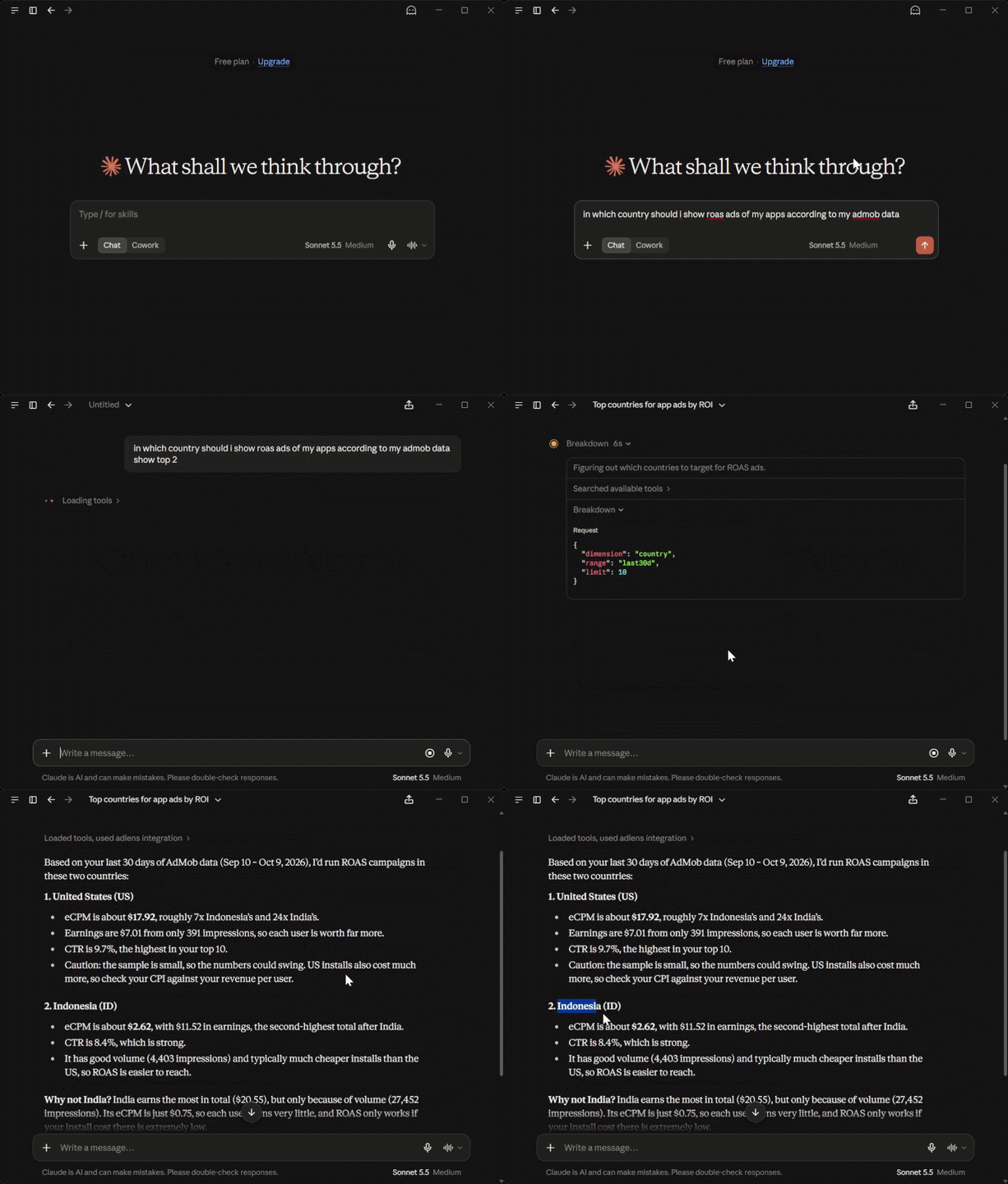
Ask a question. Claude calls AdLens. Live AdMob answers.
---
## What is AdLens?
The AdMob console shows you totals. **AdLens shows you causes.**
Connect your AdMob account once (read-only) and you get:
1. **A fast web dashboard** for revenue, impressions, eCPM, mediation and country breakdowns.
2. **An MCP server** so Claude, Cursor, Codex and other AI clients can answer questions from the same live data, such as *"Which ad format has the best eCPM this month?"*
It is free, read-only, and stores none of your report data. You can use the [hosted version](https://adlens.moreproductive.in) or [run your own](#self-hosting).
## Features
### Dashboard
- **Live, not synced:** fetched from the AdMob API when you open a page.
- **Today at a glance:** today, yesterday, last 7 days and this month, with impressions and eCPM.
- **Period comparisons:** every KPI shows its change vs. the previous period.
- **Sortable breakdowns:** by day, app, ad unit, format, mediation source or country.
- **Per-app deep dives** with the same depth, plus dark and light themes.
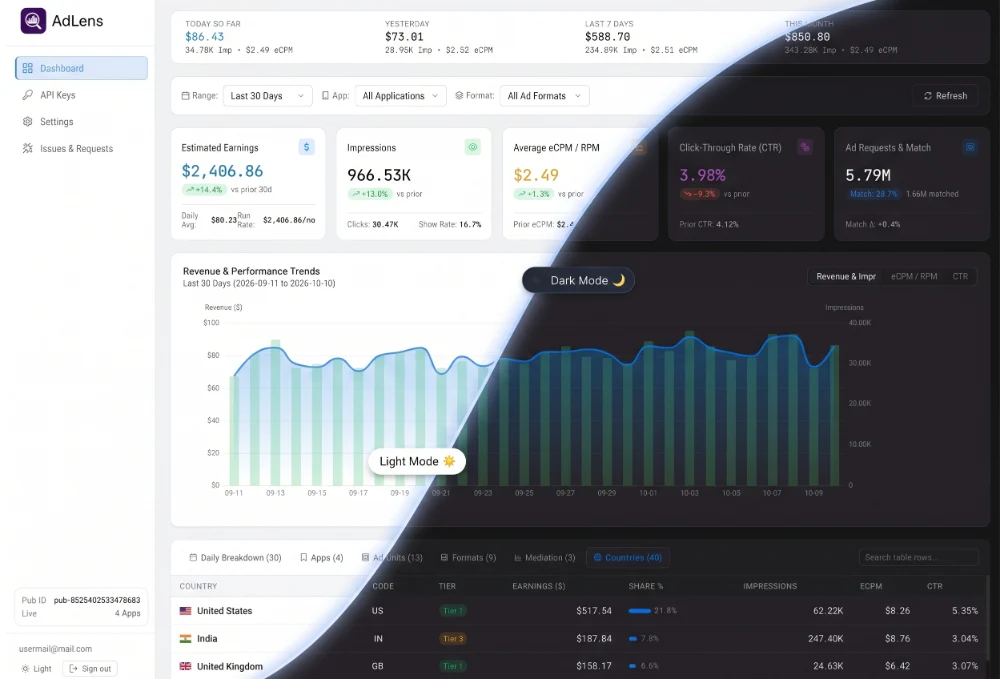
The AdLens dashboard (sample data).
### MCP server
Five read-only tools that any MCP client can call:
| Tool | What it does |
| --- | --- |
| `account_overview` | Lists your connections and apps (id, name, platform, package name) |
| `revenue_summary` | Totals plus daily or weekly series, using presets or explicit dates |
| `breakdown` | Revenue by app, ad unit, format, country, ad source (mediation) or date |
| `top_movers` | Period-over-period movers, with the previous period chosen automatically for presets |
| `list_ad_units` | Your ad unit inventory |
Example prompts to try:
- *"Revenue summary for the last 30 days"*
- *"Top movers by country, this week vs last week"*
- *"Break down mediation revenue for my top app"*
- *"Which ad format has the best eCPM this month?"*
## Getting started (hosted)
Setup takes about a minute.
1. **Sign in** at [adlens.moreproductive.in](https://adlens.moreproductive.in) with an email one-time code or Google. A password is optional.
2. **Connect AdMob.** You approve one Google OAuth consent screen with the `admob.readonly` scope.
3. **Use it your way.** Open the dashboard, or generate an API key and connect your AI client (below).
## Connect your AI assistant (MCP)
Generate an API key on the [**API Keys page**](https://adlens.moreproductive.in/app/api-keys) of the dashboard. Keys look like `ak_live_...` and are shown **once**, so copy yours right away. Then add AdLens to your client.
The MCP endpoint is:
```
https://adlens.moreproductive.in/mcp
```
If you [self-host](#self-hosting), replace the domain with your own. AdLens is a standard **Streamable HTTP** MCP server authenticated with a Bearer token, so any client that supports a remote URL with custom headers will work.
Claude Code
```bash
claude mcp add --transport http adlens https://adlens.moreproductive.in/mcp \
--header "Authorization: Bearer ak_live_..."
```
Or add it to `.mcp.json`:
```json
{
"mcpServers": {
"adlens": {
"type": "http",
"url": "https://adlens.moreproductive.in/mcp",
"headers": { "Authorization": "Bearer ak_live_..." }
}
}
}
```
Claude Desktop
Claude Desktop's config file has no native URL + header support, so bridge it with [`mcp-remote`](https://www.npmjs.com/package/mcp-remote).
Edit `claude_desktop_config.json`:
- macOS: `~/Library/Application Support/Claude/`
- Windows: `%APPDATA%\Claude\`
- Linux: `~/.config/Claude/`
```json
{
"mcpServers": {
"adlens": {
"command": "npx",
"args": [
"-y", "mcp-remote",
"https://adlens.moreproductive.in/mcp",
"--header", "Authorization: Bearer ak_live_..."
]
}
}
}
```
**On Windows**, use `npx.cmd` instead of `npx` as the command:
```json
{
"mcpServers": {
"adlens": {
"command": "npx.cmd",
"args": [
"-y", "mcp-remote",
"https://adlens.moreproductive.in/mcp",
"--header", "Authorization: Bearer ak_live_..."
]
}
}
}
```
Codex
In `~/.codex/config.toml` (Windows: `%USERPROFILE%\.codex\config.toml`):
```toml
[mcp_servers.adlens]
url = "https://adlens.moreproductive.in/mcp"
http_headers = { "Authorization" = "Bearer ak_live_..." }
```
Cursor, VS Code, Windsurf and other clients
For Cursor, edit `~/.cursor/mcp.json` (Windows: `%USERPROFILE%\.cursor\mcp.json`):
```json
{
"mcpServers": {
"adlens": {
"url": "https://adlens.moreproductive.in/mcp",
"headers": { "Authorization": "Bearer ak_live_..." }
}
}
}
```
For stdio-only clients, use the `mcp-remote` bridge shown in the Claude Desktop section.
Antigravity
In `~/.gemini/antigravity/mcp_config.json` (Windows: `%USERPROFILE%\.gemini\antigravity\mcp_config.json`), or via the MCP Store panel → Manage MCP Servers → View raw config:
```json
{
"mcpServers": {
"adlens": {
"serverUrl": "https://adlens.moreproductive.in/mcp",
"headers": { "Authorization": "Bearer ak_live_..." }
}
}
}
```
OpenCode
In `opencode.json` (project) or `~/.config/opencode/opencode.json`. This path is the same on Windows (`%USERPROFILE%\.config\opencode\opencode.json`), not `%APPDATA%`. Setting `oauth: false` makes OpenCode use your Bearer key instead of trying OAuth sign-in first.
```json
{
"$schema": "https://opencode.ai/config.json",
"mcp": {
"adlens": {
"type": "remote",
"url": "https://adlens.moreproductive.in/mcp",
"enabled": true,
"oauth": false,
"headers": { "Authorization": "Bearer ak_live_..." },
"timeout": 30000
}
}
}
```
> **Tip:** to test the endpoint without an AI client, run the [MCP Inspector](https://github.com/modelcontextprotocol/inspector): `npx @modelcontextprotocol/inspector`
## Self-hosting
AdLens is multi-tenant by design and easy to run yourself. You need:
- Node.js (LTS) and [pnpm](https://pnpm.io), or just Docker
- A Postgres database (the included Docker Compose file starts one)
- A **[MojAuth](https://www.mojoauth.com)** project for sign-in (email OTP + Google). You'll need its API key.
- A **Google Cloud OAuth client** with the AdMob API enabled and the `admob.readonly` scope
### 1. Clone and configure
```bash
git clone https://github.com/ys-pro-duction/AdLens.git
cd AdLens
cp .env.example .env # then fill in the values below
```
Generate the random secrets with:
```bash
openssl rand -hex 32
```
| Variable | Required | Description |
| --- | --- | --- |
| `APP_URL` | yes | Public URL of your instance (use your `https` domain in production) |
| `DATABASE_URL` | yes | Postgres connection string |
| `MOJOAUTH_API_KEY` | yes | Your MojAuth project's key (email OTP + Google sign-in) |
| `SESSION_SECRET` | yes | Random secret used to sign session cookies |
| `GOOGLE_CLIENT_ID` / `GOOGLE_CLIENT_SECRET` | yes | Google OAuth client for connecting AdMob |
| `ENCRYPTION_KEY` | yes | 32-byte hex key used to encrypt refresh tokens at rest |
| `OAUTH_STATE_SECRET` | no | Separate secret for signing OAuth state |
| `TRUST_PROXY` | no | Set to `1` when running behind nginx so rate limits see real client IPs |
| `HOST` | no | Bind address. Use `127.0.0.1` behind a reverse proxy |
| `MOJOAUTH_AUDIENCE` | no | Optional audience check for MojAuth tokens |
| `MOJOAUTH_ISSUERS` | no | Override the allowed MojAuth token issuers |
`.env.example` is kept current and has the full annotated list.
In your **Google Cloud OAuth client**, register `/api/admob/callback` as an authorized redirect URI. In your **MojAuth dashboard**, register the callback URL it shows you.
### 2a. Run with Docker (everything)
```bash
docker compose up --build
```
### 2b. Run locally for development
```bash
pnpm install
docker compose up -d db # Postgres only
pnpm db:migrate
pnpm dev # API on :3000, web on :5173
```
### 3. Production
Build from the **repo root** (building a single package can leave a stale `packages/db/dist`):
```bash
git pull && pnpm install && pnpm db:migrate && pnpm build
```
In production the API serves the built web app (`apps/web/dist`), so there is a single process to run. Run it under a process manager of your choice (the hosted instance uses pm2, with Postgres in Docker).
Behind nginx (or any reverse proxy):
- Set `APP_URL` to your `https` domain
- Set `TRUST_PROXY=1`
- Bind the app to localhost with `HOST=127.0.0.1`
> **Note:** rate limits are held in memory per process, so AdLens is designed to run as a single process. If it is exposed directly (no proxy), leave `TRUST_PROXY` unset, because `X-Forwarded-For` can be spoofed.
## Fair-use limits
AdLens is free, with no plans and no billing. Per-IP rate limits protect the service:
| Endpoint | Limit |
| --- | --- |
| Dashboard API (`/api`) | 300 requests / minute |
| MCP server (`/mcp`) | 15 requests / minute |
If you self-host, these limits are yours to adjust in the source.
## Architecture
```mermaid
flowchart LR
A[Vue dashboard] --> B[Express API]
C[MCP clients] --> B
B --> D[Live AdMob layer
60-min cache · single-flight]
D --> E[(Google AdMob API)]
B --> F[(Postgres
identity · encrypted keys )]
```
There is no worker, no warehouse and no stored metrics. Reports are fetched from Google on demand and aggregated in JS.
## Tech stack & layout
TypeScript monorepo (pnpm workspaces):
```
apps/web Vue 3 + Vite SPA (ECharts): dashboard, reports, mediation, API keys, settings
apps/api Express API + stateless MCP server; serves web/dist in production
(live AdMob serving layer: apps/api/src/live)
packages/db Drizzle schema + migrations (multi-tenant: tenant_id everywhere)
packages/admob AdMob OAuth + reporting API client
packages/crypto AES-256-GCM secrets, API key generation/hashing, scrypt
packages/shared Shared TypeScript types and AdMob constants
```
## Disclaimer
AdLens is an independent project and is not affiliated with, endorsed by, or sponsored by Google. AdMob and Google are trademarks of Google LLC.
## License
[MIT](LICENSE)