# DSH Multi-Selection Comments
English | [简体中文](README.md)
Bring Codex-style multiple, independent selection comments to DeepSeek Harness (DSH).
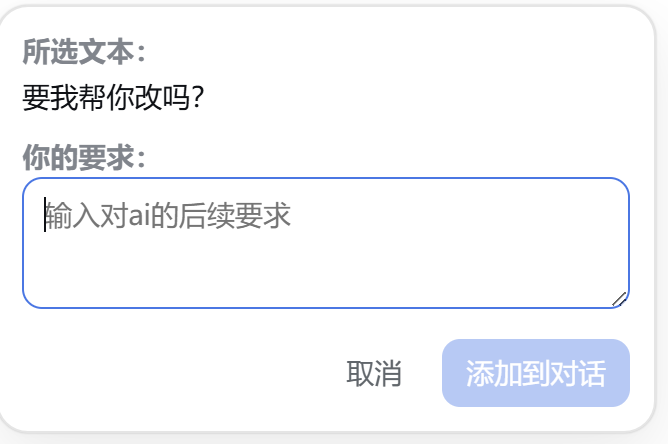
Select several passages from assistant responses or tool output, write a separate comment for each selection, and send them together as structured context with your main message—without cluttering the composer.
## Preview
### Comment on one selected passage
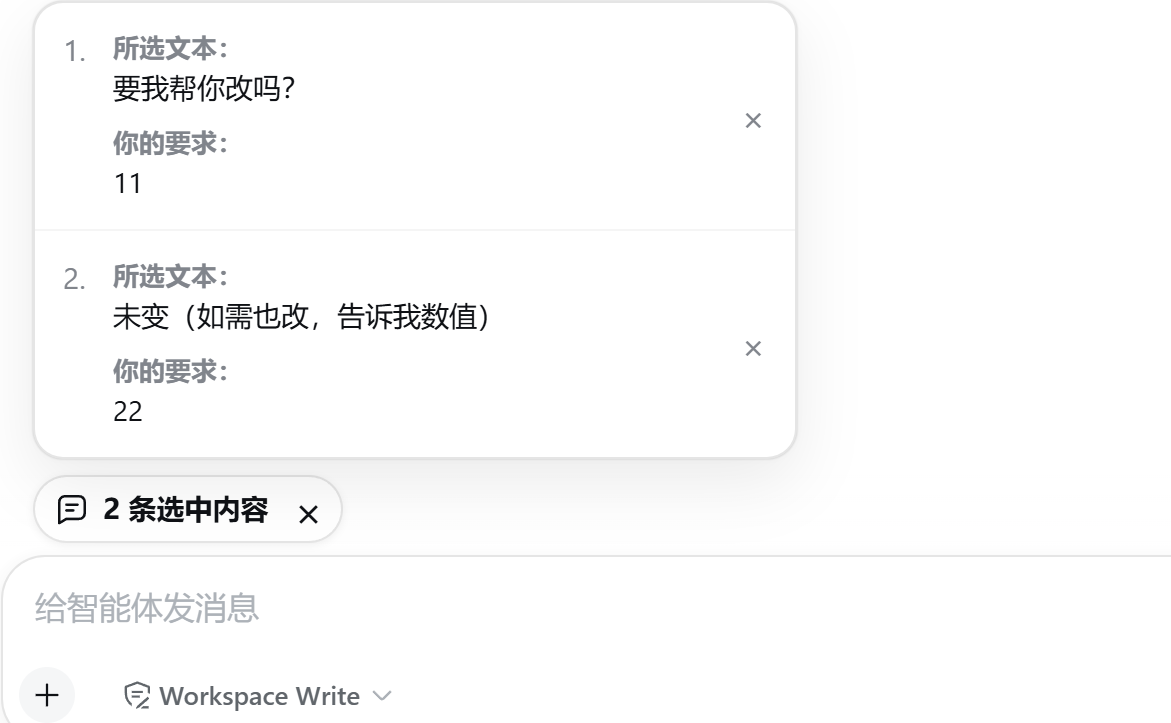
 ### Review multiple independent comments
 ## Features
- Codex-inspired selection commenting: select text and comment directly on that passage.
- Add multiple comments in sequence; every “selected text + user comment” pair stays independent.
- Keep the composer clean with a compact “N comments” capsule instead of stacked blockquotes.
- Open the capsule to review or remove individual comments; click outside the panel to close it.
- Press Enter to add a selection to the conversation; use Ctrl/Command+Enter for a newline.
- The comment is optional, so selected text can be attached without an additional instruction.
- Submit selections even when the main composer is otherwise empty.
- Inject structured comment context only when the main message is submitted.
- Render sent comments as a right-aligned annotation capsule instead of exposing raw XML.
- Ignore selections inside user messages, inputs, editable regions, and steering messages.
- Follow the DSH page language for Chinese and English UI labels.
## Windows Installation
Node.js, npm, and a working DSH installation are required.
```powershell
git clone https://github.com/yuanc1204/dsh-multi-selection-comments.git
cd dsh-multi-selection-comments
powershell -ExecutionPolicy Bypass -File .\install.ps1
```
The installer will:
1. Install dependencies, then run type checking, tests, and the build.
2. Link this repository into the DSH profile's `node_modules` directory.
3. Register the plugin idempotently in `~/.dsh/profiles/web/cordis.patch.yml`.
Stop the current process and restart DSH after installation:
```powershell
dsh web
```
Verify that the plugin is present in DSH's effective configuration:
```powershell
dsh --profile web --dump-config | Select-String dsh-plugin-multi-selection-comments
```
If the page still shows an older version, perform a hard refresh to clear the browser cache.
When upgrading from `dsh-plugin-quote-to-chat`, uninstall the legacy plugin in DSH's plugin manager before installing this repository so both client modules are not loaded together.
## Usage
1. Select a passage in an assistant response or tool output.
2. Enter a comment for that passage and choose “Add to conversation.”
3. Repeat for other passages; a comment-count capsule appears above the composer.
4. Write your main message and submit it normally.
The plugin serializes the independent comments as structured context internally, while the transcript shows only an expandable annotation capsule.
## Development
```powershell
npm install
npm run check
```
Or run each check separately:
```powershell
npm run typecheck
npm test
npm run build
```
Build artifacts are `dist/index.js` (server entry) and `client.js` (DSH Web client module).
## Compatibility
The plugin uses DSH Web's `conversation.input.dock` slot and relies on the `data-conversation-scroll` and `data-chat-flow-kind` markers in the conversation DOM. It is type-checked against the DSH `0.1.0-rc.6` client packages.
## License
[MIT](LICENSE)
## Features
- Codex-inspired selection commenting: select text and comment directly on that passage.
- Add multiple comments in sequence; every “selected text + user comment” pair stays independent.
- Keep the composer clean with a compact “N comments” capsule instead of stacked blockquotes.
- Open the capsule to review or remove individual comments; click outside the panel to close it.
- Press Enter to add a selection to the conversation; use Ctrl/Command+Enter for a newline.
- The comment is optional, so selected text can be attached without an additional instruction.
- Submit selections even when the main composer is otherwise empty.
- Inject structured comment context only when the main message is submitted.
- Render sent comments as a right-aligned annotation capsule instead of exposing raw XML.
- Ignore selections inside user messages, inputs, editable regions, and steering messages.
- Follow the DSH page language for Chinese and English UI labels.
## Windows Installation
Node.js, npm, and a working DSH installation are required.
```powershell
git clone https://github.com/yuanc1204/dsh-multi-selection-comments.git
cd dsh-multi-selection-comments
powershell -ExecutionPolicy Bypass -File .\install.ps1
```
The installer will:
1. Install dependencies, then run type checking, tests, and the build.
2. Link this repository into the DSH profile's `node_modules` directory.
3. Register the plugin idempotently in `~/.dsh/profiles/web/cordis.patch.yml`.
Stop the current process and restart DSH after installation:
```powershell
dsh web
```
Verify that the plugin is present in DSH's effective configuration:
```powershell
dsh --profile web --dump-config | Select-String dsh-plugin-multi-selection-comments
```
If the page still shows an older version, perform a hard refresh to clear the browser cache.
When upgrading from `dsh-plugin-quote-to-chat`, uninstall the legacy plugin in DSH's plugin manager before installing this repository so both client modules are not loaded together.
## Usage
1. Select a passage in an assistant response or tool output.
2. Enter a comment for that passage and choose “Add to conversation.”
3. Repeat for other passages; a comment-count capsule appears above the composer.
4. Write your main message and submit it normally.
The plugin serializes the independent comments as structured context internally, while the transcript shows only an expandable annotation capsule.
## Development
```powershell
npm install
npm run check
```
Or run each check separately:
```powershell
npm run typecheck
npm test
npm run build
```
Build artifacts are `dist/index.js` (server entry) and `client.js` (DSH Web client module).
## Compatibility
The plugin uses DSH Web's `conversation.input.dock` slot and relies on the `data-conversation-scroll` and `data-chat-flow-kind` markers in the conversation DOM. It is type-checked against the DSH `0.1.0-rc.6` client packages.
## License
[MIT](LICENSE)