# vite-plugin-supericon



[English](./README.md)
在构建期把一个 SVG 目录编译成可直接使用的图标,并在开发服务器里内置一套图标预览与管理界面。把插件指向图标目录后,往里丢 `.svg` 就能直接用——不需要手动导出,也不用维护额外的图标构建脚本。
## 特性
- **一行配置即可开始**——指向目录就能用。
- **两种交付格式**——生成**字体图标**(基于 [fantasticon](https://github.com/tancredi/fantasticon#readme))和/或 **SVG sprite**,可任选其一或同时启用。
- **两种消费方式**——CSS class(`class="icon-home"`)或可被 tree-shaking 的 Vue 组件(`import { IconHome }`)。
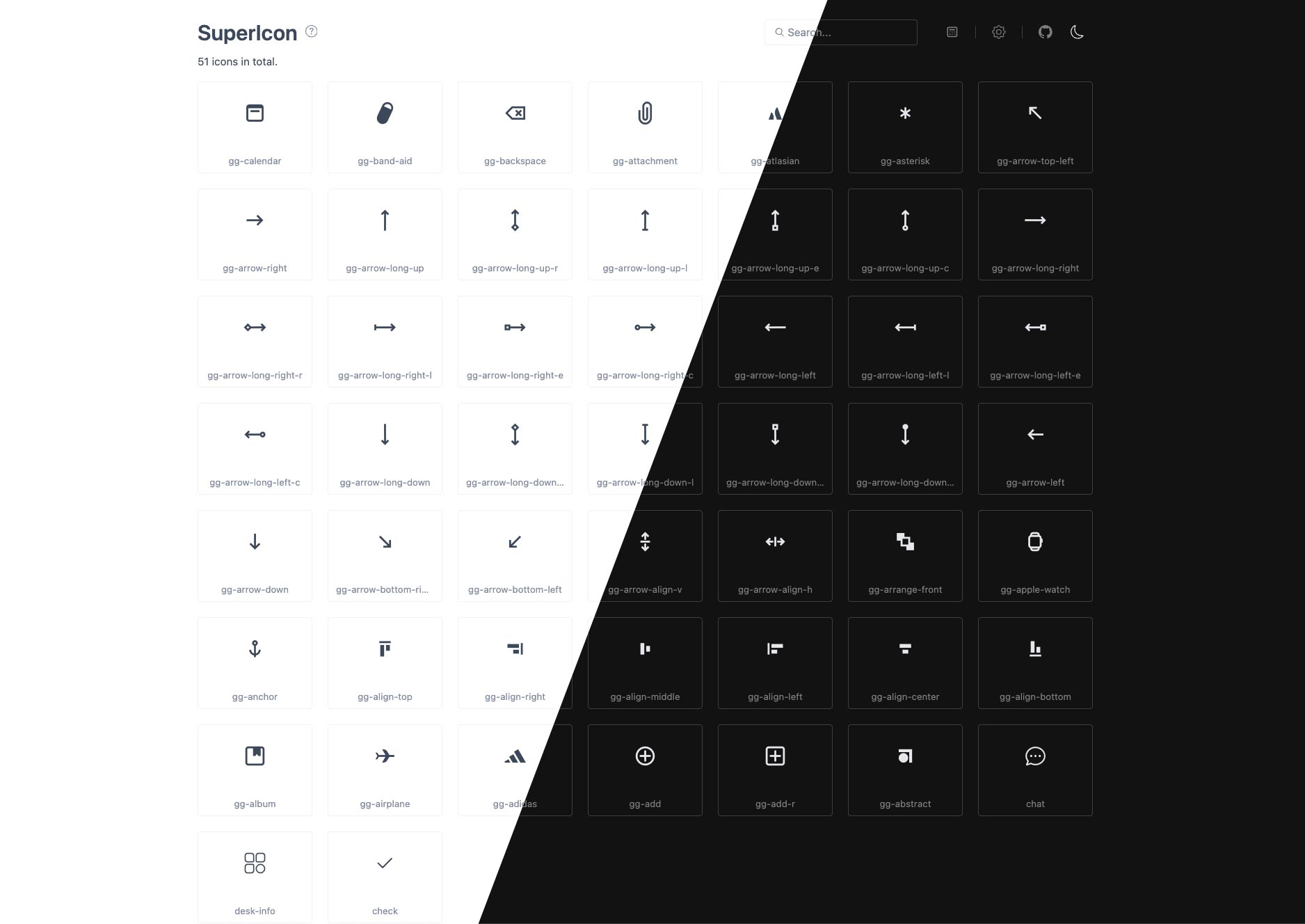
- **内置预览界面**,地址 `/__supericon/`——支持搜索、筛选、排序、一键复制用法代码,以及源 SVG 与渲染结果的对比。
- **热更新**——新增、修改、删除 SVG 后自动重新生成图标。
- **一键修复**——在界面里修复有问题的 SVG 并写回磁盘。
- **编辑器自动补全**——配合 VS Code 的 [Iconify IntelliSense](https://marketplace.visualstudio.com/items?itemName=antfu.iconify)。
## 安装
```shell
# npm
npm i vite-plugin-supericon -D
# yarn
yarn add vite-plugin-supericon -D
# pnpm
pnpm add vite-plugin-supericon -D
```
## 快速开始
在 Vite 配置中加入插件并指向图标目录。`font` / `svg` 至少配置一个——可以只启用其中一个,也可以两个都开。
```ts
// vite.config.ts
import { defineConfig } from 'vite'
import { superIcon } from 'vite-plugin-supericon'
export default defineConfig({
plugins: [
superIcon({
font: { dir: './src/assets/icons' } // SVG → 字体图标
// svg: { dir: './src/assets/svgicons' } // SVG → sprite(可选)
})
]
})
```
在入口文件里引入一次运行时。这是一个副作用引入,用于把字体样式表和/或 sprite 注入到页面:
```ts
// main.ts
import 'virtual:supericon/register'
```
启动开发服务器,打开预览界面 `http://localhost:5173/__supericon/`(终端里也会打印该地址)。然后就能在任意位置使用图标:
```html
```
> 完整示例见 [`demo`](./demo/)。
## 消费模式
通过 `mode` 选项提供两种互斥的消费模式。
### `class` 模式(默认)
`virtual:supericon/register` 会把资源全局注入,你在标签里按名称引用图标。
```ts
// vite.config.ts
superIcon({ font: { dir: './src/assets/icons' } })
```
```ts
// main.ts
import 'virtual:supericon/register'
```
```html
```
### `import` 模式
每个图标都会导出为一个可被 tree-shaking 的 Vue 组件。只有真正被引入的图标才会进入产物,sprite 也只会保留被用到的 symbol。
```ts
// vite.config.ts
superIcon({
mode: 'import',
font: { dir: './src/assets/icons' },
svg: { dir: './src/assets/svgicons' }
})
```
```ts
// main.ts —— 执行一次副作用初始化(加载字体 css + sprite)
import 'virtual:supericon/register'
```
```vue
```
生成的组件都接受 `size`(默认 `1em`)与 `color`(默认继承)两个 prop。
`import` 模式下会在项目根目录写入一份类型声明文件(默认 `supericon.d.ts`),用于让虚拟模块能被解析并获得自动补全。确保它被 `tsconfig.json` 包含:
```jsonc
{
"include": ["src", "supericon.d.ts"]
}
```
> `import` 模式下导出名必须在所有源目录间全局唯一。重名(例如两个不同目录下都有 `home.svg`)会导致构建失败并给出明确的冲突提示。
## Iconify IntelliSense(VS Code)
插件会在缓存目录写入一份 `iconify.json` 图标集。把 [Iconify IntelliSense](https://marketplace.visualstudio.com/items?itemName=antfu.iconify) 扩展指向它,即可在编辑器里预览:
```jsonc
// .vscode/settings.json
{
"iconify.customCollectionJsonPaths": ["node_modules/.supericon/iconify.json"]
}
```
## 配置项
```ts
superIcon({
prefix: 'icon',
mode: 'class',
font: { dir: './src/assets/icons' },
svg: { dir: './src/assets/svgicons' }
})
```
### 顶层选项
| 选项 | 类型 | 默认值 | 说明 |
| ------------ | --------------------- | ------------------ | ------------------------------------------------------------------------ |
| `font` | `FontOptions` | — | 字体图标轨道,见下。`font` / `svg` 至少配置一个。 |
| `svg` | `SvgOptions` | — | SVG sprite 轨道,见下。 |
| `mode` | `'class' \| 'import'` | `'class'` | 消费模式(见上),二者互斥。 |
| `prefix` | `string` | `'icon'` | 字体 CSS class 与 sprite symbol id 的共享前缀(`${prefix}-${文件名}`)。 |
| `dts` | `string \| false` | `'supericon.d.ts'` | 仅 `import` 模式。声明文件路径(相对根目录);`false` 关闭。 |
| `base` | `string` | Vite 的 `base` | 预览界面挂载的基础 URL。 |
| `watch` | `boolean` | `true` | 源 SVG 变化时重新生成图标。 |
| `clearCache` | `boolean` | `true` | 服务启动前清空缓存目录。 |
| `open` | `boolean` | `false` | 启动时在浏览器中打开预览界面。 |
| `silent` | `boolean` | `false` | 不在终端打印预览界面地址。 |
### `font` 选项
| 选项 | 类型 | 默认值 | 说明 |
| ------------ | --------- | ------------ | ------------------------------------------------------- |
| `dir` | `string` | — | **必填。** 待转换为字体的 SVG 源目录。 |
| `name` | `string` | `'iconfont'` | 字体文件名与 CSS `font-family`。 |
| `fontHeight` | `number` | `300` | 图标缩放到的高度(字体单位),越高越清晰。 |
| `normalize` | `boolean` | `true` | 将所有图标缩放到统一高度,忽略源尺寸差异。 |
| `descent` | `number` | — | 基线以下的距离,用于微调垂直对齐。 |
| `round` | `number` | — | 将 SVG 路径坐标四舍五入到该精度。 |
| `tag` | `string` | `'i'` | 生成的 CSS 基础选择器使用的 HTML 标签。 |
| `selector` | `string` | `null` | 自定义基础 CSS 选择器;未设置时回退到 `tag`。 |
### `svg` 选项
| 选项 | 类型 | 默认值 | 说明 |
| ------------ | ----------------------- | ---------- | ------------------------------------------------------------------------- |
| `dir` | `string` | — | **必填。** 待打包为 sprite 的 SVG 源目录。 |
| `spriteName` | `string` | `'sprite'` | sprite 文件名(不含扩展名)。 |
| `inject` | `'fetch' \| 'inline'` | `'fetch'` | `fetch` 运行时加载 sprite;`inline` 把内容内联进模块,导入时同步注入。 |
| `svgo` | `boolean \| SvgoConfig` | `true` | SVGO 优化:`true` = 默认预设(保留 `viewBox`),`false` = 关闭,或完整配置。 |
> 每个 SVG 内部的 id 会按 symbol 自动命名空间化,避免多色图标之间的 id / 颜色串扰。如果传入自定义 `svgo` 配置,请保留 `removeViewBox: false`。
已废弃选项
顶层的 `srcDir` 和 `name` 仍可用,但会被映射到字体轨道并给出警告。请改用 `font.dir` / `font.name`。
| 选项 | 替代项 |
| -------- | ----------- |
| `srcDir` | `font.dir` |
| `name` | `font.name` |
## 工作原理
- SVG 会被一次性编译到 `node_modules/.supericon`(缓存目录,而非你的构建产物目录)。
- 开发环境下资源从该缓存提供;生产环境下作为普通 Vite 资源发出,带哈希 URL。
- 构建时 sprite 会被 tree-shaking:只保留代码中实际引用到的 ``。
- 预览界面通过 Vite 的 WebSocket 与插件通信,因此会随你编辑图标实时同步。
## License
[MIT](https://opensource.org/licenses/MIT)