# SwipeMenuViewController
[](https://developer.apple.com/ios/)
[](https://swift.org)
[](https://www.swift.org/documentation/package-manager/)
[](https://github.com/yysskk/SwipeMenuViewController/actions/workflows/test.yml)
[](https://yysskk.github.io/SwipeMenuViewController/documentation/swipemenuviewcontroller/)
[](https://opensource.org/licenses/MIT)
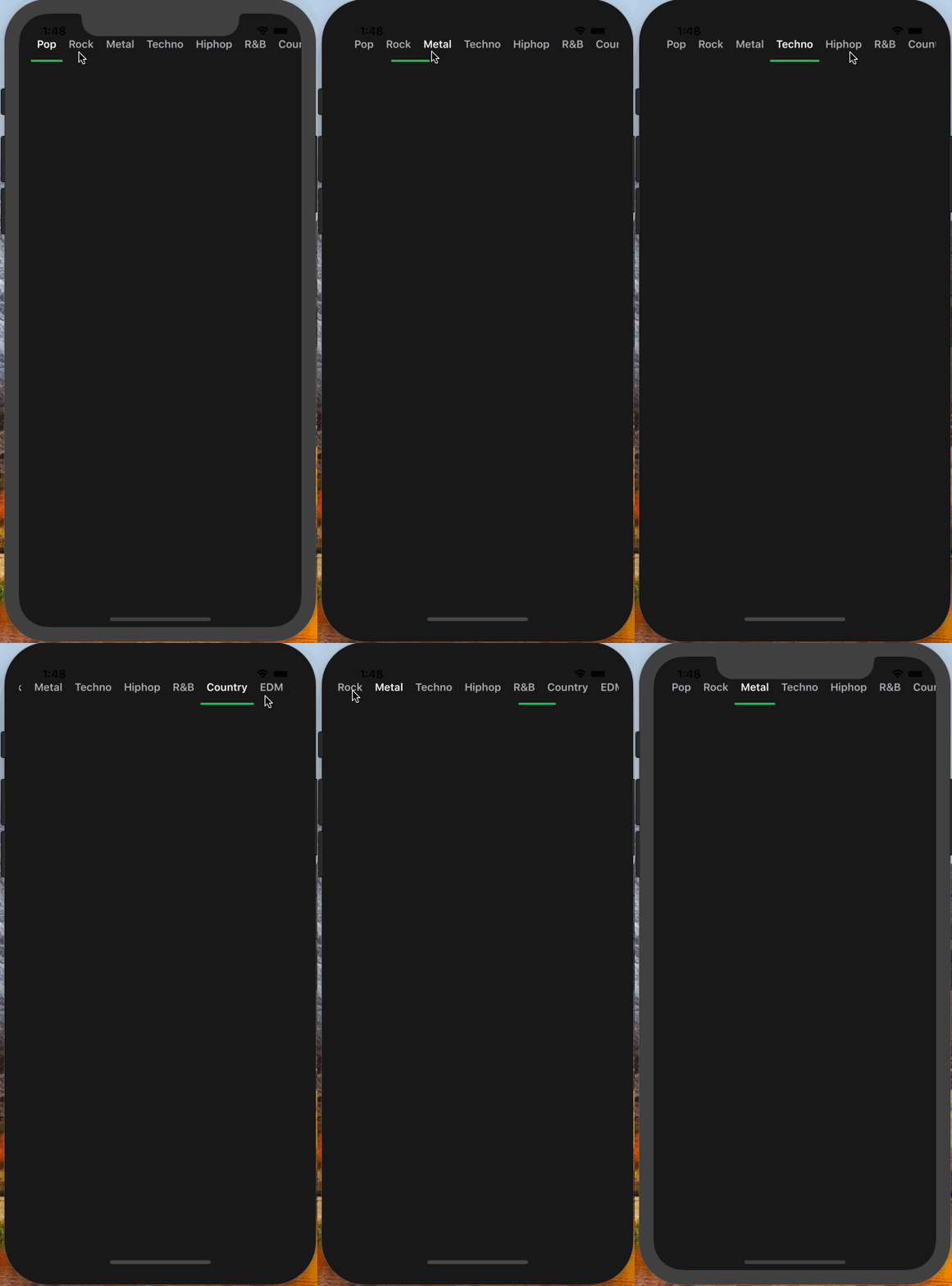
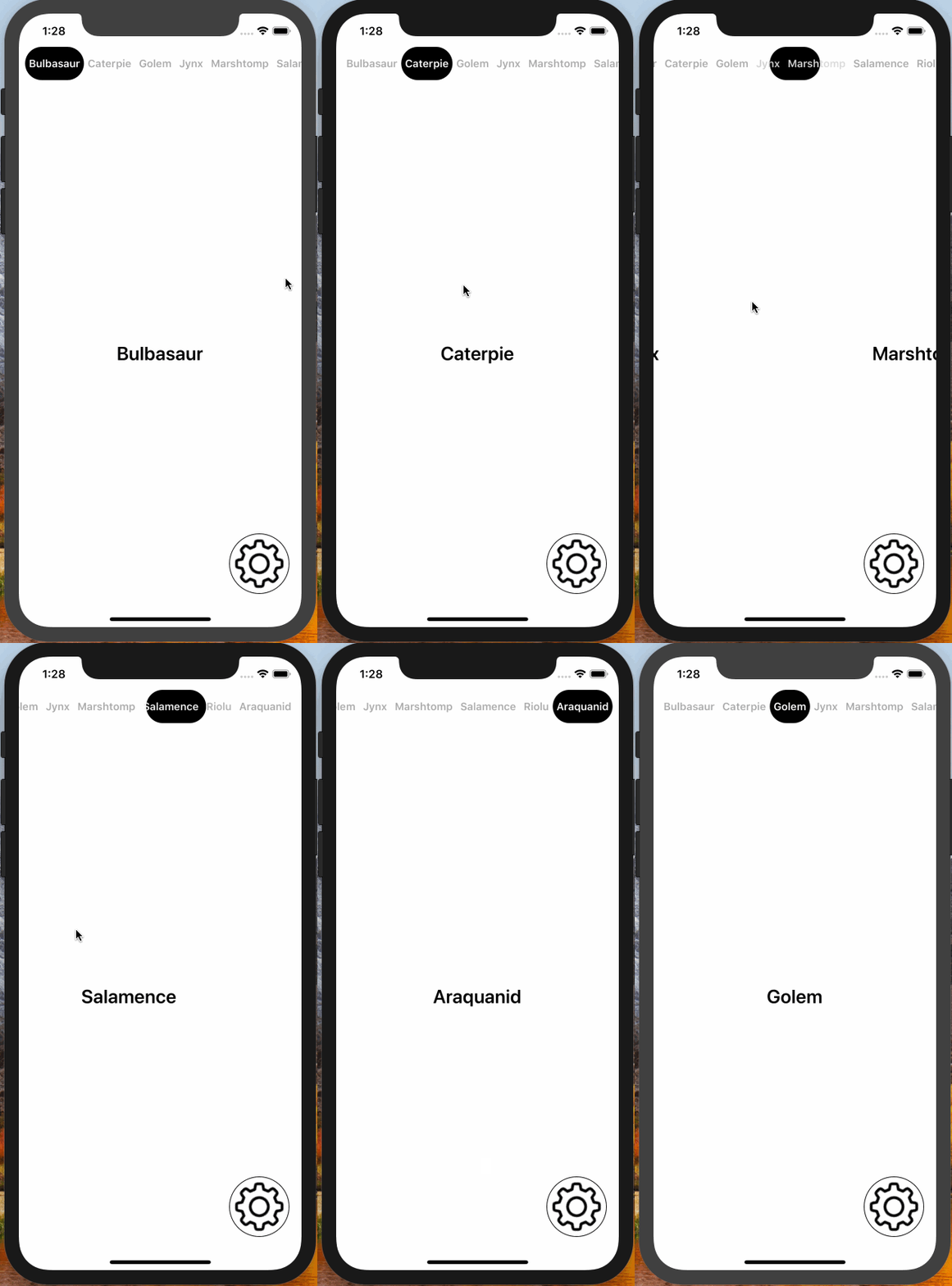
Swipe-based paging UI for iOS: a scrollable tab bar sits above a horizontally paging content area, and swiping the content keeps the tab selection in sync. Use it from UIKit through data source and delegate protocols, or from SwiftUI (iOS 18+) as `SwipeMenu` with a selection binding.
| Segmented Tab & Underline | Flexible Tab & Underline | Flexible Tab & Circle |
|:---:|:---:|:---:|
|  |
|  |
|  |
## Requirements
- iOS 16.0+ (the SwiftUI `SwipeMenu` requires iOS 18.0+)
- Xcode 26.0+ / Swift 6.2+
> Need an older toolchain or deployment target? Use the [4.x releases](https://github.com/yysskk/SwipeMenuViewController/releases).
## Installation
SwipeMenuViewController is distributed with [Swift Package Manager](https://www.swift.org/documentation/package-manager/). In Xcode, choose **File ▸ Add Package Dependencies…** and enter the repository URL, or add it to a `Package.swift` manifest:
```swift
dependencies: [
.package(url: "https://github.com/yysskk/SwipeMenuViewController.git", .upToNextMajor(from: "5.0.0"))
]
```
## Quick Start
### UIKit
Subclass `SwipeMenuViewController` and add your pages as child view controllers. Each child becomes a page: its `title` is the tab title and its view is the page content.
```swift
import SwipeMenuViewController
final class MenuViewController: SwipeMenuViewController {
override func viewDidLoad() {
pages.forEach { addChild($0) }
super.viewDidLoad()
}
private let pages: [UIViewController] = {
let first = UIViewController()
first.title = "First"
let second = UIViewController()
second.title = "Second"
return [first, second]
}()
}
```
To embed the paging UI in a view hierarchy you already have, add a `SwipeMenuView` directly and drive it through `SwipeMenuViewDataSource` — the [Getting Started](https://yysskk.github.io/SwipeMenuViewController/documentation/swipemenuviewcontroller/gettingstarted) article walks through both approaches.
### SwiftUI
On iOS 18 and later, use `SwipeMenu` to drive the same UI from SwiftUI. The selected page is a binding — setting it is the equivalent of `jump(to:animated:)` — pages come from a view builder, and the appearance is configured with `SwipeMenuOptions`:
```swift
import SwiftUI
import SwipeMenuViewController
struct ContentView: View {
@State private var selection = 0
private let titles = ["First", "Second"]
var body: some View {
SwipeMenu(selection: $selection, titles: titles) { index in
Text(titles[index])
.frame(maxWidth: .infinity, maxHeight: .infinity)
}
}
}
```
The [SwipeMenu in SwiftUI](https://yysskk.github.io/SwipeMenuViewController/documentation/swipemenuviewcontroller/swipemenuinswiftui) article covers the options, the paging callbacks, and the differences from the UIKit view.
## Documentation
The full API reference and guides are published with DocC:
**[Read the documentation →](https://yysskk.github.io/SwipeMenuViewController/documentation/swipemenuviewcontroller/)**
- [Getting Started](https://yysskk.github.io/SwipeMenuViewController/documentation/swipemenuviewcontroller/gettingstarted) — set up `SwipeMenuView` or `SwipeMenuViewController`
- [Customizing Appearance](https://yysskk.github.io/SwipeMenuViewController/documentation/swipemenuviewcontroller/customizingappearance) — every `SwipeMenuViewOptions` field
- [SwipeMenu in SwiftUI](https://yysskk.github.io/SwipeMenuViewController/documentation/swipemenuviewcontroller/swipemenuinswiftui) — drive the same UI from SwiftUI with a selection binding
You can also build the documentation locally in Xcode with **Product ▸ Build Documentation**, or explore the [Example app](./Example) in this repository (its Xcode project is generated with [XcodeGen](https://github.com/yonaskolb/XcodeGen) — see the [Example README](./Example/README.md)).
## Contributing
Bug reports and pull requests are welcome. See [CONTRIBUTING.md](./CONTRIBUTING.md) for how to build, test, format, and document your changes, then open an issue using one of the templates. Make sure the test suite passes before submitting:
```sh
xcodebuild test -scheme SwipeMenuViewController -destination 'platform=iOS Simulator,name=iPhone 16'
```
## Changelog
See [CHANGELOG.md](./CHANGELOG.md) for the release history.
## License
SwipeMenuViewController is available under the MIT license. See the [LICENSE](./LICENSE) file for details.
|
## Requirements
- iOS 16.0+ (the SwiftUI `SwipeMenu` requires iOS 18.0+)
- Xcode 26.0+ / Swift 6.2+
> Need an older toolchain or deployment target? Use the [4.x releases](https://github.com/yysskk/SwipeMenuViewController/releases).
## Installation
SwipeMenuViewController is distributed with [Swift Package Manager](https://www.swift.org/documentation/package-manager/). In Xcode, choose **File ▸ Add Package Dependencies…** and enter the repository URL, or add it to a `Package.swift` manifest:
```swift
dependencies: [
.package(url: "https://github.com/yysskk/SwipeMenuViewController.git", .upToNextMajor(from: "5.0.0"))
]
```
## Quick Start
### UIKit
Subclass `SwipeMenuViewController` and add your pages as child view controllers. Each child becomes a page: its `title` is the tab title and its view is the page content.
```swift
import SwipeMenuViewController
final class MenuViewController: SwipeMenuViewController {
override func viewDidLoad() {
pages.forEach { addChild($0) }
super.viewDidLoad()
}
private let pages: [UIViewController] = {
let first = UIViewController()
first.title = "First"
let second = UIViewController()
second.title = "Second"
return [first, second]
}()
}
```
To embed the paging UI in a view hierarchy you already have, add a `SwipeMenuView` directly and drive it through `SwipeMenuViewDataSource` — the [Getting Started](https://yysskk.github.io/SwipeMenuViewController/documentation/swipemenuviewcontroller/gettingstarted) article walks through both approaches.
### SwiftUI
On iOS 18 and later, use `SwipeMenu` to drive the same UI from SwiftUI. The selected page is a binding — setting it is the equivalent of `jump(to:animated:)` — pages come from a view builder, and the appearance is configured with `SwipeMenuOptions`:
```swift
import SwiftUI
import SwipeMenuViewController
struct ContentView: View {
@State private var selection = 0
private let titles = ["First", "Second"]
var body: some View {
SwipeMenu(selection: $selection, titles: titles) { index in
Text(titles[index])
.frame(maxWidth: .infinity, maxHeight: .infinity)
}
}
}
```
The [SwipeMenu in SwiftUI](https://yysskk.github.io/SwipeMenuViewController/documentation/swipemenuviewcontroller/swipemenuinswiftui) article covers the options, the paging callbacks, and the differences from the UIKit view.
## Documentation
The full API reference and guides are published with DocC:
**[Read the documentation →](https://yysskk.github.io/SwipeMenuViewController/documentation/swipemenuviewcontroller/)**
- [Getting Started](https://yysskk.github.io/SwipeMenuViewController/documentation/swipemenuviewcontroller/gettingstarted) — set up `SwipeMenuView` or `SwipeMenuViewController`
- [Customizing Appearance](https://yysskk.github.io/SwipeMenuViewController/documentation/swipemenuviewcontroller/customizingappearance) — every `SwipeMenuViewOptions` field
- [SwipeMenu in SwiftUI](https://yysskk.github.io/SwipeMenuViewController/documentation/swipemenuviewcontroller/swipemenuinswiftui) — drive the same UI from SwiftUI with a selection binding
You can also build the documentation locally in Xcode with **Product ▸ Build Documentation**, or explore the [Example app](./Example) in this repository (its Xcode project is generated with [XcodeGen](https://github.com/yonaskolb/XcodeGen) — see the [Example README](./Example/README.md)).
## Contributing
Bug reports and pull requests are welcome. See [CONTRIBUTING.md](./CONTRIBUTING.md) for how to build, test, format, and document your changes, then open an issue using one of the templates. Make sure the test suite passes before submitting:
```sh
xcodebuild test -scheme SwipeMenuViewController -destination 'platform=iOS Simulator,name=iPhone 16'
```
## Changelog
See [CHANGELOG.md](./CHANGELOG.md) for the release history.
## License
SwipeMenuViewController is available under the MIT license. See the [LICENSE](./LICENSE) file for details.