
BranchMark · 枝签
Clip the insight. Grow a branch.
Capture important knowledge, preserve a traceable Session tree, and fork your attention without losing the main development thread. BranchMark keeps every branch connected to its source so Vibe Coding stays focused.
简体中文 ·
Interactive demo ·
Why BranchMark ·
Session tree ·
Quick start ·
Distribution





## Interactive demo
Start with an answer worth keeping, organize its insights into clips, and continue exploring different ideas. Both demonstrations use a running DSH Web Profile with a 2560×1440 workspace at 80% browser zoom. Each animation fills its own row; select it to view the original 1600×900 image.
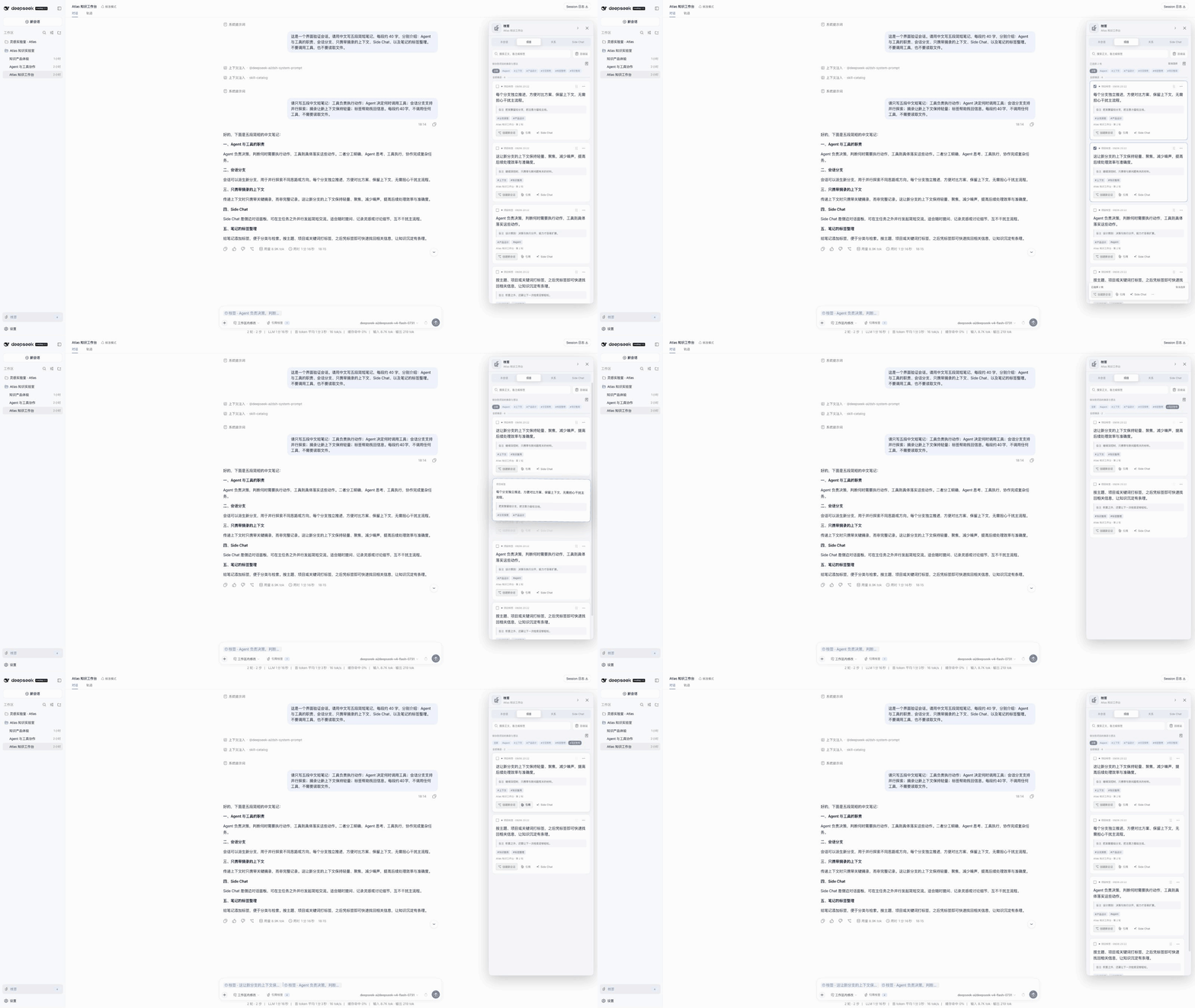
### Keep good ideas ready for the next question
Organize knowledge with notes and tags, then select, reorder, or reference the clips you need to build on an existing insight.
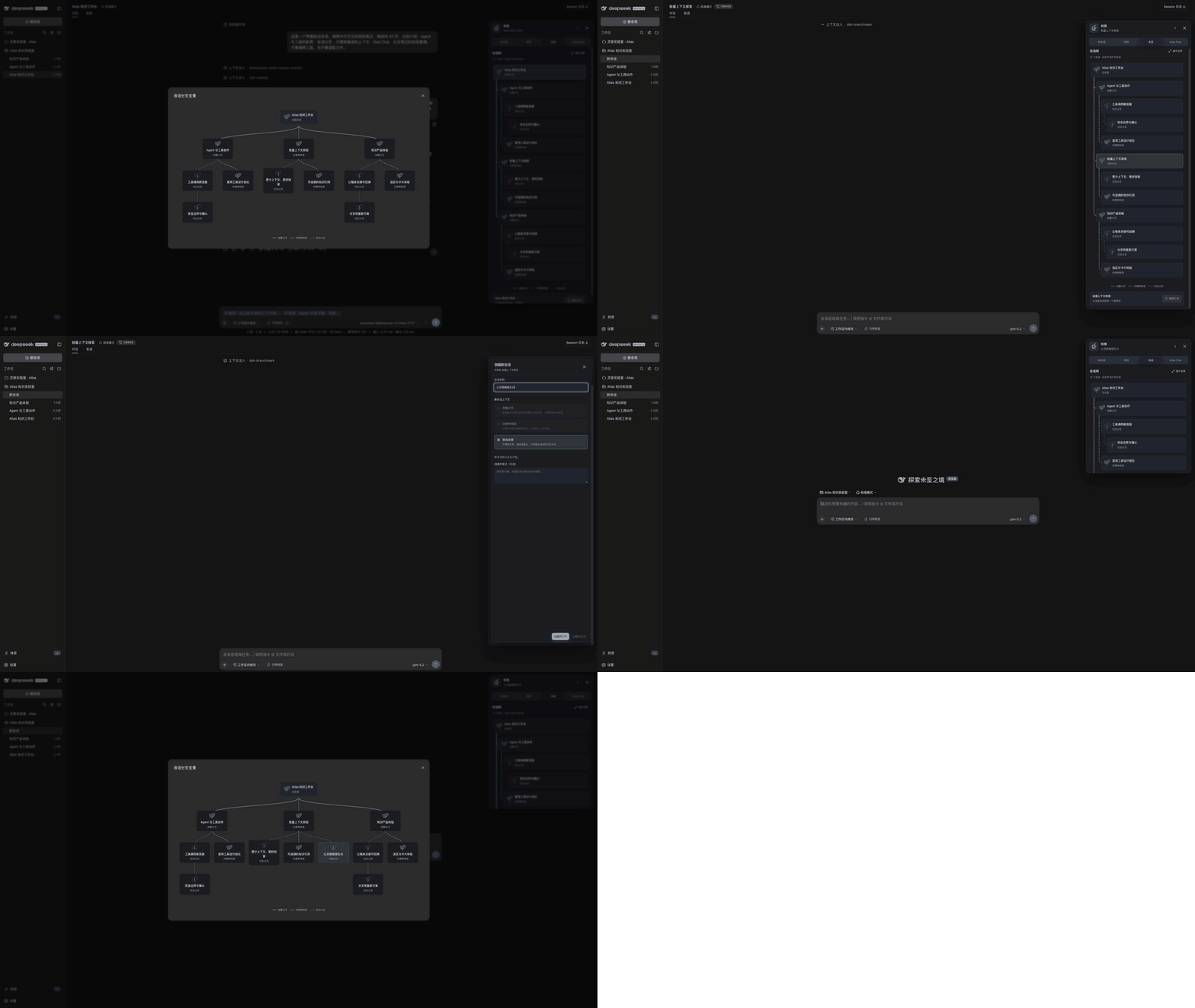
### Grow one idea into a Session tree
Full forks, clip-only Sessions, and blank branches carry different amounts of context. Open the overview to see how ideas connect, then select a node to continue its conversation.
> [!IMPORTANT]
> BranchMark `0.1.2-rc.2` targets DSH `0.1.2-rc.1`. The plugin version and DSH compatibility target are maintained separately; install an exact verified pair from the table below. Keep the published `0.1.1-rc.2` and `0.1.2-alpha.5` combinations explicitly pinned and do not mix them.
BranchMark is a plugin Bundle that does not modify DSH source code. It saves important conversation excerpts as clips and uses the clip's source message as an attention fork point. You can create a child Session that inherits the source context or a standalone Session that receives only the selected knowledge. Clip text and source anchors remain immutable; notes and tags remain editable.
## Contents
- [Interactive demo](#interactive-demo)
- [BranchMark prevents developer attention loss](#branchmark-prevents-developer-attention-loss)
- [Core workflow: clip, fork, and return to the main thread](#core-workflow-clip-fork-and-return-to-the-main-thread)
- [Session tree and Session management](#session-tree-and-session-management)
- [Quick start](#quick-start)
- [Operation guide](#operation-guide)
- [Data and permissions](#data-and-permissions)
- [DSH plugin distribution and ecosystem requirements](#dsh-plugin-distribution-and-ecosystem-requirements)
- [Documentation](#documentation)
- [Development and contribution](#development-and-contribution)
## BranchMark prevents developer attention loss
Long development tasks are not a single uninterrupted exchange. While implementing the main task, you encounter conclusions worth preserving, assumptions that need verification, and side paths that can progress independently. Keeping every follow-up in one Session gradually buries the main thread. Starting an empty Session loses the original context. Copying text alone disconnects the knowledge from the decision process that produced it.
| Development moment | Common response | What gets lost |
| --- | --- | --- |
| A response is important, but the current task must continue | Keep it in mind and find it later | The important knowledge and its source position |
| An idea deserves deeper validation | Continue asking in the main Session | The attention thread of the current task |
| Open a new Session directly | Re-explain the background | The parent context and reason for the fork |
| Advance several directions at once | Create unrelated Sessions | Parent-child relationships and a path back to the main thread |
BranchMark binds knowledge anchors to Session forks. Clips preserve reusable content, while Session relationships record where attention diverged. You can continue along the main thread, move a side path into a new Session, and return to the original location through the relationship tree or source link.
## Core workflow: clip, fork, and return to the main thread
BranchMark centers on traceable Sessions that grow from important knowledge, not on adding another chat window.
```text
Main Session: continue the current development goal
│
├── Select key text → Save a clip → Add notes and tags
│ │
│ ├── Reference in the current Composer: stay on the main thread
│ ├── Full fork: carry parent history into a child Session
│ └── Clip-only: start an independent Session with focused knowledge
│
└── The main Session does not need to contain every exploratory branch
```
### 1. Capture important knowledge
Select text in a completed user or assistant message, then save it to the current Session or project. A Session clip belongs only to its source Session by default. A project clip can be searched and reused across Sessions, but only an explicit “Save to project” action puts it in the project clip library. The current Session does not display private clips from other Sessions.
Clip text and source messages cannot be edited, so future references preserve the conclusion that was actually recorded. Notes and multiple tags are editable and can record why the clip matters, what to verify next, and which technical topic it belongs to.
### 2. Fork attention from a knowledge point
When you create a Session, first choose how much parent context the new task needs:
| Fork mode | What the new Session receives | Attention strategy |
| --- | --- | --- |
| Full fork | Complete turns from the primary clip's source Session, from the beginning through the source message, plus all selected clips and enabled notes | Continue with the original reasoning process |
| Clip-only | A new Session without a DSH parent, plus all selected clips and enabled notes | Carry only focused knowledge and isolate parent-session noise |
| Blank branch | A new Session with no inherited history, clips, or notes | Retain an organizational link while exploring a new idea independently |
When selected clips come from different Sessions, choose one primary source. The primary source only determines which parent chain a full fork inherits; every other clip still enters the new Session as complete knowledge material.
### 3. Advance a branch and return to its source
“Create and open” enters the new Session immediately and leaves its Composer empty. “Create and send” collects a question first, then creates and runs the new Session in the background. A derived Session displays its source and fork details, while each clip card lists the derived Sessions that used it.
A new Session has an independent lifecycle. Moving a clip to the recycle bin or permanently deleting it does not delete, rewrite, or stop an existing derived Session.
### Quick questions
Side Chat is a temporary outlet for attention, not BranchMark's primary data structure. Use it to ask a quick question about one or more clips without writing messages to the source Session or entering the Session tree. Closing a tab or exiting the Host destroys the Side Chat immediately. Save useful results as clips or promote the work to a durable Session.
## Session tree and Session management
BranchMark's Session tree includes full forks, clip-only Sessions, and blank branches. Roots appear above their descendants; narrow panels use an indented outline, while the overview shows the branching layout. Clicking a node opens the real Session. “Continue branch” defaults to a blank branch.
| Relationship | Authoritative data | UI meaning |
| --- | --- | --- |
| DSH history inheritance | `SessionHeader.parentSession` / Client `parentId` | Native parentage for a full fork |
| BranchMark organization | `DerivedSessionRelation.parentSessionId` and `mode` | Position of all three branch modes; line styles identify their context |
| Clip usage | Attachment ids and immutable `ClipUsage` snapshots | Finds Sessions that used a clip |
| Side Chat | No durable relationship | Temporary quick-question tabs |
Clip-only and blank branches have an organizational parent without a native DSH parent or inherited history. Relationship reads resolve unprompted Sessions omitted from the native list, so these nodes remain discoverable and openable after refresh or Host restart. Unreadable Sessions appear unavailable. Older records without an organizational parent do not infer one from current clips.
## Quick start
BranchMark installs into the DSH Web Profile as an npm Bundle. Saving clips, viewing the relationship tree, and using “Create and open” do not require a model. Sending a question to a durable Session or using Side Chat requires an available model configured in DSH.
### Requirements
| npm channel | BranchMark | DeepSeek Harness | Use |
| --- | --- | --- | --- |
| Current source / `latest` | `0.1.2-rc.2` | `0.1.2-rc.1` | Session tree and Clip interaction update |
| `alpha` | `0.1.2-alpha.5` | `0.1.2-alpha.5` | Published alpha compatibility line |
| Legacy pinned pair | `0.1.1-rc.2` | `0.1.1-rc.2` | Maintained on `release/dsh-0.1.1-rc` |
All combinations require Node.js `^22.19.0` or `>=24.0.0` and support only the DSH Web Profile. `dsh --version` must match the compatibility target for the installed BranchMark version.
Check the channels with `npm view @deepseek-ai/dsh dist-tags` and `npm view dsh-branchmark dist-tags`, then install an exact pair from the table. For unpublished source changes, use the tarball installation procedure below.
### 1. Select and install a compatible pair
Install the current compatible pair:
```sh
npm install --global @deepseek-ai/dsh@0.1.2-rc.1
dsh plugin --profile web add dsh-branchmark@0.1.2-rc.2
```
Use the published `alpha` pair:
```sh
npm install --global @deepseek-ai/dsh@0.1.2-alpha.5
dsh plugin --profile web add dsh-branchmark@0.1.2-alpha.5
```
To isolate this installation from daily profiles, create a dedicated DSH home before installation:
```sh
export BRANCHMARK_DSH_HOME="$(mktemp -d)"
DSH_HOME="$BRANCHMARK_DSH_HOME" \
dsh plugin --profile web add dsh-branchmark@0.1.2-alpha.5
```
When you use an isolated home, every later `dsh` command must also include `DSH_HOME="$BRANCHMARK_DSH_HOME"`; otherwise the command reads the default Profile.
### 2. Verify the Profile
```sh
dsh --version
dsh --profile web --dump-config
```
`dsh --version` must match the DeepSeek Harness version in the table. The configuration output must contain both `dsh-branchmark` and `branchmark-host`. If the version differs or an entry is missing, reinstall the correct pair from the compatibility table.
### 3. Start DSH from the target project
DSH uses the launch directory as the Workspace by default, so enter the project you want to work on before starting DSH:
```sh
cd /absolute/path/to/your/project
dsh web
```
Open a Session, wait for a user or assistant message to finish, and select text in that message. The plugin is active when the four selection actions and the BranchMark chip appear.
### Build the current alpha from source
```sh
git clone https://github.com/zaizaizhao/dsh-branchmark.git
cd dsh-branchmark
corepack enable
pnpm install --frozen-lockfile
pnpm run release:check
pnpm run pack:bundle
dsh plugin --profile web add ./dist/dsh-branchmark-0.1.2-rc.2.tgz
```
Do not install through a Git URL, a GitHub source specifier, or `plugin add .`. The source repository does not commit compiled `lib/` output. Only the npm package and a locally built tarball contain the complete installable package.
## Operation guide
Every entry point requires an explicit user selection or send action. Selecting text never causes BranchMark to contact a model automatically.
| Attention need | Operation | Result |
| --- | --- | --- |
| Preserve an important conclusion from the current task | Save to Session | The clip is durable and appears only in the source Session |
| Make focused knowledge available to other Sessions | Save to project | The clip is durable and appears in the current Workspace's project library |
| Provide knowledge to the current Composer without leaving the main thread | Reference in Composer | Inserts removable native reference chips and never sends automatically |
| Continue a durable branch from the original discussion point | Full fork | Creates a durable child Session with a DSH parent |
| Start an isolated task from focused knowledge | Clips only | Carries only selected excerpts and notes, with an organizational parent |
| Explore a new idea | Blank branch | Carries no history, excerpts, or notes, with an organizational parent |
| Manage parallel development branches | Relationship view and clip cards | Shows the Session tree, sources, and bidirectional usage relationships |
| Confirm a small question temporarily | Ask in side | Creates a temporary quick-question tab that is not durable and does not enter the tree |
The right-edge handle starts above the center to avoid DSH's centered turn navigation. Drag it vertically along the right edge; releasing a drag does not open the panel. This browser remembers its relative position and keeps it visible after resizing. Click to open, or focus it and use Up/Down for small moves and Home/End for the upper/lower edge.
The right Dock provides Session, Project, Relationship, and Side Chat views. Cards grow with their excerpts and notes and expose compact New session, Quote, and Side Chat buttons; editing, tagging, pinning, and deletion live in More actions. The batch toolbar appears only when at least two clips are selected. Trash is a separate button beside search and supports restoration; deletion and ordering provide Undo.
The Session tree places roots above their descendants, using a vertical outline in the narrow Dock and curved branches in the overview. Clicking a node opens its real DSH Session; Continue branching defaults to a blank branch. Full forks, clips-only branches, and blank branches use solid, dashed, and dotted connections. Organizational links do not change the native DSH sidebar inheritance tree.
## Data and permissions
BranchMark keeps durable knowledge and relationships in local DSH storage and limits temporary exploration to the current Host process.
- Clips, notes, tags, ordering, recycle-bin state, usage snapshots, and derived relationships are stored in the local DSH `storageDomain` under the `clip_explorer` domain. The plugin provides no cloud synchronization and uploads no data to a service controlled by its author.
- Full-fork, clips-only, and blank-branch Sessions use native DSH persistence. BranchMark does not copy or replace DSH Session logs.
- Saving, searching, and organizing clips and viewing relationships do not call a model. Only after the user sends a question do selected clips, enabled notes, and reconstructed context enter a request to the configured DSH provider.
- Side Chat project-file tools are read-only, but tool results can enter model requests. Web search and fetch behavior follows the current DSH deployment's provider configuration.
- Workspace and Session are the current data-isolation keys; a Worktree is not a separate isolation boundary. BranchMark supports only the DSH Web Profile and does not modify the native DSH sidebar hierarchy.
For complete configuration, network behavior, and limitations, see the [Bundle reference](packages/bundle/README.md) and [compatibility and limitations reference](course/reference/compatibility-and-limitations.md). Report security issues privately according to [SECURITY.md](SECURITY.md); never publish credentials in an issue, log, or screenshot.
## DSH plugin distribution and ecosystem requirements
BranchMark uses the official Bundle mechanism of its target DSH release. The DSH [plugin packaging and installation guide](https://github.com/deepseek-ai/deepseek-harness/blob/db6bdc3576c2d4e7c965e8e3ed0c2a731eed87f5/docs/user/develop/basic/publish.md) defines Profile Bundles, while the [Client module documentation](https://github.com/deepseek-ai/deepseek-harness/blob/db6bdc3576c2d4e7c965e8e3ed0c2a731eed87f5/packages/client/modules/README.md) defines the Web browser entry point.
The official material for the DSH versions supported by BranchMark does not provide a third-party marketplace submission interface, and the official repository does not accept external code pull requests. The DSH [contribution guide](https://github.com/deepseek-ai/deepseek-harness/blob/db6bdc3576c2d4e7c965e8e3ed0c2a731eed87f5/CONTRIBUTING.md) directs plugin authors to maintain their own repositories and add the GitHub [`dsh-plugin`](https://github.com/topics/dsh-plugin) topic for discovery. Community catalogs provide another distribution channel but do not represent official DSH review, compatibility guarantees, or security certification.
View installability conditions and BranchMark release readiness
### Installable Bundle requirements
| DSH requirement | BranchMark implementation |
| --- | --- |
| The package has non-empty `name` and `version` fields and provides a resolvable runtime entry point | `dsh-branchmark@0.1.2-rc.2` includes compiled Host, Typert, Remote, and browser entry points |
| `package.json` declares `dsh.bundle.patch`; otherwise `dsh plugin add` installs a dependency without activating a Profile layer | `packages/bundle/package.json` points to `./cordis.patch.yml` |
| `cordis.patch.yml` inserts or overrides a real Loader row and uses a package name resolvable after installation | The Bundle patch inserts `branchmark-host` with module name `dsh-branchmark` |
| A Web plugin exports `./client` and declares its browser entry point with `dsh.client.platform: "web"` | The Bundle exports the self-contained `lib/client.js` and declares the required Client injections |
| An npm package or tarball contains compiled output; a Git source installation that requires a build provides a self-contained `prepare` script explicitly approved by the user in pnpm | BranchMark does not run install-time scripts and supports only a local tarball containing `lib/`; direct installation from Git source is not supported |
| After installation, verify the Bundle layer with `--dump-config`, then restart the target Profile | The README and release workflow check `dsh-branchmark` and `branchmark-host` in an isolated DSH home |
BranchMark release readiness:
| Item | Status |
| --- | --- |
| Independent public repository, MIT License, Issues, and a security-reporting path | Complete |
| `dsh.bundle.patch`, `cordis.patch.yml`, Web `./client`, and `dsh.client` declaration | Complete |
| Node `22.19` / `24` CI, keyless tests, Bundle self-containment checks, and npm dry-run | Complete |
| Isolated Profile tarball installation and `--dump-config` verification | Complete |
| Exact compatible pairs for npm `latest` and `alpha` | Complete |
| GitHub `dsh-plugin` topic | Complete |
See [RELEASING.md](RELEASING.md) for the release procedure, file inventory, npm verification, and real-Profile smoke test.
## Documentation
This README explains the attention problem, Session management, installation path, and distribution status. The documents below own the complete product rules, implementation architecture, and reproduction course.
| What you want to learn | Document |
| --- | --- |
| Reproduce the complete plugin from first principles | [Course index](course/README.md) |
| Product rules and acceptance scope | [PRD](docs/PRD.md) |
| Host, Client, storage, Session fork, and relationship architecture | [Architecture](docs/ARCHITECTURE.md) |
| DSH Session lineage and BranchMark usage relationships | [Architecture map](course/reference/architecture-map.md) |
| Why the DSH Client uses the current extension design | [DSH Client architecture rationale](course/reference/dsh-client-architecture-rationale.md) |
| Configuration fields, data rules, and limitations | [Bundle reference](packages/bundle/README.md) |
| Distribution and real-Profile acceptance | [Release process](RELEASING.md) |
## Development and contribution
Run these checks before submitting code:
```sh
pnpm run check
pnpm run release:check
```
`check` covers type checks, keyless tests, builds, and Bundle self-containment verification. `release:check` adds documentation checks, public-package metadata checks, publint, and an npm dry-run. Keyless checks do not make real provider requests; a release candidate must still complete the isolated Web Profile smoke test in [RELEASING.md](RELEASING.md).
Read [CONTRIBUTING.md](CONTRIBUTING.md) before contributing. Report ordinary defects and feature requests through [GitHub Issues](https://github.com/zaizaizhao/dsh-branchmark/issues). See [CHANGELOG.md](CHANGELOG.md) for version changes. BranchMark uses the [MIT License](LICENSE).