# MCP Swagger Server(mss)
[](https://www.typescriptlang.org/)
[](https://nodejs.org/)
[](LICENSE)
**A tool that converts OpenAPI/Swagger specifications to Model Context Protocol (MCP) format**
**Languages**: English | [中文](README.md)
---
## 🎬 Quick Demo

## 🎯 Project Screenshots
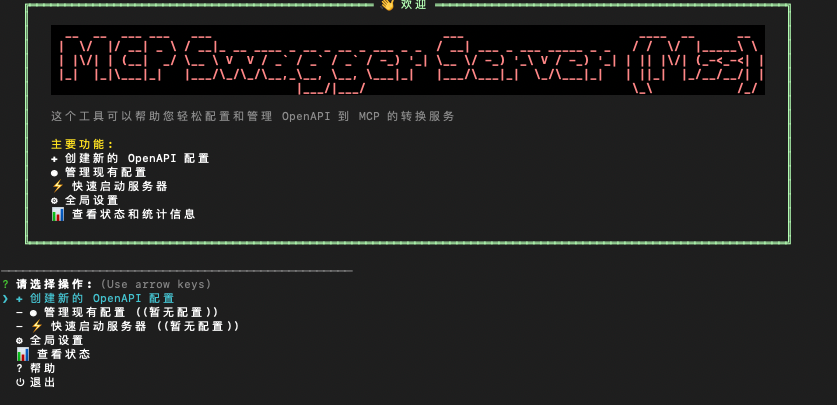
## 🎯 Project Overview
MCP Swagger Server is a tool that converts OpenAPI/Swagger specifications to Model Context Protocol (MCP) format.
### 📦 Project Structure
```
mcp-swagger-server/
├── packages/
│ ├── mcp-swagger-server/ # 🔧 Core MCP Server (Available)
│ ├── mcp-swagger-parser/ # 📝 OpenAPI Parser (Available)
│ └── mcp-swagger-api/ # 🔗 REST API Backend (Available)
└── scripts/ # 🔨 Build Scripts
```
### ✨ Core Features
- **🔄 Zero Configuration**: Input OpenAPI spec, get MCP tools instantly
- **🎯 Progressive Command Line**: Provides step-by-step guided command line interface for easy user configuration
- **🖥️ Terminal-first workflow**: CLI and interactive terminal are the primary user experience
- **🔌 Multi-Transport**: Support for SSE, Streamable, and Stdio transports
- **🔐 Secure Authentication**: Bearer Token authentication to protect API access
## 🚀 Quick Start
### Prerequisites
- Node.js ≥ 20.0.0
- pnpm ≥ 8.0.0 (recommended)
### Installation
```bash
npm i mcp-swagger-server -g
```
### Command Guide
- `mss`: interactive terminal UI (default)
- `mcp-swagger-server` / `mcp-swagger`: standard CLI (best for scripts and AI client integration)
- `mss --openapi ...`: direct mode (skip interactive UI)
> Note: interactive session mode does not support starting STDIO servers. Use `mss --openapi ... --transport stdio` (alias still works: `mcp-swagger-server --transport stdio ...`) for STDIO.
### Quick Launch
#### Interactive Launch (recommended for first-time setup)
```bash
mss
```
#### One-Command Launch (non-interactive)
```bash
mss --openapi https://api.example.com/openapi.json \
--operation-filter-methods GET \
--operation-filter-methods POST \
--transport streamable \
--auth-type bearer \
--bearer-token "your-token-here"
# Using configuration file
mss --config config.json
```
## 📖 Usage Guide
### 🔧 `mcp-swagger-server` Package
This is the core package of the project, providing complete MCP server functionality.
#### Installation and Usage
```bash
# Global installation
npm install -g mcp-swagger-server
# Command line usage
mss --openapi https://petstore.swagger.io/v2/swagger.json --transport streamable --port 3322
```
#### Supported Transport Protocols
- **stdio**: For command-line integration
- **sse**: Server-Sent Events, suitable for web applications
- **streamable**: HTTP streaming transport, suitable for modern web applications
#### Command Line Options
```bash
# Basic usage
mss [options]
# Options:
--openapi, -o OpenAPI specification URL or file path
--transport, -t Transport protocol (stdio|sse|streamable)
--port, -p Port number
--endpoint, -e Custom endpoint path (default: sse=/sse, streamable=/mcp)
--base-url Override API base URL (highest priority)
--watch, -w Monitor file changes
--env Environment file path (.env)
# Bearer Token authentication options:
--auth-type Authentication type (bearer)
--bearer-token Directly specify Bearer Token
--bearer-env Read token from environment variable
--config, -c Configuration file path
--custom-header Custom header "Key=Value" (repeatable)
--custom-header-env Environment header "Key=VAR_NAME" (repeatable)
--custom-headers-config Custom headers config file (JSON)
--debug-headers Enable header debug logging
# Operation filtering options:
--operation-filter-methods HTTP method filtering (repeatable) [Example: GET]
--operation-filter-paths Path filtering (supports wildcards, repeatable) [Example: /api/*]
--operation-filter-operation-ids Operation ID filtering (repeatable) [Example: getUserById]
--operation-filter-status-codes Status code filtering (repeatable) [Example: 200]
--operation-filter-parameters Parameter filtering (repeatable) [Example: userId]
```
> Note: to use direct mode with `mss`, you must pass `--openapi`. If your OpenAPI spec uses relative `servers.url` values (for example `/v1`), prefer loading from a remote URL, or set `--base-url` explicitly. Swagger 2.0 specs are auto-converted to OpenAPI 3.x on startup (including `host/basePath` mapping).
#### Examples
```bash
# Use local OpenAPI file
mss --openapi ./swagger.json --transport sse --port 3322
# Use remote OpenAPI URL
mss --openapi https://api.example.com/openapi.json --transport streamable --port 3323
# Monitor file changes
mss --openapi ./api.yaml --transport stdio --watch
# Use Bearer Token authentication
mss --openapi https://api.example.com/openapi.json --auth-type bearer --bearer-token "your-token-here" --transport sse --port 3322
# Read token from environment variable
export API_TOKEN="your-token-here"
mss --openapi https://api.example.com/openapi.json --auth-type bearer --bearer-env API_TOKEN --transport stdio
# Using operation filtering options
# Include only GET and POST method endpoints
mss --openapi https://api.example.com/openapi.json \
--operation-filter-methods GET \
--operation-filter-methods POST \
--transport streamable
# Include only specific path endpoints
mss --openapi https://api.example.com/openapi.json \
--operation-filter-paths "/api/users/*" \
--operation-filter-paths "/api/orders/*" \
--transport streamable
# Include only specific operation ID endpoints
mss --openapi https://api.example.com/openapi.json \
--operation-filter-operation-ids "getUserById" \
--operation-filter-operation-ids "createUser" \
--transport streamable
# Include only specific status code endpoints
mss --openapi https://api.example.com/openapi.json \
--operation-filter-status-codes "200" \
--operation-filter-status-codes "201" \
--operation-filter-status-codes "204" \
--transport streamable
# Include only endpoints with specific parameters
mss --openapi https://api.example.com/openapi.json \
--operation-filter-parameters "userId" \
--operation-filter-parameters "email" \
--transport streamable
# Combine multiple filtering options
mss --openapi https://api.example.com/openapi.json \
--operation-filter-methods GET \
--operation-filter-methods POST \
--operation-filter-paths "/api/users/*" \
--operation-filter-status-codes "200" \
--operation-filter-status-codes "201" \
--transport streamable
```
### 🔐 Bearer Token Authentication
`mcp-swagger-server` supports Bearer Token authentication to protect API access that requires authentication.
#### Authentication Methods
**1. Direct Token Specification**
```bash
mss --auth-type bearer --bearer-token "your-token-here" --openapi https://api.example.com/openapi.json --transport streamable
```
**2. Environment Variable Method**
```bash
# Set environment variable
export API_TOKEN="your-token-here"
# Use environment variable
mss --auth-type bearer --bearer-env API_TOKEN --openapi https://api.example.com/openapi.json
```
**3. Configuration File Method**
```json
{
"transport": "sse",
"port": 3322,
"openapi": "https://api.example.com/openapi.json",
"auth": {
"type": "bearer",
"bearer": {
"token": "your-token-here",
"source": "static"
}
}
}
```
```bash
# Use configuration file
mss --config config.json
```
#### Environment Variable Configuration
Create a `.env` file:
```env
# Basic configuration
MCP_PORT=3322
MCP_TRANSPORT=stdio
MCP_OPENAPI_URL=https://api.example.com/openapi.json
MCP_ENDPOINT=/mcp
MCP_BASE_URL=https://api.example.com/v1
# Authentication configuration
MCP_AUTH_TYPE=bearer
API_TOKEN=your-bearer-token-here
```
### 🤖 AI Assistant Integration
#### Claude Desktop Configuration
```json
{
"mcpServers": {
"swagger-converter": {
"command": "mss",
"args": [
"--openapi", "https://petstore.swagger.io/v2/swagger.json",
"--transport", "stdio"
]
},
"secured-api": {
"command": "mss",
"args": [
"--openapi", "https://api.example.com/openapi.json",
"--transport", "stdio",
"--auth-type", "bearer",
"--bearer-env", "API_TOKEN"
],
"env": {
"API_TOKEN": "your-bearer-token-here"
}
}
}
}
```
#### Programmatic Usage
```typescript
import axios from 'axios';
import { createMcpServer, startStreamableMcpServer } from 'mcp-swagger-server';
const openApiData = (await axios.get('https://api.example.com/openapi.json')).data;
const server = await createMcpServer({
openApiData,
authConfig: {
type: 'bearer',
bearer: {
source: 'static',
token: 'your-token-here'
}
}
});
await startStreamableMcpServer(server, '/mcp', 3322);
```
## 🛠️ Development
### Build System
```bash
# Build all packages
pnpm build
# Build core workspace packages
pnpm build:packages
# Terminal development mode (CLI / parser watch)
pnpm dev
# Clean build artifacts
pnpm clean
```
### Testing and Debugging
```bash
# Run tests
pnpm test
# Code linting
pnpm lint
# Type checking
pnpm type-check
# Project health check
pnpm diagnostic
```
### MCP Server Development
```bash
cd packages/mcp-swagger-server
# Development mode startup
pnpm dev
# Run CLI tools
pnpm cli --help
# Debug with MCP Inspector
npx @modelcontextprotocol/inspector node dist/index.js
```
## 📊 Project Status
| Package | Status | Description |
|---------|--------|-------------|
| `mcp-swagger-server` | ✅ Available | Core MCP server with multi-transport support |
| `mcp-swagger-parser` | ✅ Available | OpenAPI parser and conversion tools |
| `mcp-swagger-api` | ✅ Available | NestJS REST API backend |
## 🤝 Contributing
Contributions are welcome! Please read the [Contributing Guide](CONTRIBUTING.md) first.
## 📄 License
MIT License - see the [LICENSE](LICENSE) file for details.
---
**Built with ❤️ by ZhaoYaNan(ZTE)**
[⭐ Star](../../stargazers) • [🐛 Issues](../../issues) • [💬 Discussions](../../discussions)