Hayba mark # Hayba **Build Unreal worlds with agents that can share an editor.** Inspect, plan, build, and validate Unreal Engine worlds through MCP. Native editor checks keep agent work accountable to the state of the project. [Get started](docs/getting-started.md) · [Explore the architecture](docs/ARCHITECTURE.md) · [Browse the tools](docs/wiki/) · [Contribute](CONTRIBUTING.md)
Hayba connects MCP-capable agents to Unreal Editor. It gives them a wide tool library, a focused in-editor workspace, and a native safety boundary for changes to a shared project. > **Release status:** `v0.3.0` is the latest completed release. The editor workspace and `0.4.0` safety train shown here are development previews under final validation. [Versioning and deploy stages](docs/VERSIONING.md)
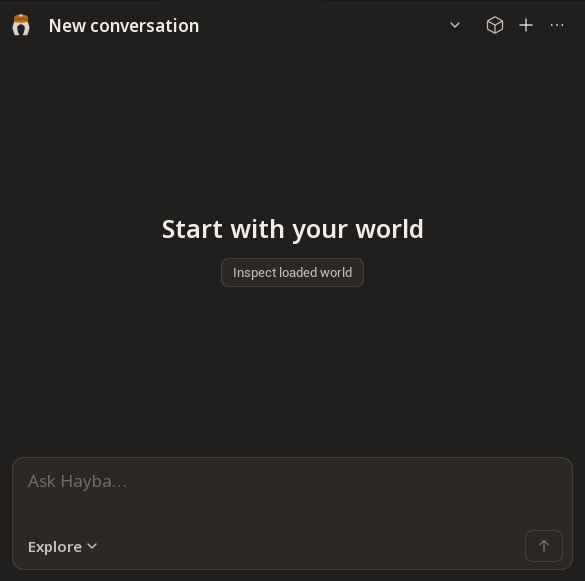
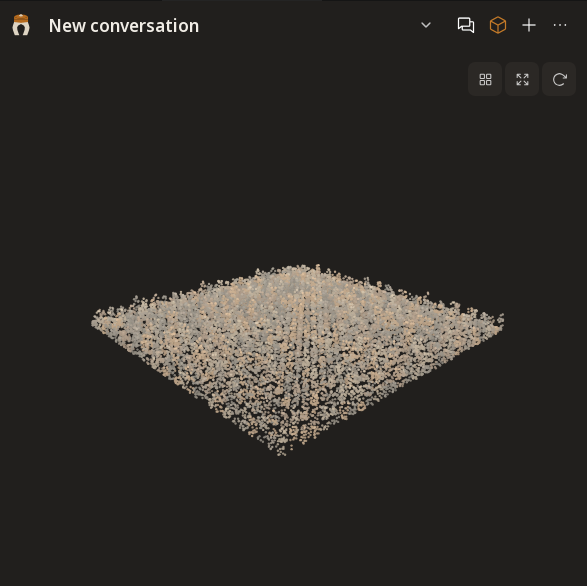
Hayba's quiet in-editor Chat workspace in a scratch Unreal project World preview of sampled mesh surfaces in a synthetic scratch scene
Chat
One place to ask, inspect, and follow a task.
World
A scene-derived spatial view of the loaded meshes.
*Actual scratch-editor captures from the development branch. Chat shows the empty workspace; it does not demonstrate a connected conversation. World shows 130,048 sampled points from 1,024 synthetic actors, not an entire unloaded project.* ## See the workflow A typical request is concrete: *“Inspect this level, propose a route to the focal point, then make the approved changes.”* Hayba exposes the scene and relevant tools, lets the agent prepare a reviewable plan, and checks the editor before writes. [The getting-started guide](docs/getting-started.md) walks through installation. ## Why Hayba | Strength | What it means in practice | Status | | --- | --- | --- | | **Tools for actual production work** | Actors, assets, levels, Blueprints, PCG, materials, UI, physics, animation, audio, tests, and project operations. Agents can discover signatures as needed instead of loading the whole catalog at once. | Available | | **Shared-editor coordination** | Owner-bound leases and busy-asset rules turn competing writes into explicit refusals. Bounded batches stop when editor state changes. The orchestrator can respond instead of guessing what happened. | `0.4.0` candidate | | **Native crash and state guards** | A contained native fault leaves the editor in a sticky unsafe state. Play, dirty Blueprints, read-only saves, and unattended execution receive checks at the editor boundary. | `0.4.0` candidate | | **Reviewable changes** | Plan Mode can require approval before destructive steps. Supported operations use Unreal undo transactions; structured results expose refusals and partial work. | Available; expanded in `0.4.0` | | **A scene-derived World view** | The development preview samples loaded meshes and first-visible depth. Agents can capture local geometry tiles on demand, page authored sources and provisional spatial relations, and inspect coverage gaps; most depth points remain unattributed. | Development branch | The [tool reference](docs/wiki/) covers individual operations. Optional [GAS and MetaSound plugins](docs/adr/0008-satellite-plugins-earn-their-place.md) extend the core. The distinction is how the tools work together under a shared editor's live constraints. ## See the safety boundary ![Two agents route requests through the MCP server to native editor checks; allowed writes reach Unreal Editor and blocked writes return a structured reason](docs/media/safety-boundary.svg) The [TypeScript MCP server](mcp-tools/hayba-mcp/) routes requests to the [C++ editor plugin](unreal/HaybaMCPToolkit/). The editor plugin checks state and ownership where writes actually happen. The [visual sidecar](mcp-tools/hayba-mcp/addons/visual-embeddings/) is optional. [Explore the architecture](docs/ARCHITECTURE.md). ## Safety is part of the workflow The `0.4.0` candidate adds a coordinated set of protections: sticky refusal after a contained native fault, PIE and asset-busy checks, guarded save paths, owner-bound leases with recovery, and bounded batch execution. These address a shared editor's real failure modes: one agent can hold a resource while another reads stale state, Play can begin during a build, or a native fault can leave the editor unsafe for more writes. The candidate is still finishing release validation; [the scratch-host safety guide](docs/SAFETY-scratch-host-and-leases.md) records the live verification boundaries. Hayba does not treat every refusal as failure. A structured refusal tells the agent whether to wait, refresh state, request a lease, stop Play, or return control to the user. Plan Mode requires approval for destructive commands when enabled; owner-bound leases, PIE and editor-health guards apply independently. Native undo covers supported operations, with documented exceptions. [Read the safety model](docs/safety-model.md) · [Security policy](SECURITY.md) · [Decision records](docs/adr/) ## World, from scene evidence The current preview progressively scans loaded static meshes. The scratch-editor capture above shows 130,048 surface samples from 1,024 synthetic actors, with source links for those mesh samples. A [second scratch capture](docs/media/world-depth-scratch-preview.png) includes 37,277 depth-derived points from a 256×256 capture of first-visible surfaces. A [zoom-local tile](docs/media/world-tile-scratch-preview.png) adds 8,192 points sampled from mesh triangles. An agent can start a loaded-world tile capture with `world_tile_capture`, then inspect its bounded geometry, source nodes, and authored semantic groups with `world_semantic_snapshot`. The latest depth observation also has queryable pages with a capture ID, camera, coverage, and gaps. Uncaptured regions report `not_captured`. The depth pass covers one editor-camera view, not an entire level; only sparse depth-matched collision labels identify possible sources. Unloaded cells and occluded surfaces remain unknown. [Open the World capture](docs/media/world-mesh-splat-preview.png) · [Zoom-local mesh detail](docs/media/world-tile-scratch-preview.png) · [Read the World model](docs/world-intelligence.md) ## The next World layer The next layer will use that evidence to compare scene composition and production options: sightlines, routes, streaming and NPC pressure, memory, texel density, PCG placement, and hand-placed focal assets. It should score alternatives with measured constraints and call out unknowns. **That decision layer is planned work, not a shipped capability.** [Read the World direction](docs/world-intelligence.md). ## Install in a scratch project **Requirements:** Node.js 22.5+, Unreal Engine 5.7+, and Visual Studio 2022 on Windows. The optional visual sidecar has separate Python dependencies. ```bash git clone https://github.com/zajalist/hayba.git cd hayba npm install npm --prefix mcp-tools/hayba-mcp run build ``` Copy [`unreal/HaybaMCPToolkit`](unreal/HaybaMCPToolkit/) into a scratch Unreal project's `Plugins/` directory and build the project. Then register the built server with your MCP host. For Claude Code: ```bash claude mcp add hayba-toolkit -- node /absolute/path/to/hayba/mcp-tools/hayba-mcp/dist/index.js ``` Open the scratch project and use the **Hayba MCP Toolkit** panel to complete setup. The [step-by-step guide](docs/getting-started.md) includes other hosts, add-ons, and troubleshooting. Start with a scratch project while evaluating any tool that can modify editor state. ## Explore the repository | Area | Purpose | | --- | --- | | [`unreal/HaybaMCPToolkit`](unreal/HaybaMCPToolkit/) | Native editor integration and tool handlers | | [`mcp-tools/hayba-mcp`](mcp-tools/hayba-mcp/) | MCP server, schemas, and tool routing | | [`docs/wiki`](docs/wiki/) | Tool and workflow reference | | [`docs/adr`](docs/adr/) | Architecture decisions | | [`website`](website/) | Public Hayba site | Developers can run `npm --prefix mcp-tools/hayba-mcp test` for the Node gate. Unreal tests require a separately built project; [CONTEXT.md](CONTEXT.md) and [the architecture guide](docs/ARCHITECTURE.md) explain the boundaries before changing them.
**A worldbuilding tool should understand the world—and know when to stop.** [Getting started](docs/getting-started.md) · [Changelog](CHANGELOG.md) · [License](LICENSE)