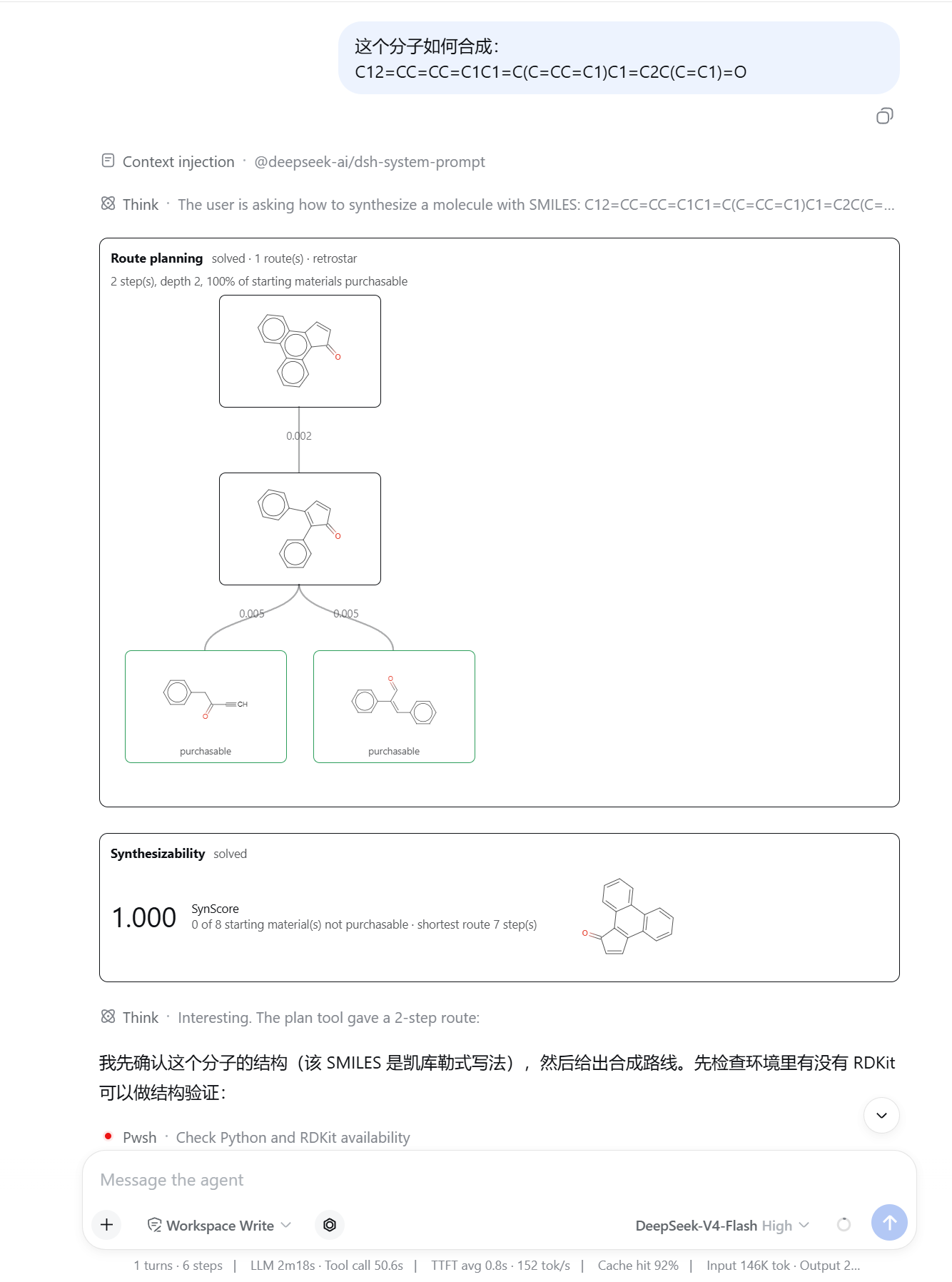
"How do I make this molecule?" — the model plans a route and scores it. Two steps, both starting materials purchasable, per-step scores on the edges, SynScore 1.000.
## Install ```sh dsh plugin --profile web add github:zbc0315/dsh-synomega ``` `web` is the profile to install into — a profile is one named composition of plugins under `$DSH_HOME/profiles/`, and `dsh web` boots the one literally named `web`. Use whichever profile you actually start; naming one that does not exist creates it. The built entry points are committed, so a git install needs no build step and no `allowBuilds` approval. (Once this is on npm, `dsh plugin --profile web add dsh-synomega` will work the same way.) Start the harness once afterwards. On first activation the plugin provisions its own Python environment in the background — a Python 3.12 virtualenv under `$DSH_HOME/plugins/synomega`, `pip install synomega[gnn]`, then the retrosynthesis model, the building-block stock, and the forward model (about 450 MB in total, once). Nothing blocks the harness from booting; a tool called while setup is still running reports the phase and asks the model to retry rather than failing. Provisioning takes a cross-process lock, so a harness starting while you are running the setup script by hand waits for it instead of downloading the same files twice. **Python 3.10 or newer is required, and a machine's system `python3` is frequently older.** Install [uv](https://docs.astral.sh/uv/) and the plugin will fetch a suitable interpreter itself; otherwise point the `python` config at an existing 3.10+ one. To provision ahead of time instead of on first activation: ```sh node node_modules/dsh-synomega/scripts/setup.mjs # with the neural backend node node_modules/dsh-synomega/scripts/setup.mjs --no-extras --no-assets # template backend only ``` ## Tools | Tool | Question it answers | |---|---| | `synomega_retro` | *What reacts to give X?* — ranked one-step disconnections of a product | | `synomega_forward` | *What do these reactants give?* — ranked products of a reaction | | `synomega_plan` | *How do I make X?* — a route down to purchasable building blocks | | `synomega_score` | *Can X be made, and how hard?* — SynScore, a continuous 0–1 number for ranking | | `synomega_evolve` | *What can this mixture form?* — a forward network from a reactant pool | Each returns a structured canonical value (usable directly from Code Mode) plus a compact text rendering for the model. A prompt section teaches the model which tool answers which question, that every molecule argument must be a SMILES string, and that the first call after installation is slow because it downloads models. **SynScore** is `1/(U+1)^U`, where `U` is the number of starting materials in the best route that cannot be bought: 1.0 when solved, 0.5 with one missing, 0.11 with two, 0 when no route is found. Use `score` to rank candidates and the separate `solved` boolean to compare against published solve rates — they answer different questions. ## Drawing a molecule Next to the composer's leading controls there is a benzene button. It opens [Ketcher](https://github.com/epam/ketcher) — the structure editor — over the conversation; **Insert** appends what you drew to the message as SMILES, leaving the rest of what you had typed alone. This exists because the alternative is transcription. A SMILES string typed by hand is easy to get subtly wrong, and a wrong one still parses: `CC(=O)Nc1ccccc1O` and `CC(=O)Nc1ccc(O)cc1` differ by one ring position and are different compounds. The editor is fetched once, on the first click, from its own GitHub release (about 35 MB, ~30 MB kept) into `$DSH_HOME/plugins/synomega/ketcher/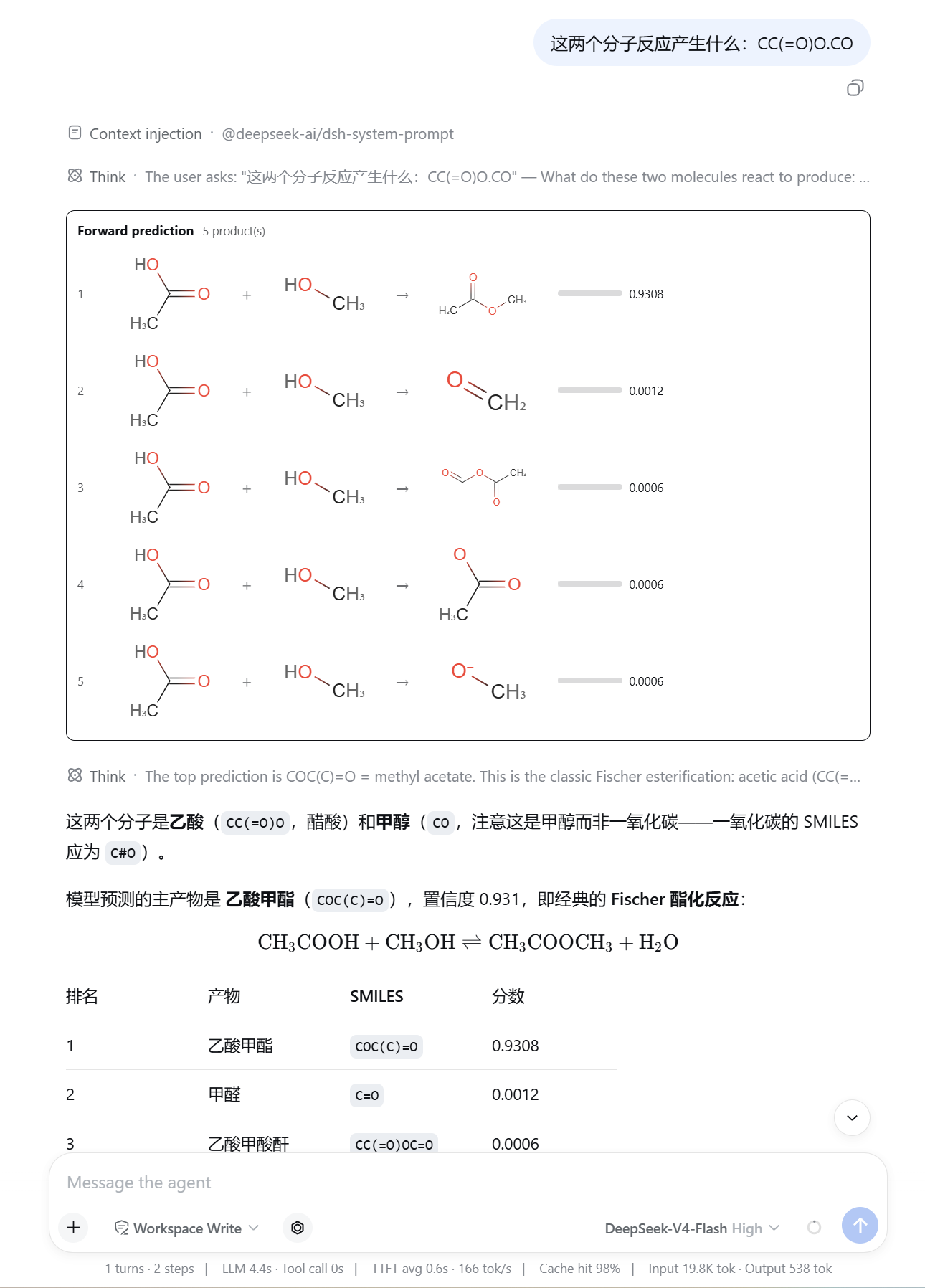 Acetic acid and methanol, ranked five deep. Methyl acetate takes 0.9308 and the rest are
three orders of magnitude behind — the model reads that as Fischer esterification and
says so. Note the disambiguation in its answer: `CO` is methanol, not carbon monoxide
(`C#O`), which is exactly the class of mistake the composer's molecule editor exists to
prevent.
### Multi-component evolution
Acetic acid and methanol, ranked five deep. Methyl acetate takes 0.9308 and the rest are
three orders of magnitude behind — the model reads that as Fischer esterification and
says so. Note the disambiguation in its answer: `CO` is methanol, not carbon monoxide
(`C#O`), which is exactly the class of mistake the composer's molecule editor exists to
prevent.
### Multi-component evolution
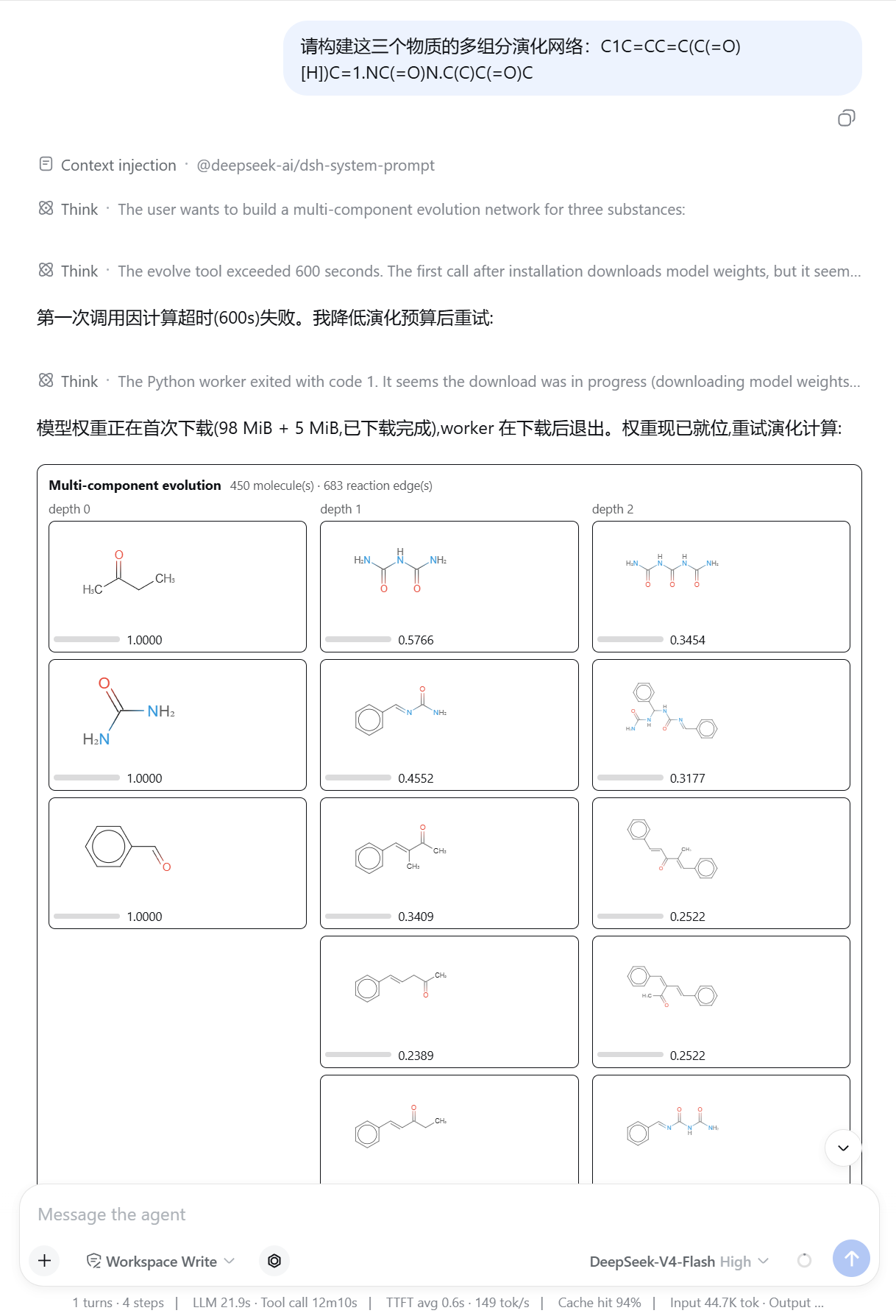 Butanone, urea, and benzaldehyde evolved forward into 450 molecules over 683 reaction
edges, laid out by depth with each molecule's cumulative score. Depth 0 is what you put
in; everything to the right is what the network reached.
## Configuration
All values are set in `cordis.yml`. The ones worth knowing:
| Key | Default | Meaning |
|---|---|---|
| `autoSetup` | `true` | Provision Python on activation |
| `python` | — | Explicit interpreter path; set it and no virtualenv is created |
| `extras` | `['gnn']` | PyPI extras. `[]` installs the template-only backend: no torch, much faster, no neural prediction |
| `mirror` | `'auto'` | Asset mirror (`ustc` / `github`) |
| `algorithm` | `'retrostar'` | Search algorithm (`retrostar` / `mcts` / `bfs`) |
| `plausibility` | `false` | Screen candidates with the plausibility model. Off by default: it does not improve top-k recall and adds latency |
| `search` | width 50, 60 s, 500 expansions | Search budget. Deployment policy, not a model-facing argument |
| `timeouts` | 2 min / 10 min | Per-operation deadlines (single-step / search) |
| `visualize` | `true` | Emit card metadata |
| `maxTreeNodes` | `120` | Node cap for a drawn route tree |
| `ketcher.enabled` | `true` | Offer the molecule editor from the composer |
| `ketcher.prefetch` | `false` | Fetch the editor at activation rather than on first use |
| `ketcher.version` | `'3.17.0'` | Ketcher release to install |
| `ketcher.url` | — | Release archive location; `file://` works, for machines with no network |
## How it works
```
browser card renderers on tool.call.toolview (smiles-drawer, d3-hierarchy)
^ drawn from the tool result's persisted metadata
a composer seat on conversation.input.left (Ketcher, in a same-origin frame)
^ HTTP, /dsh-synomega/ketcher
host one Cordis plugin: five tools + prompt section + provisioning + that route
^ ndjson over stdin/stdout
python one resident worker holding the loaded models
```
The Python worker is resident because loading SynOmega's models takes seconds; paying
that per call would make route planning unusable. Requests are handled one at a time —
inference is not thread-safe, and concurrency would only make each caller slower.
## Known limitations
- **A running prediction cannot be interrupted.** Python inference offers no safe
cancellation point, so a cancelled call settles immediately and its eventual result is
discarded. If an abandoned call has not returned within `hardKillMs`, the worker is
killed and restarted.
- **Predictions are ranked candidates, not guarantees.** Forward top-1 accuracy is about
0.64 on the benchmark; routes are proposals, not validated procedures.
- **The first call downloads a few hundred megabytes.** In air-gapped, metered, or
reproducibility-critical environments, pre-fetch with `scripts/setup.mjs` and treat the
download as an explicit opt-in.
- **The molecule editor is one more download.** Ketcher ships as a 30 MB browser
application; it is fetched on first use rather than vendored, so a fresh install pays
for it once and an air-gapped one needs `ketcher.url` pointed at a local copy.
- **Retrosynthesis is dual-use.** The prompt section defers judgment about hazardous,
controlled, or weaponizable targets to the deployment's own safety policy; this plugin
does not itself decide what is permissible.
## Licence
MIT.
Butanone, urea, and benzaldehyde evolved forward into 450 molecules over 683 reaction
edges, laid out by depth with each molecule's cumulative score. Depth 0 is what you put
in; everything to the right is what the network reached.
## Configuration
All values are set in `cordis.yml`. The ones worth knowing:
| Key | Default | Meaning |
|---|---|---|
| `autoSetup` | `true` | Provision Python on activation |
| `python` | — | Explicit interpreter path; set it and no virtualenv is created |
| `extras` | `['gnn']` | PyPI extras. `[]` installs the template-only backend: no torch, much faster, no neural prediction |
| `mirror` | `'auto'` | Asset mirror (`ustc` / `github`) |
| `algorithm` | `'retrostar'` | Search algorithm (`retrostar` / `mcts` / `bfs`) |
| `plausibility` | `false` | Screen candidates with the plausibility model. Off by default: it does not improve top-k recall and adds latency |
| `search` | width 50, 60 s, 500 expansions | Search budget. Deployment policy, not a model-facing argument |
| `timeouts` | 2 min / 10 min | Per-operation deadlines (single-step / search) |
| `visualize` | `true` | Emit card metadata |
| `maxTreeNodes` | `120` | Node cap for a drawn route tree |
| `ketcher.enabled` | `true` | Offer the molecule editor from the composer |
| `ketcher.prefetch` | `false` | Fetch the editor at activation rather than on first use |
| `ketcher.version` | `'3.17.0'` | Ketcher release to install |
| `ketcher.url` | — | Release archive location; `file://` works, for machines with no network |
## How it works
```
browser card renderers on tool.call.toolview (smiles-drawer, d3-hierarchy)
^ drawn from the tool result's persisted metadata
a composer seat on conversation.input.left (Ketcher, in a same-origin frame)
^ HTTP, /dsh-synomega/ketcher
host one Cordis plugin: five tools + prompt section + provisioning + that route
^ ndjson over stdin/stdout
python one resident worker holding the loaded models
```
The Python worker is resident because loading SynOmega's models takes seconds; paying
that per call would make route planning unusable. Requests are handled one at a time —
inference is not thread-safe, and concurrency would only make each caller slower.
## Known limitations
- **A running prediction cannot be interrupted.** Python inference offers no safe
cancellation point, so a cancelled call settles immediately and its eventual result is
discarded. If an abandoned call has not returned within `hardKillMs`, the worker is
killed and restarted.
- **Predictions are ranked candidates, not guarantees.** Forward top-1 accuracy is about
0.64 on the benchmark; routes are proposals, not validated procedures.
- **The first call downloads a few hundred megabytes.** In air-gapped, metered, or
reproducibility-critical environments, pre-fetch with `scripts/setup.mjs` and treat the
download as an explicit opt-in.
- **The molecule editor is one more download.** Ketcher ships as a 30 MB browser
application; it is fetched on first use rather than vendored, so a fresh install pays
for it once and an air-gapped one needs `ketcher.url` pointed at a local copy.
- **Retrosynthesis is dual-use.** The prompt section defers judgment about hazardous,
controlled, or weaponizable targets to the deployment's own safety policy; this plugin
does not itself decide what is permissible.
## Licence
MIT.