
 [Bowei Zhang](https://scholar.google.com/citations?user=tYH72AYAAAAJ)1,2*, [Lei Ke](https://www.kelei.site/)1\*, [Adam W. Harley](https://adamharley.com/)3, [Katerina Fragkiadaki](https://www.cs.cmu.edu/~katef/)1
1Carnegie Mellon University 2Peking University 3Stanford University
**NeurIPS 2025**
\* Equal Contribution
[Bowei Zhang](https://scholar.google.com/citations?user=tYH72AYAAAAJ)1,2*, [Lei Ke](https://www.kelei.site/)1\*, [Adam W. Harley](https://adamharley.com/)3, [Katerina Fragkiadaki](https://www.cs.cmu.edu/~katef/)1
1Carnegie Mellon University 2Peking University 3Stanford University
**NeurIPS 2025**
\* Equal Contribution
 ---
### 🚀 News
- **(2025.12.28)** 🔥 We have updated the **Training** and **Evaluation** code! Check out the new sections below.
## Overview
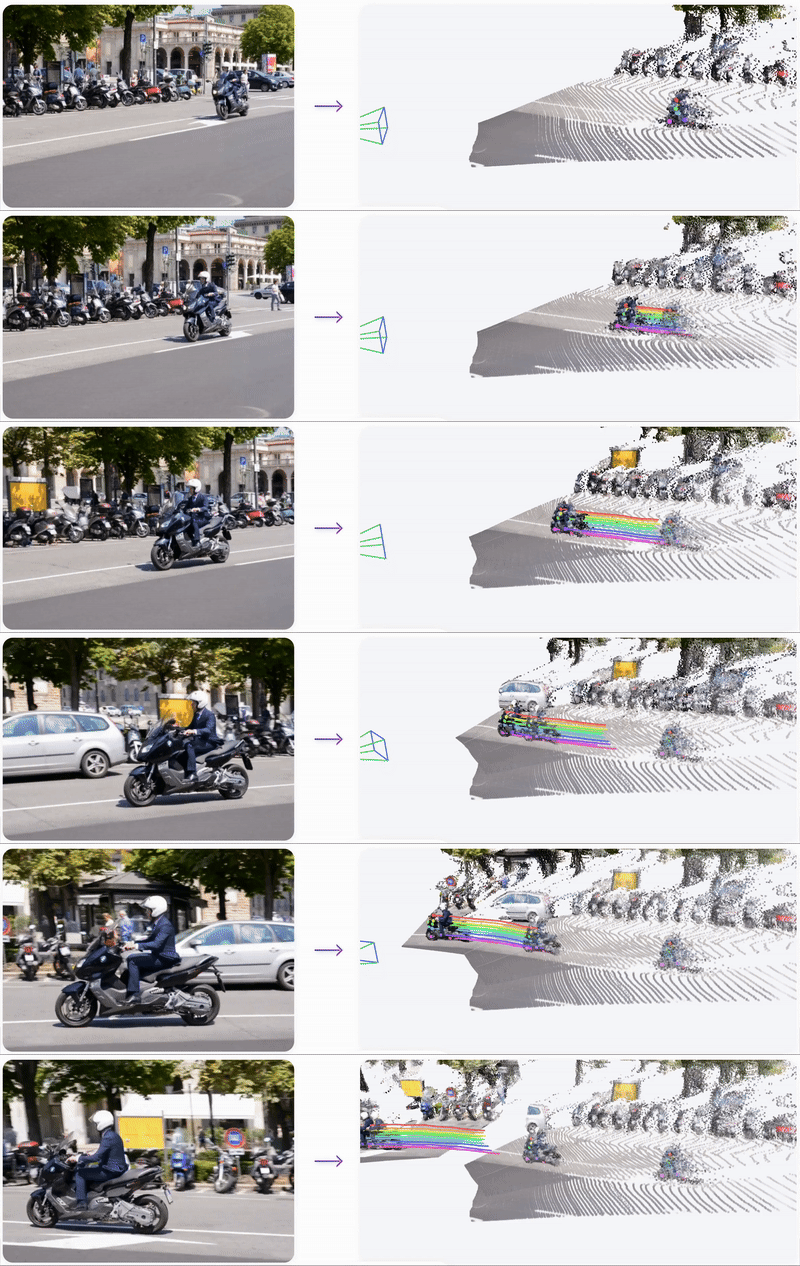
**TAPIP3D** is a method for long-term **feed-forward** 3D point tracking in monocular RGB and RGB-D video sequences. It introduces a 3D feature cloud representation that lifts image features into a persistent world coordinate space, canceling out camera motion and enabling accurate trajectory estimation across frames.
We provide a detailed [video illustration](https://neurips.cc/virtual/2025/loc/san-diego/poster/117634#:~:text=Within%20this%20stabilized%203D%20representation,trained%20checkpoints%20will%20be%20public.) of our TAPIP3D.
## Installation
### Installing dependencies
1. Prepare the environment
```bash
conda create -n tapip3d python=3.10
conda activate tapip3d
pip install torch==2.4.1 torchvision==0.19.1 torchaudio==2.4.1 "xformers>=0.0.27" --index-url https://download.pytorch.org/whl/cu124
pip install torch-scatter -f https://data.pyg.org/whl/torch-2.4.1+cu124.html
pip install -r requirements.txt
```
2. Compile pointops2
```bash
cd third_party/pointops2
LIBRARY_PATH=$CONDA_PREFIX/lib:$LIBRARY_PATH python setup.py install
cd ../..
```
3. Compile megasam
```bash
cd third_party/megasam/base
LIBRARY_PATH=$CONDA_PREFIX/lib:$LIBRARY_PATH python setup.py install
cd ../../..
```
### Downloading checkpoints
Download our TAPIP3D model checkpoint [here](https://huggingface.co/zbww/tapip3d/resolve/main/tapip3d_final.pth) to `checkpoints/tapip3d_final.pth`
If you want to run TAPIP3D on monocular videos, you need to prepare the following checkpoints manually to run MegaSAM:
1. Download the DepthAnything V1 checkpoint from [here](https://huggingface.co/spaces/LiheYoung/Depth-Anything/resolve/main/checkpoints/depth_anything_vitl14.pth) and put it to `third_party/megasam/Depth-Anything/checkpoints/depth_anything_vitl14.pth`
2. Download the RAFT checkpoint from [here](https://drive.google.com/drive/folders/1sWDsfuZ3Up38EUQt7-JDTT1HcGHuJgvT) and put it to `third_party/megasam/cvd_opt/raft-things.pth`
Additionally, the checkpoints of [MoGe](https://wangrc.site/MoGePage/) and [UniDepth](https://github.com/lpiccinelli-eth/UniDepth.git) will be downloaded automatically when running the demo. Please make sure your network connection is available.
## Demo Usage
We provide a simple demo script `inference.py`, along with sample input data located in the `demo_inputs/` directory.
The script accepts as input either an `.mp4` video file or an `.npz` file. If providing an `.npz` file, it should follow the following format:
- `video`: array of shape (T, H, W, 3), dtype: uint8
- `depths` (optional): array of shape (T, H, W), dtype: float32
- `intrinsics` (optional): array of shape (T, 3, 3), dtype: float32
- `extrinsics` (optional): array of shape (T, 4, 4), dtype: float32
For demonstration purposes, the script uses a 32x32 grid of points at the first frame as queries.
### Inference with Monocular Video
By providing an video as `--input_path`, the script first runs [MegaSAM](https://github.com/mega-sam/mega-sam) with [MoGe](https://wangrc.site/MoGePage/) to estimate depth maps and camera parameters. Subsequently, the model will process these inputs within the global frame.
**Demo 1**
---
### 🚀 News
- **(2025.12.28)** 🔥 We have updated the **Training** and **Evaluation** code! Check out the new sections below.
## Overview
**TAPIP3D** is a method for long-term **feed-forward** 3D point tracking in monocular RGB and RGB-D video sequences. It introduces a 3D feature cloud representation that lifts image features into a persistent world coordinate space, canceling out camera motion and enabling accurate trajectory estimation across frames.
We provide a detailed [video illustration](https://neurips.cc/virtual/2025/loc/san-diego/poster/117634#:~:text=Within%20this%20stabilized%203D%20representation,trained%20checkpoints%20will%20be%20public.) of our TAPIP3D.
## Installation
### Installing dependencies
1. Prepare the environment
```bash
conda create -n tapip3d python=3.10
conda activate tapip3d
pip install torch==2.4.1 torchvision==0.19.1 torchaudio==2.4.1 "xformers>=0.0.27" --index-url https://download.pytorch.org/whl/cu124
pip install torch-scatter -f https://data.pyg.org/whl/torch-2.4.1+cu124.html
pip install -r requirements.txt
```
2. Compile pointops2
```bash
cd third_party/pointops2
LIBRARY_PATH=$CONDA_PREFIX/lib:$LIBRARY_PATH python setup.py install
cd ../..
```
3. Compile megasam
```bash
cd third_party/megasam/base
LIBRARY_PATH=$CONDA_PREFIX/lib:$LIBRARY_PATH python setup.py install
cd ../../..
```
### Downloading checkpoints
Download our TAPIP3D model checkpoint [here](https://huggingface.co/zbww/tapip3d/resolve/main/tapip3d_final.pth) to `checkpoints/tapip3d_final.pth`
If you want to run TAPIP3D on monocular videos, you need to prepare the following checkpoints manually to run MegaSAM:
1. Download the DepthAnything V1 checkpoint from [here](https://huggingface.co/spaces/LiheYoung/Depth-Anything/resolve/main/checkpoints/depth_anything_vitl14.pth) and put it to `third_party/megasam/Depth-Anything/checkpoints/depth_anything_vitl14.pth`
2. Download the RAFT checkpoint from [here](https://drive.google.com/drive/folders/1sWDsfuZ3Up38EUQt7-JDTT1HcGHuJgvT) and put it to `third_party/megasam/cvd_opt/raft-things.pth`
Additionally, the checkpoints of [MoGe](https://wangrc.site/MoGePage/) and [UniDepth](https://github.com/lpiccinelli-eth/UniDepth.git) will be downloaded automatically when running the demo. Please make sure your network connection is available.
## Demo Usage
We provide a simple demo script `inference.py`, along with sample input data located in the `demo_inputs/` directory.
The script accepts as input either an `.mp4` video file or an `.npz` file. If providing an `.npz` file, it should follow the following format:
- `video`: array of shape (T, H, W, 3), dtype: uint8
- `depths` (optional): array of shape (T, H, W), dtype: float32
- `intrinsics` (optional): array of shape (T, 3, 3), dtype: float32
- `extrinsics` (optional): array of shape (T, 4, 4), dtype: float32
For demonstration purposes, the script uses a 32x32 grid of points at the first frame as queries.
### Inference with Monocular Video
By providing an video as `--input_path`, the script first runs [MegaSAM](https://github.com/mega-sam/mega-sam) with [MoGe](https://wangrc.site/MoGePage/) to estimate depth maps and camera parameters. Subsequently, the model will process these inputs within the global frame.
**Demo 1**
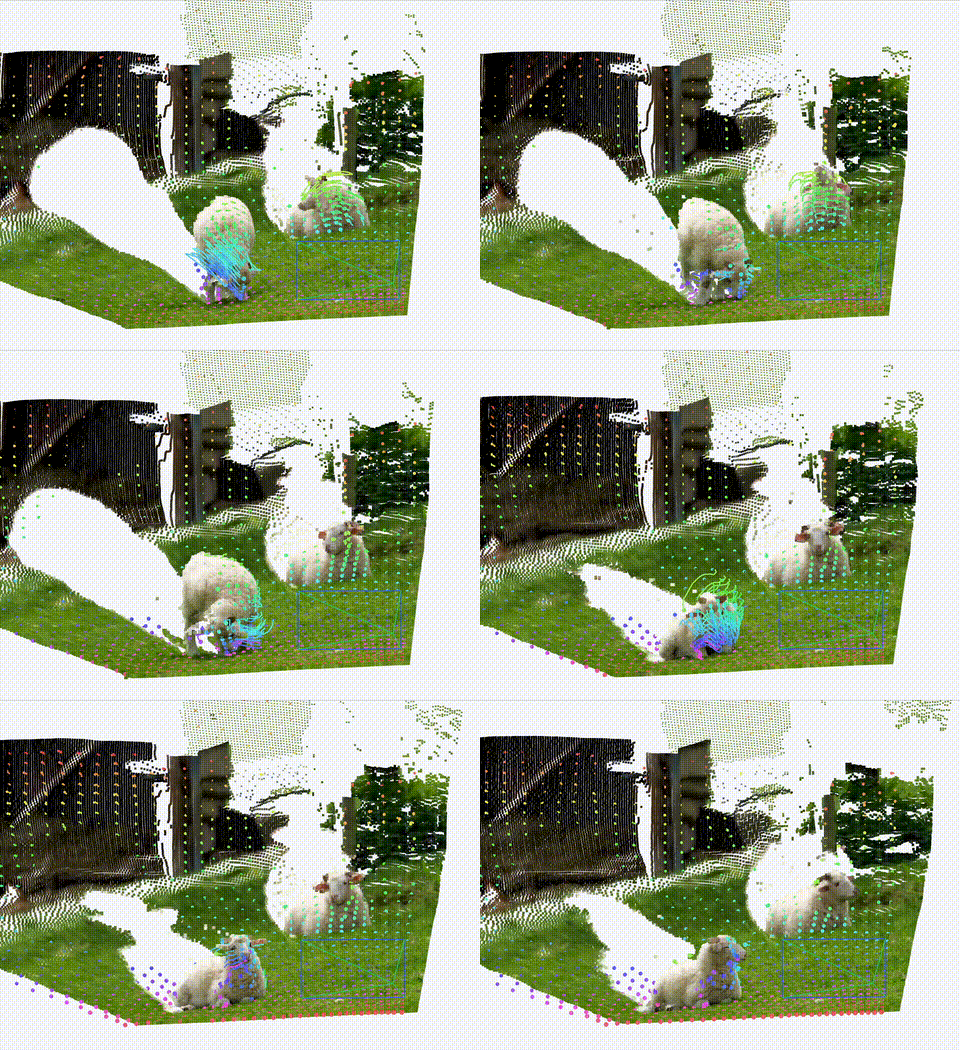 To run inference:
```bash
python inference.py --input_path demo_inputs/sheep.mp4 --checkpoint checkpoints/tapip3d_final.pth --resolution_factor 2
```
An npz file will be saved to `outputs/inference/`. To visualize the results:
```bash
python visualize.py
To run inference:
```bash
python inference.py --input_path demo_inputs/sheep.mp4 --checkpoint checkpoints/tapip3d_final.pth --resolution_factor 2
```
An npz file will be saved to `outputs/inference/`. To visualize the results:
```bash
python visualize.py 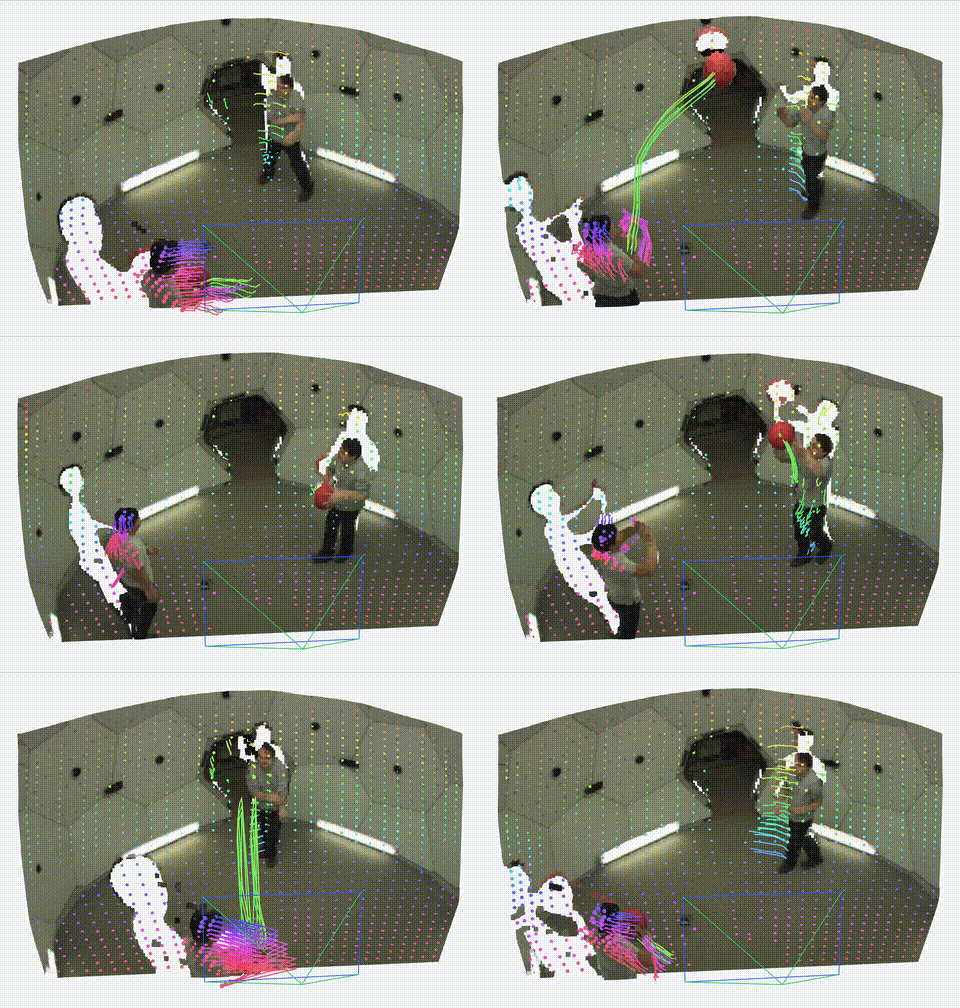 ```bash
python inference.py --input_path demo_inputs/pstudio.mp4 --checkpoint checkpoints/tapip3d_final.pth --resolution_factor 2
```
**Inference with Known Depths and Camera Parameters**
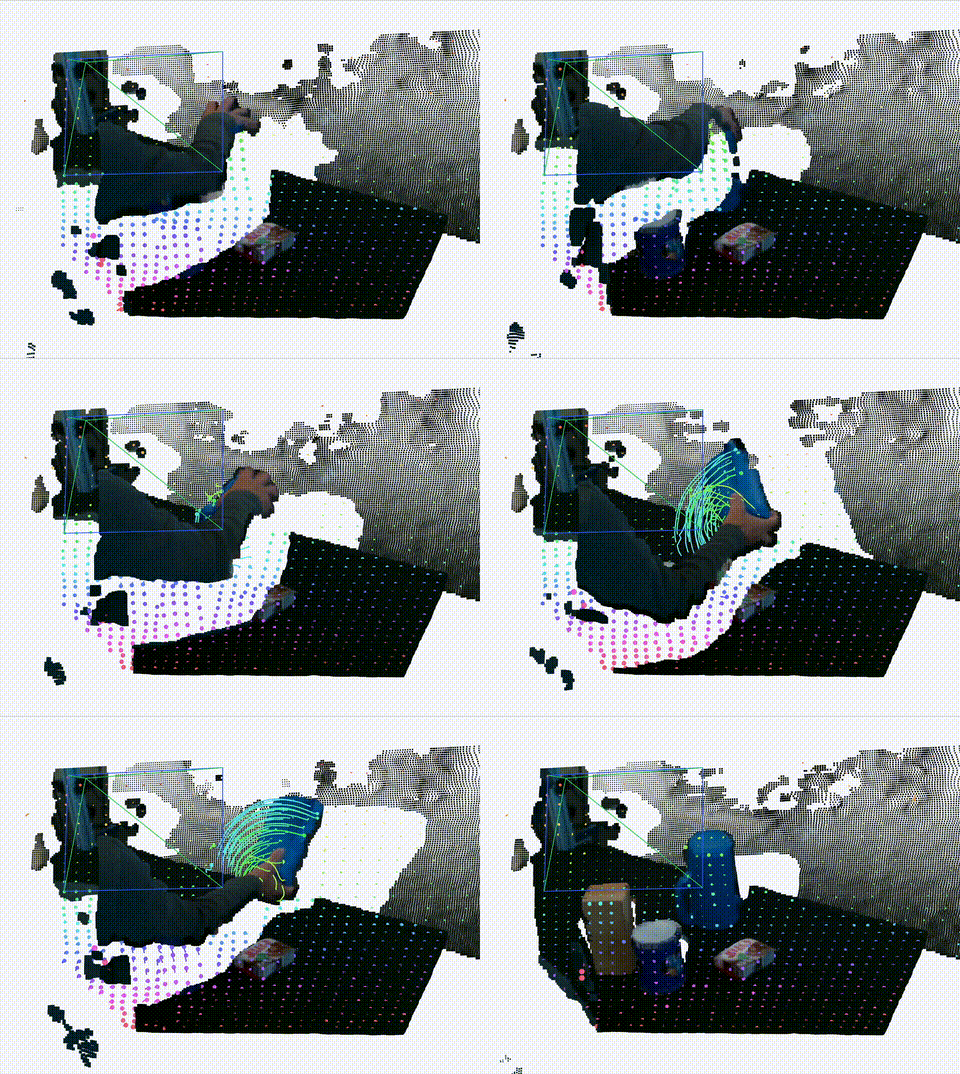
If an `.npz` file containing all four keys (`rgb`, `depths`, `intrinsics`, `extrinsics`) is provided, the model will operate in an aligned global frame, generating point trajectories in world coordinates.
We provide one example `.npz` file at [here](https://huggingface.co/zbww/tapip3d/resolve/main/demo_inputs/dexycb.npz?download=true) and please put it in the `demo_inputs/` directory.
**Demo 3**
```bash
python inference.py --input_path demo_inputs/pstudio.mp4 --checkpoint checkpoints/tapip3d_final.pth --resolution_factor 2
```
**Inference with Known Depths and Camera Parameters**
If an `.npz` file containing all four keys (`rgb`, `depths`, `intrinsics`, `extrinsics`) is provided, the model will operate in an aligned global frame, generating point trajectories in world coordinates.
We provide one example `.npz` file at [here](https://huggingface.co/zbww/tapip3d/resolve/main/demo_inputs/dexycb.npz?download=true) and please put it in the `demo_inputs/` directory.
**Demo 3**
 ```bash
python inference.py --input_path demo_inputs/dexycb.npz --checkpoint checkpoints/tapip3d_final.pth --resolution_factor 2
```
## Training and Evaluation
### 1. Dataset Preparation
Please refer to [DATASET.md](DATASET.md) for instructions on preparing datasets for both training and evaluation.
### 2. Training
To start training, run:
```bash
bash scripts/train.sh
```
- `experiment_name`: The run name shown on **WandB**.
- `experiment_id`: A unique identifier. Re-running with the same `experiment_id` will **automatically resume** training from the latest checkpoint.
### 3. Evaluation
To evaluate a checkpoint, run:
```bash
bash scripts/eval.sh
```
You can specify the model to evaluate by modifying the `checkpoint` variable in `scripts/eval.sh`.
## Citation
If you find this project useful, please consider citing:
```
@article{tapip3d,
title={TAPIP3D: Tracking Any Point in Persistent 3D Geometry},
author={Zhang, Bowei and Ke, Lei and Harley, Adam W and Fragkiadaki, Katerina},
journal={arXiv preprint arXiv:2504.14717},
year={2025}
}
```
```bash
python inference.py --input_path demo_inputs/dexycb.npz --checkpoint checkpoints/tapip3d_final.pth --resolution_factor 2
```
## Training and Evaluation
### 1. Dataset Preparation
Please refer to [DATASET.md](DATASET.md) for instructions on preparing datasets for both training and evaluation.
### 2. Training
To start training, run:
```bash
bash scripts/train.sh
```
- `experiment_name`: The run name shown on **WandB**.
- `experiment_id`: A unique identifier. Re-running with the same `experiment_id` will **automatically resume** training from the latest checkpoint.
### 3. Evaluation
To evaluate a checkpoint, run:
```bash
bash scripts/eval.sh
```
You can specify the model to evaluate by modifying the `checkpoint` variable in `scripts/eval.sh`.
## Citation
If you find this project useful, please consider citing:
```
@article{tapip3d,
title={TAPIP3D: Tracking Any Point in Persistent 3D Geometry},
author={Zhang, Bowei and Ke, Lei and Harley, Adam W and Fragkiadaki, Katerina},
journal={arXiv preprint arXiv:2504.14717},
year={2025}
}
```