# dsh-remote-agent
[简体中文](README.md) | **English**
Turn another computer into a **remote agent co-worker** for your DSH.
The worker machine runs its own DSH with an independent agent loop — tasks keep
running locally on it. Your main machine only receives the **handoff result
card** and the **artifact manifest**; final artifacts cross over only when you
explicitly pull them.
```
┌──────────── main machine (hub) ────────────┐
│ DSH · model · session logs · all credentials │
│ ┌─ dsh-remote-agent ─────────────────────┐ │
│ │ 7 remote_* tools + Web panel │ │
│ └────────────────────────────────────────┘ │
└──────────────────▲──────────────────────────┘
│ node dials in (direct / relay)
┌──────────────────┴──────────────────────────┐
│ ┌─ worker machine ─────────────────────────┐ │
│ │ independent agent loop · own model ctx │ │
│ │ D:\work\** intermediates stay here │ │
│ └──────────────────────────────────────────┘ │
└─────────────────────────────────────────────┘
```
| | |
|---|---|
| **Status** | 0.3.0 —— hub side end-to-end usable; worker `exec` usable, real-runtime dial-in verified (standalone worker process → running DSH desktop hub, see [KNOWN-ISSUES §8](KNOWN-ISSUES.md)); both root causes of the `agent` path fixed, awaiting confirmation on two real machines |
| **DSH** | Desktop / CLI, verified on 0.2.0-rc.2 |
| **Platforms** | Windows (fully verified) · Linux / macOS (CI covered) |
| **Dependencies** | **Zero external npm dependencies** —— `node:` built-ins only |
| **Node** | `^22.19.0 \|\| >=24.0.0` |
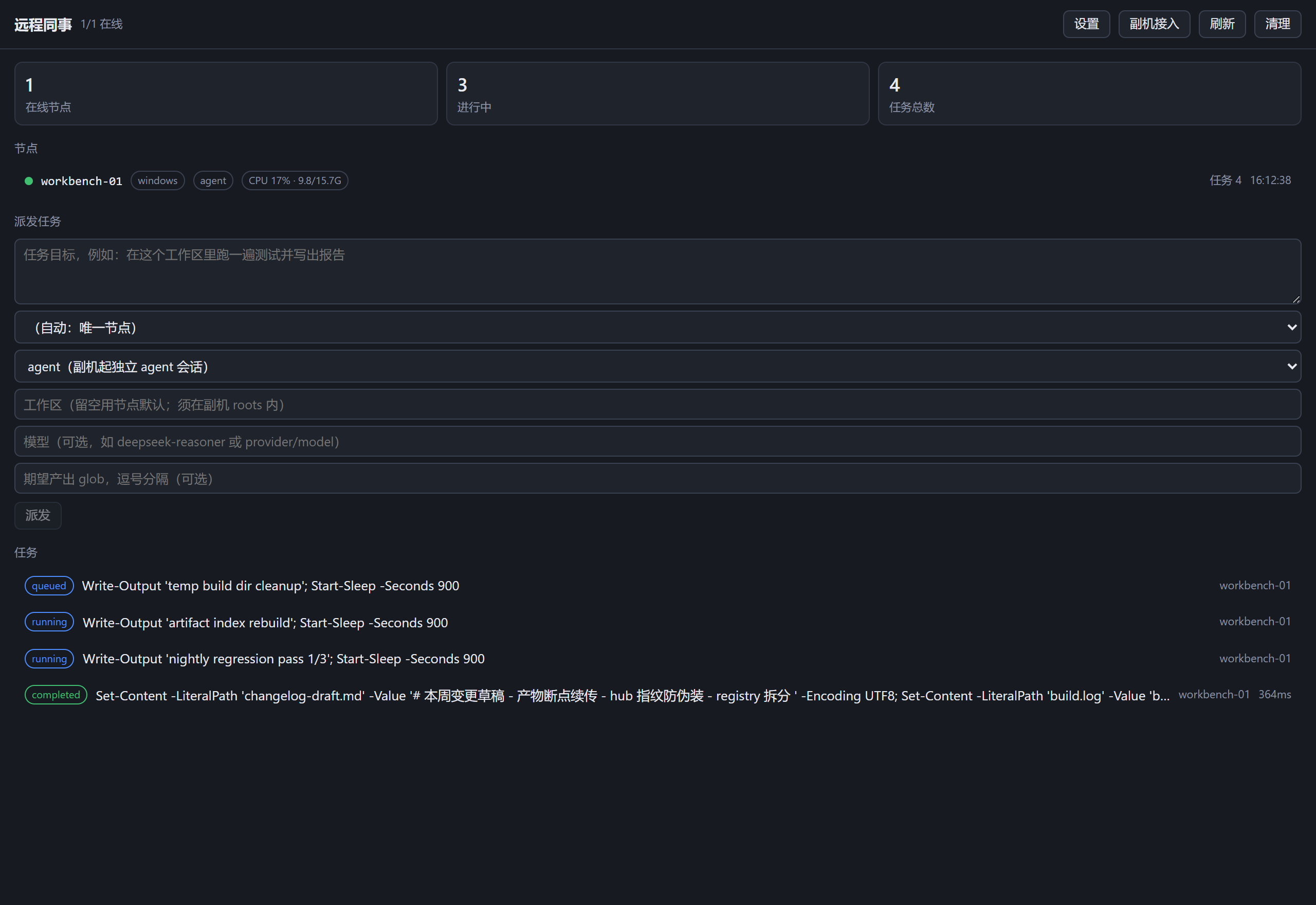
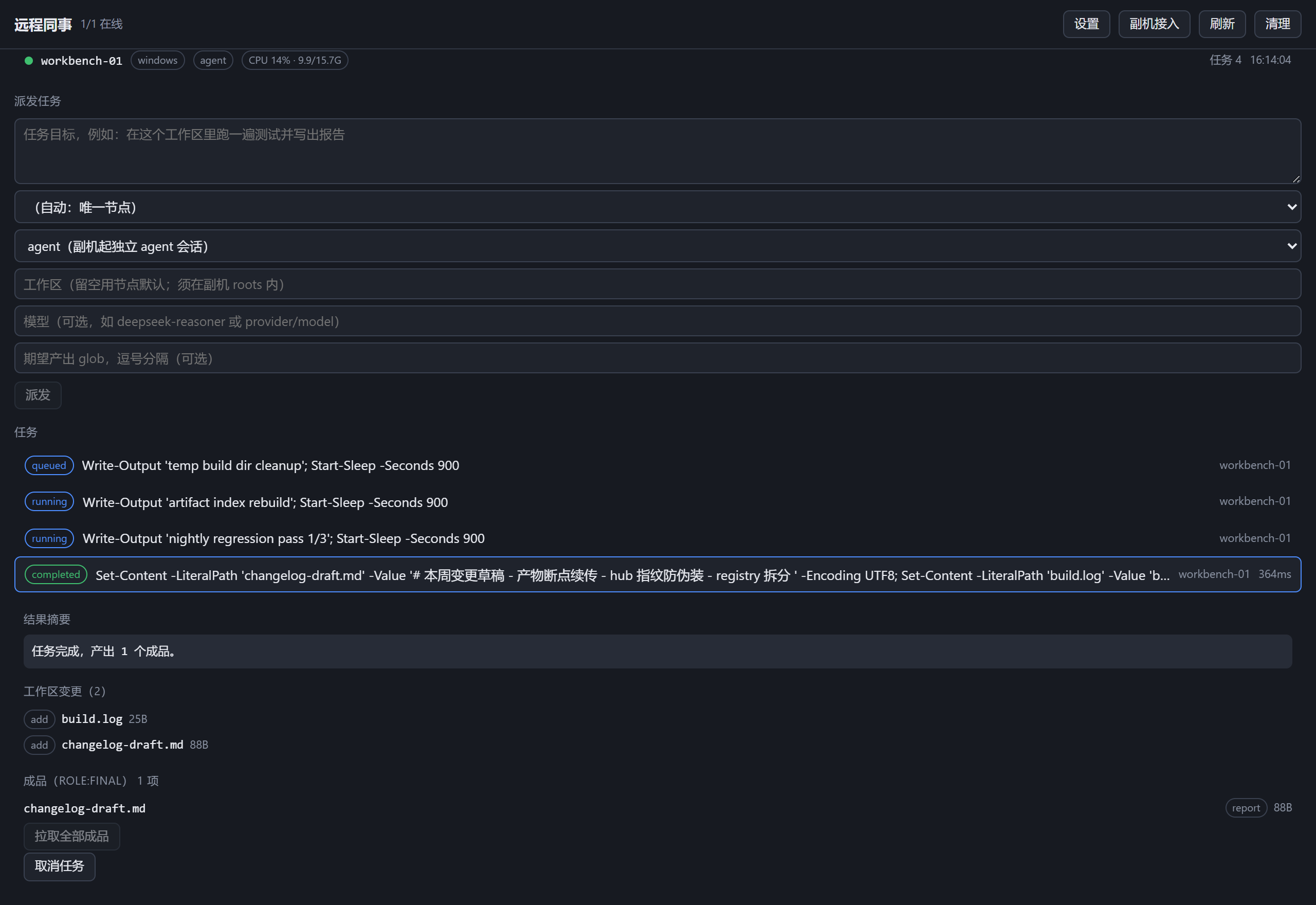
**Web panel**(sidebar → "远程同事" / Remote co-worker):node list with CPU /
memory badges, task dispatch, task states, result summaries, workspace changes,
final artifacts, log tail.
---
## Up and running in five minutes
Pick one route based on how comfortable you are with a terminal — **every route
leads to the same endpoint**:
| Route | Hub | Worker | For |
|---|---|---|---|
| **① Zero terminal**(Windows) | Double-click `bin/双击运行-配置向导.cmd` → Enter → Web panel "副机接入" copies the pairing code | Double-click the same file → paste the pairing code → Enter writes config | Anyone who flinches at a black window |
| **② Wizard**(recommended) | Run the wizard in a terminal → Enter to confirm | Same, paste the pairing code | You can open a terminal |
| **③ Manual** | Hand-write config per the section below | Hand-write (`inject: []` is mandatory) | You want full control |
After any route: **restart DSH on both machines**, then ask the hub
"which nodes are online on the worker?" —— if it answers, you're connected.
When something breaks, run `--doctor`; every ✗ item ships with a fix.
```bash
node bin/dsh-remote-setup.js
```
> **Windows, no terminal?** In the plugin's `bin/` directory **double-click
> `双击运行-配置向导.cmd`** —— then just keep pressing Enter in the window
> that opens.
> The plugin lives at `%USERPROFILE%\.dsh\dsh_orb\dsh-plugin\dsh-remote-agent\bin\`.
1. **Run on the hub**: choose "1 = hub" → the wizard auto-detects the LAN IP,
generates a strong-random `nt_` `nodeToken`, and prints the **worker
pairing code** (one line, `dshra1://…`) plus complete YAML for both machines
(including the **firewall allow command**).
2. **Run on the worker**: choose "2 = worker" → **paste the pairing code the
hub gave you** (or type the address and token by hand) → the wizard
**probes the hub port first**, then writes the worker config. The
error-prone `inject: []` is filled in for you (without it the worker stays
silent forever and never comes online). The worker config may also be just
one line `pair: ''`, expanded to address + token at runtime
(explicit config wins; writing `hubUrl:` overrides it temporarily).
3. Restart DSH on both machines, ask the hub "**which nodes are online on the
worker?**" —— an answer means you're connected.
4. **Terminal-free path (GUI)**: open the hub's Web panel → the "**副机接入**"
(worker onboarding) button → generates and copies the pairing code in one
click (firewall command included). When dispatching from the hub panel you
can also set the model the worker should use in the "模型" (model) field
(leave empty for the worker's default).
5. When in doubt, run the doctor (reads your config files, checks each item,
every ✗ comes with a fix):
```bash
node bin/dsh-remote-setup.js --doctor your-config.yml
```
Not interactive? One command does it all: `--role worker --hub-url
192.168.1.10:19387 --token nt_xxx --roots D:\work --node-id slave-pc`.
---
## Core invariants
These are the design premises of this package — read them before changing it:
| Invariant | Meaning |
|---|---|
| **Credentials never leave the worker** | The protocol carries no model keys; the worker uses its own model config |
| **Disconnects don't kill tasks** | Tasks keep running locally on the worker; even a relay outage finishes, and reconciliation happens on reconnect |
| **Manifest before bytes** | On completion only the manifest + handoff come back; artifacts transfer only via `remote_pull` |
| **Only `role:final` crosses the wire** | Logs / caches / intermediate build files stay on the worker; only metadata is reported |
| **Resumable transfer** | If `remote_pull` drops mid-transfer, it does not restart from zero: received bytes are kept, retries resume from the offset, full sha256 verification still applies |
---
## Install
### From npm or GitHub
```bash
# via DSH's plugin installer (GitHub)
dsh plugin add github:zbzbhs/dsh-remote-agent
# or via npm
npm install -g dsh-remote-agent
```
Or type `github:zbzbhs/dsh-remote-agent` into DSH's plugin dialog.
After installing, make sure this stanza exists in `cordis.patch.yml` (the
in-package patch inserts it automatically):
```yaml
- id: remote-agent
name: dsh-remote-agent
inject: ['webServer', 'tools', 'systemPrompt']
config:
role: hub
```
### Worker
**Same package, different config** —— the key point is that **`inject: []` is
mandatory**:
```yaml
- id: remote-agent
name: dsh-remote-agent
inject: [] # ← mandatory on the worker, or it never activates (see below)
config:
role: worker
nodeId: slave-pc
transportMode: direct
hubUrl: 'ws://:19387/api/remote-agent/node'
token: ''
roots: ['D:\work'] # ← change to a real directory on the worker
```
**Typing addresses is error-prone? Use the pairing code** —— the hub wizard
prints one line `dshra1://…` (address + token inside). On the worker, replace
the `transportMode/hubUrl/token` lines with a single line:
```yaml
config:
role: worker
pair: 'dshra1://eyJ2IjoxLC…' # ← the full line printed by the hub wizard
roots: ['D:\work']
```
> **Two rules about the pairing code**
>
> 1. **It contains the token, so it IS a credential** —— hand it over in
> person or via encrypted chat; never paste it into public channels.
> 2. **`roots` is not part of the pairing code** —— which directories the
> worker may touch is the worker's own security boundary, always declared
> by the worker config; nothing on the hub side can decide it.
>
> Explicit config wins: when `pair` and `hubUrl` both exist, `hubUrl` applies —
> handy for temporarily switching addresses while debugging. A broken pairing
> code never prevents the worker from starting —— it logs one warning and is
> treated as unconfigured (`--doctor` will flag it).
> **Hub identity verification (on by default)**: the worker verifies the hub
> too. On first start the hub generates a persistent identity (fingerprint
> `hubfp1-…`, stored at `~/.dsh-remote-agent/hub-identity.json`); the pairing
> code carries the fingerprint automatically —— pasting it pins the hub on
> first connect (TOFU, state in the worker's
> `~/.dsh-remote-agent/hub-pin.json`). Manual config can pin explicitly with
> `pinnedHubFingerprint: hubfp1-…`; from then on a fingerprint mismatch means
> the worker refuses to come online and stops reconnecting (if you deliberately
> swapped hubs, delete `hub-pin.json` and restart to re-pin).
> See [SECURITY.md](SECURITY.md) checklist item 7.
> **Why the worker needs `inject: []`**
>
> The in-package `cordis.patch.yml` declares
> `inject: ['webServer','tools','systemPrompt']` —— those are the services the
> **hub** needs. The worker profile doesn't have them, so without clearing the
> line it would sit in **PENDING** and **never activate**, and the worker would
> never dial in. The loader overrides by id, so writing `inject: []` overrides
> the in-package declaration.
**Connectivity paths**(both behind NAT / one side has a public IP / tunnels)
are covered in **[profiles/README.md](profiles/README.md)** —— it has config
snippets and verification commands for every path, plus a **fallback chain**:
direct when possible, otherwise fall back to a relay VPS or a cloudflared
tunnel; if the whole chain is down the worker keeps running locally and
reconciles on reconnect. The relay VPS deployment template (TLS-ready) lives in
[deploy/relay-vps/](deploy/relay-vps/).
---
## Usage
Once installed you **don't need to memorize commands** — just talk:
| You say | The agent calls |
|---|---|
| "Which nodes are online on the worker?" | `remote_nodes` |
| "Have the worker run the tests in D:\work" | `remote_task` |
| "How is that task going?" | `remote_status` |
| "Give me a summary" | `remote_handoff` |
| "What artifacts are there?" | `remote_manifest` |
| "Pull report.pdf over" | `remote_pull` |
| "Cancel that task" | `remote_cancel` |
There is also a Web panel (sidebar → "远程同事"): node list (with CPU / memory
/ load badges), task dispatch, task states, result summaries, workspace
changes, final artifacts, log tail.
### Tool reference
remote_task parameters
| Parameter | Meaning |
|---|---|
| `goal` | Task brief. In `mode=agent` this is the task statement for the worker's agent; in `mode=exec` it is the command to run |
| `node` | Target node id. When omitted, exactly one online node is required |
| `workspace` | Absolute path on the worker, must be inside the node's `roots`. Defaults when omitted |
| `mode` | `agent` (worker starts an independent agent session, default) / `exec` (run a command directly) |
| `model` | Optional. Model the worker should use (`mode=agent` only): `{model:"deepseek-chat"}` or `{provider:"openai",model:"gpt-4o"}`. Selection only, no credentials —— the worker runs it with its own provider config; unsupported on headless backends |
| `outputs` | Glob of expected outputs (relative to the workspace), used to filter the artifact manifest |
| `timeoutMs` | Worker-side timeout, 1 hour by default |
| `denyPaths` | Extra absolute paths to deny |
| `artifactRules` | Override built-in artifact role classification, e.g. `{ intermediate: ["build/**"] }` |
**`exec` mode runs PowerShell on Windows workers** —— separate commands with
`;`, not `&` (rejected). For cmd syntax, use `cmd /c "..."` explicitly.
---
## Security
**This plugin lets the hub read/write files and execute commands on another
computer.** Read **[SECURITY.md](SECURITY.md)** before deploying — especially:
1. **`nodeToken` is not verified by default** —— it is **mandatory** for public
deployments. Leaving it empty is only for fully trusted private networks
(Tailscale / same machine / trusted LAN).
2. **Transport has no built-in TLS** —— public direct connections must sit
behind a TLS reverse proxy and use `wss://`.
3. **`roots` is the real security boundary** —— grant only the directories the
tasks need, never a whole drive or the user home.
---
## Layout
| Path | Purpose |
|---|---|
| `lib/index.js` | Plugin entry (role dispatcher: `role: hub` / `worker` / `both`) |
| `lib/hub/**` | Hub side: node registry, 7 tools, subagent provider, UI routes |
| `lib/hub/views.js` | **Shared projection layer** —— tools and the UI use the same field whitelist |
| `lib/node/**` | Worker side: dial-in, task engine, artifact service, exec/agent backends |
| `lib/client.js` | Browser half (Web panel) |
| `lib/protocol.js` | Wire protocol (frame types, error codes, `PROTOCOL_VERSION`) |
| `lib/setup.js` + `bin/dsh-remote-setup.js` | Beginner wizard (config generation / doctor check / plain-language connect-error translation) |
| `lib/relay.js` + `bin/dsh-remote-relay.js` | Relay (rendezvous point for NAT scenarios) |
| `profiles/**` | Deployment profiles and config snippets |
| `scripts/**` | Relay provisioning (systemd / scheduled task) + quality check scripts |
---
## Development
```bash
npm install # only to verify the lockfile; zero runtime dependencies
npm run check # packaging self-consistency + doc drift + all tests
```
**There is no build step.** The `.js` files in `lib/**` are exactly what DSH
loads (pure ESM, no transpilation).
Read **[CONTRIBUTING.md](CONTRIBUTING.md)** before changing code — it documents
several traps that **fail silently** (tool return values crossing the boundary,
cordis lifecycle, why `ctx.get()` is necessary).
> `node --test test/`(directory form)treats the directory as a module entry on
> Node 24 and always fails. Use `npm test`. PowerShell on Windows doesn't
> expand globs — don't pass `test/*.test.js` directly either.
### Quality gates
| Layer | Command | Content |
|---|---|---|
| Packaging | `npm run check:packaging` | every path referenced by `files`/`exports`/`bin`/`dsh.bundle.patch` must exist |
| Doc drift | `npm run check:docs` | 102 assertions pinning key doc ⇄ code conventions |
| Behavior tests | `npm test` | 652 tests |
---
## Known issues
See **[KNOWN-ISSUES.md](KNOWN-ISSUES.md)** —— it records things **deliberately
not done**, items **pending verification**, and the debugging methodology.
Highlights:
- The worker `agent` backend doesn't work yet (`exec` does) —— under investigation
- The Windows 8.3 short-name bypass vector is unverified
- POSIX branches lack hands-on platform coverage (CI only)
---
## Changelog
See **[CHANGELOG.md](CHANGELOG.md)** —— includes a **root-cause analysis** for
every fix. During 0.x, `lib/**` is the loaded artifact, so any change may be a
behavior change — read it before upgrading.
---
## License
MIT —— see [LICENSE](LICENSE).