> Disclaimer: This project is for learning and research purposes only. It must not be used for any commercial purposes. All consequences arising from the use of this project are solely the responsibility of the user.
Multi-platform automated account registration and management system, supporting plugin-based extensibility, Web UI management, batch registration, state synchronization, and automatic local Turnstile Solver launch.
## Table of Contents
- [Project Overview](#project-overview)
- [Current Interface & Supported Platforms](#current-interface--supported-platforms)
- [Features](#features)
- [UI Preview](#ui-preview)
- [Tech Stack](#tech-stack)
- [Requirements](#requirements)
- [ChatGPT Specific Features](#chatgpt-specific-features)
- [Email Service Support](#email-service-support)
- [Quick Start](#quick-start)
- [Docker Deployment](#docker-deployment)
- [Plugins & External Dependencies](#plugins--external-dependencies)
- [Common Troubleshooting](#common-troubleshooting)
- [Project Structure](#project-structure)
- [Electron Development Notes](#electron-development-notes)
- [User Discussion Group](#user-discussion-group)
- [Sponsors](#sponsors)
- [Support the Author](#support-the-author)
- [Star History](#star-history)
- [License](#license)
## Project Overview
This project is a fork/secondary development based on [lxf746/any-auto-register](https://github.com/lxf746/any-auto-register.git).
## Current Interface & Supported Platforms
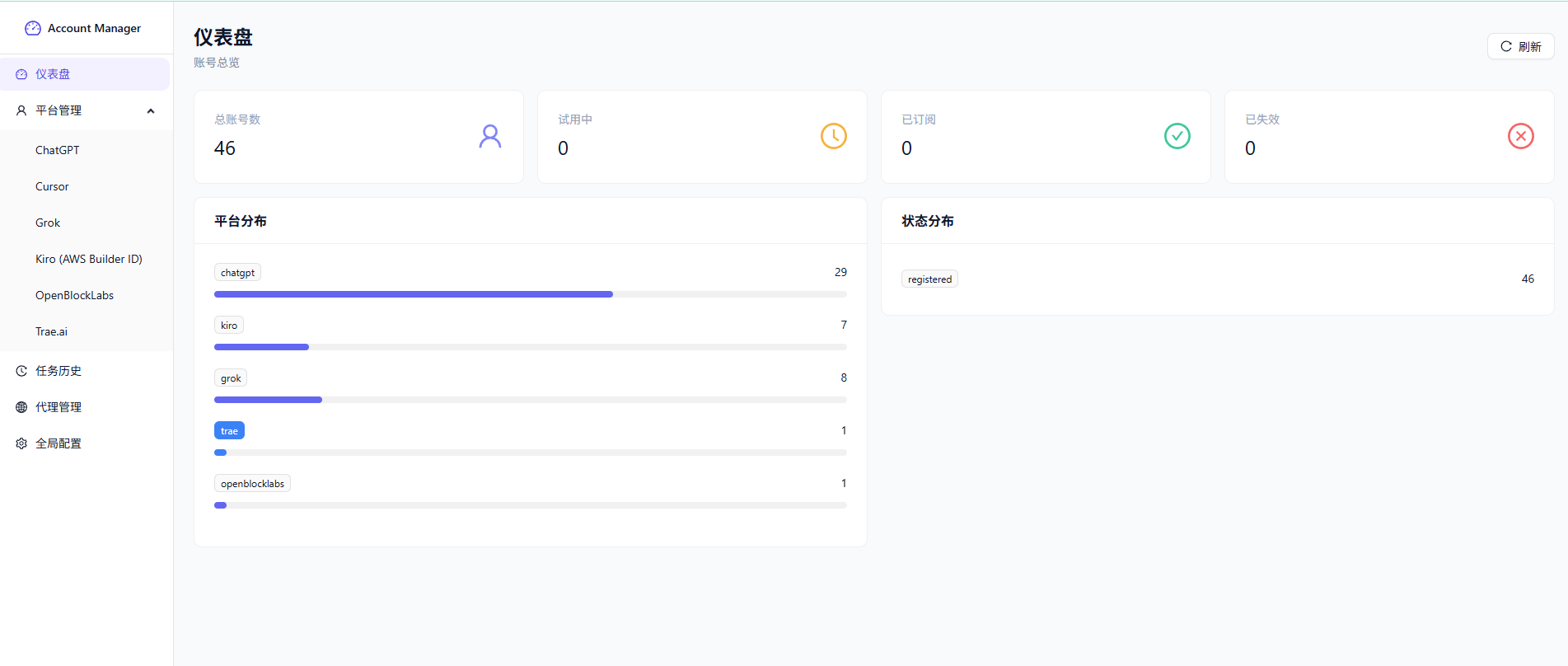
Based on the current frontend code and UI, the **platforms displayed by default in the left "Platform Management" menu** are:
- ChatGPT
- Grok
- Kiro (AWS Builder ID)
- OpenBlockLabs
- Trae.ai
## Features
- **Multi-platform Account Registration & Management**: Unified account list, details, import/export, deletion, batch operations
- **Multiple Executor Modes**: Pure protocol, headless browser, headed browser
- **Multiple Email Service Integration**: Built-in, third-party, self-hosted Worker Email, and more
- **Captcha Support**: YesCaptcha, Local Turnstile Solver (Camoufox)
- **Proxy Capability**: Proxy pool rotation, proxy state maintenance, proxy integration during registration
- **Batch Registration**: Supports setting registration count, concurrency, and startup delay per account
- **Real-time Logs**: View registration logs in real-time on the frontend
- **Task History Management**: View history records and batch delete
- **Plugin-based Extensibility**: Integratable external services and independent management panels
## UI Preview
### Dashboard
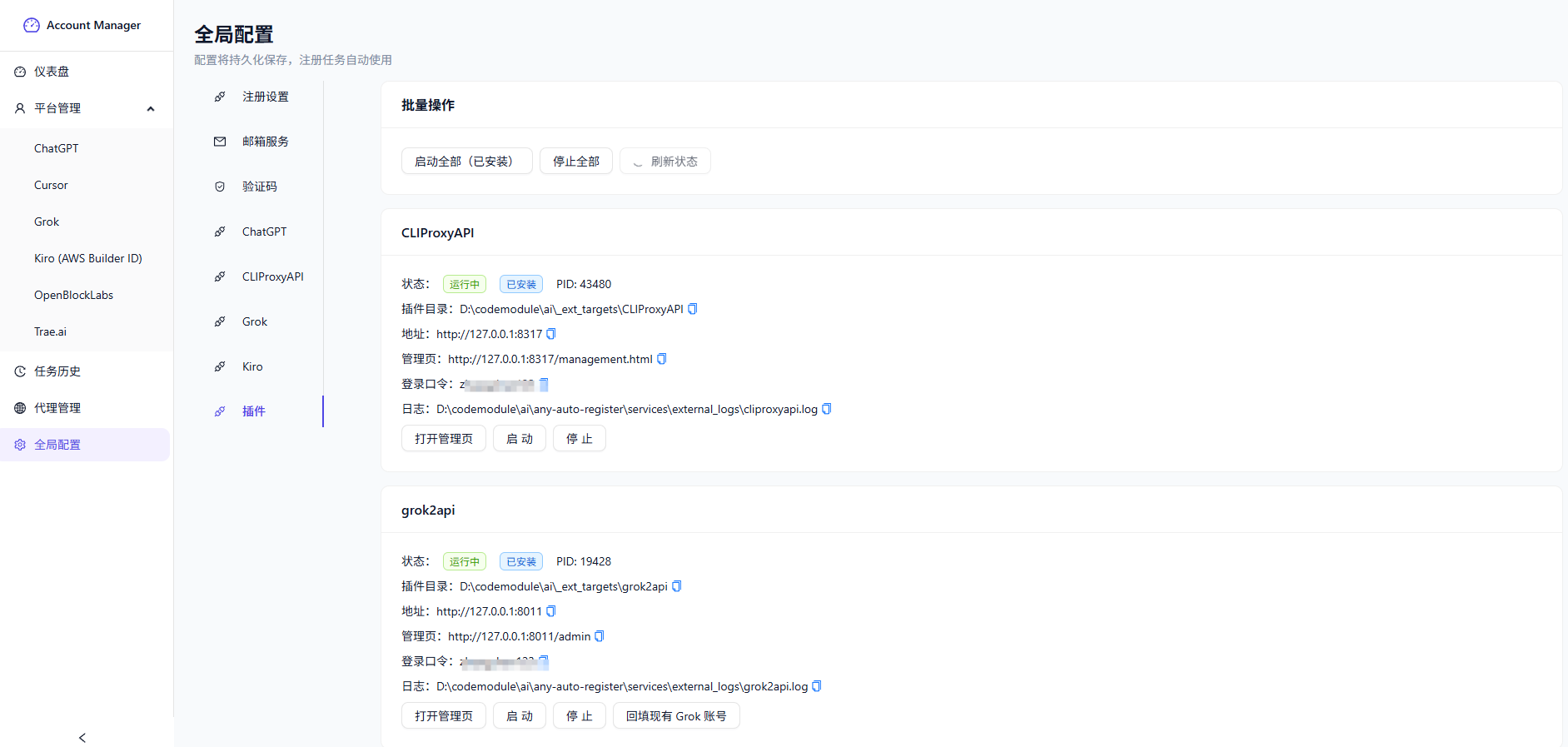
### Global Config / Plugin Management
## Tech Stack
| Layer | Technology |
| --- | --- |
| Backend | FastAPI + SQLite (SQLModel) |
| Frontend | React + TypeScript + Vite |
| HTTP | curl_cffi |
| Browser Automation | Playwright / Camoufox |
## Requirements
- Python 3.12+
- Node.js 18+
- Conda (recommended)
- Windows (recommended for using the included startup scripts directly)
## ChatGPT Specific Features
In the current version, **ChatGPT is one of the most feature-complete platforms**, supporting not only registration but also Token lifecycle management, status probing, and external system synchronization.
### 1. ChatGPT Token Mode Switching
The current version provides two ChatGPT registration modes:
- **With RT** (recommended by default)
- Uses the new PR pipeline
- Outputs **Access Token + Refresh Token**
- **Without RT** (legacy compatibility)
- Uses the old pipeline
- Only outputs **Access Token / Session**
- Features depending on RT may not work
This toggle can be found in:
- Registration task page
- ChatGPT platform registration popup
### 4. ChatGPT Batch Status Sync & Re-upload
At the top of the ChatGPT platform list, there are two types of batch capabilities:
- **Status Sync**
- Sync selected accounts' local status
- Sync selected accounts' CLIProxyAPI status
- Or batch execute on current filter results
- **Re-upload accounts not found on remote**
- Re-upload auth-files not found on the remote
- Supports "current filter scope" or "currently selected accounts"
## Email Service Support
Based on the actual configuration in the registration page, the project supports the following email services:
| Service Name | Identifier | Description |
| --- | --- | --- |
| LuckMail | `luckmail` | Free to claim for testing, **daily check-in to continue receiving emails** |
| MoeMail | `moemail` | Default common solution, auto-registers accounts and generates emails |
| TempMail.lol | `tempmail_lol` | Temporary email, some regions may require a proxy |
| SkyMail (CloudMail) | `skymail` | Used via API / Token / Domain |
| YYDS Mail / MaliAPI | `maliapi` | Supports domain and automatic domain strategy |
| GPTMail | `gptmail` | Generates temporary emails via GPTMail API with rotation, supports random address assembly when domains are known |
| DuckMail | `duckmail` | Temporary email solution |
| Freemail | `freemail` | Self-hosted email service |
| Laoudo | `laoudo` | Fixed email solution |
| CF Worker | `cfworker` | Self-hosted email via Cloudflare Worker |
### Kiro Email Notes
Kiro currently has strict risk control, and the email solution significantly affects success rate. The project also retains this important note:
- **Self-hosted email: 100% success rate**
- **Built-in temporary email: 0% success rate**
Therefore, when registering **Kiro (AWS Builder ID)**, it is recommended to prioritize using a **self-hosted email**.
## Quick Start
### 1. Create and Activate Conda Environment
```bash
conda create -n any-auto-register python=3.12 -y
conda activate any-auto-register
```
### 2. Install Backend Dependencies
```bash
pip install -r requirements.txt
```
### 3. Install Browser Dependencies
```bash
python -m playwright install chromium
python -m camoufox fetch
```
### 4. Install and Build Frontend
```bash
cd frontend
npm install
npm run build
cd ..
```
After building, static assets are output to:
```text
./static
```
### 5. Start the Project
#### Recommended for Windows
PowerShell:
```powershell
.\start_backend.ps1
```
CMD:
```bat
start_backend.bat
```
#### Manual Start
```bash
conda activate any-auto-register
python main.py
```
After starting, access at:
```text
http://localhost:8000
```
> If you've already run `npm run build`, the frontend is served by FastAPI directly, so you access `8000`, not `5173`.
## Windows Startup Scripts
The repo includes the following scripts:
- `start_backend.bat`
- `start_backend.ps1`
- `stop_backend.bat`
- `stop_backend.ps1`
These scripts force the `any-auto-register` conda environment for starting/stopping the backend, avoiding common issues:
- Backend starts but Solver doesn't launch
- `ModuleNotFoundError: quart`
- Turnstile Solver on frontend always shows "Not Running"
To stop services, run:
PowerShell:
```powershell
.\stop_backend.ps1
```
CMD:
```bat
stop_backend.bat
```
By default, this stops:
- Backend port: `8000`
- Solver port: `8889`
## Frontend Development Mode
Suitable for debugging React pages.
### Terminal 1: Start Backend
```powershell
.\start_backend.ps1
```
### Terminal 2: Start Vite
```bash
cd frontend
npm run dev
```
Access at:
```text
http://localhost:5173
```
Vite proxies `/api` requests to the backend at `http://localhost:8000`.
## Turnstile Solver
### Auto Start
The local Turnstile Solver is automatically launched when the FastAPI backend starts, defaulting to:
```text
http://localhost:8889
```
The frontend "Global Config → Captcha → Turnstile Solver" shows the **detection result from the backend**, therefore:
- Backend not started → Frontend shows "Not Running"
- Backend started but wrong conda environment → Solver may fail to start
### Manual Solver Start
```bash
conda activate any-auto-register
python services/turnstile_solver/start.py --browser_type camoufox --port 8889
```
### Solver Logs
If startup fails, check:
```text
services/turnstile_solver/solver.log
```
## Docker Deployment
The repo root includes:
- `Dockerfile`
- `docker-compose.yml`
Default deployment includes:
- FastAPI Backend
- Built frontend static assets
- SQLite database persistence at `./data`
- Local Turnstile Solver auto-launched with the backend
### Start
```bash
docker compose up -d --build
```
The first build will additionally download Python dependencies, Playwright Chromium, and Camoufox, so it will take noticeably longer.
The current Dockerfile now installs Camoufox via direct links to avoid GitHub Releases API anonymous rate limiting.
### Access
```text
http://localhost:8000
```
### Stop
```bash
docker compose down
```
### View Logs
```bash
docker compose logs -f app
```
### Data Persistence
The container defaults to:
```text
DATABASE_URL=sqlite:////app/data/account_manager.db
```
The host machine mounts to:
```text
./data
```
### Common Environment Variables
| Variable | Default | Description |
| --- | --- | --- |
| `HOST` | `0.0.0.0` | FastAPI listen address |
| `PORT` | `8000` | FastAPI listen port |
| `DATABASE_URL` | `sqlite:////app/data/account_manager.db` | SQLite database path |
| `APP_ENABLE_SOLVER` | `1` | Whether to auto-start Solver, set to `0` to disable |
| `SOLVER_PORT` | `8889` | Solver listen port |
| `LOCAL_SOLVER_URL` | `http://127.0.0.1:8889` | Backend access URL for Solver |
To change settings like `SMSTOME_COOKIE`, `OPENAI_*`, simply write them to the `.env` file in the repo root, and `docker compose` will automatically inject them into the container environment.
### Camoufox Build Parameters
To override the upstream version, specify during build:
```bash
CAMOUFOX_VERSION=135.0.1 CAMOUFOX_RELEASE=beta.24 docker compose build app
```
### Docker Usage Notes
- The current Docker image primarily covers the main application and local Turnstile Solver
- Auto-install/launch logic for `grok2api`, `CLIProxyAPI`, `Kiro Account Manager` still favors the host machine environment
- If you depend on `conda`, Go, or Windows executables, it is not recommended to run these directly in the current Linux container
- If you only need Web UI, account management, task scheduling, and local Solver, the current Compose configuration works out of the box
## Plugins & External Dependencies
### Temporary Email Source
The project supports self-hosting temporary email via Cloudflare Worker, sourced from:
-
### External Plugin Git URLs
The project currently supports on-demand installation/launch of the following external components:
| Project | Purpose | Git URL |
| --- | --- | --- |
| CLIProxyAPI | CPA / Proxy pool management service | `https://github.com/router-for-me/CLIProxyAPI.git` |
| grok2api | Grok token management, backfill, chat/API service | `https://github.com/chenyme/grok2api.git` |
| kiro-account-manager | Kiro account management plugin | `https://github.com/hj01857655/kiro-account-manager.git` |
The **"Install Latest / Update to Latest"** button in the plugin page syncs the latest code from the repo, and now supports **uninstallation** (stops the service first, then deletes the local plugin directory).
By default, it updates to the **latest semver tag**; you can also switch back to **branch HEAD** mode in "Settings → Plugins → Install/Update Strategy".
If you need to change to `ghproxy`, `gitclone`, enterprise Git mirrors, or other proxy addresses, you'll need to also modify:
```text
services/external_apps.py
```
## Common Troubleshooting
### 1. Turnstile Solver Shows "Not Running" on Frontend
First check if the backend is running:
```bash
curl http://localhost:8000/api/solver/status
```
Normal response:
```json
{"running":true}
```
If port `8000` is unreachable, the issue is with the backend, not the Solver.
### 2. `ModuleNotFoundError: quart`
The Python used to start the backend is not the `any-auto-register` environment. Use:
```powershell
.\start_backend.ps1
```
or:
```bat
start_backend.bat
```
### 3. Verify the Correct Python
```bash
python -c "import sys; print(sys.executable)"
```
Expected output:
```text
D:\miniconda\conda3\envs\any-auto-register\python.exe
```
### 4. Solver Opens but Status is Still Abnormal
Check both addresses:
```text
http://localhost:8000/api/solver/status
http://localhost:8889/
```
If the second one works but the first doesn't, the issue is with the backend, not the Solver.
### 5. Port Already in Use
If you get `WinError 10048` on startup, first run:
```powershell
.\stop_backend.ps1
```
Then restart:
```powershell
.\start_backend.ps1
```
## Project Structure
```text
any-auto-register/
├── api/
├── core/
├── docs/
├── electron/
├── frontend/
├── platforms/
├── services/
│ ├── solver_manager.py
│ └── turnstile_solver/
├── static/
├── tests/
├── main.py
├── requirements.txt
├── docker-compose.yml
├── Dockerfile
├── start_backend.bat
├── start_backend.ps1
├── stop_backend.bat
└── stop_backend.ps1
```
## Electron Development Notes
Electron development mode does NOT auto-start the Python backend.
You must first start the backend from the project root:
```powershell
.\start_backend.ps1
```
Then run Electron.
## User Discussion Group
- QQ Group: **1065114376** (any-auto-register registration tool user discussion group)
## Sponsors
Thank you to the following friends and partners for supporting any-auto-register.
| Logo | Name | Description | Website |
| --- | --- | --- | --- |
| | 星思研中转站 | Provides stable relay services for model calling scenarios like Claude Code, Codex, etc., suitable for developers and teams needing high-availability interfaces, convenient integration, and continuous delivery support. | [https://gzxsy.vip](https://gzxsy.vip) |
| | 小野API中转站 | Provides stable relay services for model calling scenarios like Claude Code, Codex, etc., suitable for developers and teams needing high-availability interfaces, convenient integration, and continuous delivery support. | [https://ai.xiaoye.io/](https://ai.xiaoye.io/) |
## Support the Author
If this project has been helpful to you, please support the author to continue maintaining and updating the project.

## Star History
## License
MIT License — For learning and research purposes only. Commercial use is prohibited.

 | 星思研中转站 | Provides stable relay services for model calling scenarios like Claude Code, Codex, etc., suitable for developers and teams needing high-availability interfaces, convenient integration, and continuous delivery support. | [https://gzxsy.vip](https://gzxsy.vip) |
|
| 星思研中转站 | Provides stable relay services for model calling scenarios like Claude Code, Codex, etc., suitable for developers and teams needing high-availability interfaces, convenient integration, and continuous delivery support. | [https://gzxsy.vip](https://gzxsy.vip) |
|  | 小野API中转站 | Provides stable relay services for model calling scenarios like Claude Code, Codex, etc., suitable for developers and teams needing high-availability interfaces, convenient integration, and continuous delivery support. | [https://ai.xiaoye.io/](https://ai.xiaoye.io/) |
## Support the Author
If this project has been helpful to you, please support the author to continue maintaining and updating the project.

## Star History
| 小野API中转站 | Provides stable relay services for model calling scenarios like Claude Code, Codex, etc., suitable for developers and teams needing high-availability interfaces, convenient integration, and continuous delivery support. | [https://ai.xiaoye.io/](https://ai.xiaoye.io/) |
## Support the Author
If this project has been helpful to you, please support the author to continue maintaining and updating the project.

## Star History