
Chrome Renamer
Rename visible Google, YouTube, and Chrome labels—locally.
在本机自定义 Google、YouTube 和 Chrome 页面中的可见名称。
A privacy-first Manifest V3 Chrome extension for personalized brand labels and a custom new tab page.




Download Chrome Renamer 1.1.2
·
Install guide
·
中文说明
·
Report an issue
⭐ If Chrome Renamer is useful, use GitHub's Star button to save it and help others discover it.
如果它对你有帮助,欢迎点击 GitHub 页面顶部的 Star 收藏并帮助更多人发现它。
## 中文简介
Chrome Renamer 是一款本地运行的 Chrome 扩展,可自定义网页中可见的 Google、YouTube 和 Chrome 品牌名称,并提供个性化新标签页。
- 名称设置只保存在本机 Chrome 扩展存储中
- 支持动态加载的网页内容和常见无障碍标签
- 可对当前网站一键暂停或恢复名称替换
- 邮箱地址、网址和域名保持原样,不会被改名
- 不需要账号,不包含分析、广告或开发者服务器
[下载 Chrome Renamer 1.1.2](https://github.com/zhangxuyuan20251443-coder/Chrome-Renamer/releases/latest/download/chrome-renamer-1.1.2.zip) · [查看 30 秒安装步骤](#30-second-install)
扩展只能修改普通 HTTP/HTTPS 网页中的内容以及自己的新标签页,不能修改 Chrome 地址栏、菜单、设置页或操作系统界面。
## Make the web feel like yours
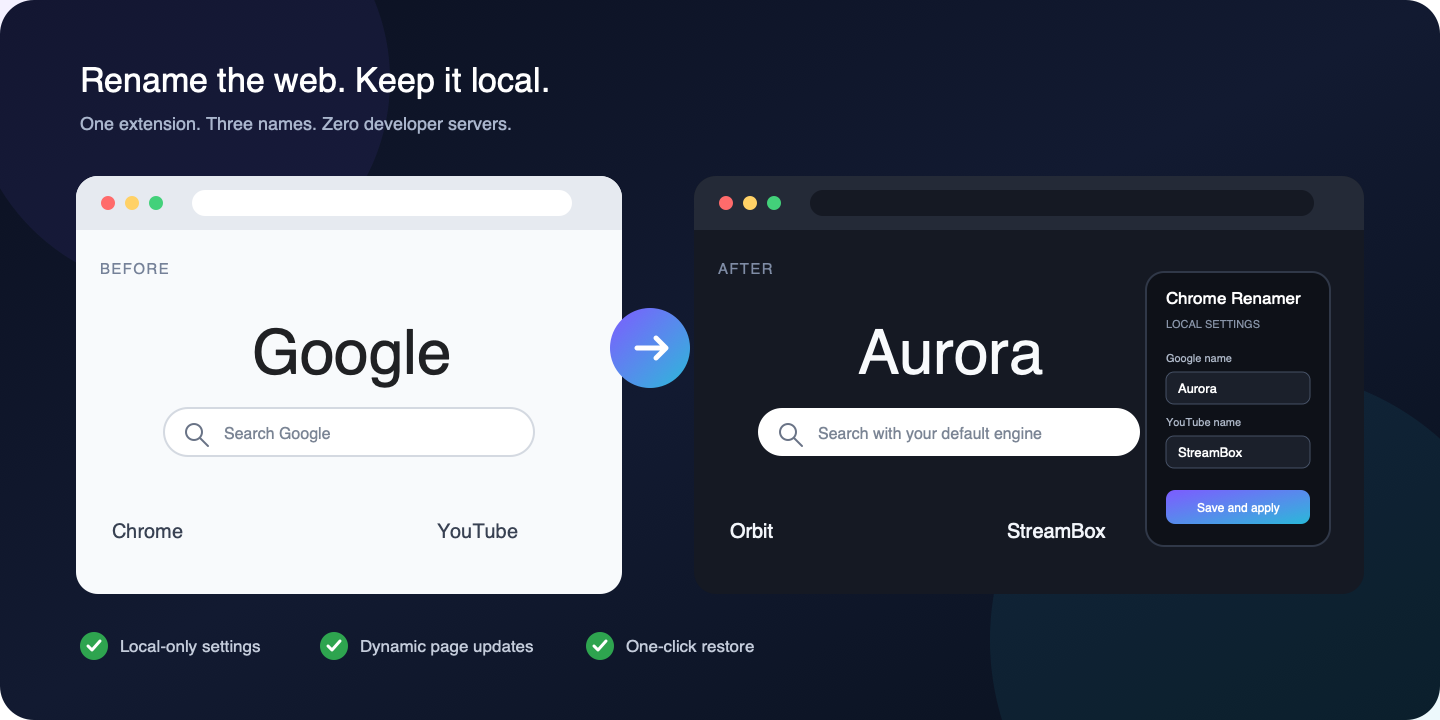
Chrome Renamer replaces supported visible brand labels on ordinary web pages and keeps the same names on its custom new tab page.
| Before | After—you choose the names |
| --- | --- |
| Google | Aurora |
| YouTube | StreamBox |
| Chrome | Orbit |
No account, developer server, analytics, advertising, or cloud processing is involved. Your chosen names stay in Chrome's local extension storage.
## What it changes
- Google logos across supported regional domains and YouTube logos on supported pages
- Visible `Google`, `YouTube`, and `Chrome` text on ordinary websites
- Dynamically loaded labels added after the page opens
- Accessible labels, titles, placeholders, and image alt text
- Email addresses, web addresses, and domain names remain unchanged
- A personalized new tab page with your chosen names
- A per-website pause control when a page should keep its original wording
The new tab search box uses Chrome's configured default search provider, and complete URLs open directly.
## 30-second install
1. [Download the latest ZIP](https://github.com/zhangxuyuan20251443-coder/Chrome-Renamer/releases/latest/download/chrome-renamer-1.1.2.zip).
2. Unzip it.
3. Open `chrome://extensions/`.
4. Enable **Developer mode**.
5. Select **Load unpacked** and choose the unzipped folder.
6. Open Chrome Renamer, enter three names, and select **Save and apply**.
Open pages and the custom new tab page update immediately. Select **Restore defaults** at any time to bring back the original names.
## Designed for privacy
| Permission or access | Why it is needed |
| --- | --- |
| `storage` | Saves the three selected names on the local device |
| `search` | Sends new-tab searches to Chrome's configured default provider |
| `activeTab` | Lets the popup identify the current website after you open the extension |
| `http://*/*`, `https://*/*` | Finds and replaces supported visible labels on ordinary web pages |
Website text is processed locally and is not retained. Chrome Renamer has no developer-controlled server and does not sell or share user data.
## Important boundary
Chrome extensions cannot rename the Chrome application or modify protected browser interfaces. Chrome Renamer therefore cannot change:
- The address bar or browser menus
- `chrome://` pages or Chrome settings
- The Chrome Web Store
- Operating-system interface elements
It changes content inside ordinary HTTP and HTTPS web pages plus the extension's own new tab page.
## Frequently asked questions
### Does it send page content anywhere?
No. Label matching and replacement run inside Chrome on your device.
### Does it keep working on dynamically loaded pages?
Yes. Chrome Renamer watches for new page content and updates supported labels as they appear.
### Can I undo every change?
Yes. Use **Restore defaults** in the extension popup, or disable/remove the extension.
### Can I pause it on one website?
Yes. Open Chrome Renamer on that website and select **Pause here**. The hostname is stored locally, and you can select **Resume here** at any time.
### Why does it request access to all websites?
Automatic renaming across ordinary websites requires the content script to run on those pages. An `activeTab`-only version would require a manual click on every page.
## Contributing
Focused bug reports and pull requests are welcome.
- Search the [existing issues](https://github.com/zhangxuyuan20251443-coder/Chrome-Renamer/issues) before opening a new one.
- For a website compatibility report, include the exact page URL, expected label, actual result, Chrome version, and Chrome Renamer version.
- Keep proposed changes local-only: no analytics, advertising, remote configuration, or page-content uploads.
- Before submitting a patch, load the extension unpacked and check the popup, dynamic labels, per-site pause control, and custom new tab page.
## Security
For a suspected security or privacy weakness, use [GitHub private vulnerability reporting](https://github.com/zhangxuyuan20251443-coder/Chrome-Renamer/security/advisories/new) instead of a public issue. Include the affected version, reproduction steps, expected impact, and the minimum evidence needed to investigate. Do not publish secrets or working exploit details.
Use the [public issue tracker](https://github.com/zhangxuyuan20251443-coder/Chrome-Renamer/issues) for ordinary bugs and compatibility requests.
## Project layout
- `manifest.json` — Manifest V3 configuration
- `popup.html` and `popup.js` — Name settings
- `content.js` — Dynamic page-label and logo replacement
- `newtab.html` and `newtab.js` — Personalized new tab and default-provider search
- `icons/` — Extension icons
## Help the project grow
If Chrome Renamer is useful to you:
1. [Star the repository](https://github.com/zhangxuyuan20251443-coder/Chrome-Renamer).
2. Share one before/after example.
3. [Open an issue](https://github.com/zhangxuyuan20251443-coder/Chrome-Renamer/issues) for a site or label that needs better support.
## Trademark notice
Chrome Renamer is an independent, unofficial project and is not affiliated with, authorized by, endorsed by, or sponsored by Google LLC.
Google, YouTube, and Chrome are trademarks of Google LLC. Their use in this project identifies the services whose visible labels the extension can personalize.
## License
Chrome Renamer is open-source software available under the [MIT License](LICENSE).