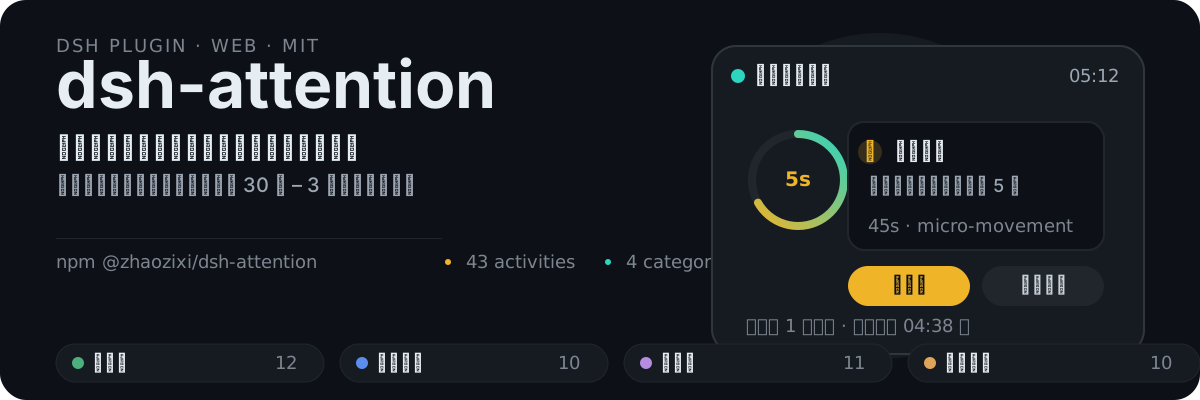
# dsh-attention




Actively reminds you to make good use of fragmented time during long-running DeepSeek Harness tasks (goal loops, background jobs, agent inference, task-board executions), solving the inefficiency of "just waiting while the task runs".
## What problem does it solve
While DSH runs a task, you usually just stare at the progress bar. dsh-attention turns that wait into **productive fragmented time**: as soon as a task starts, a floating panel appears after 5 seconds with a 30-second to 3-minute micro-activity suggestion; click **Done** to get the next one immediately, and when the task finishes the panel collapses and generates a fragmented-time usage report.
## Features
- **Multi-source task monitoring** — `agent/status` (main-session conversations, subagents, and task-board execution sessions), goal rounds, background jobs, and task-board state polling all feed one task start/end detector.
- **Restart recovery** — after a host restart, running task windows are automatically re-seeded; tasks that were running before a restart keep reminding afterwards.
- **Reminder engine** — pushes activity suggestions on a configurable cadence (default 5 minutes); **Done** advances to the next one immediately; a fragmented-time report is generated when the task ends.
- **Built-in activity library** — 43 preset micro-activities across four categories, **randomly ordered** (reshuffled for every new task session) without repeats within a session.
- **Activity pool editor** — the "Attention" entry in the left sidebar opens an editing panel: add, edit, and delete activities per category, with Save / Cancel at the bottom-right, persisted to the profile.
- **Global top-level floating panel** — maximum z-index + React Portal mounted on `body`, above every dialog; shows elapsed time, suggestion count, and next-reminder countdown.
## How it works
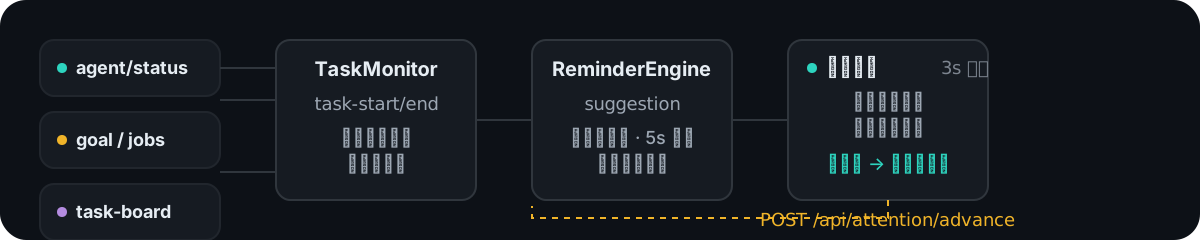
Task signals (agent status / goal / background jobs / task-board) → **TaskMonitor** normalizes them into task-start/task-end → **ReminderEngine** emits suggestions on a cadence (customizable activity table) → the browser **floating panel** polls every 3 seconds; clicking **Done** calls `POST /api/attention/advance` to get the next one immediately.
## Quick start
### Install (npm)
```sh
dsh plugin --profile web add @zhaozixi/dsh-attention@latest
```
If pnpm blocks a build script on first install, run `pnpm approve-builds --all` in the profile directory and retry.
After installing, **restart DSH** (host half loads) and **hard-refresh the browser** (client half takes effect). The ⭐ "Attention" entry appears below "New Session" in the left sidebar.
### Local development (link)
```sh
dsh plugin --profile web add link:../packages/dsh-attention
```
## Configuration
Override the `attention` row in the profile's `cordis.patch.yml`:
```yaml
- id: attention
config:
enabled: true
remindIntervalMs: 300000 # reminder interval (Done advances immediately, bypassing this)
firstReminderDelayMs: 5000 # delay before the first reminder after a task starts
categories: # activity category pool
- micro-movement
- mind-refresh
- micro-learning
- quick-organize
maxActivitiesPerSession: 6 # max suggestions per session
```
## Customizing the activity pool
1. Click the "Attention" entry in the left sidebar (below New Session).
2. The panel lists activities by four categories; each row's title and guidance text are editable and can be deleted; each section has "+ Add activity".
3. **Save** persists to `~/.dsh/profiles/web/attention-activities.json` (carried with the profile) and the engine starts using the new table immediately; **Cancel** discards changes.
## HTTP API
| Endpoint | Method | Purpose |
|---|---|---|
| `/api/attention/state` | GET | Panel state snapshot (busy / elapsed / next reminder / last suggestion) |
| `/api/attention/snooze` | POST | Pause the reminder cadence |
| `/api/attention/resume` | POST | Resume the reminder cadence |
| `/api/attention/advance` | POST | Advance to the next activity immediately ("Done") |
| `/api/attention/activities` | GET / POST | Read / save the activity pool (including custom activities) |
## Directory structure
```
dsh-attention/
├── package.json # dsh.bundle + dsh.client declarations
├── cordis.patch.yml # profile patch: registers the attention row
├── assets/readme/ # README visuals (hero / workflow SVGs)
└── lib/
├── index.js # Host Service entry (monitor + engine + HTTP + pool persistence)
├── monitor.js # Task-state monitoring (agent/status + goal + jobs + task-board + restart seed)
├── reminder-engine.js # Reminder engine (scheduling + randomized pool + custom activity table)
├── activities.js # Built-in activity library (43 presets)
├── client.js # Browser side: floating panel + sidebar entry + pool editor
└── invariant.js # Assertion helpers
```
## FAQ
| Symptom | Cause / Fix |
|---|---|
| No reminder while a task runs | Make sure DSH was restarted (host-half changes need a restart) and the browser hard-refreshed; check whether `/api/attention/state` reports `busy: true` |
| Reminder stays visible with no task | A stale window left over from closing/deleting a running session — fixed via the `agent/disposed` listener; upgrade to the latest version if it still happens |
| No reminder for tasks in progress after a restart | Older versions lack seed recovery; after upgrading, both `agent/status` and goal support restart re-seeding |
| Activity-pool edits have no effect | Saving persists via `POST /api/attention/activities`; confirm `poolSize` changes in the engine after saving |
## Contributing
This project is **open source** (MIT License) — everyone is welcome to contribute:
1. **Fork** this repository to your account
2. Create your feature branch from `main` (`git checkout -b feat/xxx`)
3. Open a **Pull Request** to `main` after committing your changes
Please include a description with your changes (problem fixed / feature added / scope of impact). Changes touching the activity pool or reminder cadence should keep the README and test notes in sync.
## License
[MIT](./LICENSE)