[🇨🇳 中文版](../README.md)
---
ZhikunCode brings **multi-agent delegation, context management, tool execution, and runtime verification** into a self-hosted browser workspace. Models read projects, edit code, run commands, and use actual tool results to decide the next step. Developers can inspect files, diffs, subtasks, and evidence, add instructions during execution, and continue following the task from a desktop or mobile browser.
**You host the runtime and choose the model APIs.** It is intended for development, review, web applications, data analysis, and document deliverables. New sessions default to Full Access (`AUTO_APPROVE`); optional capabilities and deployment boundaries are described below.
> 📱 **[Watch the phone recording: a game brief → online play → Android installation and gameplay](#mobile-to-android)** · Full 4m35s recording, live game, development report, APK, and source code.
[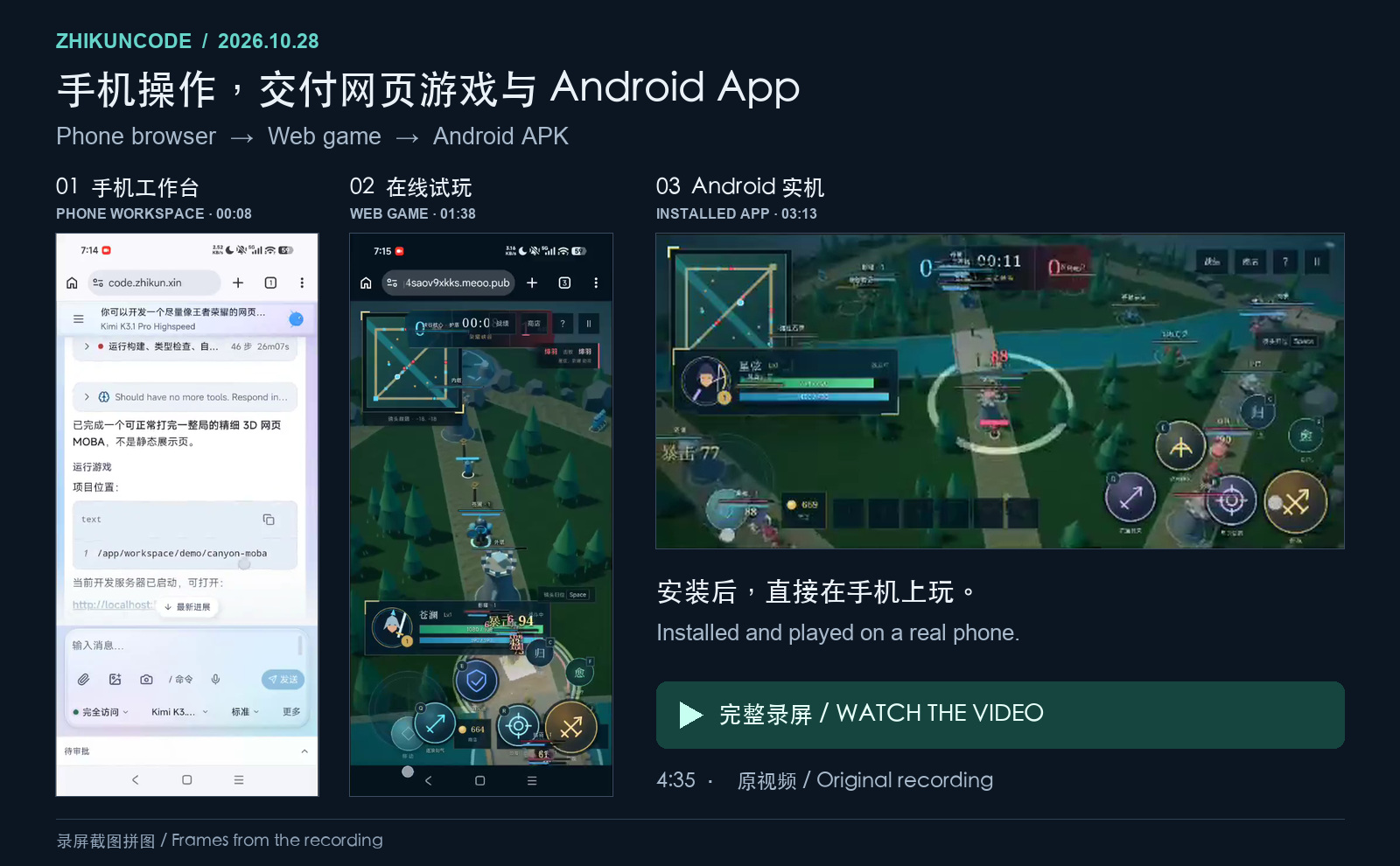](https://zhikunqingtao.github.io/zhikuncode/case-studies/assets/mobile-to-android-20261028/demo.mp4)
**[Play Honor of the Canyon online →](https://ug4saov9xkks.meoo.pub)** · **[Download the game's Android APK →](https://share.zhikun.xin/zhikuncode-artifacts/workspace/workspace-63ac928c7693d6607179fd930e29b622/8d3cda9669bb39d3f95258a52f78fbd75b6aebf5699a66caa42db3c4f00128f5-canyon-moba.apk)**
> 🏗️ **[View Full System Architecture →](https://zhikunqingtao.github.io/zhikuncode/ZhikunCode-Architecture.html)**
> Java Agent Runtime · React Browser Control Plane · Python Capability Service · Full Visualization
> 🔎 **[Real-Time Gold Monitor: ZhikunCode vs Codex Head-to-Head →](https://zhikunqingtao.github.io/zhikuncode/case-studies/zhikuncode-codex-gold-monitor-audit.html)**
> ZhikunCode × Codex · Same task, two implementations · 14 scoring dimensions, process screenshots and published log excerpts
> 🚄 **[12306 Full-Chain Visualization: Single File, Zero Dependencies →](https://zhikunqingtao.github.io/zhikuncode/case-studies/zhikuncode-codex-12306-audit.html)**
> ZhikunCode/KimiK3 × Codex/GPT-5.6 Sol · 7-dimension comparison · ZhikunCode artifact playable online; comparison implementation source is also published
> 🎮 **[5 Hours: AI Builds a Playable Web Version of "Honor of Kings" from Scratch →](https://zhikunqingtao.github.io/zhikuncode/case-studies/zhikuncode%E5%BC%80%E5%8F%91%E7%8E%8B%E8%80%85%E8%8D%A3%E8%80%80.html)**
> Kimi K3 · About 5h29m from first request to last billed request · 19 first-party files / 7,979 lines · Playable single-player prototype
> 📊 **[AI Office Tools Benchmark (Unitree Robotics scenario, as of 2026-08-30) →](https://zhikunqingtao.github.io/aireport/case-studies/AI%E5%8A%9E%E5%85%AC%E5%B7%A5%E5%85%B7%E5%AF%B9%E6%AF%94%E6%B5%8B%E8%AF%84_%E5%AE%87%E6%A0%91%E7%A7%91%E6%8A%80_%E6%88%AA%E8%87%B32026-08-30.html)**
> 5 tools × 6 chained tasks · 30 frozen deliverables with evidence audit · Mirrored on Aliyun OSS: [oss.zhikun.xin](https://oss.zhikun.xin/zhikuncode/aireport/case-studies/AI%E5%8A%9E%E5%85%AC%E5%B7%A5%E5%85%B7%E5%AF%B9%E6%AF%94%E6%B5%8B%E8%AF%84_%E5%AE%87%E6%A0%91%E7%A7%91%E6%8A%80_%E6%88%AA%E8%87%B32026-08-30.html)
> 🔍 **AI Coding Review Comparison: 17 Reports**
> [Claude Opus5.5: Ranking Methodology and Evidence (Chinese) →](https://github.com/zhikunqingtao/zhikuncode/blob/aicoding-eval-0923/docs/case-studies/assets/aicoding%E8%AF%84%E6%B5%8B/Claude%20Opus5.5-17%E4%BB%BD%E5%AE%A1%E6%9F%A5%E6%8A%A5%E5%91%8A%E6%8E%92%E5%90%8D%E5%88%86%E6%9E%90%E6%96%B9%E6%B3%95%E8%BF%87%E7%A8%8B%E8%AF%81%E6%8D%AE%E4%B8%8E%E7%BB%93%E8%AE%BA.md) · [GPT-6 Astra Ultra: Fair Ranking and Verifiable Evidence (Chinese) →](https://github.com/zhikunqingtao/zhikuncode/blob/aicoding-eval-0923/docs/case-studies/assets/aicoding%E8%AF%84%E6%B5%8B/GPT-6%20Astra%20Ultra-17%E4%BB%BD%E5%AE%A1%E6%9F%A5%E6%8A%A5%E5%91%8A%E5%85%AC%E5%B9%B3%E6%8E%92%E5%90%8D%E4%B8%8E%E5%8F%AF%E5%A4%8D%E6%A0%B8%E8%AF%81%E6%8D%AE.md)
> 🔬 **[Eight AI Coding Tools Reviewing One Commit (2026-09-25) →](case-studies/assets/AICoding%E8%AF%84%E6%B5%8B0925/README.md)**
> Eight reports · Six scoring dimensions · Verifiable evidence and a 1h57m process recording · Materials primarily in Chinese
> 🏆 **[SWE-bench Lite Technical Report →](https://zhikunqingtao.github.io/zhikuncode/swe-bench-report.html)**
> Submission namespace `20260525_zhikuncode` · Official harness: **168 / 300 (56.0%)** · Reference-fix exposure limits the conclusion; see [evidence](#swe-bench)
---
## 🔎 Open Engineering Cases
### Phone Recording: From a Game Brief to Online Play and an Android APK
A game brief sent through a phone browser to ZhikunCode on Alibaba Cloud ECS started development of **Honor of the Canyon (荣耀峡谷), a new Honor of Kings-style 3D MOBA single-player game**. Follow-up requests delivered an online version, a visual development walkthrough, and an Android APK installed and played on the same phone. **No Skill was invoked; the Android build components were downloaded and installed as needed.**
**The main Agent took over when sub-agents reached their turn limits, fixed issues, and completed verification.** The development walkthrough records **17 Vitest tests and 27 browser checks passing**.
**[Full phone recording →](https://zhikunqingtao.github.io/zhikuncode/case-studies/assets/mobile-to-android-20261028/demo.mp4)** · **[Play online →](https://ug4saov9xkks.meoo.pub)** · **[Development walkthrough →](https://kfep92yogbmk.meoo.pub)** · **[Download Android APK →](https://share.zhikun.xin/zhikuncode-artifacts/workspace/workspace-63ac928c7693d6607179fd930e29b622/8d3cda9669bb39d3f95258a52f78fbd75b6aebf5699a66caa42db3c4f00128f5-canyon-moba.apk)**
**Download source: [Web game (ZIP) →](https://share.zhikun.xin/zhikuncode-artifacts/d6f617ce-2d22-40d1-88c4-15f5b571b35b/10a540fa-598e-458d-8423-730c52ec6168/e0c5474537a23cc8081282eae4b33a9e2d951961ad51fbe59312b115a02df483-canyon-moba-complete.zip) · [Android project (ZIP) →](https://share.zhikun.xin/zhikuncode-artifacts/workspace/workspace-7bdd768f8c3b43c299bc8e26ac4bb526/a37117559e5804f8de0a5b66b19b2679262050cbdd25398d5a64d7aab9c1a26b-canyon-moba-android-source.zip)**
Video index and file hashes
Recorded on **2026-10-28**. The approximately **4m35s** video combines task-history review with live installation and gameplay. The workspace displays **Kimi K3.1 Pro Highspeed**.
| Time | What the recording shows |
|---|---|
| 00:00 | Reviewing the game brief, tool execution, and publication history in the phone browser |
| 00:49 | Opening the visual development walkthrough |
| 01:20 | Opening the online game, selecting a hero, and playing |
| 02:29 | Downloading and installing the APK on the phone |
| 02:54 | Launching the installed app and playing in landscape orientation |
| 03:31 | Returning to the workspace: task navigation, model options, and themes |
The APK bundles the game resources and loads them locally through Android WebView. The [original recording](case-studies/assets/mobile-to-android-20261028/demo.mp4) is about **24.67 MiB**, with its video and audio preserved without recompression. SHA-256:
```text
demo.mp4
38e6791000ebd7663a0144aaaa5be6a6e49c9c84fc8b695c58592a4a8380b29a
canyon-moba.apk
8d3cda9669bb39d3f95258a52f78fbd75b6aebf5699a66caa42db3c4f00128f5
canyon-moba-complete.zip
e0c5474537a23cc8081282eae4b33a9e2d951961ad51fbe59312b115a02df483
canyon-moba-android-source.zip
a37117559e5804f8de0a5b66b19b2679262050cbdd25398d5a64d7aab9c1a26b
```
**Try it yourself: [Local setup](#quickstart) · [Run your first task](#first-task)**
### Real-Time Gold Monitor: ZhikunCode vs Codex Head-to-Head
[](https://zhikunqingtao.github.io/zhikuncode/case-studies/zhikuncode-codex-gold-monitor-audit.html)
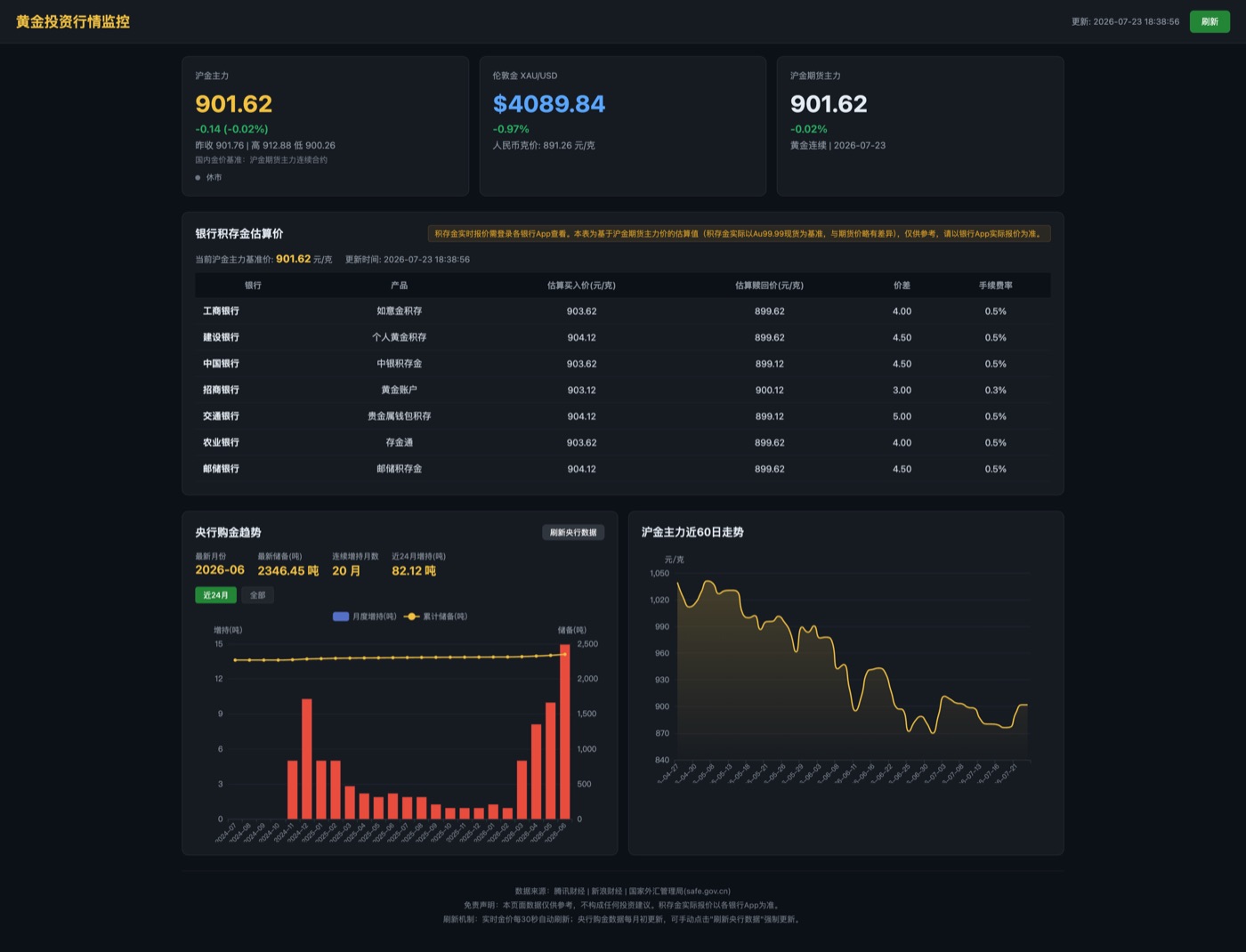
The same real-time gold-price monitoring brief was handed to ZhikunCode and Codex to build from scratch, then scored across 14 dimensions — requirement understanding, development interaction, data accuracy, architecture, code quality, user experience and more. The report keeps both sides' strengths and defects.
- ZhikunCode: Kimi K3 hit an HTTP 429; the user switched to GLM-5.2 and continued within the same logical session.
- Codex: GPT-5.6 Sol, reasoning effort High.
- Final scores: ZhikunCode 68.3 vs Codex 68.4 — effectively a dead heat. The screenshot contains historical prices; some bank prices are estimates and global data coverage has gaps.
**[View comparison report →](https://zhikunqingtao.github.io/zhikuncode/case-studies/zhikuncode-codex-gold-monitor-audit.html)** ·
**[Download raw data →](case-studies/zhikuncode-codex-gold-monitor-evidence.json)** ·
**[About the methodology →](case-studies/README.md)**
### 12306 Full-Chain Visualization: Single File, Zero Dependencies
[](https://zhikunqingtao.github.io/zhikuncode/case-studies/assets/12306-comparison/artifacts/zhikuncode/12306-houbu.html)
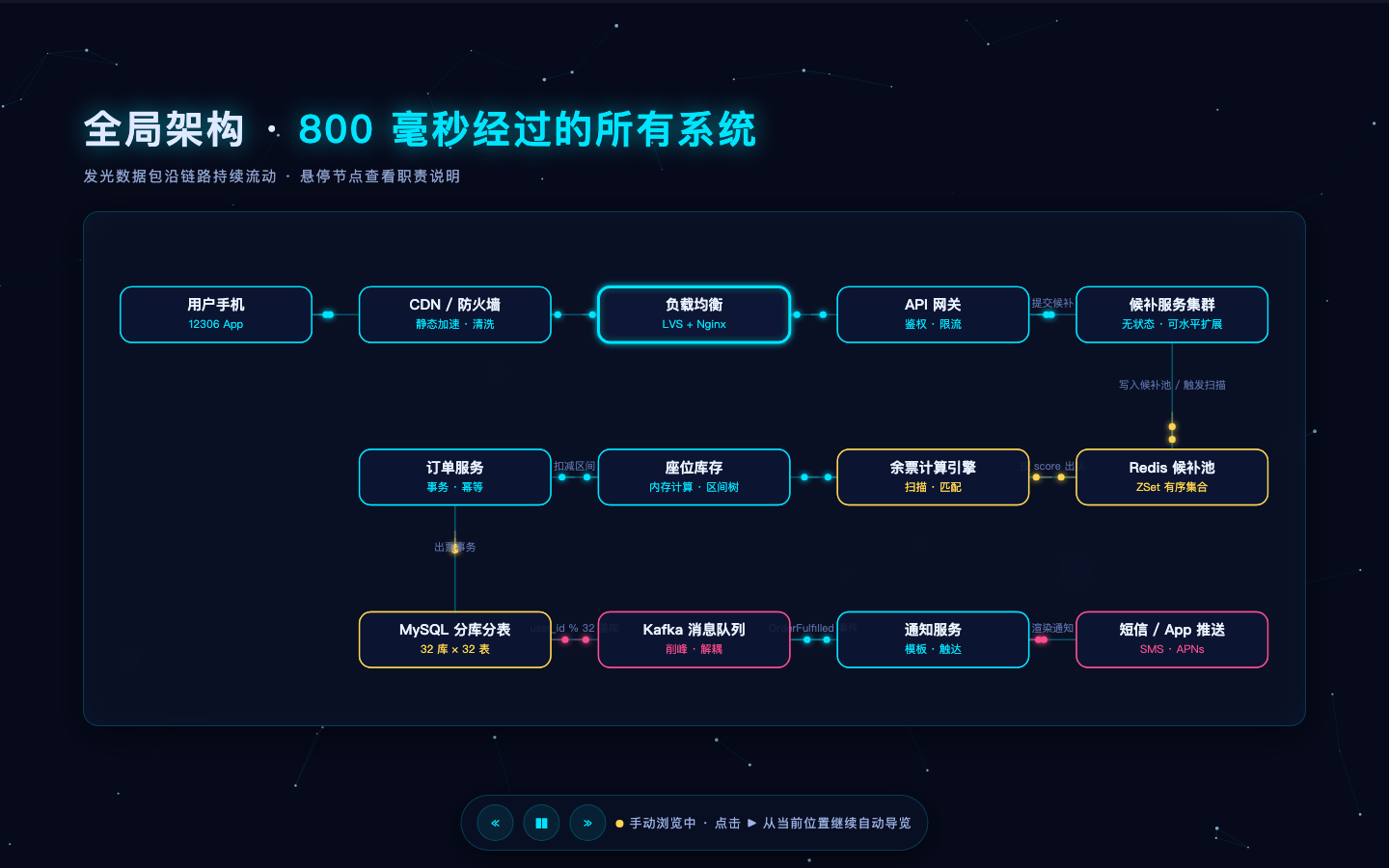
The same "12306 waitlist-fulfillment backend full-chain" animated visualization brief was given to ZhikunCode and Codex, then evaluated across 7 dimensions: task understanding, code quality, dynamic visualization, architecture & math, user experience, development efficiency, and technical implementation. The report keeps both sides' strengths and defects.
- ZhikunCode: historical kimi-k3 delivered one HTML file with eight autoplay scenes, a 13-node relationship diagram, and six mathematical explanation cards — 1,061 lines, zero external network dependencies. This is a conceptual illustration, not measured railway data or internal 12306 documentation.
- Codex: GPT-5.6 Sol (high reasoning mode) delivered a Next.js project; session screenshots show 27m52s total.
- Final weighted scores: ZhikunCode 8.68 vs Codex 8.45 — a narrow gap, but two completely different artifacts.
**[View comparison report →](https://zhikunqingtao.github.io/zhikuncode/case-studies/zhikuncode-codex-12306-audit.html)** ·
**[Live artifact demo →](https://zhikunqingtao.github.io/zhikuncode/case-studies/assets/12306-comparison/artifacts/zhikuncode/12306-houbu.html)** ·
**[Download raw data →](case-studies/zhikuncode-codex-12306-evidence.json)** ·
**[About the methodology →](case-studies/README.md)**
### 5 Hours: AI Builds a Playable Web Version of "Honor of Kings" from Scratch
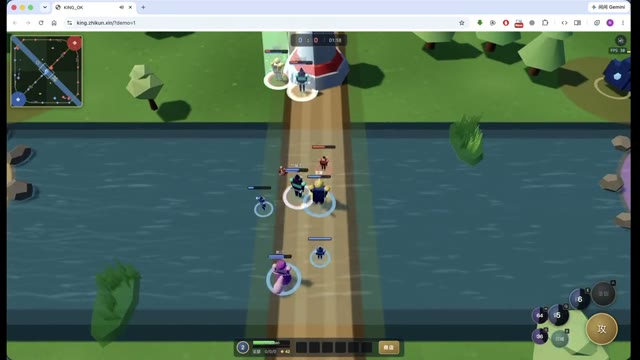
In an overnight session on 2026-08-09, ZhikunCode used Kimi K3 to build a static Three.js 5v5 MOBA prototype with five playable heroes, three lanes, skills, equipment, AI teammates and enemies. The main agent continued implementation and used the browser to investigate path blockage, endgame, and performance issues.
[](https://king.zhikun.xin/?demo=1)
- About 5h29m from the first request to the last billed request, producing 19 first-party files and 7,979 lines of code, plus Three.js.
- Ten sub-agents were delegated gameplay, rendering, AI behavior and assets; nine reached a time or budget limit, and the main agent continued unfinished work.
- Purely static delivery — no backend, no external network dependencies, runs directly in the browser.
- Every step on record: 43 screenshots and 5 derived video previews to inspect; the original recordings are not published.
**A concrete debugging sequence:** Browser state showed about 100 minions accumulating at map corner `(-80,60)`. The main agent used that evidence to delegate path/separation fixes, then checked a longer match. Later fixes addressed endgame stalemates and bases against walls. The report records the observations, edits, and rechecks so readers can inspect what delegation and verification actually did.
**[View full case study →](https://zhikunqingtao.github.io/zhikuncode/case-studies/zhikuncode%E5%BC%80%E5%8F%91%E7%8E%8B%E8%80%85%E8%8D%A3%E8%80%80.html)** ·
**[Play online (5-hero draft) →](https://king.zhikun.xin/)** ·
**[Auto demo (jump straight into a match) →](https://king.zhikun.xin/?demo=1)** ·
**[About the methodology →](case-studies/README.md)**
### AI Office Tools Benchmark (Unitree Robotics scenario, as of 2026-08-30)
Five AI office tools — Qianwen Office, Qoder, Doubao Office, WorkBuddy and ZhikunCode — each executed the same six chained prompts on a Unitree Robotics research scenario, covering a full office workflow from an Excel analysis workbook and a Word research report to a PPT, infographics and an interactive HTML page, producing 30 frozen deliverables with per-file evidence audits.
ZhikunCode scored **93.77 with equal task weights and 92.65 with investment-workflow weights**. Both place it in the same near-score group as Qianwen; the report does not establish a unique overall winner. All six ZhikunCode final artifacts required corrections before use. Across all 30 deliverables, the delivery-gate distribution was G0 3 / G1 20 / G2 7. This is a fixed-sample task chain with defined inputs and scoring, not a general product ranking.
**[View full report (GitHub Pages) →](https://zhikunqingtao.github.io/aireport/case-studies/AI%E5%8A%9E%E5%85%AC%E5%B7%A5%E5%85%B7%E5%AF%B9%E6%AF%94%E6%B5%8B%E8%AF%84_%E5%AE%87%E6%A0%91%E7%A7%91%E6%8A%80_%E6%88%AA%E8%87%B32026-08-30.html)** ·
**[Aliyun OSS mirror →](https://oss.zhikun.xin/zhikuncode/aireport/case-studies/AI%E5%8A%9E%E5%85%AC%E5%B7%A5%E5%85%B7%E5%AF%B9%E6%AF%94%E6%B5%8B%E8%AF%84_%E5%AE%87%E6%A0%91%E7%A7%91%E6%8A%80_%E6%88%AA%E8%87%B32026-08-30.html)**
### Teaching Documents and Slides
A separate [teaching-document and slide comparison with WorkBuddy](https://zhikunqingtao.github.io/zhikuncode/case-studies/zhikuncode对比workbuddy.html) examines document structure, a 25-page slide deck, illustrations, and requirement fulfillment. It compares fixed artifacts, not teaching effectiveness.
### AI Coding Review Comparison: 17 Reports
Two evaluators analyze the same 17 delivered reports using their own methods and evidence; these are not two independent product experiments.
**[Claude Opus5.5: Ranking Methodology, Evidence and Conclusions (Chinese) →](https://github.com/zhikunqingtao/zhikuncode/blob/aicoding-eval-0923/docs/case-studies/assets/aicoding%E8%AF%84%E6%B5%8B/Claude%20Opus5.5-17%E4%BB%BD%E5%AE%A1%E6%9F%A5%E6%8A%A5%E5%91%8A%E6%8E%92%E5%90%8D%E5%88%86%E6%9E%90%E6%96%B9%E6%B3%95%E8%BF%87%E7%A8%8B%E8%AF%81%E6%8D%AE%E4%B8%8E%E7%BB%93%E8%AE%BA.md)** ·
**[GPT-6 Astra Ultra: Fair Ranking and Verifiable Evidence (Chinese) →](https://github.com/zhikunqingtao/zhikuncode/blob/aicoding-eval-0923/docs/case-studies/assets/aicoding%E8%AF%84%E6%B5%8B/GPT-6%20Astra%20Ultra-17%E4%BB%BD%E5%AE%A1%E6%9F%A5%E6%8A%A5%E5%91%8A%E5%85%AC%E5%B9%B3%E6%8E%92%E5%90%8D%E4%B8%8E%E5%8F%AF%E5%A4%8D%E6%A0%B8%E8%AF%81%E6%8D%AE.md)**
### Eight AI Coding Tools Reviewing One Commit (2026-09-25)
Eight AI coding tools reviewed the same commit. Their final reports were compared across effective findings, accuracy, causal attribution, evidence, engineering coverage, and recommendations and delivery. The materials include all eight original reports, itemized scores, verification evidence, recalculation scripts, and a 1h57m process recording. This is a single-task evaluation of delivered reports, not a general ranking of product capabilities. Materials are primarily in Chinese.
**[Evaluation overview →](case-studies/assets/AICoding%E8%AF%84%E6%B5%8B0925/README.md)** ·
**[Evidence and recalculation →](case-studies/assets/AICoding%E8%AF%84%E6%B5%8B0925/%E8%AF%81%E6%8D%AE%E9%99%84%E4%BB%B6/README.md)** ·
**[Recording and timeline →](case-studies/assets/AICoding%E8%AF%84%E6%B5%8B0925/%E8%AF%81%E6%8D%AE%E9%99%84%E4%BB%B6/%E5%AE%8C%E6%95%B4%E6%B5%81%E7%A8%8B%E5%BD%95%E5%B1%8F/%E5%BD%95%E5%B1%8F%E6%97%B6%E9%97%B4%E7%B4%A2%E5%BC%95%E4%B8%8E%E8%BF%87%E7%A8%8B%E6%A0%B8%E9%AA%8C.md)**
In the eight-tool review, ZhikunCode identified a mismatch between tool output `outputTruncated` and the consumer's `truncated` field, and ruled out a false claim of working-directory loss. The [itemized audit](case-studies/assets/AICoding评测0925/AICoding八方评测_综合排名与证据审计.md) also records its missed issues and incorrect recommendations.
> All cases above are single-task test records. Models, inputs, and acceptance methods differ. See each report for methodology and data, and [evidence availability and checksums](#evidence-integrity) for the publication limits.
---
## ✨ Key Features
| | Feature | Description |
|---|---|---|
| 🌐 | **Full Browser-Based Control** | Deploy once, then manage everything from any device's browser — permission approvals, plan discussions, task management. Works on mobile. No client installation needed |
| 🧭 | **Conversation Workbench** | The development workbench shows conversations, tools, files, Git, terminal, browser, and Agent details. Compact, Standard, and Full Process display modes change presentation. The Simple/Development view switch is currently hidden |
| 📦 | **Current Delivery Projection** | Correlates the current request, final response, deliverables, pending Interactions, activities, and Evidence through the current Root Run and its recursive child Runs, preventing results from different executions from being presented as one delivery. Legacy Sessions that cannot be correlated exactly are explicitly marked as compatibility fallbacks |
| 🔀 | **Session Context Merge** | Bring summaries, text records of persisted activity, and temporary artifacts with established ownership from 2–5 idle sessions into a new session. Source sessions are preserved; the new session waits for your next instruction and does not automatically merge project code |
| 📁 | **Project and Run Control** | Projects use canonical server paths and persistent authorization; Session APIs reject arbitrary client working directories. In-run input is delivered to its Session with queued/applied/rejected status, with cancellation, Run CAS terminal states, and reconnect recovery |
| 🔗 | **Local File References** | Direct local access adds a canonical path through the native picker without uploading content. ECS, remote, and proxied access uses the browser picker, immediately publishes the file as a permanently public OSS object, and adds its URL to the prompt. OSS must be configured for remote references |
| 🤖 | **Agent Delegation and Background Tasks** | Five child-Agent roles, independent contexts, and parallel execution; synchronous results, current-Run background result aggregation, and queryable background Tasks with cancellation requests |
| 🔒 | **Unified Tool Authorization** | Canonical inputs, risk/resource analysis, policy checks, grants or durable permission interactions, final dynamic recheck, and structured execution results. New sessions default to Full Access (`AUTO_APPROVE`), including high-risk operations that reach approval; see the security boundaries below |
| 🇨🇳 | **Multiple Model Providers** | Configure Qwen, DeepSeek, Moonshot/Kimi, Zhipu, MiniMax, and other supported channels with their own credentials and network access |
| 🐳 | **Docker Self-Hosting** | Base Compose starts Java with bundled static frontend. The image includes an optional Python service that must be enabled separately; runtime data is local, while external service requests leave the deployment |
| 📤 | **OSS Publishing and Screenshot Paste (Optional)** | Explicit `/publish-oss` publishes a checked file as a permanently public link. Pasted screenshots use OSS when configured or Base64 otherwise. Remote file references immediately publish selected files and have no Base64 fallback |
| 🌍 | **Meoo App Publishing (Optional)** | Use `/publish-meoo` to publish a verified static website or full-stack app as a new site with a shareable URL. Disabled by default; publication is authorized or denied according to the current permission mode |
| 🎙️ | **Voice Interaction (ASR / TTS)** | Microphone speech-to-text input (qwen3-asr-flash) and one-click text-to-speech for AI replies (qwen3-tts-flash); powered by Alibaba Cloud DashScope — just configure the API Key; buttons auto-hide when unconfigured |
| ⚡ | **Context Management** | Progressive trimming, folding and compaction through ContextCascade; incremental collapse and context-limit recovery use the current model window and input budget. Optional precise tokenizer and self-correction are off by default. Image references are externalized and injected under size/count budgets |
| 📷 | **Multimodal Image Chat** | Models with image support receive images directly. Otherwise routing considers the configured vision fallback, then family/same-provider candidates and other available choices. A suitable configured model is required. Reinjection of externalized image references allows at most 8 images per call, with Base64 limits of 1,500,000 bytes per image and 2,000,000 bytes total; model image-count limits and the remaining budget can reduce these further. ImageRefInjector and TokenBudgetGuard control payload size; large images are externalized and injected on demand |
| 💬 | **Process Display Modes** | Compact folds request, process and response into independently expandable sections; Standard and Full Process show increasing detail. Modes can change during execution. Mobile input includes attachments, voice and display controls |
| 🖼️ | **Browser Semantic Snapshot** | `/snap` command captures full web page state (DOM structure + interactive elements), extracts structured JSON for Agent parsing and replay verification |
| 📊 | **Real-Time Activity Tracking & Approval** | Activity Panel records full AI tool execution lifecycle, L1/L2/L3 three-layer display, Signal smart tagging (auto_approve/review_recommended/needs_review), one-click batch approval, SQLite backend persistence, session restoration support |
| 🧪 | **Runtime Verification Framework** | Browser and HTTP API verifiers, with auto selecting one strategy for a whole journey; 8 HTTP action handlers, JSONPath assertions, evidence storage, feature gates, and progress display |
| 📦 | **Evidence Bundle Visualization (RV-4)** | Screenshots, commands, console, tests, HAR, videos, and diffs have viewer/API implementations. Evidence appears when collected; the mobile verification-approval flow is not fully wired |
| 🏆 | **Historical SWE-bench Lite Record (2026-05)** | `qwen3.7-max`, six tools, 168/300 resolved by the official harness and 284 patches. At least one trajectory exposes the reference fix; this is not a verified independent solve rate. [Evidence and limits](#swe-bench) |
| 🚀 | **Measured Engineering Baselines** | The v9.3 report contains 490 request samples and REST/WebSocket latency measurements. These are historical endpoint measurements, not current model speed or task completion guarantees |
| 🏭 | **Runtime Reliability** | Run state CAS atomic management · Durable Interaction Inbox (reconnect recovery) · Process hard timeout + graceful termination cascade · Scoped grants with controlled sub-agent inheritance · Artifact declare→seal→hash verification · Provider local budget guard |
---
### Appearance Themes
Choose from nine themes: Light (`light`), Dark (`dark`), Liquid Glass (`glass`), Spaceship (`spaceship`), **Huaguo Morning / 花果晨** (`ink-havoc`), **Lingxiao Night / 灵霄夜** (`ink-havoc-night`), **Jelly / 果冻** (`jelly`), **Spider / 蜘蛛爬虫** (`spider`), and **Galaxy / 璀璨银河** (`galaxy`). Open **Appearance settings (外观设置)** in the desktop header or **Appearance (外观)** under the mobile composer's **More actions (更多操作)**. Settings apply immediately and are saved locally.
Spider combines a deep black background with cyan, magenta, and violet neon webs. An eight-legged spider explores and lifts copies of visible text while idle, and changes its actions in response to real task states. Selecting the theme enables the full effects, with no separate motion levels; the original text remains selectable and copyable.
The theme prioritizes PCs, with fewer simultaneous text lifts on tablets and phones according to available space. Its 3D effects require WebGL 2; when unavailable, the theme colors and chat functionality remain available. 3D rendering pauses while the page is hidden. It uses more GPU resources than a regular theme, but the animation itself makes no additional model calls.
Galaxy fills the page with a continuously rotating blue, violet, and rose galaxy. Real tasks drive file stars, tool light trails, and reply stardust; collapsed tool details can dock their effects on the execution summary. Selecting the theme enables the full effects, with no separate effect switch or star-map sidebar; original text and controls stay in place. Effects require WebGL 2, with static colors and chat functionality retained when unavailable. Rendering pauses while the page is hidden. It uses more GPU resources and power than a regular theme, but the animation itself makes no additional model calls and does not replay task effects for historical messages.
Jelly offers Rich/Calm styling and Full/Reduced/Off motion settings, respecting the system's reduced-motion preference.
The two ink themes draw on the rich colors and theatrical styling of *Havoc in Heaven*, with warm silk-paper and dark night palettes respectively. Each uses a dedicated accent color, so accent presets are disabled while either is active. Their additional controls include:
- **Rich mode (浓郁模式)**: show gold patterns, decorative plaques, and solid message bubbles; turn it off for the calm presentation. Motion can independently be set to Full, Reduced, or Off.
- **Retreat (闭关)**: hide decorative effects to focus on writing.
- **Mounted share (装裱分享)**: export a single PNG card with the session title and an editable inscription, using a vertical scroll, horizontal scroll, or album-page layout.
### Conversation Workbench and Change Review
New sessions start in the **development workbench with the Standard display mode**. Compact, Standard, and Full Process control display detail; the Simple/Development workbench switch is currently hidden. The “Changes this turn” summary at the end of an assistant turn expands into a file list of per-operation changes for native `Edit`/`Write` operations that succeeded with a verifiable path in the turn.
### Session Context Merge (2–5 Sources)
Select 2–5 stopped idle sessions in the session list (they may use different folders) to merge into a new session, confirming the primary session, title, and model; the new session receives the handoff summary, activity text, and copies of temporary artifacts with established ownership, while project code is not merged automatically. Sources remain viewable but cannot run or be deleted during merging; the new session uses **Full Access (`AUTO_APPROVE`)** and waits for your next instruction.
### Speech Recognition Hotword Configuration
Speech recognition requires `LLM_PROVIDER_DASHSCOPE_API_KEY` (a Token Plan Key cannot substitute for it); configure `ASR_CORRECTIONS` in the project's root `.env` and restart the backend to apply hotword corrections. Format: `Canonical:variant1,variant2;Canonical2:variant3`, for example `zhikuncode:zhi kun code,zkun code,智坤code;PostgreSQL:post gre sql`. See also [`.env.example`](../.env.example).
## ⚡ Quick Start
### Prerequisites: Get an LLM API Key
Prepare a model API key with tool-calling support. Configure the matching provider in `.env`; DashScope pay-as-you-go, Bailian Token Plan, Moonshot, and Kimi Code use separate credentials. For example, obtain a DashScope key from [Alibaba Cloud Bailian](https://bailian.console.aliyun.com/cn-beijing/?tab=model#/api-key), then set `LLM_PROVIDER_DASHSCOPE_API_KEY`. Other provider portals include [DeepSeek](https://platform.deepseek.com/) and [Moonshot/Kimi](https://platform.moonshot.cn/). Provider quotas, access, and billing depend on your account. [Supported providers](#supported-llm-providers) and [configuration](#configuration) below describe the channels.
For first-time setup, sign in to your provider's platform, create a key from its API key management page, and copy it for later use. After cloning the repository and running `cp .env.example .env` below, set the matching provider variable in `.env` (for example, `LLM_PROVIDER_DASHSCOPE_API_KEY`). Clear the API key values for unused providers, including any `your-…-key` placeholders. Do not commit a `.env` containing credentials.
### Option 1: Docker Deployment (Recommended)
Prepare an API key for a model that supports tool calling. These commands target Bash or Zsh on macOS/Linux. Docker also needs Docker Engine, Compose V2, and network access to build dependencies:
| Setup | Best suited for | Requirements and instructions |
|---|---|---|
| **Base Docker deployment** | Start with chat, file, and command tools; the image bundles the frontend, so the host needs neither Java nor Node | Docker and Compose V2 → commands below; [enable Python capabilities separately](#docker-python) |
| **Three local services** | Use the workspace, edit code, run browser and HTTP verification, and debug the application | JDK 21, Node.js 22.x (at least 22.13) or 24+, Python 3.11/3.12 → [Step-by-step setup and health checks](#local-setup) |
The base Docker deployment builds an image from your local checkout. Its startup check recognizes DashScope, Token Plan, DeepSeek, Moonshot, Zhipu, ZenMux, or the legacy `LLM_API_KEY`. **If you only have a Kimi Code, MiniMax, or OpenRouter key, use the [three-service local setup](#local-setup)**; the container startup check does not yet recognize those three settings.
```bash
git clone https://github.com/zhikunqingtao/zhikuncode.git
cd zhikuncode
cp .env.example .env
# Edit .env and set a supported key, such as LLM_PROVIDER_DASHSCOPE_API_KEY
# Set WORKSPACE_PATH=/absolute/path/to/your/project in .env
# The directory must exist and be readable and writable by the container user
docker compose up -d --build
docker compose ps
curl -fsS http://localhost:8080/actuator/health
```
Keep your own `.env` if it already exists. The health check should return JSON containing `"status":"UP"`. Open [localhost:8080](http://localhost:8080), choose a configured model, then authorize a directory under `/app/workspace` inside Docker. If you set a different `ZHIKUN_PORT`, use it in the URL and health check. For startup errors, inspect `docker compose logs --tail=100 zhikuncode`. Stop with `docker compose stop`; do not use `down -v` when you need to retain data.
**Next: [Complete the first-task exercise](#first-task).** Create a separate two-file project, observe two failing tests, ask ZhikunCode to change the code, and independently confirm all twelve tests pass. Local and Docker instructions appear in the same section.
Before your first task, note that new sessions default to Full Access (`AUTO_APPROVE`); switch permission modes if you want individual approval prompts. Base Compose does not start Python. See [Docker Python](#docker-python) for optional capabilities. The default container entry permits sources that reach the backend; use a controlled network for the first trial and configure [access boundaries](#security) before remote deployment.
You can explore existing results without configuring a model: open the [12306 visualization](https://zhikunqingtao.github.io/zhikuncode/case-studies/assets/12306-comparison/artifacts/zhikuncode/12306-houbu.html), or open the [saved HTML file](case-studies/assets/12306-comparison/artifacts/zhikuncode/12306-houbu.html) from your checkout. Asking a model to create a similar deliverable starts a new run with its own results.
### Option 2: Local Development
Three local services: installation, manual startup, and health checks
Prepare JDK 21, Node.js 22.x (at least 22.13) or 24+, Python 3.11 or 3.12, Git, curl, and ripgrep. Java builds use the repository's Maven Wrapper. Clone the source and configure `.env` as above, then confirm ports 8080, 8000, and 5173 are not occupied by other services. Install dependencies from the repository root:
```bash
python3.11 -m venv python-service/.venv
python-service/.venv/bin/python -m pip install -r python-service/requirements.lock
python-service/.venv/bin/python -m playwright install chromium
npm --prefix frontend ci
```
Use `python3.12` on the first line if that is your installed version. On Linux, follow Playwright's output to install Chromium's system libraries; file-type detection may also need `libmagic`. The commands below explicitly use `.venv` so dependencies and execution use the same environment.
**Open three terminals. Start each at the repository root and run this shared configuration first:**
```bash
set -a
source .env
set +a
export ZHIKUN_DEFAULT_WORKSPACE="$PWD"
export WORKSPACE_ROOT="$PWD"
export ZHIKUN_LOCAL_PICKER_ENABLED=true
export PATH="$PWD/scripts/mcp:$PATH"
```
Load only a trusted `.env` that you maintain. The local picker is for direct local access; keep it disabled and configure allowed roots for remote deployments. Then run one service in each terminal:
```bash
# Terminal 1: Java backend; Python runs independently in another terminal
export PYTHON_SERVICE_AUTO_START=false
cd backend
./mvnw spring-boot:run -DskipTests
```
```bash
# Terminal 2: Python capability service
export PYTHONPATH="$PWD/python-service/src"
python-service/.venv/bin/python -m uvicorn src.main:app --app-dir python-service --host 127.0.0.1 --port 8000
```
```bash
# Terminal 3: frontend development proxy
cd frontend
npm run dev
```
Check the services from another terminal:
```bash
curl -fsS http://127.0.0.1:8080/actuator/health
curl -fsS http://127.0.0.1:8000/api/health
curl -fsS http://127.0.0.1:8000/api/health/capabilities
curl -fsS -o /dev/null -w '%{http_code}\n' http://127.0.0.1:5173/
```
Java should report `UP`, Python `ok`, and the frontend HTTP `200`. Also inspect each capability's `available` and `reason`. Open [localhost:5173](http://localhost:5173), then continue with the [first task](#first-task). Use each terminal's `Ctrl+C` to stop its own service.
After installing dependencies, `./start.sh` is a shorter option, but it clears fixed ports, terminates matching old Java processes, and removes `backend/target`. It prefers `python-service/venv`, then `.venv`, then system Python. Use the manual route on shared development machines. The Vite development proxy is for local use and should not be exposed directly to remote networks.
#### Using the Local Workbench
Create a session, authorize the selected server directory, and choose a configured model. The development workbench includes conversation, tool cards, files, Git, terminal, browser, and verification views. Inspect actual command results and diffs before accepting delivery. “Changes this turn” covers successful native `Edit`/`Write` operations with verifiable paths, not every possible change made through shell commands or external tools. “Reveal in folder” requires direct local browser access.
Docker option: enable the container's Python capability service
The base image contains Python but does not start it by default. From the repository root, pass this override through standard input. Retain these overrides whenever you recreate the container:
```bash
docker compose -f docker-compose.yml -f - up -d --build <<'YAML'
services:
zhikuncode:
environment:
PYTHON_SERVICE_AUTO_START: "true"
PYTHON_SERVICE_PATH: /app/python-service
PYTHON_SERVICE_EXECUTABLE: /app/python-service/.venv/bin/python
WORKSPACE_ROOT: /app/workspace
YAML
docker compose exec zhikuncode curl -fsS http://127.0.0.1:8000/api/health/capabilities
```
This lets Java call Python inside the container; feature flags and capability health still determine availability. Frontend views that call Python directly for files, Git, or analysis also need a same-origin proxy. Starting Python alone does not make every UI feature ready. Follow the [Vite configuration](../frontend/vite.config.ts) and [Python routes](../python-service/src/main.py); preserve Java's file-selection, reference, and search routes, and apply shared access control to Java, Python, and WebSocket. Do not expose the Python port directly.
First task: prepare two files, ask the model to edit, then verify independently
This exercise needs no third-party packages. Keep a dedicated terminal open. **Start at the zhikuncode repository root** and create a separate temporary project with these commands; both deployment paths use this preparation:
```bash
ZHIKUN_DEMO=$(mktemp -d "${TMPDIR:-/tmp}/zhikuncode-first-task.XXXXXX")
mkdir -p "$ZHIKUN_DEMO/src" "$ZHIKUN_DEMO/test"
cat > "$ZHIKUN_DEMO/src/shipping.mjs" <<'JS'
/** Amounts are in yuan. Existing rule: free shipping at 100, otherwise 6. */
export function shippingFee(subtotal) {
if (!Number.isFinite(subtotal) || subtotal < 0) {
throw new RangeError('subtotal must be a finite, non-negative number');
}
return subtotal >= 100 ? 0 : 6;
}
JS
cat > "$ZHIKUN_DEMO/test/shipping.test.mjs" <<'JS'
import test from 'node:test';
import assert from 'node:assert/strict';
import { shippingFee } from '../src/shipping.mjs';
test('regular: zero subtotal costs 6', () => assert.equal(shippingFee(0), 6));
test('regular: below 100 costs 6', () => assert.equal(shippingFee(99.99), 6));
test('regular: exactly 100 is free', () => assert.equal(shippingFee(100), 0));
test('regular: above 100 is free', () => assert.equal(shippingFee(150), 0));
test('member: below 80 costs 6', () => assert.equal(shippingFee(79.99, true), 6));
// These two acceptance tests intentionally fail before the first task is done.
test('member: exactly 80 is free', () => assert.equal(shippingFee(80, true), 0));
test('member: below 100 is free', () => assert.equal(shippingFee(99.99, true), 0));
test('member: at 100 remains free', () => assert.equal(shippingFee(100, true), 0));
test('negative subtotal is rejected', () => assert.throws(() => shippingFee(-1), RangeError));
test('NaN subtotal is rejected', () => assert.throws(() => shippingFee(NaN), RangeError));
test('Infinity subtotal is rejected', () => assert.throws(() => shippingFee(Infinity), RangeError));
test('-Infinity subtotal is rejected', () => assert.throws(() => shippingFee(-Infinity), RangeError));
JS
```
**Local three-service users** continue in the same terminal with Node.js 22+:
```bash
git -C "$ZHIKUN_DEMO" init -q
git -C "$ZHIKUN_DEMO" add .
ZHIKUN_BASE=$(git -C "$ZHIKUN_DEMO" write-tree)
(cd "$ZHIKUN_DEMO" && pwd -P && node --test test/shipping.test.mjs)
```
**Docker users** continue in the same terminal using the container's Node installation; the host does not need Node. The first command must succeed to confirm the mount is writable:
```bash
docker compose exec -T zhikuncode sh -c 'test -w /app/workspace'
ZHIKUN_CONTAINER_DEMO=$(docker compose exec -T zhikuncode mktemp -d /app/workspace/first-task.XXXXXX)
tar -C "$ZHIKUN_DEMO" -cf - src test | docker compose exec -T zhikuncode tar -C "$ZHIKUN_CONTAINER_DEMO" -xf -
docker compose exec -T -w "$ZHIKUN_CONTAINER_DEMO" zhikuncode git init -q
docker compose exec -T -w "$ZHIKUN_CONTAINER_DEMO" zhikuncode git add .
ZHIKUN_BASE=$(docker compose exec -T -w "$ZHIKUN_CONTAINER_DEMO" zhikuncode git write-tree)
printf '%s\n' "$ZHIKUN_CONTAINER_DEMO"
docker compose exec -T -w "$ZHIKUN_CONTAINER_DEMO" zhikuncode node --test test/shipping.test.mjs
```
`git write-tree` saves the initial file snapshot's tree ID in `ZHIKUN_BASE` without making a commit; later comparisons use this fixed snapshot even if the index changes. Keep this terminal and variable for verification. The initial result should be **10 passed, 2 failed, exit code 1**. The failing cases are `member: exactly 80 is free` and `member: below 100 is free`. Resolve other errors before proceeding.
Open the workspace, create a session, and authorize the printed project path. Local users select the path from `pwd -P`; Docker users select `/app/workspace/first-task.…`. Choose a model with tool-calling support and send:
```text
This is a separate shipping-rule exercise. Read src/shipping.mjs and
test/shipping.test.mjs, then run node --test test/shipping.test.mjs
to confirm the current failures.
Change only src/shipping.mjs to implement shippingFee(subtotal, isMember = false):
Regular customers get free shipping at 100 yuan or more; otherwise it costs 6.
Members get free shipping at 80 yuan or more; otherwise it costs 6.
Omitting the second argument must preserve regular-customer behavior.
Negative or non-finite amounts must still throw RangeError.
Do not edit tests, install dependencies, access the network, commit, or push.
Rerun the tests and inspect git diff. Report the actual results and changed files;
clearly state any checks you could not run.
```
Inspect the actual file operations and command output in the tool cards. After completion, **local users** return to the original terminal for independent verification:
```bash
(cd "$ZHIKUN_DEMO" && node --test test/shipping.test.mjs)
git -C "$ZHIKUN_DEMO" diff "$ZHIKUN_BASE" -- src/shipping.mjs
git -C "$ZHIKUN_DEMO" diff --name-only "$ZHIKUN_BASE"
git -C "$ZHIKUN_DEMO" diff --exit-code "$ZHIKUN_BASE" -- test/shipping.test.mjs
git -C "$ZHIKUN_DEMO" ls-files --others --exclude-standard
```
**Docker users** verify the same container project from the original repository terminal:
```bash
docker compose exec -T -w "$ZHIKUN_CONTAINER_DEMO" zhikuncode node --test test/shipping.test.mjs
docker compose exec -T -w "$ZHIKUN_CONTAINER_DEMO" zhikuncode git diff "$ZHIKUN_BASE" -- src/shipping.mjs
docker compose exec -T -w "$ZHIKUN_CONTAINER_DEMO" zhikuncode git diff --name-only "$ZHIKUN_BASE"
docker compose exec -T -w "$ZHIKUN_CONTAINER_DEMO" zhikuncode git diff --exit-code "$ZHIKUN_BASE" -- test/shipping.test.mjs
docker compose exec -T -w "$ZHIKUN_CONTAINER_DEMO" zhikuncode git ls-files --others --exclude-standard
```
The acceptance point is **12 passed, 0 failed**. Only `src/shipping.mjs` should appear in the diff against the fixed baseline; the test file must be unchanged. Inspect untracked files and distinguish application metadata from extra business files. This checks the basic edit-and-test workflow; it does not establish that parallel agents, browser verification, or publishing were tested, and it is not a guarantee of model performance.
### Optional: OSS Artifact Publishing, Screenshot Paste, and Remote File References
ZhikunCode includes a built-in `/publish-oss` Skill that can publish one checked workspace file, using an artifact record or workspace-file fallback, as a permanently public OSS link. The underlying OSS publishing capability is **disabled by default** and must be configured separately; its command is absent from command lists and completion while deployment support is disabled. The Skill management switch does not replace deployment configuration. Generating a file, completing a Run, previewing, or opening a file cannot trigger publication; screenshot paste and remote file references have the separate immediate-upload paths described below. Every publication requires an explicit user request. `AUTO_APPROVE` can approve it automatically; `PLAN` and `DONT_ASK` deny this high-risk publication; other permission modes require one-time confirmation. Configuration, file, and content checks still apply.
With the same OSS configuration enabled, the browser can detect PNG/JPEG/WebP screenshots pasted from another application (up to 5 MiB each), publish them immediately through a deterministic backend endpoint, and pass the server-validated OSS image URL directly to the vision model. This path does not invoke `/publish-oss` or make an extra LLM call. If OSS is not configured, screenshots automatically fall back to Base64 inline upload — no extra configuration needed to use image analysis.
Local File References selects its path from the effective request capability. Only direct loopback access with no forwarding proxy and all native-picker safety gates satisfied sends a canonical path without file content. ECS, remote, and proxied access instead opens the browser file picker, immediately uploads the selected file below `${ZHIKUN_OSS_PREFIX}/local-files/`, and appends its name and OSS URL to the prompt. The remote path accepts any file type up to `ZHIKUN_OSS_MAX_FILE_BYTES` (100 MiB by default); it does not fall back to Base64 when OSS is unavailable and does not scan filenames or content for secrets. Every uploaded object is permanently `public-read`; removing the tag, switching Sessions, or abandoning the draft does not delete it, so only select files that may be public.
Credential mode defaults to `auto`: complete standard `ALIBABA_CLOUD_ACCESS_KEY_ID`/`ALIBABA_CLOUD_ACCESS_KEY_SECRET` values take priority through Alibaba Cloud's default credential chain; otherwise a configured `ZHIKUN_OSS_ECS_ROLE_NAME` uses **ECS RAM Role + IMDSv2**; with neither present it still tries the default chain (for example an Alibaba Cloud CLI default profile). The same non-secret configuration can therefore support both local one-click startup and ECS. Every deployment must use its own Bucket and least-privilege identity.
Configure `.env` as follows:
```bash
ZHIKUN_OSS_ENABLED=true
ZHIKUN_OSS_ENDPOINT=https://oss-cn-your-region.aliyuncs.com
ZHIKUN_OSS_REGION=cn-your-region
ZHIKUN_OSS_BUCKET=your-bucket
ZHIKUN_OSS_PUBLIC_BASE_URL=
ZHIKUN_OSS_PREVIEW_ENABLED=false
ZHIKUN_OSS_PREFIX=zhikuncode-artifacts
ZHIKUN_OSS_ECS_ROLE_NAME=your-ecs-ram-role
ZHIKUN_OSS_CREDENTIAL_MODE=auto
ZHIKUN_OSS_MAX_FILE_BYTES=104857600
ZHIKUN_OSS_CONNECT_TIMEOUT_MS=10000
ZHIKUN_OSS_REQUEST_TIMEOUT_MS=120000
```
Optional custom domain and preview: first configure the target Bucket's domain binding, DNS, and HTTPS, then set `ZHIKUN_OSS_PUBLIC_BASE_URL` to your HTTPS domain root (for example `https://files.example.com`, without a port, path prefix, query, or fragment). Artifact publishing, screenshot paste, and remote file references will use that domain; the upload Endpoint stays unchanged. With `ZHIKUN_OSS_PREVIEW_ENABLED=true`, only newly uploaded HTML, plain text, PDF, PNG/JPEG/GIF/WebP files use `inline`; other types remain attachments. Preview requires a custom domain, not the default OSS domain. An empty base URL and disabled preview retain the original download behavior.
When OSS is disabled, invalid custom-domain or preview configuration produces a warning and is omitted from CSP without blocking startup. With OSS enabled, the same error still blocks startup. Valid custom domains remain in CSP even when OSS is disabled, so historical images can load. Publication retains strict configuration validation. The clipboard API normalizes concrete image MIME types returned by HEAD (lowercase, without parameters), preserving valid CDN conversion types; other types fall back to byte detection. The client's declared image type must still match the uploaded content.
For local deployment, configure the Alibaba Cloud CLI default profile, or place restricted RAM-user / temporary STS values in the local `.env` as `ALIBABA_CLOUD_ACCESS_KEY_ID`, `ALIBABA_CLOUD_ACCESS_KEY_SECRET`, and optional `ALIBABA_CLOUD_SECURITY_TOKEN`. Never commit real values. Legacy `OSS_ACCESS_KEY_ID`, `OSS_ACCESS_KEY_SECRET`, and `OSS_SESSION_TOKEN` variables are rejected.
> Grant only the target Bucket/prefix permissions needed for `PutObject`, `GetObject/HeadObject`, `PutObjectAcl`, and cleanup via `DeleteObject`. The Bucket must allow the target object to become `public-read`; otherwise the operation fails and attempts to clean up the private object.
Usage:
1. Prepare the file within the current workspace. Prefer a registered, verified artifact; the implementation also permits a checked workspace-file fallback.
2. Explicitly enter `/publish-oss `, or ask to upload the artifact just generated to OSS.
3. When your permission mode asks for approval, review the file name, size, and permanent-public visibility before approving.
4. Use the publication result card to preview or download, according to the browser's actual response; do not have the model reconstruct the URL.
Security boundaries and current limitations:
- Only **one regular file** inside the current workspace is published; the default limit is 100 MiB. The resolver can use an Artifact Manifest or a validated workspace-file fallback. This differs from Meoo publishing, which requires verification-evidence binding and snapshot checks.
- Directories, batch uploads, symbolic links, paths outside the workspace, `.env` files, private keys, databases, credential files, and files detected as containing sensitive content are rejected.
- The object is uploaded privately first and changed to `public-read` only after remote verification; a newly created private object is cleaned up if publication fails.
- The returned URL is a **permanently public link**. The card uses the public URL's response to distinguish preview from download; a failed check conservatively shows “Download” without undoing successful publication. The default OSS domain normally downloads HTML.
- Existing object contents, metadata, and historical message URLs are not migrated. Republishing an existing object can return the currently configured domain, but an old attachment may still download. Disabling preview does not restore previously uploaded objects' metadata.
- HTML previews execute page scripts. Do not share application login cookies with the sharing domain or add it to authenticated API cross-origin allowlists; same-site subdomains are not complete security isolation. Renew HTTPS certificates and do not assume every browser can preview every format.
- The current minimal version does not provide batch publishing, publication history, or a revoke action; operators must explicitly delete public objects in OSS.
- Both local and ECS deployments support real uploads. Local startup uses the default credential chain; ECS should use automatically rotated RAM Role credentials.
- Remote file references stream the raw request body without increasing Spring's global multipart limit. If a reverse proxy fronts ECS, its request-body limit must be at least `ZHIKUN_OSS_MAX_FILE_BYTES`.
### Supported LLM Providers
ZhikunCode supports **multi-Provider simultaneous configuration** (recommended) and single-Provider mode. In multi-Provider mode, you can freely switch models from the frontend:
**Option A: Multi-Provider Configuration (Recommended)**
Set an independent API key in `.env` for each provider you use, and leave unused providers' key values empty. The examples below show the available settings; you can switch between configured models in the frontend:
```bash
# DashScope (Qwen series)
LLM_PROVIDER_DASHSCOPE_API_KEY=your-dashscope-key
# DashScope Token Plan (Alibaba Cloud Bailian; independent sk-sp- key)
LLM_PROVIDER_DASHSCOPE_TOKEN_PLAN_API_KEY=your-token-plan-key
# DeepSeek
LLM_PROVIDER_DEEPSEEK_API_KEY=your-deepseek-key
# Moonshot (Kimi)
LLM_PROVIDER_MOONSHOT_API_KEY=your-moonshot-key
# Kimi Code subscription: K3.1 Pro Highspeed + K2.8 Preview (separate from Moonshot)
LLM_PROVIDER_KIMI_CODE_API_KEY=your-kimi-code-key
# LLM_PROVIDER_KIMI_CODE_MODELS=k3.1-pro-highspeed,kimi-for-coding
# Zhipu (GLM)
LLM_PROVIDER_ZHIPU_API_KEY=your-zhipu-api-key-here
# MiniMax
LLM_PROVIDER_MINIMAX_API_KEY=your-minimax-api-key-here
# ZenMux default catalog: Fable 5.1 / Opus 5.5 / Sonnet 5.5 / Haiku 5.5 / GPT-5.6 Sol / GPT-6 Astra / Gemini 4 Argon / Grok 4.7 / Muse Wonder 1.0
# Supports comma-separated multi-key: subscription key (sk-ss-v1- prefix) first,
# pay-as-you-go key (sk-ai-v1- prefix) as fallback; auto cooldown 15 min and switch on
# 402 quote_exceeded / 404 model_not_available.
LLM_PROVIDER_ZENMUX_API_KEY=your-zenmux-api-key-here
```
**Kimi Code subscription:** Configure `LLM_PROVIDER_KIMI_CODE_API_KEY`, restart, and select `k3.1-pro-highspeed` or `kimi-for-coding`. Current configuration uses `https://api.kimi.com/coding/v1`; Moonshot uses its separate key and `kimi-k3.1-pro-highspeed`. Both streaming and synchronous requests for these subscription models explicitly send `thinking.type=enabled` and `reasoning_effort=max`. The registry declares a 1,048,576-token window and 131,072-token output ceiling, while the main loop's recommended output budget is capped at 65,536. These are application settings, not a claim that every account or request receives those limits. Subscription access and quota depend on the provider. There is no automatic cross-provider credential fallback; zero estimated token cost represents subscription accounting, not free usage. See [the official Kimi Code model documentation](https://www.kimi.com/code/docs/kimi-code/models.html), [the local registry](../backend/src/main/java/com/aicodeassistant/llm/ModelRegistry.java), and [provider configuration](../backend/src/main/resources/application.yml); historical case records retain their original Kimi K3 names.
**GLM-5.3 (Bailian):** Reuses `LLM_PROVIDER_DASHSCOPE_TOKEN_PLAN_API_KEY`. The default catalog includes `bailian/glm-5.3`; append it to `LLM_PROVIDER_DASHSCOPE_TOKEN_PLAN_MODELS` if your `.env` overrides that list, then restart. Only requests sent to Token Plan translate this local ID to the upstream `glm-5.3`; existing `glm-5.3` sessions still use direct Zhipu. Bare `glm-5.3` in the Token Plan catalog is normalized and deduplicated before registration. Streaming and synchronous calls force `enable_thinking=true`, `reasoning_effort=max`, and `clear_thinking=false`, with a **1,000,000-token** context and an accepted application output budget of 65,536 tokens (not a claim about the official output maximum). Tool calls and reasoning replay are supported; image input is disabled for this text model. Zero estimated token cost represents subscription accounting, not free usage. Verified 2026-09-21: [supported models](https://help.aliyun.com/zh/model-studio/token-plan-personal-overview), [GLM parameters](https://help.aliyun.com/zh/model-studio/glm), [official context configuration](https://help.aliyun.com/zh/model-studio/openclaw).
**Option B: Single-Provider Configuration (Backward Compatible)**
To use single-Provider mode, clear all `LLM_PROVIDER_*_API_KEY` values in `.env`, then configure `LLM_BASE_URL` and `LLM_API_KEY`. The system falls back to this mode when no multi-Provider keys are configured:
| Provider | Base URL | Recommended Model | Notes |
|----------|----------|-------------------|-------|
| **Qwen / DashScope** | `https://dashscope.aliyuncs.com/compatible-mode/v1` | qwen3.8-max-0902 | Pay-as-you-go Provider, direct connection in China |
| **Alibaba Cloud Bailian Token Plan** | `https://token-plan.cn-beijing.maas.aliyuncs.com/compatible-mode/v1` | qwen3.8-max / qwen3.8-flash / deepseek-v4.1-flash | Independent `sk-sp-` key; models are labeled “Bailian”. V4.1 Flash defaults `app.model.default`, fast queries and vision fallback; the frontend initial preference remains `qwen3.8-max-0902`, with configured/session selections taking precedence |
| **DeepSeek** | `https://api.deepseek.com/v1` | deepseek-flash | Direct connection in China; DeepSeek V4.1 Flash with thinking, tool use, and native vision |
| **Moonshot (Kimi)** | `https://api.moonshot.cn/v1` | kimi-k3.1-pro-highspeed | Separate Moonshot pay-as-you-go key; current registry includes vision and 1M context |
| **Zhipu (GLM)** | `https://open.bigmodel.cn/api/paas/v4` | glm-5.3, glm-5.3-flash | China direct access |
| **MiniMax** | `https://api.minimax.chat/v1` | MiniMax-M3 | 1M context window |
| **ZenMux (Multi-Model Gateway)** | `https://zenmux.ai/api/v1` | anthropic/claude-fable-5.1 / anthropic/claude-opus-5.5 / anthropic/claude-sonnet-5.5 / anthropic/claude-haiku-5.5 / openai/gpt-5.6-sol / openai/gpt-6-astra / google/gemini-4-argon / x-ai/grok-4.7 / meta/muse-wonder-1.0 | Responses reasoning/tool continuation for OpenAI, Google, xAI, and Meta models · Image support |
| **OpenAI** | `https://api.openai.com/v1` | gpt-5.6-sol / gpt-5.4-mini | Requires international network access |
| **Local Ollama** | `http://localhost:11434/v1` | All Ollama models (ollama/*) | Fully offline |
> OpenAI-compatible endpoints can use the existing provider route. Tool calling, streaming, image formats, and reasoning parameters must also match the selected model; API compatibility alone does not guarantee every feature.
### Optional: Enable DashScope-hosted MCP Services
ZhikunCode currently ships with 17 preconfigured Alibaba Cloud Bailian MCP services providing 83 allowlisted tools. Runtime uses a minimal service-level default: Zhipu Web Search, Amap, QwenImage, and WanVideo start enabled; 13 lower-frequency or higher-risk news, legal, business, moderation, finance, academic, sourcing, logistics, market, and industry-data services start disabled. Without a Bailian API Key, remote connections are simply skipped—core chat, code editing, and local tools are unaffected.
An MCP service that is disabled by default or by the user is not connected, does not register tools, and contributes no tool descriptions to the model context; direct invocation is rejected. Open **MCP Management** from the **MCP** badge in the top bar to enable or disable services immediately. Choices are stored locally and do not require a restart.
| MCP Service | Transport | Capability | Tools |
|-------------|-----------|------------|-------|
| Amap (Gaode Maps) | SSE | Geocoding, IP positioning, weather, search, distance and four route-planning modes, etc. | 13 |
| QwenImage | HTTP | Text-to-image, single-image editing, multi-image fusion | 3 |
| WanVideo | HTTP | Text-to-video, image-to-video, digital humans, first/last-frame video, and result queries | 8 |
| OneKey News | HTTP | Channels, hot lists, news search by channel or title | 3 |
| OneKey Deli Legal Data | HTTP | Regulations and similar-case retrieval | 2 |
| OneKey Shangqi Business Registry | HTTP | Company matching, business registration, shareholders, personnel, investments, branches, contact details | 7 |
| OneKey Content Moderation | HTTP | Violation, promotion, abuse, low-quality, and advertising-law risk review | 1 |
| `zhipu-websearch` | SSE | Zhipu Web Search Pro | 1 |
| Eastmoney Market Intelligence | HTTP | Stock quotes, announcements, research, financials, capital flows, and market data | 11 |
| Enterprise Intellectual Property | HTTP | Enterprise intellectual-property information | 1 |
| Wanfang Literature | HTTP | Academic literature search and record details | 2 |
| arXiv Papers | SSE | Paper search, details, authors, and categories | 4 |
| 1688 Product Sourcing | HTTP | Product sourcing and supplier discovery | 1 |
| Logistics & Express | SSE | Shipment lookup and tracking | 2 |
| Precious Metals | HTTP | Gold, silver, and other precious-metals market data | 6 |
| Chain Retail & Tea Insights | HTTP | Chain brands, stores, trade areas, and tea-market insights | 8 |
| Tourism Insights | HTTP | Attractions, visitor flows, hotels, and tourism-market analysis | 10 |
**To use them** (requires an Alibaba Cloud Bailian API Key with the corresponding MCP capabilities activated in the console; some services may incur charges—refer to the Bailian console for current pricing):
1. Configure your DashScope key in `.env`:
```bash
LLM_PROVIDER_DASHSCOPE_API_KEY=sk-xxxxxxxx
```
2. Apply `.env` changes using your deployment route: Docker users recreate with the same Compose files/overrides; manual local users reload `.env` and restart their services; users who already use the startup scripts can run `./stop.sh && ./start.sh` (these scripts stop matching processes and clear fixed ports).
3. Open **MCP Management** from the top bar and enable only the services needed for the current task. Later toggles take effect immediately without a restart.
> `"enabled": true` in the registry means that a tool is on the administrator allowlist; it does not mean that its service starts enabled at runtime. Registry allowlisting, the service switch, and credential readiness are separate gates.
---
## 🏆 SWE-bench Lite Evaluation
The published May 2026 `qwen3.7-max` record reports **168/300 (56.0%) resolved by the official harness**, with patches for 284/300 tasks. Results, predictions, and trajectories are available under [`swe-bench/20260525/`](swe-bench/20260525/).
**At least one published trajectory contains the corresponding merged fix, so the score does not establish an independent solve rate without reference-fix exposure.** In [`sympy__sympy-11897`](swe-bench/20260525/trajs/sympy__sympy-11897.md), Bash outputs 37 and 39 expose the fix and its source hunk matches the final prediction. Actual tool inputs appear as `{}`, so the record cannot establish live network access versus existing material. This finding alone does not invalidate the other instances. The historical runner `swe-bench/swe_bench.py` is not tracked; public materials support inspection, not a guaranteed strict rerun of the original environment. The separately tracked [docs/swe-bench/scripts/swe_bench.py](swe-bench/scripts/swe_bench.py) has different defaults and stale comments; it cannot stand in as the exact original runner.
### Key Metrics
| Metric | Value | Source |
|---|---|---|
| Resolved Instances | **168 / 300 (56.0%)** | `docs/swe-bench/20260525/results.json` `resolved_instances=168` |
| Patch Generation Rate | **284 / 300 (94.7%)** | `all_preds.jsonl` (16 empty patches) |
| Historical Backbone Model (original record retained) | `qwen3.7-max` | `docs/swe-bench/20260525/metadata.yaml` |
| Recorded Tool Set | Read / Edit / Write / Bash / Grep / Glob | [Submission notes](swe-bench/20260525/README.md); original runner is absent |
| Historical Budget | Conflicting records; exact run setting is not established | Original README: 60 turns / 900 seconds; archived submission notes: 60 turns / 1200-second per-turn timeout; tracked script uses 100 turns / 2000 seconds |
| Recorded Parallel Workers | 1 | Historical report |
| Network / Sub-agent | No subagents reported; no-network execution is not established by the public trajectory | [Trajectory evidence](swe-bench/20260525/trajs/sympy__sympy-11897.md) |
| Submission Namespace | `20260525_zhikuncode` | `metadata.yaml` |
### Per-Repository Breakdown (from `results/resolved_by_repo.json`)
| Repository | Resolved / Total | Resolve Rate |
|---|---|---|
| mwaskom/seaborn | 3 / 4 | **75.0%** |
| django/django | 82 / 114 | **71.9%** |
| astropy/astropy | 4 / 6 | **66.7%** |
| sympy/sympy | 42 / 77 | 54.5% |
| scikit-learn/scikit-learn | 12 / 23 | 52.2% |
| pytest-dev/pytest | 8 / 17 | 47.1% |
| pydata/xarray | 2 / 5 | 40.0% |
| matplotlib/matplotlib | 8 / 23 | 34.8% |
| psf/requests | 2 / 6 | 33.3% |
| sphinx-doc/sphinx | 4 / 16 | 25.0% |
| pylint-dev/pylint | 1 / 6 | 16.7% |
| pallets/flask | 0 / 3 | 0.0% |
| **Total** | **168 / 300** | **56.0%** |
### Engineering Highlights (every claim is source-traceable)
- The report describes ANALYZE→LOCATE→FIX→VERIFY prompts; prompts guide behavior and do not establish hard enforcement of those phases.
- Current context handling is inspectable in [ContextCascade](../backend/src/main/java/com/aicodeassistant/engine/ContextCascade.java) and [QueryEngine](../backend/src/main/java/com/aicodeassistant/engine/QueryEngine.java), including progressive trimming, incremental collapse, and context-limit recovery.
- [SelfCorrectionLoop](../backend/src/main/java/com/aicodeassistant/engine/correction/SelfCorrectionLoop.java) is an optional implementation, disabled by default. Its presence does not prove it executed in every historical benchmark task.
[Historical report](https://zhikunqingtao.github.io/zhikuncode/swe-bench-report.html) · [Results](swe-bench/20260525/results.json) · [Predicted patches](swe-bench/20260525/all_preds.jsonl) · [Trajectories](swe-bench/20260525/trajs/)
Evidence availability and checksum notes
Gold-monitoring and 12306 reports publish structured evidence, log excerpts, and screenshots. The gold-monitoring case does not publish its complete raw logs or artifact ZIP. The **2026-08-09 MOBA** archive contains source and derived video previews; the original videos are not published.
The [phone-to-Android case](#mobile-to-android) includes the original recording, live game, development walkthrough, Android APK, source code for both the web game and Android project, and file hashes.
The two existing SHA-256 manifests match the published evidence JSON, log excerpts, screenshots, and 12306 artifact source. Their report HTML and shared case README changed after the manifests were recorded: later changes added navigation/CSS, the game case, and a redaction wording correction. The [original commit](https://github.com/zhikunqingtao/zhikuncode/tree/cd9261c755ecda8fc9528cca6383a7f375b532b4/docs/case-studies) matches all gold entries (10/10) and 12306 entries (21/21). Do not describe the current entire package as matching the old manifests. Hashes check file bytes, not evaluation methodology or business correctness.
From the repository root, inspect the current status with:
```bash
cd docs/case-studies
shasum -a 256 -c zhikuncode-codex-gold-monitor-SHA256SUMS.txt
shasum -a 256 -c zhikuncode-codex-12306-SHA256SUMS.txt
```
The known report/README differences produce failures; do not regenerate the manifests to hide them. See the [case publication notes](case-studies/README.md) and the linked original records for context.
---
## 📊 Comparison
### Feature Comparison
The published comparisons are task-specific: gold monitoring scored 68.3 vs 68.4; the conceptual 12306 visualization scored 8.68 vs 8.45; office-task weights produce a near-score group rather than a unique winner. Model, prompt, date, artifact type, and scoring differ. Inspect the [original cases](#cases) instead of treating these scores as a general product ranking. This README does not maintain an unverified current-version checkbox matrix for other products.
| Decision | What to inspect in ZhikunCode |
|---|---|
| Hosting and access | Self-hosted Java service with a browser workspace; optional Python capabilities; desktop and mobile layouts |
| Models and cost | Multiple configured providers and separate model routes; MIT software, externally billed APIs and services |
| Parallel work | Agent roles, independent contexts, background result collection, optional worktree isolation |
| Workflow extension | Markdown Skills, MCP clients, Java SPI plugins, and project instructions |
| Evidence | Tool outputs, tests, browser/HTTP assertions when invoked, artifact records, and linked historical cases |
### Security Comparison
Evaluate the deployment against your own boundaries: runtime OS account, accessible mounts, network egress, service authentication, and enabled extensions. ZhikunCode defaults to Full Access; its optional Docker command sandbox is off and does not cover every tool. Project authorization and plugin class-loader rules are not OS sandboxes. See [Security Architecture](#security) for the actual controls.
#### ZhikunCode Differentiated Capabilities
| Capability | Implementation and usage |
|---|---|
| Long-running tasks | Context management, staged recovery, multi-agent delegation, and result handoff; see [Architecture](#how-it-works) and [Agents](#agents) |
| Behavior and delivery checks | Browser/HTTP assertions, actual tool output, per-operation changes, and evidence and artifact records; verification requires its dependencies and actual execution |
| Browser control | Follow tasks, add instructions, handle approvals, and inspect results from desktop or mobile; reconnecting restores records, while a backend restart does not resume execution |
| Extensions | Markdown Skills, Java SPI plugins, MCP services, and configurable models, each with its own setup requirements |
---
## 🏗️ Architecture Overview
ZhikunCode uses a three-tier architecture: the Java backend handles core orchestration, the React frontend provides the UI, and the Python service provides code analysis, browser automation, and HTTP verification.
```
┌──────────────────┐ WebSocket / HTTP ┌──────────────────────┐
│ Frontend │ ◄────────────────────────► │ Backend │
│ React 18 + TS │ │ Java 21 + Spring │
│ Vite + Tailwind │ │ Boot 3.4 │
│ :5173 (dev) │ │ :8080 │
└──────────────────┘ └──────────┬───────────┘
│ HTTP
▼
┌──────────────────────┐
│ Python Service │
│ FastAPI + Uvicorn │
│ :8000 │
└──────────────────────┘
```
### Layer Responsibilities
| Layer | Tech Stack | Responsibilities |
|-------|-----------|-----------------|
| **Backend** | Java 21, Spring Boot 3.4.x, WebSocket, SQLite | Core orchestration engine, LLM API routing, Agent management, built-in tools and MCP dynamic extensions, unified authorization gateway, session persistence |
| **Frontend** | React 18, TypeScript 5.6, Vite 5, TailwindCSS, Monaco Editor, xterm.js, Zustand | Conversational UI, code editor, built-in terminal, file browser, settings panel, real-time streaming output, delegation results |
| **Python Service** | FastAPI, Uvicorn, Python 3.11/3.12 | Code analysis, AST parsing, browser automation and HTTP verification, plus supporting file and Git APIs |
### Docker Deployment Architecture
Production uses a single Docker container. The image contains the Java backend, bundled static frontend, and Python runtime; the base Compose configuration starts only Java, while the managed Python service requires an explicit environment/override opt-in:
```
┌─────────────────────────────────────────────────┐
│ Docker Container │
│ ┌───────────┐ ┌───────────┐ ┌──────────────┐ │
│ │ Backend │ │ Python* │ │ Frontend │ │
│ │ :8080 │ │ :8000 │ │ (static files)│ │
│ └───────────┘ └───────────┘ └──────────────┘ │
│ │
│ Volume: zhikun-data (SQLite + session data) │
│ Volume: workspace (user project files) │
├──────────────────────────────────────────────────┤
│ Port: 8080 → host │
└──────────────────────────────────────────────────┘
```
`*` The Python service is an optional in-container managed process. It is not exposed publicly and is not started by the base Compose configuration.
### Core Engines
ZhikunCode’s intelligent decision-making is driven by the following core engines working in concert:
| Engine | Responsibility | Key Feature |
|--------|---------------|-------------|
| **QueryEngine** | Agent decision-making & tool execution orchestration | Multi-step iteration loop driving the full Agent Loop |
| **AuthorizationService** | Unified policy and authorization decision | System invariants, permission modes, grant matching, durable interactions |
| **OperationAnalyzerRegistry** | Tool semantics and risk analysis | File, Bash, network, MCP/dynamic tool classification |
| **ToolExecutionGateway** | Single core-tool execution entry point | Execution slot, final authorization recheck, structured results |
| **PermissionGrantRepository** | Grant persistence, matching, and revocation | RUN/SESSION/WORKSPACE scopes and parent-child Agent inheritance |
| **ContextCascade** | Context compression & recovery | 6-layer cascade + two-stage context compaction for 413 |
| **ImageRefInjector** | Safe image-reference injection and budget management | Candidate selection, dynamic budgets, integrity checks, and deduplication |
| **TokenBudgetGuard** | Two-phase token budget control | Historical Base64 cleanup and final-payload gradient degradation |
| **ToolExecutionPipeline** | Full tool execution lifecycle | Validation, input freezing, authorization, execution, and result normalization |
| **SelfCorrectionLoop** | Optional error diagnosis & repair prompting | Disabled by default; configured retry limits do not prove a historical run invoked it |
| **RunControlService** | Run lifecycle CAS | Atomic state updates with a single terminal authority |
| **DurableInteractionService** | Durable Interaction | Inbox, ACK, server deadline, CAS terminal state, and reconnect recovery |
### Agent Loop Query Cycle
ZhikunCode's QueryEngine drives Agent decision-making and tool execution through a multi-step iteration loop:
```
Compression Cascade (ContextCascade) → Streaming Session Creation → API Call (with circuit breaker, adaptive retry, and downgrade protection) → Response Collection → Tool Result Consumption (ToolExecutionPipeline) → Termination Evaluation → Tool Summary Injection → State Update
```
**Key Subsystems:**
| Component | Responsibility | Configuration |
|-----------|---------------|---------------|
| IncrementalCollapseManager | Incremental collapse every 10 turns; a 30-minute tracking-state cleanup condition, not a task timeout | Current implementation constants; similarly named YAML numeric values are not bound to them |
| ContextCascade | Six-layer compression cascade (Snip→MicroCompact→ContextCollapse→AutoCompact→CollapseDrain→ReactiveCompact) | `context.cascade.*` |
| MicroCompactService | Clears old tool result content to reduce context size | Actual cascade/runtime path; CACHED_MICROCOMPACT only gates a system-prompt section |
| ModelTierService | Downgrade/recovery bookkeeping using cooldown, retryAfter and successful-call counts; cooldown expiry alone does not guarantee automatic restoration | `app.model.tier-chain` |
**413 recovery**: [QueryEngine.java](../backend/src/main/java/com/aicodeassistant/engine/QueryEngine.java) orchestrates two context-compaction stages first:
1. **Level 3** — CollapseDrain uses the executing model and remaining history budget; 50% of the context window is a soft target.
2. **Level 4** — ReactiveCompact further reduces history while protecting the required tail and checking whether it fits.
If compaction cannot recover and the error is media-related, QueryEngine additionally attempts to strip media blocks. Exhaustion releases the error and terminates instead of falling through to ordinary model fallback. The two compaction stages are not the entire error-recovery path.
Recovery budgets are calculated from the **actual executing model**: context window minus output reservation, system prompt, tool schema estimates, a 5% margin, handoff reservations, and protected-tail tokens. A token-context rejection can tighten the current Run/model budget, and subsequent compaction applies that bound. Generic HTTP 413 or media errors do not by themselves prove a token-window limit. Compression also checks cancellation and Run status; an exhausted recovery path ends with `CONTEXT_RECOVERY_EXHAUSTED`. These mechanisms manage finite context, not lossless or unlimited memory. See [QueryEngine](../backend/src/main/java/com/aicodeassistant/engine/QueryEngine.java) and [CompactionContext](../backend/src/main/java/com/aicodeassistant/engine/CompactionContext.java).
[SubAgentExecutor](../backend/src/main/java/com/aicodeassistant/tool/agent/SubAgentExecutor.java) handles delegated contexts, while [ToolExecutionGateway](../backend/src/main/java/com/aicodeassistant/authorization/ToolExecutionGateway.java) performs final execution checks. [VerifyJourney](../backend/src/main/java/com/aicodeassistant/tool/verify/VerifyJourneyTool.java) can check browser behavior or HTTP assertions when configured and invoked. Artifact hashes check registered file consistency; they do not prove functional correctness.
Six-Layer Compression Cascade (ContextCascade) Details
| Level | Name | Semantics | Trigger Condition |
|-------|------|-----------|-------------------|
| L0 | Snip (preferred trim) | Trims oversized tool results against a model-window budget | Checks tool-result budgets each round |
| L1 | MicroCompact (micro-compression) | Clears older tool results while protecting recent content | Applies the protected-tail rules |
| L1.5 | ContextCollapse (progressive collapse) | Progressively folds history; incremental collapse separately checks a code-defined threshold of 10 Agent-loop turns | When the corresponding mechanism runs |
| L2 | AutoCompact (auto-compression) | System auto-compresses global context | Standard threshold breached |
| L3 | CollapseDrain (aggressive compression) | Remaining model/history budget; 50% window is only a soft target | First context-limit recovery phase |
| L4 | ReactiveCompact (reactive compression) | More aggressive compaction with protected tail and budget checks | Second context-limit recovery phase |
Source: `ContextCascade.java`
---
## 🔒 Security Architecture
New sessions use Full Access (`AUTO_APPROVE`) by default. Authorization policy, tool checks, OS access, and deployment isolation are distinct controls; none should be inferred from another.
### Bash Checks and Optional Command Sandbox
| Control | Implementation and boundary |
|---|---|
| Parsing and risk analysis | Classifies shell structure and effects before authorization; classification is not a proof that every script is harmless |
| Policy and path checks | Checks protected paths, environment and operation constraints according to the operation type |
| Authorization | Uses the session mode, compatible grants, or a durable interaction; Full Access can approve high-risk operations without asking |
| Optional Docker sandbox | Disabled by default; requires Docker and a supported execution route. It does not cover all Bash, PowerShell, plugin, MCP or other tool effects |
| Output and audit | Stores structured execution results and activity records, with output limits; a record is not a complete forensic capture of every process side effect |
Running ZhikunCode in its application container is different from enabling the optional command sandbox. Review [SandboxConfig](../backend/src/main/java/com/aicodeassistant/sandbox/SandboxConfig.java) and [SandboxManager](../backend/src/main/java/com/aicodeassistant/sandbox/SandboxManager.java) for the actual route and settings.
### Unified Tool Authorization Flow
Every core tool execution goes through the same non-bypassable authorization chain:
```text
Schema/Tool validation
→ Canonical input freezing
→ Operation Analyzer
→ System security invariants
→ Grant / permission mode / user interaction decision
→ Acquire execution lease
→ Final path, symlink, environment, and authorization recheck
→ Tool Gateway execution
→ Structured Effect / Result / audit event
```
- Tools execute from frozen canonical input, so mutating the original parameters after authorization cannot change the executed operation.
- High-risk operations cannot create reusable grants; outside Full Access they use per-operation authorization. Full Access can approve them without an interaction.
- Current Bash reuse uses `ToolWideConstraint` for SAFE/GUARDED operations in RUN/SESSION scope, not exact command-string matching. It does not create WORKSPACE Bash grants; system invariants and the final recheck still apply.
- Constrained file reads and edits may use SESSION/WORKSPACE grants.
- Unknown MCP and dynamic tools have no reusable-grant path by default; approval behavior still depends on the saved permission mode.
- Grants cannot override protected paths, symlink escape checks, sensitive environment rules, or dynamic pre-execution changes.
- The SQLite Interaction CAS terminal state is the sole authority for user decisions.
### Folder Selection and Persistent Authorization
A new Web session must first select an authorized directory. In remote and Docker deployments, the directory browser exposes only configured server roots and their descendants. For direct-local deployments with the local picker enabled, the built-in browser starts at the default workspace and may browse directories readable by the server process. macOS and Windows also show a native folder button when the operating-system picker is available; that dialog normally starts at the Desktop. Linux continues to use the built-in browser. In Docker, the host `WORKSPACE_PATH` is mounted as `/app/workspace`; a browser cannot turn a client-local path into a remote server path.
- A Project is a global, persistent, revocable trust scope and default relative-path root, not a general operating-system sandbox. Dedicated file tools resolve relative paths from the Session's canonical workspace and separately authorize and recheck external paths.
- In DEFAULT mode, ordinary file operations inside the Project do not prompt repeatedly. Requests outside it enter the authorization flow and may be remembered where policy permits. Full Access is a separate mode and can approve high-risk operations automatically.
- Revoking a Project disables persistent automatic authorization for subsequent ordinary writes. Existing Sessions retain the original directory as their default relative-path root; safe reads still follow Session policy, while other controlled operations return to the normal authorization flow.
- Session, Query, and file-search APIs use `projectId` or `sessionId`; arbitrary client-provided `workingDirectory` values are rejected.
- Ordinary directories and Git subdirectories may both be authorized. Built-in repository context and Git slash commands are available only when the selected directory is itself the Git worktree root. Bash is not a directory sandbox, but it always follows its separate command-authorization flow and is never auto-approved merely by selecting a Project.
- The backend security default for `ZHIKUN_LOCAL_PICKER_ENABLED` is `false`. For local quick starts, `./start.sh` enables the picker only when neither `ZHIKUN_WORKSPACE_ALLOWED_ROOTS` nor the picker variable has a non-empty value; an explicit `false` or configured allowed roots is preserved and never implicitly enables it. Remote, reverse-proxied, and production deployments should explicitly keep it disabled and configure allowed roots.
- Python uses `WORKSPACE_ROOT` as the default anchor for relative paths. When `ZHIKUN_WORKSPACE_ALLOWED_ROOTS` is configured, Python routes enforce the same roots; only the loopback development mode with no allowed roots and an explicitly enabled local picker may analyze another absolute path selected by the user.
### Authorization Scopes and Child Agent Inheritance
| Scope | Lifetime | Sub-Agent behavior |
|-------|----------|--------------------|
| ONCE | Current operation | Not persisted |
| RUN | Current direct Run | DIRECT_ONLY; not inherited by siblings or descendants |
| SESSION | Current root session | Reusable by the root Agent and descendants under identical constraints |
| WORKSPACE | Current canonical workspace | Constrained file capabilities are reusable by the root session and descendants |
Sub-agents match parent grants through an authorization subject composed of root session, root run, and actor ancestry. Inheritance reuses only identical tool semantics and constraints; it cannot expand paths, commands, risk level, or resource scope.
### Permission Modes
| Mode | Behavior |
|------|----------|
| DEFAULT | Ordinary edits inside an authorized Project are auto-allowed; other controlled operations without a reusable grant request confirmation |
| PLAN | Allows safe workspace reads and SAFE_INTERNAL operations; other effects are denied |
| ACCEPT_EDITS | Non-high-risk in-workspace file edits are auto-allowed; other controlled operations still require confirmation |
| DONT_ASK | Creates no interaction; safe reads, existing grants, and ordinary file operations inside an authorized Project may run; other operations requiring confirmation are denied |
| AUTO_APPROVE | Automatically approves operations that reach the interactive authorization stage, including requests for files outside the workspace, public internet requests, and Meoo publishing; Meoo verification evidence binding, snapshot consistency, and content safety checks remain mandatory; hard denials, security hooks, SSRF protection, and deployment sandboxes remain in force |
New Web, REST, and merged sessions default to Full Access (`AUTO_APPROVE`); creation endpoints honor an explicitly supplied valid mode. REST queries on existing sessions use the saved mode. An explicit `permissionMode` that differs from the session returns HTTP 409 with `PERMISSION_MODE_MISMATCH` before execution, including for SSE. Change the session permission setting first. The UI updates after server confirmation; subsequent tool authorizations use the saved mode, while already authorized or running operations continue.
`AUTO_APPROVE` removes tool permission prompts, including for high-risk direct reads, OSS and Meoo publishing. On remote deployments, use it only when the runtime account, filesystem, and network boundaries are appropriate. It grants no privileges beyond the operating system and does not bypass system or deployment security controls.
### Protected Paths
Sensitive locations receive operation-specific analysis. Hard denials cannot be overridden, but sensitive direct reads can be classified high risk and then approved by Full Access. Do not assume these names are unconditionally unreadable in every tool path:
- `.git` — Git repository data
- `.env` — Environment variables and secrets
- `.ssh` — SSH keys
- `.gnupg` — GPG keys
- `.aws` — AWS credentials
Permission and deployment boundaries
New sessions default to `AUTO_APPROVE` (Full Access). Select another permission mode before running a task if you need approval prompts. Project authorization defines trusted paths and operation rules; it is not an operating-system sandbox.
| Boundary | Current behavior |
|---|---|
| Permissions | `DEFAULT` allows ordinary authorized-project file operations and asks for other controlled effects; `PLAN` permits safe workspace reads and SAFE_INTERNAL operations; `DONT_ASK` denies operations that would need interaction |
| Full Access | Can approve high-risk direct reads, including sensitive files, without a prompt; hard denials, security hooks, final checks, and OS restrictions still apply |
| Command isolation | The separate Docker command sandbox defaults off, requires available Docker and a matching route, and does not cover every execution path; running the application container is a different boundary |
| Remote access | With `ALLOW_PRIVATE_NETWORK=true`, the current filter permits all sources reaching the backend, not only private addresses; the image enables this default |
| External services | Model APIs, MCP services, and publishing endpoints receive data included in their requests |
For remote deployment, configure entry-point authentication, TLS, firewall rules, and port bindings. Pass `ALLOW_PRIVATE_NETWORK=false` explicitly through Compose `environment` or an override to disable the bypass; the base Compose file does not forward that setting merely because it appears in `.env`. Test the proxy and authentication behavior afterwards. Instance access control is not a complete multi-user identity/isolation system.
Keep runtime data and the Docker data volume when stopping or upgrading. `docker compose stop` stops services; adding `-v` to a removal command deletes volumes. Back up SQLite and data consistently while the application is stopped. Sources: [authorization](../backend/src/main/java/com/aicodeassistant/authorization/AuthorizationService.java), [remote-access filter](../backend/src/main/java/com/aicodeassistant/config/RemoteAccessSecurityFilter.java), and [Compose](../docker-compose.yml).
### Security Testing
- Dedicated tests cover authorization, Bash, paths, symlinks, WebSocket behavior, concurrency, and database CAS
- Includes command injection, path traversal, permission bypass, and other attack scenarios
- **New defense-in-depth in v9.3**:
- **CWE-22 Path Traversal**: `CoordinatorService.getScratchpadDir` sessionId allowlist (11 unit tests). Even if upstream URI interception is bypassed, the allowlist remains the final on-disk line of defense
- **Cross-User Access Isolation (P2-A)**: `BrowserReplayController` two-layer gate — sessionId format validation returns 400 + principal ownership validation returns 403, with MVP anonymous-session compatibility
**Selected v9.3 Security Defenses:**
| Defense Layer | Location | Protection Mechanism | Unit Tests |
|--------------|----------|---------------------|------------|
| P1-2 | `CoordinatorService.getScratchpadDir` | sessionId allowlist `^[A-Za-z0-9_-]{1,128}$` | 11 |
| P2-A | `BrowserReplayController` | sessionId format validation (400) + principal ownership validation (403) | — |
- These scenarios have dedicated tests; run the full security suite locally or through the specialized workflows.
### 🧪 Quality Assurance
Full test report: [archived end-to-end report](test-results/v9.3/ZhikunCode全链路测试报告.md). Its path/title retains v9.3, while the report header records v9.5 and 2026-06-05. Counts below retain their original dates, environments, and skips; they are not a new test run. The report's 2,500 aggregate mixes test cases and performance samples, not 2,500 independent current-version passing tests.
**Continuous Integration:**
- **GitHub Actions Pipeline**: The main CI runs backend and Python tests plus frontend checks and builds. Docker image verification runs only on pushes to `main`.
- **Published case checks**: CI runs [verify-king-case.mjs](../scripts/verify-king-case.mjs) with Node.js 22 and FFmpeg to recompute MOBA publication checks. These check files and recorded consistency, not overall product quality.
**Historical Frontend Verification Snapshot (2026-10-04):**
- **Frontend Vitest**: 127 test files passed; 1220 tests passed / 16 skipped (1236 total), including notification replacement, stale timer callbacks, unmount/remount behavior, and syntax palette contrast.
- **Theme Browser Regression**: 16 scenarios at desktop/mobile viewport widths of 1440 / 390 px, with 8360 color and isolation assertions passed. Coverage includes both ink themes in rich/calm modes, the four existing themes, prose, link hover, inline code, tables, 99/100-line code blocks and manual highlighting, message actions, Mermaid, images, and mixed text/image messages.
- **Historical Skips**: Two Spaceship image-overlay interactions (one per viewport) were skipped because of a `clip-path` issue. The issue was fixed on 2026-10-06, and both checks now run and pass.
- **Static and Build Validation**: TypeScript, ESLint for changed source files, the Vite production build, and `git diff --check` passed. The build still warns about some chunks exceeding 1000 kB.
These are frontend-only results, not a new full-stack verification. The browser regression uses real components and complete styles in independent Chromium contexts, blocks HTTP(S) requests, and does not connect to the backend or use real session data or the host clipboard. The backend and Python results below retain their original verification date.
**Historical Local Verification Snapshot (2026-09-02):**
- **Backend Unit/Integration Tests**: 1258 tests / 0 failure / 0 error / 62 skipped
- **Python pytest**: 107 PASS
- **Frontend vitest**: 207 PASS / 16 skipped (223 total)
- **Simple Workbench Playwright E2E**: 7 / 7 PASS
- **Static and Build Validation**: TypeScript and the Vite production build passed
**Historical Specialized and E2E Baselines:**
- **36-Module REST/WS/LLM/Session Smoke**: 45/45 PASS (42 REST + 1 WS STOMP + 1 LLM live inference + 1 Session persistence)
- **E2E Differentiated Pipelines**: Task 7 Visualization Auto-Routing (`/visualize` mermaid/json/text) · Task 8 Browser Semantic Snapshot MVP (`/snap`) — all end-to-end PASS
- **APOS Phase 1 E2E**: 62 cases (9 modules, including 28 core features + 34 supporting paths) 100% PASS, covering Activity UI / Data Flow / Three-layer Display / Signal Marking / Feature Flag / Backend API / Responsive / Persistence, with 4 bug fix regressions
- **APOS Phase 2 E2E**: 5 modules, 50 cases (Change Impact Panorama / Pipeline View & DAG / Anomaly Detection & Alert / Mobile Responsive / Phase 2 Integration) 48 PASS / 2 SKIP, pass rate 96%
- **APOS Risk Fix Verification**: 11 cases 100% PASS (tool invocation / batch operations / concurrency race conditions / API fallback)
- **AI Coding Enhancement**: 6 modules (SelfCorrectionLoop / Precise Tokenizer / Skill Budget & Security / BashTool Dynamic Timeout / GitDiffTracker / SearchStrategyRouter) 33 cases + 238 unit tests + 7 integration tests + Feature Flag bi-directional verification, 100% PASS
- These historical suites cover the reported scenarios, not 100% of planned features or the current codebase.
**Historical Test Framework Details (2026-09-02):**
| Framework | Layer | Coverage | Count |
|-----------|-------|----------|-------|
| JUnit 5 + Mockito | Backend Unit/Integration | Context/Authorization Gateway/Skill/Plugin/LLM/MCP/Memory/Concurrency/SSE/Persistence/Tool/Workbench projection etc. (selected coverage) | 1258 tests / 0 failure / 0 error / 62 skipped |
| Vitest | Frontend Unit | Store lifecycle/cross-tab sync/streaming/permission interactions/reconnect recovery/workbench and route boundaries | 207 PASS / 16 skipped |
| Playwright + Node scripts | E2E | Simple Workbench / Three visualization viewTypes / Browser snapshot MVP / APOS Phase 1 full-stack / APOS Phase 2 full-stack | Simple Workbench 7/7 PASS; Task 7/8/APOS historical results, including recorded skips |
| Pytest | Python Service | Token estimation/file processing/browser automation/semantic snapshots/code analyzers/CLI | 107 PASS |
**Selected Performance Baselines (v9.3; [original performance report](test-results/v9.3/task9-performance.md): 490 request samples):**
The performance report is dated 2026-05-09. Its REST summary mixes 14 HTTP endpoints measured serially with one connection; the 490 total also includes other probes. These measurements exclude LLM inference and do not establish model speed, whole-task duration, concurrent throughput, or a current deployment guarantee.
| Metric | p50 | p95 | p99 |
|--------|-----|-----|-----|
| REST API (14 endpoints mixed) | 1.5ms | 2.3ms | 4.3ms |
| WS STOMP Handshake | 2.22ms | 4.58ms | 6.22ms |
| Browser Semantic Snapshot (warm) | 9.23ms | 12.20ms | 12.26ms |
**Detailed Test Data & Evidence:**
- Full v9.3 report: [docs/test-results/v9.3/](test-results/v9.3/)
- Per-module results: [docs/test-results/](test-results/)
- Frontend E2E scripts: [frontend/e2e/](../frontend/e2e/)
- Isolated theme regression script: [frontend/tests/browser/theme-regression.mjs](../frontend/tests/browser/theme-regression.mjs)
- E2E screenshots: [docs/test-results/screenshots/](test-results/screenshots/) (historical captures)
**Repeat the Theme Browser Regression:**
From the repository root, install frontend dependencies and Playwright Chromium on first use, then run the [isolated regression script](../frontend/tests/browser/theme-regression.mjs):
```bash
cd frontend
npm ci
npx playwright install chromium
npm run test:theme-regression
```
Once dependencies and Chromium are installed, rerun only `npm run test:theme-regression` from `frontend/`. No backend or frontend development server is required. Failure screenshots go to the system temporary directory.
📋 Selected Historical Test Modules (original report: 36 modules; original numbering retained; click to expand)
| # | Module | Cases | Pass Rate | Notes |
|---|--------|-------|-----------|-------|
| 1 | Environment Setup & Service Startup | 7 | 100% | — |
| 2 | REST API Core Functions | 33 | 100% | Per-endpoint verification |
| 3 | WebSocket STOMP Communication | 8 | 100% | — |
| 4 | Agent Loop Core Cycle | 9 | 100% | — |
| 5 | Tool System & Security | 10 | 100% | — |
| 6 | Permission Governance | 6 | 100% | — |
| 7 | System Prompt & LLM Integration | 7 | 100% | — |
| 8 | Memory System | 7 | 86% | ★ First coverage |
| 9 | Skill System | 7 | 100% | ★ First coverage |
| 10 | Plugin System & MCP | 11 | 100% | ★ First coverage |
| 12 | Python Service | 15 | 100% | 1 BUG fixed |
| 13 | Frontend E2E & UI | 7 | 86% | 1 PARTIAL |
| 14 | File History & API | 11 | 100% | ★ First coverage |
| 15 | CLI Tool (aica) | 11 | 91% | 2 BUGs fixed |
| 16 | Visualization E2E | 19 | 100% | ★ First coverage |
| 17 | F3 Code Complexity Analysis | 6 | 100% | ★ New in v1.0 |
| 18 | F33 Change Impact Analysis | 6 | 100% | ★ New in v1.0 |
| 19 | F25 API Contract Visualization | 6 | 100% | ★ New in v1.0 |
| 20 | F35 Code→Diagram Generation | 25 | 100% | ★ New in v1.0 |
| 21 | F40 Code Path Tracing | 25 | 100% | ★ New in v1.0 |
| 22 | Unit Test Suite (v9.3 expanded) | 84 | 100% | Historical E2E module-level cases; unit-test totals use a different counting scope |
| 23 | APOS Basic UI | 4 | 100% | ★ First coverage |
| 24 | APOS Data Flow | 4 | 100% | ★ First coverage |
| 25 | APOS Three-layer Display | 4 | 100% | ★ First coverage |
| 26 | APOS Signal & Filter | 2 | 100% | ★ First coverage |
| 27 | APOS Feature Flag | 2 | 100% | ★ First coverage |
| 28 | APOS Backend API | 1 | 100% | ★ First coverage |
| 29 | APOS Responsive + Health | 3 | 100% | ★ First coverage |
| 30 | APOS Activity Persistence | 8 | 100% | ★ First coverage + 4 Bug fixes |
| 31 | APOS Change Impact Panorama | 6 | 100% | ★ Phase 2 new |
| 32 | APOS Pipeline View & DAG | 12 | 92% | ★ Phase 2 new |
| 33 | APOS Anomaly Detection & Alert | 10 | 100% | ★ Phase 2 new, 2 SKIP |
| 34 | APOS Mobile Responsive | 9 | 89% | ★ Phase 2 new |
| 35 | APOS Phase 2 Integration | 13 | 100% | ★ Phase 2 new |
| 36 | AI Coding Enhancements | 33 | 100% | ★ v9.4 new (6 sub-modules + 238 units + Feature Flag verification) |
---
## 🎯 Skill System
ZhikunCode's Skill System is a **Markdown-driven extensible workflow engine**. Each skill is a `.md` file — YAML frontmatter defines metadata, Markdown body defines execution instructions.
### Management and Availability
Open **Skill** in the desktop or tablet header, or **More → Skill Management** on a phone, to search skills, inspect their source and content, and enable or disable each one. Existing and newly discovered skills are enabled by default. All devices and sessions connected to the same backend share these settings, stored at `~/.zhikun/skill-states.json`. Override the path with `SKILL_STATE_PATH`; Docker uses `/app/data/skill-states.json` in its persistent data directory.
Choices are keyed by the internal skill name. Replacing a definition, reloading its file, or deleting and recreating the same skill preserves its previous setting.
Saving immediately blocks new calls to a disabled skill; the next user message uses the updated configuration without restarting. Disabled skills disappear from runtime discovery and suggestions, and their descriptions and bodies are no longer automatically included or charged as corresponding input tokens. When all skills are disabled, the `Skill` tool is removed. While the app is visible, settings synchronize every five seconds; manual refresh is also available.
If the settings file is damaged or unreadable, the backend still starts, but all skills are temporarily disabled. Management displays an error and blocks saves, preserving the original file. Repair the indicated file and restart the backend to restore management.
Current answers and already started skill executions continue. Skill content in chat history can still influence the model; start a new chat for a clean context. Switches control skill loading and invocation, not ordinary file access. Independent commands, underlying tools, and deployment settings retain their own availability rules: for example, disabling the `review` skill does not disable the separate `/review` command.
### 13 Built-in Skills
In the Web input, enter `/skill ` to open the skill dialog, fill in its arguments or task instructions, then execute. The bundled `commit`, `pr`, `test`, `verify`, `debug`, `remember`, `software-architecture`, `prompt-engineering`, `csv-data-summarizer`, and `test-driven-development` skills preserve the complete supplementary instructions after the template. Bundled `review` uses the complete instructions as its review scope. Web `/skill` and model calls to `Skill` share these rendering rules. Other skills, including project or user overrides with the same name, retain declared-argument template substitution without automatically appending the original text.
Use the dedicated commands shown below for publishing; direct commands with matching names, such as `/review`, have separate implementations. The 13 bundled workflows default to enabled, while execution still depends on skill settings, tool permissions and service configuration. If OSS or Meoo deployment support is disabled, its `/publish-oss` or `/publish-meoo` command is absent from command lists and completion. Enabling deployment support still requires the corresponding skill to be available.
| Skill | Command | Description |
|-------|---------|-------------|
| **Smart Commit** | `/skill commit` | Analyzes staged changes, generates commit messages in Conventional Commits format |
| **Code Review** | `/skill review` | Reviews uncommitted changes, categorizes issues by P0/P1/P2/P3 severity |
| **Smart Test** | `/skill test` | Generates/runs tests for specified code or recent changes, covers edge cases |
| **PR Assistant** | `/skill pr` | Analyzes branch diff, generates structured PR description and review notes |
| **Debug** | `/skill debug` | Diagnoses root causes, applies minimal fixes, or investigates stalled work according to the request |
| **Verify** | `/skill verify` | Selects builds, tests and static checks based on the project and change risk |
| **Project Notes** | `/skill remember` | Explicitly saves, retrieves and updates shared project notes; automatic loading in new sessions is not guaranteed |
| **Architecture** | `/skill software-architecture` | Clean Architecture + SOLID + design pattern evaluation |
| **CSV Summary** | `/skill csv-data-summarizer` | CSV statistical analysis + charts + Markdown report |
| **Prompt Engineering** | `/skill prompt-engineering` | Optimizes prompt structure, clarity and effectiveness |
| **Test-Driven Dev** | `/skill test-driven-development` | TDD red→green→refactor cycle methodology guidance |
| **OSS Artifact Publishing** | `/publish-oss` | Explicitly publishes one checked workspace file as a permanently public link; disabled by default, with approval depending on session mode |
| **Meoo App Publishing** | `/publish-meoo` | Each publication creates a new site, preserves existing sites, and consumes platform quota. The result card shows anonymous access verification status. [Setup guide (Chinese)](deployment/meoo.md) |
### Skill Loading Sources
At startup, built-in, project and user skills load in that order; later definitions replace earlier ones with the same name. This is not a layered registry that automatically restores overridden definitions after deletion:
```
bundled → project → user
```
| Source | Directory | Description | Status |
|--------|-----------|-------------|--------|
| **managed** | Policy-managed directory | Enterprise-distributed skills | Reserved |
| **user** | `~/.zhikun/skills/` | User global custom skills | ✅ Implemented |
| **project** | `.zhikun/skills/` under the backend startup directory | Not automatically resolved from each UI-selected Project; Git ignore rules determine versioning | ✅ Implemented |
| **plugin** | Plugin-provided | Skills embedded in JAR plugins | Reserved |
| **bundled** | Built-in | 13 out-of-the-box skills | ✅ Implemented |
| **mcp** | MCP-built | Skills registered via MCP protocol | Reserved |
### Custom Skills
Create a file such as `translate.md` in the backend user's `~/.zhikun/skills/`, or `.zhikun/skills/` under the backend startup directory:
```markdown
---
description: "Translate code to a specified language"
arguments:
- language
---
# Translation Task
Translate the selected code to {{language}}, preserving original logic and comment style.
```
In the Web input, enter `/skill translate`, fill in `language=python` or `python` in the dialog's arguments field, then execute.
**Parseable frontmatter fields:**
When the model calls the `Skill` tool, the rendered body is returned as a tool result; Web `/skill` sends the rendered prompt into the current conversation through the command path. Supplementary-text preservation follows the bundled-skill rules above, independently of whether the template declares argument slots.
| Field | Type | Description |
|-------|------|-------------|
| `description` | string | Skill description |
| `name` | string | Display name (overrides filename) |
| `arguments` | list | Parameter definition list |
| `argument_hint` | string | Parameter hint text |
| `when_to_use` | string | Usage-condition description metadata |
| `allowed_tools` | list | Tools declared by the skill; does not replace actual tool permission controls |
| `context` | string | `inline` (default) returns the rendered body as tool output; `fork` returns the body and execution metadata without automatically creating a child Agent |
| `model` | string | Model declaration (`inherit` means no override); the executor returns this metadata without automatically switching models |
| `version` | string | Skill version number |
| `disable_model_invocation` | boolean | Model-invocation preference (default: false); the current tool entry does not enforce it as an invocation restriction |
| `user_invocable` | boolean | Manual-invocation preference (default: true); current entry points do not use it to restrict invocation |
| `hooks` | object | Hook configuration (reserved) |
| `effort` | string | Reasoning-effort declaration included in fork result metadata; does not automatically adjust model requests |
| `agent` | string | Agent-name declaration included in fork result metadata; does not automatically create that Agent |
| `paths` | list | Declared file path glob patterns (metadata) |
| `shell` | string | Shell-type declaration (default: bash); does not automatically start or switch shells |
> The watcher monitors only the PROJECT directory, with a 500ms debounce. Changes under the user skill directory require a backend restart. Deleting an override does not automatically restore the built-in definition; rebuild/restart after bundled-resource changes and refresh the menu.
**Security & Runtime Controls:**
- **Skill Loading & Context**: Skill loading has no fixed cumulative token quota per skill or session. Model context capacity, turn and output limits still apply; repeated loading still increases actual input token usage.
- **Tool Declarations**: `allowed_tools` describes intended tools; runtime enforcement of this list is not guaranteed, and actual tool permissions still apply
- **Text Skill Checks**: Model calls to `Skill` check the complete original instructions for the ten supplementary-text skills above and bundled `review` against a length limit of 2,000 (Java `String.length()`, including parameter names, whitespace and newlines). Markdown and code examples are not filtered by the shell-pattern checks. For those ten skills, this tightens the previous per-argument limit: individually valid arguments can now be rejected when the complete input exceeds the limit. This change retains that tool-entry limit.
- **Other Skill Checks**: Other skills, including custom skills, same-name overrides and publishing skills, retain the per-argument length limit of 2,000 and six dangerous regex patterns when called through the `Skill` tool: `$(...)`, backticks, `; command`, pipe commands, `&& rm`, and `${...}`.
- **Web Command Entry**: `/skill` does not pass through `SkillToolValidator`; this change adds neither the length nor regex checks to that entry. The same instructions may therefore work through the Web command but be rejected for total length through the `Skill` tool. Subsequent tool calls still pass through authorization and execution checks.
- **Fork Depth Check**: Fork mode checks the current context depth and rejects calls at depth ≥3; this entry still only returns the rendered body and metadata.
---
## 🧩 Plugin System
ZhikunCode's Plugin System uses standard **Java SPI (ServiceLoader)** to discover and load third-party JAR plugins, providing four bridging capabilities: command registration, tool registration, hook interception, and MCP server integration. `plugin.enabled` controls automatic loading at startup; reload/install entry points can still initialize plugins, so it is not a global disable switch.
### Four Bridging Capabilities
| Bridge Type | Description | Example |
|-------------|-------------|--------|
| **Command Registration** | Plugins can register custom slash commands, auto-prefixed with plugin name | `/myplugin:hello` |
| **Tool Registration** | Plugins can provide custom tools for AI Agents to invoke | Custom code analysis tool |
| **Hook Interception** | Plugins can execute custom logic before/after key events | Security audit before tool execution |
| **MCP Server** | Plugins can register MCP servers to extend AI capabilities | Connect to external data sources |
### Security Features
- **PluginClassLoader Package Visibility** — Plugins access host APIs via package allowlists: Core API packages (`com.aicodeassistant.plugin.*`, `tool.*`, `command.*`, `mcp.*`), standard libraries (`java.*`, `javax.*`, `jdk.*`, `sun.*`, `org.slf4j.*`), and core frameworks (`org.springframework.*`, `com.fasterxml.jackson.*`, `jakarta.*`). Access to non-allowlisted host classes throws `ClassNotFoundException`; this is not an OS sandbox. JAR code runs in the backend process and must be trusted
- **Hook Execution Timeout Protection** — Pre-execution security-hook failure or timeout rejects the operation. Time limits do not turn in-process plugin code into an isolated process
- **JAR File Validation** — Pre-load validation of file existence, JAR format, size limit (default 50MB), and SPI config file (`META-INF/services/`) completeness
- **API Version Compatibility Check** — Plugins declare `minApiVersion` / `maxApiVersion`, the host automatically validates compatibility
### Hot Reload
Supports runtime reloading of all plugins without service restart:
- Uses `ReentrantReadWriteLock` to serialize reload/load lifecycle operations; this does not establish safety for every already-running plugin task or external side effect
- Reload flow: unload all plugins (unregister commands/tools/hooks/MCP + close ClassLoaders) → re-scan and load
- Trigger via: `/reload-plugins` slash command or REST API
### 8 Hook Event Types
Plugins can register hooks for the following events to execute custom logic at key points:
| Event Type | Trigger |
|------------|--------|
| `PreToolExecution` | Before tool execution |
| `PostToolExecution` | After tool execution |
| `UserPromptSubmit` | When a prompt is submitted |
| `SessionStart` | Session begins |
| `SessionEnd` | Session ends |
| `TaskCompleted` | Declared event type; not automatically dispatched by the current task-completion path |
| `Notification` | Notification event |
| `Stop` | Stop event |
### Plugin Development Guide
Developing a ZhikunCode plugin takes just four steps:
**1. Implement the `PluginExtension` SPI interface**
```java
public class MyPlugin implements PluginExtension {
@Override public String name() { return "my-plugin"; }
@Override public String version() { return "1.0.0"; }
@Override
public List getCommands() {
return List.of(/* custom commands */);
}
@Override
public void onLoad(PluginContext ctx) {
ctx.getLogger().info("Plugin loaded!");
}
}
```
**2. Register via `META-INF/services/`**
```
# META-INF/services/com.aicodeassistant.plugin.PluginExtension
com.example.MyPlugin
```
**3. Place the JAR in `~/.zhikun/plugins/`**
**4. Restart the service or run `/reload-plugins` to hot reload**
> The `PluginExtension` interface uses default methods — a minimal implementation only requires `name()` and `version()`. Additional capabilities (commands/tools/hooks/MCP) can be overridden as needed.
---
## 🧠 Memory System
ZhikunCode stores personal memory, project instructions, and ordinary team Markdown files. Their loading paths differ: only the two project-root instruction files are automatically injected into the ordinary system prompt.
### Three-Layer Memory Architecture
| Layer | File | Scope | Description |
|-------|------|-------|-------------|
| **Personal Memory** | `~/.ai-code-assistant/MEMORY.md` | Global, cross-project | Read/write/delete on demand through Memory tools or edit in the Memory UI |
| **Project Memory** | `zhikun.md` / `zhikun.local.md` | Current project | Project-level coding conventions, architecture decisions, build processes |
| **Team Memory** | `.zhikun/team-memories/*.md` | Shared with team | Ordinary Markdown files read with file tools when needed; no dedicated Team Memory UI/tool entry |
### Memory Categories
Based on cognitive psychology models (a design-level conceptual taxonomy; the implementation distinguishes memories via file paths and metadata tags), the documentation uses four categories; they are not an automatic classifier guarantee:
| Category | Description | Example |
|----------|-------------|----------|
| **Semantic** | Project knowledge, user preferences, technical conventions | "This project uses JUnit 5 + AssertJ" |
| **Episodic** | Specific operation history, debugging sessions | "Port conflict fix from last deployment" |
| **Procedural** | Common workflows, deployment processes | "Always run `mvn test` before committing" |
| **Team** | Team-level shared knowledge and standards | "All APIs return unified Result wrapper" |
### Automatic Memory & Search
The `Memory` tool can read, write, and delete personal notes when called. Saving a note is a model/tool action, not an automatic guarantee after every task.
- **Project auto-load** — Only `zhikun.md` and `zhikun.local.md` from the selected Project root are injected automatically.
- **Personal and team retrieval** — Personal notes use Memory tools/UI; team Markdown is read as ordinary files when needed. Neither is universally injected into every new session.
- **BM25 and reranking** — Internal [MemorySearchEngine](../backend/src/main/java/com/aicodeassistant/memdir/MemorySearchEngine.java) supports BM25 and optional reranking, but ordinary Memory tool/UI entries do not expose that search pipeline.
- **Source metadata** — Stored entries can identify REST/API versus tool-created sources; this does not prove note correctness.
- **Project-notes Skill** — `/skill remember` is explicit and separate; it does not make all saved notes automatically loaded.
### Managing Memories from the UI
Click the **Memory** badge in the top bar to view and edit your personal memories (`MEMORY.md`):
- **Card mode** — View, edit, and delete entries individually, or add new ones manually
- **Full-text mode** — Edit the entire file as Markdown with live preview
- **Safety** — Entries are normalized on save with a `.bak` backup, and concurrent-edit conflicts are detected; responsive layout on PC, tablet, and mobile
### Project Memory Files
Create these instruction files in the selected Project root. They are loaded into the system prompt; the model must still apply them correctly:
```markdown
# zhikun.md — Project conventions (committed to repo)
## Coding Standards
- Java methods use camelCase naming
- Test classes end with Test suffix
## Build Process
- Run `./mvnw test` before every commit
- Use Conventional Commits format
```
```markdown
# zhikun.local.md — Local config (not committed, add to .gitignore)
## Local Environment
- My API Key is in the .env file
- Local database port: 5432
```
> Project memory loads `zhikun.md` and `zhikun.local.md` only from the selected Project root and never searches parent directories; each file is limited to 100KB. `zhikun.md` is committed for team sharing; `zhikun.local.md` is for personal local configuration.
### Safety Protections
- Personal-memory reads have length limits; truncation protects context size and can omit stored content.
- Internal compaction and age-cleanup helpers exist, but they are not a scheduled automatic expiration service in the ordinary memory path.
- Project-memory operations validate paths and symlinks; project auto-loading stops at the selected root and caps each file at 100KB.
- Do not store credentials in shared notes. Use `zhikun.local.md` only for non-secret local conventions and keep it out of Git.
Sources: [ProjectMemoryService](../backend/src/main/java/com/aicodeassistant/service/ProjectMemoryService.java), [SystemPromptBuilder](../backend/src/main/java/com/aicodeassistant/prompt/SystemPromptBuilder.java), [MemoryTool](../backend/src/main/java/com/aicodeassistant/memdir/MemoryTool.java).
---
## 💻 CLI Tools
Beyond the Web UI, the optional CLI connects to the same backend for terminal sessions and scripts:
### Python CLI (aica) — Terminal AI Coding
`aica` is ZhikunCode's command-line client, designed as a first-class UNIX pipe citizen:
```bash
# Install after local setup, from the repository root
python-service/.venv/bin/python -m pip install -e './python-service[cli]'
export PATH="$PWD/python-service/.venv/bin:$PATH"
# Change to the project you intend to work on before using --working-dir "$PWD"
# Basic usage
aica "refactor this function"
# Explicitly authorize the current directory (localhost backend only)
aica --working-dir "$PWD" "refactor this function"
# Use an existing Project with a remote backend
aica --server https://example.com --project-id PROJECT_ID "review the project"
# Pipe input — compose like grep/sed
cat src/main.py | aica "review this code"
# Structured output + jq processing
aica -f json "list all API endpoints" | jq '.result'
# Streaming output
aica -f stream-json "refactor this module"
# Continue last conversation
aica --continue "fix the bug we just discussed"
```
When neither `--working-dir` nor `--project-id` is provided, and no Session is selected through `--session-id`, `--continue`, or `--resume`, the CLI uses the backend's default workspace. `--working-dir` is localhost-only; remote backends require `--project-id`, and the two options cannot be combined.
**Key features:**
| Feature | Description |
|---------|-------------|
| Three output formats | `text` (terminal Markdown rendering) / `json` (structured) / `stream-json` (SSE streaming) |
| Pipe support | Auto-reads stdin, seamlessly composable with shell pipes |
| Permission modes | `--permission-mode default/plan/accept_edits/dont_ask/auto_approve` controls authorization (when omitted, new sessions default to Full Access and existing sessions retain their saved mode; `auto_approve` removes interactive confirmation, including for Meoo publishing, and cannot bypass hard denials, security hooks, SSRF protection, or deployment sandboxes) |
| Session management | `--continue` resumes last session, `--resume ` restores a specific session |
| Model selection | `--model` selects a configured model; reasoning options parsed by the CLI do not all have backend support |
| Tool control | `--allowed-tools` / `--disallowed-tools` whitelist/blocklist |
| Exit codes | 0=success, 1=generic error, 2=argument error, 3=connection error, 4=auth error, 130=Ctrl+C |
> `--effort`, `--fallback-model`, `--fork-session`, and `--json-schema` are parsed and sent by the CLI, but have no corresponding fields in the backend query contract; do not rely on them to change execution. Inspect [CLI requests](../python-service/cli/main.py) and the [backend query contract](../backend/src/main/java/com/aicodeassistant/controller/QueryController.java) when scripting.
> `aica` connects to the ZhikunCode backend via HTTP/SSE, sharing the same Agent engine, toolset, and security architecture. Ideal for CI/CD integration and scripting automation.
### 35+ Slash Commands — Web UI Quick Actions
> The following slash commands are available in the **Web UI**. The `aica` CLI accesses the same backend Agent engine through natural language prompts.
Type `/` or press `Ctrl+K` in the Web UI to open the command palette with fuzzy search and keyboard navigation:
| Category | Commands | Description |
|----------|----------|-------------|
| **Core** | `/help` `/clear` `/exit` | Help, clear conversation, exit |
| **Model** | `/model` | List available models; switch via the model selector in the input bar |
| **Diagnostics** | `/doctor` | 9-item system diagnostic (Java/LLM/Git/JVM/Python/Disk) |
| **Compression** | `/compact` | Manual context compression, accepts instructions (e.g., `/compact focus on API`) |
| **Git** | `/diff` `/commit` `/review` | Code diff (`/diff [unstaged\|staged\|--staged]`; `--cached` is no longer accepted — use `staged`), staged preview / direct commit, code review |
| **Config** | `/config` `/permissions` | View config, permission mode management |
| **Session** | `/session` `/resume` | Session info, restore history sessions |
| **Cost** | `/cost` `/usage` | Token usage, cost statistics |
| **MCP** | `/mcp-servers` `/mcp-tools` | MCP service management |
| **Deep Analysis** | `/ultrareview` | AI deep review (architecture + security + performance + concurrency) |
| **Browser** | `/snap` | Semantic snapshot — capture current page DOM structure and interactive elements, generate JSON-format snapshot |
| **Visualization** | `/visualize mermaid\|json\|text` | Auto-routing push — stream-rendered Mermaid diagrams, JSON data, or plain-text visualization results |
> On mistyped commands, the system automatically suggests similar commands using Levenshtein distance matching.
---
## 📱 Full Browser-Based Control
The browser is ZhikunCode's control surface. After deployment, desktop and mobile browsers can access conversations, task state, file views, and approval interactions without installing an IDE extension.
See the [phone recording of a game delivered through an ECS deployment](#mobile-to-android): online play, a visual development report, APK download, and installation and gameplay on the same phone.
### Why This Matters
| Scenario | ZhikunCode workflow |
|---|---|
| Follow a running task away from a desktop | Open the same instance from a mobile browser over an authorized network |
| Use a hosted development workspace | Select an authorized directory on the server; files and execution remain there |
| Review work from another device | Reconnect to saved session history, run events, and pending interactions |
| Share a deployment | Configure entry authentication and deployment boundaries first; instance access is not complete per-user isolation |
### Complete Browser Control
From your browser, you can manage the entire AI coding workflow:
- **Conversational coding** — Describe requirements in natural language; the Agent generates code with real-time streaming output
- **Permission approvals** — Operations requiring interaction under the saved mode show server-provided choices; Full Access auto-approves eligible operations without a prompt
- **Plan discussion** — Review, discuss, and confirm Agent-proposed plans in the browser
- **Task management** — Inspect task status and results, request cancellation by task ID, and check termination confirmation
- **File browsing** — Navigate and view the project file tree directly in the browser
- **Delegation results** — Inspect subtask results through tool responses in the conversation
### Real-Time Communication
The frontend and backend maintain a real-time connection via **STOMP over SockJS** (auto-negotiates WebSocket → xhr-streaming → xhr-polling fallback):
- **Streaming output** — LLM responses stream token by token, no waiting for completion
- **Durable permission interactions** — Requests are persisted to SQLite before browser delivery; unfinished requests recover after refresh or reconnect. A backend restart marks unfinished runs interrupted and does not resume the old execution stack
- **Server-authoritative terminal decisions** — The browser submits only server-provided options; allow, deny, expiry, and cancellation are mutually exclusive database CAS outcomes
- **Server deadline** — The permission decision window is 300 seconds; the frontend displays the server deadline and never fabricates a local denial
- **Sub-Agent grant reuse** — Descendants reuse root-session SESSION/WORKSPACE grants only under identical constraints, avoiding duplicate prompts
- **State synchronization** — Agent state changes are reflected in the UI instantly
- **Heartbeat keep-alive** — Bidirectional 10s heartbeat detection, auto-reconnect on disconnect (exponential backoff 1s→10s)
- **Message guarantees** — 128KB message size limit, 1MB send buffer, 30s send timeout
### 🌉 Bridge (Cross-Platform Bridging)
The source contains a Bridge module with the following components. Its end-to-end wiring remains incomplete; this table is not a claim of a working cross-device bridge workflow:
| Component | Responsibility |
|-----------|---------------|
| **BridgeServer** | Bridge server, manages device connections and message routing |
| **BridgeApiClient** | Client API wrapper, supports remote invocation |
| **TrustedDeviceManager** | Trusted device management, device registration and authentication |
---
## 🤖 Agent Delegation and Background Tasks
Delegate independent investigation, implementation, or verification to child Agents while the main Agent retains the overall goal. Use background Tasks for execution that needs its own queryable status and output. Both support longer work alongside the main conversation, with distinct responsibilities.
### Five Built-in Agent Roles
The `Agent` tool selects a role through `subagent_type`. `SubAgentExecutor` creates a separate child session and context for every call, guided by its role prompt and currently available tools:
| Role | Suitable Work | Tool Scope |
|------|---------------|------------|
| **explore** | Search code, trace calls, locate implementations and risks | Enabled tools excluding direct editing tools and role-specific exclusions |
| **verification** | Reproduce issues, run tests, find counterexamples, and report evidence | Enabled tools excluding direct editing tools and role-specific exclusions; follows the verification role's file-protection rules |
| **plan** | Analyze requirements, compare approaches, and break down implementation | Enabled tools excluding direct editing tools and role-specific exclusions |
| **general-purpose** | Implement features, fix issues, and complete full subtasks | Enabled tools, subject to common exclusions and authorization |
| **guide** | Consult documentation and explain configuration or usage | Only Glob, Grep, Read, WebFetch, and WebSearch |
The tool pool is assembled from enabled built-in, plugin, and MCP tools, then filtered by common exclusions and role allow/deny rules. Child Agents do not receive nested delegation or verification-orchestration entry points such as `Agent`, `TaskCreate`, or `VerifyPlanExecution`. Explore, verification, and plan exclude direct editing tools such as `Edit`, `Write`, and `NotebookEdit`. Available shell, browser, and MCP operations still follow authorization; tool filtering alone is not a complete read-only sandbox.
**Verification requires evidence.** The `verification` role prompt protects source code, existing tests, configuration, dependencies, and lockfiles. Within authorization, it permits test execution and reproducible verification artifacts, caches, and temporary scripts; it prohibits dependency installation and Git writes for verification. Dynamic claims must cite actual commands and tool output, while static analysis must be identified as such. Reports must probe the main risk with counterexamples and distinguish **PASS** (acceptance scope verified without major gaps), **FAIL** (a confirmed failure), and **PARTIAL** (no confirmed failure, but important checks remain incomplete). These are role execution and reporting rules; conclusions should be reviewed against the actual evidence.
### Independent Contexts, Parallel Execution, and Result Collection
Each delegation's `prompt` should state the goal, known findings, file paths, authorization boundaries, and expected deliverables; the child starts with its own context. Independent `Agent` calls in the same turn can execute concurrently on Virtual Threads, useful for investigating separate modules or completing non-conflicting subtasks. Writes in a shared directory still need non-overlapping scope: separate context does not isolate files.
| Entry Point | Invocation and Result Flow | Suitable Work |
|----------------|----------------------------|---------------|
| **Agent (synchronous)** | Child session executes → status and result return → main Agent continues | The next step depends on this result |
| **Agent (background)** | `run_in_background=true` → agent ID and output file path return → background execution → current Run collects results → main Agent synthesizes | The main Agent has other independent work to do |
| **TaskCreate** | Submit background execution → task ID returns → TaskList/TaskGet retrieve status and output | Execution needing separate queries, output updates, or cancellation requests |
| **TodoWrite** | Update the plan and progress checklist | Record steps and completion without starting execution |
`BackgroundAgentTracker` registers background Agents by parent session and parent Run. WebSocket events announce start, completion, and failure. `BACKGROUND_AGENT_WAIT` is enabled by default: before the main Run finishes, `QueryEngine` waits for undelivered background Agent results belonging to **that Run**, adds them to context as task data, and resumes the main Agent to produce a consolidated answer. Results do not become new authorization or execution instructions.
Ordinary execution truncates answer bodies exceeding **100,000 characters** and adds a marker; the Worktree path applies the same treatment to combined result, delivery, and recovery content. Exception recovery and additional information follow separate handling, so this is not a universal limit on final responses. Background output files store the processed results. Automatic collection into the parent Run includes the first **4,000 characters** of each file, adds a truncation marker when needed, and retains the file path. Read that path for more saved content; the file itself may already contain a truncated result.
A child Agent's base execution-wait budget defaults to **30 minutes**, with a default configured cap of **30 minutes**. After an execution-wait timeout, the default exit window is a further **30 seconds**. Child-session initialization and worktree preparation and delivery are outside this execution-wait timer, so it is not an end-to-end call duration limit.
Each parent Run background-result wait batch has a separate default **31-minute** budget, timed independently of the child execution wait. A new batch receives a new budget; wakeups within one batch do not reset its deadline. Disable waiting with `FEATURE_BACKGROUND_AGENT_WAIT=false`, or configure `AGENT_TIMEOUT_MAX_WAIT_MINUTES`; adjust it when raising the child timeout limit. A wait timeout explicitly reports `BACKGROUND_AGENT_WAIT_TIMEOUT`. Cancellation, interrupted waiting, or the main Run's turn limit can also leave result collection incomplete. This collection flow belongs to background `Agent` calls; `TaskCreate` results are retrieved through task tools.
### Model Selection, Authorization, and Actual Execution Status
All five roles resolve models in this order: **explicit `model` parameter → parent query model → `premium` alias**. `model` can select an available model name or the `light`, `standard`, and `premium` aliases. Configure aliases under `agent.model-aliases` in `application.yml`; all three currently default to `qwen3.8-max-0902`.
Child Agents use the linked root session, root Run, and agent ancestry for authorization. Matching SESSION/WORKSPACE grants can be reused according to their tool semantics and constraints; inheritance does not expand paths, commands, risk levels, or resources. Operations requiring human approval use the root session's durable interaction flow.
Execution results distinguish `completed`, `failed`, `timeout`, `interrupted`, and `max_turns`, and background results preserve the actual end reason. An execution-wait timeout signals abort and allows an exit window, returning partial progress when recoverable. An execution-wait timeout or cancellation request alone does not confirm all managed execution has stopped; use termination confirmation and recovery information to decide subsequent handling.
`AgentConcurrencyController` provides **30 global** and **10 per-session** concurrency admission slots, with a **3-level** execution-depth limit. Requests exceeding limits are rejected. Slots are released according to the execution path; releasing a slot does not confirm that the underlying execution has stopped.
### Working Directories and Safe Delivery
The `Agent` tool exposes two `isolation` choices:
| Isolation | Behavior | Suitable Work |
|-----------|----------|---------------|
| **none** (default) | Uses the parent working directory with a separate child-session context | Investigation, verification, and subtasks with clear file ownership |
| **worktree** | Creates an independent Git worktree from the project's committed HEAD; automatically merges changes back after safety checks | Implementation or experiments needing isolated file changes |
WORKTREE excludes uncommitted parent changes and never automatically stashes or commits the parent directory. The execution directory matches its prompt, without expanding Project authorization. The authorized root must be a valid repository root; an execution subdirectory within it is mapped into the new tree. Unborn and detached HEADs are not supported for automatic delivery.
Automatic integration requires successful execution, quiescent managed work, and verified target branch, history and working-tree state. Delivered work with a cleanup failure remains completed with a warning. Undelivered work, conflicts, timeouts and unconfirmed termination preserve the worktree and branch with recovery locations. Naturally exited Git commands do not cause hook background processes to be killed for cleanup. On Linux and macOS, directories are retained while ordinary descendants remain in the managed process group; daemons that deliberately leave that group are outside this guarantee. Other platforms retain the existing best-effort tracking without the same descendant-exit guarantee. Stopping the service does not remove worktrees or agent branches. Delivery respects Git ignore rules: ignored files are not force-added and may be removed with the directory during normal cleanup; deliverables that must be preserved belong in non-ignored paths. Uncommitted content inside submodules blocks delivery; submodules are not recursively committed.
`Worktree remove` safely cleans only currently registered, project-owned and unoccupied empty or delivered worktrees; it is not a force-discard command. Preserved temporary directories are not permanent archives, and automatic management across restarts is not promised. Manual cleanup also conservatively checks managed background work in the creating and calling sessions; an unrelated background task in either session can defer cleanup. Internal serialization does not cover external Git or concurrent writes through other tools.
### Background Tasks and Planning Checklists
`TaskCreate` immediately submits real background execution and returns a task ID with a creation acknowledgment. Success is determined by the execution result. Supported types are `agent`, `shell`, and the single general-purpose child-agent compatibility types `local_workflow`, `monitor_mcp`, and `dream`; the latter three do not provide recurring monitoring or special priority.
Tasks normally follow `PENDING → RUNNING → COMPLETED / FAILED / CANCELLED`; cancellation before execution can move directly to `CANCELLED`. During execution, cancellation first records a request, with a terminal status published after execution and its managed resources exit. The default per-task timeout is **30 minutes**; a timeout ends as `FAILED` with its cause retained. Tasks share **10 concurrent slots** across the service process. Full capacity immediately returns `TASK_CAPACITY_REACHED` rather than queuing for a slot; this limit is separate from Agent concurrency limits.
| Tool | Responsibility | Results and Boundaries |
|------|----------------|------------------------|
| **TaskCreate** | Create and start background execution | Track the returned `taskId`; successful creation does not mean successful execution |
| **TaskList** | List tasks in the current session | Inspect status and output previews, optionally filtering by status |
| **TaskGet** | Query a task in the current session | Retrieve status, stored output, available errors, cancellation requests, and termination confirmation; returned content has a length limit |
| **TaskUpdate** | Replace a task's stored output | Does not change execution status; final execution output may replace an interim note |
| **TaskStop** | Request cancellation of a current-session task by `taskId` | The acknowledgment confirms the request; use TaskGet to confirm exit |
| **TodoWrite** | Maintain a plan or progress checklist | Records pending and completed work without starting background execution |
`TaskCoordinator` owns Task execution status. Queries distinguish cancellation requested (`cancellationRequested`) from termination confirmed (`terminationConfirmed`). Task records live in the service process's memory. Stored output and errors, and query responses, each have length limits and may be truncated. `TaskUpdate` can revise output after execution ends without changing status or errors. `TaskStop` takes the ID of a Task record; the agent ID returned by a background Agent belongs to a separate execution flow.
A typical workflow starts with parallel exploration. The main Agent synthesizes findings, implements or delegates the changes, and uses verification evidence to complete delivery.
```text
Parallel exploration: explore Agents investigate separate scopes
-> Main Agent synthesizes findings and the implementation plan
-> Implementation by the main Agent or a delegated Agent
-> verification Agent performs checks
-> Commands, outputs, and verification findings are reported
-> Main Agent reviews evidence and delivers the result
```
For a long command or agent task requiring separate tracking, start it with `TaskCreate`, inspect it with `TaskList`/`TaskGet`, and request cancellation with `TaskStop` when needed. Use `TodoWrite` for the plan and progress checklist.
---
## 🧩 MCP Tool Extensions
ZhikunCode connects to [MCP (Model Context Protocol)](https://modelcontextprotocol.io/) services through four client transport implementations: StdIO, SSE, WebSocket, and HTTP. Server-side entry points have separate availability and limits described below.
### Preconfigured MCP Services
The current registry contains 17 services and 83 allowlisted tools. Runtime exposure is controlled by a separate service-level switch; actual availability also depends on the Bailian API Key, console activation status, and account quota.
- **Enabled by default (4):** Zhipu Web Search, Amap, QwenImage, and WanVideo.
- **Disabled by default (13):** News, legal research, business information, content moderation, A-share financial data, enterprise intellectual property, Wanfang, arXiv, 1688 sourcing, logistics, precious metals, retail insights, and tourism insights.
- **Context isolation:** A disabled service is not connected or registered and injects no tool definitions into the model context. Direct invocation is rejected.
- **User control:** Open **MCP Management** from the **MCP** badge in the top bar. Changes take effect immediately and are stored in `~/.zhikun/mcp-service-states.json`; Docker persists them at `/app/data/mcp-service-states.json`.
| Tool | Description | Source |
|------|-------------|--------|
| **Amap (13 tools)** | IP positioning, weather, geocoding, place search, distance and route planning | DashScope MCP |
| **QwenImage (3 tools)** | Text-to-image, single-image editing, and multi-image fusion | DashScope Streamable HTTP MCP |
| **WanVideo (8 tools)** | Async submission and queries for text-to-video, image-to-video, digital humans, and first/last-frame video | DashScope Streamable HTTP MCP |
| **Web Search Pro** | Online search, returns web page summaries | DashScope MCP |
| **OneKey News / Legal / Business / Content Moderation (13 tools)** | External data queries and text safety | DashScope Streamable HTTP MCP |
| **Eastmoney Market Intelligence (11 tools)** | Stock quotes, announcements, research, financials, capital flows, and market data | DashScope Streamable HTTP MCP |
| **Enterprise Intellectual Property (1 tool)** | Enterprise intellectual-property information | DashScope Streamable HTTP MCP |
| **Wanfang Literature (2 tools)** | Academic literature search and record details | DashScope Streamable HTTP MCP |
| **arXiv Papers (4 tools)** | Paper search, details, authors, and categories | DashScope SSE MCP |
| **1688 Product Sourcing (1 tool)** | Product sourcing and supplier discovery | DashScope Streamable HTTP MCP |
| **Logistics & Express (2 tools)** | Shipment lookup and tracking | DashScope SSE MCP |
| **Precious Metals (6 tools)** | Gold, silver, and other precious-metals market data | DashScope Streamable HTTP MCP |
| **Chain Retail & Tea Insights (8 tools)** | Chain brands, stores, trade areas, and tea-market insights | DashScope Streamable HTTP MCP |
| **Tourism Insights (10 tools)** | Attractions, visitor flows, hotels, and tourism-market analysis | DashScope Streamable HTTP MCP |
### Optional External MCP Services
GitHub, Context7, and Alibaba Cloud Ops are configured through `ZHIKUN_MCP_SERVERS` in `.env`. Configuration only makes these services available for selection: all three are disabled by default and must be enabled manually in **MCP Management**. Do not use `MCP_SERVERS`: that name collides with Spring Boot binding for `mcp.servers`. See [`.env.example`](../.env.example) for the complete JSON template, and never commit real credentials.
| Service | Default after configuration | Tool allowlist |
|---------|-----------------------------|----------------|
| **GitHub MCP Server** | Disabled by default; enable manually in MCP Management | `get_me`, `get_file_contents`, `search_code`, `list_branches`, `list_commits`, `list_pull_requests`, `pull_request_read`; read-only and Lockdown modes are enforced |
| **Context7** | Disabled by default; enable manually in MCP Management | `resolve-library-id`, `query-docs` |
| **Alibaba Cloud Ops** | Disabled by default; enable manually in MCP Management | `ECS_DescribeInstances`, `ECS_DescribeRegions`, `ECS_DescribeSecurityGroups`, `OSS_ListBuckets`, `OSS_ListObjects` |
```bash
# Place real values only in the Git-ignored .env file
CONTEXT7_API_KEY=your-context7-api-key
ALIBABA_CLOUD_ACCESS_KEY_ID=your-access-key-id
ALIBABA_CLOUD_ACCESS_KEY_SECRET=your-access-key-secret
GITHUB_TOOLS=get_me,get_file_contents,search_code,list_branches,list_commits,list_pull_requests,pull_request_read
GITHUB_READ_ONLY=1
GITHUB_LOCKDOWN_MODE=1
ALIBABA_CLOUD_OPS_VISIBLE_TOOLS=ECS_DescribeInstances,ECS_DescribeRegions,ECS_DescribeSecurityGroups,OSS_ListBuckets,OSS_ListObjects
# ZHIKUN_MCP_SERVERS=
```
Restart after changing `.env` or external MCP connection configuration, then enable the required service manually in **MCP Management**. Later changes to a service switch take effect without another restart.
For local StdIO services, configuration also needs executable dependencies: [the GitHub wrapper](../scripts/mcp/zhikun-github-mcp) requires the server binary or Docker, while [the Alibaba Cloud Ops wrapper](../scripts/mcp/zhikun-alibaba-cloud-ops-mcp) requires its runtime/`uvx` path. The application image includes these dependencies. Local startup adds `scripts/mcp` to PATH; the manual instructions above do so explicitly.
### Custom MCP Tools
Administrators can register new MCP tools in `configuration/mcp/mcp_capability_registry.json`. Here, `enabled` is the tool allowlist flag, not the user-facing service switch:
```json
{
"id": "mcp_your_tool",
"name": "Your Tool Name",
"toolName": "mcp_server_tool_name",
"url": "https://your-mcp-server/mcp",
"transportType": "HTTP",
"domain": "your_domain",
"category": "MCP_TOOL",
"enabled": true
}
```
### MCP Protocol Enhancements
- **MCP Roots**: Declares filesystem roots to the external server. It is protocol scope information, not an OS sandbox or proof that a remote server cannot access other paths
- **MCP Progress Tracking**: Real-time progress display for long-running MCP tool operations with cancellation support
- **MCP Schema Compression**: Automatically compresses large tool parameter schemas to reduce LLM context usage
- **Service-Level Context Isolation**: Disabled services do not connect, register tools, or inject schemas into the model context
- **MCP Failure Reporting**: Tool-reported errors remain failures with their diagnostic text. Unavailable connections, timeouts, and call exceptions return the corresponding errors instead of replaying previous successful results.
### MCP Protocol Transport Layer
| Transport | Client use | Server-side boundary |
|---|---|---|
| **StdIO** | Launch and communicate with an external local MCP process | A server class exists, but no application startup call makes it an out-of-box StdIO server |
| **SSE** | Remote SSE MCP connections | Do not infer a matching SSE server from the client |
| **WebSocket** | WebSocket MCP client implementation | `/app/mcp` is the application's UI management channel, not an MCP WebSocket server |
| **HTTP** | Remote HTTP/Streamable HTTP client implementation | `/mcp` JSON-RPC is available only when `mcp.server.enabled` is true; it is not a claim of a complete Streamable HTTP server implementation |
---
## 🛠️ Built-in Tools
ZhikunCode provides built-in tools across the development lifecycle and supports dynamic MCP extensions:
| Category | Tools | Description |
|----------|-------|-------------|
| **File Operations** | Read, Write, Edit, NotebookEdit | Read, write, and edit files (atomic writes + SHA-256 conflict detection), including Jupyter Notebook support; Read supports automatic large image externalization (>50KB converted to JSON references, injected on-demand by ImageRefInjector) |
| **Code Search** | Grep, Glob, ToolSearch, LSP, Snip | Regex search, file glob matching, tool search, LSP language service (call hierarchy analysis), code snippets, optional layered search (SEARCH_STRATEGY_ROUTER and ToolSearch are disabled by default) |
| **Command Execution** | Bash, PowerShell, REPL | Shell execution under command policy (optional sandbox has limited route coverage; dynamic timeouts and recovery hints, no automatic retry), Windows PowerShell, interactive REPL sessions |
| **Git Operations** | Git, Worktree | Git command execution, Worktree management |
| **Web Tools** | WebSearch, WebFetch, WebBrowser | Web search, page fetching, browser automation |
| **Agent Delegation** | Agent | Five roles, independent contexts, parallel execution, and synchronous or background result collection |
| **Task Management** | TaskCreate, TaskGet, TaskList, TaskUpdate, TaskStop | Current-session background execution, status and result queries, output updates, and cancellation requests |
| **Interaction** | AskUserQuestion, Brief, Sleep, TodoWrite | User questions, basic context display, wait, todo lists; multiple-choice questions that allow multiple answers require multiSelect |
| **Scheduled Tasks** | CronCreate, CronList, CronDelete | Cron job management; disabled by default |
| **Plan Tools** | EnterPlanMode, ExitPlanMode, VerifyPlanExecution | EnterPlanMode/ExitPlanMode are not wired to permission changes and return PLAN_MODE_UNAVAILABLE; VerifyPlanExecution checks files, content, or command results |
| **Configuration** | Config, SyntheticOutput | Configuration management and synthetic output |
| **Monitoring** | Monitor, CtxInspect, TerminalCapture | System monitoring, context inspection, terminal output capture; Monitor is disabled by default |
| **Verification** | VerifyJourney | Runtime verification — browser tests or HTTP assertion chains; `auto` chooses one strategy for the whole journey, not a mixed per-step switch. Requires RUNTIME_VERIFICATION and the corresponding Python capability |
| **MCP Extensions** | MCP tool adapters | Connect to external MCP services (dynamically registered) |
The `PLAN` permission mode remains available independently of the planning panel. `/plan` and `/plan on [name]` show the frontend planning panel; `/plan off` hides it. These commands do not change session permissions. The `EnterPlanMode`/`ExitPlanMode` tools also do not change permissions, submit approvals, or display plan files.
See “Agent Delegation and Background Tasks” above for task creation, queries, output updates, cancellation, and how these differ from `TodoWrite`.
`Edit` requires a non-empty match when updating an existing file. Use `Write` to populate an existing empty file. An empty `old_string` can still create a file that does not yet exist.
---
## 📈 Visualization
ZhikunCode provides visualizations for data and status throughout the AI coding process:
| Feature | Description |
|---------|-------------|
| **Mermaid Diagram Rendering** | Mermaid code blocks in AI responses are automatically rendered as interactive vector diagrams, with copy SVG / download PNG support |
| **API Sequence Diagram** | Automatically extracts tool call records from conversations and generates Mermaid sequence diagrams, with filtering and detail viewing |
| **Git Timeline** | Visualizes Git commit history with Diff viewing and Blame view, auto-colored by commit type |
| **Tool Progress Visualization** | Displays progress bars, ETA estimates, and a mini log viewer during tool execution |
| **File Tree Navigation** | Sidebar project file tree with search filtering, virtual scrolling, and file type icons |
| **Code Complexity Treemap** | Interactive treemap built on recharts — area maps to LOC, color maps to risk level (A-E). Supports drill-down navigation, language/risk filtering, and stats cards. Multi-language analysis via Python radon + tree-sitter |
| **Change Impact Analysis** | DAG visualization built on @xyflow/react showing change propagation paths. LibCST-based static Python call analysis with BFS propagation and heuristic resolution; it is not a complete runtime call graph. Displays node type, confidence, and impact depth at a glance |
| **API Contract Viewer** | Merges ZhikunCode's own Java and Python OpenAPI specs; it is not automatic discovery of an arbitrary project's API contracts. Endpoints grouped by tag, HTTP methods color-coded, recursive Schema display. Supports All/Java/Python data source switching |
| **Code-to-Diagram Auto-Generation** | Input a code file path to auto-generate Mermaid sequence diagrams / flowcharts. Python LibCST + tree-sitter multi-language parsing, BFS call-chain traversal with auto-identification of Controller/Service/Repository participants, five-dimensional confidence scoring (0-1), Monaco Editor for real-time source editing, SVG copy / PNG download export, supports 1-5 level traversal depth control |
| **Code Path Tracing Visualization** | Interactive code call-path tracing visualization built on @xyflow/react. Python CodePathTracer performs forward BFS traversal with six-layer classification (Controller/Service/Repository/Database/External/Utility), dagre TB layout algorithm for automatic node arrangement, custom LayerNode components with layer-based coloring, MiniMap for global overview + LayerStatsBar for layer statistics, supports API endpoint scanning, parameter tracking, node click details, and maxDepth depth control via the sidebar "Code Path" tab |
| **Runtime Verification Progress Panel** | JourneyVerifyPanel — real-time display of verification step execution status (waiting/executing/passed/failed), STOMP push progress, evidence chain association |
| **Evidence Bundle Viewer (RV-4)** | `EvidenceBundleView` tabbed panel rendering 7 verification evidence types — screenshots, command outputs, console errors, test results, network requests (HAR), video recordings, and code diffs — sourced from `/api/evidence/{bundleId}` and `/api/evidence/session/{sessionId}`, with binary assets streamed via `/api/evidence/blob/{sha256}`. The mobile verification-approval path is not fully wired, so the presence of `verify_attention` and `MobileApprovalSheet` code does not establish a working approval loop. Frontend state is managed by `evidenceStore` |
| **Activity Panel** | Three-layer card display (L1 Compact → L2 Expanded → L3 Portal), real-time tool execution status, Signal risk markers, approval decision tracking |
> `/visualize` routes Mermaid, JSON, and text outputs through VisualizationAutoRouter. Static code diagrams include heuristic symbol and call resolution; use source inspection and runtime tests to validate conclusions. Python-dependent views also need a healthy Python service and frontend proxy routes.
---
## ⚙️ Configuration
### Model Selection and Routing
Main queries use the user-selected model; child Agents resolve models as explicit `model` → parent query model → `premium` alias. Fast queries and summaries have independent configuration: fast queries default to Bailian `deepseek-v4.1-flash`; summaries default to the direct DeepSeek endpoint `deepseek-flash`. Vision fallback applies only when the selected model cannot accept images: the configured fallback is considered first, followed by family/same-provider candidates and other available options. A healthy configured target is required. Bailian and direct DeepSeek use separate model IDs, endpoints and keys.
Bailian V4.1 Flash streaming requests, fast queries and summaries send `thinking.type=enabled` and the string `reasoning_effort="max"`; the direct DeepSeek endpoint sends the same parameters for streaming requests and summaries (`chatSync` non-streaming fast queries do not inject thinking). Tests on 2026-09-15 confirmed that the Token Plan endpoint accepts `"max"` and rejects integers; its internal numeric mapping remains unverified.
### Environment Variables
Use [`.env.example`](../.env.example) as the template; complete defaults are defined in [application.yml](../backend/src/main/resources/application.yml) and [ModelRegistry](../backend/src/main/java/com/aicodeassistant/llm/ModelRegistry.java). Manual startup must load `.env` explicitly. Docker only passes variables listed in Compose, so editing `.env` does not automatically inject every setting. Restart the relevant service after changing startup configuration.
**Multi-Provider Configuration (Recommended):**
| Variable | Required | Default | Description |
|----------|:---:|---------|-------------|
| `LLM_PROVIDER_DASHSCOPE_API_KEY` | — | — | Qwen/DashScope API Key |
| `LLM_PROVIDER_DASHSCOPE_TOKEN_PLAN_API_KEY` | — | — | Alibaba Cloud Bailian Token Plan API Key |
| `LLM_PROVIDER_DEEPSEEK_API_KEY` | — | — | DeepSeek API Key |
| `LLM_PROVIDER_MOONSHOT_API_KEY` | — | — | Moonshot/Kimi API Key |
| `LLM_PROVIDER_KIMI_CODE_API_KEY` | — | — | Kimi Code subscription API key; empty disables this provider |
| `LLM_PROVIDER_KIMI_CODE_MODELS` | — | k3.1-pro-highspeed,kimi-for-coding | Kimi K3.1 Pro Highspeed / K2.8 Preview subscription IDs |
| `LLM_PROVIDER_ZHIPU_API_KEY` | — | — | Zhipu GLM API Key |
| `LLM_PROVIDER_OPENROUTER_API_KEY` | — | — | OpenRouter API Key; leave empty to skip registering this Provider |
| `LLM_PROVIDER_OPENROUTER_MODELS` | — | openrouter/anthropic/claude-fable-5.1 | Available OpenRouter models (comma-separated) |
| `LLM_DEFAULT_MODEL` | — | deepseek-v4.1-flash | Bailian Token Plan default; falls back to an active Provider default when unavailable |
| `LLM_FAST_MODEL` | — | deepseek-v4.1-flash | Preferred fast-query model and classifier fallback |
| `LLM_COMPACT_MODEL` | — | deepseek-flash | Summary model (direct DeepSeek), configured independently of the fast model |
| `LLM_COMPACT_PROVIDER` | — | deepseek | Summary provider; must be registered and is used together with `LLM_COMPACT_MODEL` |
| `LLM_VISION_FALLBACK_MODEL` | — | deepseek-v4.1-flash | Preferred model when the selected model cannot accept images |
> The frontend can switch among configured, available Providers. The Docker entrypoint checks DashScope, Token Plan, DeepSeek, Moonshot, Zhipu, ZenMux, or the legacy key; with only a Kimi Code, MiniMax, or OpenRouter key, use the local three-service setup until that entrypoint supports it.
**WebSearch configuration (local startup and Docker Compose):**
| Variable | Default | Description |
|----------|---------|-------------|
| `WEB_SEARCH_BACKEND` | auto | `auto`: connected MCP zhipu-websearch → disabled; `deepseek`: explicitly enable DeepSeek; `mcp` and `disabled` are also supported |
| `WEB_SEARCH_DEEPSEEK_API_KEY` | Empty | Dedicated key; unset, empty, or whitespace-only values use `LLM_PROVIDER_DEEPSEEK_API_KEY` |
| `WEB_SEARCH_DEEPSEEK_BASE_URL` | https://api.deepseek.com | API root without `/v1` or `/v1/tools/search`; unset or blank values use the default |
Set `WEB_SEARCH_BACKEND=deepseek` and restart to enable paid search. `auto` does not enable it merely because a DeepSeek key exists, and failed calls do not switch backends. Split the selected key source on commas, trim entries, and use the first non-empty key without LLM key rotation. A non-blank dedicated value with no usable entries, such as `,,`, disables search.
For the explicit DeepSeek backend, only DeepSeek Search is integrated; `include_content` is off by default. Received HTTP 408, 429, and 500–599 responses may be retried, with at most 3 attempts including the first and a 45-second timeout per request. The retry delay is the greater of a parseable `Retry-After` and local backoff; an unparseable non-empty value, or a single wait above 30 seconds, stops retries instead of retrying early. Retry waits count toward the tool call's wall-clock time but do not consume the per-request timeout.
**OpenRouter / Claude Fable 5.1:** Set `LLM_PROVIDER_OPENROUTER_API_KEY` in `.env`, restart the service, then select `Claude Fable 5.1(OpenRouter)` (`openrouter/anthropic/claude-fable-5.1`) from the model list. To make it the default model, add `LLM_DEFAULT_MODEL=openrouter/anthropic/claude-fable-5.1`. Both local startup and Docker Compose support these variables.
This project deliberately reduces duplicate model choices; this does not indicate supplier retirement. The OpenRouter **provider default** changes from the free Union Alpha preview to paid Claude Fable 5.1, affecting requests that use this provider default fallback. The global defaults of `app.model.default` and `LLM_DEFAULT_MODEL` remain Bailian `deepseek-v4.1-flash`. Billing estimates and upstream limits should be checked against the chosen account.
Integration reuses the existing `llm.providers.*` → `MultiProviderConfiguration` → `OpenAiCompatibleProvider` chain with the endpoint `https://openrouter.ai/api/v1`, keeping streaming output, image input, tool calls, and key rotation. Capabilities are exposed uniformly by `ModelRegistry` via `/api/models`, with no new frontend branches.
**OpenRouter forced-reasoning models and channel isolation:**
| Display name | ZhikunCode model ID | Upstream model ID | Context / Max output |
|---|---|---|---|
| Claude Fable 5.1(OpenRouter) | `openrouter/anthropic/claude-fable-5.1` | `anthropic/claude-fable-5.1` | 1,000,000 / 128,000 |
Claude Fable 5.1 uses the existing OpenRouter key and requests `reasoning.effort=max` with `exclude=false` by default, and is not downgraded by the global thinking-off switch; These are repository request settings, not an independent guarantee of current upstream specifications or account access. Context follows the registered window, while the existing output reservation, compaction thresholds, and safety margins still apply. The per-run output budget is determined by the current runtime configuration; the table lists repository limits, not independently verified provider ceilings or the length generated every time.
The `openrouter/` prefix of internal IDs is only used for routing, capabilities, sessions, and retry isolation, and is stripped when sending requests; existing ZenMux routes for `openai/gpt-6-astra` and `anthropic/claude-fable-5.1` stay unchanged. If the official raw ID `anthropic/claude-fable-5.1` appears in the OpenRouter model list, it is normalized and deduplicated at startup so registration order never decides the channel. Any other duplicate IDs are explicitly rejected as ambiguous routing.
Streaming thinking uses the existing display events; `reasoning_details` (including signed/encrypted data) are stored in order and only replayed to subsequent requests of the same Provider and model—never reused across channels or models. The registry's pricing values are estimates; consult the provider for current billing, account limits, and context-dependent prices.
Original configuration record dated 2026-09-17; provider specifications may change. References: [Fable](https://openrouter.ai/anthropic/claude-fable-5.1), [Reasoning docs](https://openrouter.ai/docs/guides/best-practices/reasoning-tokens).
**Single-Provider Configuration (Backward Compatible):**
| Variable | Required | Default | Description |
|----------|:---:|---------|-------------|
| `LLM_API_KEY` | ✅ | — | API Key for your LLM provider |
| `LLM_BASE_URL` | — | DashScope | LLM API endpoint |
| `LLM_DEFAULT_MODEL` | — | qwen3.8-max-0902 | Default model |
| `LLM_MODELS` | — | Qwen series | Available models (comma-separated) |
> If all `LLM_PROVIDER_*_API_KEY` values are empty, the system automatically falls back to single-Provider mode. Clear any placeholder values as well.
**General Configuration:**
| Variable | Required | Default | Description |
|----------|:---:|---------|-------------|
| `ZHIKUN_PORT` | — | 8080 | Host port for Docker mapping |
| `SPRING_PROFILES_ACTIVE` | — | production | Spring profile |
| `JAVA_OPTS` | — | -Xms256m -Xmx1024m | JVM options |
| `WORKSPACE_PATH` | — | ./workspace | Working directory mounted into the container |
| `ZHIKUN_DEFAULT_WORKSPACE` | — | Server process directory; repository root under `./start.sh` | Server-owned fallback for non-Web clients without a Project; it does not grant automatic ordinary edits |
| `ZHIKUN_WORKSPACE_ALLOWED_ROOTS` | — | Empty | Server roots available for registration and browsing, comma-separated; required for remote registration |
| `ZHIKUN_LOCAL_PICKER_ENABLED` | — | false (backend); true under `./start.sh` when both related variables lack non-empty values | Lets a directly connected local desktop server browse the local filesystem; explicit `false` and allowed-roots configuration are preserved, and proxy/production deployments should keep it disabled and configure allowed roots |
| `ZHIKUN_GLOBAL_DB_PATH` | — | `~/.config/ai-code-assistant/global.db` | Database file path for Project authorizations and global configuration |
| `ZHIKUNCODE_DATABASE_PROJECT_ROOT` | — | Project workspace | Root for the Session database; Docker Compose pins it to `/app/data` |
| `ALLOW_PRIVATE_NETWORK` | — | true in image | Current filter permits all sources reaching the backend when true; pass false explicitly through Compose for remote access control |
| `LOG_DIR` | — | /app/log | Container log directory |
| `MCP_REGISTRY_PATH` | — | Auto-configured | MCP capability registry file path |
**Advanced Configuration:**
| Variable | Required | Default | Description |
|----------|:---:|---------|-------------|
| `FEATURE_BACKGROUND_AGENT_WAIT` | — | true | Wait for and summarize background Agent results belonging to the current parent Run; set false to disable |
| `AGENT_TIMEOUT_MAX_WAIT_MINUTES` | — | 31 | Wait budget per batch of background Agent results, in minutes; does not change child Agent execution timeouts |
| `ZHIKUN_COORDINATOR_MODE` | — | 0 | Feature flag, enable coordinator mode (0=off, 1=on) |
| `ZHIKUN_DELETE_CONFIRM_CODE` | — | Empty | Optional session-deletion confirmation code; when set, deleting a session in Web requires entering this code |
| `LLM_PROVIDER_DASHSCOPE_MODELS` | — | qwen3.8-max-0902 | DashScope available models (comma-separated) |
| `LLM_PROVIDER_DASHSCOPE_TOKEN_PLAN_MODELS` | — | qwen3.8-max,qwen3.8-flash,deepseek-v4.1-flash,bailian/glm-5.3 | Alibaba Cloud Bailian Token Plan models; independent from standard DashScope and direct DeepSeek settings |
| `LLM_PROVIDER_DEEPSEEK_MODELS` | — | deepseek-flash | DeepSeek models; defaults to V4.1 Flash (comma-separated) |
| `LLM_PROVIDER_MOONSHOT_MODELS` | — | kimi-k3.1-pro-highspeed | Moonshot available models (comma-separated) |
| `LLM_PROVIDER_ZHIPU_MODELS` | — | glm-5.3,glm-5.3-flash | Zhipu GLM available models (comma-separated) |
The two background-wait variables above must reach the backend process environment. For Docker, pass them explicitly through `environment` in a Compose override; adding them only to the project `.env` does not forward them automatically.
**Context Management Configuration (application.yml):**
| Configuration | Default | Description |
|--------------|---------|-------------|
| `context.cascade.incremental-collapse.enabled` | true | Controls registration of IncrementalCollapseManager at startup; false disables incremental collapse triggered by this component. Restart after changing it |
| `context.cascade.incremental-collapse.segment-turns` | 10 | YAML entry; current manager uses a 10-turn code constant, not this bound value |
| `context.cascade.incremental-collapse.session-timeout-minutes` | 30 | YAML entry; current manager uses a 30-minute code constant, not this bound value |
| `features.flags.CACHED_MICROCOMPACT` | true | Controls the corresponding system-prompt section, not actual ContextCascade execution |
| `features.flags.TOKEN_BUDGET` | false | Controls the corresponding system-prompt section, not the actual TokenBudgetGuard |
| `features.flags.SELF_CORRECTION_LOOP` | false | Auto-diagnose and fix execution failures (compile errors/test failures, max 3 retries) |
| `features.flags.PRECISE_TOKENIZER` | false | Precise token counting (Python tiktoken, replaces character estimation) |
| `features.flags.GIT_DIFF_TRACKER` | false | Git change tracking and edit history aggregation |
| `features.flags.SEARCH_STRATEGY_ROUTER` | false | Scope-aware layered search strategy routing |
| `RUNTIME_VERIFICATION` | true | Enable runtime verification framework (displays verification progress panel on frontend, requires BROWSER_AUTOMATION or HTTP_API capability domain) |
Model and feature settings are defined by [`.env.example`](../.env.example), [application.yml](../backend/src/main/resources/application.yml), and [ModelRegistry](../backend/src/main/java/com/aicodeassistant/llm/ModelRegistry.java). For flags read through `FeatureFlagService`, backend environment variables named `FEATURE_` override the corresponding `features.flags` values, for example `FEATURE_PRECISE_TOKENIZER=true`; this rule does not apply to arbitrary configuration settings. Load the variables before manual startup, or explicitly pass them through Compose's `environment` for Docker, then restart the backend. Self-correction, precise tokenizer, Cron, Monitor, ToolSearch, OSS publishing, and Meoo publishing are off by default. Browser/HTTP verification requires its enabled capability domain, dependencies, and an actual invocation; voice requires an ordinary DashScope key. Adding a variable to `.env` does not forward it through Compose unless Compose references it.
### Docker Resource Limits
Default resource configuration (adjustable in `docker-compose.yml`):
| Setting | Default |
|---------|---------|
| Memory limit | 4GB |
| Memory reservation | 1GB |
| Health check interval | 30s |
| Startup grace period | 60s |
> The initial build includes Maven and frontend builds. If the logs show insufficient memory, increase the memory available to Docker. The table lists Compose settings; whether the limits are enforced depends on the runtime environment.
---
## ❓ FAQ
Startup and task troubleshooting
| Symptom | Check |
|---|---|
| Build/startup failure | Build terminal; `docker compose ps` and `docker compose logs --tail=100 zhikuncode`; JDK 21, the Node version in [local setup](#local-setup), and dependency downloads for local builds |
| Model/Key error | Selected provider and model, valid credentials, endpoint connectivity, and the Docker entrypoint's supported key names |
| Port occupied | Inspect 8080, 8000, and 5173 with `lsof`; use the manual startup path and do not stop an unidentified service |
| Project or volume denied | Authorized server path, allowed roots, resolved path and mount ownership; Docker uses `/app/workspace`, not the host path |
| Python tools unavailable | `/api/health/capabilities`, the reported `reason`, interpreter, Chromium installation, and the same-origin proxy |
| Repeated disconnects | `/ws` proxy and WebSocket Upgrade handling, authentication, browser errors, and saved run state |
Local script logs are in `log/backend-console.log`, `log/python-console.log`, and `log/frontend-console.log`; manual startup writes to each terminal. Container application logs are under `/app/log`. Share only relevant, redacted excerpts. A healthy process does not mean every optional capability is available; a missing approval prompt is expected for operations approved by the current mode.
Q1: Which LLMs are supported?
Configured providers include the following. Compatibility also depends on tool calling, streaming, image formats, and reasoning parameters:
- **Qwen / DashScope** (direct connection in China, recommended default)
- **DeepSeek** (direct connection in China)
- **Moonshot / Kimi** (direct connection in China)
- **Zhipu GLM** (direct connection in China)
- **MiniMax** (direct connection in China)
- **OpenAI gpt-5.6-sol / gpt-5.4-mini** (requires international network access)
- **Anthropic Claude** (via OpenAI-compatible API)
- **Local models** (via Ollama, vLLM, etc.)
Use `LLM_BASE_URL` and `LLM_API_KEY` for the single-provider path, then verify the actual model behavior; use independent provider variables for the named multi-provider routes.
Q2: What are the Docker deployment requirements?
**Minimum requirements:**
- Docker 20.10+
- Docker Compose V2
- 4GB+ available RAM
- Network access to the LLM API endpoint (domestic network is fine for Qwen)
**Deploy in 3 steps:**
```bash
git clone https://github.com/zhikunqingtao/zhikuncode.git && cd zhikuncode
cp .env.example .env # Edit and add your API Key
docker compose up -d --build # Build and start
```
Open `http://localhost:8080` and you're ready to go.
Q3: Where is data stored? Is it secure?
**Application state and databases stay local.** Prompts, relevant code context, and other model inputs are sent to your configured LLM provider:
- **Session data** — SQLite database stored in Docker Volume `zhikun-data`
- **Project code** — Your local project directory is mounted via Docker Volume
- **API Key** — Managed by deployment settings and configuration; remove credentials before sharing logs or diagnostic material
> **Legacy authorization database upgrades:** The current V015 durable-interaction and V019 authorization schemas do not guarantee compatibility with older authorization schemas, and legacy permissions are not automatically converted into current grants. Old tables can lack required columns or conflict with new table names; migration validation failures prevent startup. Stop the application and consistently back up the project database, global database and related data before upgrading. Validate migration and startup with the target version on an isolated copy first. If incompatible, stop the upgrade, preserve the original databases, and use a verified migration procedure before granting permissions again. The project database also contains sessions and messages: do not delete it or rebuild it unconditionally. Rebuilding is appropriate only for explicitly disposable development data.
>
> **Storage-path migration after compatibility validation:** Compose now persists the Session database and global configuration database in `zhikun-data` at `/app/data/.ai-code-assistant` and `/app/data/global.db`. The following steps copy and restore old container data; they do not convert authorization schemas. After the isolated-copy validation above succeeds, stop the old container, back up `/app/.ai-code-assistant` and `/app/.config/ai-code-assistant/global.db`, then restore them to the new locations. Do not run `docker compose down -v` at any point.
>
> ```bash
> docker compose stop zhikuncode
> docker cp zhikuncode:/app/.ai-code-assistant ./ai-code-assistant.backup
> docker cp zhikuncode:/app/.config/ai-code-assistant/global.db ./global.db.backup
> docker compose down
> docker compose create --build zhikuncode
> docker cp ./ai-code-assistant.backup \
> zhikuncode:/app/data/.ai-code-assistant
> docker cp ./global.db.backup \
> zhikuncode:/app/data/global.db
> docker compose run --rm --user root --entrypoint chown \
> zhikuncode -R zhikun:zhikun \
> /app/data/.ai-code-assistant /app/data/global.db
> docker compose start zhikuncode
> ```
>
> `docker compose create` creates but does not start the new container. Complete the restore and `chown` before its first `start`. If an old path does not exist, skip its corresponding `docker cp` and restore target. Keep the local backups until Sessions, configuration, and authorized Projects have been verified.
Local storage does not mean no external requests: model inputs go to the configured provider or gateway; MCP, search, publishing, and other enabled integrations receive their request data. Remote file references immediately publish selected files as permanent public OSS objects; removing a draft tag does not delete them.
Q4: Can it run on an internal network / offline?
Self-hosting can keep the application on your local network. Fully offline operation additionally requires local model inference and dependencies, and disabling or replacing features that need external services.
- **Using Chinese LLMs (Qwen/DeepSeek):** Direct connection from mainland China, no VPN needed
- **Local model endpoint:** For Docker Desktop, Ollama can use `LLM_BASE_URL=http://host.docker.internal:11434/v1`; configure an available model and verify tool support. Host access differs on Linux, and external MCP/search/publishing features are not offline
- **Enterprise intranet:** Just ensure the server can reach the LLM API endpoint
Q5: How do I use Agent delegation and background Tasks?
Describe the task, each subtask's scope, and the expected results, for example:
> “Have two explore Agents investigate the authentication API and frontend login flow in parallel, reporting file locations and risks. Synthesize their findings into a change plan. After implementation, have a verification Agent run the authorized tests and report evidence.”
The main Agent can wait synchronously or use `run_in_background=true` to continue other work before collecting the current Run's results. Specify `isolation=worktree` when file changes need isolation: execution starts from committed HEAD and integrates changes after safety checks.
For execution requiring ongoing queries, ask to “run the tests with TaskCreate, then retrieve the result with TaskGet.” To cancel, use TaskStop with that task ID and check termination confirmation. TodoWrite maintains the planning checklist. See “Agent Delegation and Background Tasks” above for roles, model selection, and delivery boundaries.
Q6: Does it conflict with VS Code plugins (Copilot/Cline)?
**No.** ZhikunCode is a standalone web application that doesn't depend on any IDE and requires no plugins.
You can use both simultaneously:
- **VS Code + Copilot** — for line-level code completion
- **ZhikunCode** — for conversational Agent programming and complex task orchestration
They complement each other.
Q7: How do I contribute?
Contributions are welcome! See [CONTRIBUTING.md](../CONTRIBUTING.md) for the full guide.
Quick steps:
1. Fork the repository
2. Create a feature branch (`git checkout -b feature/your-feature`)
3. Commit your changes
4. Open a Pull Request
We recommend starting with Issues labeled `good first issue`.
**Development environment:** JDK 21, Node.js 22.x (at least 22.13) or 24+, Python 3.11~3.12, Maven 3.9+
Q8: Why the Java + React + Python three-tier architecture?
Each technology choice has a clear rationale:
- **Java 21 + Spring Boot (Backend):**
- Strong typing + mature enterprise ecosystem for maintainable code
- Spring WebSocket provides native real-time communication support
- Virtual Threads are a natural fit for concurrent multi-Agent execution
- Easy for enterprise IT teams to adopt and deploy
- **React 18 + TypeScript (Frontend):**
- Component-based development with mature state management (Zustand)
- TypeScript provides type safety
- Vite offers fast builds and a great developer experience
- TailwindCSS enables efficient UI development
- **Python FastAPI (Analysis Service):**
- Python's ecosystem excels at code analysis and AST parsing
- FastAPI delivers strong async performance
- Running as an independent service keeps the main backend stable
Q9: How to troubleshoot Docker deployment issues?
**Container shows unhealthy after startup:**
```bash
# Check container status
docker ps -a
# View startup logs (Java typically needs 30-60s to start)
docker logs zhikuncode
# Inspect health check details
docker inspect --format='{{json .State.Health}}' zhikuncode | python3 -m json.tool
```
**Common startup failure causes:**
- `LLM_API_KEY is not configured` — API Key not set, check your .env file
- `Unable to access jarfile` — Incomplete image build, try `docker compose up --build`
- Out of memory — Default requires 4GB, adjust `deploy.resources.limits.memory` in docker-compose.yml
**View runtime logs:**
```bash
# Follow logs in real-time
docker logs -f zhikuncode
# Enter container to check log files
docker exec -it zhikuncode ls -la /app/log/
docker exec -it zhikuncode tail -100 /app/log/app.log
```
**About `ALLOW_PRIVATE_NETWORK`:**
The current filter permits all sources reaching the backend when this is `true`, not only private or bridge-network addresses. The image defaults it to `true`. To disable that bypass, explicitly pass `ALLOW_PRIVATE_NETWORK=false` through Compose `environment` or an override, then verify proxy authentication, TLS, firewall, and port binding. A `.env` entry alone is not forwarded by base Compose. This is instance access control, not complete multi-tenant isolation.
**Adjust JVM memory:**
Set in `.env`:
```bash
JAVA_OPTS="-Xms512m -Xmx2048m --enable-preview"
```
Q10: What if port 8080 is already in use?
Edit the port in your `.env` file:
```bash
ZHIKUN_PORT=9090 # Change to any available port
```
Then restart:
```bash
docker compose down
docker compose up -d
```
Access `http://localhost:9090` instead.
---
Continue with the [case archive](case-studies/), [system architecture](https://zhikunqingtao.github.io/zhikuncode/ZhikunCode-Architecture.html), [capability overview](https://zhikunqingtao.github.io/zhikuncode/ZhikunCode-Capability-Overview.html), [session-merge design](session-merge-architecture-v2.md), [configuration](#configuration), and [security reporting](../SECURITY.md).
## 🤝 Contributing
We welcome all forms of contribution — bug fixes, new features, documentation improvements.
See [CONTRIBUTING.md](../CONTRIBUTING.md) for details.
---
## 📄 License
This project is licensed under the [MIT License](../LICENSE).
---
## 📬 Contact
- **Email:** alizhikun@gmail.com
- **GitHub Issues:** [Open an Issue](https://github.com/zhikunqingtao/zhikuncode/issues)
---
## ⭐ Star History
If this project is useful to you, a Star ⭐ would be appreciated.
---