[π¨π³ δΈζη](../README.md)
---
> **deploy it to a server, open a browser, and start coding. Works on your phone too.**
> ποΈ **[View Full System Architecture β](https://zhikunqingtao.github.io/zhikuncode/ZhikunCode-Architecture.html)**
> Three-tier Separation Β· 660+ Files Β· 110,646 Lines of Code Β· Full Visualization
---
## β¨ Key Features
| | Feature | Description |
|---|---|---|
| π | **Full Browser-Based Control** | Deploy once, then manage everything from any device's browser β permission approvals, plan discussions, task management. Works on mobile. No client installation needed |
| π€ | **Multi-Agent Collaboration** | Three collaboration modes: Team (fixed roles) / Swarm (dynamic negotiation) / SubAgent (parent-child delegation). Complex tasks are automatically distributed |
| π | **Defense-in-Depth Security** | 8-layer Bash sandbox + 14-step permission pipeline + 289 security tests. Every command must pass security checks before execution |
| π¨π³ | **Native Chinese LLM Support** | Qwen / DeepSeek / Moonshot work out of the box with direct connections from mainland China β no VPN required |
| π³ | **One-Command Docker Deployment** | `docker compose up -d` β one command to start. Data stays local, fully private |
| β‘ | **Intelligent Context Management** | Five-layer compression cascade + incremental collapse (auto-compress every 10 turns) + 413 three-phase recovery (aggressive compression β reactive compact β media stripping) + three-level token alerts for seamless ultra-long conversations |
---
## π¬ Demo
### π± Mobile Full-Stack TODO App Development (End-to-End)
https://github.com/user-attachments/assets/bf1f1d3a-4a9b-4d91-af48-97a7d3dd7b8a
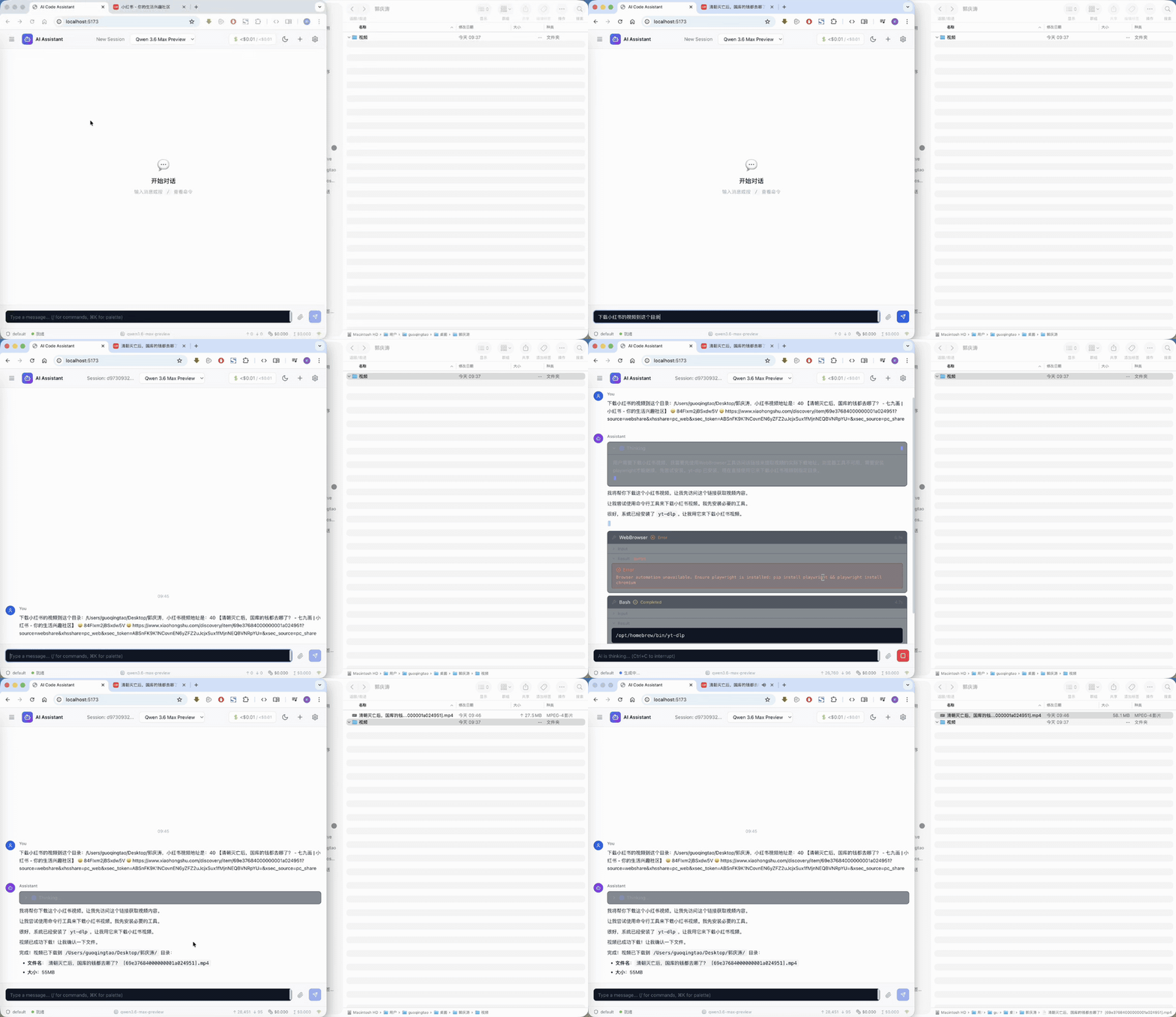
### Auto-Code to Download Xiaohongshu Videos
https://github.com/user-attachments/assets/4b66261b-3258-44bd-82d3-6b2b3bbd4995
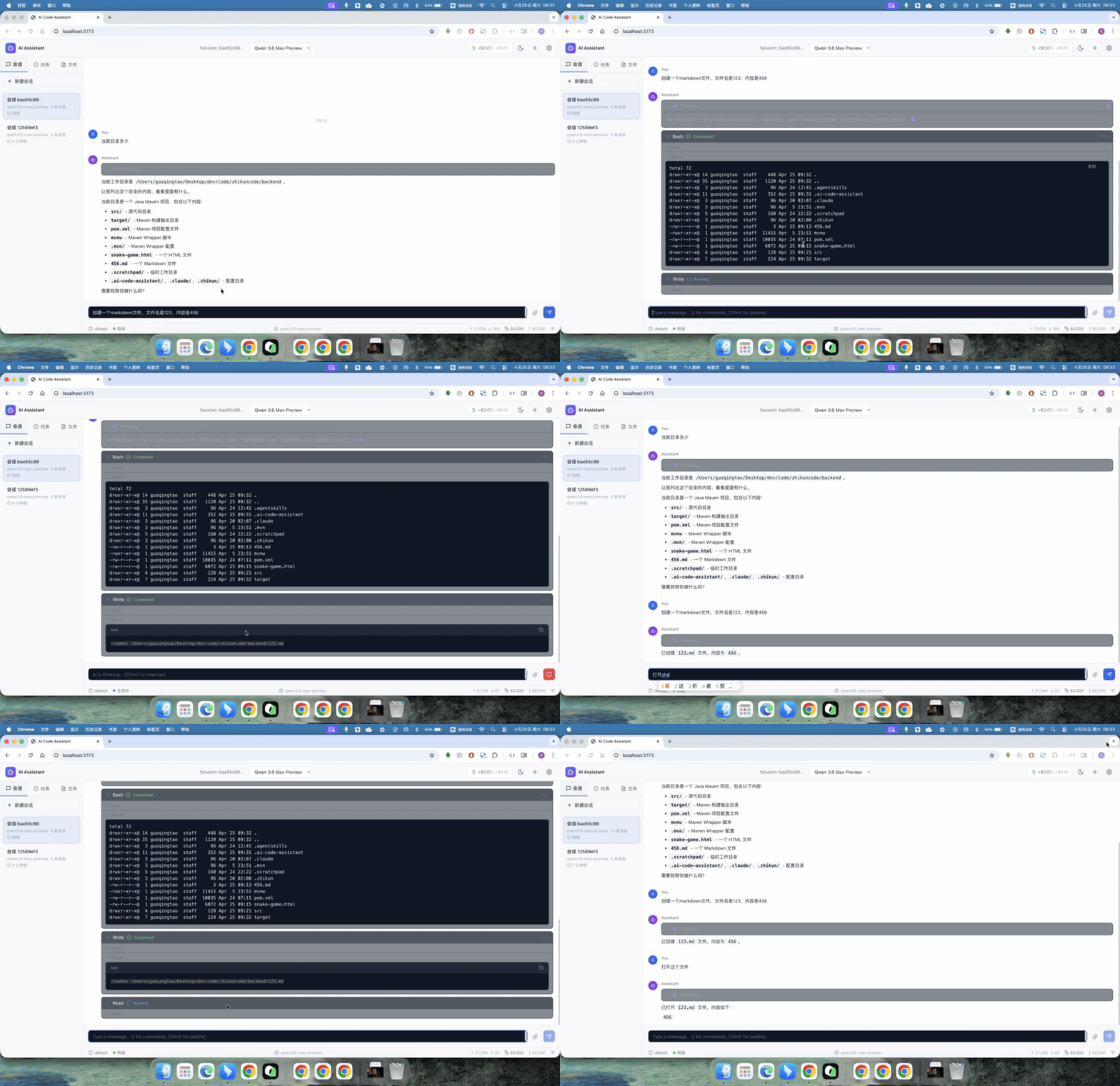
### π± Project Analysis and Command Execution Demo
https://github.com/user-attachments/assets/7b45c5d4-e540-4ffd-80d4-e11502477dba
### File Operations
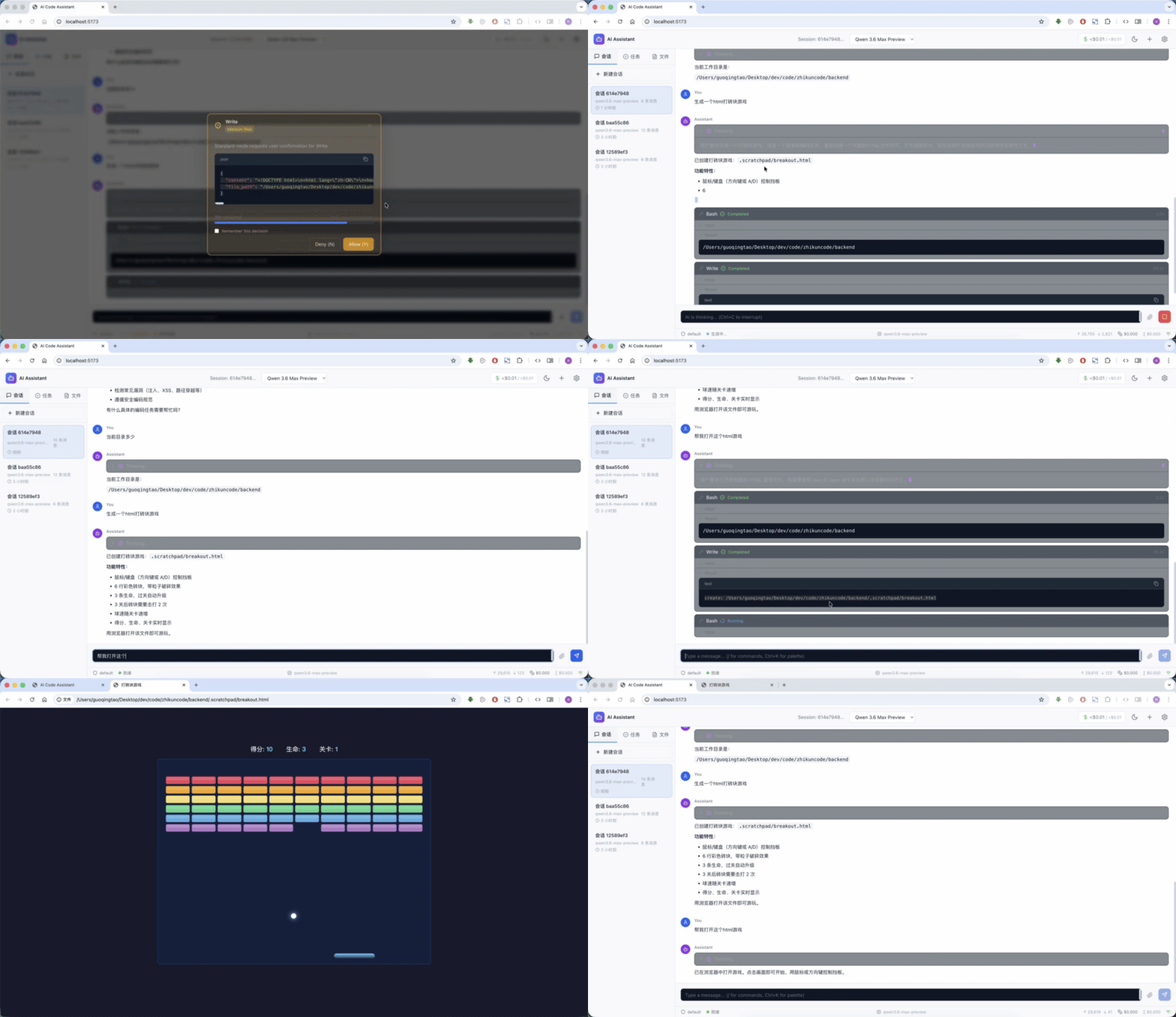
### Game Generation
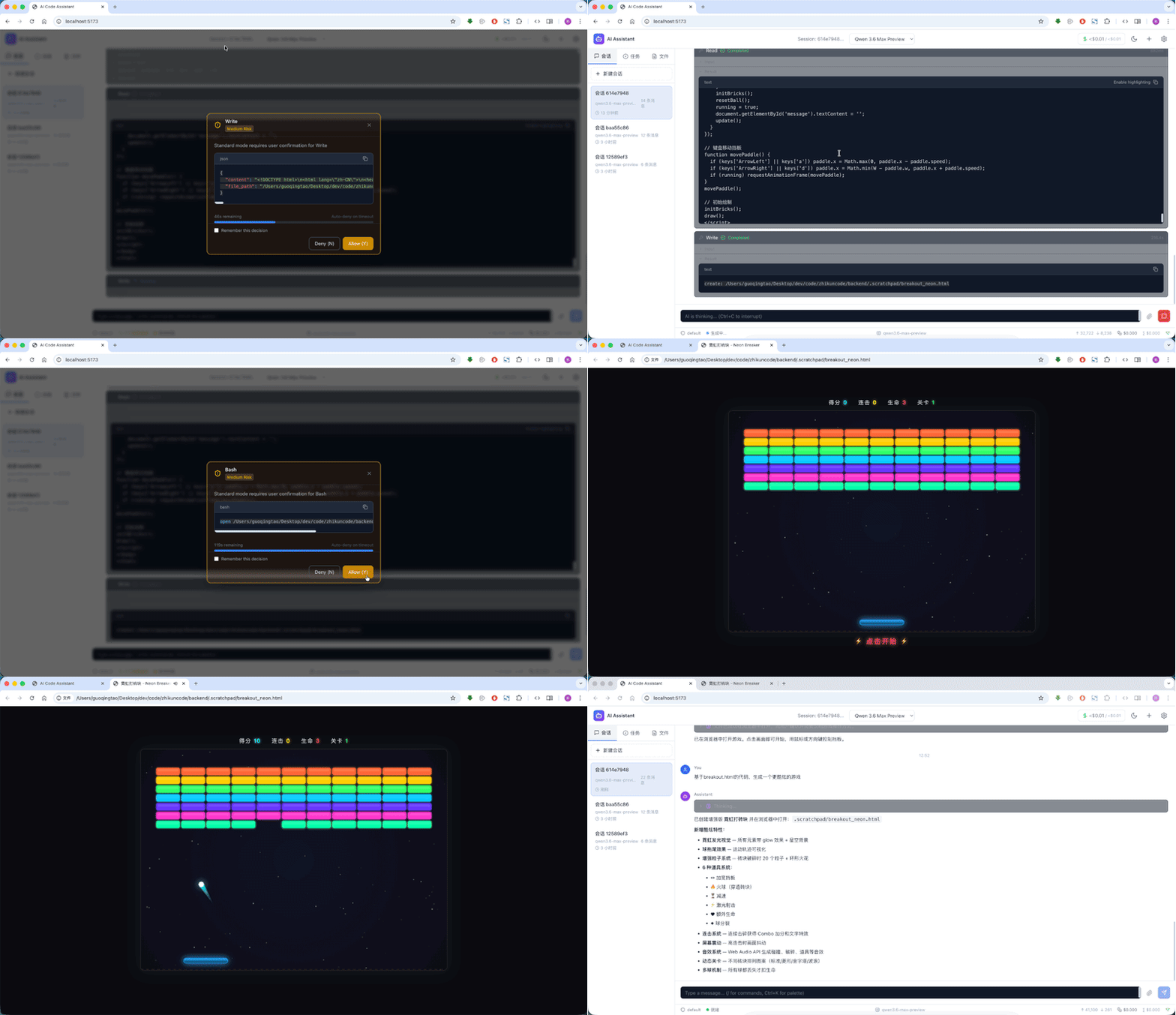
### Code Optimization
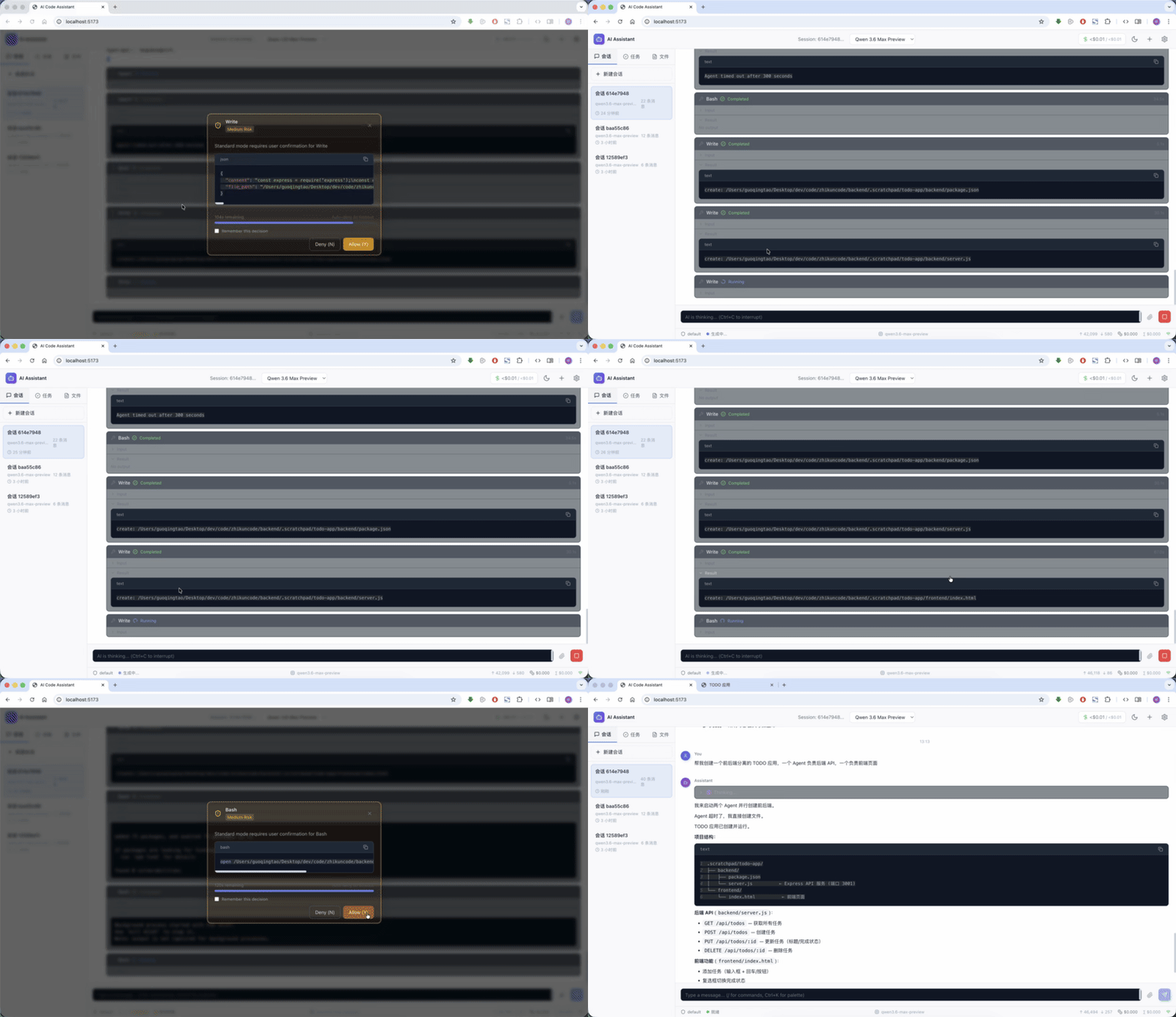
### Multi-Agent Collaborative Full-Stack Development
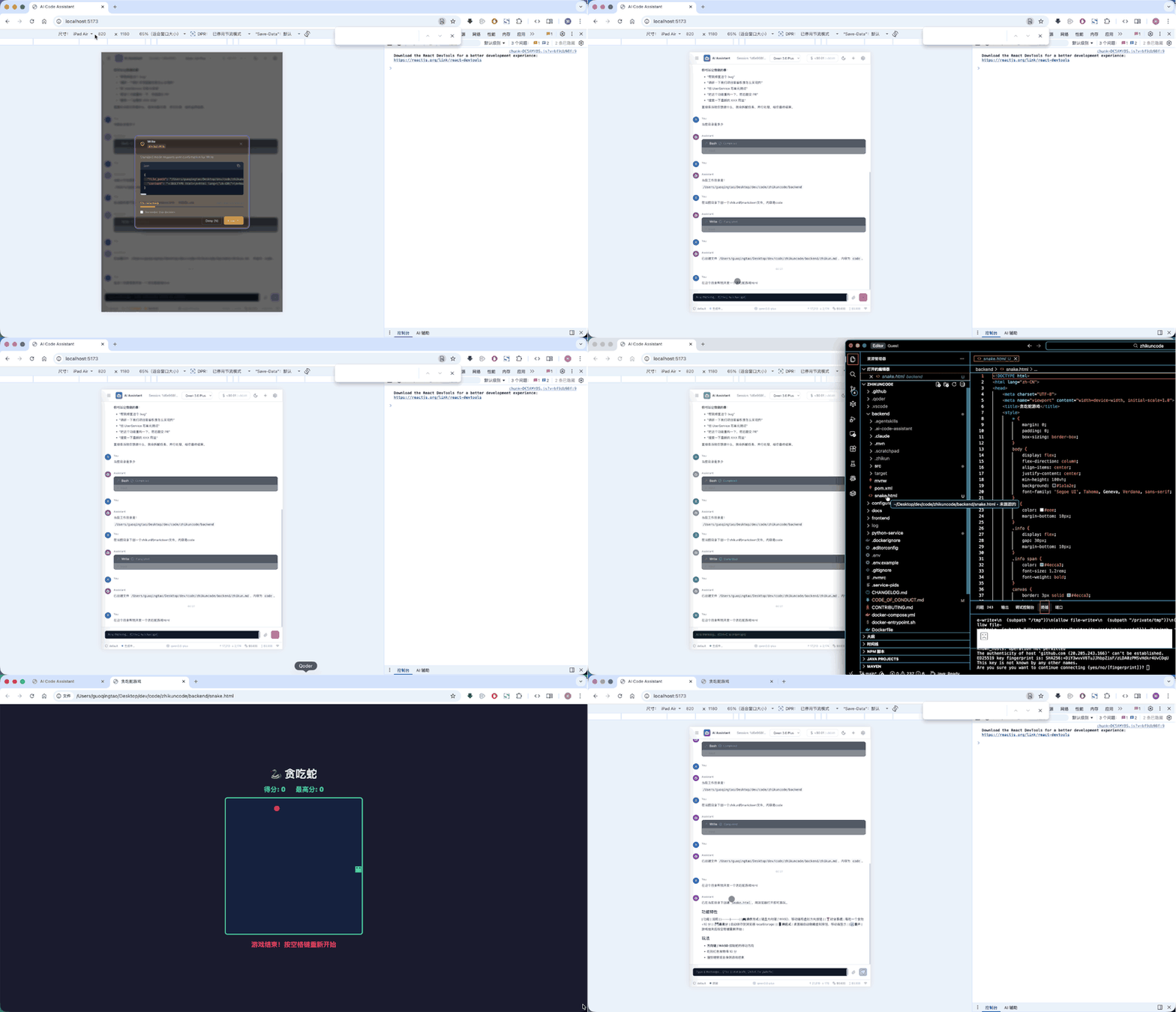
### Full Browser-Based Control on iPad
---
## β‘ Quick Start
### Prerequisites: Get an LLM API Key
This project requires an LLM (Large Language Model) API Key to run. It defaults to **Alibaba Cloud Qwen (DashScope)**, which works directly in China without VPN.
**Get a Qwen API Key:**
1. Visit [Alibaba Cloud Bailian API Key Management](https://bailian.console.aliyun.com/cn-beijing/?tab=model#/api-key)
2. Sign up or log in to your Alibaba Cloud account
3. Create an API Key and copy the full key (starts with `sk-`)
> Qwen offers a free quota sufficient for personal development. You can also use [DeepSeek](https://platform.deepseek.com/), [Moonshot/Kimi](https://platform.moonshot.cn/), or other providers. See "Supported LLM Providers" below.
### Option 1: Docker Deployment (Recommended)
Three steps from zero to running:
```bash
# 1. Clone the repository
git clone https://github.com/zhikunqingtao/zhikuncode.git
cd zhikuncode
# 2. Configure your API Key
cp .env.example .env
# Edit .env and add your LLM API Key (defaults to Qwen/DashScope, direct connection in China)
# 3. Start
docker compose up -d
```
> **First build note:** The first run will automatically build the Docker image, downloading dependencies and compiling the project. This takes approximately **15-30 minutes** depending on network speed. Subsequent starts take only a few seconds. Use `docker compose logs -f` to monitor build progress.
Once started, open **http://localhost:8080** in your browser.
> **System Requirements:** Docker 20.10+, Docker Compose V2, 4GB+ RAM recommended.
### Option 2: Local Development
**Prerequisites:** JDK 21, Node.js 22+, Python 3.11~3.12 (does not support 3.13+)
```bash
git clone https://github.com/zhikunqingtao/zhikuncode.git
cd zhikuncode
# Configure environment variables
cp .env.example .env
# Edit .env and add your LLM API Key
# Start all three services at once
./start.sh
```
All three services start simultaneously:
| Service | Address | Description |
|---------|---------|-------------|
| **Backend** | `http://localhost:8080` | Java Spring Boot backend, core API |
| **Python Service** | `http://localhost:8000` | FastAPI service, code analysis |
| **Frontend** | `http://localhost:5173` | React dev server |

Start each service manually
```bash
# Backend
cd backend && ./mvnw spring-boot:run -DskipTests
# Python Service
cd python-service
python -m venv venv && source venv/bin/activate
pip install -r requirements.txt
uvicorn src.main:app --host 0.0.0.0 --port 8000
# Frontend
cd frontend && npm install && npm run dev
```
### Supported LLM Providers
ZhikunCode supports **multi-Provider simultaneous configuration** (recommended) and single-Provider mode. In multi-Provider mode, you can freely switch models from the frontend:
**Option A: Multi-Provider Configuration (Recommended)**
Configure independent API Keys for each provider in `.env`, and switch freely from the frontend:
```bash
# DashScope (Qwen series)
LLM_PROVIDER_DASHSCOPE_API_KEY=your-dashscope-key
# DeepSeek
LLM_PROVIDER_DEEPSEEK_API_KEY=your-deepseek-key
# Moonshot (Kimi)
LLM_PROVIDER_MOONSHOT_API_KEY=your-moonshot-key
```
**Option B: Single-Provider Configuration (Backward Compatible)**
If no multi-Provider keys are configured, the system automatically falls back to single-Provider mode. Configure `LLM_BASE_URL` and `LLM_API_KEY` in `.env`:
| Provider | Base URL | Recommended Model | Notes |
|----------|----------|-------------------|-------|
| **Qwen / DashScope** | `https://dashscope.aliyuncs.com/compatible-mode/v1` | qwen3.6-max-preview | **Default**, direct connection in China |
| **DeepSeek** | `https://api.deepseek.com/v1` | deepseek-v4-pro | Direct connection in China |
| **Moonshot (Kimi)** | `https://api.moonshot.cn/v1` | kimi-k2.6 | Direct connection in China |
| **OpenAI** | `https://api.openai.com/v1` | gpt-4o | Requires international network access |
| **Local Ollama** | `http://localhost:11434/v1` | qwen2.5:latest | Fully offline |
> Any provider compatible with the OpenAI API format can be integrated β just configure the corresponding Base URL and API Key.
### Optional: Enable DashScope-hosted MCP Services
Starting from the latest version, the following MCP services hosted on `dashscope.aliyuncs.com` are **disabled by default**, to avoid startup log flooding for users who have not configured an Alibaba Cloud Bailian API Key:
| MCP Service | Capability | Tool IDs |
|-------------|------------|----------|
| `Wan25Media` | Wanx 2.5 image generation / image-to-image editing | `mcp_wan25_image_gen`, `mcp_wan25_image_edit` |
| `zhipu-websearch` | Zhipu Web Search Pro | `mcp_web_search_pro` |
> βΉοΈ Disabling these MCPs does **not** affect core chat, code editing, or local tools.
**To enable them** (requires an Alibaba Cloud Bailian API Key with the corresponding MCP capabilities activated in the console):
1. Configure your DashScope key in `.env`:
```bash
LLM_PROVIDER_DASHSCOPE_API_KEY=sk-xxxxxxxx
```
2. Uncomment the `zhipu-websearch` block in [`backend/src/main/resources/application.yml`](../backend/src/main/resources/application.yml).
3. Flip `enabled` to `true` for the entries you need in [`configuration/mcp/mcp_capability_registry.json`](../configuration/mcp/mcp_capability_registry.json).
4. Run `./stop.sh && ./start.sh` to fully restart all three tiers so the changes take effect.
---
## π Comparison
### Feature Comparison
| Feature | ZhikunCode | Aider | Cline | Cursor | Claude Code | Copilot |
|---------|:---:|:---:|:---:|:---:|:---:|:---:|
| Open Source & Free | β
| β
| β
| β | β | β |
| Web UI | β
Full-featured | β οΈ Experimental browser UI | β | β οΈ Web ver. | β
| β οΈ GitHub.com |
| Docker Self-hosted | β
Full web service | β οΈ CLI container | β | β οΈ Enterprise | β | β |
| Chinese LLM Support | β
Native | β οΈ Compatible API | β οΈ Compatible API | β | β | β |
| Multi-Agent | β
Team/Swarm/Sub | β | β
Kanban + CLI parallel | β
Multi-Agents | β
Sub-Agents | β
/fleet + Agent Mode |
| Full Browser ControlΒΉ | β
| β | β | β | β | β |
| Security Sandbox | β
8-layer | β | β | β οΈ Enterprise | β
OS-level | β οΈ GitHub permission policies |
| MCP Tool Extension | β
| β οΈ 3rd-party | β
| β
| β
| β
|
| CLI Terminal Tools | β
aica + 35+ slash cmds | β
CLI-first | β
CLI 2.0 | β
Cursor CLI | β
CLI-only | β
Copilot CLI |
| Extensible Skill System | β
Markdown-driven + 6-level sources | β | β | β
Rules | β
Hooks | β |
| Plugin System | β
Java SPI plugins + sandbox isolation + hot reload | β | β | β
Plugins | β
Skills/Hooks | β
Plugins |
| Cross-Session Memory | β
3-layer memory + BM25 search | β | β | β
Rules | β
Memory | β |
| No Client Install | β
| β | β | β οΈ | β
| β |
> ΒΉ **Full Browser Control**: After deployment, any device's browser (including mobile) can fully control the entire coding workflow β permission approval, plan negotiation, task management. This is different from Cline/Cursor's "AI controlling a browser for automated testing".
### Security Comparison
| Security Feature | ZhikunCode | Aider | Cline | Claude Code |
|-----------------|:---:|:---:|:---:|:---:|
| Command Sandbox | 8-layer checks | β User approval | β User approval | β
gVisor/Firecracker |
| Permission Pipeline | 14-step pipeline | β | Simple confirm | Permission system |
| Security Tests | 289 items | Not disclosed | Not disclosed | Not disclosed |
| Sensitive Path Block | β
| β | β | β |
| Dangerous Cmd Block | β
| β | β | β
Partial |
| Env Var Whitelist | β
| β | β | β |
> **Note:** Comparison based on official documentation (as of April 2026). AI coding tools iterate rapidly β please [open an issue](https://github.com/zhikunqingtao/zhikuncode/issues) if any inaccuracy is found. Cline CLI 2.0, Cursor 2.0+, Claude Code Desktop, and GitHub Copilot /fleet are all evolving rapidly.
>
> **Latest Updates (April 2026):** Claude Code Desktop App released (supports local + cloud hybrid execution); Cursor 3.1 introduced Canvas feature (interactive dashboard + custom UI components); latest versions: Aider v0.86+, Cline v1.0.35+, Cursor 3.1+, Claude Code 2.1.119+, GitHub Copilot CLI 1.0.35+.
---
## ποΈ Architecture Overview
ZhikunCode uses a three-tier architecture: the Java backend handles core orchestration, the React frontend provides the UI, and the Python service handles code analysis.
```
ββββββββββββββββββββ WebSocket / HTTP ββββββββββββββββββββββββ
β Frontend β ββββββββββββββββββββββββββΊ β Backend β
β React 18 + TS β β Java 21 + Spring β
β Vite + Tailwind β β Boot 3.4 β
β :5173 (dev) β β :8080 β
ββββββββββββββββββββ ββββββββββββ¬ββββββββββββ
β HTTP
βΌ
ββββββββββββββββββββββββ
β Python Service β
β FastAPI + Uvicorn β
β :8000 β
ββββββββββββββββββββββββ
```
### Layer Responsibilities
| Layer | Tech Stack | Responsibilities |
|-------|-----------|-----------------|
| **Backend** | Java 21, Spring Boot 3.4.x, WebSocket, SQLite | Core orchestration engine, LLM API routing, Agent management, tool execution (48 built-in tools + MCP dynamic extensions), permission pipeline, session persistence |
| **Frontend** | React 18, TypeScript 5.6, Vite 5, TailwindCSS, Monaco Editor, xterm.js, Zustand | Conversational UI, code editor, built-in terminal, file browser, settings panel, real-time streaming output, Agent collaboration visualization |
| **Python Service** | FastAPI, Uvicorn, Python 3.11+ | Code analysis, AST parsing, MCP tool bridging |
### Docker Deployment Architecture
In production, all three services are packaged in a single Docker container:
```
βββββββββββββββββββββββββββββββββββββββββββββββββββ
β Docker Container β
β βββββββββββββ βββββββββββββ ββββββββββββββββ β
β β Backend β β Python β β Frontend β β
β β :8080 β β :8000 β β (static files)β β
β βββββββββββββ βββββββββββββ ββββββββββββββββ β
β β
β Volume: zhikun-data (SQLite + session data) β
β Volume: workspace (user project files) β
ββββββββββββββββββββββββββββββββββββββββββββββββββββ€
β Port: 8080 β host β
ββββββββββββββββββββββββββββββββββββββββββββββββββββ
```
### Agent Loop Query Cycle
ZhikunCode's core execution engine QueryEngine drives Agent decision-making and tool execution through an 8-step loop:
```
Compression Cascade β Streaming Session Creation β API Call (with downgrade protection) β Response Collection β Tool Result Consumption β Continue/Terminate Decision β Tool Summary Injection β State Update
```
**Key Subsystems:**
| Component | Responsibility | Configuration |
|-----------|---------------|---------------|
| IncrementalCollapseManager | Triggers incremental context collapse every 10 turns | `context.cascade.incremental-collapse.enabled` |
| ContextCascade | Five-layer compression cascade (SnipβMicroCompactβAutoCompactβCollapseDrainβReactiveCompact) | `context.cascade.*` |
| MicroCompactService | Clears old tool result content to reduce context size | `features.flags.CACHED_MICROCOMPACT` |
| ModelTierService | Model downgrade chain management with 30-min cooldown auto-recovery | `app.model.tier-chain` |
**413 Three-Phase Recovery**: When the API returns 413 (Payload Too Large), automatic three-phase recovery is triggered:
1. **Phase 1** β Aggressive Compression (Context Collapse Drain)
2. **Phase 2** β Reactive Compact
3. **Phase 3** β Media File Stripping (Media Recovery)
---
## π Security Architecture
Security is a core design principle of ZhikunCode. Every command must pass through multiple security layers before execution.
### 8-Layer Bash Security Sandbox
All shell commands must pass through these 8 layers before execution:
| Layer | Check | Description |
|-------|-------|-------------|
| **Layer 1** | Command parsing | Parses command structure; identifies pipes, redirects, and subcommands |
| **Layer 2** | Blocklist filtering | Three-tier interception system (ABSOLUTE_DENY/HIGH_RISK_ASK/AUDIT_LOG), blocks known dangerous commands (`rm -rf /`, `mkfs`, `dd`, `format`, etc.), with ReDoS regex protection |
| **Layer 3** | Path traversal detection | Prevents `../` path traversal attacks; blocks device paths and UNC paths |
| **Layer 4** | Permission verification | 14-step permission pipeline decision; sensitive operations require user approval |
| **Layer 5** | Sandboxed execution | Destructive commands run in a Docker sandbox (read-only filesystem + memory limits + network isolation) |
| **Layer 6** | Argument sanitization | Environment variable allowlist, command injection protection |
| **Layer 7** | Output validation | Detects anomalous output, redacts sensitive information |
| **Layer 8** | Audit logging | Complete record of every command execution for traceability |
### 14-Step Permission Pipeline
The permission pipeline uses a **short-circuit** design β any matching interception rule returns immediately without further processing:
```
Request enters
β
ββ 1. Deny rule check ββββββββββββ Match β Deny
ββ 2. Ask rule check βββββββββββββ Match β Prompt user
ββ 3. Tool-level permission βββββββ Tool denies β Block
ββ 4. User interaction check ββββββ Needs interaction β Prompt
ββ 5. Content-level danger ββββββββ rm -rf, chmod 777, eval, sudo β Force prompt
ββ 6. Write path safety βββββββββββ Dangerous directories, symlinks β Block
ββ 7. Dangerous delete detection ββ rm with risky targets β Block
ββ 8. Environment variable check ββ Non-allowlisted vars β Block
ββ 9. Hook injection check ββββββββ PreToolUse hooks can block
ββ 10. Classifier evaluation βββββββ AI risk assessment (AUTO mode)
ββ 11. Sandbox rule evaluation βββββ In-sandbox operations β Auto-allow
ββ 12. Emergency kill switch βββββββ Admin can temporarily disable AUTO
ββ 13. AlwaysAllow rules βββββββββββ Allowlist match β Allow
ββ 14. Mode branch decision ββββββββ DEFAULT/PLAN/AUTO/BYPASS final decision
```
### Protected Paths
The following paths require user confirmation even in bypass mode:
- `.git` β Git repository data
- `.env` β Environment variables and secrets
- `.ssh` β SSH keys
- `.gnupg` β GPG keys
- `.aws` β AWS credentials
### Security Testing
- **289 security tests** covering all security paths
- Includes command injection, path traversal, permission bypass, and other attack scenarios
- The full security test suite runs on every code change
### π§ͺ Quality Assurance
Full test report: [ZhikunCode Core Functionality Test Report v9.1](ZhikunCodeζ ΈεΏεθ½ζ΅θ―ζ₯ε.md) (2026-05-06)
**Continuous Integration:**
- **GitHub Actions Pipeline**: Automatically runs backend compilation, frontend build, Python tests, and Docker image verification on every push
**Test Coverage:**
- **22 functional modules** with **326 test cases**
- **Results**: 323 PASS / 3 PARTIAL / 0 OBSERVE / 0 FAIL β **99.1% pass rate**
- **Automation Stack**: JUnit 5 + Vitest + Pytest + Playwright (4-layer coverage)
- **Unit Test System (v9.1 new)**: 277 test methods / 30 test files / 12 first-time covered domains
- **Feature Completeness**: 100% of planned v1.0 features verified
**Test Framework Details:**
| Framework | Layer | Coverage | Methods |
|-----------|-------|----------|--------|
| JUnit 5 | Backend Unit | Context/Permission/Skill/Plugin/LLM/MCP/Memory/Concurrency/SSE/Persistence/Tool | 176 |
| Vitest | Frontend Unit | Store Lifecycle/Cross-Tab Sync/Streaming Render/Immer Immutability/Route Boundary | 35 |
| Playwright | E2E | Permission Dialog/Command Palette/Tool Result Rendering + 7 Regression | 19 |
| Pytest | Python Service | Token Estimation/File Processing/Browser Automation/Code Analyzers | 29 |
**Detailed Test Data & Evidence:**
- Per-module results: [docs/test-results/](docs/test-results/)
- Frontend E2E scripts: [frontend/e2e/](frontend/e2e/) (including tc-fe-003~005)
- E2E screenshots: [docs/test-results/screenshots/](docs/test-results/screenshots/) (125+ images)
π 22 Test Modules Breakdown (click to expand)
| # | Module | Cases | Pass Rate | Notes |
|---|--------|-------|-----------|-------|
| 1 | Environment Setup & Service Startup | 7 | 100% | β |
| 2 | REST API Core Functions | 33 | 100% | Per-endpoint verification |
| 3 | WebSocket STOMP Communication | 8 | 100% | β |
| 4 | Agent Loop Core Cycle | 9 | 100% | β |
| 5 | Tool System & Security | 10 | 100% | β |
| 6 | Permission Governance | 6 | 100% | β |
| 7 | System Prompt & LLM Integration | 7 | 100% | β |
| 8 | Memory System | 7 | 100% | β
First coverage |
| 9 | Skill System | 7 | 100% | β
First coverage |
| 10 | Plugin System & MCP | 11 | 100% | β
First coverage |
| 11 | Multi-Agent Collaboration | 6 | 100% | β |
| 12 | Python Service | 15 | 93% | 1 BUG fixed |
| 13 | Frontend E2E & UI | 7 | 86% | 1 PARTIAL |
| 14 | File History & API | 11 | 100% | β
First coverage |
| 15 | CLI Tool (aica) | 11 | 91% | 2 BUGs fixed |
| 16 | Visualization E2E | 19 | 100% | β
First coverage |
| 17 | F3 Code Complexity Analysis | 6 | 100% | β
New in v1.0 |
| 18 | F33 Change Impact Analysis | 6 | 100% | β
New in v1.0 |
| 19 | F25 API Contract Visualization | 6 | 100% | β
New in v1.0 |
| 20 | F35 CodeβDiagram Generation | 25 | 100% | β
New in v1.0 |
| 21 | F40 Code Path Tracing | 25 | 100% | β
New in v1.0 |
| 22 | Unit Test Suite v9.1 | 84 | 100% | 277 methods / 30 files |
---
## π― Skill System
ZhikunCode's Skill System is a **Markdown-driven extensible workflow engine**. Each skill is a `.md` file β YAML frontmatter defines metadata, Markdown body defines execution instructions.
### 6 Built-in Skills
Ready to use out of the box β type `/skill-name` to invoke:
| Skill | Command | Description |
|-------|---------|-------------|
| **Smart Commit** | `/commit` | Analyzes staged changes, generates commit messages in Conventional Commits format |
| **Code Review** | `/review` | Reviews uncommitted changes, categorizes issues by P0/P1/P2 severity |
| **Smart Fix** | `/fix` | Diagnoses root cause from error messages, applies minimal fix and verifies |
| **Smart Test** | `/test` | Generates/runs tests for specified code or recent changes, covers edge cases |
| **PR Assistant** | `/pr` | Analyzes branch diff, generates structured PR description and review notes |
### 6-Level Loading Priority
Skills with the same name are overridden by priority chain β higher priority automatically shadows lower:
```
managed > user > project > plugin > bundled > mcp
```
| Source | Directory | Description |
|--------|-----------|-------------|
| **managed** | Policy-managed directory | Enterprise-distributed skills |
| **user** | `~/.zhikun/skills/` | User global custom skills |
| **project** | `.zhikun/skills/` | Project-level skills, distributed with the codebase |
| **plugin** | Plugin-provided | Skills embedded in JAR plugins |
| **bundled** | Built-in | 6 out-of-the-box skills |
| **mcp** | MCP-built | Skills registered via MCP protocol |
### Custom Skills
Create `.md` files in `~/.zhikun/skills/` or `.zhikun/skills/` in your project root:
```markdown
---
description: "Translate code to a specified language"
arguments:
- language
---
# Translation Task
Translate the selected code to {{language}}, preserving original logic and comment style.
```
Invoke with: `/translate language=python` or `/translate python`
**Supported frontmatter fields:**
| Field | Type | Description |
|-------|------|-------------|
| `description` | string | Skill description |
| `name` | string | Display name (overrides filename) |
| `arguments` | list | Parameter definition list |
| `argument_hint` | string | Parameter hint text |
| `when_to_use` | string | Conditions for automatic model invocation |
| `allowed_tools` | list | Tool allowlist for this skill |
| `context` | string | `inline` (default, inject into current conversation) or `fork` (create independent sub-agent) |
| `model` | string | Specify model (`inherit` uses parent model) |
> Skills support hot reload β changes take effect immediately after saving, no service restart needed. Powered by Java NIO WatchService with 500ms debounce.
---
## π§© Plugin System
ZhikunCode's Plugin System uses standard **Java SPI (ServiceLoader)** to discover and load third-party JAR plugins, providing four bridging capabilities: command registration, tool registration, hook interception, and MCP server integration. Controlled by the `plugin.enabled` feature flag.
### Four Bridging Capabilities
| Bridge Type | Description | Example |
|-------------|-------------|--------|
| **Command Registration** | Plugins can register custom slash commands, auto-prefixed with plugin name | `/myplugin:hello` |
| **Tool Registration** | Plugins can provide custom tools for AI Agents to invoke | Custom code analysis tool |
| **Hook Interception** | Plugins can execute custom logic before/after key events | Security audit before tool execution |
| **MCP Server** | Plugins can register MCP servers to extend AI capabilities | Connect to external data sources |
### Security Features
- **PluginClassLoader Sandbox Isolation** β Plugins access host APIs via package allowlists: Core API packages (`com.aicodeassistant.plugin.*`, `tool.*`, `command.*`, `mcp.*`), standard libraries (`java.*`, `javax.*`, `jdk.*`, `sun.*`, `org.slf4j.*`), and core frameworks (`org.springframework.*`, `com.fasterxml.jackson.*`, `jakarta.*`). Access to non-allowlisted host classes throws `ClassNotFoundException`
- **Hook Execution Timeout Protection** β Virtual Thread + `CompletableFuture.orTimeout(5s)`, auto-allows on timeout to prevent plugins from blocking the main flow
- **JAR File Validation** β Pre-load validation of file existence, JAR format, size limit (default 50MB), and SPI config file (`META-INF/services/`) completeness
- **API Version Compatibility Check** β Plugins declare `minApiVersion` / `maxApiVersion`, the host automatically validates compatibility
### Hot Reload
Supports runtime reloading of all plugins without service restart:
- Uses `ReentrantReadWriteLock` to ensure concurrency safety during reload
- Reload flow: unload all plugins (unregister commands/tools/hooks/MCP + close ClassLoaders) β re-scan and load
- Trigger via: `/reload-plugins` slash command or REST API
### 8 Hook Event Types
Plugins can register hooks for the following events to execute custom logic at key points:
| Event Type | Trigger |
|------------|--------|
| `PreToolExecution` | Before tool execution |
| `PostToolExecution` | After tool execution |
| `UserPromptSubmit` | When a prompt is submitted |
| `SessionStart` | Session begins |
| `SessionEnd` | Session ends |
| `TaskCompleted` | Task completion |
| `Notification` | Notification event |
| `Stop` | Stop event |
### Plugin Development Guide
Developing a ZhikunCode plugin takes just four steps:
**1. Implement the `PluginExtension` SPI interface**
```java
public class MyPlugin implements PluginExtension {
@Override public String name() { return "my-plugin"; }
@Override public String version() { return "1.0.0"; }
@Override
public List getCommands() {
return List.of(/* custom commands */);
}
@Override
public void onLoad(PluginContext ctx) {
ctx.getLogger().info("Plugin loaded!");
}
}
```
**2. Register via `META-INF/services/`**
```
# META-INF/services/com.aicodeassistant.plugin.PluginExtension
com.example.MyPlugin
```
**3. Place the JAR in `~/.zhikun/plugins/`**
**4. Restart the service or run `/reload-plugins` to hot reload**
> The `PluginExtension` interface uses default methods β a minimal implementation only requires `name()` and `version()`. Additional capabilities (commands/tools/hooks/MCP) can be overridden as needed.
---
## π§ Memory System
ZhikunCode features a three-layer memory architecture that lets the AI assistant **remember your preferences, project conventions, and workflows across sessions**.
### Three-Layer Memory Architecture
| Layer | File | Scope | Description |
|-------|------|-------|-------------|
| **Personal Memory** | `~/.ai-code-assistant/MEMORY.md` | Global, cross-project | AI auto-records user preferences, common patterns, error solutions |
| **Project Memory** | `zhikun.md` / `zhikun.local.md` | Current project | Project-level coding conventions, architecture decisions, build processes |
| **Team Memory** | `.zhikun/team-memories/*.md` | Shared with team | Team standards and shared knowledge distributed with the codebase |
### Memory Categories
Based on cognitive psychology models (a design-level conceptual taxonomy; the implementation distinguishes memories via file paths and metadata tags), memories are automatically classified into four types:
| Category | Description | Example |
|----------|-------------|----------|
| **Semantic** | Project knowledge, user preferences, technical conventions | "This project uses JUnit 5 + AssertJ" |
| **Episodic** | Specific operation history, debugging sessions | "Port conflict fix from last deployment" |
| **Procedural** | Common workflows, deployment processes | "Always run `mvn test` before committing" |
| **Team** | Team-level shared knowledge and standards | "All APIs return unified Result wrapper" |
### Automatic Memory & Search
The AI automatically records and retrieves memories via the built-in MemoryTool:
- **Auto-write** β AI proactively records important information (user preferences, project norms, etc.)
- **Auto-load** β Memories are automatically injected into the system prompt at session start
- **BM25 Search** β Pure Java BM25 search engine with Chinese+English support (Unigram + Bigram CJK tokenization)
- **Source Tracking** β Memory source tracking (source field) to distinguish REST API-created vs LLM tool-created memories
- **LLM Reranking** β Optional LLM reranking service for precision after BM25 initial retrieval
### Project Memory Files
Create memory files in your project root β the AI will automatically read and follow them:
```markdown
# zhikun.md β Project conventions (committed to repo)
## Coding Standards
- Java methods use camelCase naming
- Test classes end with Test suffix
## Build Process
- Run `./mvnw test` before every commit
- Use Conventional Commits format
```
```markdown
# zhikun.local.md β Local config (not committed, add to .gitignore)
## Local Environment
- My API Key is in the .env file
- Local database port: 5432
```
> Project memory files are loaded by traversing up to 5 parent directories, with a 100KB per-file limit. `zhikun.md` is committed for team sharing; `zhikun.local.md` is for personal local configuration.
### Safety Protections
- Truncation protection: Personal memory capped at 200 lines / 25KB to prevent system prompt token explosion
- Auto-compaction: When exceeding 50,000 characters, automatically compacts keeping the newest 70%
- Auto-expiration: Memories untouched for 90 days are automatically purged
- Path traversal protection: Absolute path and symlink validation on project memory writes
---
## π» CLI Tools
Beyond the Web UI, ZhikunCode provides full command-line capabilities for three scenarios:
### Python CLI (aica) β Terminal AI Coding
`aica` is ZhikunCode's command-line client, designed as a first-class UNIX pipe citizen:
```bash
# Install
cd python-service
pip install -e ".[cli]"
# Basic usage
aica "refactor this function"
# Pipe input β compose like grep/sed
cat src/main.py | aica "review this code"
# Structured output + jq processing
aica -f json "list all API endpoints" | jq '.result'
# Streaming output
aica -f stream-json "refactor this module"
# Continue last conversation
aica --continue "fix the bug we just discussed"
```
**Key features:**
| Feature | Description |
|---------|-------------|
| Three output formats | `text` (terminal Markdown rendering) / `json` (structured) / `stream-json` (SSE streaming) |
| Pipe support | Auto-reads stdin, seamlessly composable with shell pipes |
| Permission modes | `--permission-mode dont_ask/bypass/default` to control security policy (CLI defaults to `dont_ask`) |
| Session management | `--continue` resumes last session, `--resume ` restores a specific session |
| Model selection | `--model` to specify model, `--effort` to control reasoning depth |
| Tool control | `--allowed-tools` / `--disallowed-tools` whitelist/blocklist |
| Exit codes | 0=success, 1=generic error, 2=argument error, 3=connection error, 4=auth error, 130=Ctrl+C |
> `aica` connects to the ZhikunCode backend via HTTP/SSE, sharing the same Agent engine, toolset, and security architecture. Ideal for CI/CD integration and scripting automation.
### 35+ Slash Commands β Web UI Quick Actions
> The following slash commands are available in the **Web UI**. The `aica` CLI accesses the same backend Agent engine through natural language prompts.
Type `/` or press `Ctrl+K` in the Web UI to open the command palette with fuzzy search and keyboard navigation:
| Category | Commands | Description |
|----------|----------|-------------|
| **Core** | `/help` `/clear` `/exit` | Help, clear conversation, exit |
| **Model** | `/model` | List/switch LLM models |
| **Diagnostics** | `/doctor` | 9-item system diagnostic (Java/LLM/Git/JVM/Python/Disk) |
| **Compression** | `/compact` | Manual context compression, accepts instructions (e.g., `/compact focus on API`) |
| **Git** | `/diff` `/commit` `/review` | Code diff, generate commit messages, code review |
| **Config** | `/config` `/permissions` | View config, permission mode management |
| **Session** | `/session` `/resume` | Session info, restore history sessions |
| **Cost** | `/cost` `/usage` | Token usage, cost statistics |
| **MCP** | `/mcp-servers` `/mcp-tools` | MCP service management |
| **Deep Analysis** | `/ultrareview` | AI deep review (architecture + security + performance + concurrency) |
> On mistyped commands, the system automatically suggests similar commands using Levenshtein distance matching.
---
## π± Full Browser-Based Control
This is ZhikunCode's core differentiator. Unlike Cursor, Cline, and other tools that require desktop clients or IDE plugins, ZhikunCode is a standalone web application β deploy once, use from any device's browser.
### Why This Matters
| Scenario | Traditional AI Coding Tools | ZhikunCode |
|----------|---------------------------|------------|
| Approve a permission request on your commute | β Need to open your laptop | β
Use your phone browser |
| A colleague wants to try your AI coding assistant | β Install VS Code + plugins | β
Just share a link |
| Deploy to a team server for shared use | β Everyone installs a client | β
Open a browser and go |
| Edit code on an iPad | β No native client | β
Works in Safari/Chrome |
### Complete Browser Control
From your browser, you can manage the entire AI coding workflow:
- **Conversational coding** β Describe requirements in natural language; the Agent generates code with real-time streaming output
- **Permission approvals** β Every sensitive operation triggers an approval prompt: allow / deny / modify
- **Plan discussion** β Review, discuss, and confirm Agent-proposed plans in the browser
- **Task management** β Monitor progress, interrupt execution, reassign tasks
- **File browsing** β Navigate and view the project file tree directly in the browser
- **Agent collaboration visualization** β See real-time status of each Agent in multi-Agent mode
### Real-Time Communication
The frontend and backend maintain a real-time connection via **STOMP over SockJS** (auto-negotiates WebSocket β xhr-streaming β xhr-polling fallback):
- **Streaming output** β LLM responses stream token by token, no waiting for completion
- **Permission bubbling** β Sub-Agent permission requests are pushed to the browser in real time
- **State synchronization** β Agent state changes are reflected in the UI instantly
- **Heartbeat keep-alive** β Bidirectional 10s heartbeat detection, auto-reconnect on disconnect (exponential backoff 1sβ10s)
- **Message guarantees** β 128KB message size limit, 1MB send buffer, 30s send timeout
---
## π€ Multi-Agent Collaboration
ZhikunCode offers three Agent collaboration modes and five typed Agent definitions for tasks of varying complexity.
### Five Built-in Agent Types
Built on Java 21 sealed interfaces with compile-time exhaustiveness checking. Each Agent type has its own toolset, model preference, and system prompt:
| Agent Type | Purpose | Toolset | Model Preference |
|-----------|---------|---------|------------------|
| **General-Purpose** | Full implementation capability | All tools, unrestricted | Inherits parent |
| **Explore** | Read-only code search | FileEdit/FileWrite denied | Lightweight (light) |
| **Verification** | Adversarial test validation | FileEdit/FileWrite denied | Inherits parent |
| **Plan** | Analysis & solution design | FileEdit/FileWrite denied | Inherits parent |
| **Guide** | Documentation & usage guidance | Only Glob/Grep/FileRead/WebFetch/WebSearch | Lightweight (light) |
> All sub-agents are blocked from calling Agent/TeamCreate/TeamDelete tools, architecturally preventing infinite recursion.
### Team Mode β Fixed Roles
Team collaboration with predefined roles. Each Agent has a clear set of responsibilities and tools.
```
βββββββββββββββ
β Leader β Task assignment & result aggregation
ββββββββ¬βββββββ
β
ββββββ΄βββββ
βΌ βΌ
ββββββββ ββββββββ
βAgent Aβ βAgent Bβ Parallel execution, independent toolsets
βBackendβ βFrontendβ
ββββββββ ββββββββ
```
- Use case: frontend/backend split development, test + dev collaboration
- Agents communicate via `TeamMailbox` (async, ConcurrentLinkedQueue)
- Tasks shared through `SharedTaskList` FIFO queue with claim & status tracking
- `InProcessBackend` runs multiple Workers concurrently via Virtual Threads
### Swarm Mode β Dynamic Negotiation
Dynamic multi-Worker collaboration built on Java 21 virtual threads, orchestrated by the Coordinator through a four-phase workflow:
```
Research β Synthesis β Implementation β Verification
```
Phases follow strict sequential order (no skipping). Each phase records timestamps and result summaries. `CoordinatorWorkflow` manages the full phase lifecycle.
- Use case: complex refactoring, large-scale code migrations
- Worker count adjusts dynamically, no pre-declaration needed
- One Virtual Thread per Worker, 30-minute timeout protection
- Worker toolsets precisely controlled via allowList/denyList
- Permissions bubble up to UI (`LeaderPermissionBridge`), 60-second timeout auto-denies to prevent deadlocks
- Real-time status pushed via STOMP WebSocket
- Active Swarms managed by Caffeine cache, 4-hour TTL auto-evicts stale instances
### SubAgent Mode β Parent-Child Delegation
The main Agent delegates subtasks to independent child Agents, with three isolation levels:
| Isolation Mode | Behavior | Use Case |
|---------------|----------|----------|
| **NONE** | Shares parent Agent working directory | Lightweight subtasks |
| **WORKTREE** | Creates independent Git Worktree, auto-merges or discards on completion | Experimental changes needing isolation |
| **Fork** | Inherits parent sessionβs full message history, reuses LLM KV cache | Continuation tasks needing full context |
- Supports background async execution (`BackgroundAgentTracker`), pushing start/complete/fail events via WebSocket
- Per-agent 5-minute timeout, results capped at 100,000 characters
### Three-Layer Concurrency Safety
`AgentConcurrencyController` enforces three-layer limits via Semaphore + session-level counters:
| Dimension | Limit | Protection Target |
|-----------|-------|-------------------|
| Global concurrency | β€ 30 agents | Memory & API pressure |
| Session concurrency | β€ 10 agents/session | Interactive resource isolation |
| Nesting depth | β€ 3 levels | Prevents infinite recursion |
Slots are auto-released via RAII pattern (`try-with-resources`), ensuring no resource leaks on exception paths.
### Model Alias Routing
Agents use a three-level fallback strategy for model resolution: user parameter β Agent type default β global default. Aliases are configured in `application.yml` under `agent.model-aliases` (e.g., `light β qwen-plus`), avoiding hardcoded model names β configure once, apply everywhere.
---
## π§© MCP Tool Extensions
ZhikunCode implements the standard [MCP (Model Context Protocol)](https://modelcontextprotocol.io/) and supports connecting to external MCP services via SSE transport:
### Built-in MCP Tools
| Tool | Description | Source |
|------|-------------|--------|
| **Wanx 2.5 Image Generation** | AI painting β generate images from text | DashScope MCP |
| **Wanx 2.5 Image Editing** | AI image editing (image-to-image) | DashScope MCP |
| **Web Search Pro** | Online search, returns web page summaries | DashScope MCP |
### Custom MCP Tools
Register new MCP tools in `configuration/mcp/mcp_capability_registry.json`:
```json
{
"id": "mcp_your_tool",
"name": "Your Tool Name",
"toolName": "mcp_server_tool_name",
"sseUrl": "https://your-mcp-server/sse",
"domain": "your_domain",
"category": "MCP_TOOL",
"enabled": true
}
```
---
## π οΈ Built-in Tools
ZhikunCode ships with 48 built-in tools + MCP dynamic extensions, covering the full development lifecycle:
| Category | Tools | Description |
|----------|-------|-------------|
| **File Operations** | FileRead, FileWrite, FileEdit, NotebookEdit | Read, write, and edit files, including Jupyter Notebook support |
| **Code Search** | GrepTool, GlobTool, ToolSearch, LspTool, SnipTool | Regex search, file glob matching, tool search, LSP language service, code snippets |
| **Command Execution** | BashTool, PowerShellTool, REPLTool | Shell sandbox execution, Windows PowerShell, interactive REPL sessions |
| **Git Operations** | GitTool, Worktree | Git command execution, Worktree management |
| **Web Tools** | WebSearch, WebFetch, WebBrowser | Web search, page fetching, browser automation |
| **Agent Collaboration** | AgentTool | Create and manage sub-Agents |
| **Task Management** | Task create/get/list/update/stop/output | SharedTaskList task collaboration (6 tools) |
| **Interaction** | AskUserQuestion, Brief, Sleep, TodoWrite | User questions, briefings, wait, todo lists |
| **Scheduled Tasks** | CronCreate, CronList, CronDelete | Cron job management |
| **Plan Mode** | EnterPlanMode, ExitPlanMode, VerifyPlan | Plan-then-execute workflow |
| **Configuration** | ConfigTool, SendMessage, SyntheticOutput | Config management, message sending, synthetic output |
| **Monitoring** | MonitorTool, CtxInspect, TerminalCapture | System monitoring, context inspection, terminal output capture |
| **MCP Extensions** | MCP tool adapters | Connect to external MCP services (dynamically registered) |
---
## π Visualization
ZhikunCode includes 11 built-in visualization features that make data and status transparent throughout the AI coding process:
| Feature | Description |
|---------|-------------|
| **Mermaid Diagram Rendering** | Mermaid code blocks in AI responses are automatically rendered as interactive vector diagrams, with copy SVG / download PNG support |
| **API Sequence Diagram** | Automatically extracts tool call records from conversations and generates Mermaid sequence diagrams, with filtering and detail viewing |
| **Agent DAG** | Real-time display of multi-Agent task dependency graphs, built on React Flow, with TB/LR layout switching |
| **Git Timeline** | Visualizes Git commit history with Diff viewing and Blame view, auto-colored by commit type |
| **Tool Progress Visualization** | Displays progress bars, ETA estimates, and a mini log viewer during tool execution |
| **File Tree Navigation** | Sidebar project file tree with search filtering, virtual scrolling, and file type icons |
| **Code Complexity Treemap** | Interactive treemap built on recharts β area maps to LOC, color maps to risk level (A-E). Supports drill-down navigation, language/risk filtering, and stats cards. Multi-language analysis via Python radon + tree-sitter |
| **Change Impact Analysis** | DAG visualization built on @xyflow/react showing change propagation paths. LibCST-powered precise Python call graph analysis with BFS propagation. Displays node type, confidence, and impact depth at a glance |
| **API Contract Viewer** | Auto-merges Java + Python dual-service OpenAPI specs. Endpoints grouped by tag, HTTP methods color-coded, recursive Schema display. Supports All/Java/Python data source switching |
| **Code-to-Diagram Auto-Generation** | Input a code file path to auto-generate Mermaid sequence diagrams / flowcharts. Python LibCST + tree-sitter multi-language parsing, BFS call-chain traversal with auto-identification of Controller/Service/Repository participants, five-dimensional confidence scoring (0-1), Monaco Editor for real-time source editing, SVG copy / PNG download export, supports 1-5 level traversal depth control |
| **Code Path Tracing Visualization** | Interactive code call-path tracing visualization built on @xyflow/react. Python CodePathTracer performs forward BFS traversal with six-layer classification (Controller/Service/Repository/Database/External/Utility), dagre TB layout algorithm for automatic node arrangement, custom LayerNode components with layer-based coloring, MiniMap for global overview + LayerStatsBar for layer statistics, supports API endpoint scanning, parameter tracking, node click details, and maxDepth depth control via the sidebar "Code Path" tab |
---
## βοΈ Configuration
### Environment Variables
Environment variables are managed via the `.env` file. Copy `.env.example` and modify as needed:
**Multi-Provider Configuration (Recommended):**
| Variable | Required | Default | Description |
|----------|:---:|---------|-------------|
| `LLM_PROVIDER_DASHSCOPE_API_KEY` | β | β | Qwen/DashScope API Key |
| `LLM_PROVIDER_DEEPSEEK_API_KEY` | β | β | DeepSeek API Key |
| `LLM_PROVIDER_MOONSHOT_API_KEY` | β | β | Moonshot/Kimi API Key |
| `LLM_DEFAULT_MODEL` | β | qwen3.6-max-preview | Default model (used when no explicit selection) |
> In multi-Provider mode, configure at least one Provider's API Key. The frontend supports free switching between configured Providers.
**Single-Provider Configuration (Backward Compatible):**
| Variable | Required | Default | Description |
|----------|:---:|---------|-------------|
| `LLM_API_KEY` | β
| β | API Key for your LLM provider |
| `LLM_BASE_URL` | β | DashScope | LLM API endpoint |
| `LLM_DEFAULT_MODEL` | β | qwen3.6-max-preview | Default model |
| `LLM_MODELS` | β | Qwen series | Available models (comma-separated) |
> If all `LLM_PROVIDER_*` keys are empty, the system automatically falls back to single-Provider mode.
**General Configuration:**
| Variable | Required | Default | Description |
|----------|:---:|---------|-------------|
| `ZHIKUN_PORT` | β | 8080 | Host port for Docker mapping |
| `SPRING_PROFILES_ACTIVE` | β | production | Spring profile |
| `JAVA_OPTS` | β | -Xms256m -Xmx1024m | JVM options |
| `WORKSPACE_PATH` | β | ./workspace | Working directory mounted into the container |
| `ALLOW_PRIVATE_NETWORK` | β | true (Docker) | Allow private network IPs to bypass auth in Docker |
| `LOG_DIR` | β | /app/log | Container log directory |
| `MCP_REGISTRY_PATH` | β | Auto-configured | MCP capability registry file path |
**Advanced Configuration:**
| Variable | Required | Default | Description |
|----------|:---:|---------|-------------|
| `ZHIKUN_COORDINATOR_MODE` | β | 0 | Feature flag, enable coordinator mode (0=off, 1=on) |
| `LLM_PROVIDER_DASHSCOPE_MODELS` | β | qwen3.6-max-preview,qwen3.6-plus | DashScope available models (comma-separated) |
| `LLM_PROVIDER_DEEPSEEK_MODELS` | β | deepseek-v4-pro,deepseek-v4-flash | DeepSeek available models (comma-separated) |
| `LLM_PROVIDER_MOONSHOT_MODELS` | β | kimi-k2.6,moonshot-v1-auto | Moonshot available models (comma-separated) |
**Context Management Configuration (application.yml):**
| Configuration | Default | Description |
|--------------|---------|-------------|
| `context.cascade.incremental-collapse.enabled` | true | Enable incremental collapse |
| `context.cascade.incremental-collapse.segment-turns` | 10 | Collapse trigger interval (turns) |
| `context.cascade.incremental-collapse.session-timeout-minutes` | 30 | Session timeout |
| `features.flags.CACHED_MICROCOMPACT` | true | Enable micro-compact service |
| `features.flags.TOKEN_BUDGET` | false | Token budget control (disabled by default; enable when needed) |
### Docker Resource Limits
Default resource configuration (adjustable in `docker-compose.yml`):
| Setting | Default |
|---------|---------|
| Memory limit | 4GB |
| Memory reservation | 1GB |
| Health check interval | 30s |
| Startup grace period | 60s |
> **Note:** The initial image build requires more memory (Maven compilation + npm build). If the build fails, increase Docker Desktop's memory allocation to 6GB or more in its settings. The runtime container memory limit is 4GB (adjustable in docker-compose.yml).
---
## β FAQ
Q1: Which LLMs are supported?
Any model compatible with the OpenAI API format, including:
- **Qwen / DashScope** (direct connection in China, recommended default)
- **DeepSeek** (direct connection in China)
- **Moonshot / Kimi** (direct connection in China)
- **OpenAI GPT-4o / GPT-4** (requires international network access)
- **Anthropic Claude** (via OpenAI-compatible API)
- **Local models** (via Ollama, vLLM, etc.)
As long as the provider is compatible with the OpenAI API format, just configure `LLM_BASE_URL` and `LLM_API_KEY`.
Q2: What are the Docker deployment requirements?
**Minimum requirements:**
- Docker 20.10+
- Docker Compose V2
- 4GB+ available RAM
- Network access to the LLM API endpoint (domestic network is fine for Qwen)
**Deploy in 3 steps:**
```bash
git clone https://github.com/zhikunqingtao/zhikuncode.git && cd zhikuncode
cp .env.example .env # Edit and add your API Key
docker compose up -d # Start
```
Open `http://localhost:8080` and you're ready to go.
Q3: Where is data stored? Is it secure?
**All data stays local** β nothing is sent to any third-party server:
- **Session data** β SQLite database stored in Docker Volume `zhikun-data`
- **Project code** β Your local project directory is mounted via Docker Volume
- **API Key** β Stored only in your `.env` file and the running container's environment variables
ZhikunCode does not run any telemetry. Your API Key connects directly to your configured LLM provider with no proxies or intermediary servers.
Q4: Can it run on an internal network / offline?
**Yes.** Once deployed via Docker, it runs entirely on your local network.
- **Using Chinese LLMs (Qwen/DeepSeek):** Direct connection from mainland China, no VPN needed
- **Fully offline:** Pair with Ollama for local models β `LLM_BASE_URL=http://host.docker.internal:11434/v1`
- **Enterprise intranet:** Just ensure the server can reach the LLM API endpoint
Q5: How do I use multi-Agent collaboration?
ZhikunCode offers three collaboration modes:
- **Team** β Fixed roles: create a team, each Agent works in parallel according to its role
- **Swarm** β Dynamic negotiation: tasks are automatically decomposed, Workers are dynamically assigned, four-phase workflow
- **SubAgent** β Parent-child delegation: the main Agent delegates subtasks to child Agents with isolated execution
Just describe your requirement in the conversation, for example:
> "Refactor the user authentication module β one Agent handles the backend API, another handles the frontend pages"
The Agent will automatically select the appropriate collaboration mode.
Q6: Does it conflict with VS Code plugins (Copilot/Cline)?
**No.** ZhikunCode is a standalone web application that doesn't depend on any IDE and requires no plugins.
You can use both simultaneously:
- **VS Code + Copilot** β for line-level code completion
- **ZhikunCode** β for conversational Agent programming and complex task orchestration
They complement each other.
Q7: How do I contribute?
Contributions are welcome! See [CONTRIBUTING.md](../CONTRIBUTING.md) for the full guide.
Quick steps:
1. Fork the repository
2. Create a feature branch (`git checkout -b feature/your-feature`)
3. Commit your changes
4. Open a Pull Request
We recommend starting with Issues labeled `good first issue`.
**Development environment:** JDK 21, Node.js 22+, Python 3.11~3.12, Maven 3.9+
Q8: Why the Java + React + Python three-tier architecture?
Each technology choice has a clear rationale:
- **Java 21 + Spring Boot (Backend):**
- Strong typing + mature enterprise ecosystem for maintainable code
- Spring WebSocket provides native real-time communication support
- Virtual Threads are a natural fit for concurrent multi-Agent execution
- Easy for enterprise IT teams to adopt and deploy
- **React 18 + TypeScript (Frontend):**
- Component-based development with mature state management (Zustand)
- TypeScript provides type safety
- Vite offers fast builds and a great developer experience
- TailwindCSS enables efficient UI development
- **Python FastAPI (Analysis Service):**
- Python's ecosystem excels at code analysis and AST parsing
- FastAPI delivers strong async performance
- Running as an independent service keeps the main backend stable
Q9: How to troubleshoot Docker deployment issues?
**Container shows unhealthy after startup:**
```bash
# Check container status
docker ps -a
# View startup logs (Java typically needs 30-60s to start)
docker logs zhikuncode
# Inspect health check details
docker inspect --format='json .State.Health' zhikuncode | python3 -m json.tool
```
**Common startup failure causes:**
- `LLM_API_KEY is not configured` β API Key not set, check your .env file
- `Unable to access jarfile` β Incomplete image build, try `docker compose up --build`
- Out of memory β Default requires 4GB, adjust `deploy.resources.limits.memory` in docker-compose.yml
**View runtime logs:**
```bash
# Follow logs in real-time
docker logs -f zhikuncode
# Enter container to check log files
docker exec -it zhikuncode ls -la /app/log/
docker exec -it zhikuncode tail -100 /app/log/app.log
```
**About `ALLOW_PRIVATE_NETWORK`:**
This variable controls whether requests from Docker bridge network IPs can bypass authentication. It defaults to `true` in Docker environments since container networking already provides isolation. For stricter security (e.g., multi-tenant environments), set to `false` β all non-localhost requests will require Bearer Token authentication.
**Adjust JVM memory:**
Set in `.env`:
```bash
JAVA_OPTS=-Xms512m -Xmx2048m --enable-preview
```
Q10: What if port 8080 is already in use?
Edit the port in your `.env` file:
```bash
ZHIKUN_PORT=9090 # Change to any available port
```
Then restart:
```bash
docker compose down
docker compose up -d
```
Access `http://localhost:9090` instead.
---
## π€ Contributing
We welcome all forms of contribution β bug fixes, new features, documentation improvements.
See [CONTRIBUTING.md](../CONTRIBUTING.md) for details.
---
## π License
This project is licensed under the [MIT License](../LICENSE).
---
## π¬ Contact
- **Email:** alizhikun@gmail.com
- **GitHub Issues:** [Open an Issue](https://github.com/zhikunqingtao/zhikuncode/issues)
---
## β Star History
If this project is useful to you, a Star β would be appreciated.
---


