
AutoClip # AutoClip **Turn long videos into moments worth sharing.** [简体中文](README.md) · **English** · [日本語](README-JA.md) · [한국어](README-KO.md) · [Español](README-ES.md) · [Português](README-PT.md) · [Русский](README-RU.md) · [Français](README-FR.md) [![GitHub release](https://img.shields.io/github/v/release/zhouxiaoka/autoclip?style=flat-square)](https://github.com/zhouxiaoka/autoclip/releases/latest) [![GitHub stars](https://img.shields.io/github/stars/zhouxiaoka/autoclip?style=flat-square)](https://github.com/zhouxiaoka/autoclip/stargazers) [![GitHub forks](https://img.shields.io/github/forks/zhouxiaoka/autoclip?style=flat-square)](https://github.com/zhouxiaoka/autoclip/forks) [![GitHub issues](https://img.shields.io/github/issues/zhouxiaoka/autoclip?style=flat-square)](https://github.com/zhouxiaoka/autoclip/issues) [![License: MIT](https://img.shields.io/github/license/zhouxiaoka/autoclip?style=flat-square)](LICENSE) [Website](https://zhouxiaoka.github.io/autoclip_intro/) · [Discussions](https://github.com/zhouxiaoka/autoclip/discussions) · [Report an issue](https://github.com/zhouxiaoka/autoclip/issues) **Desktop installers: [macOS · Apple Silicon](https://github.com/zhouxiaoka/autoclip/releases/latest) · [Windows · x64](https://github.com/zhouxiaoka/autoclip/releases/latest)** [Installation and your first clips](docs/USER_INSTALLATION_GUIDE.en.md) · [Full troubleshooting guide](docs/FAQ.en.md)
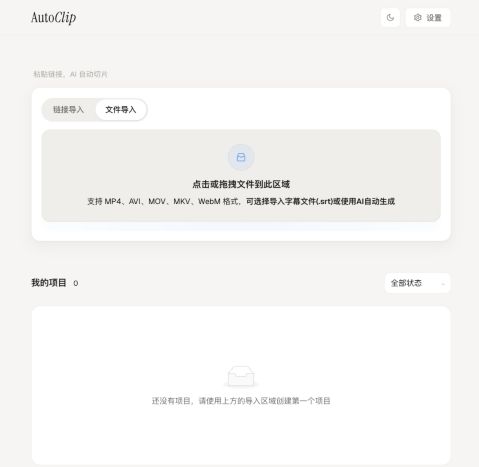
Since v1.3.1, the app, website and README support Chinese, English, Japanese, Korean, Spanish, Portuguese, Russian and French. Choose a language in the header or follow your system. Your media and generated content keep their original language. AutoClip uses AI to analyze video transcripts, find highlights, write titles, and create clips and collections. Built for interviews, podcasts, courses, and livestream recordings, it offers a desktop app, a Docker web interface, and CLI / MCP access. ## See the interface ![AutoClip v1.3.0 — local video import](docs/images/import-local.jpg) Real v1.3.0 web interface: add a local video in the file import area, with optional SRT subtitles. ## Community recognition
AutoClip — GitHub Trending AutoClip — Trendshift Python daily ranking AutoClip — Trendshift daily ranking, all languages

These badges are provided by Trendshift. Click to view AutoClip’s recorded achievements. GitHub Trending and Trendshift are separate rankings; badges show recorded achievements, not a live position. ## What you can do | Capability | Details | | --- | --- | | Import footage | Use local videos, YouTube or Bilibili links, with optional SRT subtitles. | | Find highlights | Extract outlines, topic timelines, highlight scores, and clip titles from transcripts. | | Create clips and collections | Generate clips and suggested collections, then adjust their order manually. | | Export for publishing | Use presets for Douyin, Xiaohongshu, YouTube Shorts, and Bilibili, with burned-in subtitles and title cards. | | Choose your models | Use Qwen, OpenAI-compatible APIs, Gemini, SiliconFlow, or local models through Ollama / LM Studio. | | Automate your workflow | Orchestrate runs with the CLI or call the same processing pipeline from an MCP client. | > Import video → Subtitles / transcription → AI analysis and scoring → Clips and collections → Export ## Quick start ### 1. Desktop app Download the appropriate installer from [GitHub Releases](https://github.com/zhouxiaoka/autoclip/releases/latest): | Platform | Installation | | --- | --- | | macOS · Apple Silicon | `.dmg` | | Windows 10 / 11 · x64 | `-setup.exe` | | Intel Mac / Linux | Use Docker or the CLI below | Desktop installers include Python and FFmpeg. Check the selected release for available platforms and first-launch instructions. After installation, select a model provider in Settings, test the connection, save, and import a video. ### 2. Docker / Web Requires Docker and Docker Compose v2. Run these commands from the repository root: ```bash git clone https://github.com/zhouxiaoka/autoclip.git cd autoclip ``` ```bash cp env.example .env ``` Before starting, edit `.env`: select `LLM_PROVIDER` and set the matching API key and model name. You can also configure the provider in Settings after startup. ```bash mkdir -p data logs uploads docker compose up -d --build ``` Open the [web interface](http://localhost:3000). [API documentation](http://localhost:8000/docs) is available once the backend starts. See the [Docker guide](docs/DOCKER.en.md) for deployment details. On Linux, if bind-mounted directories cause permission errors, fix ownership of the project data directories with this command, then start the services again: ```bash docker compose run --rm --no-deps --user root --entrypoint sh autoclip -c 'chown -R autoclip:autoclip /app/data /app/logs /app/uploads' docker compose up -d ``` ### 3. CLI / MCP Requires Python 3.10+ (3.11 recommended) and FFmpeg on PATH. The installation example uses a macOS / Linux shell; on Windows PowerShell, activate with `venv\Scripts\Activate.ps1`. Local CLI processing does not require Redis. ```bash git clone https://github.com/zhouxiaoka/autoclip.git cd autoclip python3 -m venv venv source venv/bin/activate python -m pip install -r requirements.txt python -m pip install -e . ``` Local model example: install and start Ollama, then download a model. Videos without subtitles require `faster-whisper`; the speech model is downloaded on first use. To supply existing subtitles, add `--srt talk.srt`. ```bash ollama pull qwen2.5:7b python -m pip install faster-whisper autoclip doctor --provider ollama autoclip run talk.mp4 --provider ollama --json ``` Replace `PROJECT_ID` with the project ID returned by processing to export for Shorts. Start the stdio MCP server with `autoclip mcp`: ```bash autoclip export PROJECT_ID --preset shorts autoclip mcp ``` In your MCP client, set `command` to the absolute path of `autoclip` in your virtual environment and `args` to `["mcp"]`. See the [CLI / MCP guide](docs/CLI_AND_MCP.md) and [Agent skill](skills/autoclip/SKILL.md) (both in Chinese). ## Model configuration | Option | Configuration | | --- | --- | | Cloud models | Select Qwen, an OpenAI-compatible API, Gemini, or SiliconFlow in Settings and enter an API key. Compatible endpoints support a custom Base URL. | | Ollama | Default endpoint: `http://localhost:11434/v1`; default model: `qwen2.5:7b`. No API key required. | | LM Studio | Load a model and start Local Server at `http://localhost:1234/v1` by default. Select a model actually served by your instance. | Inside Docker, `localhost` refers to the container. To use a model on the host, configure an address reachable from the container; see the CLI / MCP guide. Video cutting runs locally; cloud model analysis sends transcript text to your selected provider. Video and model downloads still need internet access. ## Frequently asked questions
Is it free? Do I need an API key? AutoClip is free and open source under MIT. Cloud providers bill their own model usage and require your API key. Ollama / LM Studio presets need no cloud key, but require model files and suitable hardware.
Are my videos uploaded? Local editing runs on your device. Cloud model analysis sends transcript text to your selected provider. Publishing/upload features send videos to the destination platform when you use them. Analytics and error reporting depend on your version and settings; see the privacy notes.
Can I use videos without subtitles? Yes, after preparing local Whisper components and a speech model. You can also import existing SRT subtitles. Accurate subtitles can reduce transcription time and recognition errors.
Why were no clips generated? Check the failed stage: empty subtitles, model connection failures, an overly high score threshold, or FFmpeg/disk problems. You can try reducing the threshold from 0.7 to 0.5, but this does not guarantee clips.
What videos work best? How long does it take? Analysis primarily uses transcripts, making interviews, podcasts, lectures, and spoken commentary suitable. Purely visual action or music may work less well. Time depends on duration, hardware, models, and export settings; start with a 3–5 minute clip you provide. For a first clip, try [Jackie Dowling | Stanford Energy Fellow](https://www.youtube.com/watch?v=dtmjLzOtx8I) (Stanford ENERGY). 示例·非托管·自担使用权 (example link, not hosted by AutoClip; you are responsible for usage rights). Other examples are optional. Dialogue is mostly English; official captions or your own SRT/Whisper are optional. - [The State of Startups in 2026](https://www.youtube.com/watch?v=yslXlV2BP_Y) (Y Combinator). 示例·非托管·自担使用权. - [Sam Altman on Astra, AGI, and the future of OpenAI](https://www.youtube.com/watch?v=VeizK1M7V7E). Sources Podcast, not an OpenAI channel. 示例·非托管·自担使用权.
[Full troubleshooting guide](docs/FAQ.en.md) · [Known issues](https://github.com/zhouxiaoka/autoclip/issues/96) ## Documentation The README is available in eight languages; installation, Docker, and troubleshooting guides are available in English and Chinese; other references below are mainly in Chinese. README translations do not indicate which languages the app interface or transcription models support. - [Installation and your first clips](docs/USER_INSTALLATION_GUIDE.en.md) - [Docker deployment (English)](docs/DOCKER.en.md) - [CLI, MCP, and local models (Chinese)](docs/CLI_AND_MCP.md) - [Model providers (Chinese)](docs/MULTI_LLM_PROVIDER_GUIDE.md) - [FAQ (English)](docs/FAQ.en.md) - [Contribution guide (Chinese)](CONTRIBUTING.md) - [Changelog](CHANGELOG.md) - [Privacy notes (Chinese / English)](docs/PRIVACY.en.md) - [README translation and badge maintenance (Chinese)](docs/i18n.md) ## Contribute and connect Contributions, feedback, and translation improvements are welcome. For bug reports, include your OS, version, model, reproduction steps, and error logs with sensitive information removed. Maintained by an individual in their spare time. Response times vary; live support and one-to-one deployment assistance are not provided. Please check the FAQ and known issues before contacting the maintainer. Ideas, use cases, and model requests belong in [GitHub Discussions](https://github.com/zhouxiaoka/autoclip/discussions). Reproducible bugs use the [issue form](https://github.com/zhouxiaoka/autoclip/issues/new/choose). Board rules: [community board](docs/COMMUNITY_BOARD.md) (Chinese). - [Welcome and categories](https://github.com/zhouxiaoka/autoclip/discussions/127) - [First-clip Q&A](https://github.com/zhouxiaoka/autoclip/discussions/128) - [Ideas](https://github.com/zhouxiaoka/autoclip/discussions/129) - Email: [christine_zhouye@163.com](mailto:christine_zhouye@163.com) Thanks to FastAPI, React, Tauri, FFmpeg, yt-dlp, Whisper, and all contributors. Licensed under the [MIT License](LICENSE). If AutoClip helps you, consider giving the project a star. [![Star History](https://api.star-history.com/svg?repos=zhouxiaoka/autoclip&type=Date)](https://star-history.com/#zhouxiaoka/autoclip&Date)