# dsh-web · DeepSeek Harness (DSH) Web GUI Plugin Ecosystem
[中文](README.md) | English




The aggregate plugin ecosystem for DeepSeek Harness (DSH) Web · Everything is a plugin
Performance Engine · Workshop · Task Board · Mobile Remote · SSH Ops · Image Understanding
[What It Is](#what-it-is) · [Workshop](#workshop-dsh-marketcom) · [Feature Plugins](#feature-plugins) · [Skins](#skins) · [Quick Start](#quick-start) · [FAQ](#faq) · [Known Limitations](#known-limitations) · [Community](#community)
## What It Is
dsh-web is the aggregate plugin ecosystem for the DeepSeek Harness (DSH) Web GUI — the most complete realization of "everything is development, everything is a plugin" on the web: the task board, mobile remote control, SSH ops, image understanding, the LiangShen anchored agent preset, rescue mode and the right panel each ship as an independent, self-contained plugin — pluggable, swappable, re-developable. Install the whole family to assemble a complete AI dev workbench, or pick one or two and they melt quietly into the stock UI. Everything mounts into `dsh web` through the official profile mechanism, no DSH source changes; the aggregate can even bolt on external plugins like `dsh-better-sidebar`, while other skin and pet assets come from the Workshop — see the [dsh-web-all README](packages/dsh-web-all/README.md).
Skins live inside the same plugin system: a v2 skin is not a standalone product but a pure asset pack of the skins plugin (a skin.json manifest plus styles, art and optional effect scripts), loaded on demand by that plugin, the single loader — official upgrades no longer touch any skin, and adding one means dropping in a directory: no publish, no install. Plugins own the logic, skin assets own the look; Blue Fantasy ships with the plugin, while other skin and pet assets are distributed through the [Workshop](#workshop-dsh-marketcom) (dsh-market.com).
| Capability | Stock dsh web | dsh-web family |
| --- | --- | --- |
| Performance monitoring & governance | None | HUD panel + event / event-loop / memory metrics + write-batch pacing + render degrade + three-tier alerts |
| Agent presets | Official presets (Standard / Minimal…) | Official and community presets |
| Task board | None | Multi-column board + cron-scheduled real runs |
| Mobile remote control | None | QR pairing with SSE real-time sync; the same link also pairs a PC browser |
| Remote server ops | None | SSH panel: terminal / transfer / tunnels / cluster |
| Image understanding | None | `describe_image` vision tool |
| File preview & changes | None | Right panel: explorer / editor / terminal / git / browser |
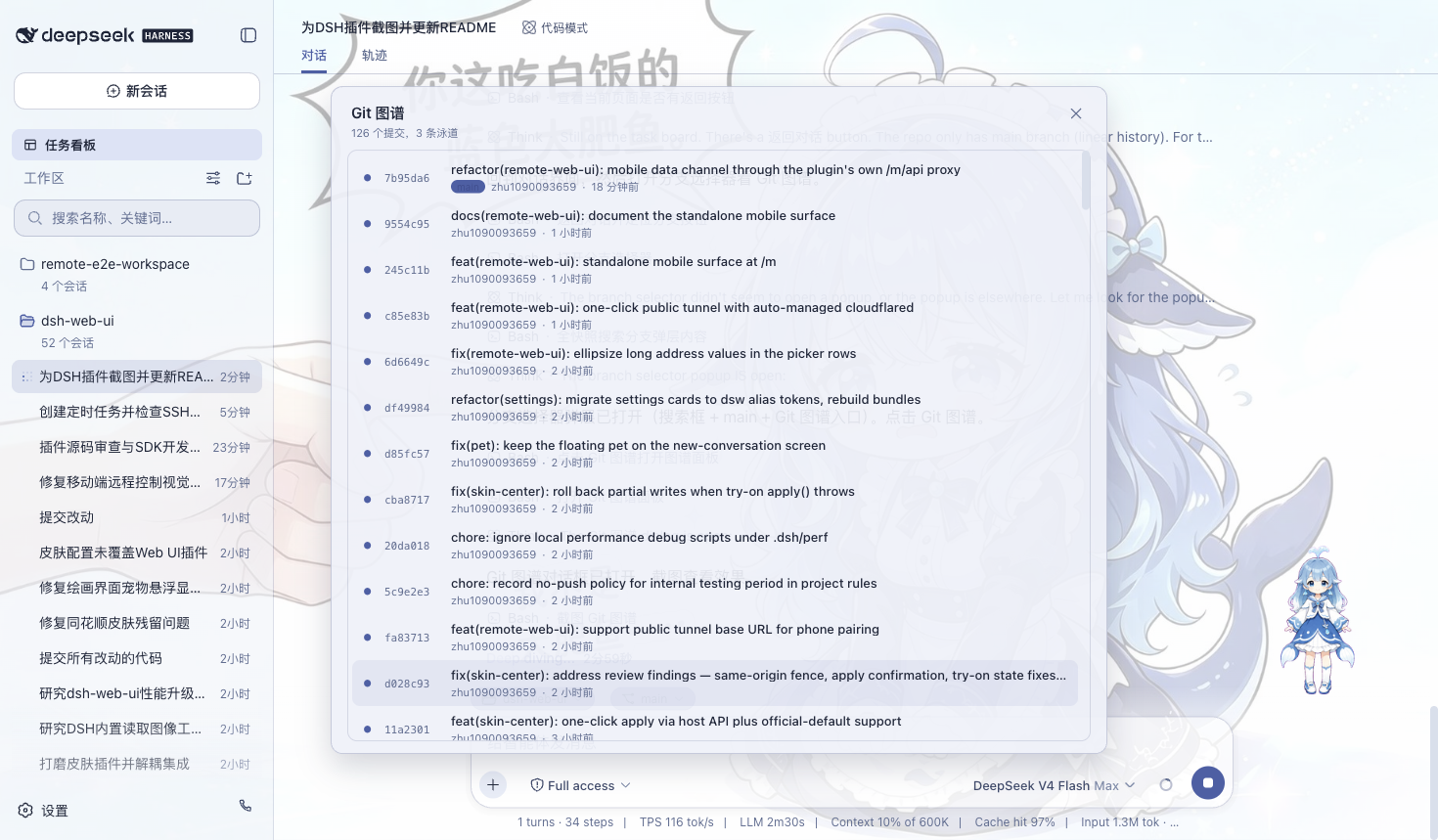
| Git visualization | None | Branch picker + commit history graph |
| Themes & skins | Default theme | Blue Fantasy ships with the skins plugin; other skins install from the Workshop |
## Workshop (dsh-market.com)
The [Workshop](https://dsh-market.com) (dsh-market.com) is DSH's one-stop home for creations: skins, pets and plugins in one place, each category ranked by device-backed likes with the top three on the landing-page podium; skins preview in a live try-on, plugins expose one-copy install commands. The Workshop settings card inside the Web GUI browses the catalog directly — skins and pets install into the DSH home directories in one click, plugins go through the plugin manager, and everything shows up in the skins and pet panels afterwards.
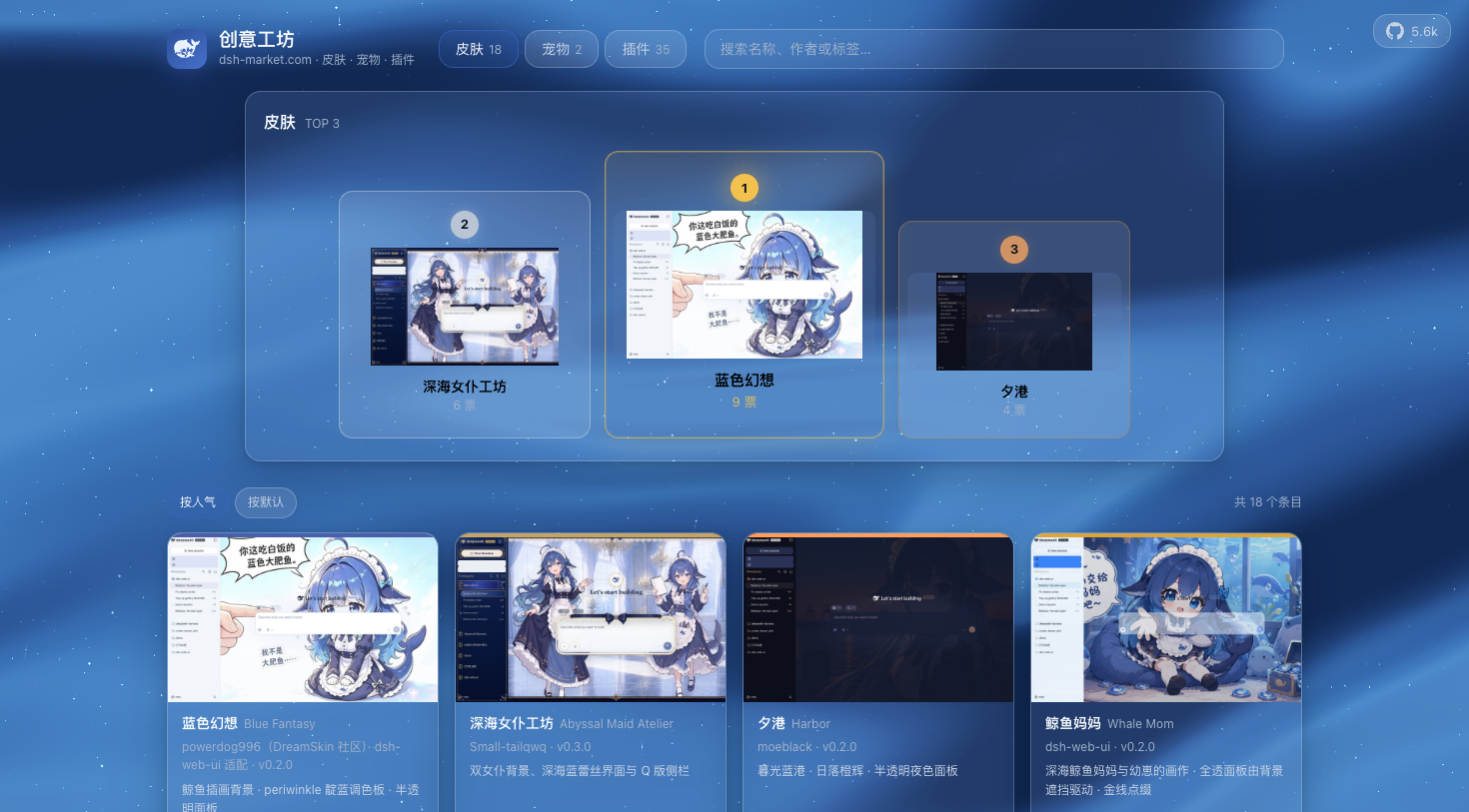
The site itself is also built from this repository: a static build generated deterministically by `scripts/market-build` from the three sources of truth (`skin.json` / `pet.json` / `community.json`); dynamic features like likes run on a Cloudflare Workers edge API (D1 persistence, one vote per device) and deploy automatically on every push to `main`.
The Workshop takes its cue from the Steam Workshop: a place where community creations are discovered, tried on and installed in one click, and where authors' work gets seen and liked. Come build it with us.
## Feature Plugins
### Performance Engine (dsh-perf)
Performance monitoring and governance for streaming and multi-session workloads. The bottom-right HUD panel is off by default; turn it on from the plugin settings and it shows per-session event rate, event-loop p99 latency, front-end FPS / Longtask, memory and write-batch delay, and alerts when active sessions cross the threshold (light / standard / strict presets). On the governance side: write-batch pacing lowers the fsync frequency while streaming; render degrade collapses oversized assistant messages and defers code highlighting, which is what removed the code-highlight spike at window open and turn end; plus agent idle badges and CSS render throttling.
All the settings sit on one card, 'Web Plugins → Performance Engine': master switch (full-stack), monitoring tier (off / balanced / aggressive), alert preset, HUD panel and render degrade. Mode and sampling interval take effect immediately on the host side, no restart needed. The observability side reads aggregate metrics only (event rate, delay distribution, memory) and never session content; the API is loopback-fenced and accepts same-origin local requests only. See packages/dsh-perf/README.md.
### Task Board(任务看板)
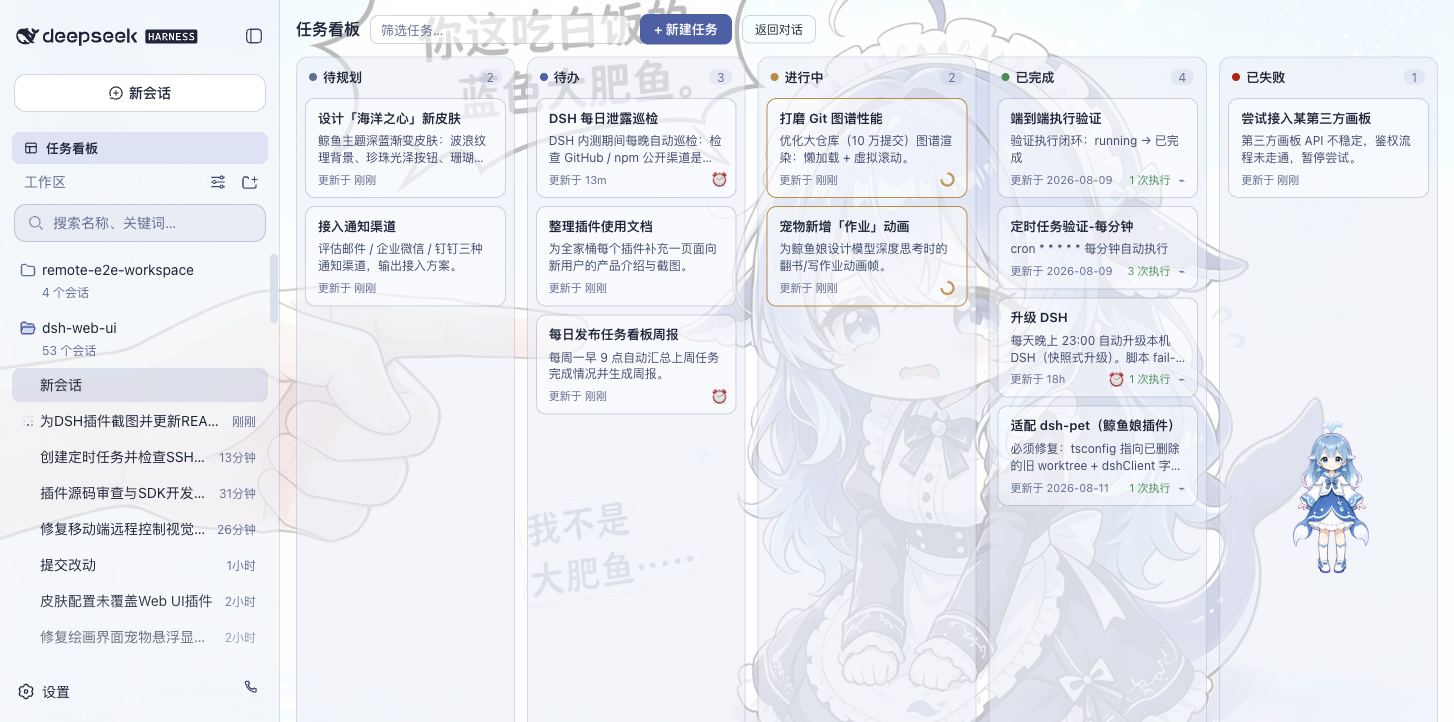
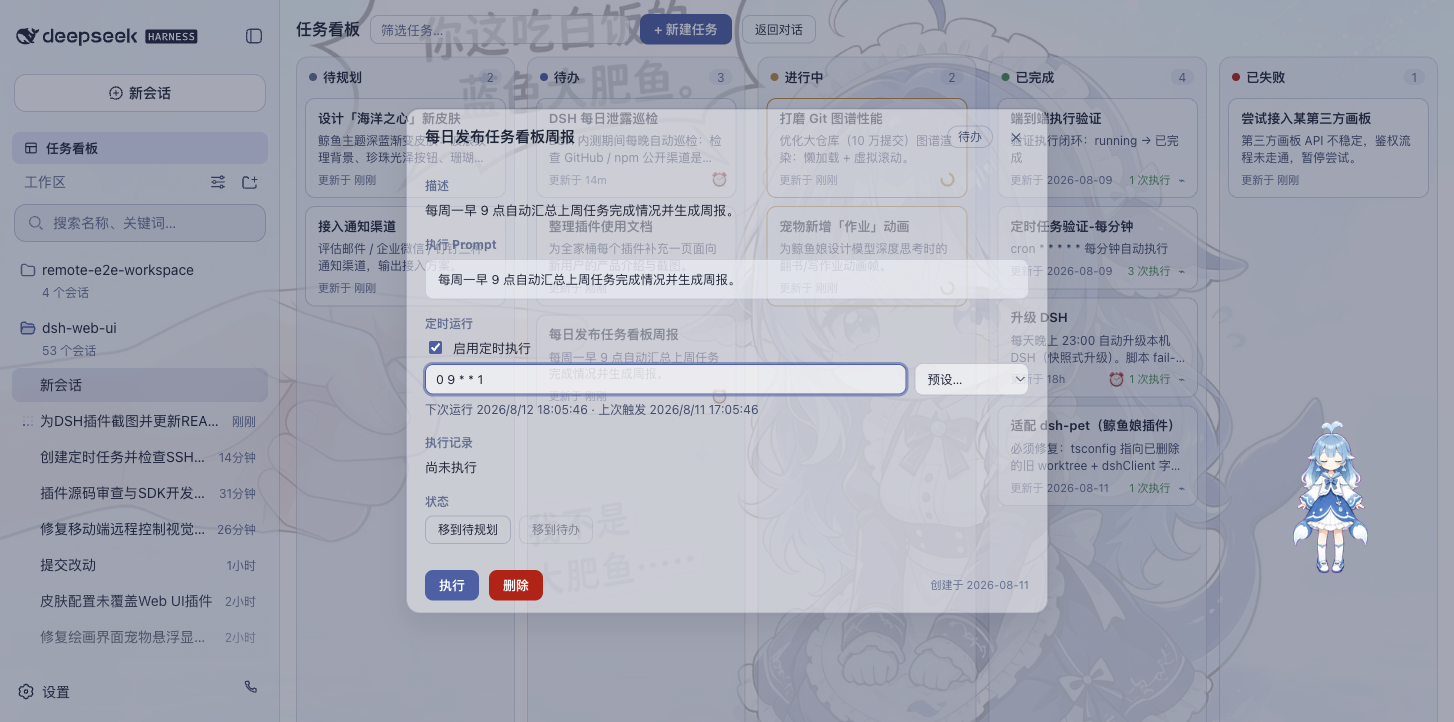
Open it from the sidebar. Tasks sit in five columns: Planned, To-do, In Progress, Done, Failed. Click "Run" on a card and the task goes to a real DSH agent session; the card status updates itself when it finishes. Want to see what happened? Jump back into the execution session for the full transcript.
Tasks can also run on schedule: set a cron expression in the detail view (auto-upgrade DSH at 23:00 every day, weekly report at 09:00 every Monday) and it starts on its own. No babysitting.
| Multi-column board | Scheduled execution |
| --- | --- |
|  |  |
### Mobile Remote Control(移动端远程控制)
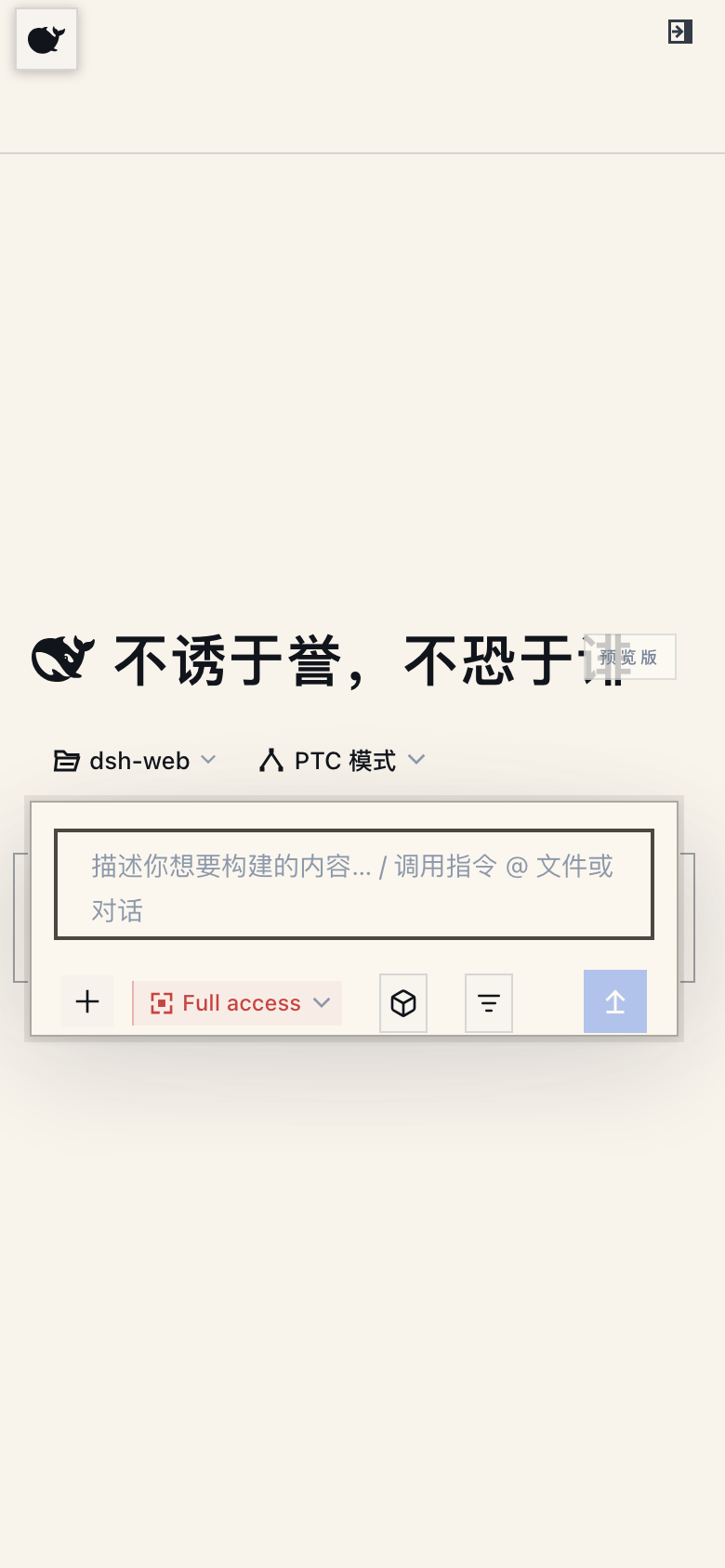
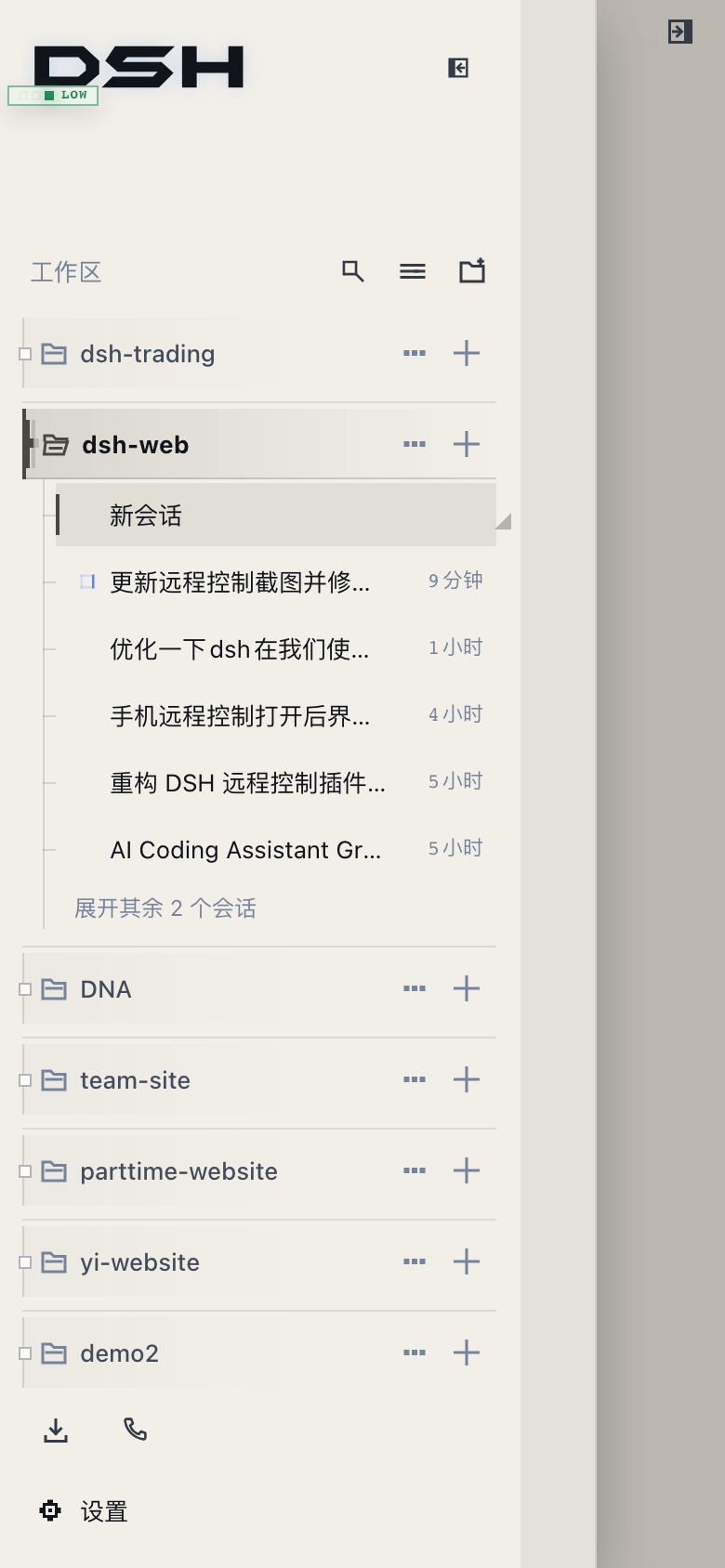
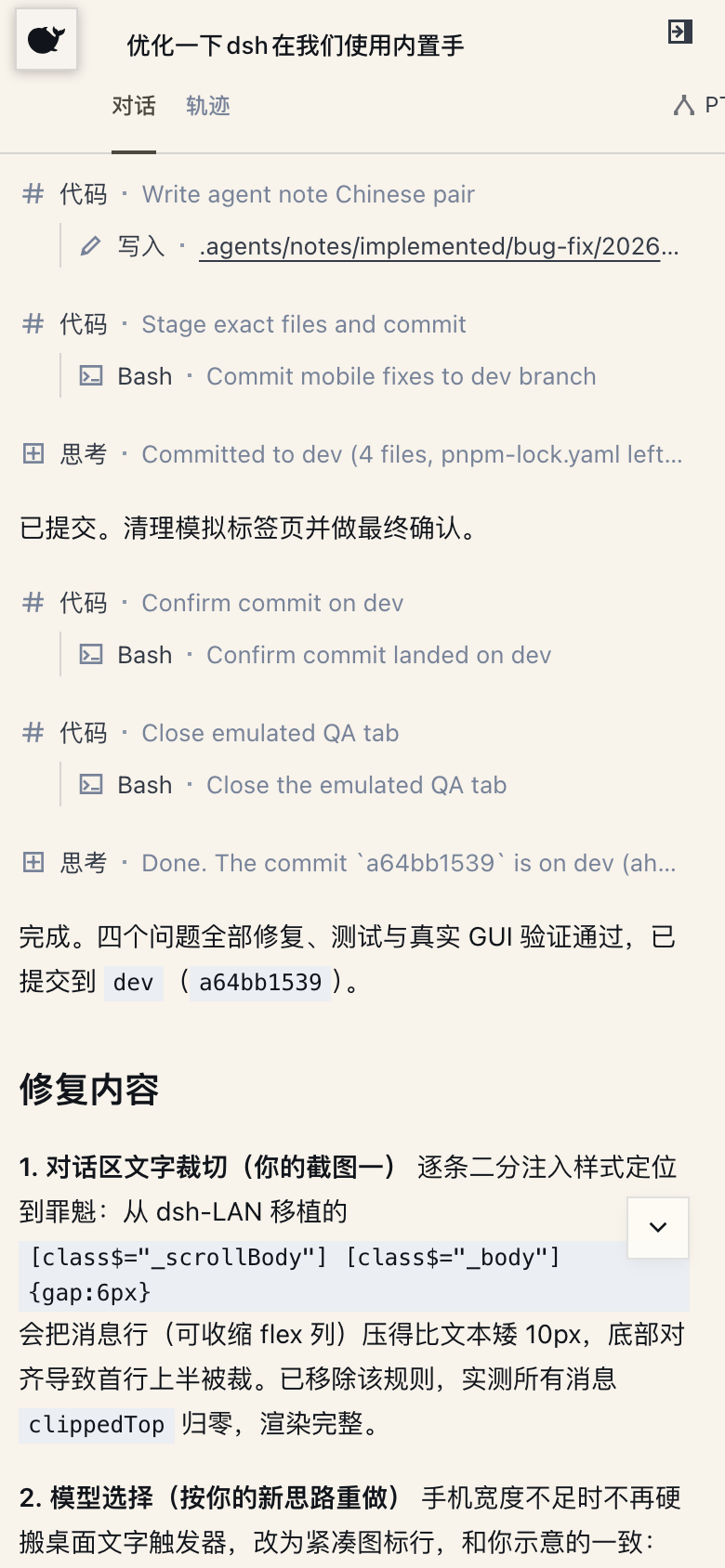
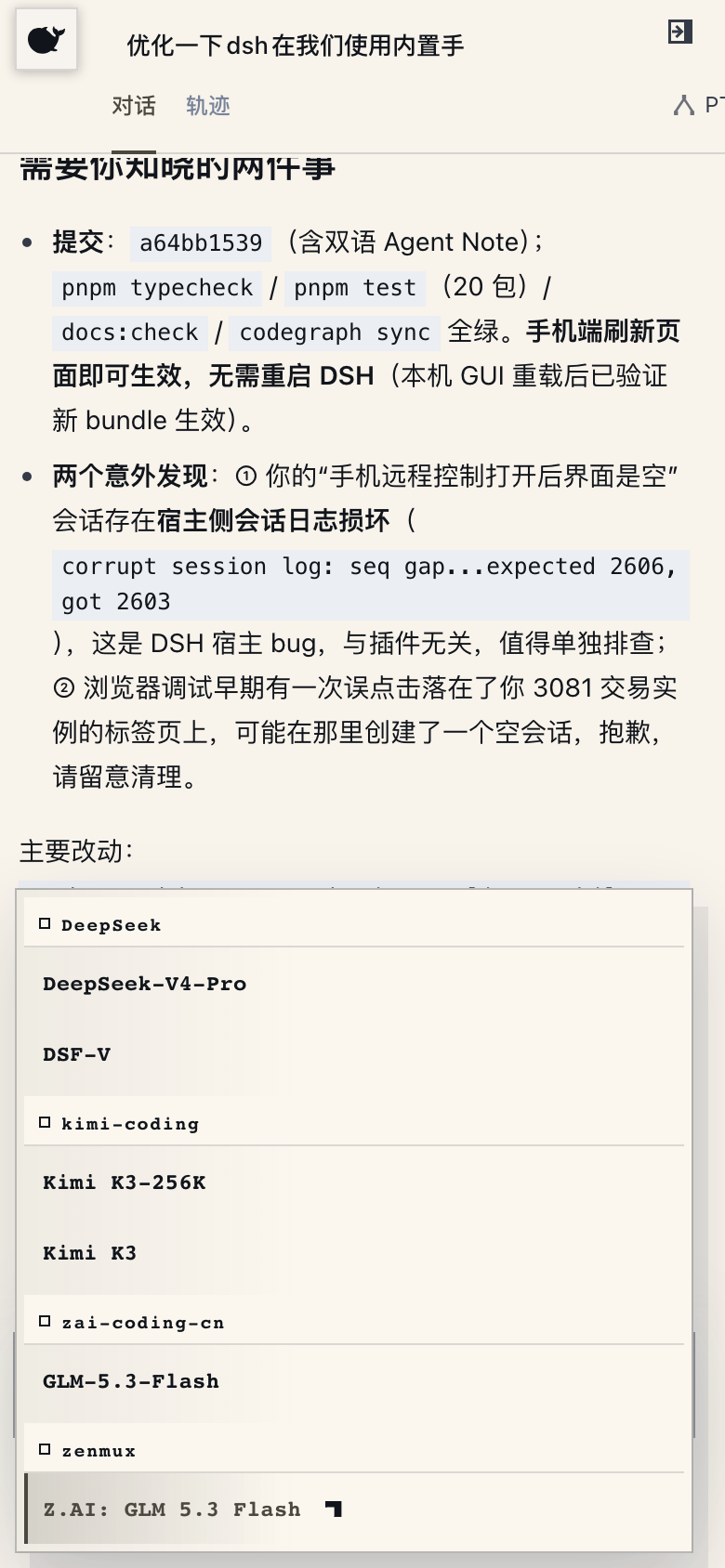
The phone icon at the bottom of the sidebar opens the pairing panel. Scan the QR code (or copy the link) and the phone runs the official Web GUI itself, with a portrait-touch adaptation injected automatically: a whale button opens the sidebar, left/right swipes collapse and expand it, long-press on a session row opens the same action menu as the desktop ellipsis, Enter inserts a newline, and 16px inputs guard against focus zoom; the desktop-oriented tool surfaces (SSH terminal, task board, git graph, etc.) hide on the phone — browsing and creating sessions, sending messages, switching models and reasoning effort, adjusting the permission preset: one UI, one state, fully in sync with the desktop. The same pairing link also pairs a **PC browser** (the phone pairing flow extended to the desktop Web GUI): open the desktop-URL form of the link on another computer and the full Web GUI runs there, its traffic on the pairing-gated `/remote/api` channel — unpaired devices get a banner and no data. Pairing tokens are one-time and time-limited; "Stop" revokes every device at any time. The QR targets the LAN by default; turn on the cloudflared public tunnel and the phone (and PC) can pair from any network. PC remote desktop should prefer this plugin's device-pairing channel; setting `--trusted-host` for a tunnel domain is not recommended on security grounds because that flag lets the SDK's `/api` bypass the pairing gate (see the [plugin README](packages/dsh-remote-web-ui/README.md)).
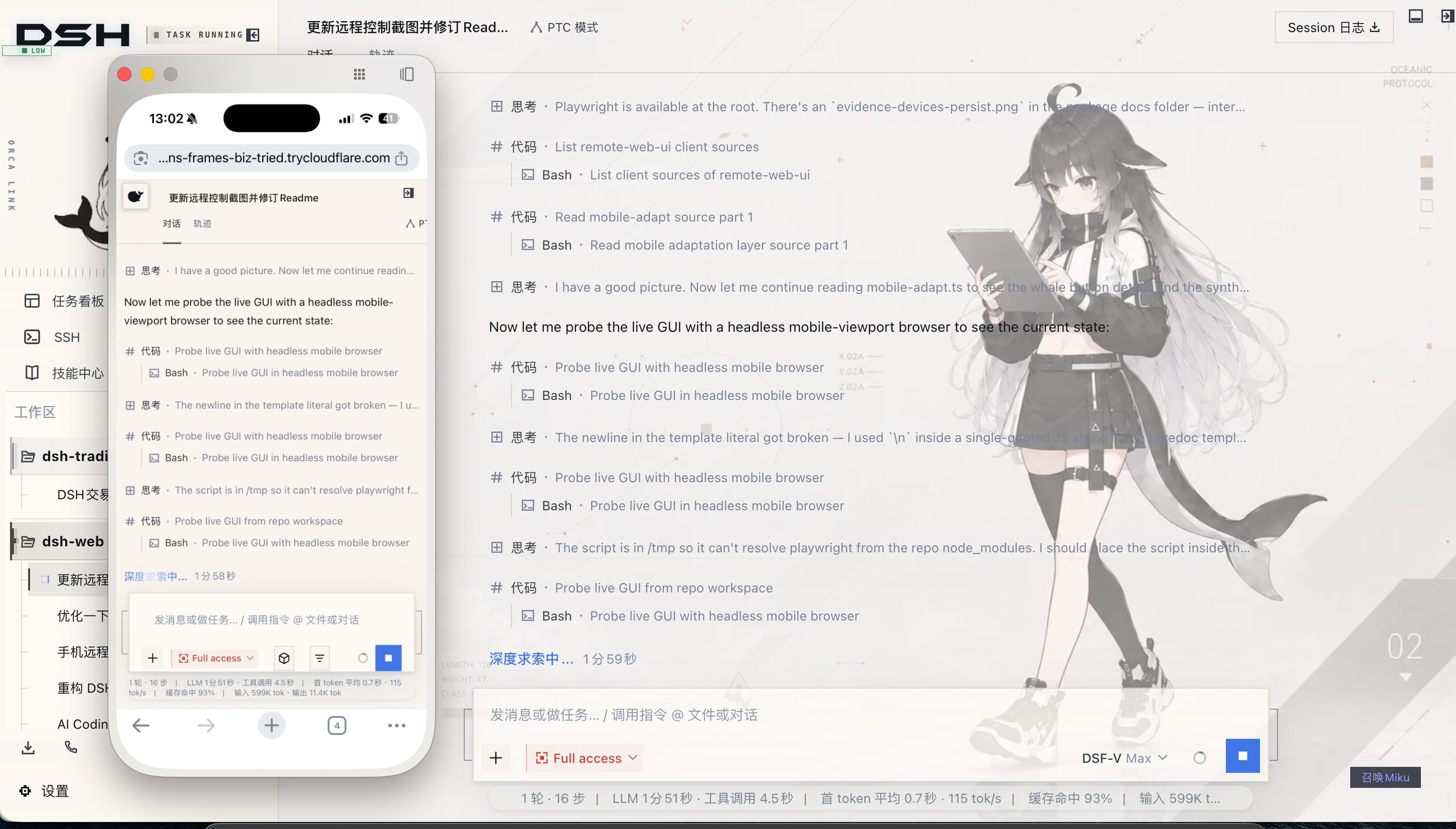
> **Real-time messages and tunnels**: mobile relies on SSE (Server-Sent Events) for live messages. Cloudflare quick tunnels (trycloudflare.com) and Tailscale Serve do not pass SSE through: plain HTTP works, live push never arrives. On those networks the plugin falls back to polling, so messages still flow and only new ones may lag a few seconds. For instant push use an SSE-capable tunnel (Cloudflare named tunnel, custom TCP port forwarding, etc.).
| Mobile home (whale entry) | Sessions |
| --- | --- |
|  |  |
| Chat (reasoning & tool calls) | Model picker (bottom sheet) |
|  |  |
### SSH Remote Ops(远程连接)
The "SSH" sidebar entry opens the remote-ops panel. Hosts support key / password auth and one-click import from `~/.ssh/config`; config lives in `~/.dsh/dsh-ssh.json`. Real operations on configured hosts:
- **Web terminal**: xterm.js PTY with live output and auto-fit;
- **File transfer**: SFTP upload / download with progress and a remote directory browser;
- **Port forwarding**: local tunnels into remote internal services (databases, APIs, admin consoles), bound to 127.0.0.1 only;
- **Cluster runs**: one command across many hosts, filtered by alias / environment / tags;
- **Agent direct control**: agents share the same host config. Say "check xxx" in chat and the agent runs the remote command.
### Image Understanding(图像理解)
Gives text-only models vision. When a conversation mentions an image (local path, http(s) URL, or session attachment), `describe_image` sends it to a configured OpenAI-compatible vision endpoint (Qwen-VL, GLM-4V, GPT-4o, a local Ollama endpoint, whatever you have) and returns the answer. **Only the returned text enters the conversation; the image itself never enters the session log.** Text-only models have no image entry in the input box, so the plugin adds an image button: pick a file, an attachment reference lands in your draft, and the model can analyze it via `describe_image`. A `prompt` argument takes custom instructions (OCR, UI diagnosis, translation) that beat the generic description. Endpoint, model, key and default instruction live under Settings > Plugin config > "Image understanding", applied immediately.
### Right Panel(右侧面板)
The right panel is provided by the external plugin [dsh-better-sidebar](https://github.com/omdsh-dev/DSH-better-sidebar) (integrated into the aggregate bundle and enabled by default), with its built-in features and third-party plugin registration — see its [README](https://github.com/omdsh-dev/DSH-better-sidebar).> Note: as of DSH 0.1.2-alpha.2 the official `@deepseek-ai/dsh-client-runtime` face is removed, and both better-sidebar and archive-manager need upstream ports; the two are temporarily excluded from the alpha.2 family bundle until compatible builds ship.
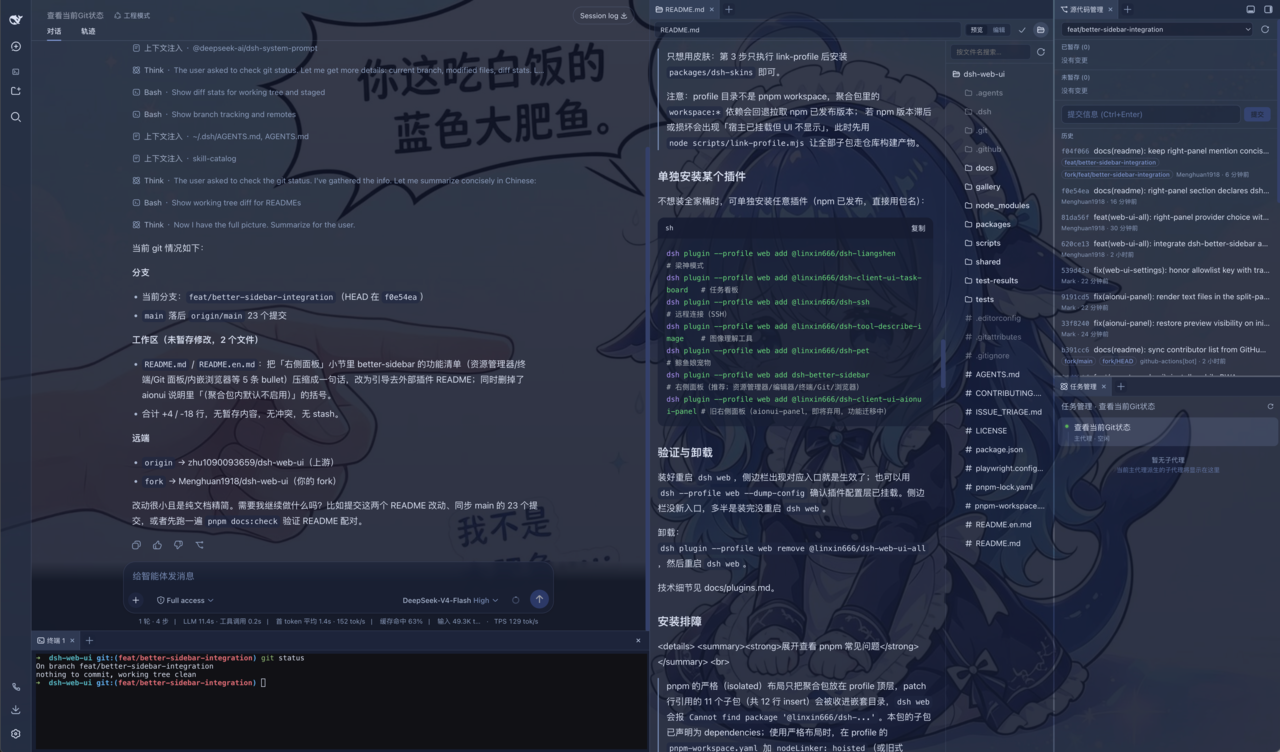
> The previous aionui-panel right panel has been **fully removed** (2026-08-28): the package and its family-bundle row are gone; the right panel is provided by [dsh-better-sidebar](https://github.com/omdsh-dev/DSH-better-sidebar), whose preferences live in that plugin's own settings section.
### Git Graph(Git 图谱)
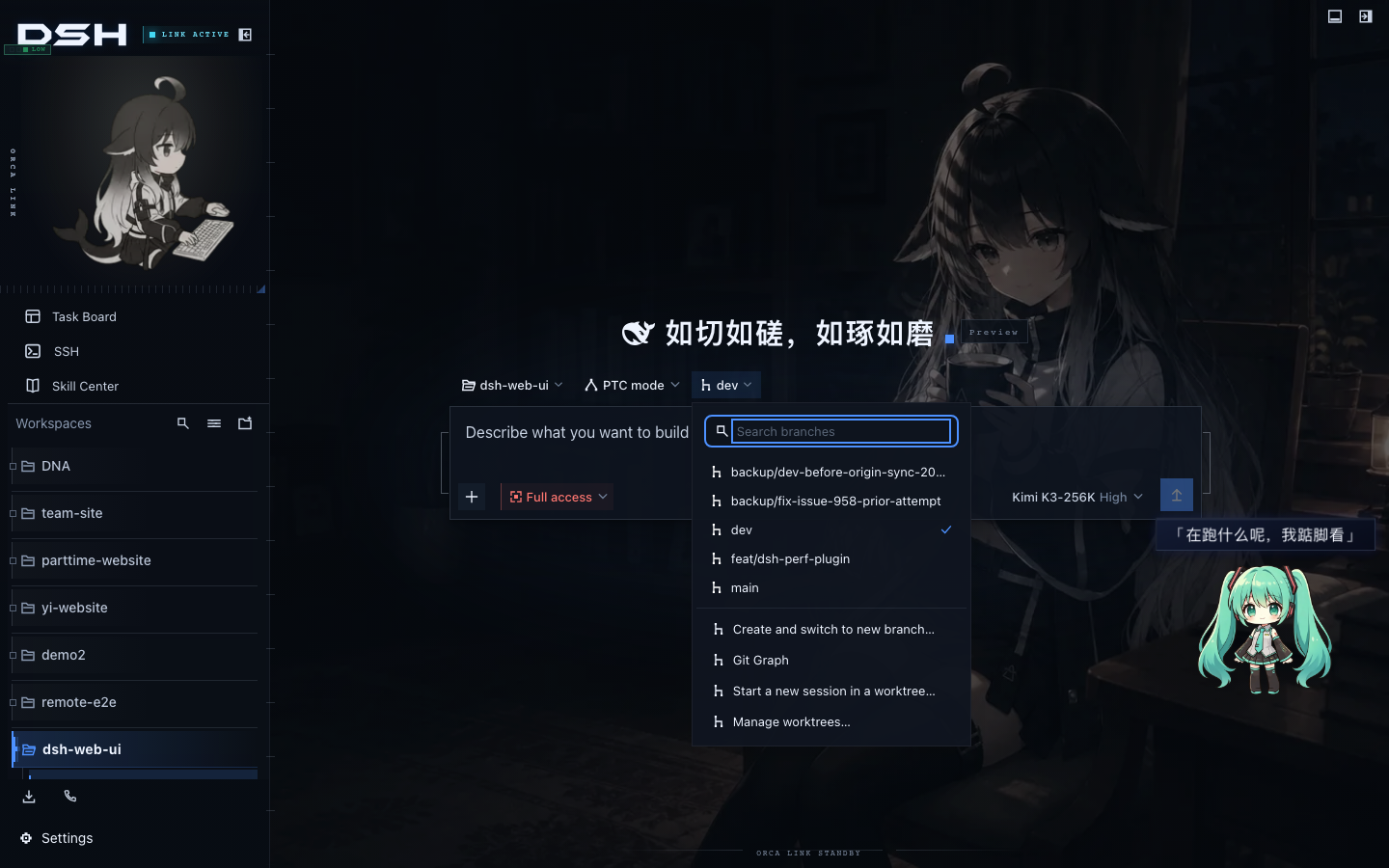
The branch picker above the input box switches branches and browses commit history. The Git graph draws branch lanes and commits on a timeline, which stays readable even in big repositories.
It also grows git worktree parallel sessions: "Start a new session in a worktree" in the popover creates an isolated checkout under `$DSH_HOME/worktrees/` (on a new `wt/` branch, with a selectable base), registers it as a workspace, and opens a new session there — the main checkout never moves. "Manage worktrees" lists every managed checkout and removes them (a dirty tree is refused once before force is offered; the `wt/` branch is kept by default). Two settings stay off by default: auto-isolation routes every new session of a git workspace into its own worktree (baseline: current branch or the remote default branch), and the agent tool hands `git_worktree` to the agent so it can create its own isolated environment.
### LiangShen Mode (Anchored Agent Preset)(梁神模式)
LiangShen Mode (`dsh-liangshen`) is a two-phase anchored agent preset that installs with the family bundle: pick "梁神模式" in the preset picker of a new session. The first model request sees only the builtin Minimal preset's exact two tools (persistent `bash` and `str_replace_editor`) plus a one-line persona — no runtime context, no injected instructions. After the first tool call, promotion waits for the first minimal-like reasoning block, then the wire switches to PTC Mode (a single `run_code` backed by the full tool registry through a generated SDK) and every prompt section and ordinary injection returns. It separates the first-trajectory choice from full later capability: in the community eval, Standard / PTC scored 91/92 while Minimal reached 99/96, and the two-phase setup measures a 98.5 mean on native Windows without sacrificing tool capability. The phase derives from persisted session events, so resume never loses state, and plan mode is supported. See the [dsh-liangshen README](packages/dsh-liangshen/README.md) for the rationale and stabilization controls.
### Rescue Mode(救助模式)
Rescue mode (`dsh-doctor`) is a transactional rescue system for DSH profiles, **on by default**: a user-level Doctor Supervisor service and a transparent Doctor Launcher maintain an isolated rescue capsule, detecting boot failures, process crashes, heartbeat loss, web faults and browser white-screens. Every repair is a transaction: snapshot the current profile, apply deterministic rules in a candidate environment, pass isolated dump-config and web health gates, then promote atomically — or roll back byte-for-byte. Profiles change only through the official `dsh plugin` command, and no unverified `latest` is ever installed. The web console (the Doctor card under Settings → Plugin config → Web Plugins) shows fault events with diagnose, repair and rollback actions; "Send to Harness" composes the latest fault's summary and error stack into a troubleshooting prompt delivered back into the current session so your agent can diagnose in place. The Supervisor listens only on a local socket (0600 token) and the web API is loopback-only; see the [dsh-doctor README](packages/dsh-doctor/README.md) for the security model and the `dsh-doctor` CLI.
### More Plugins(更多插件)
- **Skill center** (`dsh-client-ui-skill-explorer`): browse loaded skills by source; enable, disable, create and delete.
- **Plugin manager** (`dsh-client-ui-plugin-manager`): install plugins from npm or git through the official host channels; manage enablement and configuration.
- **Branching session editing** (external plugin [@morlay/better-session](https://github.com/morlay/better-session), bundled in the aggregate, inactive by default): edit past messages in place and regenerate, one-click retry of failed turns, with rewind and fork support; enablement and legacy migration live in the dsh-web-all README.
- **Desktop launcher** (`dsh-desktop-launcher`): a double-click desktop icon starts `dsh web` and opens the Web GUI; a floating power button exits the host process gracefully.
- **Archive manager** (external plugin [@mlgbnb/dsh-archive-manager](https://github.com/z953218350/dsh-archive-manager), bundled in the aggregate): group sessions by project, search and filter, preview conversations, restore or delete in one click.> Note: temporarily excluded in the alpha.2 family bundle (same as better-sidebar, pending upstream compatibility with the dsh-client-runtime removal).
### Skins
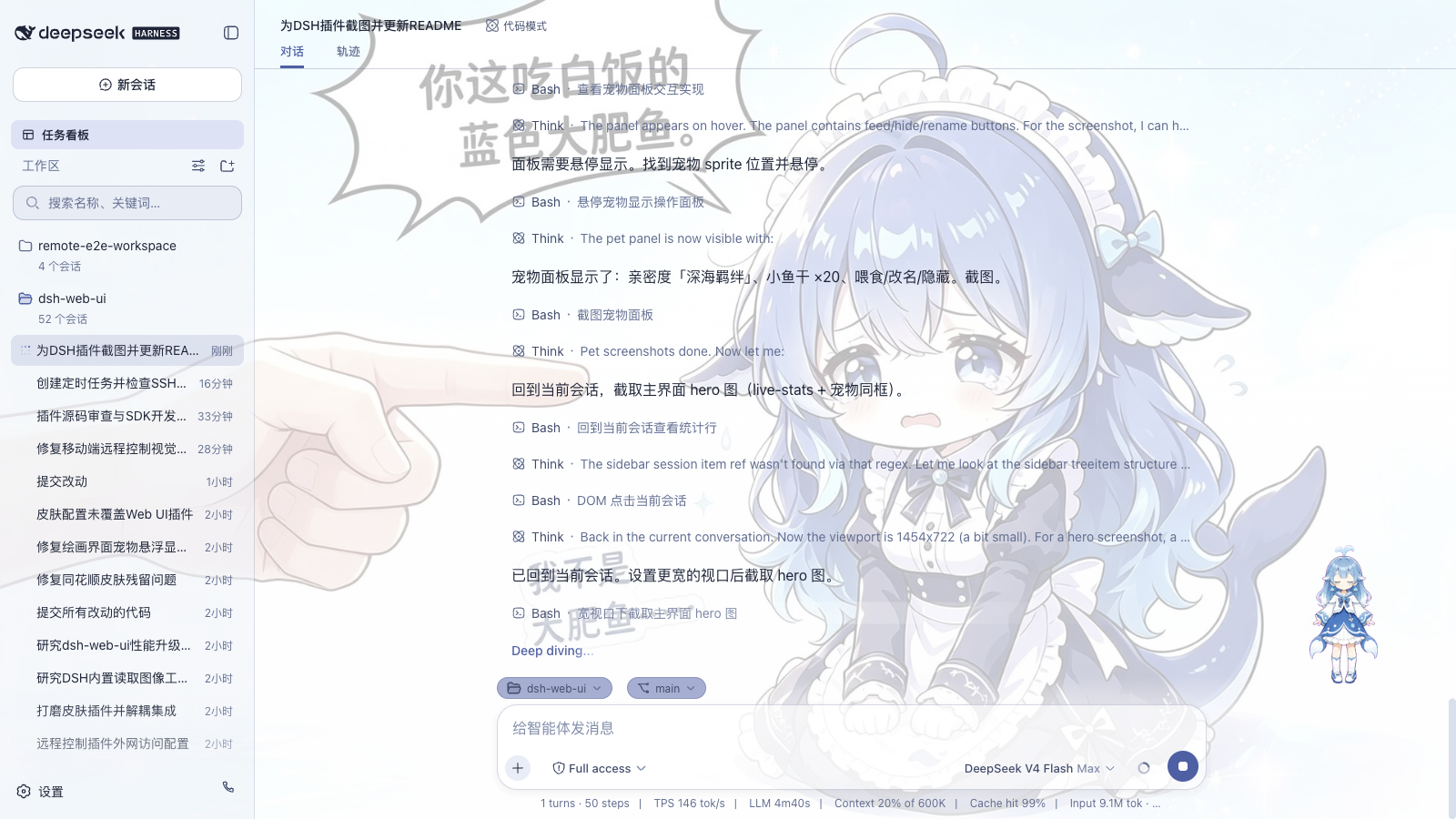
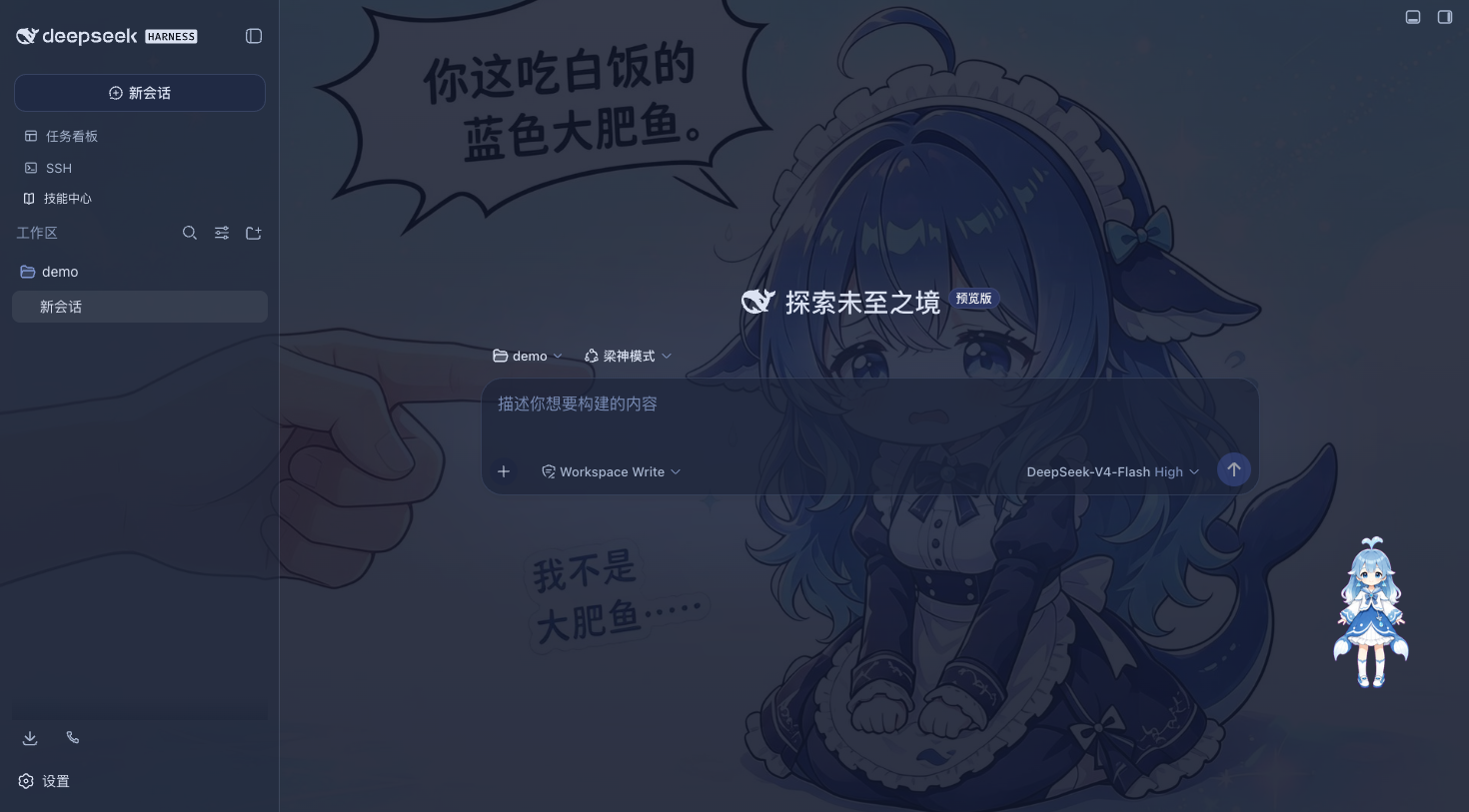
Classic Blue Fantasy is the default skin shipped with the skins plugin: whale artwork sits beneath translucent panes in a periwinkle-indigo palette that reads best in dark mode. Other skins and Wallpaper Engine wallpapers are managed by the skins plugin and are available to browse, try on and install on demand from the [Workshop](https://dsh-market.com).
## Quick Start
### System Requirements
- DeepSeek Harness installed, with `dsh web` starting normally.
- npm installs need nothing extra; repository installs need Node.js >= 22 and pnpm.
### Get Started in 3 Steps (npm, Recommended)
- **DSH Web CLI (Browser)**:
1. Install the aggregate package: `dsh plugin --profile web add @linxin666/dsh-web-all@latest`
2. Restart `dsh web`, every plugin entry appears in the sidebar
3. Open "Settings > Plugin config" to toggle plugins, or try on skins in the skins panel
- **DSH Desktop (Desktop Client)**:
1. Install the aggregate package: `dsh plugin --profile desktop add @linxin666/dsh-web-all@latest`
2. Verify bundle mount: `dsh --profile desktop --dump-config`
3. Fully quit and restart the DSH Desktop application to see all plugin and skin entries
> Skins only? Install `@linxin666/dsh-client-ui-skin-center`. If you ended up with an old version (pnpm 11's release-age gate), see "Install Troubleshooting" below.
### Install Directly from the GitHub Repository
The repository root `package.json` declares `dsh.bundle` (reusing the aggregate's assembly manifest) and depends on the npm-published aggregate, so the whole repository installs directly as one plugin — no clone or build needed. Plugin hubs that one-click-install from a repository use exactly this path:
```sh
dsh plugin --profile web add github:zhu1090093659/dsh-web
# Equivalent: dsh plugin --profile web add git+https://github.com/zhu1090093659/dsh-web.git
```
The plugin code comes from the npm aggregate resolved at install time; the repository only contributes the assembly manifest. Choose either this or the npm aggregate install — both produce the same `web-ui-*` plugin rows, and installing both fails to mount on duplicate ids.
### Install from the Repository (Development)
The packages are already on npm; installing from this repository is only for development (requires Node.js >= 22 and pnpm):
```sh
# 1. Clone the repository
git clone https://github.com/zhu1090093659/dsh-web.git
cd dsh-web
# 2. Install dependencies and build
pnpm install
pnpm -r build
# 3. Link the family into the web profile (recommended: link all children first, then the aggregate)
node scripts/link-profile.mjs
dsh plugin --profile web add link:$(pwd)/packages/dsh-web-all
# 4. Restart dsh web, all plugin entries appear in the sidebar
dsh web
```
> Skins only? Run only link-profile in step 3, then install `packages/skins/skin-center`.
>
> Note: the profile directory is not a pnpm workspace, so `workspace:*` dependencies in the aggregate package
> fall back to the published npm versions; if the npm versions lag or break you may see "host mounted but UI
> missing". In that case run `node scripts/link-profile.mjs` first so every child package uses the
> repository build output.
### Upgrade from the legacy aggregate
Profiles still mounted on `@linxin666/dsh-web-ui-all` do not need a manual remove-then-add step. With Doctor enabled, the Doctor Launcher detects the legacy aggregate before starting DSH and runs a transactional migration: installs `@linxin666/dsh-web-all`, removes the legacy package, preserves the existing `web-ui-*` rows and bundle order, and passes a `--dump-config` preflight before continuing. Launch through `dsh-doctor launch` or the Doctor service; a bare `dsh web` does not pass through this preflight.
### Install a Single Plugin
Prefer individual plugins? Install them one by one (published on npm, so use the package name directly):
```sh
dsh plugin --profile web add @linxin666/dsh-client-ui-task-board@latest # Task board
dsh plugin --profile web add @linxin666/dsh-ssh@latest # Remote connection (SSH)
dsh plugin --profile web add @linxin666/dsh-tool-describe-image@latest # Image understanding tool
dsh plugin --profile web add @linxin666/dsh-pet@latest # Whale-girl pet
dsh plugin --profile web add @linxin666/dsh-liangshen@latest # LiangShen mode (two-phase anchored preset, pick in new sessions)
dsh plugin --profile web add @linxin666/dsh-doctor@latest # Rescue mode (on by default, can be disabled in the Doctor card)
dsh plugin --profile web add dsh-better-sidebar@latest # Right panel (recommended; explorer/editor/terminal/git/browser)
```
All npm packages
Every plugin is published on npm under the `@linxin666/dsh-*` scope and can be viewed and installed directly:
| npm package | What it is |
| --- | --- |
| [@linxin666/dsh-web-all](https://www.npmjs.com/package/@linxin666/dsh-web-all) | All-in-one aggregate: every feature plugin in one install, including the skins plugin and its skin assets |
| [@linxin666/dsh-client-ui-task-board](https://www.npmjs.com/package/@linxin666/dsh-client-ui-task-board) | Task board: real session execution plus cron scheduling |
| [@linxin666/dsh-remote-web-ui](https://www.npmjs.com/package/@linxin666/dsh-remote-web-ui) | Scan-to-pair remote control of the Web GUI from mobile or PC |
| [@linxin666/dsh-ssh](https://www.npmjs.com/package/@linxin666/dsh-ssh) | SSH panel: terminal / transfer / tunnel / cluster |
| [@linxin666/dsh-tool-describe-image](https://www.npmjs.com/package/@linxin666/dsh-tool-describe-image) | `describe_image` vision tool |
| [@linxin666/dsh-pet](https://www.npmjs.com/package/@linxin666/dsh-pet) | Registry-driven floating pet companion |
| [@linxin666/dsh-liangshen](https://www.npmjs.com/package/@linxin666/dsh-liangshen) | LiangShen mode: two-phase anchored agent preset |
| [@linxin666/dsh-client-ui-git-graph](https://www.npmjs.com/package/@linxin666/dsh-client-ui-git-graph) | Git branch selector and commit history graph |
| [@linxin666/dsh-client-ui-skin-center](https://www.npmjs.com/package/@linxin666/dsh-client-ui-skin-center) | Skins: the single loader for every skin, with skin assets installed on demand from the Workshop |
| [@linxin666/dsh-client-ui-market](https://www.npmjs.com/package/@linxin666/dsh-client-ui-market) | Workshop card: browse skins / pets / plugins from dsh-market.com and install with one click |
| [@linxin666/dsh-client-ui-plugin-manager](https://www.npmjs.com/package/@linxin666/dsh-client-ui-plugin-manager) | Plugin manager: install from npm or git, enable, disable and configure |
| [@linxin666/dsh-client-ui-skill-explorer](https://www.npmjs.com/package/@linxin666/dsh-client-ui-skill-explorer) | Skill center: browse, toggle and manage skills |
| [@morlay/better-session](https://www.npmjs.com/package/@morlay/better-session) | Branching session editing: in-place edit / retry / rewind / fork (inactive in the aggregate by default) |
| [@linxin666/dsh-desktop-launcher](https://www.npmjs.com/package/@linxin666/dsh-desktop-launcher) | Desktop launcher: one-click start and shutdown for dsh |
| [@linxin666/dsh-doctor](https://www.npmjs.com/package/@linxin666/dsh-doctor) | Transactional rescue mode: repairs DSH profiles (on by default) |
| [@linxin666/dsh-client-ui-community-plugins](https://www.npmjs.com/package/@linxin666/dsh-client-ui-community-plugins) | Community plugin data source: the market plugin list is generated from it |
| [@linxin666/dsh-client-ui-web-ui-settings](https://www.npmjs.com/package/@linxin666/dsh-client-ui-web-ui-settings) | Settings section for the dsh-web plugin group |
### Verify and Uninstall
After installing, restart `dsh web`; a working plugin shows up in the sidebar. `dsh --profile web --dump-config` also confirms the mounted config layers. If the sidebar shows nothing, you most likely forgot to restart `dsh web`.
Uninstall: `dsh plugin --profile web remove @linxin666/dsh-web-all`, then restart `dsh web`.
Technical details live in [docs/plugins.md](docs/plugins.md).
### Install Troubleshooting
Expand for common pnpm issues
> pnpm's strict (isolated) layout only puts the aggregate package at the profile top level, so the child packages referenced by the patch rows stay nested and `dsh web` fails with `Cannot find package '@linxin666/dsh-...'`. The children are declared as dependencies of this package; on a strict layout, add `nodeLinker: hoisted` (or the legacy `public-hoist-pattern: ['@linxin666/*']`) to the profile's `pnpm-workspace.yaml` and reinstall.
> First install may stop on `ERR_PNPM_IGNORED_BUILDS` (pnpm blocks dependency build scripts): copy the printed keys (`cloudflared` / `cpu-features` / `ssh2`) into the profile's `pnpm-workspace.yaml` `allowBuilds` list and re-run.
> **pnpm 11 release-age gate**: within 24 hours of a new release (the built-in `minimumReleaseAge` default), pnpm 11 can silently resolve to older `@linxin666/*` versions (e.g. `dsh-web-all@0.1.20` with the old skins plugin); an explicit `@latest` is gated the same way. The old skins plugin writes references to standalone skin packages when a skin is applied, which crashes `dsh web` at boot (`ERR_MODULE_NOT_FOUND ... dsh-client-ui-skin-*`). Exclude every `@linxin666/*` package in the profile's `pnpm-workspace.yaml` before installing or updating:
>
> ```yaml
> minimumReleaseAgeExclude:
> - '@linxin666/*'
> ```
## FAQ
I restarted, but nothing appears in the sidebar?
A: First make sure the plugin went into the `web` profile (the `--profile web` in the command), then check the mounted config layers with `dsh --profile web --dump-config`. Still stuck? See "Install Troubleshooting" above. A page refresh is not enough; the `dsh web` process must restart.
Why didn't a scheduled task run on time?
A: Scheduling runs in the `dsh web` Host and does not require a browser tab to stay open. Occurrences missed while the Host is stopped, the system is asleep, or the Host is paused for a long time are skipped rather than queued; an occurrence due while the same task is running also rolls to the next match. To allow the display to turn off while preventing idle system sleep, explicitly enable the task board's power-protection setting.
The phone pairs but gets no live messages?
A: Cloudflare quick tunnels and Tailscale Serve do not pass SSE through. On those networks the plugin falls back to polling: messages still flow, new ones may lag a few seconds. For instant push use an SSE-capable tunnel (Cloudflare named tunnel, custom TCP port forwarding, etc.).
I tried a skin and don't like it, what now?
A: Skins support try-on before apply: the preview applies instantly and reverts fully on exit, and nothing persists until you click "Apply". Feel free to experiment.
I only want the skins, or just one plugin?
A: Install `@linxin666/dsh-client-ui-skin-center` for skins only, or use the package names under "Install a Single Plugin". Both work with the npm install flow.
Can I install a single plugin alongside the family bundle?
A: Yes. The aggregate namespaces every row id with a `web-ui-` prefix (e.g. `web-ui-describe-image`), which no longer collides with the standalone plugin's own id (e.g. `describe-image`), so `dsh web` no longer fails with `duplicate loader entry id`. When the same plugin is loaded from both sources, the host half registers once (the second source is a no-op) and the browser half is deduped by package name. Keeping both sources has no benefit, so prefer one. Note that profile patch config rows written by id must use the `web-ui-` prefixed id when the plugin comes from the bundle (e.g. the remote-web-ui `autoTunnel` row becomes `web-ui-remote-web-ui`); standalone installs keep the plugin's own id.
## Known Limitations
- The task board is scheduled by the Host and continues after the browser closes; occurrences missed while the Host is stopped or the computer is asleep are skipped and not replayed. Optional power protection is off by default and prevents only idle system sleep, not lid close, manual sleep, hibernation, or shutdown. See [dsh-task-board README](packages/dsh-task-board/README.md).
- SSH passwords and passphrases are stored in plaintext in `~/.dsh/dsh-ssh.json` (mode 0600); reconnects may replay non-idempotent commands, and remote output is returned unredacted. See the security model in [dsh-ssh README](packages/dsh-ssh/README.md).
- Mobile remote relies on SSE live push: Cloudflare quick tunnels and Tailscale Serve do not pass SSE through, so the plugin falls back to polling and new messages may arrive a few seconds late.
- Repository installs require Node.js >= 22 and pnpm and are for development only; npm installs are unaffected.
## Community
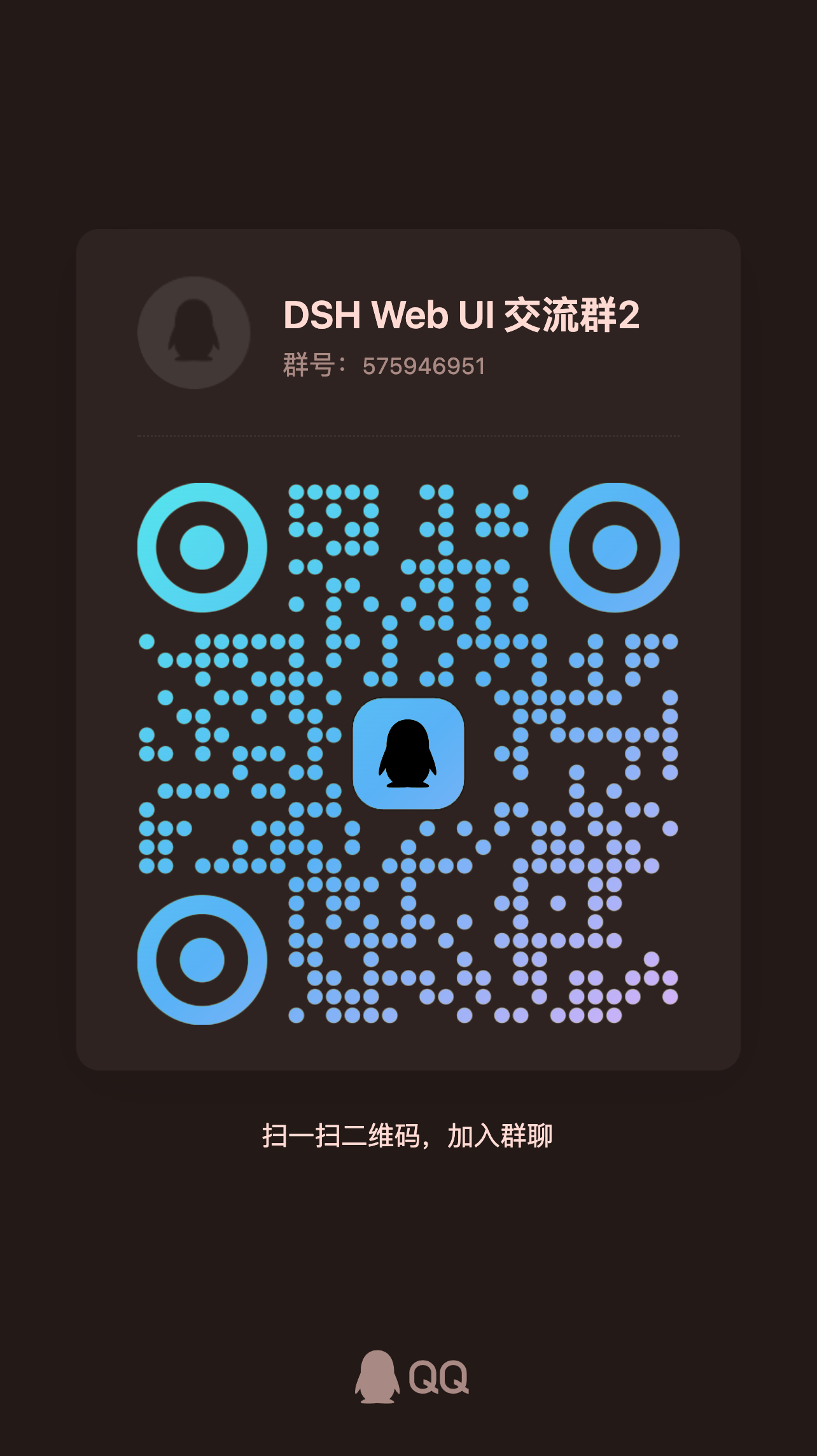
The community chat is here: talk usage, report issues and discuss ideas with the developers and other users. Scan the QQ code to join "DSH Web UI 交流群":
 You can also join the [Discord community](https://discord.gg/6v4gm9u4S), or head straight to [GitHub Issues](https://github.com/zhu1090093659/dsh-web/issues) to report bugs / request features.
Friend links
- [DeepSeek Harness Desktop](https://github.com/anywhere-labs/deepseek-harness-desktop) — a modern desktop experience built for the DeepSeek Harness (DSH) ecosystem.
- [LINUX DO](https://linux.do) — a new ideal community.
- [dshfind](https://dshfind.com) — a learning and sharing community for DeepSeek Harness, aggregating paper deep-dives, a plugin marketplace and user rankings.
- [deepseek-plugin-store](https://github.com/Ericwong5021/deepseek-plugin-store) — an independent community plugin store for DeepSeek Harness: discover, install and submit verified plugins, tools and extensions.
- [dsh-data-agent](https://github.com/omdsh-dev/dsh-data-agent) — a dedicated Data Agent preset for DSH that lets AI query, update and analyze your data.
- [dsh-TUI](https://github.com/ccch1mneyyy/dsh-TUI) — a Claude Code style full-screen terminal plugin filling the official terminal TUI gap: pixel whale header, live status line, streamed reasoning, double-Esc rollback, context progress and a TPS gauge.
- [dsh-tianshu-tui](https://github.com/huiliyi37/dsh-tianshu-tui) — an interactive terminal UI plugin built on the official DeepSeek Harness, adding TDD and evidence gates on top.
- [dsh-genui](https://github.com/omdsh-dev/dsh-genui) — renders generative UI inline in assistant replies via the dsh-ui fence: layouts, charts, tables, forms, quizzes, Mermaid, 3D and native audio/video, with dual-channel rendering for stock DSH and newer builds, streaming render, panel docking and component actions looping back to the model.
- [dsh-annotation](https://github.com/omdsh-dev/dsh-annotation) — select text in DSH Web, annotate it and send it along with your message; the model replies per Annotation N. The UI and annotation block follow the DSH locale (zh/en), Cmd/Ctrl+Enter sends annotations alone, and slash commands pass through unchanged.
## Contributing
- Read [CONTRIBUTING.md](CONTRIBUTING.md) before opening a PR; attach screenshots or verification evidence for user-visible changes.
- Commit messages follow Conventional Commits (e.g. `fix(task-board): fix xxx`); emoji is banned in code, docs and commit messages alike.
- Scaffold new plugins and skins with `node scripts/dsh-plugin-new ` and `node scripts/dsh-skin-new`.
- Pass the gates before submitting: `pnpm typecheck && pnpm test && pnpm docs:check`. The full workflow lives in [docs/development.md](docs/development.md).
## License
This repository is licensed under [Apache-2.0](LICENSE). Third-party code merged in must keep its LICENSE and attribution; active third parties with an upstream are forked or referenced as dependencies instead of vendored.
### Sources & Licensing
Third-party sources & licenses (click to expand · plugins / skins / pets)
**Plugins**
- **dsh-task-board / dsh-git-graph / dsh-pet / dsh-remote-web-ui / dsh-web-settings / dsh-doctor / dsh-ssh / dsh-skill-explorer / dsh-desktop-launcher / dsh-market / dsh-plugin-manager / dsh-community-plugins / dsh-web-all** — authored by zhu1090093659, Apache-2.0 (zhu1090093659)
- **dsh-tool-describe-image** — ported from [whitelonng/dsh-plugin-describe-image](https://github.com/whitelonng/dsh-plugin-describe-image) (deepseek-harness `packages/vision/tool-describe-image`), Apache-2.0 (zhu1090093659)
- **dsh-liangshen** — plugin body original; preset derives from the DeepSeek Harness builtin Minimal / Standard presets and [xiaobright/dsh-anchored-standard](https://github.com/xiaobright/dsh-anchored-standard), Apache-2.0 (zhu1090093659) + MIT (preset derivations)
- **dsh-better-sidebar** — external integrated plugin [omdsh-dev/DSH-better-sidebar](https://github.com/omdsh-dev/DSH-better-sidebar) (right panel, npm dependency reference), MIT (omdsh-dev)
- **dsh-archive-manager** — external integrated plugin [z953218350/dsh-archive-manager](https://github.com/z953218350/dsh-archive-manager) (settings-page archive manager, npm dependency reference), MIT (z953218350)
- **better-session** — external integrated plugin [morlay/better-session](https://github.com/morlay/better-session) (branching session editing with RDB session persistence, npm dependency reference), MIT (morlay)
- **dsh-ssh** — implemented against the capability list of [badseal/ssh-skill](https://github.com/badseal/ssh-skill); code is this repository's Apache-2.0 (zhu1090093659), the upstream capability list belongs to badseal/ssh-skill
- **dsh-miku-pet** — code and asset layout follow [PC2005-cloud/dsh-pet](https://github.com/PC2005-cloud/dsh-pet) structure (MIT); the Hatsune Miku name, image and likeness belong to Crypton Future Media, INC. and usage follows the Piapro Character License (see [NOTICE.md](packages/dsh-miku-pet/NOTICE.md) in the package)
- **Community plugin index** — 37 external plugins with sources and licenses declared by their authors, registered in [community.json](packages/dsh-community-plugins/community.json), browsable in Settings → Community Plugins and on dsh-market.com
**Skins (third-party authors or artwork)**
- **maid-atelier / orca-link** — [Small-tailqwq/dsh-deep-whale](https://github.com/Small-tailqwq/dsh-deep-whale), CC BY-NC-SA 4.0; attribution chains in the in-package LICENSE/NOTICE (maid: 上善 → zipzip → Small-tailqwq; orca: 上善 → Small-tailqwq)
- **cyber-night** — logan0116; code under the repository license, backdrop generated by the author with OpenAI GPT and released as CC0 1.0 (public domain)
- **future-window** — zhuqin; original background and decorative artwork Apache-2.0 (in-package LICENSE/NOTICE, attribution in skin.json)
- **matrix** — contributor seanchen original (Matrix dark eye-care skin), Apache-2.0 (declared by seanchen)
- **blue-fantasy** — powerdog996 (DreamSkin community) adapted by dsh-web; no third-party license statement in the skin directory (pending author confirmation)
- **deep-current** — Twelveeee; no license statement in the skin directory (pending author confirmation)
- **furina** — artwork by sclass53, skin code zhu1090093659 (in-directory LICENSE is BSD-3-Clause); the Furina character belongs to miHoYo (Genshin Impact) and is used as fan art
- **harbor** — moeblack; no license statement in the skin directory (pending author confirmation)
- **miku** — artwork by 涂山苏苏, skin code zhu1090093659; the Hatsune Miku character belongs to Crypton Future Media, INC. (Piapro Character License)
- **pink-sakura** — artwork by guomengjia618-dot, skin code zhu1090093659 (in-directory LICENSE is Apache-2.0)
- **war-thunder** — skin code is this repository's (Apache-2.0); the background art and launcher crest are extracted read-only from a local War Thunder client, copyright Gaijin Entertainment, personal non-commercial use only (see skin.json attribution)
> The remaining skins (mint / whale-song / whale-mom / dragon-heir / minecraft / trading / summer-liquid-glass / wallpaper-exclusive / xp) are original to this repository, Apache-2.0.
**Pets**
- **ouo-neko** — Pessimist0906, MIT (contribution record in [PR #1118](https://github.com/zhu1090093659/dsh-web/pull/1118) and dsh-pet [THIRD_PARTY_NOTICES.md](packages/dsh-pet/THIRD_PARTY_NOTICES.md))
- **whale / whale-refined** — whale ornaments derived from the DeepSeek wordmark (MIT / BSD-3-Clause; materials and statements in dsh-pet THIRD_PARTY_NOTICES.md)
- **miku-pet** — see the plugin entry above (character rights under the Piapro Character License)
## Contributors


View all contributors
**If you like it, give us a star.**
[Report Bug](https://github.com/zhu1090093659/dsh-web/issues) · [Request Feature](https://github.com/zhu1090093659/dsh-web/issues) · [View Releases](https://github.com/zhu1090093659/dsh-web/releases)
## Support the Project
Thank you to everyone who uses, gives feedback on and contributes to dsh-web. If this project helps you, you are welcome to scan the QR code to support its continued maintenance and development: