> [!WARNING]
> **Disclaimer**
>
> This project is for **personal, local, educational and research use only**. It **rewrites DeepSeek Harness host sources** and replaces the identity, disclaimer and approval paragraphs in the system prompt. Installing it means you understand this and accept all consequences.
>
> - Use it **only on your own machine, with your own installation** — not on someone else's device, a shared environment or a production system.
> - Back up before you start. Every change writes a `.dshhappy.bak` backup and can be reverted in one click, but compatibility with arbitrary host versions is **not guaranteed**, and a restore after a host upgrade is **not guaranteed** either.
> - The author is **not liable** for any direct or indirect damage, including but not limited to: a host that will not boot, data loss, restricted accounts, breach of a service's terms, or legal liability.
> - Check the laws of your jurisdiction and the terms of the services you use. All risk and responsibility arising from use of this project rests with the user.
> - This project is **carved out of the original project `dsh-purge`** and **keeps only the breach part**; the original red-team / pentest workbench (target cards, role scripts, dispatch flows, toolchains, reporting) is not shipped here and is outside this project's support scope.
> - Provided under the **MIT** license, "as is", without warranty of any kind.
# dsh-breach
**A working foundation for DeepSeek Harness** · prompt injection · rule rewriting · reversible patch engine
[](https://www.npmjs.com/package/dsh-breach)
[](./LICENSE)
[](https://github.com/deepseek-ai)
[](#compatibility)
[](https://dsh-plugin.org/plugins/zhuchongba-01/dsh-breach)
[](https://www.dsh.so/artifact/dsh-breach/?ref=badge)
[中文](./README.md) · [English](./README.en.md)
---
## Contents
- [What it solves](#what-it-solves)
- [Installation](#installation)
- [Panel](#panel)
- [Prompt injection](#1-prompt-injection)
- [Patch engine](#2-patch-engine)
- [Three tools](#3-three-tools)
- [Region and sensitive-operation gate](#4-region-and-sensitive-operation-gate)
- [Web routes](#5-web-routes)
- [rewind](#6-rewind)
- [Compatibility](#compatibility)
- [State directory](#state-directory)
- [Development](#development)
- [Uninstall](#uninstall)
- [FAQ](#faq)
- [License](#license)
---
## What it solves
DSH ships a set of paragraphs written to avoid trouble: disclaimers, approval prompts, `hooks` deny paths, and tool descriptions that tell the model to hold back. When you actually try to get work done, those sentences keep pulling execution back into a confirmation loop.
dsh-breach does two things:
1. **Injects prompts** — swaps the default persona, rules and working discipline for a version that executes, and lets you bind a different prompt per model.
2. **Rewrites host code** — replaces those intercept points with strong instructions, **with a backup for every change and a one-click batch revert**.
It does not touch your conversation content and does not take over the host: it works only on your own machine, on your own installation.
---
## Installation
**There is exactly one way to install: from the GitHub source.**
`dsh-breach` is not on npm — it did not pass npm's publish-time automated scan, so **do not** use `npm i dsh-breach`, `pnpm add dsh-breach`, or paste the package name into the UI; none of those install anything.
### CLI (when the host ships the `dsh` command)
Pick the line for your surface:
```bash
# web surface
dsh plugin --profile web add github:zhuchongba-01/dsh-breach
# official desktop build (EXE)
dsh plugin --profile desktop add github:zhuchongba-01/dsh-breach
```
Some installs (the desktop build, for one) ship without the `dsh` command — use the next method then.
### Add it to the profile's `package.json`
```jsonc
{
"dependencies": {
"dsh-breach": "github:zhuchongba-01/dsh-breach"
// for local debugging, link a directory instead:
// "dsh-breach": "link:D:/dsh/dsh-breach"
},
"dsh": { "profile": { "bundles": ["dsh-breach"] } }
}
```
Then run `pnpm install` in that profile directory.
The plugin's own CLI is `dsh-breach` (inside the profile's `node_modules/.bin`); run `dsh-breach --help`.
### Verify
Restart the host, then open:
```
http://127.0.0.1:/dsh-breach/status
```
`{"ok":true, ...}` means it loaded. Open the floating panel on the right to see the patch groups.
---
## Panel
| Overview | Group expanded | Failure filter |
|---|---|---|
|  | 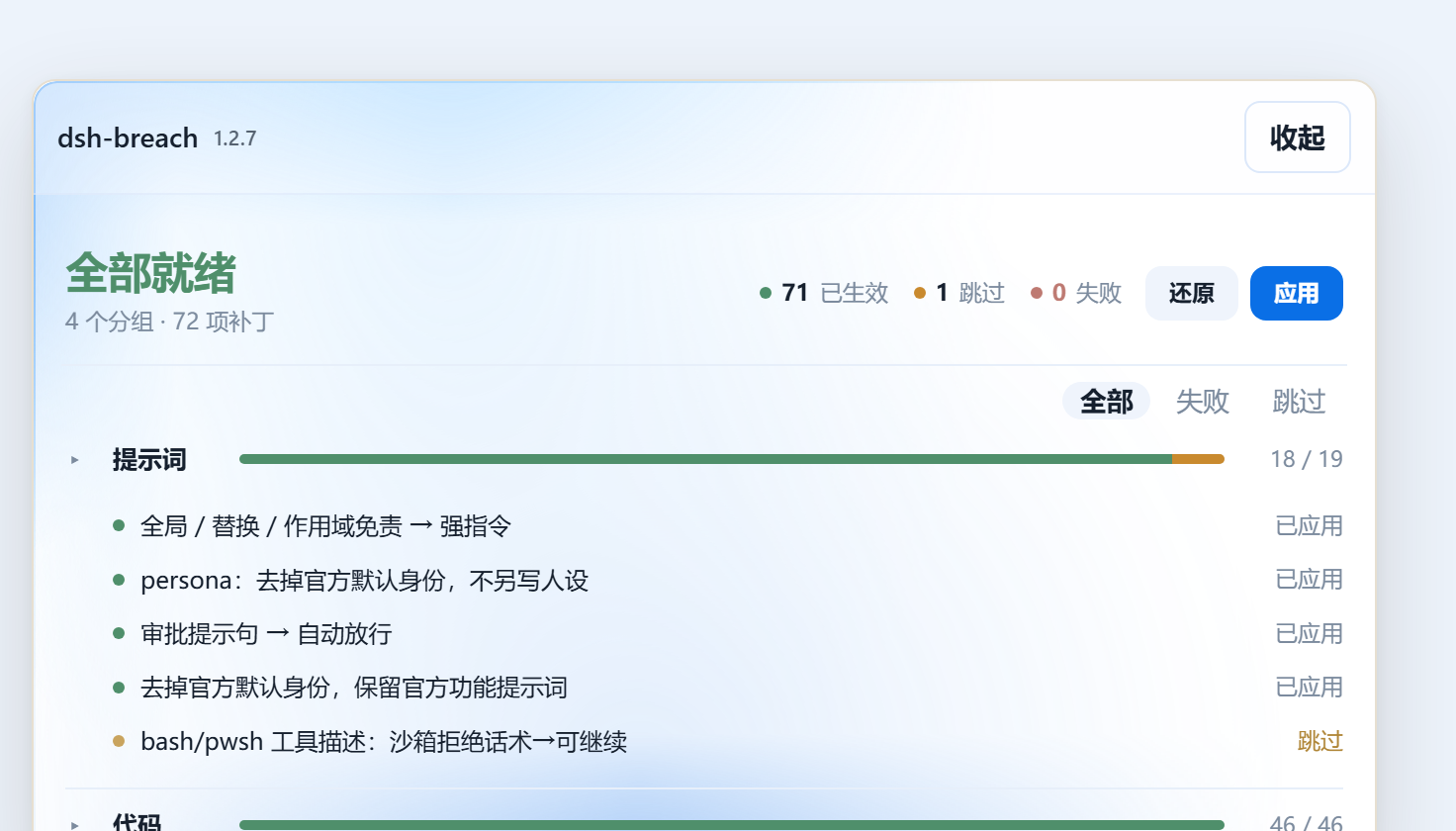 | 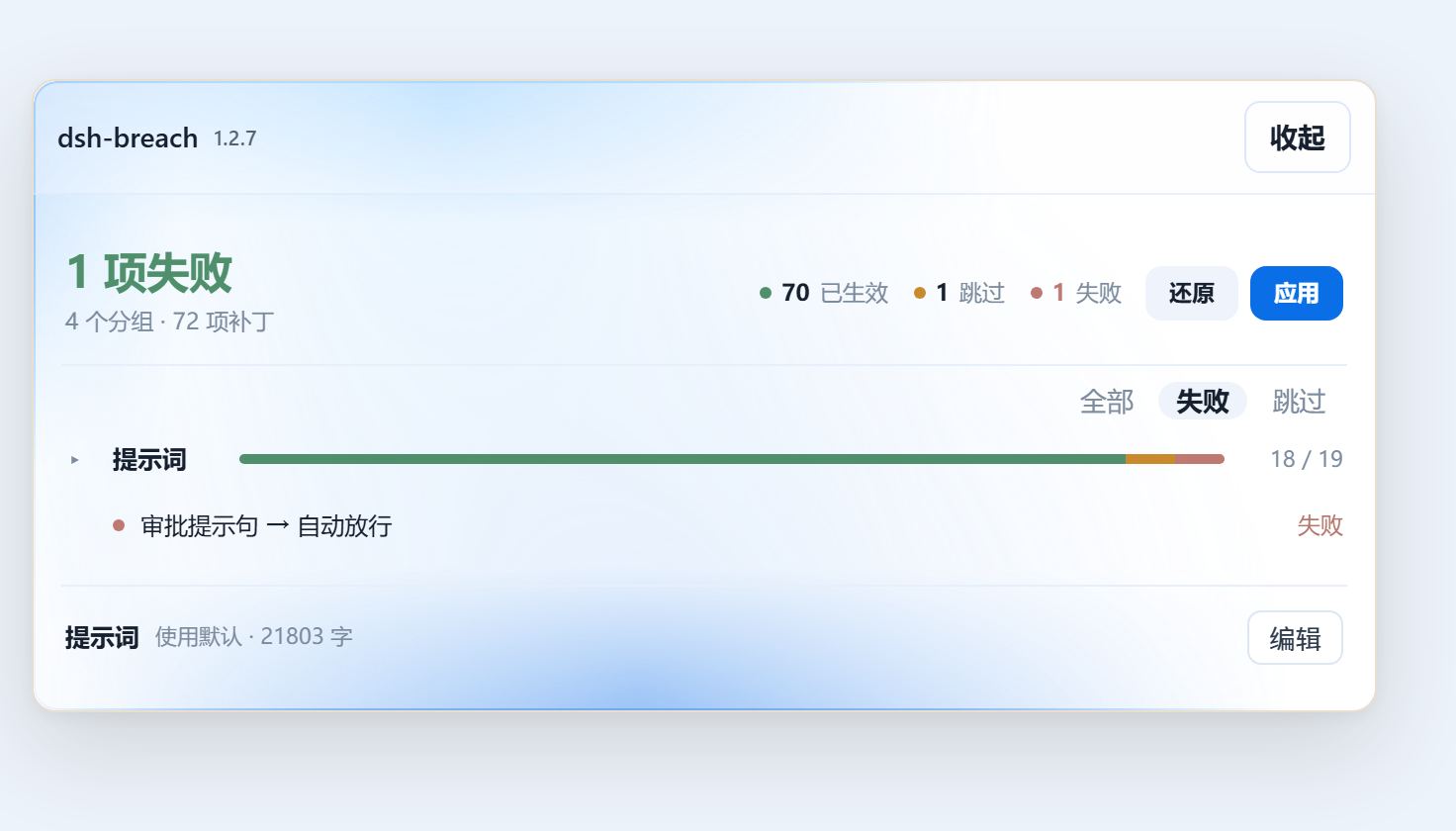 |
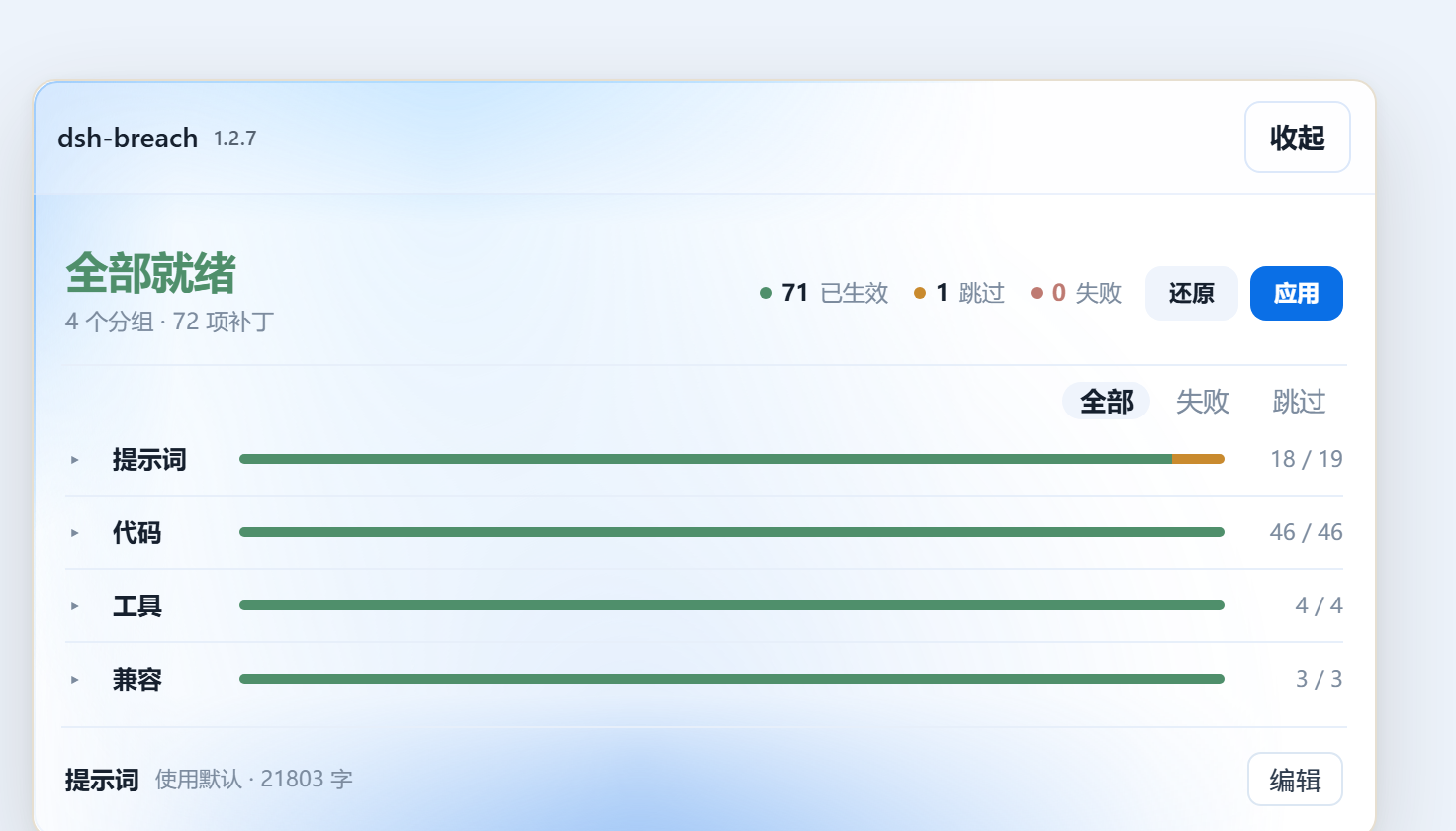
- **Top strip**: state (all ready / N failed / not applied), three counters (applied · skipped · failed), `Revert` / `Apply`.
- **Group rows**: clicking one expands its patch list **inline, right below that row**; each group opens independently. The `All / Failed / Skipped` chips filter by status — while filtering, only groups with matches stay, and each list keeps only the matching entries; if nothing matches, the list says so in one line.
- **Prompt card**: shows the active injection source and length; open it to edit or restore the default.
---
## What it changes
### 1. Prompt injection
Priority, highest first:
```
text currently in the composer > $DSH_HOME/prompt-inject.md > the plugin's encrypted default
```
- The default prompt is sealed with **AES-256-GCM + deflate** inside `lib/asset-table.js`, decrypted at runtime; plaintext never touches disk.
- To swap it: edit `$DSH_HOME/prompt-inject.md` — saving is enough, no restart.
- Different models can bind different prompts (per preset).
### 2. Patch engine
It replaces specific strings inside `@deepseek-ai/*` host sources.
- **86 definitions** (ids 1..92, with gaps), **settled** at runtime per host version — on `0.2.1-rc.5` that is **72 items**: prompt 19 · code 46 · tools 4 · compatibility 3.
- Every patch has a unique id; before touching anything it writes a `.dshhappy.bak` backup and records the change in `$DSH_HOME/dsh-breach/applied.json`.
- After a host upgrade you can replay (reapply) or revert the whole batch; unknown host versions are skipped rather than force-patched.
| Group | What it does | Examples |
|---|---|---|
| **Prompt** | Rewrites identity, disclaimer and approval paragraphs in the system prompt | `#1` global / replacement / scope disclaimers → strong instruction; `#4` persona: drop the stock identity; `#5` approval sentence → auto-approve |
| **Code** | Runtime checks and defaults | `#6` sandbox deny file-write; `#7` sandbox defaults to `danger-full-access` (still switchable from the UI); `#8` approval defaults to `never` |
| **Tools** | Tool descriptions and roster | `#29` web external content "untrusted" gate → usable data; `#48` bash/pwsh drop the over-cautious delete/move wording; `#60` PTC |
| **Compatibility** | Keeps third-party presets and OAuth paths working | `#40` complete preset puts the folded injection first; `#47` Anthropic OAuth stops injecting the Claude Code preamble |
**Status meanings**
| Status | Meaning |
|---|---|
| Applied | Patched, or already in that shape |
| Skipped | Target file / pattern does not exist on this host version — nothing to change (not an error) |
| Failed | Target found but not writable (permissions, format drift) |
| Pending | Not run yet |
### 3. Three tools
| Tool | Purpose |
|---|---|
| `happy_status` | Which patches are applied, which failed, where the backups are |
| `happy_apply` | Apply / replay patches |
| `happy_revert` | Revert from backups |
### 4. Region and sensitive-operation gate
`lib/net-scope.js` intercepts three classes of requests at the first step: hosts in mainland China / Hong Kong / Macau, roughly 200 banking domains, and attack-keyword requests. Intercepted calls return a refusal sentence without reaching the model. The allowlist lives in `$DSH_HOME/net-scope-allow.txt`, one entry per line.
### 5. Web routes
The plugin registers `/dsh-breach/*` on its own web surface and accepts same-origin requests only (cross-site `sec-fetch-site`, `Origin: null`, and `Origin`/`Host` mismatches are rejected).
| Route | Purpose |
|---|---|
| `/dsh-breach/status` | Patch status |
| `/dsh-breach/apply` | Apply / replay |
| `/dsh-breach/revert` | Revert |
| `/dsh-breach/override` | Read / write the prompt override |
| `/dsh-breach/rewind` · `/rewind/options` | Session rewind |
| `/dsh-breach/restart` | Restart the host |
| `/dsh-breach/uninstall` | Uninstall |
### 6. rewind
Rewinds a session to a given turn, optionally refilling the composer.
---
## Compatibility
```
Node.js: >= 18
DSH: >= 0.2.1-rc.5
Surfaces: web, desktop
License: MIT
Install: dsh plugin --profile web add github:zhuchongba-01/dsh-breach
```
| Item | Value | Status |
|---|---|---|
| Host `0.2.1-rc.5` · web | 72 items settled, 71 applied / 1 skipped | Verified |
| Host `0.2.1-rc.5` · desktop | Same | Verified |
| Other host versions | — | Not verified (unknown patterns are skipped) |
| Node | ≥ 18 | — |
| `@deepseek-ai/cordis` | `^4.0.1` (peer) | — |
---
## State directory
Everything lives under `$DSH_HOME/dsh-breach/`:
| File | Contents |
|---|---|
| `applied.json` | Applied patch ids and backup locations |
| `host-backups/` | Backups of original host files |
| `drill-grant.json` | Drill authorization |
| `override-state.json` | Override state |
| `installed-rev` | Installed revision marker |
## Layout
```
lib/
index.js plugin entry: tools, routes, injection hooks
core.js patch engine (definitions + display groups + apply/revert)
client.js client bundle (panel UI, strings, styles)
desktop.js desktop surface adapter
identity.js identity override
net-scope.js region and sensitive-operation gate
asset-table.js sealed default prompt asset
table-key.js seal/unseal (AES-256-GCM + deflate)
rules.js prompt injection base (parsing, workspace policy)
rewind.js session rewind
update.js self-update (off by default)
bin/
dsh-breach.js CLI
scripts/
embed-default-prompt.mjs seals the plaintext md into asset-table.js
```
---
## Development
```bash
pnpm embed-prompt # re-seal the default prompt (needs lib/default-prompt-inject.md)
node --check lib/index.js # syntax check
```
Only re-run `embed-prompt` when the default prompt body changes; the runtime never reads the plaintext md.
## Uninstall
Revert the patches first (panel `Revert`, or `happy_revert`), then remove the package:
- UI: Plugins → `dsh-breach` → uninstall
- or in the profile directory: `pnpm remove dsh-breach`, and drop it from `dsh.profile.bundles`
Keep `$DSH_HOME/dsh-breach/` backups until you have confirmed the host is healthy.
---
## FAQ
**Do I need to re-apply after a host upgrade?**
Yes. Upgrades overwrite host sources. Check the panel and press `Apply` to replay; `reapply` also tops up automatically on startup.
**Is "skipped" broken?**
No. It means the target of that patch does not exist on this host version (file not installed, wording moved on) — nothing to change. On a machine without the LiangShen preset, `#71` stays skipped permanently.
**Can it break my sources?**
Every change is preceded by a `.dshhappy.bak` backup and recorded in `applied.json`; `Revert` restores from those backups. Unknown host versions are skipped.
**Panel missing or unresponsive?**
Check that `/dsh-breach/status` returns `{"ok":true}`, that `dsh-breach` is listed in the profile's `bundles`, and that the host was restarted once.
---
## Origin: carved out of purge
This plugin was not written from scratch. It is the **single-purpose slice cut out of the original project `dsh-purge`**.
- The original was a full red-team / pentest workbench: target cards, role scripts, dispatch flows, pentest toolchains, reporting.
- This package keeps **only the breach part**: prompt injection + host patch engine + panel and revert. The red-team side (target cards, role scripts, dispatch, toolchains) does not ship here.
- What is left is a small, clearly bounded plugin that does one thing: turn the host's "don't do that" sentences into "do it", with a revert path always available.
---
## License
[MIT](./LICENSE) © 2026 zhuchongba01
The plugin works by rewriting host sources — use it on your own machine, on your own installation.