 memsearch
Cross-platform semantic memory for AI coding agents.














## 📰 What's New
- **Optional Jev reranking** — rerank memory search results with Jev through the TypeSafe API, with no local model download. See [configuration](docs/home/configuration.md#optional-remote-reranking) and the [Chinese/English evaluation](evaluation/reranking-evaluation.md).
- **DeepSeek Harness support** — MemSearch now brings automatic capture, recall hints, native skill-based recall, background maintenance, and a read-only memory browser to [DeepSeek Harness (DSH)](https://zilliztech.github.io/memsearch/platforms/dsh/).
- **Skills from memory** — MemSearch now distills the workflows you repeat into reusable, installable agent skills (a third "procedural memory" layer) and keeps them up to date in the background. See [Skills from Memory](#skills-from-memory).
- **Advanced memory maintenance** — optional background tasks keep durable `PROJECT.md` and `USER.md` notes current across sessions. See [Advanced Memory Maintenance](#advanced-memory-maintenance).
---
### Why memsearch?
- 🌐 **All Platforms, One Memory** — memories flow across [Claude Code](plugins/claude-code/README.md), [Codex](plugins/codex/README.md), [DeepSeek Harness](plugins/dsh/README.md), [OpenClaw](plugins/openclaw/README.md), [OpenCode](plugins/opencode/README.md), and [WorkBuddy](docs/platforms/workbuddy.md). A conversation in one agent becomes searchable context in all others — no extra setup
- 👥 **For Agent Users**, install a plugin and get persistent memory with zero effort; **for Agent Developers**, use the full [CLI](https://zilliztech.github.io/memsearch/cli/) and [Python API](https://zilliztech.github.io/memsearch/python-api/) to build memory and harness engineering into your own agents
- 📄 **Markdown is the source of truth** — inspired by [OpenClaw](https://github.com/openclaw/openclaw). Your memories are just `.md` files — human-readable, editable, version-controllable. Milvus is a "shadow index": a derived, rebuildable cache
- 🔍 **Progressive retrieval, hybrid search, smart dedup, live sync** — 3-layer recall (search → expand → transcript); dense vector + BM25 sparse + RRF reranking; SHA-256 content hashing skips unchanged content; file watcher auto-indexes in real time
---
## 🧑💻 For Agent Users
Choose your agent below for installation and configuration.
For Claude Code Users
```bash
# Install
/plugin marketplace add zilliztech/memsearch
/plugin install memsearch
# Restart Claude Code to activate the plugin
```
After restarting, just chat with Claude Code as usual. The plugin captures every conversation turn automatically.
**Verify it's working** — after a few conversations, check your memory files:
```bash
ls .memsearch/memory/ # you should see daily .md files
cat .memsearch/memory/$(date +%Y-%m-%d).md
```
**Recall memories** — two ways to trigger:
```
/memory-recall what did we discuss about Redis?
```
Or just ask naturally — Claude auto-invokes the skill when it senses the question needs history:
```
We discussed Redis caching before, what was the TTL we chose?
```
> 📖 [Claude Code Plugin docs](https://zilliztech.github.io/memsearch/platforms/claude-code/) · [Troubleshooting](https://zilliztech.github.io/memsearch/platforms/claude-code/troubleshooting/)
For Codex Users
```bash
# Install
git clone --depth 1 https://github.com/zilliztech/memsearch.git
bash memsearch/plugins/codex/scripts/install.sh
codex --yolo # needed for ONNX model network access
```
After installing, chat as usual. Hooks capture and summarize each turn.
**Verify it's working:**
```bash
ls .memsearch/memory/
```
**Recall memories** — use the skill:
```
$memory-recall what did we discuss about deployment?
```
> 📖 [Codex Plugin docs](https://zilliztech.github.io/memsearch/platforms/codex/)
For DeepSeek Harness Users
```bash
uv tool install "memsearch[onnx]"
dsh plugin --profile web add @zilliz/memsearch-dsh
```
For default summaries with an API key saved on DSH's **Models** page, give
`headless` jobs access to saved keys. Add or update this top-level entry in
`~/.dsh/profiles/headless/cordis.patch.yml`, or ask `memory-config` to do it.
```yaml
- id: credentials
name: '@deepseek-ai/dsh-credentials-local'
disabled: false
```
Restart your DSH profile or start a new session. Complete a turn, then open
today's file in `.memsearch/memory/` and check for a summary of what you discussed.
**Recall memories** — ask naturally or tell DSH to use the registered `memory-recall` skill:
```
Use memory-recall to find what we decided about the deployment architecture.
```
The web profile also adds a compact MemSearch dock where you can review skill candidates and browse supported files under `.memsearch/` without editing them.
> 📖 [DeepSeek Harness Plugin docs](https://zilliztech.github.io/memsearch/platforms/dsh/)
For OpenClaw Users
```bash
# Install from ClawHub
openclaw plugins install --force clawhub:memsearch
openclaw config set plugins.entries.memsearch.hooks.allowConversationAccess true
openclaw config set plugins.entries.memsearch.hooks.allowPromptInjection true
openclaw gateway restart
```
After installing, chat in TUI as usual. The plugin captures each turn automatically.
**Verify it's working** — memory files are stored in your agent's workspace:
```bash
# For the main agent:
ls ~/.openclaw/workspace/.memsearch/memory/
# For other agents (e.g. work):
ls ~/.openclaw/workspace-work/.memsearch/memory/
```
**Recall memories** — two ways to trigger:
```
/memory-recall what was the batch size limit we set?
```
Or just ask naturally — the LLM auto-invokes memory tools when it senses the question needs history:
```
We discussed batch size limits before, what did we decide?
```
> 📖 [OpenClaw Plugin docs](https://zilliztech.github.io/memsearch/platforms/openclaw/) · [Browse on ClawHub](https://clawhub.ai/plugins/memsearch)
For OpenCode Users
MemSearch gives OpenCode persistent memory across sessions. Install the plugin:
```bash
opencode plugin add @zilliz/memsearch-opencode
```
Completed turns are summarized into `.memsearch/memory/` and indexed for recall. Pending work resumes after an interruption.
Ask about previous decisions or debugging sessions, and OpenCode can search memory, expand relevant notes, and look up the original conversation. The `memory-recall`, `memory-config`, and `memory-to-skill` Skills are included.
> 📖 [OpenCode Plugin docs](https://zilliztech.github.io/memsearch/platforms/opencode/)
For WorkBuddy Users
Follow the [WorkBuddy setup guide](docs/platforms/workbuddy.md) to install the CLI and configure a summary API provider. Then add `zilliztech/memsearch` under **Skills → Kits** and install **memsearch**.
### ⚙️ Configuration (all platforms)
All plugins share the same memsearch backend. Configure once, works everywhere.
#### Embedding
Use **ONNX bge-m3** for local CPU embeddings with no API key. On first launch the model (~558 MB) is downloaded from HuggingFace Hub.
```bash
memsearch config set embedding.provider onnx # local, free
memsearch config set embedding.provider openai # needs OPENAI_API_KEY
memsearch config set embedding.provider ollama # local, any model
```
> All providers and models: [Configuration — Embedding Provider](https://zilliztech.github.io/memsearch/home/configuration/#embedding-provider)
#### Milvus Backend
Just change `milvus_uri` (and optionally `milvus_token`) to switch between deployment modes:
**Milvus Lite** (default) — zero config, single file. Great for getting started:
```bash
# Works out of the box, no setup needed
memsearch config get milvus.uri # → ~/.memsearch/milvus.db
```
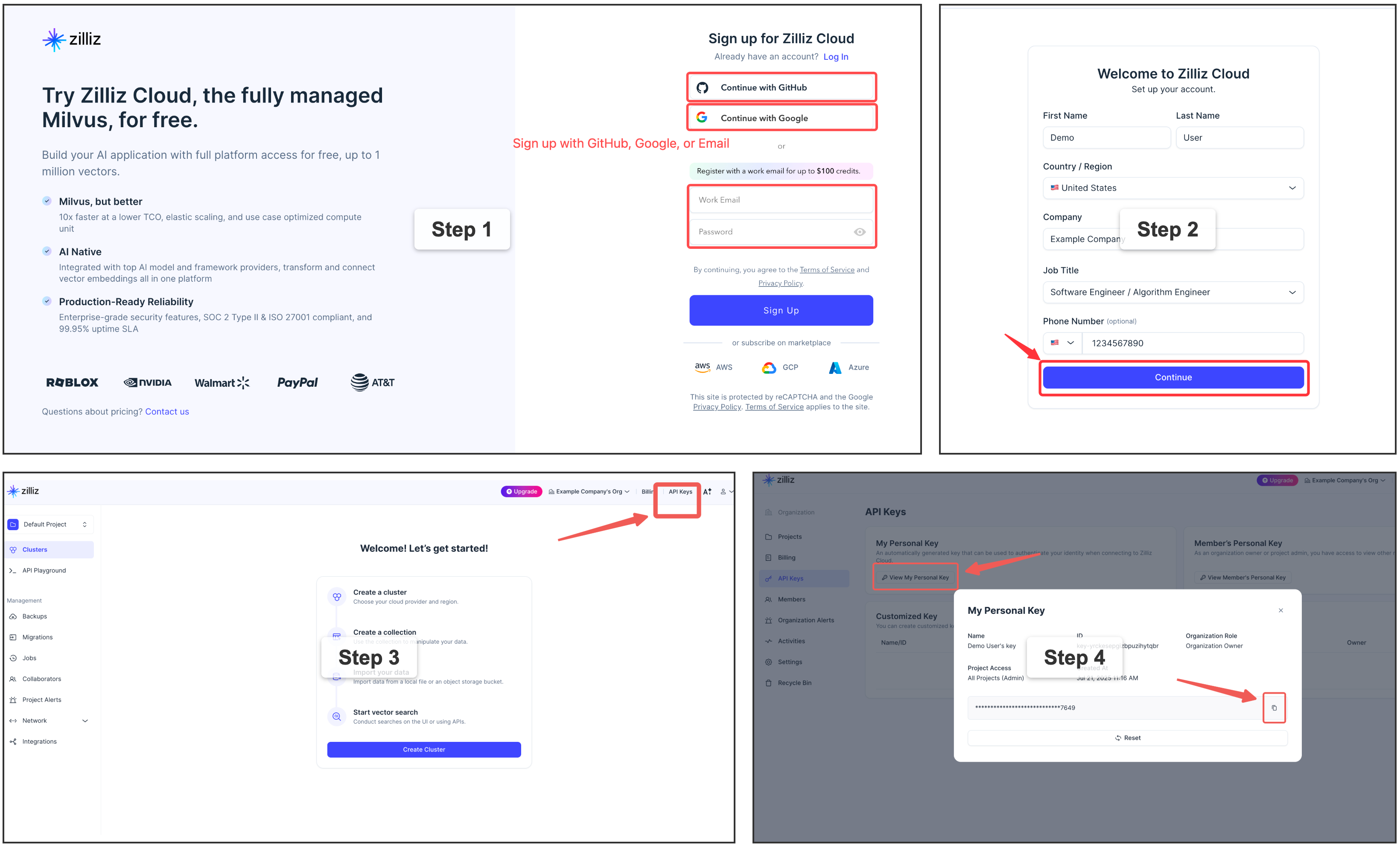
⭐ **Zilliz Cloud** (recommended) — fully managed, [free tier available](https://cloud.zilliz.com/signup?utm_source=github&utm_medium=referral&utm_campaign=memsearch-readme) — [sign up](https://cloud.zilliz.com/signup?utm_source=github&utm_medium=referral&utm_campaign=memsearch-readme) 👇:
```bash
memsearch config set milvus.uri "https://in03-xxx.api.gcp-us-west1.zillizcloud.com"
memsearch config set milvus.token "your-api-key"
```
⭐ Sign up for a free Zilliz Cloud cluster
You can [sign up](https://cloud.zilliz.com/signup?utm_source=github&utm_medium=referral&utm_campaign=memsearch-readme) on Zilliz Cloud to get a free cluster and API key.
Self-hosted Milvus Server (Docker) — for advanced users
For multi-user or team environments with a dedicated Milvus instance. Requires Docker. See the [official installation guide](https://milvus.io/docs/install_standalone-docker-compose.md).
```bash
memsearch config set milvus.uri http://localhost:19530
```
> 📖 Full configuration guide: [Configuration](https://zilliztech.github.io/memsearch/home/configuration/) · [Platform comparison](https://zilliztech.github.io/memsearch/platforms/)
#### Capture Summarization Routing
For agents with a native summarizer, you can override its model:
```bash
memsearch config set plugins.codex.summarize.model gpt-5.1-codex-mini
memsearch config set plugins.opencode.summarize.model anthropic/claude-haiku
```
Advanced users can route plugin summarization through a memsearch-managed API provider:
```bash
memsearch config set llm.providers.openai.type openai
memsearch config set llm.providers.openai.model gpt-5-mini
memsearch config set llm.providers.openai.api_key env:OPENAI_API_KEY
memsearch config set plugins.codex.summarize.provider openai
```
Leave `plugins..summarize.provider` empty to preserve the platform's default behavior. Claude Code, Codex, OpenClaw, and OpenCode also accept `native`; DSH selects its headless-agent backend when the provider is unset. Plugin-specific summarize settings do not fall back to `llm.model`.
You can also disable automatic capture globally for a platform while keeping the plugin installed:
```bash
memsearch config set plugins.codex.summarize.enabled false
```
#### Advanced Memory Maintenance
Your agent can keep two higher-level notes current in the background: **`PROJECT.md`** — durable project state (active threads, decisions, risks, next steps) — and **`USER.md`** — your reusable preferences, working style, and recurring goals. They refresh after a session only when the journals changed and a minimum interval has passed, and they are **off by default**.
Turn them on by asking your agent — *"enable MemSearch's PROJECT.md and USER.md maintenance"* — and it configures them through the `memory-config` skill, which can also choose the model/provider, the interval, and custom prompts, or diagnose the current setup. Prefer editing files? The settings live under `[plugins..project_review]` and `[plugins..user_profile]` in your MemSearch config (both read `.memsearch/memory` and write `.memsearch/PROJECT.md` / `.memsearch/USER.md` by default).
If a background maintenance task seems silent, check `.memsearch/.maintenance-state.json` or ask the `memory-config` skill to inspect it; failed runs record `last_error` and retry on the next due run because failed input digests are not marked successful.
#### Skills from Memory
Beyond the episodic journals and the semantic `PROJECT.md` / `USER.md` notes, MemSearch grows a third memory layer — **procedural memory**: your agent turns the workflows you repeat into reusable, installable skills. You drive it entirely through your agent, in natural language — nothing to memorize:
- *"Make a skill out of what we just did."* — the agent drafts a skill from the session (reading the original transcript so the steps are exact, not guessed), saves it as a candidate, and offers to install it.
- *"What skill candidates do I have? Install the deploy one."* — the agent lists candidates and installs the one you pick into its own skill directory, where it becomes a real `/`-command.

Under the hood, candidates live in a git-tracked `.memsearch/skill-candidates/` store — diffable and revertible, and **inert until you install one** (that step is always yours). An optional background pass can also mine recurring workflows from your history on its own. Distilled skills follow the [Agent Skills](https://agentskills.io) open standard, so one capture is portable across Claude Code, Codex, DSH, OpenClaw, OpenCode, and other compatible agents.
**Turning it on is also just a sentence:** ask your agent *"enable MemSearch skill distillation"* (or *"make it more eager"*) and it configures things through the `memory-config` skill — it's off by default. Prefer editing files? The same settings live under `[plugins..memory_to_skill]` in your MemSearch config. Full guide: **[Skills from Memory](https://zilliztech.github.io/memsearch/home/skills-from-memory/)**.
### What can you use it for?
- **Resume debugging threads** — ask how a similar Redis, Docker, database, or deployment issue was fixed last time.
- **Recover decision rationale** — find why the project chose one architecture, library, migration path, or API design over another.
- **Trace feature history** — understand how a feature evolved across sessions, including the files changed and tradeoffs discussed.
- **Do code archaeology** — ask when and why a module, config, or workflow was changed before touching it again.
- **Find the right session to resume** — ask which previous conversation covered a topic, recover the relevant context, and continue from there.
- **Carry context across agents** — keep your agents working from the same project memory.
---
## 🛠️ For Agent Developers
Beyond ready-to-use plugins, memsearch provides a complete **CLI and Python API** for building memory into your own agents. Whether you're adding persistent context to a custom agent, building a memory-augmented RAG pipeline, or doing harness engineering — the same core engine that powers the plugins is available as a library.
### 🏗️ Architecture Overview
```
┌──────────────────────────────────────────────────────────────┐
│ 🧑💻 For Agent Users (Plugins) │
│ Claude Code · Codex · DSH · OpenClaw · OpenCode · WorkBuddy │
│ │ │
├────────────────────────────┬─────────────────────────────────┤
│ 🛠️ For Agent Developers │ Build your own with ↓ │
│ ┌─────────────────────────┴──────────────────────────────┐ │
│ │ memsearch CLI / Python API │ │
│ │ index · search · expand · watch · compact │ │
│ └─────────────────────────┬──────────────────────────────┘ │
│ ┌─────────────────────────┴──────────────────────────────┐ │
│ │ Core: Chunker → Embedder → Milvus │ │
│ │ Hybrid Search (BM25 + Dense + RRF) │ │
│ └────────────────────────────────────────────────────────┘ │
├──────────────────────────────────────────────────────────────┤
│ 📄 Markdown Files (Source of Truth) │
│ memory/2026-03-27.md · memory/2026-03-26.md · ... │
└──────────────────────────────────────────────────────────────┘
```
Plugins sit on top of the CLI/API layer. The API handles indexing, searching, and Milvus sync. Markdown files are always the source of truth — Milvus is a rebuildable shadow index. Everything below the plugin layer is what you use as an agent developer.
### How Plugins Work (Claude Code as example)
**Capture — after each conversation turn:**
```
User asks question → Agent responds → Stop hook fires
│
┌────────────────────┘
▼
Parse last turn
│
▼
LLM summarizes (haiku)
"- User asked about X."
"- Claude did Y."
│
▼
Append to memory/2026-03-27.md
with anchor
│
▼
memsearch index → Milvus
```
**Recall — 3-layer progressive search:**
```
User: "What did we discuss about batch size?"
│
▼
L1 memsearch search "batch size" → ranked chunks
│ (need more?)
▼
L2 memsearch expand → full .md section
│ (need original?)
▼
L3 parse-transcript → raw dialogue
```
### 📄 Markdown as Source of Truth
```
Plugins append ──→ .md files ←── human editable
│
▼
memsearch watch (live watcher)
│
detects file change
│
▼
re-chunk changed .md
│
hash each chunk (SHA-256)
│
┌───────────┴───────────┐
▼ ▼
hash unchanged? hash is new/changed?
→ skip (no API call) → embed → upsert to Milvus
│ │
└───────────┬───────────┘
▼
┌──────────────────┐
│ Milvus (shadow) │
│ always in sync │
│ rebuildable │
└──────────────────┘
```
### 📦 Installation
```bash
# Install as a global CLI tool — recommended when you mainly use the
# `memsearch` command or any of the agent plugins (Claude Code, Codex,
# DSH, OpenClaw, OpenCode, WorkBuddy), which all shell out to the CLI.
uv tool install memsearch # via uv
pipx install memsearch # via pipx
pip install memsearch # plain pip
# Install as a project dependency — use this if you want to import
# `memsearch` from your own Python code (e.g. via the MemSearch class).
uv add memsearch # via uv, adds to pyproject.toml
pip install memsearch # into an activated venv
```
Optional embedding providers
```bash
# Install local ONNX support for the CLI
uv tool install "memsearch[onnx]"
pipx install "memsearch[onnx]"
pip install "memsearch[onnx]"
# As a project dependency
uv add "memsearch[onnx]"
# Other options: [openai], [google], [voyage], [jina], [mistral], [ollama], [local], [all]
```
### 🐍 Python API — Give Your Agent Memory
The Python API defaults to OpenAI (`OPENAI_API_KEY`). For local embeddings, pass `embedding_provider="onnx"`.
```python
from memsearch import MemSearch
mem = MemSearch(paths=["./memory"])
await mem.index() # index markdown files
results = await mem.search("Redis config", top_k=3) # semantic search
scoped = await mem.search("pricing", top_k=3, source_prefix="./memory/product")
print(results[0]["content"], results[0]["score"]) # content + similarity
```
Full example — agent with memory (OpenAI) — click to expand
```python
import asyncio
from datetime import date
from pathlib import Path
from openai import OpenAI
from memsearch import MemSearch
MEMORY_DIR = "./memory"
llm = OpenAI() # your LLM client
mem = MemSearch(paths=[MEMORY_DIR]) # memsearch handles the rest
def save_memory(content: str):
"""Append a note to today's memory log (OpenClaw-style daily markdown)."""
p = Path(MEMORY_DIR) / f"{date.today()}.md"
p.parent.mkdir(parents=True, exist_ok=True)
with open(p, "a") as f:
f.write(f"\n{content}\n")
async def agent_chat(user_input: str) -> str:
# 1. Recall — search past memories for relevant context
memories = await mem.search(user_input, top_k=3)
context = "\n".join(f"- {m['content'][:200]}" for m in memories)
# 2. Think — call LLM with memory context
resp = llm.chat.completions.create(
model="gpt-5-mini",
messages=[
{"role": "system", "content": f"You have these memories:\n{context}"},
{"role": "user", "content": user_input},
],
)
answer = resp.choices[0].message.content
# 3. Remember — save this exchange and index it
save_memory(f"## {user_input}\n{answer}")
await mem.index()
return answer
async def main():
# Seed some knowledge
save_memory("## Team\n- Alice: frontend lead\n- Bob: backend lead")
save_memory("## Decision\nWe chose Redis for caching over Memcached.")
await mem.index() # or mem.watch() to auto-index in the background
# Agent can now recall those memories
print(await agent_chat("Who is our frontend lead?"))
print(await agent_chat("What caching solution did we pick?"))
asyncio.run(main())
```
Anthropic Claude example — click to expand
```bash
pip install memsearch anthropic
```
```python
import asyncio
from datetime import date
from pathlib import Path
from anthropic import Anthropic
from memsearch import MemSearch
MEMORY_DIR = "./memory"
llm = Anthropic()
mem = MemSearch(paths=[MEMORY_DIR])
def save_memory(content: str):
p = Path(MEMORY_DIR) / f"{date.today()}.md"
p.parent.mkdir(parents=True, exist_ok=True)
with open(p, "a") as f:
f.write(f"\n{content}\n")
async def agent_chat(user_input: str) -> str:
# 1. Recall
memories = await mem.search(user_input, top_k=3)
context = "\n".join(f"- {m['content'][:200]}" for m in memories)
# 2. Think — call Claude with memory context
resp = llm.messages.create(
model="claude-sonnet-4-6",
max_tokens=1024,
system=f"You have these memories:\n{context}",
messages=[{"role": "user", "content": user_input}],
)
answer = resp.content[0].text
# 3. Remember
save_memory(f"## {user_input}\n{answer}")
await mem.index()
return answer
async def main():
save_memory("## Team\n- Alice: frontend lead\n- Bob: backend lead")
await mem.index()
print(await agent_chat("Who is our frontend lead?"))
asyncio.run(main())
```
Ollama (fully local, no API key) — click to expand
```bash
pip install "memsearch[ollama]"
ollama pull nomic-embed-text # embedding model
ollama pull llama3.2 # chat model
```
```python
import asyncio
from datetime import date
from pathlib import Path
from ollama import chat
from memsearch import MemSearch
MEMORY_DIR = "./memory"
mem = MemSearch(paths=[MEMORY_DIR], embedding_provider="ollama")
def save_memory(content: str):
p = Path(MEMORY_DIR) / f"{date.today()}.md"
p.parent.mkdir(parents=True, exist_ok=True)
with open(p, "a") as f:
f.write(f"\n{content}\n")
async def agent_chat(user_input: str) -> str:
# 1. Recall
memories = await mem.search(user_input, top_k=3)
context = "\n".join(f"- {m['content'][:200]}" for m in memories)
# 2. Think — call Ollama locally
resp = chat(
model="llama3.2",
messages=[
{"role": "system", "content": f"You have these memories:\n{context}"},
{"role": "user", "content": user_input},
],
)
answer = resp.message.content
# 3. Remember
save_memory(f"## {user_input}\n{answer}")
await mem.index()
return answer
async def main():
save_memory("## Team\n- Alice: frontend lead\n- Bob: backend lead")
await mem.index()
print(await agent_chat("Who is our frontend lead?"))
asyncio.run(main())
```
> 📖 Full Python API reference: [Python API docs](https://zilliztech.github.io/memsearch/python-api/)
### ⌨️ CLI Usage
**Setup:**
```bash
memsearch config init # interactive setup wizard
memsearch config set embedding.provider onnx # switch embedding provider
memsearch config set milvus.uri http://localhost:19530 # switch Milvus backend
```
**Index & Search:**
```bash
memsearch index ./memory/ # index markdown files
memsearch index ./memory/ ./notes/ --force # re-embed everything
memsearch index . --ignore-file .gitignore # opt in to repository ignore rules
memsearch search "Redis caching" # hybrid search (BM25 + vector)
memsearch search "auth flow" --top-k 10 --json-output # JSON for scripting
memsearch expand # show full section around a chunk
```
**Live Sync & Maintenance:**
```bash
memsearch watch ./memory/ # live file watcher (auto-index on change)
memsearch compact # LLM-powered chunk summarization
memsearch stats # show indexed chunk count
memsearch reset --yes # drop all indexed data and rebuild
```
> 📖 Full CLI reference with all flags: [CLI docs](https://zilliztech.github.io/memsearch/cli/)
## ⚙️ Configuration
Embedding and Milvus backend settings → [Configuration (all platforms)](#️-configuration-all-platforms)
Collection priority: integration-derived default → `~/.memsearch/config.toml` → `.memsearch.toml` → explicit `--collection` or Python argument. Without an integration-derived default, the built-in collection is used.
> 📖 Full config guide: [Configuration](https://zilliztech.github.io/memsearch/home/configuration/)
## 🔗 Links
- 📖 [Documentation](https://zilliztech.github.io/memsearch/) — full guides, API reference, and architecture details
- 🔌 [Platform Plugins](https://zilliztech.github.io/memsearch/platforms/) — Claude Code, Codex, DeepSeek Harness, OpenClaw, OpenCode, WorkBuddy
- 💡 [Design Philosophy](https://zilliztech.github.io/memsearch/design-philosophy/) — why markdown, why Milvus, competitor comparison
- 🦞 [OpenClaw](https://github.com/openclaw/openclaw) — the memory architecture that inspired memsearch
- 🗄️ [Milvus](https://milvus.io/) | [Zilliz Cloud](https://cloud.zilliz.com/signup?utm_source=github&utm_medium=referral&utm_campaign=memsearch-readme) — the vector database powering memsearch
## 🤝 Contributing
Bug reports, feature requests, and pull requests are welcome! See the [Contributing Guide](CONTRIBUTING.md) for development setup, testing, and plugin development instructions. For questions and discussions, join us on [Discord](https://discord.com/invite/FG6hMJStWu).
## 📄 License
[MIT](LICENSE)