ZizkaDB — visit db.zizka.ai # ZizkaDB ### The audit trail database for AI agents **Tamper-evident, checksum-backed decision logs** with **session replay** and **time-travel debugging**,
built to support **EU AI Act Article 12** record-keeping. Drift detection · MCP server · Python & TypeScript SDKs · Self-host or cloud **[Quickstart](#quickstart-60-seconds)** · **[Docs](DEVELOPMENT.md)** · **[Integrations](#integrations)** · **[Connect](CONNECT.md)** · **[Cloud](https://db.zizka.ai)** · **[Discussions](https://github.com/Zizka-ai/ZizkaDB/discussions)** · **[Contributing](CONTRIBUTING.md)** [![CI](https://github.com/Zizka-ai/ZizkaDB/actions/workflows/ci.yml/badge.svg?branch=main)](https://github.com/Zizka-ai/ZizkaDB/actions/workflows/ci.yml) [![License: AGPL-3.0](https://img.shields.io/badge/License-AGPL--3.0-blue.svg)](LICENSE) [![Release](https://img.shields.io/badge/release-v0.4.1-f97316)](https://github.com/Zizka-ai/ZizkaDB/releases) [![Python SDK](https://img.shields.io/pypi/v/zizkadb-sdk?label=Python%20SDK)](https://pypi.org/project/zizkadb-sdk/) [![TypeScript SDK](https://img.shields.io/npm/v/zizkadb-sdk?label=TypeScript%20SDK)](https://www.npmjs.com/package/zizkadb-sdk) [![GitHub stars](https://img.shields.io/github/stars/Zizka-ai/ZizkaDB?style=flat)](https://github.com/Zizka-ai/ZizkaDB/stargazers) [![PyPI downloads](https://img.shields.io/pepy/dt/zizkadb-sdk?label=PyPI%20downloads)](https://pepy.tech/projects/zizkadb-sdk) [![npm downloads](https://img.shields.io/npm/d18m/zizkadb-sdk?label=npm%20downloads)](https://www.npmjs.com/package/zizkadb-sdk) #1 Product of the Week on PostYourStartup




Every agent team eventually asks: *Why did it say that? Why did it call that tool?* ZizkaDB links every agent step to the step that caused it, so you get the answer in one call instead of scrolling through traces. - **Causal, not just traces.** Each event carries a `parent_id`. `db.why(event_id)` walks back to the user message, wrong tool, or bad context that started it. - **Time-travel.** `db.at(agent, timestamp)` rebuilds exactly what the agent knew at any past moment. - **Tamper-evident audit trail.** Every decision is logged with a checksum, so you have a verifiable record for EU AI Act Article 12. - **Drift detection.** See when an agent's behavior shifts from its baseline. - **Self-host or cloud.** Run it on your own Postgres with one Docker command, or use [ZizkaDB Cloud](https://db.zizka.ai). AGPL-3.0, no per-trace billing; self-hosted data never leaves your infrastructure. Self-hosted runs **one agent with one API key**; multiple agents, agent fleets and agent-to-agent messaging are on Cloud. **In plain words:** ZizkaDB is a flight recorder for AI agents. It records every step an agent takes and which step led to it, so when an agent does something unexpected, you can see exactly why. ### Start here | You are… | Go to | | --- | --- | | New to ZizkaDB, or not technical | [ZizkaDB Cloud](https://db.zizka.ai): nothing to install | | A developer trying it on your laptop | [Quickstart](#quickstart-60-seconds): one command, about a minute | | Adding it to an agent you already have | [Connect your agent](#connect-your-agent) | | Running it for your team on a server | [Self-host on a server](#self-host-on-a-server) or [Deploy on Redu Cloud](#deploy-on-redu-cloud) |
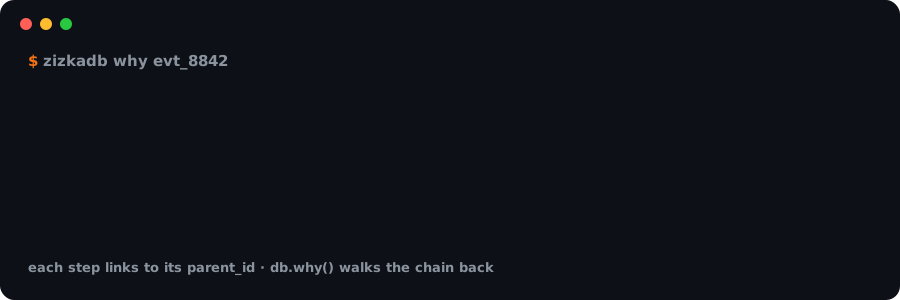
Animated: db.why() walks from a tool_call back through llm_response to the root-cause user_message

## Contents - [Quickstart (60 seconds)](#quickstart-60-seconds) - [Self-host on a server](#self-host-on-a-server) · [Deploy on Redu Cloud](#deploy-on-redu-cloud) - [Integrations](#integrations) - [Connect your agent](#connect-your-agent) - [What it does](#what-it-does) - [Audit trail and EU AI Act Article 12](#audit-trail-and-eu-ai-act-article-12) - [How it works](#how-it-works) - [Use with your AI assistant (MCP)](#use-with-your-ai-assistant-mcp) - [ZizkaDB vs. tracing tools](#zizkadb-vs-tracing-tools) - [Cloud, FAQ and docs](#more) - [Contributors](#contributors) --- ## Quickstart (60 seconds) One command, one container. No repo clone, no Python, no config files.

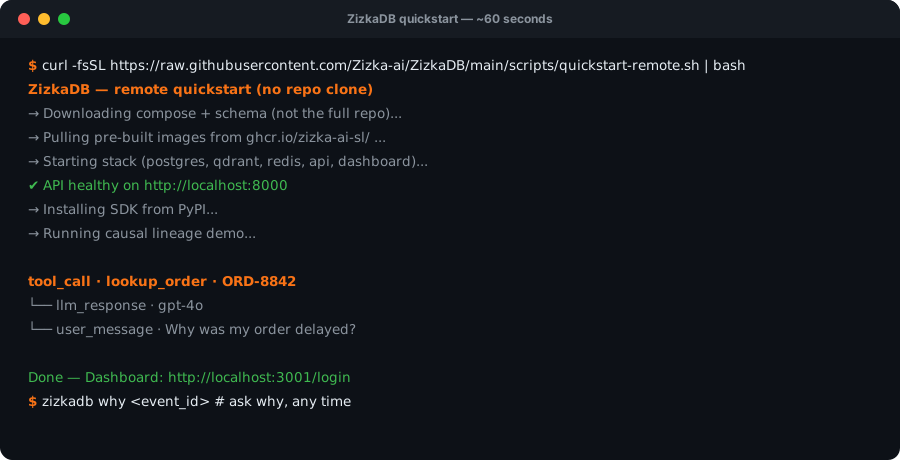
Terminal animation: one curl command starts ZizkaDB and prints a causal chain

**1. Run it.** With [Docker](https://docs.docker.com/get-docker/) running: ```bash curl -fsSL https://raw.githubusercontent.com/Zizka-ai/ZizkaDB/main/scripts/quickstart-remote.sh | bash ``` This pulls a single image (Postgres, the API and the dashboard together), starts it, and logs a demo agent run. After the download, startup takes a few seconds. **2. See why.** It prints the causal chain behind the demo agent's tool call: ```text tool_call · lookup_order · ORD-8842 └── llm_response · gpt-4o └── user_message · Why was my order delayed? ``` **3. Explore.** The dashboard opens on that agent, already signed in: [localhost:3001/dashboard/activity?agent=support-bot](http://localhost:3001/dashboard/activity?agent=support-bot). Click any event → **Why? (causal)** tab. Now log your own agent: `pip install zizkadb-sdk`, then see [CONNECT.md](CONNECT.md). The local API is `http://localhost:8000` with key `zizkadb_dev_local`.
Prefer plain docker run? Day-two commands The script is a wrapper around this: ```bash docker run -d --name zizkadb -e ENV=development \ -p 127.0.0.1:8000:8000 -p 127.0.0.1:3001:3001 \ -v zizkadb_data:/data ghcr.io/zizka-ai-sl/zizkadb ``` | Do this | Command | |---------|---------| | Stop / start | `docker stop zizkadb` / `docker start zizkadb` | | Logs | `docker logs -f zizkadb` | | Upgrade (keeps data) | re-run the quickstart command | | Erase everything | `docker rm -f zizkadb && docker volume rm zizkadb_data` | | Dashboard port busy | `ZIZKADB_DASHBOARD_PORT=3005` before the quickstart command |
The single container has two modes: - **On your own machine** (`-e ENV=development`, what the quickstart uses): one-click sign-in and a well-known API key, with the ports bound to `127.0.0.1` only. - **On a server** (the default, production mode): the container generates its own secrets on first start, and the dashboard and API share port 3001. Sign in with the admin token: ```bash docker run -d --name zizkadb -p 3001:3001 -v zizkadb_data:/data ghcr.io/zizka-ai-sl/zizkadb docker exec zizkadb sed -n 's/^GEN_SELFHOST_ADMIN_TOKEN=//p' /data/secrets.env # your admin token ``` Put it behind HTTPS, and set `ZIZKADB_PUBLIC_URL=https://your-domain` so the links it generates are correct. If a reverse proxy on the same host forwards to it, add `-e TRUSTED_PROXIES=127.0.0.1,::1,172.16.0.0/12` so sign-in rate limits see each visitor. The single container runs without Qdrant, so semantic search and embeddings need the full stack below. The self-hosted dashboard is just your dashboard: no signup, no email, no account. Accounts and plans exist only on [ZizkaDB Cloud](https://db.zizka.ai). Self-hosted is single-agent: the first agent name you log with becomes your agent, and a second name is rejected with a message naming it. The `support-bot` demo agent does not count. For several agents, use [ZizkaDB Cloud](https://db.zizka.ai). ### Self-host from a clone The full stack (Postgres, Qdrant, Redis, API, dashboard as separate containers) — use this for development, semantic search, or production: ```bash git clone https://github.com/Zizka-ai/ZizkaDB.git && cd ZizkaDB bash scripts/setup-local.sh ``` | Service | URL | |---------|-----| | API | http://localhost:8000 | | Dashboard | http://localhost:3001 | | Swagger | http://localhost:8000/swagger | ### Self-host on a server On a machine other people can reach, set these in `infra/.env` before starting the stack: ```bash ENV=production # turns off the one-click button and dev API keys DEV_API_KEY= # must not be the default, or the API refuses to start JWT_SECRET= # openssl rand -hex 32 (also JWT_REFRESH_SECRET) DEPLOYMENT_MODE=self_hosted SELFHOST_ADMIN_TOKEN= # python -c "import secrets; print(secrets.token_urlsafe(32))" ``` The dashboard then asks for the admin token instead of showing the one-click button. Without `SELFHOST_ADMIN_TOKEN`, dashboard login stays disabled. Everyone who has the token signs in to the same single owner workspace. Check your config with `bash scripts/validate-selfhost-config.sh --production`. Full steps: [wiki/Self-Hosting](https://github.com/Zizka-ai/ZizkaDB/wiki/Self-Hosting). ### Deploy on Redu Cloud [![Deploy on Redu Cloud](https://img.shields.io/badge/Deploy%20on-Redu%20Cloud-2563eb)](redu.md) [Redu Cloud](https://redu.cloud) is ZizkaDB's recommended cloud for the open-source edition. With the redu MCP added to your coding agent, ask it to "Deploy https://github.com/Zizka-ai/ZizkaDB to redu". The agent follows [redu.md](redu.md): the single container on one VM, the dashboard and API on one HTTPS URL, and your data kept in a volume. Then sign in with the admin token, create your API key in Settings, and set `ZIZKADB_HOST` and `ZIZKADB_API_KEY` in your agent. Full guide: **[DEVELOPMENT.md](DEVELOPMENT.md)** · Troubleshooting: [wiki/Troubleshooting.md](wiki/Troubleshooting.md) · What ZizkaDB sends: [docs/telemetry.md](docs/telemetry.md) --- ## Integrations Works with the stack you already use — add one package and every step is logged with its cause.

Python    TypeScript    LangChain    CrewAI    LiveKit    MCP    REST API

IntegrationInstallWhat you get
 Python pip install zizkadb-sdk Any Python agent
 TypeScript npm install zizkadb-sdk Any JavaScript / TypeScript agent
 LangChain pip install zizkadb-langchain Drop-in callback handler
 CrewAI pip install zizkadb-crewai Crew logger for your agents
 LiveKit pip install zizkadb-livekit Voice agents — one call, one session
 MCP uvx zizkadb-mcp Ask Cursor or Claude why
 REST API Swagger docs Any language
Click a name for its setup guide. New project? Scaffold one with `zizkadb init my-agent --template basic`. --- ## Connect your agent ```python import asyncio from zizkadb import ZizkaDB async def main(): async with ZizkaDB(host="http://localhost:8000") as db: user = await db.log(agent="my-bot", event="user_message", data={"text": "Why is my order late?"}) tool = await db.log(agent="my-bot", event="tool_call", data={"tool": "lookup_order"}, parent_id=user.event_id) (await db.why(tool.event_id)).print() asyncio.run(main()) ```
TypeScript ```ts import { ZizkaDB } from 'zizkadb-sdk' const db = new ZizkaDB({ host: 'http://localhost:8000' }) const user = await db.log({ agent: 'my-bot', event: 'user_message', data: { text: 'Why is my order late?' } }) const tool = await db.log({ agent: 'my-bot', event: 'tool_call', data: { tool: 'lookup_order' }, parentId: user.eventId }) ;(await db.why(tool.eventId)).print() ```
From the terminal: `zizkadb why `. Full guide: **[CONNECT.md](CONNECT.md)** --- ## What it does | Function | What you get | | --- | --- | | `db.why(event_id)` | The causal chain behind any event | | `db.at(agent, timestamp)` | What the agent knew at a past moment | | `db.search(query)` | Semantic search over the agent's history | | `db.context_for(agent, task)` | Relevant past events, ready to inject into the next prompt | | `db.baseline(agent)` | Drift detection: alerts when agent behavior shifts from past sessions | | `db.forget(key, value)` | GDPR erasure by metadata filter, including the search index | ### Audit trail and EU AI Act Article 12 Article 12 of the EU AI Act requires high-risk AI systems to automatically keep logs of what they did. ZizkaDB gives you that record: - **Checksum-backed decision logs.** Every event is stored with a SHA-256 checksum over its content and audit fields (agent, session, parent, timestamp, sequence), and `GET /v1/events/verify` reports any row whose fields no longer match. - **Causally linked history.** Each decision points to the event that caused it, so an auditor can follow the full chain. - **Session replay.** Step through any past session event by event. - **Time-travel debugging.** Rebuild exactly what the agent knew at any moment with `db.at()`. - **Drift detection.** `db.baseline()` flags when an agent starts behaving differently from its history. ZizkaDB supports your record-keeping obligations; it doesn't make a system compliant on its own.

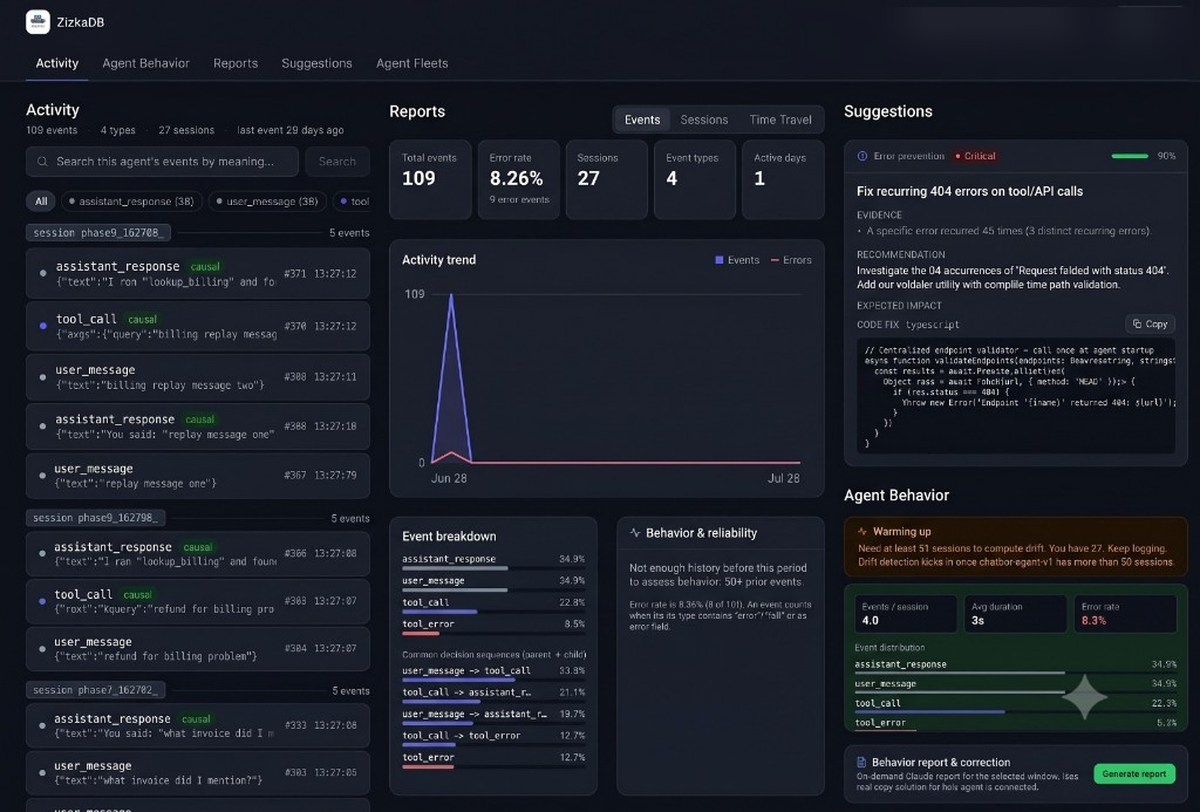
ZizkaDB dashboard showing agent activity

--- ## How it works ```mermaid flowchart LR A[Your agent
SDK · LangChain · CrewAI · LiveKit] -->|events + parent_id| B[ZizkaDB API] D[Dashboard] --> B M[MCP server
Cursor · Claude] --> B B --> P[(PostgreSQL
source of truth)] B --> Q[(Qdrant
semantic search)] B --> R[(Redis
cache)] ``` - **Causal lineage** lives in Postgres: every event stores its parent, and `why()` walks the chain with a recursive query. No separate graph store. - **Every event is written twice**: to Postgres for structured queries and to Qdrant for semantic search. Design decisions: [docs/adr/](docs/adr/). --- ## Use with your AI assistant (MCP) Ask Cursor or Claude *"why did support-bot call lookup_order?"* and get the chain back. Add this to your MCP config: ```json { "mcpServers": { "zizkadb": { "command": "uvx", "args": ["zizkadb-mcp"], "env": { "ZIZKADB_HOST": "http://localhost:8000" } } } } ``` For ZizkaDB Cloud, use `ZIZKADB_API_KEY` instead. Setup for each client: [mcp/README.md](mcp/README.md). The MCP server is MIT-licensed. --- ## ZizkaDB vs. tracing tools Tools like Langfuse and LangSmith **observe** span trees. ZizkaDB **audits** decisions. | | ZizkaDB | Typical LLM tracing tools | | --- | :---: | :---: | | Explicit cause → effect links | ✅ | Span nesting | | One-call root cause (`db.why()`) | ✅ | Manual trace reading | | Time-travel to past agent state | ✅ | — | | Memory for future runs (`db.context_for()`) | ✅ | — | | Pricing | Free self-host (AGPL) | Often per-trace | ---
Managed cloud (Pro / Team) The same features, hosted at [db.zizka.ai](https://db.zizka.ai). No Docker to maintain. | | **Pro** | **Team** | | --- | --- | --- | | Price | €29 / mo | €69 / mo | | Events / mo† | 50k | 100k | | API keys | 2 | 5 | [Sign up →](https://db.zizka.ai/signup/plan) † Plan targets on managed cloud; not enforced in API yet. See [docs/README.md](docs/README.md#plan-limits-honest).
FAQ **Do I need to clone this repo?** No. The curl quickstart downloads config and Docker images only. **Do I need an API key locally?** No. `http://localhost:8000` uses a built-in dev key. **My server's login page asks for an admin token. Where is it?** A server install generates one on first start. Single container: `docker exec zizkadb sed -n 's/^GEN_SELFHOST_ADMIN_TOKEN=//p' /data/secrets.env`. Full stack: the `SELFHOST_ADMIN_TOKEN` you set in `infra/.env`. After signing in, create your API key in **Settings**. **Where does my data go?** When you self-host, everything stays on your machine. The server and dashboard make no outside requests; the SDKs send one anonymous install ping, which `ZIZKADB_TELEMETRY=false` turns off. Details: [docs/telemetry.md](docs/telemetry.md). **`zizkadb demo` says connection refused?** The stack isn't running. Start it with the curl command above or `bash scripts/setup-local.sh`.
Docs & community | | | | --- | --- | | Worked example | [worked/01-support-order-delay](worked/01-support-order-delay/) | | Examples | [examples/](examples/) | | Self-hosting | [DEVELOPMENT.md](DEVELOPMENT.md) · [wiki/Self-Hosting](https://github.com/Zizka-ai/ZizkaDB/wiki/Self-Hosting) | | Integrate any agent | [docs/integrate/](docs/integrate/) | | Issues · Discussions | [Issues](https://github.com/Zizka-ai/ZizkaDB/issues) · [Discussions](https://github.com/Zizka-ai/ZizkaDB/discussions) | | Security | [SECURITY.md](SECURITY.md) | | AI-assisted development | [AGENTS.md](AGENTS.md) |
--- ## Contributors Thanks to everyone who has helped build ZizkaDB. Want to join? Read [CONTRIBUTING.md](CONTRIBUTING.md) or pick up an [open issue](https://github.com/Zizka-ai/ZizkaDB/issues).
saadamjad
saadamjad
Zizka-ai
Zizka-ai
arshadgit23
arshadgit23
rajandevkota98
rajandevkota98
Subhajitdas99
Subhajitdas99
saadwashmen
saadwashmen
mikeaig4real
mikeaig4real
aqilaziz
aqilaziz
pingkui
pingkui
AIandI0x1
AIandI0x1
lamenting-hawthorn
lamenting-hawthorn
nabeeltahirdeveloper
abdurrehman616
abdurrehman616
danielhagever
danielhagever
eaz1337
eaz1337
HafizHamzaShahid
HafizHamzaShahid
mbilalzeeshan
mbilalzeeshan
nabeeltahirpsy
nabeeltahirpsy
AbdelazizBs
AbdelazizBs
Mephistopheles9631
Mephistopheles9631
Qalbeabbas-12
Qalbeabbas-12
towfiq-ul
towfiq-ul
---

AGPL-3.0 · MCP server MIT · Disable telemetry: export ZIZKADB_TELEMETRY=false
This repo is the open-source self-host stack. The operator console and VPC deploy live in a private repo (why).