# dsh-trellis
Trellis Workflow Extension for DeepSeek Harness
Structured Stage Progression · Step State Machine · Verification Quality Gates · Optional Read-Only Planning




---
## Overview
`dsh-trellis` is an engineering workflow extension for [DeepSeek Harness (DSH)](https://github.com/deepseek-ai/deepseek-harness), inspired by the stage specifications and state machine design of [Trellis](https://github.com/mindfold-ai/trellis).
In complex, multi-turn AI coding workflows, typical pain points include:
1. **Writing code without a clear design**: Jumping directly into implementation often causes structural drift or regressions.
2. **Fragmented task checklists**: Maintaining separate checklists across different notes or files leads to state divergence.
3. **Missing quality verification**: Marking tasks as done without running tests or consulting human reviewers.
`dsh-trellis` addresses these issues through a unified step state machine, explicit stage progressions, and runtime tool filtering to ensure that models follow a disciplined "plan first, implement later, verify before closing" workflow.
---
## Core Features
- **Structured Stage Progression**: Standardized workflow tracks for feature development (`feat`), bug fixes (`issue`), and code refactoring (`refactor`).
- **Single Execution Contract**: Uses `task.json.steps` as the single authoritative source of truth for step statuses, preventing checklist divergence.
- **Verification Gates**: Standard step states (`pending`, `in_progress`, `verifying`, `blocked`, `completed`) with explicit support for automated AI testing and human sign-off gates before marking steps complete.
- **Optional Read-Only Planning**: When enabled via settings, code-writing tools (`write` / `edit`) are filtered out during planning phases, leaving only a sandboxed artifact channel for design documentation.
- **Session-Level Isolation**: Session pointers are stored independently under `.trellis/.runtime/sessions/`, preventing multi-session or subagent race conditions.
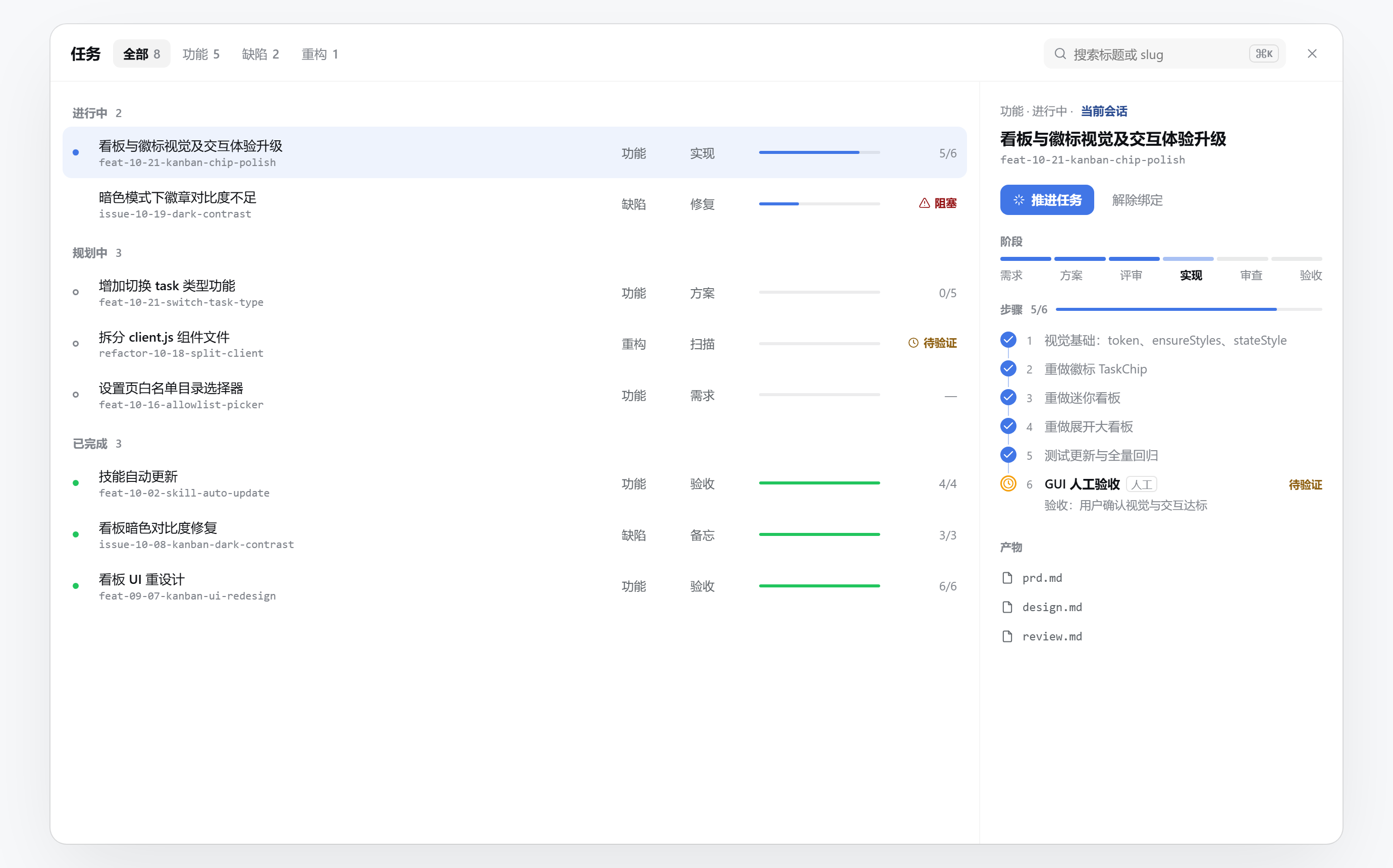
- **Dual-Mode Task Board (Visual Language v2)**: A compact task popover by default (active bound task pinned at the top as a hero card with an inline step checklist; open tasks grouped cleanly by status below), expanding into a full-screen board (tasks grouped by In Progress / Planning / Completed with `⌘K` search and workflow filters); the right-hand details drawer provides a **Step Tracker checklist**, stage track nodes, and an artifact file list. The board adheres to a **single-accent color system** and **restrained interaction** — it never mutates task state directly; the only advance path is the **Advance Task** button injecting an instruction into the composer for the Agent to execute, and artifact clicks produce native `@.trellis/tasks/...` file references handled by DSH.
- **Git Cleanliness Check (scoped mode supported)**: Automatically verifies that the Git working tree is clean and committed before closing or archiving a task. When the working tree contains uncommitted changes unrelated to the current task, pass the task's actual changed files via `modified_files` to `trellis_task_update` / `trellis_task_archive`: the check then scopes to those files (which must themselves be committed), and uncommitted changes outside the list only emit a warning instead of blocking. Omitting the parameter keeps the global strict check.
---
## Getting Started
### 1. Installation
Ensure Node.js ≥ 20 is installed, then run in your terminal:
```sh
dsh plugin --profile web add @banana-peeljj12/dsh-trellis@latest
```
After installation, **restart the DSH service**.
> **Desktop app (DeepSeek Harness App): use the bundled carrier CLI.** The ordinary `dsh`
> CLI refuses to touch the `desktop` profile with
> `error: profile "desktop" is managed exclusively by the Electron application` (that name is
> hard-coded as protected). Use the CLI shipped inside the app instead:
>
> ```sh
> & "F:\DeepSeek Harness\resources\runtime\cli\bin\dsh.cmd" plugin --profile desktop add link:F:\dsh-plugins\dsh-trellis
> ```
>
> For a local development checkout, install it as `link:`. Afterwards
> **fully quit and relaunch the desktop app** (including the tray icon — confirm no
> `DeepSeek Harness.exe` remains in Task Manager) for the change to take effect.
> **Version compatibility**: the `@deepseek-ai/dsh-*` peer ranges a plugin declares must cover
> the running DSH version. DSH validates those ranges both in the install preflight (before pnpm
> runs) and at profile startup; a mismatch produces `installation rejected` and the plugin is not
> loaded. This is a declaration problem, not a code problem: on a `0.2.0-rc.2` runtime,
> `^0.1.7-rc.1` (= `>=0.1.7-rc.1 <0.2.0-0`) does not cover it and must be raised to
> `^0.2.0-rc.2`. If the plugin suddenly stops working after a DSH upgrade, check the peer ranges
> first. This repository currently targets **DSH 0.2.0-rc.2**; see
> [`docs/ref/dsh-0.2.0-rc.2-audit.md`](docs/ref/dsh-0.2.0-rc.2-audit.md) for the audit evidence.
### 2. Configure Allowed Directories (Important)
By default, the plugin will not intercept any unconfigured workspaces. Add your target workspace directory to the allowlist:
1. Open the DSH Web UI, click the **Plugins** icon on the left sidebar, and click **@banana-peeljj12/dsh-trellis** under the **Installed** tab to enter its detail page (the configuration form is rendered directly on the top-level plugin detail page, without needing to expand "Included Components");
2. Under **Allowed Projects (allowlist)**, add the absolute path of your workspace root directory — either type it manually or click **Browse…** to pick a folder via the system folder picker, then click Save (hot-reloaded).
> **Note**: To prevent the model from editing source code prior to plan approval, enable **Enforce Read-Only Planning (`enforceReadonlyPlanning`)** on the same detail page.
### 3. Usage
When describing complex tasks in chat, the model will guide you through creating and advancing Trellis tasks:
- **New Features**: Creates `feat-mm-dd-name`, advancing through `prd` → `design` → `impl` → `review` → `check`;
- **Bug Fixes**: Creates `issue-mm-dd-name`, advancing through `report` → `analyze` → `fix` → `fix-note`;
- **Refactoring**: Creates `refactor-mm-dd-name`, advancing through `scan` → `design` → `apply` → `done`.
To bypass workflow interception in a specific turn, include `no-trellis` in your prompt.
---
## Workflow Tracks
The plugin provides three standard tracks mapped to the task stage (`work.stage`):
| Track | Naming Pattern | Stage Progression | Description |
|---|---|---|---|
| **Feature (`feat`)** | `feat-MM-DD-name` | `prd` → `design` → `impl` → `review` → `check` | For new feature development or major functionality changes |
| **Issue (`issue`)** | `issue-MM-DD-name` | `report` → `analyze` → `fix` → `fix-note` | For bug diagnosis, fixing anomalies, and regression testing |
| **Refactor (`refactor`)** | `refactor-MM-DD-name` | `scan` → `design` → `apply` → `done` | For behavior-preserving optimizations and cleanups |
---
## Key Mechanisms
### 1. Step State Machine & Verification Gates
The `steps` array in `task.json` serves as the execution list and supports 5 states:
- `pending`: Waiting to be worked on;
- `in_progress`: Actively working on the step;
- `verifying`: Implementation done, awaiting verification;
- `blocked`: Blocked by external causes (requires `blockedReason`);
- `completed`: Verified and closed.
#### Verification Modes:
- **Automated Verification (`verification: 'ai'`)**: The model must run test commands and record `verified: true` with `verificationNotes` evidence via `trellis_task_update` in an initial call before the step can be marked `completed` in a subsequent call.
- **Human Approval Gate (`verification: 'human'`)**: Reserved for critical or high-risk changes. The step cannot be marked `completed` unless confirmed by the user and saved with `verifiedBy: 'human'`.
- **Completion Audit**: When closing or archiving a task, the plugin validates that all steps are completed and verified, and that the Git working tree is clean.
### 2. Dual-Mode Task Board (Compact Popover & Full-Screen Board)
In the DSH Web UI, the session header phase chip provides an interactive task board with dual presentation modes:
#### Compact Popover View & Full-Screen Board
The default popover pins the active bound task at the top in a prominent card featuring a live **Step Tracker checklist** (bolding active step with acceptance criteria and collapsible completed steps), with other tasks grouped by status below. Clicking the top-right maximize icon expands it into a roomy full-screen board with `⌘K` search and a comprehensive details drawer:

#### Workflow Filter & Comprehensive Details
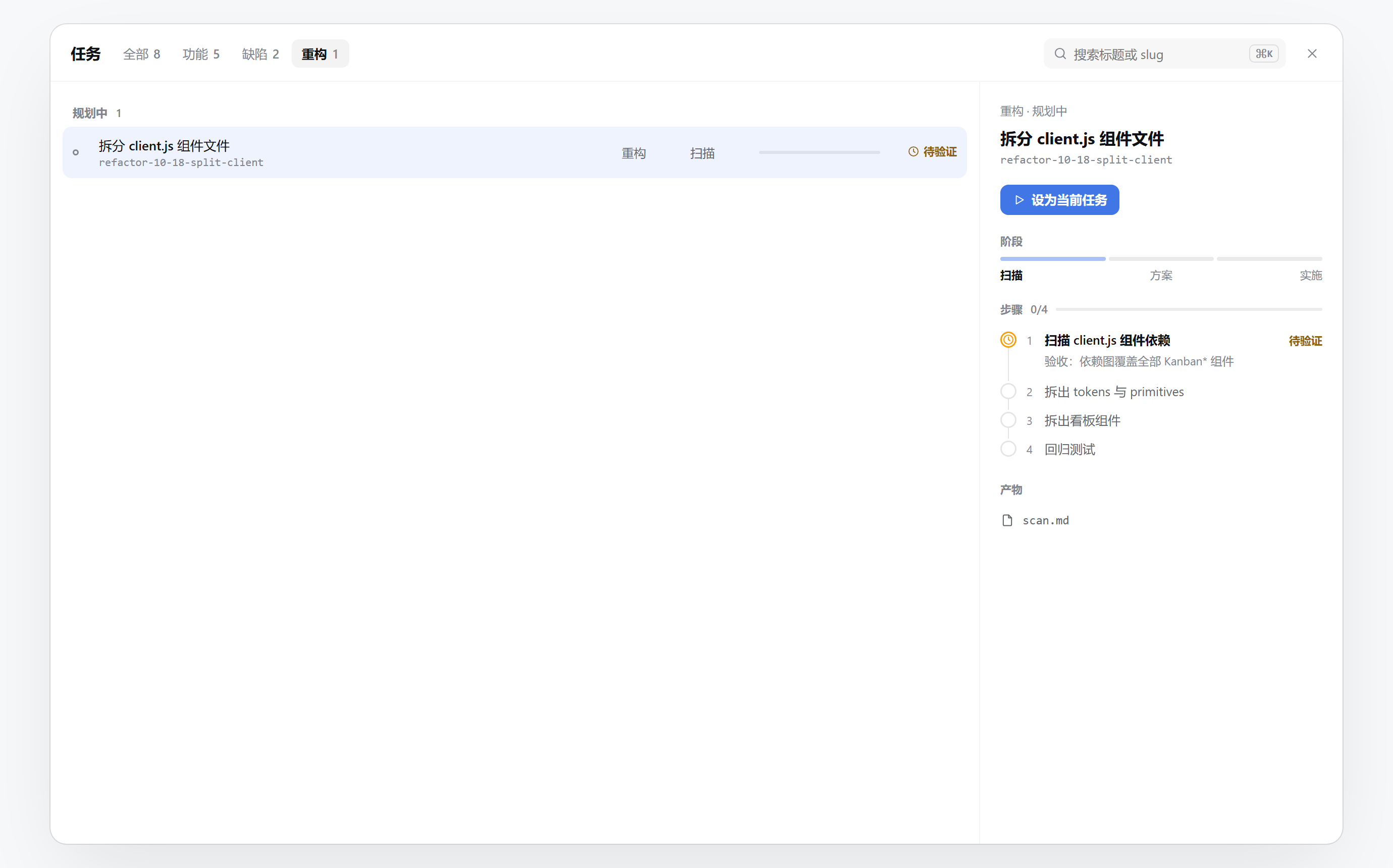
Users can instantly filter by workflow type (Features / Issues / Refactors). Scoping down to a specific workflow track (such as refactoring) displays matching tasks alongside stage pipeline nodes, full step state machine status, and artifact files:
- **Single-Accent Visual Language**: Workflow types are rendered in clean, uncolored text; brand blue is reserved for active session bindings and in-progress steps, while red/amber alerts appear strictly for external blockers and human verification gates.
- **Restrained Interaction**: The board serves strictly for observation and intent steering without mutating state behind the model's back. The right-hand **Advance Task** button simply injects structured prompts into the composer for the Agent to carry out.
- **Native File Navigation**: Clicking "Open" on any artifact resolves a native `@.trellis/tasks/...` reference, seamlessly opening DSH's native sidebar preview.
### 3. Read-Only Planning (Optional Enforcement)
When `enforceReadonlyPlanning: true` is configured, the plugin TRIMS ONLY the specified tools based on the current workflow state (denylist semantics — every other tool, including tools registered by other plugins, is kept):
| Authorization State | Condition | Trimmed Tools | Description |
|---|---|---|---|
| `undecided` | In allowlist, no active task, not skipped | `write` / `edit` + `trellis_task_update` / `trellis_artifact_update` / `trellis_task_archive` / `trellis_ui_update` | Removes code-write and task-write tools to avoid blindly rewriting source; `trellis_task_create` / `trellis_task_skip` and all other tools (including other plugins') are kept |
| `planning` | Task is in planning stages (`prd`, `design`, `scan`, `report`) | `write` / `edit` + `trellis_task_create` / `trellis_task_skip` / `trellis_task_archive` / `trellis_ui_update` | Removes generic `write` / `edit` tools and task-lifecycle tools; deliverables can only be updated through the artifact tool; `trellis_task_update` / `trellis_artifact_update` and all other tools are kept |
| `authorized` | Task is in implementation stages (`impl`, `fix`, `apply`) or skipped | None (no trimming) | Restores the full tool surface |
> Note: `trellis_artifact_update` only permits writing whitelisted documentation inside the active task directory (`.trellis/tasks//`), preventing path traversal.
---
## Provided Tools
The plugin registers the following specialized tools:
- **`trellis_task_create`**: Creates a new task with initial `task.json`, seeds templates, and binds to the current session.
- **`trellis_task_update`**: Advances task stages, updates step progress, records verification evidence, or modifies task metadata without changing the current session binding. An explicit `slug` selects only the update target; use the board's activate button to switch tasks.
- **`trellis_artifact_update`**: Safely updates task planning documents (such as `prd.md`, `design.md`, `check.md`), restricted by path and filename whitelists.
- **`trellis_task_archive`**: Archives a completed task to `.trellis/tasks/archive/YYYY-MM/` and unbinds the session.
- **`trellis_task_skip`**: Skips the Trellis workflow for the active session upon user approval, unlocking write tools.
- **`trellis_state`**: Inspects and reports Trellis runtime state and task information for the current workspace.
- **`trellis_ui_update`**: Manually refreshes the web header phase chip.
---
## Configuration Reference
Configure via the Web UI (sidebar **Plugins** icon → **@banana-peeljj12/dsh-trellis** detail page) or in `~/.dsh/settings.yaml`:
| Key | Type | Default | Description |
|---|---|---|---|
| `allowlist` | `string[]` | `[]` | **Project Allowlist**: Absolute paths of enabled workspace roots. Empty disables interception |
| `enforceReadonlyPlanning` | `boolean` | `false` | **Read-Only Planning**: Strips code modification tools during planning stages when enabled |
| `injectSpecIndex` | `boolean` | `true` | **Inject project docs**: when `.trellis/doc.json` exists, injects the document **bodies** listed in `files` (caps come from the two injection-budget keys below; anything cut is truncated and marked with its path); without it, the legacy `.trellis/spec/` index scan is preserved |
| `docFileBudgetKB` | `number` | `8` | **Per-file injection budget (KB)**: how many KB of one document body may be injected, hard cap 128KB; a project can override it via `budgets.fileKB` in `.trellis/doc.json` |
| `docTotalBudgetKB` | `number` | `32` | **Total body injection budget (KB)**: how many KB of bodies may be injected in total, hard cap 512KB; a project can override it via `budgets.totalKB` in `.trellis/doc.json` |
| `skipKeywords` | `string[]` | `['no-trellis']` | **Skip Keywords**: Suppresses the per-turn breadcrumb and interception when the user message contains one of these words. The session-level prompt sections (`injectSpecIndex` / `enforceReadonlyPlanning`) are not suppressed per turn — turn them off with their own switches |
| `injectStep` | `number` | `1` | Breadcrumb prompt injection step index (default: first step of turn) |
| `inline` | `boolean` | `false` | Enables codex-inline style phase dispatch |
---
## Project Documentation Entry
A project can declare the Markdown files Trellis should read in `.trellis/doc.json`:
```json
{
"root": ".trellis/spec",
"files": [
".trellis/spec/guides/index.md",
".trellis/spec/trellis-workflow/task-engine/index.md"
],
"budgets": { "fileKB": 16, "totalKB": 64 }
}
```
- `files`: the runtime injection whitelist. Every entry is a project-relative Markdown file path. Multiple files are supported, injected in order, and deduplicated. **Bodies are injected**, not paths.
- `budgets` (optional): this project's own injection budget in KB — write only the field you want to override. Precedence: **`budgets` in `doc.json` > the `docFileBudgetKB` / `docTotalBudgetKB` settings > built-in 8KB / 32KB**, with hard caps of 128KB per file and 512KB in total (out-of-range values are clamped). `0`, negative numbers or non-numbers count as "not configured" and fall through to the next source.
- **Budgets**: per-file and total caps (default 8KB / 32KB, UTF-8 bytes). Anything over the budget is truncated and marked `truncated / over budget — read ` so the model can fetch the rest; unreadable files are marked with their path too. The prompt header echoes the caps actually in effect.
- `root`: Skill metadata only. `trellis-spec-bootstrap` and `trellis-update-spec` use it as the default documentation root for discovery and updates. It neither prefixes nor filters `files`, and changing it never changes runtime injection.
- Without `.trellis/doc.json`, the legacy `.trellis/spec/` scan is preserved (index only, no bodies). Once explicitly configured, unlisted legacy Specs are no longer injected.
- An invalid explicit config produces a short repair diagnostic instead of silently falling back to the legacy tree.
- Add any new long-lived injected document to `files`. Existing Docs projects can use the migration branch of `trellis-spec-bootstrap`; new projects use its initialization branch.
- **Visual editor**: switch to **"Project docs"** in the conversation's top-level view bar (next to Chat / Trajectory / Git) to view and edit the current project's `.trellis/doc.json`: add, remove and reorder files, edit the project's own "Injection budget" (per-file / total KB — blank inherits the plugin setting, an invalid value is marked inline and blocks saving), see each file's injection status (full body / truncated to the effective cap / path only) and budget usage, and seed a first draft from the existing `.trellis/spec` index when nothing is configured. A save takes effect on the very next injection — no restart.
---
## Repository Structure
```text
dsh-trellis/
├── lib/
│ ├── index.js # Plugin entry: registers pre-step hooks, tool filtering, and API routes
│ ├── task.js # Task engine: step state machine, verification gates, and audits
│ ├── skills.js # Skills provider: provisions standard workflow skills into workspace
│ ├── breadcrumb.js # Context builder: extracts focused steps and formats prompts
│ ├── spec.js # Spec index: reads the .trellis/doc.json files whitelist or falls back to .trellis/spec
│ ├── readonly.js # Authorization logic: undecided / planning / authorized states
│ ├── state.js # State resolution: stage inference, session pointers, slug checks
│ ├── artifact.js # Sandboxed writes: whitelisted artifact updates and security checks
│ ├── archive.js # Archiving logic: completion validation, directory migration, Git checks
│ ├── board.js # Kanban data: aggregates active tasks and archive buckets
│ ├── client.js # Web client: phase chip, dual-mode board (compact popover + full-screen board), and settings panel
│ └── types/index.d.ts # TypeScript type definitions
├── skills/ # Bundled workflow skills and markdown templates
├── docs/images/ # Screenshots and architecture diagrams
└── test/ # Automated unit test suite
```
---
## License & Acknowledgements
- Licensed under the [MIT License](./LICENSE);
- Thanks to [Trellis](https://github.com/mindfold-ai/trellis) (Mindfold) for the conceptual foundation of stage specifications and breadcrumb injection;
- Thanks to [CodeStable](https://github.com/codestable/CodeStable) for the three standard workflow track classifications;
- Thanks to [DeepSeek Harness](https://github.com/deepseek-ai/deepseek-harness) for the modern, extensible agent runtime.