dsh-floway Usage Guide
AI-driven development workflow — from PRD to shipped code
Usage Guide — Six-step closed-loop development workflow: Plan, Design, Break Down, Implement, Review, Ship.
Contents
- 1. Overview
- 2. Installation
- 3. Workflow Overview
- 4. Step 1: /prd — Requirements Planning
- 5. Step 1.5: /prd-to-spec — PRD to Technical SPEC
- 6. Step 1.6: /to-issues — Break Down into Issues
- 7. Step 2: Implementation — /implement · /loop-it & /graph
- 8. Step 3: /review-it — Code Review
- 9. Step 4: /ship-it — Commit and Ship
- 10. Bonus: /humanize-it — De-AI Text Rewriting
- 11. Bonus: /insight-diagram — UML and Architecture Diagrams
- 12. Bonus: /refactor — Expert-Level Code Refactoring
- 13. Bonus: /modern-go — Go Code Modernization
- 14. Bonus: /note-it — Implementation Notes
- 15. Bonus: /code-to-spec — Reverse-Generate SPEC
- 16. Bonus: /smell — Architecture Smell Detection
- 17. Bonus: /loop-it — Automated Issue Implementation Loop
- 18. Bonus: /to-design — PRD to Design Document
- 19. Bonus: /graph — Parallel Task-Graph Execution
- 20. Bonus: /understand — Interactive Change Review
- 21. Bonus: /ask-flow — Which Skill Do I Use?
- 22. Bonus: /triage — Triaging Inbound Issues
- 23. Bonus: /diagnose — The Debugging Loop
- 24. Bonus: /conflict — Resolving Merge / Rebase Conflicts
- 25. Supported Platforms
- 26. FAQ
1. Overview
dsh-floway is a collection of AI-driven development workflow skills built for the DeepSeek Harness (DSH). It breaks down the complete software development lifecycle into standardized steps, each driven by a dedicated Skill.
It enables AI agents to act like experienced engineers — from understanding requirements, breaking down tasks, writing code, reviewing quality, to final submission and merge — autonomously completing the entire process. You just describe the feature idea, and the workflow handles the rest.
/ask-flow and describe where you are (a half-formed idea, a pile of inbound issues, code that won't work, a long implementation). It answers only "what do I type next" and which decisions are yours to make — it never does the work for you.
/ask-flow
Skill routing (entry point): next step only, no execution
- Routes on the skill map; answers "what do I type next"
- Suggests only: no spec writing, no file edits
- user-only (invisible to the model catalog)
/prd
Requirements document generation + Issue breakdown
- Clarifying questions → structured PRD
- Decomposed into independently implementable Issues
- Supports GitHub / Local / iCafe
/prd-to-spec
PRD to technical design SPEC
- PRD requirements → architecture + API + data model
- Error handling + security + performance strategies
- Issue mapping + implementation plan
/to-issues
Break PRD/SPEC into vertical-slice Issues
- Vertical slices (tracer bullets), not layers
- Explicit blocking edges, blockers created first
- Supports GitHub / Local, standalone
/triage
Turn raw inbound issues into executable cards
- Reproduce / understand → assign a role (ready / needs-info / bug-confirmed / duplicate / wontfix)
- Fill the ready ones out into agent-ready cards
- Inbound items only — never triage /to-issues output
/goal
DSH goal command (human-facing UI)
- Persisted objective with autonomous rounds
- A UI command the model cannot invoke
- Not the pipeline's implementation step
/review-it
Automated code review and repair
- Detect uncommitted changes or branch diff
- Findings → iterative fixes
- Until review passes
/ship-it
Commit → PR → Merge → Close
- Commit linked to Issue number
- Squash merge + delete branch
- Add implementation summary and close card
/understand
Interactive review of fresh AI-generated changes
- Scan uncommitted / branch changes into a webpage
- File tree + syntax-highlighted diff + per-segment notes
- Each segment shows its requirement and a plain-language explanation
/humanize-it
Iterative de-AI text rewriting
- Auto-select best humanization strategy
- Three-path skill iteration until target met
- Up to 42 rounds of intelligent switching
/insight-diagram
UML and architecture diagram generator
- Analyze codebase structure
- UML / architecture diagrams / flowcharts
- Rendered as HTML+SVG
/refactor
Expert-level code refactoring
- 22 code smell detections
- 40+ refactoring techniques (Fowler catalog)
- Five-phase safety protocol
/modern-go
Go code modernization
- 35+ gofix-style transformation rules
- Full coverage Go 1.0 to 1.26+
- Auto-detect version + safety guard
/note-it
Implementation notes
- Design decisions / deviations / tradeoffs
- Tracking open questions
- Saved as HTML in docs/
/code-to-spec
Reverse-generate project SPEC
- Analyze code, config, tests, structure
- Generate 12-chapter complete SPEC
- Supports multi-level deep analysis
/smell
Architecture smell detection
- 8 categories: architecture, coupling, cohesion, design, code, testing, naming, complexity
- 50+ anti-patterns and bad smells detected
- Detailed markdown report with refactoring roadmap
/loop-it
Automated batch issue implementation
- Fetch issues → dependency sort → implement inline → commit; one review + one ship at batch end
- Checkpoint/resume with .loop-state.json
- Structured error recovery (10 error classes)
/to-design
PRD to design document (Go proposal style)
- A decision doc on "why this approach"
- Proactively lists rejected alternatives + reasons
- Distinct from SPEC: a decision artifact, not a contract
/graph
Parallel task-graph execution (DAG + supersteps)
- Task/PRD → DAG → layered into superstep waves
- Independent nodes per wave implemented concurrently by subagents
- Each node implements and commits in its own worktree; the wave reviews and ships once
/implement
The inline closed loop for a single unit
- Implement inline → prove with project gates → /review-it → /ship-it
- No worktree, no subagent, no wave branch
- One unit only; never expand scope
/test-first
Reference for the red → green loop
- Good tests assert behaviour through public interfaces
- Agree the seams with the user up front
- Three anti-patterns + loop rules (red before green, one slice at a time)
/diagnose
The debugging loop for hard bugs
- Get a command already red on this bug before theorising
- Minimise → 3–5 falsifiable hypotheses → one variable at a time
- Regression test at the right seam; it does no review / ship
/conflict
Resolve an in-progress merge / rebase
- Recover both sides' intent → resolve hunk by hunk (keep both when possible)
- Run the project gates and finish the operation
- Always resolve, never
--abort
/design-it
Self-contained HTML design document
- Requirement / spec → one styled HTML page
- TOC, SVG diagrams, code blocks, callouts
- Aligned-decisions panel + test cases + code index
/listenhub-tts
Text to speech via the ListenHub API
- Quick synthesis, multi-role scripts, long-form streaming
- Auto-fetches voices when none is specified
- Default voice: chat-girl-105-cn (晓曼)
/article-icons
Animated-style icons for articles
- Fetches clean inline SVG from itshover.com/icons
- Places icons at headings, concepts, lists, callouts
- Works on Markdown and HTML documents
2. Installation
dsh-floway targets the DeepSeek Harness (DSH). There are two install routes — recommended: install as a skill directory; optional: install as a DSH bundle. Pick one, not both.
Option 1 (Recommended): Install as a skill directory
# Recommended — install all skills into ~/.agents/skills
npx skills add 9Ashwin/dsh-floway

# Or install a specific skill
npx skills add 9Ashwin/dsh-floway --skill ask-flow
npx skills add 9Ashwin/dsh-floway --skill prd
npx skills add 9Ashwin/dsh-floway --skill prd-to-spec
npx skills add 9Ashwin/dsh-floway --skill to-issues
npx skills add 9Ashwin/dsh-floway --skill triage
npx skills add 9Ashwin/dsh-floway --skill to-design
npx skills add 9Ashwin/dsh-floway --skill design-it
npx skills add 9Ashwin/dsh-floway --skill implement
npx skills add 9Ashwin/dsh-floway --skill test-first
npx skills add 9Ashwin/dsh-floway --skill loop-it
npx skills add 9Ashwin/dsh-floway --skill graph
npx skills add 9Ashwin/dsh-floway --skill diagnose
npx skills add 9Ashwin/dsh-floway --skill conflict
npx skills add 9Ashwin/dsh-floway --skill review-it
npx skills add 9Ashwin/dsh-floway --skill understand
npx skills add 9Ashwin/dsh-floway --skill ship-it
npx skills add 9Ashwin/dsh-floway --skill note-it
npx skills add 9Ashwin/dsh-floway --skill humanize-it
npx skills add 9Ashwin/dsh-floway --skill listenhub-tts
npx skills add 9Ashwin/dsh-floway --skill insight-diagram
npx skills add 9Ashwin/dsh-floway --skill code-to-spec
npx skills add 9Ashwin/dsh-floway --skill refactor
npx skills add 9Ashwin/dsh-floway --skill modern-go
npx skills add 9Ashwin/dsh-floway --skill smell
npx skills add 9Ashwin/dsh-floway --skill article-icons

# Global install (available for all projects)
npx skills add 9Ashwin/dsh-floway -g

# Update from the same source later
npx skills update -g

# Install to a specific agent (for compatibility; DSH scans ~/.agents/skills)
npx skills add 9Ashwin/dsh-floway -a dsh
Skills land in ~/.agents/skills, which DSH scans at session start. This is the least-effort route: nothing to change in a profile, and it applies to every profile.
Option 2 (Optional): Install as a DSH bundle
# Optional — install as a DSH bundle (config-only package)
dsh plugin --profile web add -w github:9Ashwin/dsh-floway

# Pin a commit for production instead of tracking the default branch
dsh plugin --profile web add -w github:9Ashwin/dsh-floway#<sha>

# Verify the bundle is registered in the profile
dsh --profile web --dump-config | grep -A3 dsh-floway-wis required because the DSH profile is treated as a pnpm workspace root — without it, pnpm 9 refuses to add the dependency and reportsERR_PNPM_ADDING_TO_ROOT.- The package is a config-only bundle (skills + config, no native build step), so no
allowBuildsgrant is needed. - Pin a commit for production with
#<sha>so an update can't shift behavior under you. - Verify with
dsh --profile web --dump-config | grep -A3 dsh-floway.
~/.agents/skills is already inside its skill roots — so Option 1 is enough when all you want is the skills: the two sources are de-duplicated nearest-layer-first, and the directory copy wins over the plugin-package copy. Installing both duplicates nothing; on the Web face the bundle simply loses to the directory. The bundle's added value is shipping a preset with the package — a preset can decide both which skills an agent mounts and whether its subagents carry the skill directory (toolFilter) and a persona, turning "how this workflow runs" into first-class deployment config. Conversely, on a face with no preset mounted (some minimal profiles), the bundle is what makes the skills visible at all.
Prerequisites
| Tool | Purpose | Install |
|---|---|---|
npx | npm package runner (recommended route) | Bundled with Node.js |
gh | GitHub CLI (Issue/PR operations) | brew install gh && gh auth login |
dsh | DeepSeek Harness CLI (optional route) | npm install -g @deepseek-ai/dsh |
/ask-flow, /prd, /prd-to-spec, /to-issues, /triage, /to-design, /design-it, /implement, /test-first, /loop-it, /graph, /diagnose, /conflict, /review-it, /ship-it, /note-it, /understand, /refactor, /modern-go, /code-to-spec, /smell, /humanize-it, /listenhub-tts, /insight-diagram, /article-icons in your DSH session to directly invoke the corresponding skill. /goal is different: it is a DSH UI command that a human types, not a skill.
3. Workflow Overview
Six-step closed loop, from requirements to delivery:
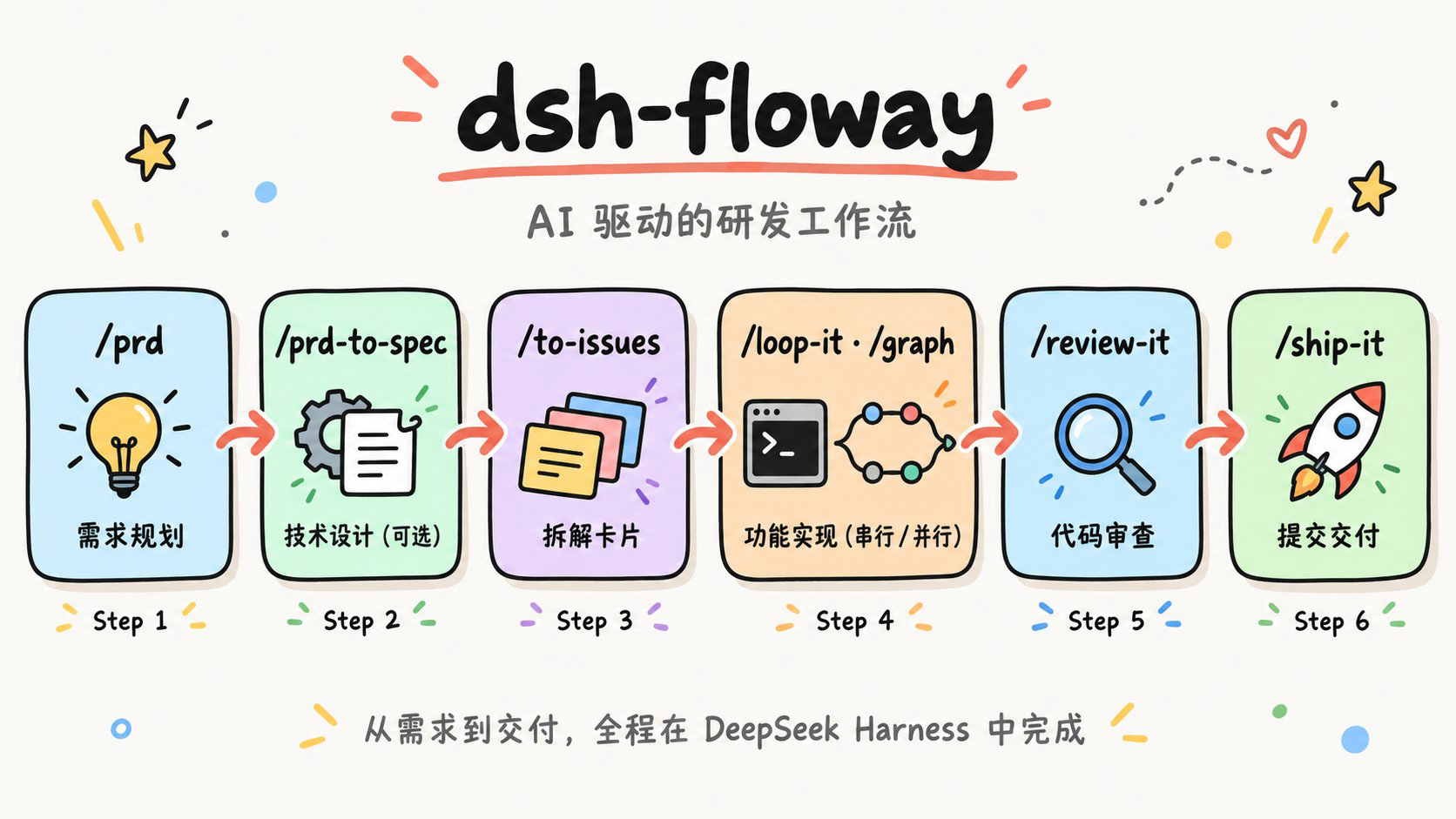
| Step | Command | Input | Output |
|---|---|---|---|
| 1. Plan | /prd |
Feature description / product idea | PRD document + Issue cards |
| 1.5 Design | /prd-to-spec |
PRD document | Technical SPEC (optional) |
| 1.6 Break Down | /to-issues |
PRD / SPEC document | Issue cards |
| 2. Implement | /implement / /loop-it / /graph |
Issue cards (or a task DAG) | Code implemented inline by the DSH agent |
| 3. Review | /review-it |
Code changes (dirty / branch) | Clean code that passes review |
| 4. Ship | /ship-it |
Reviewed code | Merged PR + Closed Issue |
/implement; a bug, an intermittent flake or a performance regression starts with /diagnose; a raw inbound issue starts with /triage; an in-progress merge / rebase uses /conflict. Can't tell which? Type /ask-flow.
4. Step 1: /prd — Requirements Planning
/prd transforms a vague feature idea into a structured product requirements document and breaks it down into independently implementable Issue cards.
How to Invoke
# Run this in DeepSeek Harness
/prd Add a priority feature to our task management system

# Or use trigger phrases
Write PRD for: User registration with email and phone support
Requirements analysis: Add rate limiting capability to the API
Workflow
- Agent asks 3-5 clarifying questions (with letter options, reply quickly with "1A, 2C, 3B")
- Generates structured PRD based on answers (User Stories, Functional Requirements, Non-Goals, Acceptance Criteria)
- Presents PRD for review; confirm or adjust
- Saves PRD to
tasks/prd-[feature-name].md - Breaks down PRD into Issue list; presents for confirmation
- Selects creation mode (GitHub / Local / Baidu iCafe) and creates Issues
Output Example
# Generated Issue list
📋 Generated 4 Issues from PRD:

#1: Add priority field to database (backend, high)
#2: Display priority indicator (frontend, high) — depends on #1
#3: Add priority selector (frontend, medium) — depends on #1
#4: Filter tasks by priority (frontend, medium) — depends on #1, #25. Step 1.5: /prd-to-spec — PRD to Technical SPEC
/prd-to-spec transforms a product requirements document (PRD) into an implementable technical design SPEC. PRD says "what to build"; SPEC says "how to build it".
How to Invoke
# Run this in DeepSeek Harness
/prd-to-spec tasks/prd-priority-system.md

# Or use trigger phrases
PRD to design: Convert priority PRD to technical plan
Technical spec: Generate SPEC based on prd-user-auth.md
PRD → SPEC Mapping
| PRD Element | SPEC Chapter | Transformation |
|---|---|---|
| User Stories | Business Logic + Test Mapping | Stories → algorithms + test cases |
| Functional Requirements | API Design + Business Logic | FR → endpoints + implementation logic |
| Acceptance Criteria | Testing Strategy | Criteria → concrete test scenarios |
| Non-Goals | Open Questions | Explicitly scoped exclusions |
| Technical Considerations | Architecture + Performance | Constraints → design decisions |
SPEC Output Structure (11 Chapters)
| # | Chapter | Content |
|---|---|---|
| 1 | Summary | Scope, PRD reference, design decision summary |
| 2 | Architecture | System context, component design, file structure |
| 3 | Data Model | Schema changes, entity definitions, migration plan |
| 4 | API Design | Endpoint table, request/response schema, error responses |
| 5 | Business Logic | Core algorithms, validation rules, state machines, edge cases |
| 6 | Error Handling | Error classification, retry strategies, degradation plan |
| 7 | Security | Authentication/authorization, input validation, data protection |
| 8 | Performance | Expected load, optimization strategies, database considerations |
| 9 | Testing Strategy | Unit/integration/E2E tests + acceptance criteria mapping |
| 10 | Implementation Plan | Implementation phases, Issue mapping, incremental delivery |
| 11 | Open Questions & Risks | Unresolved questions, technical risks, assumptions |
Workflow
- Locate PRD file (auto-scan tasks/ or manually specified)
- (Optional) Analyze existing codebase: architecture, tech stack, patterns, conventions (skip if no codebase — propose architecture from scratch)
- Ask 3-5 technical clarification questions (with options)
- Generate complete SPEC document
- Present for review; confirm or iterate
- Save to
tasks/spec-[feature-name].md
/prd-to-spec is an optional step. For most small to medium features, the Functional Requirements and Acceptance Criteria in the PRD are sufficient for the AI agent to make autonomous technical decisions during the /goal phase — the agent automatically analyzes the codebase, understands the architecture, and chooses the right implementation path without needing a pre-written SPEC. Consider running /prd-to-spec only in the following scenarios:
- Multiple people or agents developing in parallel, needing shared technical conventions
- Large changes spanning multiple services/modules, where architecture decisions have broad impact
- Team has compliance or review process requiring design documents
- PRD is vague and needs upfront technical detail to reduce interpretation variance
6. Step 1.6: /to-issues — Break Down into Issues
/to-issues breaks down a PRD and/or SPEC into vertically-sliced, independently implementable Issues and creates them on your chosen platform. It can be used standalone — no need to run /prd first.
/goal.
How to Invoke
# Run this in DeepSeek Harness
/to-issues

# Or use trigger phrases
Create issues for: Create Issues from prd-user-auth.md
Break down issues: Break down implementable cards from SPEC
Generate cards: Break PRD and SPEC together into Issues
Input Sources
| Option | Description |
|---|---|
| Auto-detect | Scan tasks/ directory, list available PRDs and SPECs |
| Specify PRD | Break down based only on PRD's User Stories |
| Specify SPEC | Use SPEC's Issue Mapping chapter as primary guidance |
| PRD + SPEC | (Recommended) PRD provides requirements, SPEC provides technical conventions — most complete Issues |
Creation Platforms
| Platform | Tool | Description |
|---|---|---|
| GitHub | gh issue create | Native blocking edges --blocked-by, sub-issues --parent (gh v2.94+) |
| Local | Markdown files | One file per Issue, dependency-ordered, in a per-feature folder |
Workflow
- Locate input files (auto-detect or manually specify PRD/SPEC)
- Find prefactoring ("make the change easy" groundwork) and order it first
- Break down into vertical-slice Issues with a demo path and explicit Blocked by edges, numbered in dependency order
- Quiz the user: granularity, blocking edges, and whether each demo path is a behaviour rather than a layer
- Select creation platform (GitHub / Local)
- Create blockers first, then output a summary report (including the ready-to-start frontier)
expand → migrate → contract sequence — the one exception to the vertical-slice rule.
/to-issues is the key bridge from requirements to implementation. It can be used independently — even if you didn't use /prd to generate a PRD, as long as you have a requirements document (or even pasted text), you can break it down into Issues.
Boundary: /triage only handles raw inbound items
/to-issues breaks down your own requirements, and its output is already agent-ready; bug reports, user feedback and requests filed by other people are the job of /triage — reproduce / understand first, then assign a role (ready / needs-info / bug-confirmed / duplicate / wontfix) and fill the ready ones out into agent-executable cards. Never triage /to-issues output. See 22. /triage.
7. Step 2: Implementation — /implement · /loop-it & /graph
This is the implementation step, and all three routes start from the Issue cards created by /to-issues: a single unit goes inline through /implement, sequential work through /loop-it, and parallel work through /graph. On every route the running DSH agent writes the code itself — implementation is done inline, never by handing the work to an external command.
/implement — the single-unit inline loop
One issue, one card, one item in a spec — when there is exactly one unit, take this route: implement inline → prove with the project's gates → /review-it → /ship-it. It explicitly does not create a worktree, not dispatch a subagent and not create a wave branch — those are the orchestration owned by /loop-it and /graph, and putting a single unit on the graph or into a loop just pays orchestration cost for nothing.
- Read the unit first: list its acceptance criteria one by one, read the PRD / SPEC / design docs it references, then read the adjacent code and tests so naming, error handling and log style match the repo
- Prove it with the project's own gates (
mise run check,go build ./... && go test ./...,pnpm --dir web lint, …): run the focused tests as you go and the full gate once at the end — a criterion that was never tested is not satisfied - Do not expand scope: no force-push, never guess a vague acceptance criterion for the user (ask instead), and never smuggle an out-of-scope drive-by change into this diff (open another issue for it)
Reference: /test-first — red → green
Use it when behaviour should be pinned down before the implementation: one test → one piece of implementation → the next test, one seam at a time. It is also the reference /implement uses internally, and it can be invoked on its own.
- Agree the seams with the user up front: before writing any test, write down which seams will be tested and confirm it with the user — you cannot test everything, and agreeing the seams first puts the effort on critical paths and complex logic
- Three anti-patterns: coupled to the implementation (mocking internal collaborators, testing private methods, verifying through a side channel), tautological (recomputing the expected value the same way the implementation does, so it passes by construction), and horizontal slicing (writing all the tests first, which tests an imagined shape rather than user-facing behaviour)
- Loop rules: red before green (write the failing test first, then the least code that makes it pass), one slice at a time (one round = one seam + one test + one minimal implementation), and refactoring is not part of this loop (that belongs to
/review-it)
Node Scope: Implement → Prove → Commit
- Each node owns an isolated git worktree and its own branch
feat/node-{N}-{slug}; every edit happens inside that worktree - It proves itself by running the project's own gates inside its worktree (e.g.
go build ./...,go test ./...,mise run check); a criterion it did not test is not satisfied - It commits to its own branch only: no push, no PR, no merge, and no self-review — a node report is evidence, not a verdict
/loop-it — Sequential Implementation
/loop-it fetches the open GitHub issues and resolves their order with a dependency-aware topological sort. It implements one Issue at a time, inline (read the requirement → write the code → prove it with the project's gates) and commits on that Issue's own branch — without pushing or opening a PR. At the end of the batch it merges the surviving branches into a single batch branch (failed branches are never merged in) and runs /review-it once and /ship-it once. It checkpoints progress to .loop-state.json after every status change, so a crash or interruption can resume from the last checkpoint instead of restarting the whole batch.
# Sequential: one Issue at a time, a commit per Issue, one review + one ship at batch end
/loop-it
/graph — Parallel Implementation
/graph turns a task, PRD, or Issue set into a DAG, layers it into waves, and dispatches one subagent per independent node concurrently. Each node works in its own git worktree and commits only to its own branch, so parallel edits never clobber each other. Every wave ends with a mandatory fan-in barrier: wait for all of the wave's settlement notices → leak check → integrate (merge only the nodes that shipped, never a failed one) → run the gates on the integrated tree → review once (section by section, node by node) → ship once (one PR, closing the Issues the wave satisfied). Progress is checkpointed to .graph_state, and a graph.html tracker re-renders from that checkpoint at every wave boundary.
# Parallel: task/PRD/issues → DAG → waves → one worktree per node → fan-in barrier
/graph tasks/prd-url-shortener.md
A wave of one node has nothing to integrate: skip the wave branch and the merge ceremony, and review + ship that node's branch directly.
When a Node Fails
- Retry in place first with
send_message, reusing that node's own context; then retry it as a fresh node; only then drop it - Its dependents are marked
blocked, but the rest of the wave still ships — a wave is not all-or-nothing — and a failed branch is never merged or marked shipped just to keep the wave moving
/implement (implement inline → prove with the gates → /review-it → /ship-it, no worktree, no subagent); /goal is a DSH UI command, not a skill, so the model cannot invoke it; /review-it and /ship-it are real skills the orchestrator calls once per wave. A child pays the parent's full prompt, tool schemas and skill catalog as fixed overhead, which is why a node stops at commit and trivia stays inline; cap concurrency at 3–4 by default and prefer waves of 2–3 nodes.
/goal is not a pipeline step. In DSH, /goal is a human-facing UI command — a persisted objective with autonomous continuation rounds — that the model cannot invoke. The implementation step above is therefore done inline by the running DSH agent (read the Issue, write the code, run the tests), not by calling /goal. A human may still type /goal <objective> for a single long-running objective, but that sits outside this pipeline.
8. Step 3: /review-it — Code Review
/review-it is the closeout check before shipping: prove the gates first, then review the diff, fixing real findings until none are actionable. Under the current contract it runs once per wave / batch, against the integrated diff — not once per node against its own fresh work.
Two Axes: Spec and Standards, Reported Separately
Every review answers two different questions, and it reports them as two sections, never one merged ranking — merge them and the naming-and-style findings drown out a missing acceptance criterion:
- Spec axis — does this diff do what was asked? Find the spec before reading the diff: the issue numbers in the commit messages (
gh issue view <n>), a path the user handed you, or a matchingtasks/prd-*.md/tasks/spec-*.md/docs/*.md. If none exists, say so and review against what the user actually asked for — never invent requirements. Check it three ways: required but missing / extra but unrequested / present but wrong. Every finding must quote the acceptance criterion it is checked against, so it is falsifiable rather than a preference. - Standards axis — is this good code in this repo? That is the eight dimensions below, ordered by severity.
| # | Dimension | What to look for |
|---|---|---|
| 1 | Hidden side effects | Cascading impact in non-obvious places; changed shared state or external-dependency behaviour |
| 2 | Breaking compatibility | Changed API signatures, data structures, config formats or CLI surface; existing callers affected |
| 3 | Edge cases | null / empty values / empty collections, extremes, concurrency races, error paths |
| 4 | Performance risks | Nested loops, N+1 queries, large allocations, blocking I/O, lock contention |
| 5 | Security risks | Injection, privilege escalation, sensitive-data leakage, unsafe deserialization, vulnerable dependencies |
| 6 | Misleading names | Names that do not match actual behaviour, or are vague about what they mean |
| 7 | Insufficient testing | Missing coverage on critical paths, boundaries and error handling; tests that do not really verify the expected behaviour |
| 8 | Future maintenance cost | Unnecessary abstraction, duplication, implicit coupling, hard-to-trace control flow |
The DSH Main Path
This project targets DeepSeek Harness (DSH). DSH has no external review CLI: once /review-it is loaded, the running DSH agent performs the review itself with the principles below, and never shells out to a review command.
# Uncommitted changes (default): review the working tree, untracked files included
git status --short
git diff
git diff --cached

# Branch / PR: generate the diff against the base, then review it section by section
git diff origin/main...HEAD > /tmp/review-it.diff
When the diff is large, or independence matters more, hand the diff file to a fresh subagent — it sees none of this conversation, so the prompt must be self-contained.
Review Principles
| Principle | Description |
|---|---|
| Advisory | Review results are suggestions, not blindly applied |
| Verify | Every finding is verified by reading real code paths |
| Reject noise | Reject impractical edge cases, speculative risks, excessive refactoring |
| Iterate | Re-review after fixes until no actionable findings remain |
| Minimal | Prefer small fixes; avoid unnecessary large refactors |
Review Modes
| Working Tree State | Mode | Action |
|---|---|---|
| Uncommitted changes | local | The current DSH agent reviews the working tree directly (untracked files included) |
| Committed not pushed | branch | git diff origin/main...HEAD + review that diff |
| Pushed / PR | branch | Same, against the PR's actual base |
| Clean working tree | skip | Skip when there is genuinely nothing to review |
Wave Review: Once, Section by Section
- The review target is the integrated tree: for a
/graphwave,git diff main...wave-{K}-{slug}(a single-node wave reviews that node's branch directly); for a/loop-itbatch, the batch branch assembled at the end - Read it one section per node / per issue, in planned order, and give the seams — shared interfaces, wiring/setup files, config and state — more attention than each node's interior: that is the class of defect a per-node self-review structurally cannot see
- This is the only review the wave gets: never skip it, and never let one feature's section absorb the whole pass
- Fix accepted findings, then re-run the gates on the integrated tree, until no actionable finding remains
references/other-clis.md. Those are compatibility support only, not this project's target platform.
9. Step 4: /ship-it — Commit and Ship
/ship-it is the standard closing workflow after implementation is complete: commit code, create PR, merge, add implementation summary, close Issue. At the close of a /graph wave or a /loop-it batch it is called exactly once: one branch, one PR, one CI run, one merge, closing the several Issues that wave or batch satisfied.
How to Invoke
# Invoke in DeepSeek Harness
/ship-it

# Or use trigger phrases
Submit code
Create PR and merge
Complete Flow
# Step 1: Commit code (link Issue)
git add <related files>
git commit -m "Add priority field to database (#42)"

# Step 2: Push branch
git push -u origin feat/issue-42-priority-field

# Step 3: Create PR (body includes Closes #42)
gh pr create --title "Add priority field" \
  --body "Closes #42 ..."

# Step 4: Merge
gh pr merge --squash --delete-branch

# Step 5: Close Issue (if not auto-closed)
gh issue close 42 --reason completed
Several Issues in One PR (Wave / Batch Mode)
A /graph wave and a /loop-it batch default to putting several Issues into one PR (after squash, only one commit remains). The PR body must list the evidence item by item — a single Closes #1 #2 #3 line is not enough, because then neither you nor the user can audit or revert a single feature.
| Item | commit | Issue closed | Acceptance evidence (test name / command) | Manual acceptance |
|---|---|---|---|---|
| Node 3 | abc1234 | Closes #12 | TestFooBar | Not manually accepted yet |
| Node 4 | def5678 | Closes #13 | mise run check + TestBaz | Not manually accepted yet |
- The commit column is mandatory: after the squash those commits are invisible on
main, so the PR body is the only place left to trace or roll back a single item - Evidence must be concrete: name the test or the command, never "tests pass"
- Mark manual acceptance per item: if nobody has walked that item's main path, write "Not manually accepted yet"; only the user can clear it, and the confirmation basis (time / environment) must be noted
- Close Issues one by one: give each item its own
Closes #N(or close it manually after the merge) instead of one combined line - This PR merges N items; to revert a single item after the squash, revert its commit from the table by hand
A single-item PR (one Issue, one PR) does not need this table — the "Complete Flow" above is enough.
Error Handling
| Scenario | Handling |
|---|---|
| CI checks failed | Check failure reason, fix and append commit then push |
| Merge conflict | Hand it to /conflict: resolve hunk by hunk from both sides' intent, run the project gates and finish the operation (never --abort), then force push |
| Branch protection | Confirm required reviews are satisfied |
| Issue not auto-closed | Confirm PR body contains Closes #N, or close manually |
/conflict — keep both sides' intent when both can be preserved, pick the side consistent with this merge's goal when they genuinely conflict and record the tradeoff in the commit message, and always resolve, never --abort. See 24. /conflict.
/ship-it depends on the gh CLI. Make sure you've authenticated with gh auth login.
10. Bonus: /humanize-it — De-AI Text Rewriting
/humanize-it rewrites specified documents to remove AI-generated feel. It automatically selects the most appropriate humanization strategy based on document type, iterating until the result meets quality standards.
How to Invoke
# Run this in DeepSeek Harness
/humanize-it docs/architecture.md

# Or use trigger phrases
De-AI: Rewrite this document in natural language
Reduce AIGC: humanize docs/blog-draft.md
Sub-Skill Capability Matrix
| Skill | Best For | Style |
|---|---|---|
humanizer-zh | General text, blogs, copywriting | Natural, warm, opinionated |
humanize-chinese | General + academic + long-form text | Multi-style (Zhihu/Xiaohongshu/academic/literary etc.) |
technical-writing | Technical docs, architecture docs, review drafts | Plain, rigorous, defensible |
Automatic Strategy Selection
| Document Type | Priority Strategy Order |
|---|---|
| Technical documentation | technical-writing → humanizer-zh → humanize-chinese |
| Academic paper | humanize-chinese (academic) → humanizer-zh → technical-writing |
| General text | humanizer-zh → humanize-chinese → technical-writing |
| Long-form text (≥1500 chars) | humanize-chinese (longform) → humanizer-zh → technical-writing |
Iteration Mechanism
- Auto-detect document type, select first rewriting skill
- After rewriting, score on 5 dimensions (AI trace removal / naturalness / information completeness / style consistency / readability)
- Score ≥ 80 passes; output result
- If not meeting target, switch to next skill, continuing to optimize on top of previous rewrite
- Auto-switch if same skill shows no improvement for 3 consecutive rounds
- After all skills used once, start a new round from the beginning with new combinations
- Maximum 42 iterations; output current best result
11. Bonus: /insight-diagram — UML and Architecture Diagrams
/insight-diagram generates UML diagrams, architecture diagrams, and flowcharts for any project. After analyzing the codebase, it lets users choose which diagram types to generate, renders them as HTML+SVG, and saves to the docs/ directory.
How to Invoke
# Run this in DeepSeek Harness
/insight-diagram

# Or use trigger phrases
Generate architecture diagram: Analyze project structure and generate architecture diagram
Draw flowchart: Draw call flow diagram for this module
Generate UML: Generate class diagram and sequence diagram
Supported Diagram Types
A total of 17 diagram types, divided into structural and behavioral categories:
Structural Diagrams (Static)
| # | Diagram Type | Focus |
|---|---|---|
| 1 | System Architecture Diagram ★ | Component relationships, global perspective (non-UML, most common) |
| 2 | Class Diagram | Defining classes, attributes, operations, and relationships |
| 3 | Object Diagram | Object instances and their relationships at a specific moment |
| 4 | Component Diagram | System components and their dependencies |
| 5 | Deployment Diagram | Physical hardware, nodes, and software deployment |
| 6 | Package Diagram | Grouping model elements for organization |
| 7 | Composite Structure Diagram | Internal structure of a class |
| 8 | Profile Diagram | Extending UML metamodel, custom stereotypes |
Behavioral Diagrams (Dynamic)
| # | Diagram Type | Focus |
|---|---|---|
| 9 | Flowchart ★ | Main flow and branches (non-UML, most common) |
| 10 | Use Case Diagram | System functionality from user perspective |
| 11 | Activity Diagram | Process flow or steps |
| 12 | State Machine Diagram | State transitions over an object's lifecycle |
| 13 | Sequence Diagram | Object interactions over time |
| 14 | Communication Diagram | Focus on organizational relationships between objects |
| 15 | Timing Diagram | Focus on timing constraints of state changes |
| 16 | Interaction Overview Diagram | Combines activity and sequence diagrams |
| 17 | Swimlane Diagram | Cross-component/role responsibility flow (activity diagram variant) |
★ Indicates most commonly used diagram types. Default recommended combination: Architecture Diagram + Sequence Diagram + Flowchart.
Workflow
- Analyze project codebase, identify key components and dependencies
- Present list of available diagram types; user selects which to generate
- Use architecture-diagram skill to render as HTML+SVG
- Save output to
docs/directory
src/services/ directory" or "focus on the database layer", to generate more targeted results.
12. Bonus: /refactor — Expert-Level Code Refactoring
/refactor provides expert-level code refactoring based on Martin Fowler's complete catalog from Refactoring 2nd Edition. By identifying code smells and applying proven refactoring techniques, it improves code maintainability, readability, and structure without changing external behavior.
How to Invoke
# Run this in DeepSeek Harness
/refactor

# Or use trigger phrases
Refactor: Refactor UserManager class, it's too large
Code smell: This function has Feature Envy, fix it
Extract method: Break this long method into smaller functions
Code Smell Catalog
Identifies 22 code smells, organized into five categories:
| Category | Smells | Primary Refactoring |
|---|---|---|
| Bloaters | Long Method | Extract Method, Replace Temp with Query |
| Large Class | Extract Class, Extract Subclass | |
| Primitive Obsession | Replace Data Value with Object | |
| Long Parameter List | Introduce Parameter Object | |
| Data Clumps | Extract Class | |
| OO Abusers | Switch Statements | Replace Conditional with Polymorphism |
| Temporary Field | Extract Class, Introduce Null Object | |
| Refused Bequest | Replace Inheritance with Delegation | |
| Alternative Classes with Different Interfaces | Rename Method, Extract Superclass | |
| Change Preventers | Divergent Change | Extract Class |
| Shotgun Surgery | Move Method, Move Field | |
| Parallel Inheritance Hierarchies | Move Method, Move Field | |
| Dispensables | Comments (code self-explanatory) | Extract Method, Rename Variable |
| Duplicate Code | Extract Method, Pull Up Method | |
| Lazy Class | Inline Class, Collapse Hierarchy | |
| Data Class | Move Method, Encapsulate Field | |
| Dead Code | Delete (Git history has record) | |
| Speculative Generality | Inline Class, Remove Parameter | |
| Couplers | Feature Envy | Move Method |
| Inappropriate Intimacy | Move Method, Move Field | |
| Message Chains | Hide Delegate | |
| Middle Man | Remove Middle Man | |
| Incomplete Library Class | Introduce Foreign Method |
Refactoring Techniques Catalog
40+ refactoring techniques in 6 categories, each with mechanical steps and comparison examples:
| Category | Count | Representative Techniques |
|---|---|---|
| Composing Methods | 9 | Extract Method, Inline Method, Extract Variable, Replace Temp with Query, Substitute Algorithm |
| Moving Features | 7 | Move Method, Move Field, Extract Class, Inline Class, Hide Delegate |
| Organizing Data | 13 | Replace Data Value with Object, Encapsulate Field, Replace Type Code with Subclasses, Replace Magic Number |
| Simplifying Conditionals | 8 | Decompose Conditional, Guard Clauses, Replace Conditional with Polymorphism, Introduce Null Object |
| Method Calls | 13 | Rename Method, Separate Query from Modifier, Introduce Parameter Object, Replace Error Code with Exception |
| Generalization | 9 | Pull Up Method, Push Down Method, Extract Interface, Form Template Method, Replace Inheritance with Delegation |
Safety Protocol
- Preparation Phase: Write characterization tests → commit current state → create refactoring branch
- Each Step: One change at a time → compile passes → all tests pass → commit
- Verification Phase: All tests pass → manual smoke test → self-review diff → final commit
- Iron Rule: Don't change external behavior, don't mix with feature changes, every step backed by tests
Language-Specific Guides
| Language | Key Recommendations |
|---|---|
| Java | final locals, IDE auto-refactor, Records, Sealed Classes |
| TypeScript | Destructuring reduces params, prefer const, Union Types replace type codes, ?. eliminates null checks |
| Python | Type Hints, dataclasses, @property, Context Managers |
| Go | Small interfaces, named return values, table-driven tests, early returns eliminate nesting |
| Rust | Result/Option replace error codes and null, Pattern Matching, From trait, Derive macros |
13. Bonus: /modern-go — Go Code Modernization
/modern-go automatically upgrades Go code to modern idioms and APIs, similar to go fix. It scans go.mod to detect the Go version, then batch-applies version-appropriate transformation rules to Go source files, covering 35+ rules from Go 1.0 through 1.26+.
How to Invoke
# Run this in DeepSeek Harness
/modern-go

# Or use trigger phrases
Modernize: Modernize this project's Go code
Upgrade Go code: Update to Go 1.22 idioms
Gofix: Scan pkg/ directory and apply transformations
Workflow
- Read
go.modto get Go version - Find
.gofiles within target scope (specified file/directory/entire project) - Scan each file for "Before" patterns, apply all transformations for versions ≤ project version
- Each transformation includes a concise comparison table and code examples (before/after)
- After editing, run
goimports -wto clean imports - Output transformation report: file count, transformations applied, rules skipped
Transformation Rule Catalog (by Go Version)
| Version | Rules | Example (Before → After) |
|---|---|---|
| 1.0+ | time.Since | time.Now().Sub(start) → time.Since(start) |
| 1.8+ | time.Until | deadline.Sub(time.Now()) → time.Until(deadline) |
| 1.10+ | strings.Builder | Loop s += item → strings.Builder |
| 1.13+ | errors.Is | err == io.EOF → errors.Is(err, io.EOF) |
| 1.18+ | any, strings.Cut, bytes.Cut | interface{} → any, Index+slice → Cut |
| 1.19+ | fmt.Appendf, type-safe atomics | append(buf, fmt.Sprintf(...)...) → fmt.Appendf |
| 1.20+ | strings.Clone, CutPrefix/CutSuffix, errors.Join | string([]byte(s)) → strings.Clone(s) |
| 1.21+ | min/max, clear, slices/maps packages | Manual loops → slices.Contains, maps.Clone etc. |
| 1.22+ | range over int, cmp.Or, reflect.TypeFor | for i:=0;i<n;i++ → for i:=range n |
| 1.23+ | Iterator helpers, SplitSeq/FieldsSeq | for _,p:=range strings.Split(s,sep) → SplitSeq |
| 1.24+ | t.Context(), omitzero, b.Loop() | Test context.Background() → t.Context() |
| 1.25+ | wg.Go() | wg.Add(1); go func(){defer wg.Done();fn()}() → wg.Go(fn) |
| 1.26+ | new(expr), errors.AsType | v:=42; &v → new(42) |
Safety Rules
omitzerois suggested only, not auto-applied (may change JSON serialization behavior)SplitSeqis applied only when the loop body doesn't need index or full slicestrings.Builderis applied only when concatenation happens inside a loop- Each transformation that needs a new import auto-adds it and runs
goimportsto clean up
/modern-go pkg/ to only transform the pkg/ directory, or /modern-go main.go to only transform a single file.
14. Bonus: /note-it — Implementation Notes
/note-it generates a structured implementation note for the current Issue after code implementation and review, recording design decisions, deviations, tradeoffs, and open questions. Output is saved as HTML in the docs/ directory.
How to Invoke
# Run this in DeepSeek Harness
/note-it

# Or use trigger phrases
Record notes: Generate implementation notes for Issue #42
Implementation notes: Record decisions and deviations from this implementation
Note Contents
| Category | Focus | Example |
|---|---|---|
| Design Decisions | Choices made where spec was ambiguous and rationale | Why interface polymorphism instead of switch |
| Deviations | Intentional deviations from spec and reasons | Rationale for simplifying error handling strategy |
| Tradeoffs | Alternatives considered and tradeoff analysis | Inline vs. extract function choice |
| Open Questions | Items needing confirmation or modification | Whether performance assumptions need benchmark validation |
Output
- Auto-detect Issue number (from branch name or /goal context)
- Generate HTML format note file
- Save to
docs/issue#XXXX.html - If notes already exist for this Issue, prompt to append or overwrite
Positioning
/note-it sits between /review-it and /ship-it in the workflow, serving as the final checkpoint before submission — ensuring implementation intent is fully documented for future maintainers to understand the decision logic behind the code.
15. Bonus: /code-to-spec — Reverse-Generate SPEC
/code-to-spec analyzes an existing project's code, configuration, tests, and structure, then reverse-generates a complete SPEC document. The output can be used for project reconstruction, onboarding new team members, or comparing actual implementation against intended design.
How to Invoke
# Run this in DeepSeek Harness
/code-to-spec

# Or use trigger phrases
Generate design doc: Analyze current project and generate SPEC
Reverse spec: Reverse engineer this project's specification
Generate SPEC document: Generate technical SPEC for src/ directory
Analysis Depth
| Level | Content | Best For |
|---|---|---|
| Overview | Architecture + tech stack + core features | Quick project understanding, ~5 minutes |
| Standard (default) | + API contracts + data model + config + dependencies | Comprehensive project understanding |
| Deep | + Internal module interactions + error handling + test coverage | Preparing for refactoring or rewrite |
SPEC Document Structure (12 Chapters)
| # | Chapter | Content |
|---|---|---|
| 1 | Overview | Purpose, core features, architectural style |
| 2 | Tech Stack | Language, framework, database, build, test, deployment |
| 3 | Project Structure | Directory tree + responsibilities per directory |
| 4 | Data Model | Core entities, fields, relationships, state transitions |
| 5 | API Surface | Endpoint/command/function table + request/response schema |
| 6 | Configuration | Environment variables, config files, feature flags |
| 7 | External Dependencies | Third-party services, infrastructure, failure impact |
| 8 | Business Rules | Invariants, validation rules, business logic constraints |
| 9 | Non-Functional | Performance, security, error handling patterns |
| 10 | Testing Strategy | Test framework, coverage patterns |
| 11 | Known Gaps | Uncertainties, assumptions, untested areas |
| 12 | Appendix | Dependency graph, local environment setup steps |
Workflow
- Confirm analysis scope (entire repo / specified directory / specific aspects) and depth level
- Scan project: identify entry points, directory structure, dependency graph, API routes, data models
- Extract business rules: derive from validation functions, guard clauses, test assertions
- Synthesize and generate 12-chapter SPEC document
- Present for review; iterate based on feedback
- Save to
docs/SPEC.mdor user-specified location
16. Bonus: /smell — Architecture Smell Detection
/smell analyzes a codebase for architectural anti-patterns, code smells, and algorithmic complexity hotspots. It produces a detailed markdown report with severity levels, evidence, and a refactoring roadmap.
How to Invoke
# Run this in DeepSeek Harness
/smell

# Or use trigger phrases
Code smell analysis: find code smells in this project
Architecture audit: detect architecture anti-patterns
Complexity scan: analyze code complexity and find hotspots
Detection Categories (8 Categories, 50+ Smells)
| Category | Examples |
|---|---|
| Architecture | Big Ball of Mud, Distributed Monolith, Anemic Domain Model, CQRS Overuse, Violated Layer Boundaries |
| Coupling | Circular Dependencies, Content Coupling, Common Coupling (Global State), Stamp Coupling |
| Cohesion | God Object, Shotgun Surgery, Feature Envy, Data Clumps |
| Design | Leaky Abstractions, Static Cling, Service Locator Abuse, SOLID Violations |
| Code | Duplicated Code, Long Method, Primitive Obsession, Magic Numbers, Dead Code |
| Testing | Zero Test Coverage, Test-Implementation Coupling, Flaky Tests |
| Naming | Vague Names, Inconsistent Naming Conventions |
| Complexity | Nested Loops (O(n^2)), N+1 Queries, Repeated Linear Scan, Sort-in-Loop, Render Recompute |
Report Structure
- Executive Summary with overall health assessment
- Architectural Style Detected vs. Expected
- Findings by severity (Critical / Warning / Suggestion)
- Dependency Graph Analysis and Module Health Scorecard
- Smell distribution across all 8 categories
- Refactoring Roadmap (Immediate / Short-Term / Long-Term)
17. Bonus: /loop-it — Automated Issue Implementation Loop
/loop-it fetches all open GitHub issues and resolves dependency order. It implements one Issue at a time, inline (read the requirement → write the code → prove it with the project's gates) and commits on that Issue's own branch (no push, no PR). At the end of the batch it merges the surviving branches into a single batch branch (failed branches are never merged in) and runs /review-it once and /ship-it once. It persists progress to .loop-state.json so you can resume from where you left off after a crash or interruption.
How to Invoke
# Run this in DeepSeek Harness
/loop-it

# Or use trigger phrases
Batch implement: 实现所有issue
Loop issues: 批量实现
Resume loop: 恢复循环
Key Features
- Pre-flight Checks — Validates gh auth, git status, remote access, and branch cleanliness before starting
- Dependency-Aware Topological Sort — Parses issue bodies for dependency patterns and sorts accordingly
- Checkpoint/Resume — Persists state to
.loop-state.jsonafter every status transition; resume from checkpoint on crash - Structured Error Recovery — 10 error classes (build, test, lint, merge conflict, CI, auth, rate limit, etc.) with per-class recovery strategies and retry limits
- Branch Hygiene — Isolated
feat/issue-N-descbranch per issue; commits stay on that branch (no push); at batch end the surviving branches merge into one batch branch, while failed branches are never merged in and are preserved - Dependency Blocking — Issues whose dependencies are not shipped are automatically blocked
- Progress Observability — Structured progress report after each issue (shipped/skipped/blocked/failed/remaining)
Pipeline Integration
# Full pipeline from PRD to shipped code
/prd → /prd-to-spec → /to-issues → /loop-it
                                               │
                                               └→ per issue: implement inline → prove → commit (× N)
                                                  batch end ×1: batch branch → /review-it → /ship-it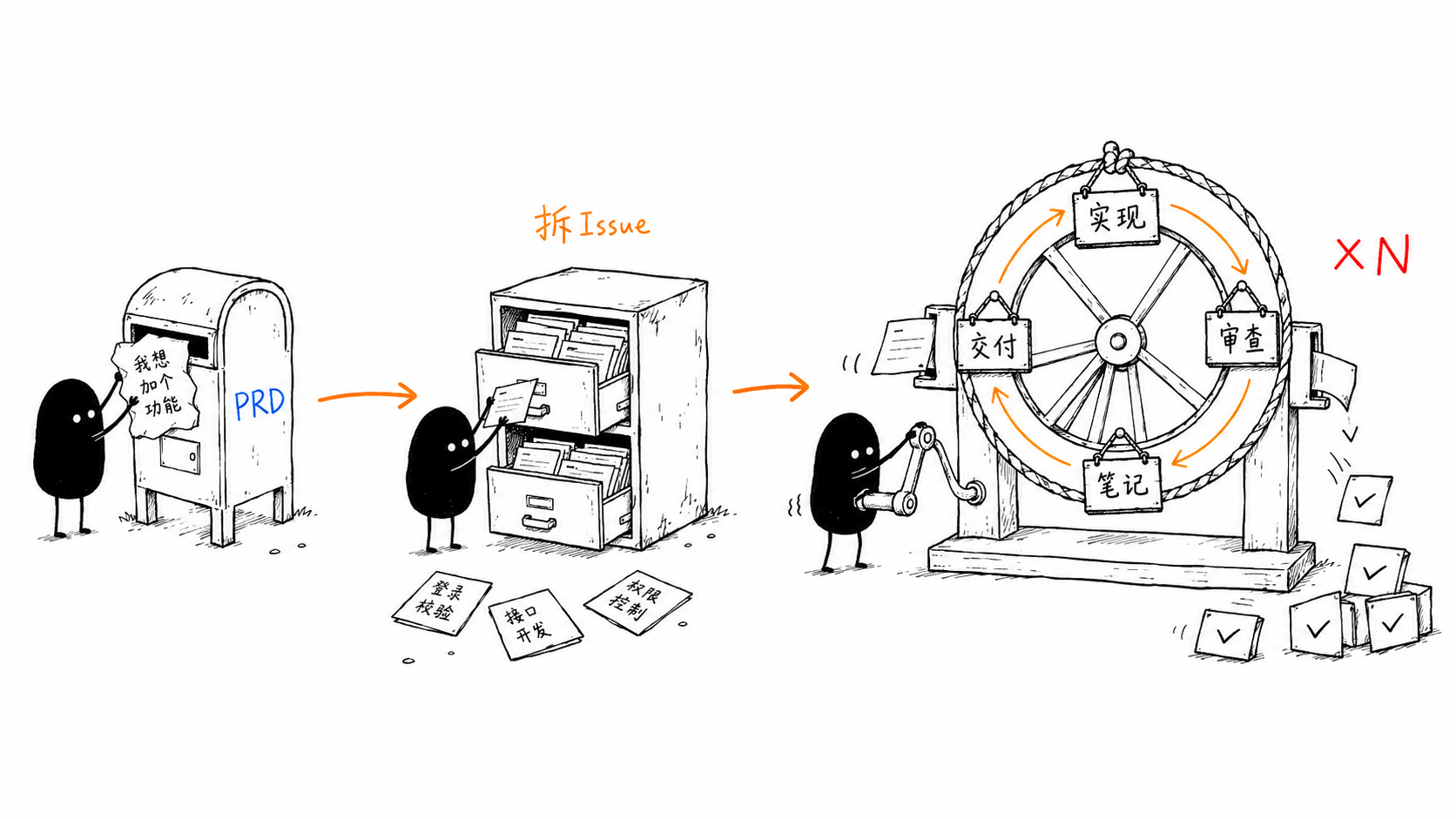
.loop-state.json to your .gitignore. If the loop crashes, just run /loop-it again — it will detect the state file and offer to resume.
18. Bonus: /to-design — PRD to Design Document
/to-design turns a PRD (or a rough idea) into a design document written in the style of Go's official design proposals: plain language, concrete examples, and — above all — an honest account of why this approach and not the alternatives.
/to-design to settle direction, then /prd-to-spec for the contract.
How to Invoke
# Run this in DeepSeek Harness
/to-design tasks/prd-priority-system.md

# Or use trigger phrases
Design doc: write a design doc for the priority system
prd-to-design: based on prd-user-auth.md
When to Use
- A PRD exists and you need to decide how to build it before committing
- The approach has real tradeoffs you want documented and debated
- The change is risky, breaking, or hard to reverse (a design doc forces the compatibility conversation early)
- Multiple people need to agree on a direction before work fans out
- You want a durable record of "why we chose X and rejected Y" — even if later rejected
Design Document Structure (distilled from 5 Go proposals)
| Section | Purpose |
|---|---|
| Abstract | The whole doc in one paragraph, with the single most important promise embedded (e.g. backward compatibility) |
| Background | Explain the pain with concrete examples or real buggy code — quantify it, don't pile on adjectives |
| Design | The body. Declaration + example + boundaries, taught progressively from simple to complex |
| Rationale | The key section: proactively lists the rejected alternatives and why they were dropped |
| Compatibility | For any breaking change, admit it head-on; honestly list the cost and a gradual migration path |
| Implementation | Back up "it's shippable" with data and tooling, not a hand-wave of "risk is manageable" |
| Appendix | (Optional) full API, end-to-end examples, FAQ |
Workflow
- Locate input (PRD file / Issue URL / pasted content / just an idea)
- (Optional) Scan the codebase: existing patterns, constraints, real pain to quote
- Find the genuine "forks in the road" and ask 3-5 clarifying questions
- Generate the design doc in Go-proposal style
- Present for review — steer feedback to Rationale and Compatibility
- Save to
tasks/design-[feature-name].md
19. Bonus: /graph — Parallel Task-Graph Execution
/graph turns a task (or PRD / SPEC / issue set) into a directed acyclic graph (DAG), layers it by dependency into supersteps (waves), then implements the independent nodes of each wave concurrently: one subagent per node implements inline and commits on its own branch inside its own git worktree; a fan-in barrier between waves then runs the leak check, merges only the nodes that shipped, runs the gates on the integrated tree, and reviews once + ships once before dynamically re-planning the next wave.
/loop-it is strictly sequential — one worktree, one issue at a time. /graph is its parallel counterpart — it fans out every independent node in a wave at once. Use /graph when the DAG has genuine parallelism (independent subsystems); use /loop-it when nodes heavily share files or serial safety matters.
The design borrows from the trending idea of graph engineering, LangGraph's StateGraph / Pregel-BSP superstep model, and Claude's dynamic-workflow orchestration.
How to invoke
# Run this in DeepSeek Harness
/graph tasks/prd-url-shortener.md

# Or use trigger phrases
parallel implement: turn these issues into a task graph and run in parallel
build a graph: fan out the DAG concurrently
Core concepts (from LangGraph / graph engineering)
| Concept | Meaning |
|---|---|
| Node | One implementable unit of work (an issue / subtask) |
| Edge | A dependency: B depends on A → edge A → B |
| Superstep / Wave | A set of nodes whose deps are all satisfied — run concurrently |
| Fan-out | Dispatch one subagent per node in the current wave |
| Fan-in (barrier) | Wait for all nodes in the wave before the next |
| State channel | .graph_state — shared checkpoint between waves, resume source |
| Live tracker | graph.html — Claude-style light-theme dashboard, re-rendered from .graph_state at every checkpoint |
| Dynamic re-plan | Revise the graph after a wave if new work/deps emerged |
Workflow
- Decompose into nodes — reuse
/to-issuesrules; each node has title, deps, acceptance criteria, type, and scope_hint (files it's expected to touch) - Build the DAG & validate — detect cycles (break by id), dangling deps, scope collisions
- Topological layering — Kahn's algorithm layers nodes into waves; nodes editing the same logic serialize to the next wave
- Render the graph & confirm — emit the layered plan + a Mermaid diagram, wait for user confirmation before fan-out
- Execute wave by wave — fan-out (multiple subagent calls in one response = parallel) → fan-in barrier → integrate, update state, dynamically re-plan
Key features
- Worktree isolation (mandatory) — each node owns a git worktree; parallel edits never clobber the working tree
- Fan-in barrier (mandatory) — wave N+1 cannot start before every node in wave N has finished and the wave's integration is done (BSP semantics)
- Scope-collision serialization — dep-free nodes editing the same logic split across waves; a shared "wiring file" (router/main) is exempt so it doesn't serialize the whole graph
- Dynamic re-plan — subagents report new work via a
NEW_WORK:line; the barrier revises and re-layers the graph - Failure blocks dependents — a failed node marks all its dependents blocked and skips them
- Checkpoint / resume — each wave writes
.graph_state; a crash resumes at the wave boundary, andgraph.htmlis re-rendered (open it in a browser — it auto-refreshes every 5s to track waves, node statuses, and progress live) - Concurrency cap — default 3–4 parallel subagents to avoid rate limits and merge contention
Concurrent execution
# Per wave: fan-out → fan-in barrier
Wave 0 (parallel×3):  #1 db schema   #2 cache layer   #3 logging util
Wave 1 (parallel×2):  #4 API (deps #1)   #5 CLI (deps #2)
Wave 2 (parallel×1):  #6 integration (deps #4,#5)

# Each node, in its own worktree:
implement inline → prove → commit on its own branch

# End of each wave (once):
leak check → merge only shipped nodes → gates on the integrated tree → /review-it → /ship-it
Pipeline integration
/prd → /prd-to-spec → /to-issues ┬→ /loop-it  # sequential: one node at a time
└→ /graph # parallel: whole wave at once.graph_state and graph.html to .gitignore. Subagents run in parallel only when dispatched as multiple calls in a single response — splitting them across responses degrades to sequential.
20. Bonus: /understand — Interactive Change Review
/understand turns the changes you just generated (usually AI-written) into a single-file interactive review webpage, so you can actually understand what changed before reviewing or shipping it. It scans the repo's uncommitted / branch changes and builds a Claude-style light-themed two-column page: a project file tree on the left, and the selected file's syntax-highlighted diff on the right, with a side rail that pairs each code segment with its unit requirement and a plain-language explanation.
How to Invoke
# Run this in DeepSeek Harness
/understand

# Or use trigger phrases
Review changes: Explain what this batch of new code does
Understand code: Walk me through the freshly generated changes
What You Get
| Area | Content |
|---|---|
| Left tree | Changed files laid out by real project structure; per-file +/− stats and A/M/D/R status. The column is drag-resizable (double-click the divider to reset). |
| Right diff | Syntax-highlighted diff with additions / deletions clearly distinguished from unchanged code, real file line numbers. |
| Side rail | Per-segment cards: the related unit requirement (or a grey "inferred intent" tag when guessed) plus a plain-language code explanation; click to jump and flash the matching lines. |
How It Works
- Scan changes: committed (base..HEAD) + staged + unstaged + untracked files, baseline = merge-base with the main branch
- The agent reads every change, then writes requirement + explanation annotations
- Render a self-contained
.understand/report.htmland open it in the browser
Positioning
/understand is a comprehension companion to /review-it: where /review-it finds and fixes issues, /understand helps you see the intent and rationale behind freshly generated code before you commit to it.
.understand/ is a generated artifact directory — add it to .gitignore so it isn't accidentally committed. Explanations and requirements are always produced in Chinese.
21. Bonus: /ask-flow — Which Skill Do I Use?
/ask-flow is the entry point to the whole skill set: you cannot remember what all these skills own, so you ask. Describe where you are (a half-formed idea, a pile of inbound issues, code that will not work, a long implementation) and it gives you the next step, plus which decisions inside that step are yours to make.
How to Invoke
# Run this in DeepSeek Harness
/ask-flow

# Or just ask
Which skill should I use?
How do I run this workflow?
What It Routes
- Main line:
/prd→/prd-to-spec(when the design is complex) →/to-issues→ the fork (true parallelism/graph/ sequential/loop-it/ a single unit/implement) → implement inline → prove with the gates →/review-it→/ship-it; add/note-itwhen decisions need a record - Bypasses: a bug goes to
/diagnose, raw inbound items to/triage, pinning behaviour down first to/test-first, and an in-progress merge / rebase to/conflict - It suggests, never executes: it will not grill your requirements, write a spec or edit a file, and it will not quietly run the skill you just asked about
- It reports its own gaps: the maintenance rule requires it to be re-read and updated whenever a skill is added, renamed or deleted — along with both READMEs and these two HTML guides — because a lying router is worse than no router
/ask-flow is marked disable-model-invocation (user-only): it is not in the model catalog, the model never picks it, and it is loaded only when you type the command.
22. Bonus: /triage — Triaging Inbound Issues
/triage handles raw items that arrive from outside: bug reports, user feedback, requests filed by other people. It reproduces / understands first, assigns each item exactly one role, and fills the ready ones out into agent-executable cards. Never triage /to-issues output — that is already agent-ready.
Roles (every item ends in exactly one)
| Role | Meaning | Action |
|---|---|---|
ready | Reproducible / clear, acceptance criteria can be written | Complete the body (repro steps, expected behaviour, acceptance criteria, blast radius) and hand it to the main line |
needs-info | Missing key information; cannot decide yet | Post one comment asking for it, from the template |
bug-confirmed | A real bug, root cause unknown | Record the symptom and minimal repro, hand it to /diagnose |
duplicate | An existing item already covers it | Comment with a pointer → close |
wontfix | Explicitly out of scope | Comment the reason (which product boundary it crosses) → close |
Handling One Item
- Reproduce / understand first: follow the reported steps; if you cannot reproduce it, say plainly "I cannot reproduce this with X" instead of pretending
- Judge the blast radius: who is affected, can it corrupt data, is there a workaround, does it only happen on older versions
- Fill it out into an agent-ready card: the body must be good enough for "a subagent that does not share this conversation can start on its own" — repro steps, expected behaviour, acceptance criteria, files / modules involved, and explicit non-goals; the same bar as
/to-issues - Leave a trace: post one comment on that issue when done (role + reason + next step), never just change labels; when the batch is finished, report the number of new
ready/needs-info/wontfixitems to the user
ready items go back to the main line — a chain of dependent ones through /loop-it, ones that share no files through /graph, and a single unit through /implement.
23. Bonus: /diagnose — The Debugging Loop
The discipline for hard bugs, intermittent flakes and performance regressions: no reasoning starts until there is a command already red on this bug — jumping straight to "I bet it's here" is exactly the failure this skill exists to prevent. It does no /review-it / /ship-it; once the cause is pinned down, go back to the main line as a single-point change.
How to Invoke
# Run this in DeepSeek Harness
/diagnose

# Or just say
Debug this intermittent failure
What is this performance regression?
The Loop
- Build a feedback loop: get a tight pass/fail signal (red on this bug) — a failing test, a curl / HTTP script, a CLI call plus fixture, a headless browser, replaying a captured trace, a one-off harness, property / fuzzing, a bisection harness, a differential loop. The bar: can go red, deterministic, seconds, runs unattended
- Reproduce + minimise: confirm the red is the failure the user described, then cut until "removing any remaining element turns it green"
- 3–5 falsifiable hypotheses: each states "if X is the cause, then changing Y makes the bug disappear / changing Z makes it worse"; anything without a prediction is a feeling, not a hypothesis. Show the ranked list to the user first — their domain knowledge often reorders it instantly
- Instrument one variable at a time: every probe answers a specific prediction; prefer debugger / REPL > targeted logging > never "log everything and grep". Give every debug log a unique prefix (e.g.
[DEBUG-a4f2]) so one grep clears them all at the end. For performance regressions, establish a baseline measurement first, then bisect - Add the regression test at the right seam, then fix: the test must reproduce the real bug pattern at the call site; having no correct seam is itself a finding (record it and open a new issue on the main line)
- Close-out checklist: the original repro no longer occurs, the regression test passes (or "no correct seam" is recorded), every
[DEBUG-...]probe is removed, throwaway prototypes are deleted, and the hypothesis that survived is written into the commit / PR description
/graph for it. Once it is located, return to the main line as a single-point change: /implement → project gates → /review-it → /ship-it.
24. Bonus: /conflict — Resolving Merge / Rebase Conflicts
/conflict resolves an in-progress git merge / rebase: recover both sides' intent, resolve hunk by hunk, run the project gates, and finish the operation. Always resolve, never --abort.
Steps
- Read the situation:
git status,git log --oneline --graph -10, list the conflicted files; establish whether this is a merge or a rebase, where it branched from, and what this merge is meant to achieve - Recover each conflict's original intent: read both sides' commit messages, look at the matching PRs and issues, grep call sites when needed — never just pick whichever side is newer or bigger
- Resolve hunk by hunk: keep both sides' intent when both can be preserved; when they genuinely conflict, take the side consistent with this merge's goal and write the tradeoff into the commit message — never invent new behaviour
- Run the project gates: build + test at minimum; the bar is the merged tree passing the gates on its own, not "the two sides look right together"
- Finish:
git addevery conflicted file and complete the operation (for a rebase,git rebase --continueuntil every commit is replayed), then write "which side gave up what" into the commit / PR description
/graph node the conflict lives in that node's worktree — use absolute paths and workdir=. When resolving on the shared checkout, confirm afterwards that git status holds nothing dirty besides this merge: a clean shared checkout is what the orchestrator's leak check relies on.
25. Supported Platforms
dsh-floway targets the DeepSeek Harness (DSH); its skills also work in other AI coding agents:
| Agent | /prd | /prd-to-spec | /to-issues | /goal | /review-it | /note-it | /ship-it | /loop-it | /refactor | /modern-go | /code-to-spec | /smell | /humanize-it | /insight-diagram | /to-design | /graph |
|---|---|---|---|---|---|---|---|---|---|---|---|---|---|---|---|---|
| DeepSeek Harness (DSH) ★ | ✓ | ✓ | ✓ | ✓ (UI command) | ✓ | ✓ | ✓ | ✓ | ✓ | ✓ | ✓ | ✓ | ✓ | ✓ | ✓ | ✓ |
| Claude Code | ✓ | ✓ | ✓ | ✓ (Built-in) | ✓ | ✓ | ✓ | ✓ | ✓ | ✓ | ✓ | ✓ | ✓ | ✓ | ✓ | ✓ |
| Codex | ✓ | ✓ | ✓ | ✓ (--goal) | ✓ | ✓ | ✓ | ✓ | ✓ | ✓ | ✓ | ✓ | ✓ | ✓ | ✓ | ✓ |
| OpenCode | ✓ | ✓ | ✓ | — | ✓ | ✓ | ✓ | ✓ | ✓ | ✓ | ✓ | ✓ | ✓ | ✓ | ✓ | ✓ |
| DeepSeek TUI | ✓ | ✓ | ✓ | — | ✓ | ✓ | ✓ | ✓ | ✓ | ✓ | ✓ | ✓ | ✓ | ✓ | ✓ | ✓ |
Issue Creation Platforms
| Platform | Tool | Description |
|---|---|---|
| GitHub | gh issue create | Requires gh CLI authentication |
| Local | Markdown files | Saved to local directory |
| Baidu iCafe | icafe-cli | Requires iCafe space parameters |
26. FAQ
Q: Do I have to use all steps in order?
No. Each Skill is independent and can be used standalone. For example, if you already have Issues, you can start directly from /implement (a single unit), /loop-it (sequential) or /graph (parallel); if code is already written, you can use /review-it directly. But going through the full workflow yields the best results.
Q: Where does /goal come from? Why isn't it in the skills directory?
/goal is a DSH UI command that a human types, not a skill: it persists an objective and lets the harness continue it in autonomous rounds. The model cannot invoke it, and it is not the implementation step — implementation is done inline by the agent, driven by /loop-it or /graph.
Q: Can I use this in non-GitHub projects?
Yes. /prd supports saving Issues as local Markdown files or creating them in Baidu iCafe. /review-it only needs a local git repository. /ship-it currently depends on GitHub (gh CLI).
Q: How is /review-it different from manual code review?
/review-it is automated self-review, catching obvious issues before submission. It reports on two axes: the Spec axis checks whether the diff did what was asked (missing / extra / wrong, each finding quoting the acceptance criterion it is checked against), and the Standards axis checks code quality across 8 dimensions. The two are reported separately, never merged into one ranking. It doesn't replace team code review, but rather improves code quality before PR creation, reducing the low-level issues reviewers need to point out.
Q: How big should an Issue be?
Each Issue should represent work an agent can complete in a single session — typically 1-3 files of changes with clear acceptance criteria. /prd automatically breaks down at this granularity, but you can adjust before confirming.
Q: How do I use this with Codex?
When installing via npx skills add, choose -a codex. In Codex, use codex --goal "..." instead of /goal. /review-it works universally across agents.
Q: Is /prd-to-spec required? When can I skip it?
Not required. /prd-to-spec is an optional step. PRD says "what to do"; SPEC says "how to do it". The distinction: an AI agent executing /goal inherently possesses the "how" capability — it automatically analyzes the codebase, understands existing architecture and conventions, and makes reasonable technical decisions during implementation. In other words, the AI agent is a living SPEC engine — it doesn't need it drawn on paper first.
Most small to medium features work perfectly fine with just PRD → /goal. The following scenarios justify the extra step of /prd-to-spec:
- Multi-person/multi-agent parallel development — need shared technical conventions to avoid divergent implementations
- Changes spanning multiple services/modules — architecture decisions have broad impact and rework costs are high
- Need maintained documentation — a formal technical reference for the team to consult later
- Compliance/review requirements — organizational process mandates design documents
- PRD is too vague — SPEC can supplement with technical details to reduce agent interpretation variance
If your project is single-developer, feature boundaries are clear, and the agent already reliably understands the project structure, skipping /prd-to-spec is entirely reasonable — and often more efficient. Treat it as an optional tool in your toolkit — bring it out only when needed.
Q: Where does the 42 iteration limit in /humanize-it come from?
The number 42 isn't due to any special iteration requirement, but a geek culture tribute to the classic sci-fi novel The Hitchhiker's Guide to the Galaxy. In the book, a supercomputer computes for 7.5 million years and arrives at "the Answer to the Ultimate Question of Life, the Universe, and Everything" — which is 42. In programming circles, this number is popular for two reasons:
- Sci-fi tribute: A well-known Easter egg among programmers, representing the ultimate answer.
- ASCII coincidence: In ASCII encoding, 42 corresponds to the asterisk
*. In computer science,*is commonly used as a wildcard meaning "anything" or "everything is possible." So "the ultimate answer is 42 (*)" perfectly aligns with the philosophical joke that it's "whatever answer you want."
In practice, most documents reach quality standards within 3-5 iterations. The core of iteration is intelligent strategy switching — when one rewriting approach plateaus, it automatically switches to another. The three strategies complement each other to cover different types of AI traces.
Q: Does /humanize-it support English documents?
Currently, the three sub-skills of /humanize-it are primarily optimized for Chinese text. humanizer-zh's pattern detection rules partially work for English as well, but rewriting effects are best for Chinese.
Q: What diagram types does /insight-diagram support?
/insight-diagram supports 17 diagram types, including system architecture diagrams, 14 UML diagrams (class, object, component, deployment, package, composite structure, profile, use case, activity, state machine, sequence, communication, timing, interaction overview), flowcharts, and swimlane diagrams. Output is in HTML+SVG format, saved to the docs/ directory. Applicable to any software project.