
Your browser already works!




English | 中文 | Deutsch | Español | Français | 日本語 | 한국어 | Português | Русский
---
**AIPex** — An open-source browser automation agent that lives in your existing browser.
- **Zero Migration**: No new browser to install. No new workflow to learn.
- **Open Source**: MIT licensed. Fully transparent, auditable, and extensible.
- **Privacy First**: Your data never leaves your machine. Bring Your Own Key (BYOK).
- **Agent Ready**: MCP, skills, and the built-in `browser-cli` share the same local browser runtime.
---
## Why We Built This
Every browser automation tool asks you to:
- Install a separate browser (Dia/Comet)
- Pay monthly subscriptions (ChatGPT Atlas)
- Give up your browsing data
**We asked: why can't automation just run in the browser you already use?**
AIPex is the answer. Install the extension, bring your own API key, and automate anything — right where you already work.
---
## Why AIPex Is Fast
AIPex runs inside the browser you already use instead of streaming a remote browser or launching a separate automation profile.
- **Local-first control path**: agents talk to a local daemon over WebSocket, and the extension executes actions directly through browser APIs.
- **DOM snapshot before vision**: agents can search structured page snapshots with glob/grep patterns and act by stable element UIDs, avoiding slow screenshot loops for most tasks.
- **No browser migration cost**: your logged-in sessions, cookies, tabs, history, and extensions are already there.
- **Lower token and latency overhead**: text snapshots and targeted element operations are much cheaper than repeatedly sending full-page images.
---
## Quick Start
1. **Install** — [Chrome Web Store](https://chromewebstore.google.com/detail/aipex-%E2%80%94%E2%80%94-tab-history-mana/iglkpadagfelcpmiidndgjgafpdifnke?hl=zh-CN&utm_source=ext_sidebar) or [Edge Add-ons](https://microsoftedge.microsoft.com/addons/detail/aipex/fkgfflijckgpphikbceckjbofkicfnfa)
2. **Open** — Press AIPex icon
3. **Automate** — Type or speak what you want in natural language
---
## Use with AI Coding Agents (MCP)
AIPex now supports the [Model Context Protocol (MCP)](https://modelcontextprotocol.io), giving AI coding agents like Cursor, Claude Code, and VS Code Copilot direct control over your browser.
```
AI Agent ──stdio──▶ aipex-mcp-bridge ──WebSocket──▶ AIPex Extension ──▶ Browser
```
### Step 1: Configure your agent
**Cursor** (`.cursor/mcp.json`) · **Claude Desktop** (`claude_desktop_config.json`) · **Windsurf** (`mcp_config.json`):
```json
{
"mcpServers": {
"aipex-browser": {
"command": "npx",
"args": ["-y", "aipex-mcp-bridge"]
}
}
}
```
**Claude Code**:
```bash
claude mcp add aipex-browser -- npx -y aipex-mcp-bridge
```
**VS Code Copilot** (`.vscode/mcp.json`):
```json
{
"servers": {
"aipex-browser": {
"command": "npx",
"args": ["-y", "aipex-mcp-bridge"]
}
}
}
```
### Step 2: Connect the extension
1. Open Chrome → AIPex icon → **Options**
2. Set WebSocket URL to `ws://localhost:9223/extension`
3. Click **Connect**
Your agent now has 30+ browser automation tools available via MCP. See [mcp-bridge/README.md](mcp-bridge/README.md) for advanced options.
---
## Use from the Terminal (`browser-cli`)
`browser-cli` has been merged into AIPex. It ships with `aipex-mcp-bridge` and talks to the same local daemon as MCP, so scripts, CI jobs, and coding agents can control your existing browser without a separate service.
```bash
npm install -g aipex-mcp-bridge
browser-cli status
browser-cli tab list
browser-cli tab new https://example.com
browser-cli page search "button*" --tab 123
browser-cli interact click btn-42 --tab 123
```
The lower-level `aipex-cli` is still available for raw tool calls, while `browser-cli` provides human-friendly command groups such as `tab`, `page`, `interact`, `download`, `intervention`, and `skill`.
---
## Skill
AIPex ships an **`aipex-browser`** skill — a ready-to-use skill package for agents that support the skill protocol (such as [Claude Code](https://claude.ai/code) and [OpenClaw](https://openclaw.dev)-compatible runtimes).
The skill bundles tool usage strategy, complete parameter schemas for all 30+ browser tools, and common automation patterns — so an agent can control the browser effectively without discovering tools from scratch.
See [`skill/SKILL.md`](skill/SKILL.md) for the full skill definition.
---
## Demos
### "I have 100 tabs open. Help."
https://github.com/user-attachments/assets/4a4f2a64-691c-4783-965e-043b329a8035
### "Research this topic without leaving my browser"
https://github.com/user-attachments/assets/71ec4efd-d80e-4e8f-8e39-88baee3ec38e
### "Write a tweet for me"
https://github.com/user-attachments/assets/81f6b482-84d0-4fd9-924b-dca634b208ec
### "Help me pass this exam"
https://github.com/user-attachments/assets/ba454715-c759-41df-bf87-e835f76be365
---
## Roadmap?
- Page Understanding
- [x] Accessbility Tree
- [x] Optimised Dom
- [ ] Vision
- Context Engineering
- [x] Search-based Retrival
- [x] Drop unused snapshot
- [x] id-based operation
- Integration
- [x] Cursor
- [x] Claude Code
- Skills
- [x] File system
- [x] Script Execution
- [ ] Evaluation - [Online-Mind2Web](https://huggingface.co/datasets/osunlp/Online-Mind2Web/raw/main/Online_Mind2Web.json)
## Why debugger is necessary for browser automation?
---
## Contributing
We love contributions! See [DEVELOPMENT.md](DEVELOPMENT.md) for setup instructions.
## Contributors
 ---
## Star History
[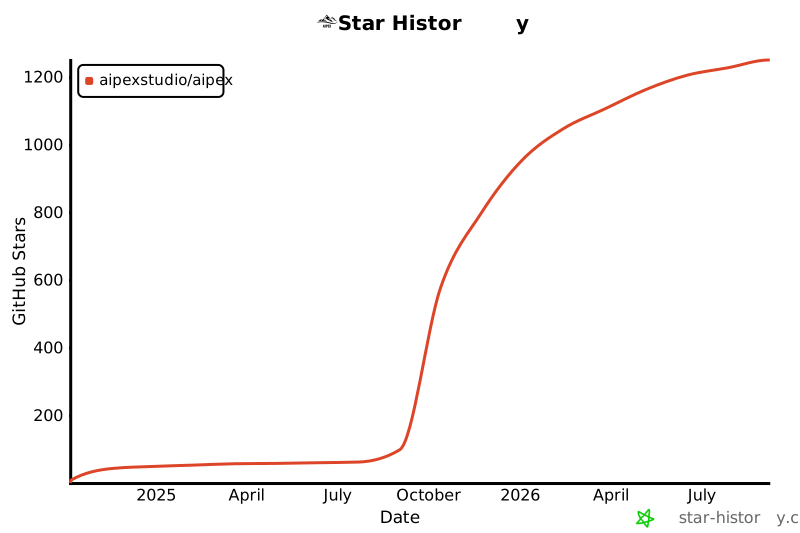](https://star-history.com/#AIPexStudio/AIPex&Date)
---
---
## Star History
[](https://star-history.com/#AIPexStudio/AIPex&Date)
---
Made with ❤️ by the AIPex Team


