
Universal DB MCP
用自然语言连接 AI 与你的数据库
一个实现了模型上下文协议(MCP)和 HTTP API 的通用数据库连接器,让 AI 助手能够使用自然语言查询和分析你的数据库。支持 Claude Desktop、Cursor、Windsurf、VS Code、ChatGPT 等 50+ 平台。




特性 •
快速开始 •
数据库 •
文档 •
贡献
English | 中文文档
---
## 为什么选择 Universal DB MCP?
想象一下,你问 AI 助手:*"帮我查一下这个月订单金额最高的 10 个客户"*,然后立即从数据库获得结果——无需编写 SQL。Universal DB MCP 通过模型上下文协议(MCP)和 HTTP API 将 AI 助手与你的数据库连接起来,让这一切成为可能。
```
你: "最近 30 天注册用户的平均订单金额是多少?"
AI: 让我帮你查询一下...
┌─────────────────────────────────────┐
│ 平均订单金额: ¥127.45 │
│ 新用户总数: 1,247 │
│ 有订单的用户: 892 (71.5%) │
└─────────────────────────────────────┘
```
## ✨ 特性
- **支持 17 种数据库** - MySQL、PostgreSQL、Redis、Oracle、SQL Server、MongoDB、SQLite,以及 10 种国产数据库
- **适配 55+ 平台** - 支持 Claude Desktop、Cursor、VS Code、ChatGPT、Dify 等 [50+ 平台](#-支持的平台)
- **灵活架构** - 2 种启动模式(stdio/http),4 种接入方式:MCP stdio、MCP SSE、MCP Streamable HTTP、REST API
- **安全第一** - 默认只读模式,防止意外的数据修改
- **智能缓存** - Schema 缓存支持可配置的 TTL,性能极速
- **批量查询优化** - 大型数据库的 Schema 获取速度提升高达 100 倍
- **Schema 增强** - 表注释、隐式关系推断,提升 Text2SQL 准确性
- **多 Schema 支持** - 自动发现所有用户 Schema(PostgreSQL、SQL Server、Oracle、达梦等)
- **数据脱敏** - 自动保护敏感数据(手机号、邮箱、身份证、银行卡等)
- **连接稳定性** - 连接池、TCP Keep-Alive、断线自动重试,保障长时间会话稳定运行
### 性能提升
| 表数量 | 优化前 | 优化后 | 提升 |
|--------|--------|--------|------|
| 50 张表 | ~5 秒 | ~200 毫秒 | **25 倍** |
| 100 张表 | ~10 秒 | ~300 毫秒 | **33 倍** |
| 500 张表 | ~50 秒 | ~500 毫秒 | **100 倍** |
## 🚀 快速开始
### 安装
```bash
npm install -g universal-db-mcp
```
### MCP 模式(Claude Desktop)
将以下配置添加到 Claude Desktop 配置文件:
- **macOS**: `~/Library/Application Support/Claude/claude_desktop_config.json`
- **Windows**: `%APPDATA%\Claude\claude_desktop_config.json`
```json
{
"mcpServers": {
"my-database": {
"command": "npx",
"args": [
"universal-db-mcp",
"--type", "mysql",
"--host", "localhost",
"--port", "3306",
"--user", "root",
"--password", "your_password",
"--database", "your_database"
]
}
}
}
```
重启 Claude Desktop,然后开始提问:
- *"帮我查看 users 表的结构"*
- *"统计最近 7 天的订单数量"*
- *"找出销量最高的 5 个产品"*
### HTTP API 模式
```bash
# 设置环境变量
export MODE=http
export HTTP_PORT=3000
export API_KEYS=your-secret-key
# 启动服务
npx universal-db-mcp
```
```bash
# 测试 API
curl http://localhost:3000/api/health
```
### MCP SSE 模式(Dify 和远程访问)
在 HTTP 模式下运行时,服务器还会通过 SSE(Server-Sent Events)和 Streamable HTTP 暴露 MCP 协议端点。这使得 Dify 等平台可以直接使用 MCP 协议连接。
**SSE 端点(传统方式):**
```
GET http://localhost:3000/sse?type=mysql&host=localhost&port=3306&user=root&password=xxx&database=mydb
```
**Streamable HTTP 端点(MCP 2025 规范,推荐):**
```
POST http://localhost:3000/mcp
请求头:
X-DB-Type: mysql
X-DB-Host: localhost
X-DB-Port: 3306
X-DB-User: root
X-DB-Password: your_password
X-DB-Database: your_database
请求体:MCP JSON-RPC 请求
```
| 端点 | 方法 | 说明 |
|------|------|------|
| `/sse` | GET | 建立 SSE 连接(传统方式) |
| `/sse/message` | POST | 向 SSE 会话发送消息 |
| `/mcp` | POST | Streamable HTTP 端点(推荐) |
| `/mcp` | GET | Streamable HTTP 的 SSE 流 |
| `/mcp` | DELETE | 关闭会话 |
详细配置说明请参阅 [Dify 集成指南](./docs/integrations/DIFY.zh-CN.md)。
## 📊 支持的数据库
| 数据库 | 类型参数 | 默认端口 | 分类 |
|--------|----------|----------|------|
| MySQL | `mysql` | 3306 | 开源 |
| PostgreSQL | `postgres` | 5432 | 开源 |
| Redis | `redis` | 6379 | NoSQL |
| Oracle | `oracle` | 1521 | 商业 |
| SQL Server | `sqlserver` | 1433 | 商业 |
| MongoDB | `mongodb` | 27017 | NoSQL |
| SQLite | `sqlite` | - | 嵌入式 |
| 达梦 | `dm` | 5236 | 国产 |
| 人大金仓 | `kingbase` | 54321 | 国产 |
| 华为 GaussDB | `gaussdb` | 5432 | 国产 |
| 蚂蚁 OceanBase | `oceanbase` | 2881 | 国产 |
| TiDB | `tidb` | 4000 | 分布式 |
| ClickHouse | `clickhouse` | 8123 | OLAP |
| 阿里云 PolarDB | `polardb` | 3306 | 云数据库 |
| 海量 Vastbase | `vastbase` | 5432 | 国产 |
| 瀚高 HighGo | `highgo` | 5866 | 国产 |
| 中兴 GoldenDB | `goldendb` | 3306 | 国产 |
## 🏗️ 架构
```
┌─────────────────────────────────────────────────────────────────────────┐
│ Universal DB MCP │
├─────────────────────────────────────────────────────────────────────────┤
│ │
│ 启动模式: │
│ ┌────────────────────────────┬────────────────────────────────────┐ │
│ │ stdio 模式 │ http 模式 │ │
│ │ (npm run start:mcp) │ (npm run start:http) │ │
│ └─────────────┬──────────────┴───────────────┬────────────────────┘ │
│ │ │ │
│ ▼ ▼ │
│ ┌─────────────────────────┐ ┌───────────────────────────────────┐ │
│ │ MCP 协议 │ │ HTTP 服务器 │ │
│ │ (stdio 传输) │ │ │ │
│ │ │ │ ┌─────────────────────────────┐ │ │
│ │ 工具: │ │ │ MCP 协议 │ │ │
│ │ • execute_query │ │ │ (SSE / Streamable HTTP) │ │ │
│ │ • get_schema │ │ │ │ │ │
│ │ • get_table_info │ │ │ 工具:(与 stdio 相同) │ │ │
│ │ • clear_cache │ │ │ • execute_query │ │ │
│ │ • get_enum_values │ │ │ • get_schema │ │ │
│ │ • get_sample_data │ │ │ • get_table_info │ │ │
│ │ • connect_database │ │ │ • clear_cache │ │ │
│ │ • disconnect_database │ │ │ • get_enum_values │ │ │
│ │ • get_connection_status│ │ │ • get_sample_data │ │ │
│ │ │ │ │ • connect_database │ │ │
│ │ 适用:Claude Desktop, │ │ │ • disconnect_database │ │ │
│ │ Cursor 等 │ │ │ • get_connection_status │ │ │
│ └─────────────┬───────────┘ │ │ │ │ │
│ │ │ │ 适用:Dify、远程访问 │ │ │
│ │ │ └──────────────┬──────────────┘ │ │
│ │ │ │ │ │
│ │ │ ┌──────────────┴──────────────┐ │ │
│ │ │ │ REST API │ │ │
│ │ │ │ │ │ │
│ │ │ │ 端点: │ │ │
│ │ │ │ • /api/connect │ │ │
│ │ │ │ • /api/query │ │ │
│ │ │ │ • /api/schema │ │ │
│ │ │ │ • ...(10+ 端点) │ │ │
│ │ │ │ │ │ │
│ │ │ │ 适用:Coze、n8n、自定义 │ │ │
│ │ │ └──────────────┬──────────────┘ │ │
│ │ └─────────────────┼─────────────────┘ │
│ │ │ │
│ └──────────────────┬───────────────┘ │
│ ▼ │
│ ┌──────────────────────────────────────────────────────────────────┐ │
│ │ 核心业务逻辑层 │ │
│ │ • 查询执行 • Schema 缓存 │ │
│ │ • 安全校验 • 连接管理 │ │
│ └──────────────────────────────────┬───────────────────────────────┘ │
│ ▼ │
│ ┌──────────────────────────────────────────────────────────────────┐ │
│ │ 数据库适配器层 │ │
│ │ MySQL │ PostgreSQL │ Redis │ Oracle │ MongoDB │ SQLite │ ... │ │
│ │ (连接池 + TCP Keep-Alive + 断线自动重试) │ │
│ └──────────────────────────────────────────────────────────────────┘ │
│ │
└─────────────────────────────────────────────────────────────────────────┘
```
## 🔒 安全
默认情况下,Universal DB MCP 运行在**只读模式**,会阻止所有写操作(INSERT、UPDATE、DELETE、DROP 等)。
### 权限模式
支持细粒度权限控制,可根据需求灵活配置:
| 模式 | 允许的操作 | 说明 |
|------|-----------|------|
| `safe`(默认) | SELECT | 只读,最安全 |
| `readwrite` | SELECT, INSERT, UPDATE | 读写但不能删除 |
| `full` | 所有操作 | 完全控制(危险!) |
| `custom` | 自定义组合 | 通过 `--permissions` 指定 |
**权限类型:**
- `read` - SELECT 查询(始终包含)
- `insert` - INSERT, REPLACE
- `update` - UPDATE
- `delete` - DELETE, TRUNCATE
- `ddl` - CREATE, ALTER, DROP, RENAME
**使用示例:**
```bash
# 只读模式(默认)
npx universal-db-mcp --type mysql ...
# 读写但不能删除
npx universal-db-mcp --type mysql --permission-mode readwrite ...
# 自定义:只允许读和插入
npx universal-db-mcp --type mysql --permissions read,insert ...
# 完全控制(等价于原来的 --danger-allow-write)
npx universal-db-mcp --type mysql --permission-mode full ...
```
**不同传输方式的权限配置:**
> ⚠️ 不同传输方式的参数命名风格不同,请注意区分!
| 传输方式 | 参数位置 | 权限模式参数 | 自定义权限参数 |
|---------|---------|-------------|---------------|
| STDIO (Claude Desktop) | 命令行 | `--permission-mode` | `--permissions` |
| SSE (Dify 等) | URL Query | `permissionMode` | `permissions` |
| Streamable HTTP | HTTP Header | `X-DB-Permission-Mode` | `X-DB-Permissions` |
| REST API | JSON Body | `permissionMode` | `permissions` |
**最佳实践:**
- 生产环境永远不要启用写入模式
- 使用专用的只读数据库账号
- 通过 VPN 或跳板机连接
- 定期审计查询日志
## 🔌 支持的平台
Universal DB MCP 可与任何支持 MCP 协议或 REST API 的平台配合使用。以下是完整列表:
### AI 代码编辑器 & IDE
| 平台 | 接入方式 | 说明 | 集成指南 |
|------|----------|------|----------|
| [Cursor](https://cursor.sh/) | MCP stdio | 内置 MCP 支持的 AI 代码编辑器 | [EN](./docs/integrations/CURSOR.md) / [中文](./docs/integrations/CURSOR.zh-CN.md) |
| [Windsurf](https://codeium.com/windsurf) | MCP stdio | Codeium 的 AI IDE,带 Cascade 智能体 | [EN](./docs/integrations/WINDSURF.md) / [中文](./docs/integrations/WINDSURF.zh-CN.md) |
| [VS Code](https://code.visualstudio.com/) | MCP stdio / REST API | 通过 GitHub Copilot 代理模式或 Cline/Continue 扩展 | [EN](./docs/integrations/VSCODE.md) / [中文](./docs/integrations/VSCODE.zh-CN.md) |
| [Zed](https://zed.dev/) | MCP stdio | 高性能开源代码编辑器 | [EN](./docs/integrations/ZED.md) / [中文](./docs/integrations/ZED.zh-CN.md) |
| [IntelliJ IDEA](https://www.jetbrains.com/idea/) | MCP stdio | JetBrains IDE,支持 MCP(2025.1+) | [EN](./docs/integrations/JETBRAINS.md) / [中文](./docs/integrations/JETBRAINS.zh-CN.md) |
| [PyCharm](https://www.jetbrains.com/pycharm/) | MCP stdio | JetBrains Python IDE | [EN](./docs/integrations/JETBRAINS.md) / [中文](./docs/integrations/JETBRAINS.zh-CN.md) |
| [WebStorm](https://www.jetbrains.com/webstorm/) | MCP stdio | JetBrains JavaScript IDE | [EN](./docs/integrations/JETBRAINS.md) / [中文](./docs/integrations/JETBRAINS.zh-CN.md) |
| [Android Studio](https://developer.android.com/studio) | MCP stdio | 通过 JetBrains MCP 插件 | [EN](./docs/integrations/JETBRAINS.md) / [中文](./docs/integrations/JETBRAINS.zh-CN.md) |
| [Neovim](https://neovim.io/) | MCP stdio | 通过 MCPHub.nvim 插件 | [EN](./docs/integrations/NEOVIM.md) / [中文](./docs/integrations/NEOVIM.zh-CN.md) |
| [Emacs](https://www.gnu.org/software/emacs/) | MCP stdio | 通过 mcp.el 包 | [EN](./docs/integrations/EMACS.md) / [中文](./docs/integrations/EMACS.zh-CN.md) |
### AI 编程助手
| 平台 | 接入方式 | 说明 | 集成指南 |
|------|----------|------|----------|
| [Claude Code](https://claude.ai/code) | MCP stdio | Anthropic 的智能编程工具 | [EN](./docs/integrations/CLAUDE-CODE.md) / [中文](./docs/integrations/CLAUDE-CODE.zh-CN.md) |
| [GitHub Copilot](https://github.com/features/copilot) | MCP stdio | VS Code/JetBrains 中的代理模式 | [EN](./docs/integrations/GITHUB-COPILOT.md) / [中文](./docs/integrations/GITHUB-COPILOT.zh-CN.md) |
| [Cline](https://github.com/cline/cline) | MCP stdio / REST API | VS Code 自主编程智能体 | [EN](./docs/integrations/CLINE.md) / [中文](./docs/integrations/CLINE.zh-CN.md) |
| [Continue](https://continue.dev/) | MCP stdio | 开源 AI 代码助手 | [EN](./docs/integrations/CONTINUE.md) / [中文](./docs/integrations/CONTINUE.zh-CN.md) |
| [Roo Code](https://github.com/roovet/roo-code) | MCP stdio | Cline 的 VS Code 分支 | [EN](./docs/integrations/ROO-CODE.md) / [中文](./docs/integrations/ROO-CODE.zh-CN.md) |
| [Sourcegraph Cody](https://sourcegraph.com/cody) | MCP stdio | AI 编程助手 | [EN](./docs/integrations/SOURCEGRAPH-CODY.md) / [中文](./docs/integrations/SOURCEGRAPH-CODY.zh-CN.md) |
| [Amazon Q Developer](https://aws.amazon.com/q/developer/) | MCP stdio | AWS AI 编程助手 | [EN](./docs/integrations/AMAZON-Q-DEVELOPER.md) / [中文](./docs/integrations/AMAZON-Q-DEVELOPER.zh-CN.md) |
| [Devin](https://devin.ai/) | MCP stdio | AI 软件工程师 | [EN](./docs/integrations/DEVIN.md) / [中文](./docs/integrations/DEVIN.zh-CN.md) |
| [Goose](https://github.com/block/goose) | MCP stdio | Block 的 AI 编程智能体 | [EN](./docs/integrations/GOOSE.md) / [中文](./docs/integrations/GOOSE.zh-CN.md) |
| [Gemini CLI](https://github.com/google-gemini/gemini-cli) | MCP stdio | Google 命令行 AI 工具 | [EN](./docs/integrations/GEMINI-CLI.md) / [中文](./docs/integrations/GEMINI-CLI.zh-CN.md) |
### 桌面 AI 聊天应用
| 平台 | 接入方式 | 说明 | 集成指南 |
|------|----------|------|----------|
| [Claude Desktop](https://claude.ai/download) | MCP stdio | Anthropic 官方桌面应用 | [EN](./docs/integrations/CLAUDE-DESKTOP.md) / [中文](./docs/integrations/CLAUDE-DESKTOP.zh-CN.md) |
| [ChatGPT Desktop](https://openai.com/chatgpt/desktop/) | MCP SSE/Streamable HTTP | OpenAI 桌面应用,支持 MCP 连接器 | [EN](./docs/integrations/CHATGPT.md) / [中文](./docs/integrations/CHATGPT.zh-CN.md) |
| [Cherry Studio](https://github.com/kangfenmao/cherry-studio) | MCP stdio | 多模型桌面聊天应用 | [EN](./docs/integrations/CHERRY-STUDIO.md) / [中文](./docs/integrations/CHERRY-STUDIO.zh-CN.md) |
| [LM Studio](https://lmstudio.ai/) | MCP stdio | 本地运行 LLM,支持 MCP | [EN](./docs/integrations/LM-STUDIO.md) / [中文](./docs/integrations/LM-STUDIO.zh-CN.md) |
| [Jan](https://jan.ai/) | MCP stdio | 开源 ChatGPT 替代品 | [EN](./docs/integrations/JAN.md) / [中文](./docs/integrations/JAN.zh-CN.md) |
| [Msty](https://msty.app/) | MCP stdio | 桌面 AI 聊天应用 | [EN](./docs/integrations/MSTY.md) / [中文](./docs/integrations/MSTY.zh-CN.md) |
| [LibreChat](https://github.com/danny-avila/LibreChat) | MCP stdio | 开源聊天界面 | [EN](./docs/integrations/LIBRECHAT.md) / [中文](./docs/integrations/LIBRECHAT.zh-CN.md) |
| [Witsy](https://witsy.app/) | MCP stdio | 桌面 AI 助手 | [EN](./docs/integrations/WITSY.md) / [中文](./docs/integrations/WITSY.zh-CN.md) |
| [5ire](https://github.com/5ire-tech/5ire) | MCP stdio | 跨平台 AI 聊天 | [EN](./docs/integrations/5IRE.md) / [中文](./docs/integrations/5IRE.zh-CN.md) |
| [ChatMCP](https://github.com/daodao97/chatmcp) | MCP stdio | MCP 专用聊天界面 | [EN](./docs/integrations/CHATMCP.md) / [中文](./docs/integrations/CHATMCP.zh-CN.md) |
| [HyperChat](https://github.com/BigSweetPotatoStudio/HyperChat) | MCP stdio | 多平台聊天应用 | [EN](./docs/integrations/HYPERCHAT.md) / [中文](./docs/integrations/HYPERCHAT.zh-CN.md) |
| [Tome](https://github.com/runebook/tome) | MCP stdio | macOS 本地 LLM 应用 | [EN](./docs/integrations/TOME.md) / [中文](./docs/integrations/TOME.zh-CN.md) |
### Web AI 平台
| 平台 | 接入方式 | 说明 | 集成指南 |
|------|----------|------|----------|
| [Claude.ai](https://claude.ai/) | MCP SSE/Streamable HTTP | Anthropic 网页界面 | [EN](./docs/integrations/CLAUDE-AI.md) / [中文](./docs/integrations/CLAUDE-AI.zh-CN.md) |
| [ChatGPT](https://chat.openai.com/) | MCP SSE/Streamable HTTP | 通过自定义连接器 | [EN](./docs/integrations/CHATGPT.md) / [中文](./docs/integrations/CHATGPT.zh-CN.md) |
| [Dify](https://dify.ai/) | MCP SSE/Streamable HTTP | LLM 应用开发平台 | [EN](./docs/integrations/DIFY.md) / [中文](./docs/integrations/DIFY.zh-CN.md) |
| [Coze](https://www.coze.com/) | REST API | 字节跳动 AI 机器人平台 | [EN](./docs/integrations/COZE.md) / [中文](./docs/integrations/COZE.zh-CN.md) |
| [n8n](https://n8n.io/) | REST API / MCP | 工作流自动化平台 | [EN](./docs/integrations/N8N.md) / [中文](./docs/integrations/N8N.zh-CN.md) |
| [Replit](https://replit.com/) | MCP stdio | 在线 IDE,带 AI 智能体 | [EN](./docs/integrations/REPLIT.md) / [中文](./docs/integrations/REPLIT.zh-CN.md) |
| [MindPal](https://mindpal.io/) | MCP SSE/Streamable HTTP | 无代码 AI 智能体构建器 | [EN](./docs/integrations/MINDPAL.md) / [中文](./docs/integrations/MINDPAL.zh-CN.md) |
### 智能体框架 & SDK
| 平台 | 接入方式 | 说明 | 集成指南 |
|------|----------|------|----------|
| [LangChain](https://langchain.com/) | MCP stdio | 流行的 LLM 框架 | [EN](./docs/integrations/LANGCHAIN.md) / [中文](./docs/integrations/LANGCHAIN.zh-CN.md) |
| [Smolagents](https://github.com/huggingface/smolagents) | MCP stdio | Hugging Face 智能体库 | [EN](./docs/integrations/SMOLAGENTS.md) / [中文](./docs/integrations/SMOLAGENTS.zh-CN.md) |
| [OpenAI Agents SDK](https://platform.openai.com/) | MCP SSE/Streamable HTTP | OpenAI 智能体框架 | [EN](./docs/integrations/OPENAI-AGENTS-SDK.md) / [中文](./docs/integrations/OPENAI-AGENTS-SDK.zh-CN.md) |
| [Amazon Bedrock Agents](https://aws.amazon.com/bedrock/) | MCP SSE/Streamable HTTP | AWS AI 智能体服务 | [EN](./docs/integrations/AMAZON-BEDROCK-AGENTS.md) / [中文](./docs/integrations/AMAZON-BEDROCK-AGENTS.zh-CN.md) |
| [Google ADK](https://cloud.google.com/) | MCP stdio | Google 智能体开发套件 | [EN](./docs/integrations/GOOGLE-ADK.md) / [中文](./docs/integrations/GOOGLE-ADK.zh-CN.md) |
| [Vercel AI SDK](https://sdk.vercel.ai/) | MCP stdio | Vercel AI 开发套件 | [EN](./docs/integrations/VERCEL-AI-SDK.md) / [中文](./docs/integrations/VERCEL-AI-SDK.zh-CN.md) |
| [Spring AI](https://spring.io/projects/spring-ai) | MCP stdio | Java/Spring AI 框架 | [EN](./docs/integrations/SPRING-AI.md) / [中文](./docs/integrations/SPRING-AI.zh-CN.md) |
### CLI 工具 & 终端
| 平台 | 接入方式 | 说明 | 集成指南 |
|------|----------|------|----------|
| [Claude Code CLI](https://claude.ai/code) | MCP stdio | 终端编程智能体 | [EN](./docs/integrations/CLAUDE-CODE.md) / [中文](./docs/integrations/CLAUDE-CODE.zh-CN.md) |
| [Warp](https://www.warp.dev/) | MCP stdio | AI 驱动的终端 | [EN](./docs/integrations/WARP.md) / [中文](./docs/integrations/WARP.zh-CN.md) |
| [Oterm](https://github.com/ggozad/oterm) | MCP stdio | 通过 CLI 与 Ollama 聊天 | [EN](./docs/integrations/OTERM.md) / [中文](./docs/integrations/OTERM.zh-CN.md) |
| [MCPHost](https://github.com/mark3labs/mcphost) | MCP stdio | CLI LLM 聊天工具 | [EN](./docs/integrations/MCPHOST.md) / [中文](./docs/integrations/MCPHOST.zh-CN.md) |
### 效率 & 自动化工具
| 平台 | 接入方式 | 说明 | 集成指南 |
|------|----------|------|----------|
| [Raycast](https://raycast.com/) | MCP stdio | macOS 效率启动器 | [EN](./docs/integrations/RAYCAST.md) / [中文](./docs/integrations/RAYCAST.zh-CN.md) |
| [Notion](https://notion.so/) | MCP SSE/Streamable HTTP | 带 AI 集成的工作空间 | [EN](./docs/integrations/NOTION.md) / [中文](./docs/integrations/NOTION.zh-CN.md) |
| [Obsidian](https://obsidian.md/) | MCP stdio | 通过 MCP Tools 插件 | [EN](./docs/integrations/OBSIDIAN.md) / [中文](./docs/integrations/OBSIDIAN.zh-CN.md) |
| [Home Assistant](https://www.home-assistant.io/) | MCP stdio | 智能家居平台 | [EN](./docs/integrations/HOME-ASSISTANT.md) / [中文](./docs/integrations/HOME-ASSISTANT.zh-CN.md) |
### 即时通讯平台集成
| 平台 | 接入方式 | 说明 | 集成指南 |
|------|----------|------|----------|
| [Slack](https://slack.com/) | MCP stdio / REST API | 通过 Slack MCP 机器人 | [EN](./docs/integrations/SLACK.md) / [中文](./docs/integrations/SLACK.zh-CN.md) |
| [Discord](https://discord.com/) | MCP stdio / REST API | 通过 Discord MCP 机器人 | [EN](./docs/integrations/DISCORD.md) / [中文](./docs/integrations/DISCORD.zh-CN.md) |
| [Mattermost](https://mattermost.com/) | MCP stdio | 开源即时通讯 | [EN](./docs/integrations/MATTERMOST.md) / [中文](./docs/integrations/MATTERMOST.zh-CN.md) |
### 本地 LLM 运行器
| 平台 | 接入方式 | 说明 | 集成指南 |
|------|----------|------|----------|
| [Ollama](https://ollama.ai/) | MCP stdio | 本地运行 LLM | [EN](./docs/integrations/OLLAMA.md) / [中文](./docs/integrations/OLLAMA.zh-CN.md) |
| [LM Studio](https://lmstudio.ai/) | MCP stdio | 本地 LLM 桌面应用 | [EN](./docs/integrations/LM-STUDIO.md) / [中文](./docs/integrations/LM-STUDIO.zh-CN.md) |
| [Jan](https://jan.ai/) | MCP stdio | 离线 ChatGPT 替代品 | [EN](./docs/integrations/JAN.md) / [中文](./docs/integrations/JAN.zh-CN.md) |
### 开发 & 测试工具
| 平台 | 接入方式 | 说明 | 集成指南 |
|------|----------|------|----------|
| [MCP Inspector](https://github.com/modelcontextprotocol/inspector) | MCP stdio | 官方 MCP 调试工具 | [EN](./docs/integrations/MCP-INSPECTOR.md) / [中文](./docs/integrations/MCP-INSPECTOR.zh-CN.md) |
| [Postman](https://postman.com/) | REST API / MCP | API 测试平台 | [EN](./docs/integrations/POSTMAN.md) / [中文](./docs/integrations/POSTMAN.zh-CN.md) |
> **提示**:任何 MCP 兼容客户端都可以通过 stdio(本地)或 SSE/Streamable HTTP(远程)连接。任何 HTTP 客户端都可以使用 REST API。
## 📚 文档
### 快速开始
- [安装指南](./docs/getting-started/installation.md)
- [快速开始](./docs/getting-started/quick-start.md)
- [配置说明](./docs/getting-started/configuration.md)
- [使用示例](./docs/getting-started/examples.md)
### 部署
- [部署概览](./docs/deployment/README.md)
- [本地部署](./docs/deployment/local.md)
- [Docker 部署](./docs/deployment/docker.md)
- [云服务部署](./docs/deployment/cloud/)
### 数据库指南
- [数据库支持概览](./docs/databases/README.md)
- [MySQL](./docs/databases/mysql.md)
- [PostgreSQL](./docs/databases/postgresql.md)
- [更多数据库...](./docs/databases/)
### HTTP API
- [API 参考](./docs/http-api/API_REFERENCE.md)
- [部署指南](./docs/http-api/DEPLOYMENT.md)
### 集成
**AI 编辑器 & IDE:**
[Cursor](./docs/integrations/CURSOR.zh-CN.md) |
[VS Code](./docs/integrations/VSCODE.zh-CN.md) |
[JetBrains](./docs/integrations/JETBRAINS.zh-CN.md) |
[Windsurf](./docs/integrations/WINDSURF.zh-CN.md) |
[Zed](./docs/integrations/ZED.zh-CN.md) |
[Neovim](./docs/integrations/NEOVIM.zh-CN.md) |
[Emacs](./docs/integrations/EMACS.zh-CN.md)
**AI 助手:**
[Claude Desktop](./docs/integrations/CLAUDE-DESKTOP.zh-CN.md) |
[Claude Code](./docs/integrations/CLAUDE-CODE.zh-CN.md) |
[GitHub Copilot](./docs/integrations/GITHUB-COPILOT.zh-CN.md) |
[Cline](./docs/integrations/CLINE.zh-CN.md) |
[Continue](./docs/integrations/CONTINUE.zh-CN.md)
**AI 平台:**
[Dify](./docs/integrations/DIFY.zh-CN.md) |
[Coze](./docs/integrations/COZE.zh-CN.md) |
[n8n](./docs/integrations/N8N.zh-CN.md) |
[ChatGPT](./docs/integrations/CHATGPT.zh-CN.md) |
[LangChain](./docs/integrations/LANGCHAIN.zh-CN.md)
**桌面应用:**
[Cherry Studio](./docs/integrations/CHERRY-STUDIO.zh-CN.md) |
[LM Studio](./docs/integrations/LM-STUDIO.zh-CN.md) |
[Jan](./docs/integrations/JAN.zh-CN.md) |
[Ollama](./docs/integrations/OLLAMA.zh-CN.md)
**即时通讯:**
[Slack](./docs/integrations/SLACK.zh-CN.md) |
[Discord](./docs/integrations/DISCORD.zh-CN.md)
**工具:**
[MCP Inspector](./docs/integrations/MCP-INSPECTOR.zh-CN.md) |
[Postman](./docs/integrations/POSTMAN.zh-CN.md)
> 📁 [查看全部 55 个集成指南](./docs/integrations/) | English version: remove `.zh-CN` from filename
### 进阶
- [安全指南](./docs/guides/security.md)
- [多租户指南](./docs/guides/multi-tenant.md)
- [架构说明](./docs/development/architecture.md)
- [故障排查](./docs/operations/troubleshooting.md)
## 🤝 贡献
欢迎贡献代码!请在提交 Pull Request 之前阅读我们的[贡献指南](./CONTRIBUTING.md)。
```bash
# 克隆仓库
git clone https://github.com/Anarkh-Lee/universal-db-mcp.git
# 安装依赖
npm install
# 构建
npm run build
# 运行测试
npm test
```
## 📄 许可证
本项目采用 [MIT 许可证](./LICENSE)。
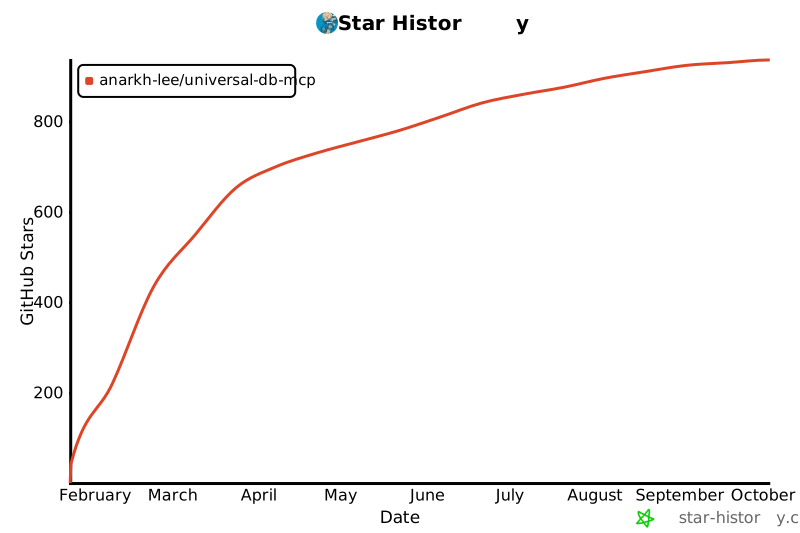
## 🌟 Star 历史
如果你觉得这个项目有用,请考虑给它一个 Star!你的支持帮助我们持续改进 Universal DB MCP。
[](https://star-history.com/#Anarkh-Lee/universal-db-mcp&Date)
## 📝 更新日志
详见 [CHANGELOG.md](./CHANGELOG.md) 了解详细的版本历史。
---
由 Anarkh-Lee 用 ❤️ 打造