# Pin Action
> English
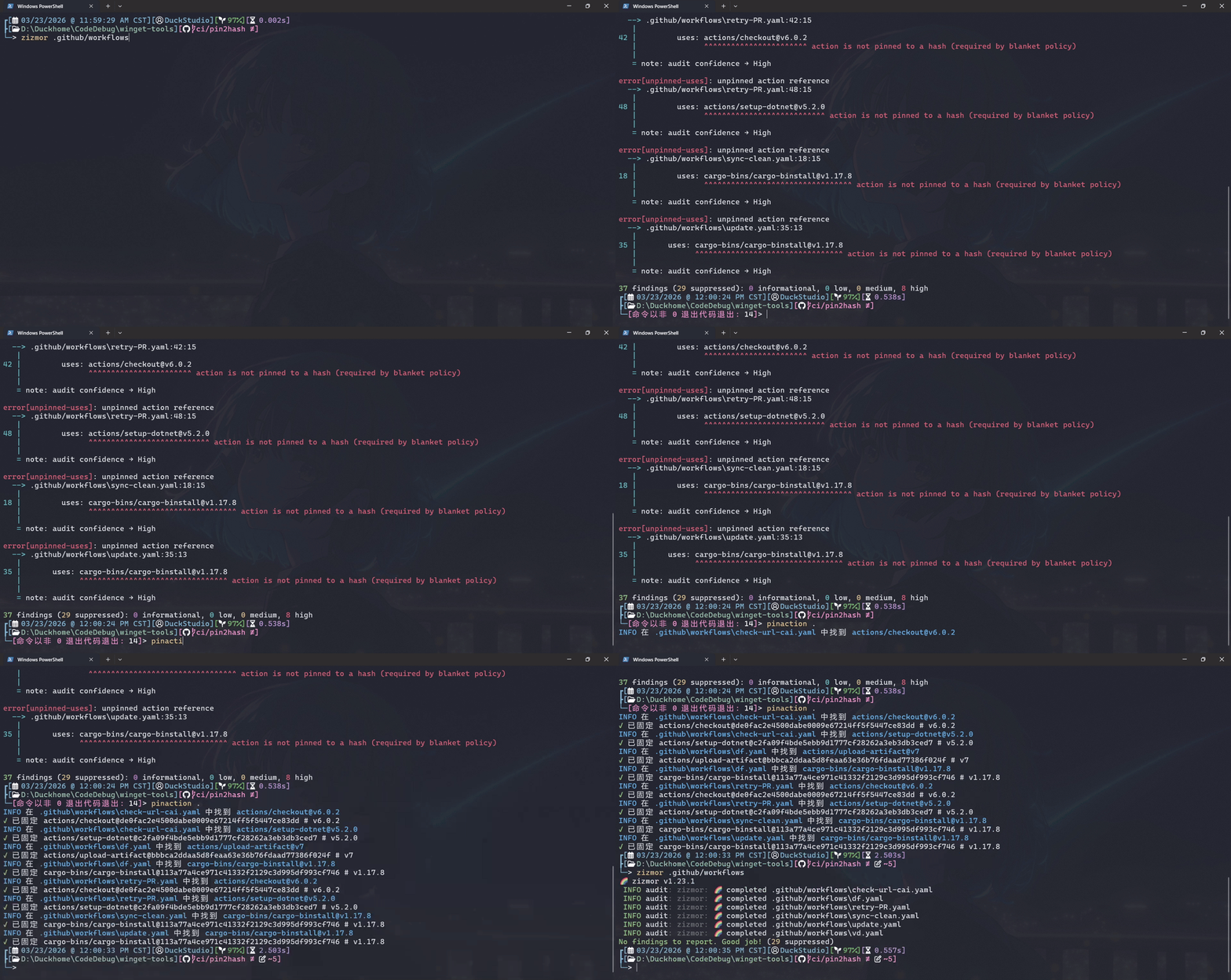
固定工作流依赖版本到全长哈希。
## 安装
### Windows
[当更新拉取请求发布后](https://github.com/microsoft/winget-pkgs/issues?q=type%3Apr%20author%3ADuckDuckStudio%20%22DuckStudio.PinAction%22),你可以通过 winget 安装:
```shell
winget install --id DuckStudio.PinAction -s winget -e
```
Linux
### Linux
> 我使用 [WSL2 Ubuntu](https://ubuntu.com/desktop/wsl) + [fish shell](https://fishshell.com/) + [bash](http://www.gnu.org/software/bash)。
> 你可以使用任意你喜欢的编辑器而不只限于 [nano](https://www.nano-editor.org/)。
> 在继续前,请先[安装 .NET 10 SDK](https://learn.microsoft.com/zh-cn/dotnet/core/install/linux)。
#### 克隆仓库
```shell
git clone https://github.com/DuckDuckStudio/PinAction.git # 添加 "-b <版本号>" 参数指定版本
cd PinAction/
```
#### 生成项目
> [!TIP]
> 你不一定要严格按照这里给出的示例,参阅 [`dotnet publish` 命令文档](https://learn.microsoft.com/zh-cn/dotnet/core/tools/dotnet-publish)可以组合出新的命令。
这里的示例使用 Release 生成配置,指定目标操作系统 linux,单文件,自包含运行时。
```shell
dotnet publish PinAction --configuration Release --os linux -p:PublishSingleFile=true --self-contained
# 对于喜欢用小写的人
mv "PinAction/bin/Release/net10.0/linux-x64/publish/PinAction" "PinAction/bin/Release/net10.0/linux-x64/publish/pinaction"
```
#### 添加到 PATH
> 请将代码中的路径替换为你实际发布文件夹的路径。
对于 fish:
```shell
nano ~/.config/fish/config.fish
# 添加以下代码
# set -gx PATH "/path/to/repo/PinAction/PinAction/bin/Release/net10.0/linux-x64/publish/" $PATH
```
对于 bash:
```bash
nano ~/.bashrc
# 添加以下代码
# export PATH="/path/to/repo/PinAction/PinAction/bin/Release/net10.0/linux-x64/publish/:$PATH"
```
然后用 `source` 命令重新加载配置。
#### 添加 fish shell 自动补全
> `complete` 命令文档: https://fishshell.com/docs/current/cmds/complete.html
```shell
touch ~/.config/fish/completions/pinaction.fish
nano ~/.config/fish/completions/pinaction.fish
```
添加以下内容
> [!NOTE]
> 如果你前面将命令修改为了全小写,请将这里的命令也修改为小写。
```shell
# DuckStudio.PinAction
# https://github.com/DuckDuckStudio/PinAction/blob/main/README.zh-CN.md
# 基础选项 (使用 --xxx 风格,其他别名请见 pinaction --help)
complete -c PinAction -l help -d "显示帮助信息"
complete -c PinAction -l version -d "显示版本号"
complete -c PinAction -l license -d "显示许可信息"
```
## 使用
```shell
pinaction "<文件或目录>"
```
你可以同时传递多个文件或目录。
对于目录,它会尝试递归查找其中的 `.yaml` 或 `.yml` 文件。
运行 `pinaction --help` 获取更多帮助信息。
## 一些问题
### 它支持使用 GitHub Token 吗?
当我学会在 C# 中读取和存储 Token 时,我想会的。
不过当前不支持,你可以在源代码中硬编码一个。
### 它能跳过一些工作流吗?
请修改代码,代码中有给示例。
### 为什么要固定版本到全长哈希?
这是 [GitHub 推荐的做法](https://docs.github.com/zh/actions/reference/security/secure-use#using-third-party-actions),在部分项目中被[视为强制要求](https://github.blog/changelog/2025-08-15-github-actions-policy-now-supports-blocking-and-sha-pinning-actions/)。
如果你的工作流依赖没有启用[不可变版本](https://docs.github.com/zh/code-security/concepts/supply-chain-security/immutable-releases),则你的工作流可能会受到上游依赖再次修改同一版本的影响。
将版本固定到全长哈希可以确保你的工作流始终使用相同的代码,即使上游依赖修改了同一版本。
### 什么是“全长哈希”?
指定的工作流版本(Tag)对应的 Git Commit Hash。
### 这个程序是怎么替换内容的?
我很懒,所以我根本没有解析 YAML,只是对带有 `uses:` 的行 `.Split()` 了几下后用正则匹配。
详见源代码文件中的 `PinActionHash` 方法。
### 为什么它没有图标?
我不会画。思考了一小时后发现我已急哭。
## 许可
本程序使用 [MIT 许可证](https://github.com/DuckDuckStudio/PinAction/blob/main/LICENSE.txt)。
### 依赖
本程序的实现离不开这些项目,感谢开源社区!
| 包 | 许可证 |
|-----|-----|
| [Octokit](https://www.nuget.org/packages/Octokit/) | MIT License |
| [DuckStudio.CatFood](https://www.nuget.org/packages/DuckStudio.CatFood) | Apache License 2.0 |
| [Spectre.Console](https://www.nuget.org/packages/Spectre.Console/) | MIT License |
有关这些依赖的许可文件,请参见 [NOTICE.md](https://github.com/DuckDuckStudio/PinAction/blob/main/NOTICE.md)。