
 |
|  |
## ✨ Core value
- **Consistency first**: Global seed + unified style + asset reuse to address the main pain of AI generation—character and scene drift.
- **Industrialized workflow**: From narrative script to shootable storyboards to video clips in one closed loop.
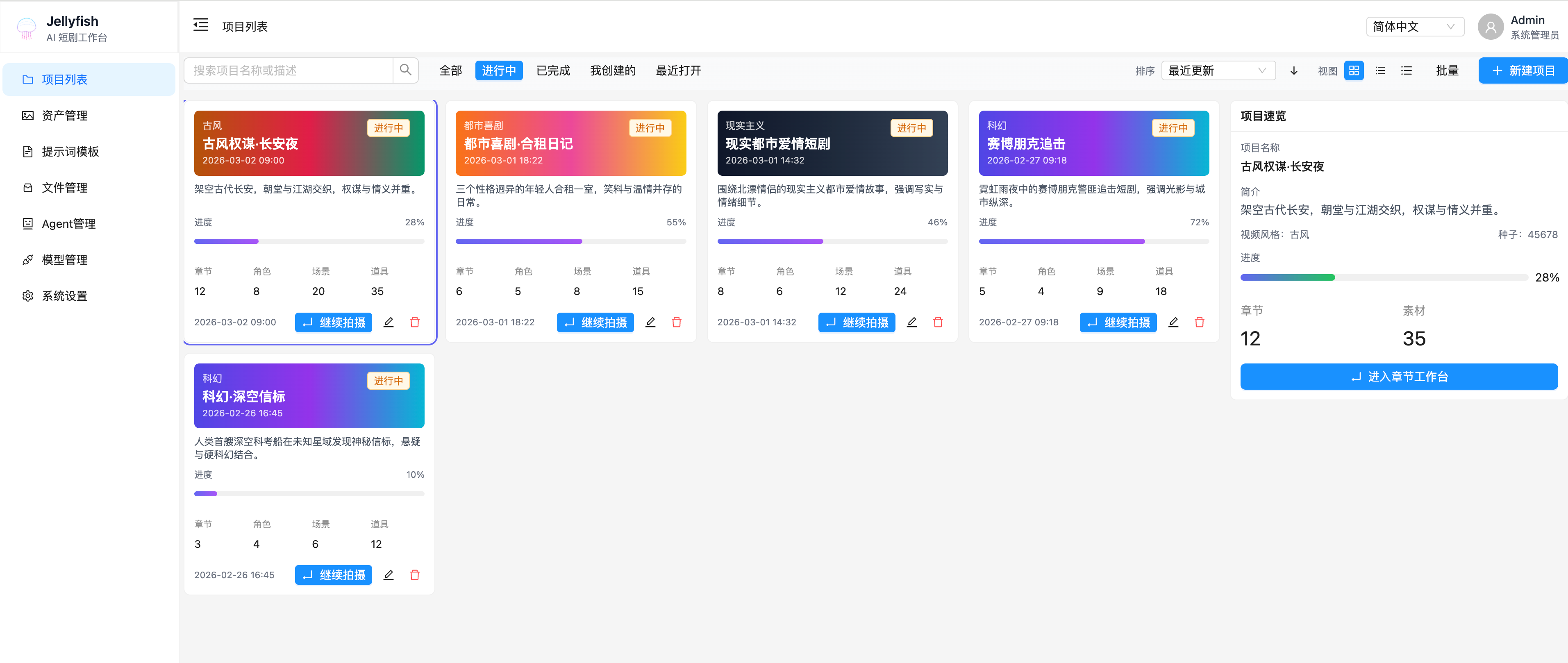
- **Visual & controllable**: WYSIWYG storyboard editor + fine-grained shot controls + real-time preview.
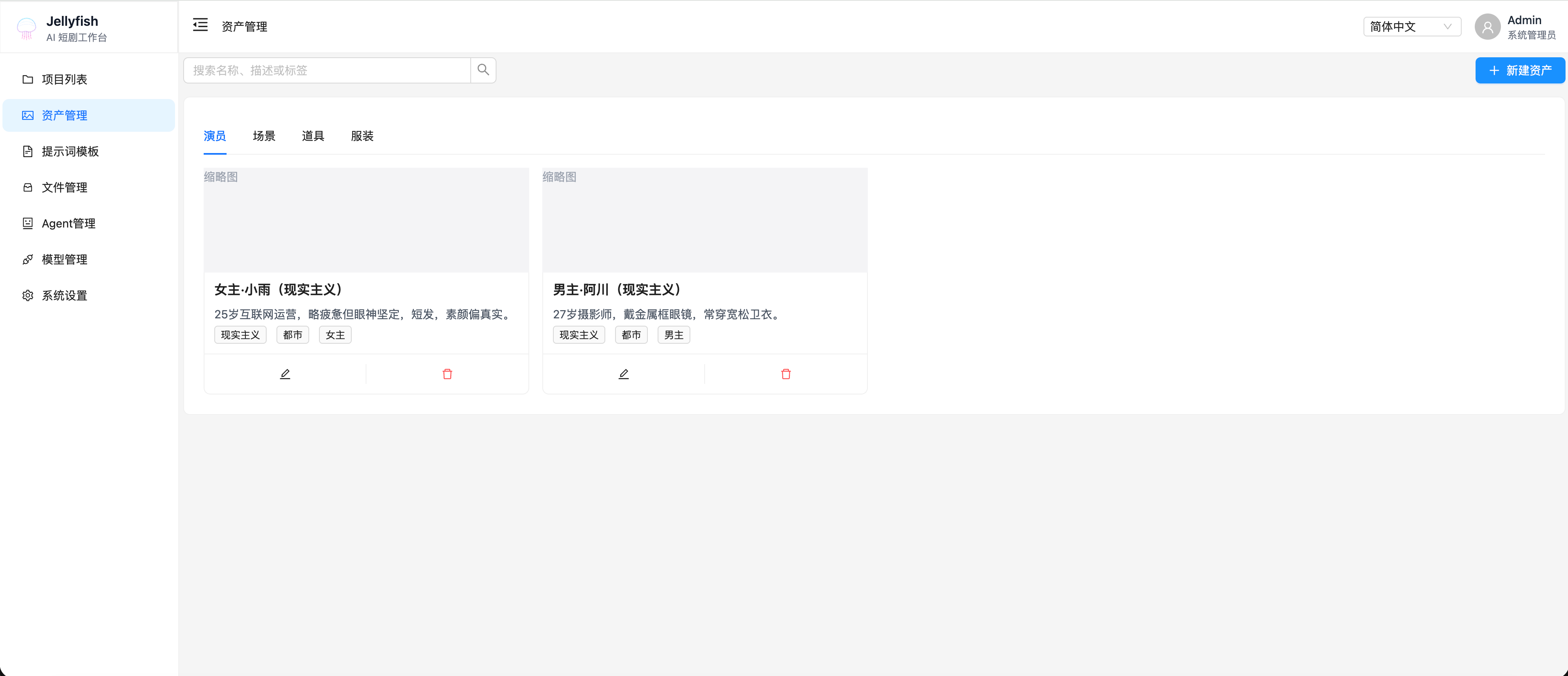
- **Asset reuse system**: Full lifecycle management for characters, scenes, props, costumes, and prompt templates.
## 🚀 Key features
| Module | Core capabilities | Highlights |
|--------|-------------------|------------|
| Project management | Create projects, global style/seed control, project dashboard, chapter stats | Global seed to reduce drift, enforced style inheritance |
| Chapter production workspace | Script input → smart condense → storyboard extraction → storyboard edit → video generation → preview | Three-column layout, collapsible right panel, batch operations |
| Storyboard fine controls | Shot size/angle/movement/emotion/duration/atmosphere/dialog/music/SFX/hidden shots | Separate prompts for first/last/key frames, multi-version management |
| Advanced generation controls | Reference images across shots, ControlNet pose/depth, lip-sync, model & duration selection | Controllable motion + lip-sync |
| Asset management | Centralized characters/scenes/props/costumes, smart extraction + manual linking + prompt templates | Per-project vs global asset library |
| Prompt template library | Storyboard/character/scene/video/music/SFX/composite prompt templates | One-click init for new chapters |
| Post-production editing | Timeline editing, multi-track video/audio, asset bin drag-drop, final export | Edit full short dramas directly from AI clips |
| Agent workflows | Custom agents (plot/character extraction, storyboard suggestions), visual orchestration & testing | Node-based workflow editor (Dify-like) |
| Model management | Multi-provider (OpenAI/Claude/Tongyi/Hunyuan, etc.), model types (text/image/video) | Per-type default model, quick connection test |
| Generated media management | Unified image/video preview, tagging, filtering, batch export | Reuse high-quality assets quickly |
## 🎯 Use cases
- Short / micro-drama content creators
- AI film studios for batch production
- Solo creators exploring vertical short drama on a budget
- Education and training teams making teaching videos
- Brands and e-commerce creating story-driven product promos
## 🛠 Tech stack (example)
- Frontend: React 18 + TypeScript + Vite + Ant Design / Tailwind CSS
- State: Redux Toolkit / Zustand
- Workflow editor: React Flow
- Video player: Video.js / Plyr
- Rich text / code editor: Monaco Editor / React Quill
- Backend (optional open-source): Node.js / NestJS / FastAPI / Spring Boot
- AI layer: Multiple model APIs (OpenAI / Anthropic / Midjourney / Runway / Kling / Luma, etc.)
## 🔁 Frontend OpenAPI client & type generation
Request helpers and types are generated from the backend OpenAPI spec. Output directory: `front/src/services/generated/`. Cached spec: `front/openapi.json`.
With the backend dev server running (default `http://127.0.0.1:8000`), from the frontend directory run:
```bash
cd front
pnpm run openapi:update
```
Notes:
- `openapi:update` fetches `http://127.0.0.1:8000/openapi.json` into `front/openapi.json`, then generates code under `front/src/services/generated/`.
- To change the API base URL, use `VITE_BACKEND_URL` (build-time) or inject `BACKEND_URL` at runtime (served as `/env.js` and loaded by `front/index.html`); see `front/src/services/openapi.ts`.
## 🐳 Run with Docker Compose (MySQL + Redis + RustFS + Backend + Celery Worker + Front)
The repository ships a ready-to-run compose setup under `deploy/compose/`.
### Ports
- Frontend: `http://localhost:7788`
- Backend: `http://localhost:8000` (Swagger at `/docs`)
- MySQL: `localhost:${MYSQL_PORT:-3306}`
- Redis: `localhost:${REDIS_PORT:-6379}`
- RustFS (S3 API): `http://localhost:${RUSTFS_PORT:-9000}` (Console: `http://localhost:${RUSTFS_CONSOLE_PORT:-9001}`)
### Start
```bash
cp deploy/compose/.env.example deploy/compose/.env
docker compose --env-file deploy/compose/.env -f deploy/compose/docker-compose.yml up --build
```
On the first start, `backend/init_db.py` will run once to create tables (`backend-init-db` service).
After it succeeds, SQL files under `backend/sql/` will be imported automatically in filename order (`mysql-init-sql` service), for example:
- `001-init-prompt-template.sql`
- `002-add-shot-extracted-candidates.sql`
Compose also starts:
- `redis`
- used as the Celery broker
- `celery-worker`
- executes long-running tasks such as `divide / extract`
### Redis / Celery broker configuration
You can configure Redis separately in compose via:
- `REDIS_PORT`
- `REDIS_DB`
- `REDIS_PASSWORD`
If `CELERY_BROKER_URL` is **not explicitly set**, the backend builds it from the Redis settings using:
```text
redis://[:password@]REDIS_HOST:REDIS_PORT/REDIS_DB
```
In the compose setup the defaults are:
```text
REDIS_HOST=redis
REDIS_PORT=6379
REDIS_DB=${REDIS_DB:-0}
```
### First-round Celery verification
After startup, verify the following first:
1. `redis` is `healthy`
2. `celery-worker` logs contain `ready`
3. Trigger:
- `Extract storyboard` from the shot management page
- `Extract and refresh candidates` from the shot edit page
4. Refresh the page and keep checking:
- chapter detail APIs
- shot list APIs
- `/api/v1/film/tasks/{task_id}/status`
The main success criteria are:
- long-running `divide / extract` work is executed by `celery-worker`
- `backend` keeps responding to other APIs
- task status can still be recovered after page refresh
## 🧑💻 Development setup (frontend & backend separately)
### Ports
- Frontend (Vite dev): `http://localhost:7788`
- Backend (FastAPI): `http://localhost:8000` (Swagger at `/docs`)
### Start backend
```bash
cd backend
cp .env.example .env
uv sync
uv run uvicorn app.main:app --reload --host 0.0.0.0 --port 8000
```
Before opening a PR, you can run `uv sync --group dev` and `uv run pylint app` under `backend` for static analysis (see [backend/README.md](../backend/README.md)).
### Start frontend
```bash
cd front
pnpm install
pnpm dev
```
### (Optional) Run only dependencies: MySQL + Redis + RustFS
If you want to use MySQL + Redis + RustFS in development (instead of the default SQLite), start only the infrastructure services:
```bash
cp deploy/compose/.env.example deploy/compose/.env
docker compose --env-file deploy/compose/.env -f deploy/compose/docker-compose.yml up -d mysql redis rustfs
```
### Git commit message format
The **first line** of each local commit must match: `[type] summary`. `type` must be **one of the following literals** (**lowercase only**), then **one space**, then the subject:
| type | meaning |
|------|---------|
| `feat` | new feature |
| `fix` | bug fix |
| `docs` | documentation |
| `style` | formatting (no semantic change) |
| `refactor` | refactor |
| `perf` | performance |
| `test` | tests |
| `chore` | chores / tooling |
| `ci` | CI config |
| `build` | build system or dependencies |
| `revert` | revert |
Examples: `[feat] add feature`, `[fix] repair login`, `[docs] update README`. Custom tags like `[wip]` are not allowed.
Enable the hook once from the repository root:
```bash
git config core.hooksPath .githooks
```
Notes: merge commits (`Merge …`), `Revert …`, and commits created during a merge are allowed by the hook.
**Remote enforcement**: pull requests run [`.github/workflows/commit-messages.yml`](.github/workflows/commit-messages.yml), which checks every commit subject in the PR (same rules; subjects starting with `Merge` / `Revert` are skipped). Push commits that match the format before opening or updating a PR.
## 🚧 Development status / Roadmap
The project is **actively developed**. Below is the current completion and planned work. Feedback and contributions via [Issues](https://github.com/Forget-C/Jellyfish/issues) are welcome.
### ✅ Done
| Module | Description |
|--------|-------------|
| Model management UI | Model list, filters, and config UI are in place |
| Project management UI | Project create/edit and dashboard flows are wired |
| Project workspace UI | Project-level workspace layout and basic actions |
| Chapter production workspace UI | Chapter production screens and interactions |
| Model management | Multi-provider, multi-type model management and default config |
| Project management | Project CRUD, global style and seed configuration |
### 🚧 In progress / Planned
| Module | Description |
|--------|-------------|
| Chapter production workspace | Full storyboard editing, video generation, and preview (deepening features) |
| Advanced prompts | Advanced prompt templates and smart fill for storyboard/character/scene (planned) |
## Developer
The project is still under development and core workflows / data models may change. A Docker Compose setup is provided for local startup (see above).
## 📄 Open-source License / License
This project is licensed under [Apache-2.0](../LICENSE).
We welcome Pull Requests, Issues, and Stars, and we will work with the community to turn this AI short drama production tool into a practical, industry-ready solution.
## 💬 Community & feedback
- **[GitHub Issues](https://github.com/Forget-C/Jellyfish/issues)** — Feature suggestions, bug reports, and usage discussions
- **WeChat / Discord** — To be set up; we will update the entry on this page later
|
## ✨ Core value
- **Consistency first**: Global seed + unified style + asset reuse to address the main pain of AI generation—character and scene drift.
- **Industrialized workflow**: From narrative script to shootable storyboards to video clips in one closed loop.
- **Visual & controllable**: WYSIWYG storyboard editor + fine-grained shot controls + real-time preview.
- **Asset reuse system**: Full lifecycle management for characters, scenes, props, costumes, and prompt templates.
## 🚀 Key features
| Module | Core capabilities | Highlights |
|--------|-------------------|------------|
| Project management | Create projects, global style/seed control, project dashboard, chapter stats | Global seed to reduce drift, enforced style inheritance |
| Chapter production workspace | Script input → smart condense → storyboard extraction → storyboard edit → video generation → preview | Three-column layout, collapsible right panel, batch operations |
| Storyboard fine controls | Shot size/angle/movement/emotion/duration/atmosphere/dialog/music/SFX/hidden shots | Separate prompts for first/last/key frames, multi-version management |
| Advanced generation controls | Reference images across shots, ControlNet pose/depth, lip-sync, model & duration selection | Controllable motion + lip-sync |
| Asset management | Centralized characters/scenes/props/costumes, smart extraction + manual linking + prompt templates | Per-project vs global asset library |
| Prompt template library | Storyboard/character/scene/video/music/SFX/composite prompt templates | One-click init for new chapters |
| Post-production editing | Timeline editing, multi-track video/audio, asset bin drag-drop, final export | Edit full short dramas directly from AI clips |
| Agent workflows | Custom agents (plot/character extraction, storyboard suggestions), visual orchestration & testing | Node-based workflow editor (Dify-like) |
| Model management | Multi-provider (OpenAI/Claude/Tongyi/Hunyuan, etc.), model types (text/image/video) | Per-type default model, quick connection test |
| Generated media management | Unified image/video preview, tagging, filtering, batch export | Reuse high-quality assets quickly |
## 🎯 Use cases
- Short / micro-drama content creators
- AI film studios for batch production
- Solo creators exploring vertical short drama on a budget
- Education and training teams making teaching videos
- Brands and e-commerce creating story-driven product promos
## 🛠 Tech stack (example)
- Frontend: React 18 + TypeScript + Vite + Ant Design / Tailwind CSS
- State: Redux Toolkit / Zustand
- Workflow editor: React Flow
- Video player: Video.js / Plyr
- Rich text / code editor: Monaco Editor / React Quill
- Backend (optional open-source): Node.js / NestJS / FastAPI / Spring Boot
- AI layer: Multiple model APIs (OpenAI / Anthropic / Midjourney / Runway / Kling / Luma, etc.)
## 🔁 Frontend OpenAPI client & type generation
Request helpers and types are generated from the backend OpenAPI spec. Output directory: `front/src/services/generated/`. Cached spec: `front/openapi.json`.
With the backend dev server running (default `http://127.0.0.1:8000`), from the frontend directory run:
```bash
cd front
pnpm run openapi:update
```
Notes:
- `openapi:update` fetches `http://127.0.0.1:8000/openapi.json` into `front/openapi.json`, then generates code under `front/src/services/generated/`.
- To change the API base URL, use `VITE_BACKEND_URL` (build-time) or inject `BACKEND_URL` at runtime (served as `/env.js` and loaded by `front/index.html`); see `front/src/services/openapi.ts`.
## 🐳 Run with Docker Compose (MySQL + Redis + RustFS + Backend + Celery Worker + Front)
The repository ships a ready-to-run compose setup under `deploy/compose/`.
### Ports
- Frontend: `http://localhost:7788`
- Backend: `http://localhost:8000` (Swagger at `/docs`)
- MySQL: `localhost:${MYSQL_PORT:-3306}`
- Redis: `localhost:${REDIS_PORT:-6379}`
- RustFS (S3 API): `http://localhost:${RUSTFS_PORT:-9000}` (Console: `http://localhost:${RUSTFS_CONSOLE_PORT:-9001}`)
### Start
```bash
cp deploy/compose/.env.example deploy/compose/.env
docker compose --env-file deploy/compose/.env -f deploy/compose/docker-compose.yml up --build
```
On the first start, `backend/init_db.py` will run once to create tables (`backend-init-db` service).
After it succeeds, SQL files under `backend/sql/` will be imported automatically in filename order (`mysql-init-sql` service), for example:
- `001-init-prompt-template.sql`
- `002-add-shot-extracted-candidates.sql`
Compose also starts:
- `redis`
- used as the Celery broker
- `celery-worker`
- executes long-running tasks such as `divide / extract`
### Redis / Celery broker configuration
You can configure Redis separately in compose via:
- `REDIS_PORT`
- `REDIS_DB`
- `REDIS_PASSWORD`
If `CELERY_BROKER_URL` is **not explicitly set**, the backend builds it from the Redis settings using:
```text
redis://[:password@]REDIS_HOST:REDIS_PORT/REDIS_DB
```
In the compose setup the defaults are:
```text
REDIS_HOST=redis
REDIS_PORT=6379
REDIS_DB=${REDIS_DB:-0}
```
### First-round Celery verification
After startup, verify the following first:
1. `redis` is `healthy`
2. `celery-worker` logs contain `ready`
3. Trigger:
- `Extract storyboard` from the shot management page
- `Extract and refresh candidates` from the shot edit page
4. Refresh the page and keep checking:
- chapter detail APIs
- shot list APIs
- `/api/v1/film/tasks/{task_id}/status`
The main success criteria are:
- long-running `divide / extract` work is executed by `celery-worker`
- `backend` keeps responding to other APIs
- task status can still be recovered after page refresh
## 🧑💻 Development setup (frontend & backend separately)
### Ports
- Frontend (Vite dev): `http://localhost:7788`
- Backend (FastAPI): `http://localhost:8000` (Swagger at `/docs`)
### Start backend
```bash
cd backend
cp .env.example .env
uv sync
uv run uvicorn app.main:app --reload --host 0.0.0.0 --port 8000
```
Before opening a PR, you can run `uv sync --group dev` and `uv run pylint app` under `backend` for static analysis (see [backend/README.md](../backend/README.md)).
### Start frontend
```bash
cd front
pnpm install
pnpm dev
```
### (Optional) Run only dependencies: MySQL + Redis + RustFS
If you want to use MySQL + Redis + RustFS in development (instead of the default SQLite), start only the infrastructure services:
```bash
cp deploy/compose/.env.example deploy/compose/.env
docker compose --env-file deploy/compose/.env -f deploy/compose/docker-compose.yml up -d mysql redis rustfs
```
### Git commit message format
The **first line** of each local commit must match: `[type] summary`. `type` must be **one of the following literals** (**lowercase only**), then **one space**, then the subject:
| type | meaning |
|------|---------|
| `feat` | new feature |
| `fix` | bug fix |
| `docs` | documentation |
| `style` | formatting (no semantic change) |
| `refactor` | refactor |
| `perf` | performance |
| `test` | tests |
| `chore` | chores / tooling |
| `ci` | CI config |
| `build` | build system or dependencies |
| `revert` | revert |
Examples: `[feat] add feature`, `[fix] repair login`, `[docs] update README`. Custom tags like `[wip]` are not allowed.
Enable the hook once from the repository root:
```bash
git config core.hooksPath .githooks
```
Notes: merge commits (`Merge …`), `Revert …`, and commits created during a merge are allowed by the hook.
**Remote enforcement**: pull requests run [`.github/workflows/commit-messages.yml`](.github/workflows/commit-messages.yml), which checks every commit subject in the PR (same rules; subjects starting with `Merge` / `Revert` are skipped). Push commits that match the format before opening or updating a PR.
## 🚧 Development status / Roadmap
The project is **actively developed**. Below is the current completion and planned work. Feedback and contributions via [Issues](https://github.com/Forget-C/Jellyfish/issues) are welcome.
### ✅ Done
| Module | Description |
|--------|-------------|
| Model management UI | Model list, filters, and config UI are in place |
| Project management UI | Project create/edit and dashboard flows are wired |
| Project workspace UI | Project-level workspace layout and basic actions |
| Chapter production workspace UI | Chapter production screens and interactions |
| Model management | Multi-provider, multi-type model management and default config |
| Project management | Project CRUD, global style and seed configuration |
### 🚧 In progress / Planned
| Module | Description |
|--------|-------------|
| Chapter production workspace | Full storyboard editing, video generation, and preview (deepening features) |
| Advanced prompts | Advanced prompt templates and smart fill for storyboard/character/scene (planned) |
## Developer
The project is still under development and core workflows / data models may change. A Docker Compose setup is provided for local startup (see above).
## 📄 Open-source License / License
This project is licensed under [Apache-2.0](../LICENSE).
We welcome Pull Requests, Issues, and Stars, and we will work with the community to turn this AI short drama production tool into a practical, industry-ready solution.
## 💬 Community & feedback
- **[GitHub Issues](https://github.com/Forget-C/Jellyfish/issues)** — Feature suggestions, bug reports, and usage discussions
- **WeChat / Discord** — To be set up; we will update the entry on this page later