OpenProgram

OpenProgram: Self-Programming AI Agent Framework
Agents create and refine their own workflows · Any LLM · Any platform

arXiv Release License Python Platforms Build status OSWorld GitHub stars

Getting Started · Docs · API Reference · Philosophy · 中文

--- > *"The more constraints one imposes, the more one frees oneself."* > — **Igor Stravinsky**, *Poetics of Music* **We propose _Agentic Programming_.** An LLM is flexible; code is deterministic. Let the model run everything and you get chaos — unpredictable execution, context explosion, no output guarantees; hard-code everything and you lose the intelligence. A **harness** balances the two, interleaved moment to moment — **Python for the flow you want fixed, the LLM for the judgement you can't script.** ([the full rationale →](docs/capabilities/agentic-programming/philosophy.md)) > 🎉 **Paper:** [_LLM-as-Code: Agentic Programming for Agent Harness_](https://arxiv.org/abs/2606.15874) — accepted at the **KDD 2026 Workshop on Agentic Software Engineering (AgenticSE)**. ## News - **2026-07-21** — **v0.6.0** — multi-agent collaboration: `spawn` N sub-agents, message them across sessions, run file-touching branches in isolated git worktrees. - **2026-06-22** — **Paper accepted** at the KDD 2026 Workshop on Agentic Software Engineering ([arXiv:2606.15874](https://arxiv.org/abs/2606.15874)). - **2026-06-07** — **v0.5.0** — installable harnesses (`openprogram programs install /`), one-command install on every platform, multi-account providers with automatic key rotation, and the `rescue` / `doctor` diagnostics. - **2026-05-28** — **v0.4.0** — the design-system foundation behind the web UI and TUI. - **2026-04-04** — **v0.3.0** — built-in Anthropic / OpenAI / Gemini providers. - **2026-04-03** — **v0.1.0** — first release: the `@agentic_function` decorator and the execution DAG. ## What makes it different Multi-platform, multi-provider, multi-channel — table stakes; OpenProgram has them (macOS / Linux / Windows, any LLM, terminal / browser / chat). What sets it apart are **four mechanisms in the harness itself — one primitive and the three things it unlocks, each the foundation for a class of agent you can build on top.** ### ① Agentic Function — the primitive everything else is built on
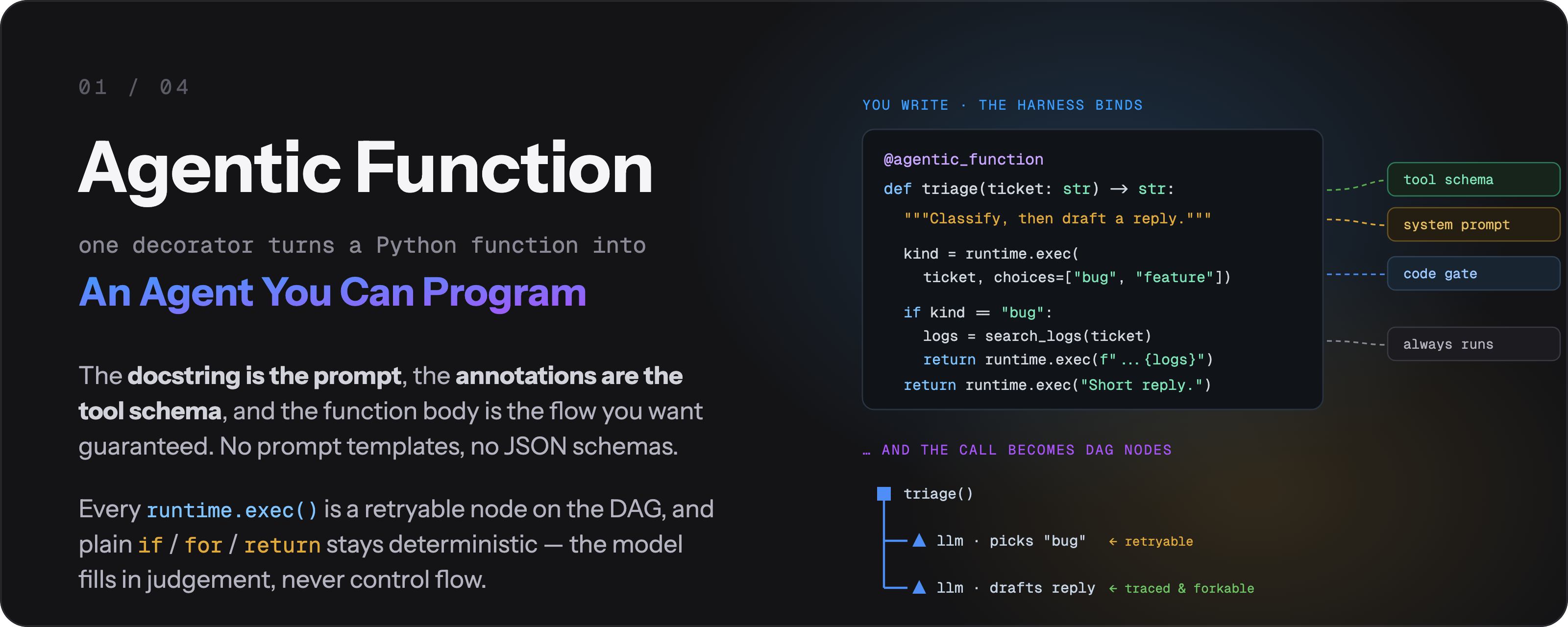
Agentic Function — one decorator turns a Python function into an agent: the docstring becomes the system prompt, type annotations become the tool schema, runtime.exec() calls become retryable DAG nodes, and plain if/for/return stays deterministic

**An agent is a Python function** — the same triage agent, written both ways:
Typical harnessOpenProgram
```python TRIAGE_PROMPT = """You are a triage agent. Classify the ticket as bug, feature, or question. Reply as JSON.""" TOOLS = [{"type": "function", "function": { "name": "triage", "parameters": {"type": "object", "properties": {"ticket": {"type": "string"}}, "required": ["ticket"]}}}] resp = client.chat(TRIAGE_PROMPT, tools=TOOLS) kind = json.loads(resp)["kind"] # hope it parses if kind not in ("bug", "feature"): ... # and re-prompt by hand ``` ```python @agentic_function def triage(ticket: str, runtime=None) -> str: """Classify the ticket as bug / feature / question, then draft a reply.""" kind = runtime.exec( # 🤖 LLM decides ticket, choices=["bug", "feature", "question"]) if kind == "bug": # 🐍 you decide logs = search_logs(ticket) # 🐍 plain Python return runtime.exec( # 🤖 LLM writes f"Reply using:\n{logs}") return runtime.exec("Draft a short reply.") ``` 🤖 `runtime.exec()` = **the LLM call** — one retryable DAG node 🐍 everything else = **plain Python**, runs every time
**docstring** = the prompt · **type annotations** = the tool schema · `choices=[...]` = a code gate that re-asks until the answer is valid. Same behavior as the left column, with no prompt template and no tool JSON. ### ② DAG Context — for native multi-agent systems

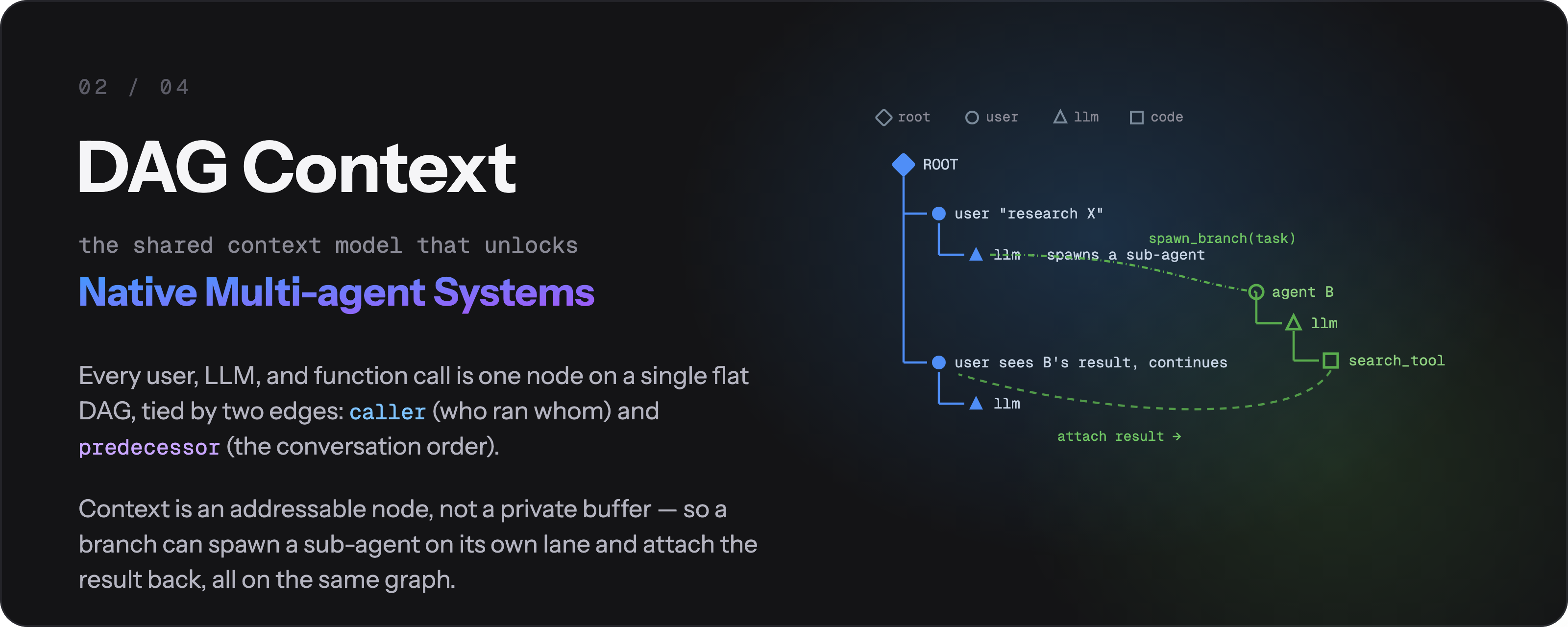
DAG Context — every user, LLM, and function call is one node on a single flat DAG; each @agentic_function declares in one line what context it reads and exposes, so fork, spawn, cross-session messaging, and worktree isolation all follow

Context is an **addressable node, not a per-agent buffer** — so every multi-agent move is just "point at a different node set": | Want to… | It's one call | |---|---| | Run a sub-agent on a clean context | `spawn_branch(...)` | | Send a message to another branch, get the reply | `message_branch(message, target=...)` | | Try an alternative without losing the original | fork the node | | Let a branch touch files safely | it runs in its own `git worktree` | ### ③ Agentic Workflow — for trustworthy & self-evolving agents

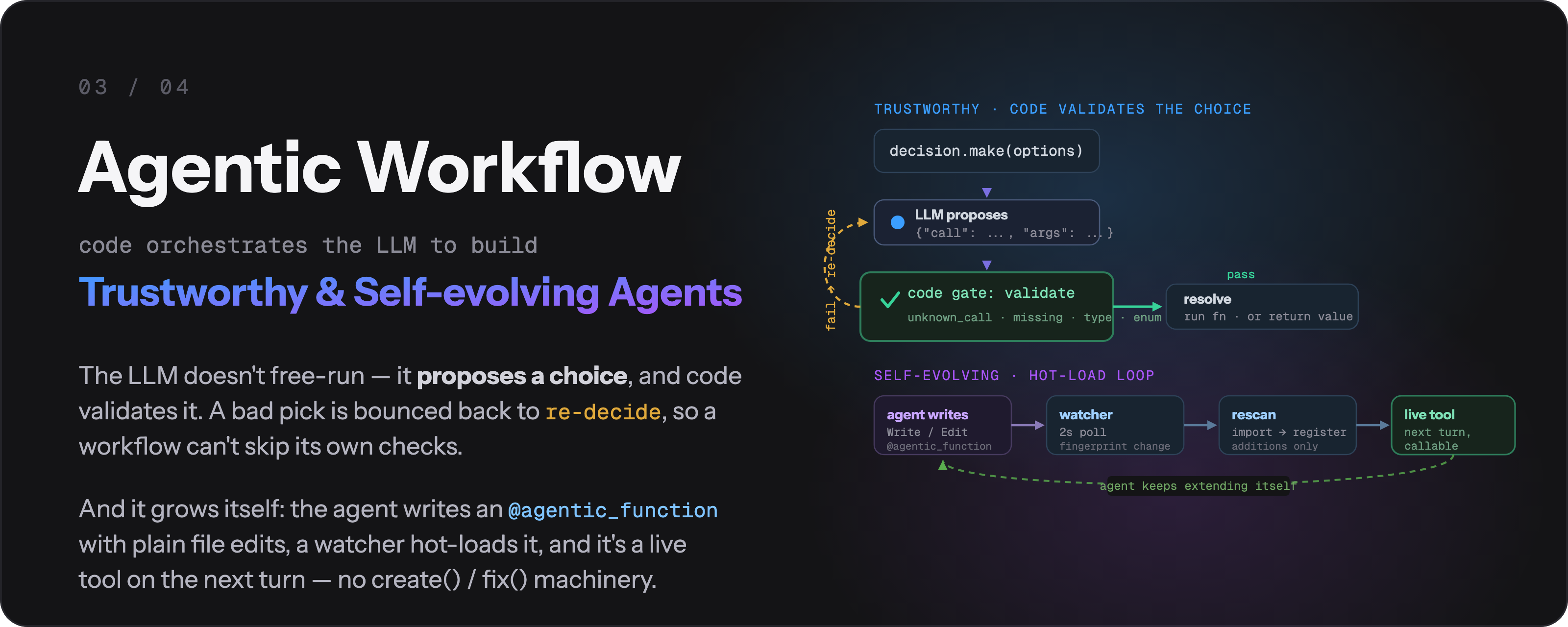
Agentic Workflow — Python drives the flow and code gates enforce the critical steps; a failed validation makes the model re-decide so it cannot skip checks; the agent writes and hot-loads its own @agentic_functions

**A code gate can't be talked past.** When the model's answer fails validation, it is sent back to re-decide — this is the real transcript: ``` llm → "probably a feature request" gate ✗ no parseable pick from ["bug", "feature", "question"] llm → {"call": "feature"} gate ✓ → branch taken in Python ``` **And it grows itself:** the agent edits its own `@agentic_function` files with ordinary file tools → a watcher hot-loads them → the new tool is live on the next turn. No `create()` / `fix()` machinery. ### ④ Event Infrastructure — for proactive agents

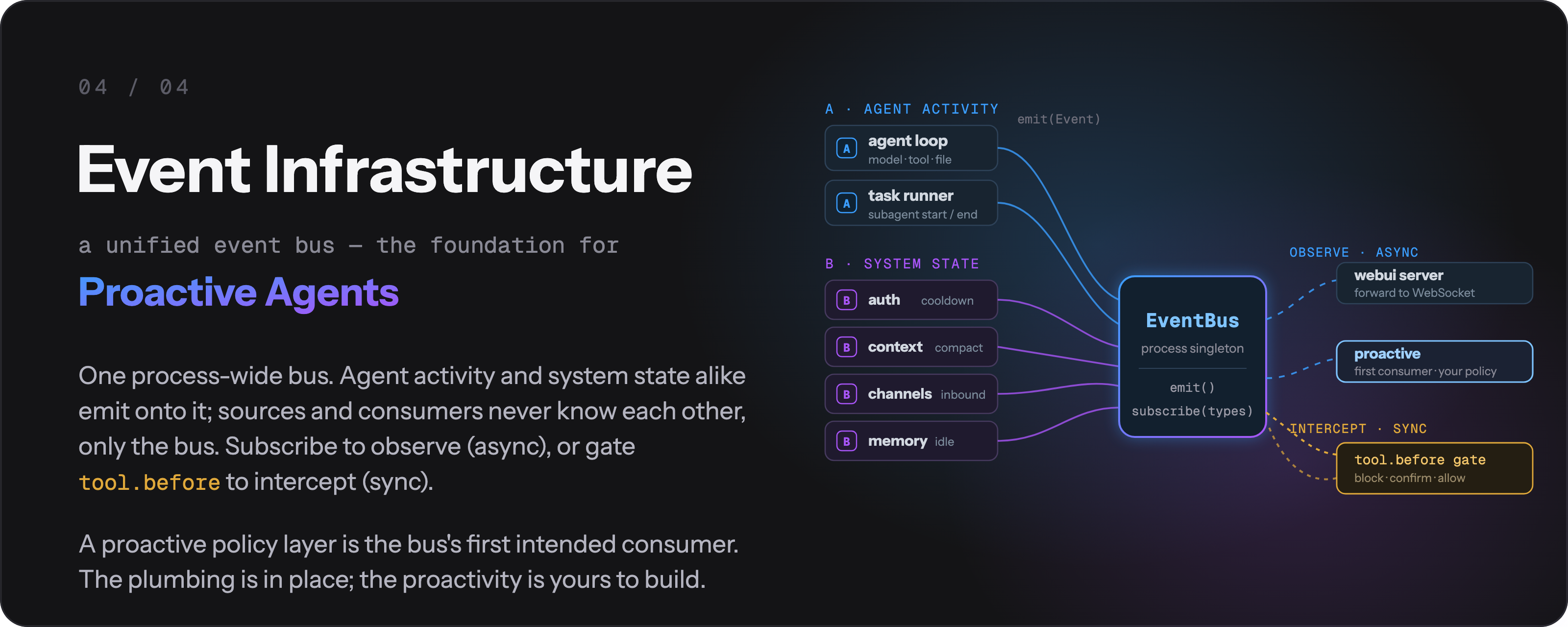
Event Infrastructure — a unified process-wide event bus that the agent loop, auth, context, channels, and memory all emit onto; anything can subscribe by event type, and a proactive policy layer builds on top

**One bus, every subsystem.** The agent loop, auth, context, channels, and memory all emit the same `Event(type, payload, ts)` envelope, so anything can watch anything: ```python from openprogram.events import get_event_bus get_event_bus().subscribe( # returns an unsubscribe fn lambda e: alert(e.payload), types={"context.compaction_recommended", "file.changed"}, ) ``` A **foundation, honestly labelled**: the plumbing is in place and the proactive policy layer is its first intended consumer — that part is yours to build. ## Quick Start ### 1. Install **macOS / Linux:** ```bash curl -fsSL https://raw.githubusercontent.com/Fzkuji/OpenProgram/main/scripts/install.sh | bash ``` **Windows (PowerShell):** ```powershell iwr -useb https://raw.githubusercontent.com/Fzkuji/OpenProgram/main/scripts/install.ps1 | iex ``` More options — flags, unattended / AI-agent install, installing from a checkout: **[docs/install/install.md](docs/install/install.md)**. ### 2. Run ```bash openprogram ``` First run sets up your provider, then asks which surface to open. Skip the prompt with `openprogram tui` (terminal) or `openprogram web` (browser → http://localhost:18100). ### 3. Add a harness Harnesses are programs under `openprogram/functions/agentics/`. Anything cloned into that folder auto-registers on the next worker restart — that's the universal way any program (including your own) plugs into OpenProgram. Pure-Python harnesses also have a one-line shortcut, `openprogram programs install `, which clones them there for you. | Harness | Install | What it does | |---|---|---| | [GUI Agent](https://github.com/Fzkuji/GUI-Agent-Harness) | `openprogram programs install gui` (pulls PyTorch), then its installer for the detector/OCR assets — **[guide](https://github.com/Fzkuji/GUI-Agent-Harness#1-install)** | Drives desktop apps & OSWorld VMs by vision. | | [Research Agent](https://github.com/Fzkuji/Research-Agent-Harness) | `openprogram programs install research` | Literature survey → experiments → paper draft. | | [Wiki Agent](https://github.com/Fzkuji/Wiki-Agent-Harness) | `openprogram programs install wiki` | Turns notes / docs / chats into an Obsidian vault with `[[wikilinks]]`. | | **Any third-party harness** | `openprogram programs install /` (or a full git URL) | Same flow — clone, deps, contract check; no registration anywhere. | Writing your own installable harness is one layout contract away — the full guide (install, manage, author, test, publish) is **[docs/capabilities/installing-harnesses.md](docs/capabilities/installing-harnesses.md)**. > Need a workflow of your own? Just ask the agent in chat — the bundled [`agentic-programming` skill](skills/agentic-programming/SKILL.md) handles the rest. ## Customizing Four levels, from a one-line edit to a distributable package. Start at the top and stop when it does what you need. ### Level 1 — Write your own agentic function Drop a directory under `openprogram/functions/agentics//` with the code in `__init__.py`. A file watcher hot-loads it, so it's a live tool on the next turn — no registration file, no restart. ```python # openprogram/functions/agentics/changelog/__init__.py import subprocess from openprogram import agentic_function @agentic_function def changelog(tag: str, runtime=None) -> str: """Summarize the commits since `tag` as user-facing release notes.""" log = subprocess.run( # plain Python — no LLM involved ["git", "log", f"{tag}..HEAD", "--oneline"], capture_output=True, text=True, ).stdout return runtime.exec(f"Write release notes from these commits:\n{log}") ``` Call it three ways — the agent picks it in chat by name, you run it headlessly, or you import it: ```bash openprogram programs run changelog --arg tag=v0.5.0 ``` > Prefer not to write it yourself? Ask the agent in chat: *"add an agentic function that summarizes commits since a tag."* It writes the file, the watcher loads it, and it's callable immediately — the bundled [`agentic-programming` skill](skills/agentic-programming/SKILL.md) teaches it the conventions. ### Level 2 — Control the context each call sees The two decorator arguments from **[Agentic Function](#①-agentic-function--the-primitive-everything-else-is-built-on)** above are the main tuning knobs, and the reason long runs stay affordable: ```python @agentic_function(expose="io", render_range={"callers": 0}) def audit(repo: str, runtime=None) -> str: """Read every file and report risky patterns.""" ... ``` | Goal | Setting | |---|---| | Sub-task shouldn't pollute the parent prompt | `render_range={"callers": 0}` — isolated scratch context, reclaimed on return | | Parent needs the reasoning, not just the answer | `expose="llm"` (or `"full"`) | | Internal helper the parent shouldn't see at all | `expose="hidden"` | | Sub-task needs one level of caller history | `render_range={"callers": 1}` | ### Level 3 — Pick models, providers, and tools Providers and per-agent models live in **Settings → Providers** in the web UI; any OpenAI-compatible endpoint works via **Add custom provider** (name + base URL). From code, override per call: ```python runtime.exec("Summarize this.", model="claude-sonnet-5") # this call only runtime.exec("Search the web.", toolset="research") # swap the tool set runtime.exec("Read-only pass.", tools_deny=["bash", "edit"]) # restrict what it can touch ``` ### Level 4 — Package it as an installable harness A harness is a git repo laid out so `openprogram programs install /` can clone it, install its deps, and check its contract — the same path the GUI / Research / Wiki harnesses use. Nothing is registered centrally, so anyone can publish one: ```bash openprogram programs available # what's installable + what you've installed openprogram programs install you/my-harness openprogram programs uninstall my-harness ``` The layout contract and publishing steps are in **[docs/capabilities/installing-harnesses.md](docs/capabilities/installing-harnesses.md)**. > **Embedding instead?** If you want the paradigm without the app — your own LLM client, your own storage — see [Python library](#python-library--import-openprogram) below. ## Troubleshooting Two diagnostic commands cover most "it broke and I don't know why" situations: ```bash openprogram rescue # 12 platform-agnostic probes, each with a fix command openprogram doctor # quick "is the install healthy?" check openprogram logs tail # follow the worker log live openprogram providers doctor # OAuth tokens — expiring? refresh wired? ``` `rescue` is the one to reach for first when something doesn't work — it doesn't depend on an LLM being reachable, walks through provider config, ports, dependencies, build artefacts, and prints the exact command to fix each finding. Case-by-case docs live in [docs/server/troubleshooting.md](docs/server/troubleshooting.md). For platform-builder topics (`Runtime` retry semantics, the full `@agentic_function` decorator API, the flat-DAG context model) see [docs/reference/API.md](docs/reference/API.md) and the per-topic notes under [docs/api/](docs/api/). ### Power-user commands ```bash openprogram logs list # all log files with size + age openprogram logs tail worker -f # follow worker.log openprogram completion bash # autocomplete: bash | zsh | powershell openprogram secrets list # same as `providers list` (openclaw-style alias) openprogram providers use [profile] # pick which account a provider runs on openprogram providers login --account work # add a second account openprogram worker status # is the backend up? on what port? openprogram --print --resume # continue a previous chat headlessly ``` **Providers & models** live in **Settings → Providers** (web UI). Each provider takes multiple accounts and multiple API keys under one credential pool — keys auto-rotate, cooling off a rate-limited one. Need a provider that isn't in the built-in list? **Add custom provider** takes just a **Name** and **Base URL** (id auto-generated) for any OpenAI-compatible endpoint; browse its models from the provider's `/models` endpoint or add a model by id, same multi-key management as the rest. --- ## How to use Two chat surfaces for day-to-day work — same backend, same sessions, switch freely — plus a library mode for embedding the engine in your own code. ### Web UI — `openprogram web` Opens at `http://localhost:18100`. The full surface: a live **mini-DAG** of the session on the right rail, **branch / merge / attach** on any node, **multi-agent** rows tagged by producer, and drag-and-drop **file attachments**. Best when you want to *see and steer* the execution tree, or for longer, branching work.

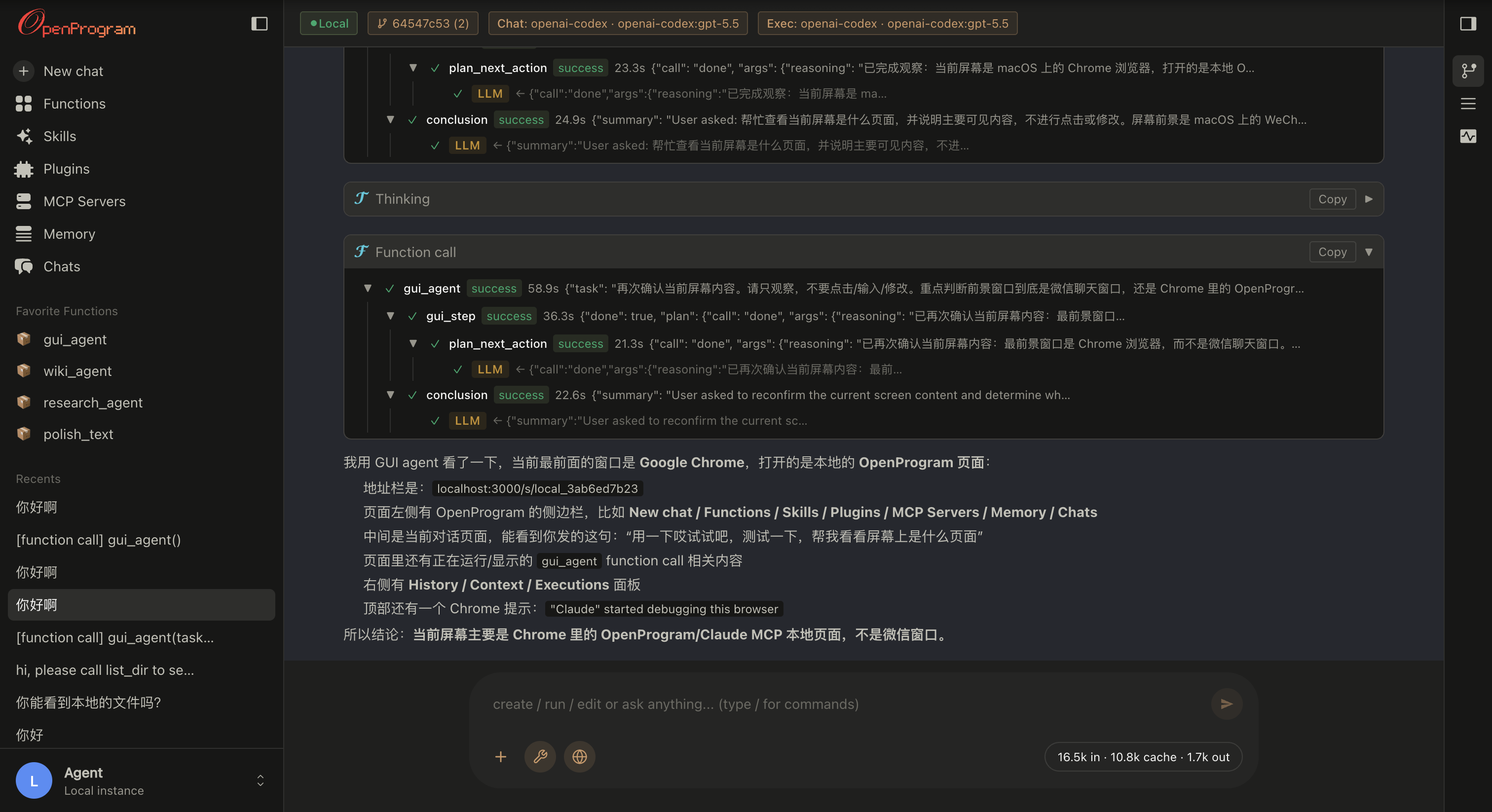
OpenProgram web UI — agentic function call tree, streamed thinking, and the conversation DAG on the right rail

### Terminal UI — `openprogram` The same backend without the browser — same commands, same chat history. Picks the native renderer per OS: **Ink** on macOS / Linux, **Rich** on Windows. Best for staying in the terminal or over SSH. One-shot, no UI: `openprogram --print "…"`.

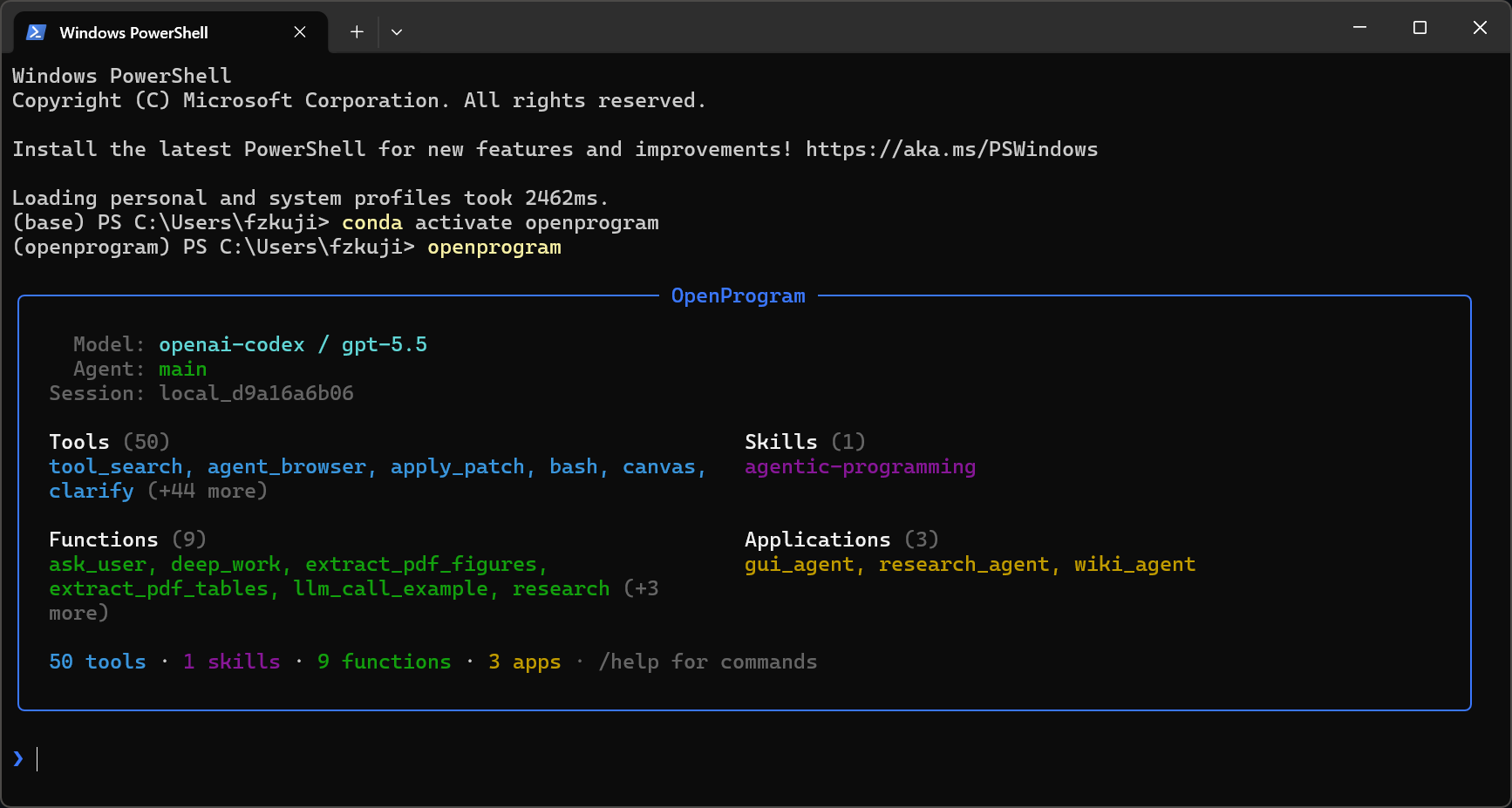
OpenProgram terminal UI — welcome screen listing the model, agents, sessions, and the registered skills / providers / tools / applications

> Sessions live in `~/.openprogram/` and are shared by both — start in the terminal, pick it up in the browser tab, and vice versa. ### Python library — `import openprogram` No UI at all: bring your own LLM client, keep state in a directory you choose, and use `@agentic_function` + the execution DAG as a component inside your own app or framework. ```python from openprogram import agentic_function, Runtime from openprogram.store import SessionStore, session_scope runtime = Runtime(call=your_llm_call, model="gpt-4o-mini") # any client, one function @agentic_function def summarize(text, runtime=None): """Summarize the text in one sentence.""" return runtime.exec(text) store = SessionStore(root_path="/var/lib/myapp/sessions") # yours — not ~/.openprogram store.create_session("reviews", agent_id="main") with session_scope(store, "reviews"): summarize("The battery lasts all week.", runtime=runtime) ``` The full guide — including handing your `@agentic_function`s to your own tool loop via `to_openai_tools` — is [docs/capabilities/agentic-programming/embedding-in-your-own-stack.md](docs/capabilities/agentic-programming/embedding-in-your-own-stack.md); the runnable version is [`examples/embed_in_your_stack.py`](examples/embed_in_your_stack.py). --- ## CLI use Beyond the chat UIs, the `openprogram` command runs headless — script it, pipe it, automate it. ```bash # One-shot: send a prompt, print the answer, exit (redirect or pipe it) openprogram --print "summarise CHANGELOG.md" > summary.md # Run a specific agentic function with key=value args openprogram programs run research --arg topic="state-space models" # Continue an earlier session by id (headless; combine with --print) openprogram --print --resume local_d9a16a6b06 "and now?" ``` Same backend and sessions as the UIs (`~/.openprogram/`) — a `--print` run or a resumed session shows up in the web / terminal UI too. ## Detailed features | Feature | One-line summary | |---|---| | **Automatic context** | Every `@agentic_function` call is a tree node; the runtime threads it through nested LLM calls — no manual prompt assembly. | | **Deep work** | `deep_work(task, level)` runs an autonomous plan → execute → evaluate → revise loop until the output meets the chosen quality bar. State persists to disk. | | **Functions that author functions** | New / fixed `@agentic_function`s are written by the agent itself via ordinary file-editing tools, guided by the `agentic-programming` skill. No dedicated `create()` / `fix()` calls. | | **Conversation as a git DAG** | Sessions are commits + branches + merges, with the right sidebar exposing the operations. File-touching branches run in isolated git worktrees. | | **Memory that writes itself** | Markdown under `~/.openprogram/memory/`: `core.md` (always loaded), `topics/` (one file per subject, every paragraph citing its source), `sources/` (the conversations those citations point at). Conversations are folded into topics in the background, and every write lands whole or not at all. | | **Mini-DAG execution view** | The right rail draws every node + edge of the active session and scrolls with the chat. | | **Multi-agent + multi-channel** | Every row tagged with its producer agent; channel layer wires external transports (Telegram, Discord, Slack, WeChat). | | **Session distill** | `/distill` turns a finished session into a reusable skill or `@agentic_function` — the next run starts from the procedure instead of the blank page ([guide](docs/capabilities/distill.md)). | The detailed tour of each one — code samples, design rationale, where to look in the codebase — lives in [**docs/start/features.md**](docs/start/features.md). ## Integration | Guide | Description | |-------|-------------| | [Getting Started](docs/start/GETTING_STARTED.md) | 3-minute setup and runnable examples | | [Claude Code](docs/integrations/claude-code.md) | Use without API key via Claude Code CLI | | [OpenClaw](docs/integrations/openclaw.md) | Use as OpenClaw skill | | [Embedding in your own stack](docs/capabilities/agentic-programming/embedding-in-your-own-stack.md) | DAG-context function calling as a plain library inside your own framework | | [API Reference](docs/reference/API.md) | Full API documentation |
Project Structure ``` openprogram/ ├── __init__.py # agentic_function re-export ├── cli.py # `openprogram` command entry point ├── agentic_programming/ # engine — paradigm-essential primitives │ ├── function.py # @agentic_function decorator │ ├── runtime.py # Runtime (exec + retry + DAG context) │ ├── session.py # session lifecycle │ └── skills.py # SKILL.md discovery ├── context/ # flat-DAG context model — nodes, storage, render, compute_reads ├── providers/ # Anthropic, OpenAI, Gemini, Claude Code, Codex, Gemini CLI ├── functions/ │ ├── _registry.py # unified registry for tools + agentic functions │ ├── tools/ # @function leaves — bash, read, edit, grep, semble_search, web_search, … │ └── agentics/ # @agentic_function modules (each its own dir, code in __init__.py) │ ├── ask_user/ # ask the user a clarifying question │ ├── deep_work/ # autonomous plan-execute-evaluate loop │ ├── extract_pdf_figures/ # PDF figure extraction │ ├── … # other agentics … │ ├── GUI-Agent-Harness/ # GUI agent (separate repo, cloned in) │ ├── Research-Agent-Harness/ # Research agent (separate repo, cloned in) │ └── Wiki-Agent-Harness/ # Wiki agent (separate repo, cloned in) └── webui/ # `openprogram web` — browser UI skills/ # SKILL.md files for agent integration examples/ # runnable demos tests/ # pytest suite ```
## Contributing This is a **paradigm proposal** with a reference implementation. We welcome discussions, alternative implementations in other languages, use cases that validate or challenge the approach, and bug reports. See [CONTRIBUTING.md](CONTRIBUTING.md) for details. ## Related projects Writing agents as ordinary typed Python — where the **docstring is the prompt** and the **signature is the contract** — is an idea several groups have arrived at independently. We think that convergence is the strongest evidence the direction is right, and the differences between these designs are where the interesting questions live. | Project | The shared intuition | Where it goes its own way | |---|---|---| | [**NVIDIA NOOA**](https://github.com/NVIDIA-NeMo/labs-OO-Agents) (Apache-2.0) | Agents are Python objects; methods with `...` bodies are LLM-implemented, docstrings are prompts, type annotations are contracts. | Object-oriented: state lives on `self`, and the model **acts by writing Python into a Jupyter-style REPL** (CodeAct). OpenProgram keeps functions module-level and has the model **choose among registered functions** instead of emitting code — a narrower action space that's easier to sandbox and replay. | | [**DSPy**](https://github.com/stanfordnlp/dspy) (MIT) | A typed **Signature** replaces the hand-written prompt; the framework compiles it. | Optimizes the prompt itself against a metric. We leave prompts fixed and readable, and put the effort into execution structure — the DAG, retries, and context scoping. The two are complementary. | | [**Marvin**](https://github.com/PrefectHQ/marvin) (Apache-2.0) · [**Mirascope**](https://github.com/Mirascope/mirascope) (MIT) | Decorate a Python function, let the docstring and return annotation drive a structured LLM call. | Focused on the single well-typed call. OpenProgram adds what happens **across** calls: a shared execution DAG, `spawn`, forking, and per-call context budgets. | | [**LangGraph**](https://github.com/langchain-ai/langgraph) (MIT) | Agent runs should be an inspectable graph with checkpoints, not an opaque loop. | The graph is declared up front as nodes and edges. Ours is **recorded from the call stack** — you write plain Python, and the DAG is the trace of what actually ran. | | [**smolagents**](https://github.com/huggingface/smolagents) (Apache-2.0) | Let the model act through code rather than rigid tool JSON. | Code-writing agents in a sandbox, like NOOA. We take the same "code is the action language" premise but bind it at **authoring** time via `@agentic_function`, so the deterministic parts are reviewable before anything runs. | If you're building in this space and we've mischaracterized your project — or missed it — please open a PR or an issue. We're happy to be corrected. ## Acknowledgements OpenProgram stands on shoulders. The tool framework, provider abstraction, and several tool implementations were ported or adapted from the projects below — each under its own license. Enormous thanks to their authors. - [**OpenClaw**](https://github.com/openclaw/openclaw) (MIT) — layout of the tool registry (`name / description / parameters / execute`), provider abstraction with `check_fn` + `requires_env` gating, `TOOLSETS` presets, skill loading via SKILL.md frontmatter + late-bound `read`. Our full clone lives under `references/openclaw/` (gitignored) for browsing. - [**hermes-agent**](https://github.com/himanshuishere/hermes-agent) (MIT) — starting point for `execute_code` (we trimmed the Docker / Modal layers), `mixture_of_agents`, and the general shape of the multi-provider `web_search` / `image_generate` / `image_analyze` tools. - [**pi-coding-agent**](https://github.com/mariozechner/pi-coding-agent) (MIT) — via OpenClaw's import, the canonical AgentSkill shape (`` XML formatter, name / description / location). - [**Claude Code**](https://www.anthropic.com/claude-code) — overall ergonomics of the `DEFAULT_TOOLS` set (bash + read / write / edit + glob / grep / list + apply_patch + the todo planning board) and the todo tools' JSON schema. - **Anthropic / OpenAI / Google SDKs** — the wire contracts, and the clients the first-party providers stream through. All three ship as base dependencies; the CLI-backed and OAuth providers talk raw HTTP instead. Individual tool files call out their direct inspirations in file-level docstrings where the lineage is more specific. These MIT-licensed components keep their original MIT terms; the combined work is distributed under AGPL-3.0. ## Citation Using OpenProgram in your work, or building on the code? Please cite our paper — and under the AGPL, any derivative you **distribute or run as a network service** must itself be open-sourced under the AGPL, with attribution preserved (see [License](#license)). > _LLM-as-Code: Agentic Programming for Agent Harness_ — accepted at the **KDD 2026 Workshop on Agentic Software Engineering (AgenticSE)**. [arXiv:2606.15874](https://arxiv.org/abs/2606.15874) ```bibtex @inproceedings{qi2026llmascode, title = {LLM-as-Code: Agentic Programming for Agent Harness}, author = {Qi, Junjia and Fu, Zichuan and Gao, Jingtong and Zhang, Wenlin and Yan, Hanyu and Wu, Xian and Zhao, Xiangyu}, booktitle = {KDD 2026 Workshop on Agentic Software Engineering (AgenticSE)}, year = {2026}, eprint = {2606.15874}, archivePrefix = {arXiv}, url = {https://arxiv.org/abs/2606.15874}, } ``` ## License [AGPL-3.0](LICENSE) © 2026 Fzkuji. Free to use, study, modify, and share — but any derivative you distribute **or run as a network service** must also be released under the AGPL, with attribution preserved.