High-performance local development port management CLI, powered by Rust
---
## Kiri Overview
Kiri is a high-performance CLI for managing local development ports, powered by Rust. It helps you quickly see which local services are running, which ports they use, and handle the process behind a port when needed.
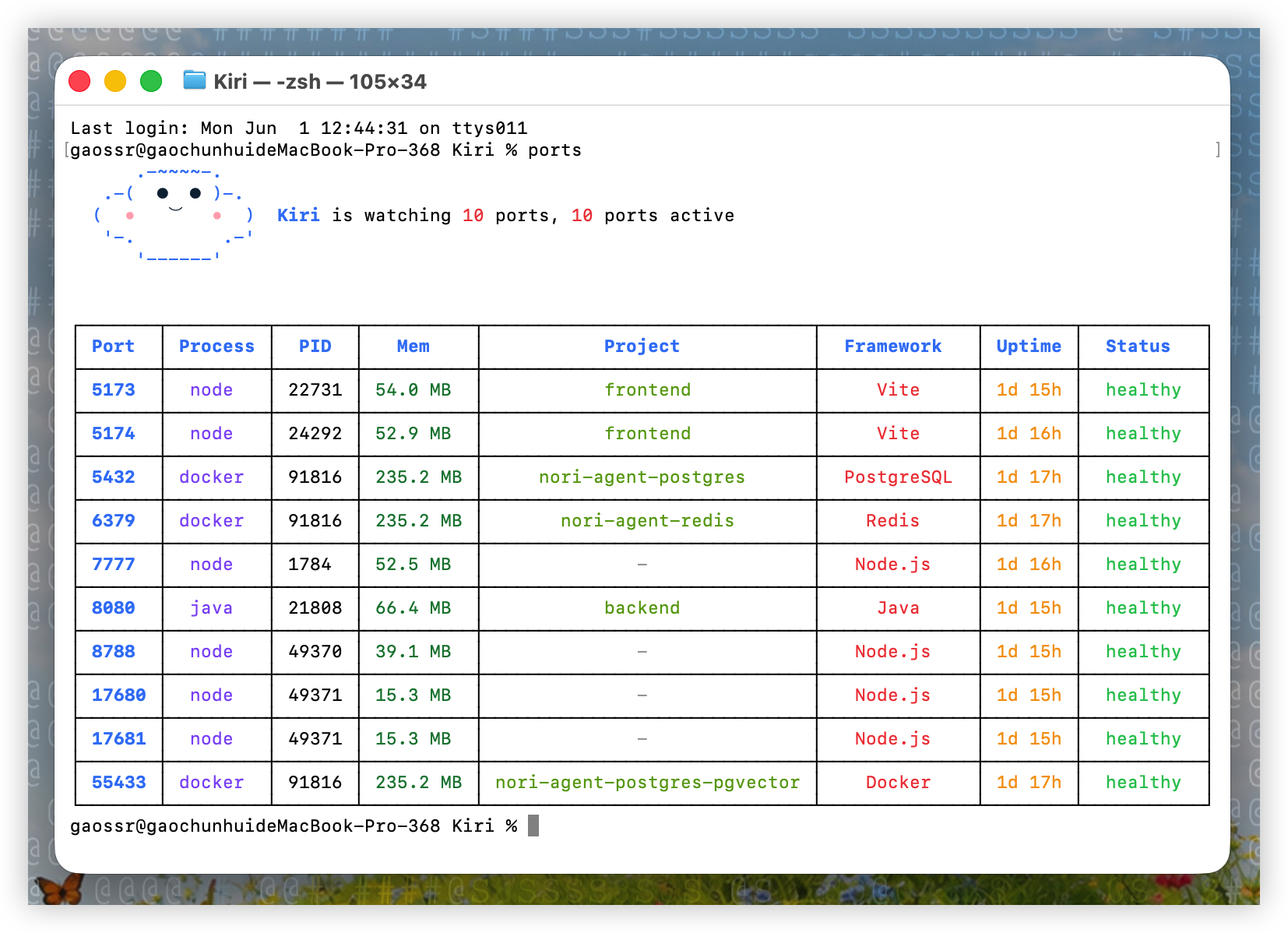
Run `ports` to see a focused local development service overview: port, process, PID, memory usage, project name, detected framework, uptime, and health status.
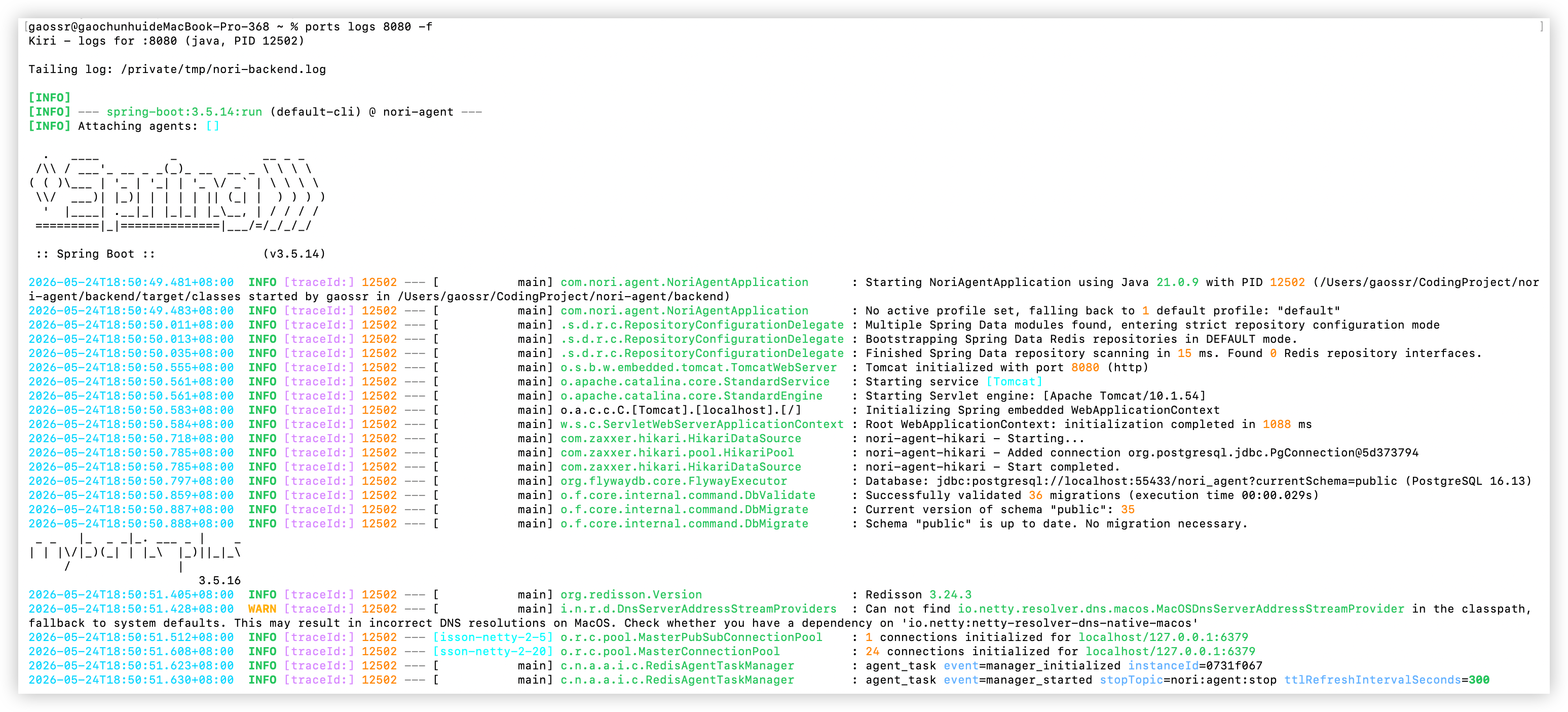
Run `ports logs -f` to follow the matched process logs. Kiri keeps dense framework output readable with ANSI colors for timestamps, log levels, process IDs, trace IDs, source classes, HTTP values, and structured fields.
## Meet Kiri
The default `ports` terminal view opens with a cute Kiri ASCII logo before the port table:
```text
.-~~~~-.
.-( ● ● )-.
( • ⌣ • ) Kiri is watching 5 ports, 5 ports active
'-. .-'
'------'
```
## Core Usage
- **View local development services and their ports:** `ports`
- **View developer background processes:** `ports ps` shows development-related processes that may not listen on a port, such as MCP Server processes started by Codex, Claude Code, or other AI coding tools. Use it when you want to see memory usage or find long-running tool processes outside the port table.
- **Quickly kill the process / PID behind a port:** `ports kill `
- **Follow logs for the process listening on a port:** `ports logs -f`
- **View all ports:** `ports --all`
## Install
Kiri ships prebuilt release artifacts for MacOS, Linux x64, and Windows x64. Install with npm, Homebrew, or the GitHub Release install scripts:
```bash
# npm
npm install -g @gaossr/kiri@latest
# Recommended on MacOS with Homebrew
brew install gaossr/tap/kiri
# MacOS / Linux install script
curl -fsSL https://raw.githubusercontent.com/GaoSSR/Kiri/main/scripts/install.sh | bash
```
Windows users can install with PowerShell:
```powershell
irm https://raw.githubusercontent.com/GaoSSR/Kiri/main/scripts/install.ps1 | iex
```
On MacOS, Homebrew is the recommended install method. npm and the install scripts use prebuilt native binaries and do not compile Rust locally.
## Commands
```bash
ports # view local development services and their ports
ports --all # show all listening ports
ports # show details for one port
ports ps # show developer background processes, including MCP Server processes that do not listen on a port
ports ps --all # show all processes
ports logs # show recent logs and exit
ports logs -f # follow logs for the process listening on a port
ports logs 3000 --lines 10 # show last 10 lines and exit
ports logs 3000 -f --lines 10 # show last 10 lines and keep following
ports logs 3000 --err # stderr only
ports clean # ask before cleaning orphaned/zombie dev processes
ports watch # stream port start/stop events
ports kill 3000 # quickly kill the process / PID behind a port
ports kill 3000-3010 # terminate listeners across a range
ports kill --force 3000 # use SIGKILL instead of SIGTERM
```
## Status Labels
Kiri uses these status labels in the `ports` table:
- `healthy`: the process is running and still has a normal parent process.
- `orphaned`: the process is still alive and may still be listening on a port, but the parent process that started it has already exited. This is an orphan process, not a zombie process.
- `zombie`: the process has already exited, but the operating system still has a leftover process record that has not been reaped by its parent.
In practice, `orphaned` means "this process is still running, but its original launcher is gone." That can happen after closing a terminal, IDE task, script runner, Codex session, or Claude Code session while a child server process keeps running.
## Platform Support
| Platform | Status |
| --- | --- |
| MacOS arm64/x64 | Supported |
| Linux x64 | Supported |
| Windows x64 | Supported |
| Linux arm64 / Windows arm64 | Planned |
On MacOS, Kiri uses `lsof`, `ps`, `tail`, MacOS `log` commands, and optional Docker metadata. Linux uses `ss`, `ps`, `/proc`, and optional Docker metadata. Windows uses PowerShell/CIM and `Get-NetTCPConnection`; process working directories are best-effort from executable paths. Docker is optional; if Docker is unavailable or no containers are running, Kiri continues without Docker mappings.
`ports` intentionally renders the Kiri ASCII logo and ANSI terminal output by default. `ports logs` adds ANSI colors for common development log formats, including Java, Python, Go, Node.js, logfmt, and JSON logs. For services started through a terminal, a stable file-backed log such as `.dev-logs/service.log` lets `ports logs -f` follow output from another process.
The default `ports` table stays focused on developer ports and includes `Mem`, so day-to-day checks do not require the broader `ports ps` process view.
## Development
For maintainers and contributors working from source:
```bash
cargo fmt
cargo test
cargo clippy --all-targets -- -D warnings
cargo build --release --bin ports
scripts/perf-smoke.sh
scripts/verify-release.sh v0.1.24
cargo run --bin ports
cargo run --bin ports -- --all
cargo run --bin ports -- ps
```
## Project Resources
- [Changelog](./CHANGELOG.md)
- [Contributing guide](./CONTRIBUTING.md)
- [Security policy](./SECURITY.md)
## Acknowledgements
Kiri was inspired by [port-whisperer](https://github.com/LarsenCundric/port-whisperer), especially the idea of making local development ports easier to see, understand, and clean up.