










LightRAG Logo
# ๐Ÿš€ LightRAG: Simple and Fast Retrieval-Augmented Generation
HKUDS%2FLightRAG | Trendshift

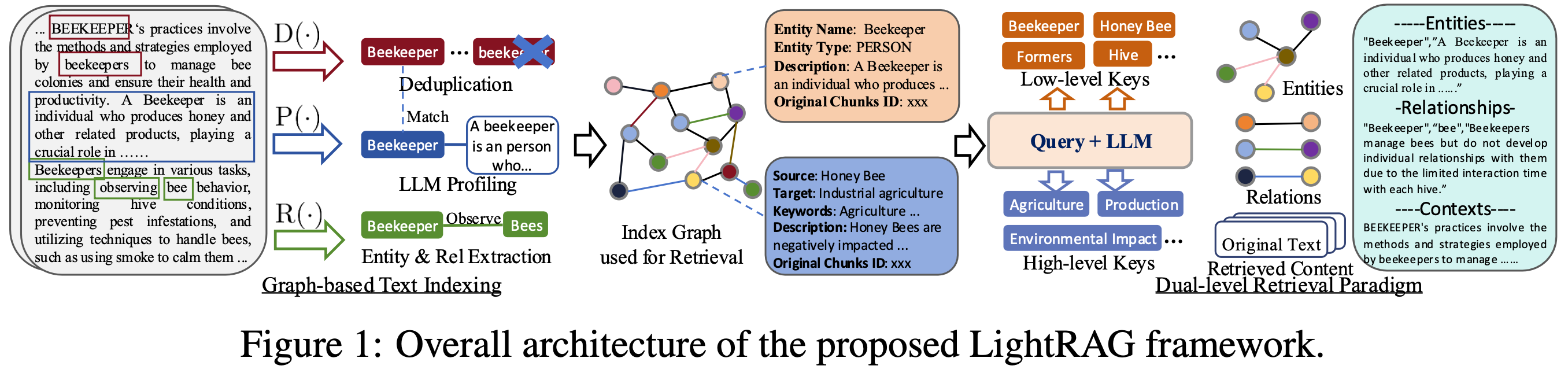
LightRAG Diagram
---
LiteWrite
--- ## ๐ŸŽ‰ News - [2026.05]๐ŸŽฏ[New Feature]: **Merge RagAnything into LightRAG**๐ŸŽ‰. Multimodal content parsing and extraction via **MinerU / Docling** services. - [2026.05]๐ŸŽฏ[New Feature]: Introducing four selectable text chunking strategies: `Fix`, `Recursive`, `Vector`, and `Paragraph`. - [2026.05]๐ŸŽฏ[New Feature]: **Role-specific LLM configuration** support, 4 distinct roles: EXTRACT, QUERY, KEYWORDS, and VLM, with independent LLM settings. - [2026.03]๐ŸŽฏ[New Feature]: Integrated **OpenSearch** as a unified storage backend, providing comprehensive support for all four LightRAG storage. - [2026.03]๐ŸŽฏ[New Feature]: Introduced a setup wizard. Support for local deployment of embedding, reranking, and storage backends via Docker. - [2025.11]๐ŸŽฏ[New Feature]: Integrated **RAGAS for Evaluation** and **Langfuse for Tracing**. Updated the API to return retrieved contexts alongside query results to support context precision metrics. - [2025.10]๐ŸŽฏ[Scalability Enhancement]: Eliminated processing bottlenecks to support **Large-Scale Datasets Efficiently**. - [2025.09]๐ŸŽฏ[New Feature] Enhances knowledge graph extraction accuracy for **Open-Sourced LLMs** such as Qwen3-30B-A3B. - [2025.08]๐ŸŽฏ[New Feature] **Reranker** is now supported, significantly boosting performance for mixed queries (set as default query mode). - [2025.08]๐ŸŽฏ[New Feature] Added **Document Deletion** with automatic KG regeneration to ensure optimal query performance. - [2025.06]๐ŸŽฏ[New Release] Our team has released [RAG-Anything](https://github.com/HKUDS/RAG-Anything) โ€” an **All-in-One Multimodal RAG** system for seamless processing of text, images, tables, and equations. - [2025.06]๐ŸŽฏ[New Feature] LightRAG now supports comprehensive multimodal data handling through [RAG-Anything](https://github.com/HKUDS/RAG-Anything) integration, enabling seamless document parsing and RAG capabilities across diverse formats including PDFs, images, Office documents, tables, and formulas. Please refer to the new [multimodal section](https://github.com/HKUDS/LightRAG/?tab=readme-ov-file#multimodal-document-processing-rag-anything-integration) for details. - [2025.03]๐ŸŽฏ[New Feature] LightRAG now supports citation functionality, enabling proper source attribution and enhanced document traceability. - [2025.02]๐ŸŽฏ[New Feature] You can now use MongoDB as an all-in-one storage solution for unified data management. - [2025.02]๐ŸŽฏ[New Release] Our team has released [VideoRAG](https://github.com/HKUDS/VideoRAG)-a RAG system for understanding extremely long-context videos - [2025.01]๐ŸŽฏ[New Release] Our team has released [MiniRAG](https://github.com/HKUDS/MiniRAG) making RAG simpler with small models. - [2025.01]๐ŸŽฏYou can now use PostgreSQL as an all-in-one storage solution for data management. - [2024.11]๐ŸŽฏ[New Resource] A comprehensive guide to LightRAG is now available on [LearnOpenCV](https://learnopencv.com/lightrag). โ€” explore in-depth tutorials and best practices. Many thanks to the blog author for this excellent contribution! - [2024.11]๐ŸŽฏ[New Feature] Introducing the LightRAG WebUI โ€” an interface that allows you to insert, query, and visualize LightRAG knowledge through an intuitive web-based dashboard. - [2024.11]๐ŸŽฏ[New Feature] You can now [use Neo4J for Storage](https://github.com/HKUDS/LightRAG?tab=readme-ov-file#using-neo4j-for-storage)-enabling graph database support. - [2024.10]๐ŸŽฏ[New Feature] We've added a link to a [LightRAG Introduction Video](https://youtu.be/oageL-1I0GE). โ€” a walkthrough of LightRAG's capabilities. Thanks to the author for this excellent contribution! - [2024.10]๐ŸŽฏ[New Channel] We have created a [Discord channel](https://discord.gg/yF2MmDJyGJ)!๐Ÿ’ฌ Welcome to join our community for sharing, discussions, and collaboration! ๐ŸŽ‰๐ŸŽ‰
Algorithm Flowchart ![LightRAG Indexing Flowchart](https://learnopencv.com/wp-content/uploads/2024/11/LightRAG-VectorDB-Json-KV-Store-Indexing-Flowchart-scaled.jpg) *Figure 1: LightRAG Indexing Flowchart - Img Caption : [Source](https://learnopencv.com/lightrag/)* ![LightRAG Retrieval and Querying Flowchart](https://learnopencv.com/wp-content/uploads/2024/11/LightRAG-Querying-Flowchart-Dual-Level-Retrieval-Generation-Knowledge-Graphs-scaled.jpg) *Figure 2: LightRAG Retrieval and Querying Flowchart - Img Caption : [Source](https://learnopencv.com/lightrag/)*
## Installation **๐Ÿ’ก Using uv for Package Management**: This project uses [uv](https://docs.astral.sh/uv/) for fast and reliable Python package management. Install uv first: `curl -LsSf https://astral.sh/uv/install.sh | sh` (Unix/macOS) or `powershell -c "irm https://astral.sh/uv/install.ps1 | iex"` (Windows) > **Note**: You can also use pip if you prefer, but uv is recommended for better performance and more reliable dependency management. > > **๐Ÿ“ฆ Offline Deployment**: For offline or air-gapped environments, see the [Offline Deployment Guide](./docs/OfflineDeployment.md) for instructions on pre-installing all dependencies and cache files. ### Install LightRAG Server * Install from PyPI ```bash ### Install LightRAG Server as tool using uv (recommended) uv tool install "lightrag-hku[api]" ### Or using pip # python -m venv .venv # source .venv/bin/activate # Windows: .venv\Scripts\activate # pip install "lightrag-hku[api]" ### Build front-end artifacts cd lightrag_webui bun install --frozen-lockfile bun run build cd .. # Setup env file # Obtain the env.example file by downloading it from the GitHub repository root # or by copying it from a local source checkout. cp env.example .env # Update the .env with your LLM and embedding configurations # Launch the server lightrag-server ``` * Installation from Source ```bash git clone https://github.com/HKUDS/LightRAG.git cd LightRAG # Bootstrap the development environment (recommended) make dev source .venv/bin/activate # Activate the virtual environment (Linux/macOS) # Or on Windows: .venv\Scripts\activate # make dev installs the test toolchain plus the full offline stack # (API, storage backends, and provider integrations), then builds the frontend. # Run make env-base or copy env.example to .env before starting the server. # Equivalent manual steps with uv # Note: uv sync automatically creates a virtual environment in .venv/ uv sync --extra test --extra offline source .venv/bin/activate # Activate the virtual environment (Linux/macOS) # Or on Windows: .venv\Scripts\activate ### Or using pip with virtual environment # python -m venv .venv # source .venv/bin/activate # Windows: .venv\Scripts\activate # pip install -e ".[test,offline]" # Build front-end artifacts cd lightrag_webui bun install --frozen-lockfile bun run build cd .. # setup env file make env-base # Or: cp env.example .env and update it manually # Launch API-WebUI server lightrag-server ``` * Launching the LightRAG Server with Docker Compose ```bash git clone https://github.com/HKUDS/LightRAG.git cd LightRAG cp env.example .env # Update the .env with your LLM and embedding configurations # modify LLM and Embedding settings in .env docker compose up ``` > Historical versions of LightRAG docker images can be found here: [LightRAG Docker Images]( https://github.com/HKUDS/LightRAG/pkgs/container/lightrag) > > Official GHCR images published by GitHub Actions are signed with Sigstore Cosign using GitHub OIDC. See [docs/DockerDeployment.md](./docs/DockerDeployment.md#verify-official-ghcr-images-with-cosign) for verification commands. ### Create .env File With Setup Tool Instead of editing `env.example` by hand, use the interactive setup wizard to generate a configured `.env` and, when needed, `docker-compose.final.yml`: ```bash make env-base # Required first step: LLM, embedding, reranker make env-storage # Optional: storage backends and database services make env-server # Optional: server port, auth, and SSL make env-base-rewrite # Optional: force-regenerate wizard-managed compose services make env-storage-rewrite # Optional: force-regenerate wizard-managed compose services make env-security-check # Optional: audit the current .env for security risks ``` For full description of every target see [docs/InteractiveSetup.md](./docs/InteractiveSetup.md). ## About LightRAG ### A Lightweight, Graph-Based RAG Framework LightRAG is a lightweight knowledge-graph RAG framework and an efficient alternative to Microsoft GraphRAG. It adopts a dual-layer architecture to manage both knowledge graphs (KGs) and vector embeddings, effectively bridging the gap between traditional vector-based RAG and graph-based RAG approaches. Designed for high scalability, LightRAG addresses key challenges in large-scale graph indexing and retrieval, including heavy computational overhead, slow response times, and the high cost of incremental updates. While supporting large datasets, LightRAG can still deliver exceptionally high RAG quality, even when paired with a 30B open-source large language model (LLM). ### Features & Advantages - **Deep Contextual Understanding:** Through graph-structured indexing, LightRAG captures complex semantic dependencies between entities, overcoming the fragmented context limitations typical of traditional chunk-based retrieval methods. Its generation quality and context awareness are particularly outstanding in vertical domains (e.g., legal, financial) that require global comprehension or logical reasoning. - **Exceptional Comprehensiveness & Diversity:** LightRAGโ€™s dual-level retrieval mechanism allows it to integrate detailed facts and abstract concepts concurrently. This enables the system to achieve remarkable performance in query result comprehensiveness and diversity, making it highly effective at handling complex, cross-document queries. - **Extreme Retrieval Efficiency & Low Cost:** LightRAG does not rely on inefficient community reports or multi-hop reasoning for complex queries. This drastically reduces the number of LLM calls required during both the indexing and querying phases, significantly lowering response latency and LLM computational costs. - **Rapid Adaptation to Dynamic Data:** LightRAG supports seamless, incremental knowledge base updates. New data only needs to go through a standard graph indexing pipeline to generate a local graph, which is then directly integrated into the existing graph via set merging. This process eliminates the need to disrupt the original structure or rebuild the global index, ensuring real-time relevance in dynamic data environments. When deleting documents, the system leverages LLM caching from the construction phase to rapidly rebuild affected entity relationships, vastly improving knowledge base update efficiency. ### Multimodal Capability Upgrades Starting from version v1.5, LightRAG has officially introduced analysis and retrieval capabilities for multimodal documents: - **Multi-Engine Document Parsing:** Its document processing pipeline supports parsing engines such as MinerU, Docling, and Native, enabling the highly efficient extraction of text, tables, formulas, and images from documents. - **Cross-Modal Entity & Relation Mapping:** It achieves cross-modal entity extraction and relationship mapping within a unified framework, resulting in seamless indexing and querying. - **Enhanced Application Scenarios:** The brand-new multimodal processing pipeline significantly improves RAG quality for documents rich in multimodal content, such as operation manuals and academic papers. ### LightRAG API Server The LightRAG server offers not only a web-based UI for exploring LightRAG functionalities but also a comprehensive REST API. For more information about the LightRAG server, please refer to [LightRAG Server](./docs/LightRAG-API-Server.md). ![iShot_2025-03-23_12.40.08](./README.assets/iShot_2025-03-23_12.40.08.png) ## Key Configuration Guide ### Selecting LLM Models LightRAG requires LLM/VLMs of four different roles during its workflow. You should configure models with different capabilities and speeds for different roles to strike a balance between performance and processing speed. LightRAG has higher capability requirements for Large Language Models (LLMs) than traditional RAG because it requires LLMs to perform complex entity-relation extraction tasks from documents. During the query phase, the LLM needs to process a large volume of retrieved information, including entities, relationships, and text chunks. This requires the model to have the capability of generating high-quality responses in long, noisy contexts. For detailed model configurations, please refer to [RoleSpecificLLMConfiguration.md](./docs/RoleSpecificLLMConfiguration.md) ### Selecting Query Modes LightRAG supports five query modes: - **local**: Focuses on precise matching of local contexts and specific entities. It retrieves candidate entities and their directly associated attributes from the knowledge graph. This mode is suitable for Q&A targeting specific objects, concrete concepts, or detailed facts, providing highly relevant and detailed local context support. - **global**: Focuses on macro themes, cross-document reasoning, and deep relationships between entities. It retrieves relationship chains covering broad themes and concepts. This mode is suitable for queries that require summarization across multiple contexts, trend analysis, or understanding complex semantic dependencies. - **hybrid**: Merges the retrieval results of both local and global modes. It performs comprehensive reasoning and generation by simultaneously recalling specific entities and global relationship contexts. - **naive**: Traditional RAG retrieval based on text chunks. It does not use a knowledge graph and relies directly on vector similarity to retrieve from the original text chunks. - **mix**: Fully-featured mode that merges retrieval results from local, global, and naive modes to provide the most comprehensive and rich retrieval results. The default query mode for LightRAG is `mix`. Using `mix` mode generally yields the most ideal query results. The `mix` mode takes slightly longer than `naive`, while other query modes are roughly comparable in latency. ### Embedding Models When choosing an Embedding model, pay attention to its multilingual support capabilities. Since LightRAG's retrieval quality has limited dependency on the Embedding model, it is recommended to choose low-dimensional and fast models. Typically, `BAAI/bge-m3` is sufficient. We highly recommend deploying the Embedding model locally to achieve the best performance. **Important Note**: The Embedding model must be determined before document indexing, and the same model must be used in the query phase. Once selected, embedding models generally cannot be changed. If changed, you will need to re-embed all text chunks, entities, and relationships. LightRAG does not currently provide a re-embedding tool. Some storage backends (e.g., PostgreSQL) require the vector dimension to be defined when creating tables for the first time, so changing the Embedding model requires deleting vector-related tables so LightRAG can recreate them. ### Enabling Reranking Enabling the Rerank option during the query phase can significantly improve query quality. However, enabling Rerank typically introduces a 1โ€“2 second delay. To minimize latency, it is highly recommended to deploy the Rerank model locally. For configuration details, please refer to the `.env.example` file. Unlike Embedding models, the Rerank model can be changed at any time during the query phase. ### Document Processing Pipeline Configuration The default pipeline configuration in LightRAG does not allow the system to perform at its best. The quality of document parsing greatly impacts document indexing and querying. Therefore, we recommend configuring the pipeline to enable the MinerU parsing engine and activating the pipeline's image analysis features. Suggested configuration: ``` LIGHTRAG_PARSER=*:native-iteP,*:mineru-iteP,*:legacy-R VLM_PROCESS_ENABLE=true VLM_LLM_MODEL= ``` Since the cloud-based MinerU service has limitations on usage, file size, and page count, it is recommended to use a locally deployed MinerU. For details on configuring the file processing pipeline, please refer to [FileProcessingPipeline.md](./docs/FileProcessingPipeline.md) ### Concurrency Optimization for File Processing For large-scale document processing, you need to improve concurrency. Key environment variables related to concurrent file processing include: - **MAX_ASYNC_LLM/EXTRACT_ASYNC_LLM**: Controls the maximum concurrency for LLM models. - **MAX_PARALLEL_INSERT**: Controls the maximum number of files processed in parallel. Processing of text, tables, formulas, and images within a single file will also occur concurrently. `MAX_PARALLEL_INSERT` should ideally be set to about 1/3 of `MAX_ASYNC_LLM`. - **MAX_PARALLEL_PARSE_MINERU**: Controls the number of parallel files processed for MinerU parsing. - **MAX_PARALLEL_PARSE_DOCLING**: Controls the number of parallel files processed for Docling parsing. - **EMBEDDING_FUNC_MAX_ASYNC**: Controls the maximum concurrency for embedding models. - **EMBEDDING_BATCH_NUM**: Controls the number of texts included in each embedding model request (how many embeddings per batch). Increasing this number can significantly reduce the number of API calls to the embedding model and speed up data persistence in the embedding storage. ``` # Sample Configuration MAX_ASYNC_LLM=8 MAX_PARALLEL_INSERT=3 EMBEDDING_FUNC_MAX_ASYNC=16 EMBEDDING_BATCH_NUM=32 ``` ### Selecting Backend Storage LightRAG requires four types of backend storage: - **KV_STORAGE**: Used to save LLM response caches, text chunking results, entity-relation extraction results, etc. - **VECTOR_STORAGE**: Used to store vector information for text chunks, entities, and relationships. - **GRAPH_STORAGE**: Used to save the knowledge graph. - **DOC_STATUS_STORAGE**: Used to store the document list. By default, LightRAG's storage backends are file-persisted, in-memory databases. These default storages are intended only for development and debugging, and are not suitable for production. In a production environment, if you prefer a single backend to handle all four storage types, you can choose PostgreSQL, MongoDB, or OpenSearch. Alternatively, you can select specialized databases for vector or graph storage, such as using Milvus or Qdrant for vector storage, and Neo4j or Memgraph for graph storage. ### Other Important Configurations for Document Processing During the document insertion stage, you may also want to adjust the following environment variables based on your needs: - **SUMMARY_LANGUAGE**: Controls the language used by the LLM when outputting entity-relation names and summaries, e.g., `Chinese`, `English`. - **ENTITY_EXTRACTION_USE_JSON**: Controls whether the LLM outputs entity-relation extractions in JSON format. Using JSON format typically yields more stable results, but it consumes more tokens and can be slightly slower. - **ENABLE_CONTENT_HEADINGS**: Controls whether the section heading information of a text chunk is sent to the LLM during the query stage (enabled by default, providing more context for the LLM). - **FORCE_LLM_SUMMARY_ON_MERGE / MAX_SOURCE_IDS_PER_RELATION**: Controls the maximum number of text chunks an `entity/relation` can be associated with. - **SOURCE_IDS_LIMIT_METHOD**: Controls whether to keep updating the entity/relation description once an `entity/relation` exceeds its associated text chunk limit (by default it stops updating, because at that point the entity-relation description is already rich enough and further updates add little value; skipping updates can greatly speed up knowledge base construction). - **DEFAULT_MAX_FILE_PATHS**: Controls the maximum number of source files an `entity/relation` can be associated with; once this limit is exceeded, new file names are no longer written to the vector storage. - **OPENAI_LLM_MAX_TOKENS / OPENAI_LLM_MAX_COMPLETION_TOKENS**: Set a max output token limit to prevent endless output from certain LLMs, which may trigger timeout errors during entity and relation extraction. Different LLM providers require distinct parameter configurations, as detailed in the `env.example`. ### Other Important Configurations for Document Querying During the document query stage, you may also want to adjust the following environment variables based on your needs: - **MAX_ENTITY_TOKENS / MAX_RELATION_TOKENS / MAX_TOTAL_TOKENS**: Controls the token length of the retrieved content sent to the LLM context. The retrieved content consists of three parts: `entities`, `relations`, and `text chunks`. The lengths of entities and relations can be controlled independently, while the text chunk length is determined by subtracting the entity and relation lengths from the total length. - **ENABLE_CONTENT_HEADINGS**: Controls whether the section heading where a text chunk resides is sent to the LLM; enabled by default, providing richer context for the LLM and improving answer quality. - **ENABLE_LLM_CACHE**: Whether to cache query results. Enabled by default; identical query questions, query modes, and LLM model parameters will return the same result. ## Using LightRAG As SDK > โš ๏ธ **For integration into your project, we strongly recommend using the REST API provided by the LightRAG Server.** The LightRAG SDK is primarily intended for embedded applications or academic research and evaluation purposes. ### Install LightRAG SDK * Install from source code ```bash cd LightRAG # ๆณจๆ„: uv sync ไผš่‡ชๅŠจๅœจ .venv/ ็›ฎๅฝ•ๅˆ›ๅปบ่™šๆ‹Ÿ็Žฏๅขƒ uv sync source .venv/bin/activate # ๆฟ€ๆดป่™šๆ‹Ÿ็Žฏๅขƒ (Linux/macOS) # Windows ็ณป็ปŸ: .venv\Scripts\activate # ๆˆ–: pip install -e . ``` * Install from PyPI ```bash uv pip install lightrag-hku # ๆˆ–: pip install lightrag-hku ``` ### LightRAG SDK Sample Code To get started with LightRAG core, refer to the sample codes available in the `examples` folder. Additionally, a [video demo](https://www.youtube.com/watch?v=g21royNJ4fw) demonstration is provided to guide you through the local setup process. If you already possess an OpenAI API key, you can run the demo right away: ```bash ### you should run the demo code with project folder cd LightRAG ### provide your API-KEY for OpenAI export OPENAI_API_KEY="sk-...your_opeai_key..." ### download the demo document of "A Christmas Carol" by Charles Dickens curl https://raw.githubusercontent.com/gusye1234/nano-graphrag/main/tests/mock_data.txt > ./book.txt ### run the demo code python examples/lightrag_openai_demo.py ``` For a streaming response implementation example, please see `examples/lightrag_openai_compatible_demo.py`. Prior to execution, ensure you modify the sample code's LLM and embedding configurations accordingly. **Note 1**: When running the demo program, please be aware that different test scripts may use different embedding models. If you switch to a different embedding model, you must clear the data directory (`./dickens`); otherwise, the program may encounter errors. If you wish to retain the LLM cache, you can preserve the `kv_store_llm_response_cache.json` file while clearing the data directory. **Note 2**: Only `lightrag_openai_demo.py` and `lightrag_openai_compatible_demo.py` are officially supported sample codes. Other sample files are community contributions that haven't undergone full testing and optimization. ### **Notes on SDK Usage** For detailed instructions on using the SDK, please refer to **[docs/ProgramingWithCore.md](./docs/ProgramingWithCore.md)**. Some LightRAG features are not exposed via the REST API and are accessible only through the SDK. These features are typically experimental and may not be compatible with future versions. ## Replicating Findings in the Paper LightRAG consistently outperforms NaiveRAG, RQ-RAG, HyDE, and GraphRAG across agriculture, computer science, legal, and mixed domains. For the full evaluation methodology, prompts, and reproduce steps, see **[docs/Reproduce.md](./docs/Reproduce.md)**. **Overall Performance Table** ||**Agriculture**||**CS**||**Legal**||**Mix**|| |----------------------|---------------|------------|------|------------|---------|------------|-------|------------| ||NaiveRAG|**LightRAG**|NaiveRAG|**LightRAG**|NaiveRAG|**LightRAG**|NaiveRAG|**LightRAG**| |**Comprehensiveness**|32.4%|**67.6%**|38.4%|**61.6%**|16.4%|**83.6%**|38.8%|**61.2%**| |**Diversity**|23.6%|**76.4%**|38.0%|**62.0%**|13.6%|**86.4%**|32.4%|**67.6%**| |**Empowerment**|32.4%|**67.6%**|38.8%|**61.2%**|16.4%|**83.6%**|42.8%|**57.2%**| |**Overall**|32.4%|**67.6%**|38.8%|**61.2%**|15.2%|**84.8%**|40.0%|**60.0%**| ||RQ-RAG|**LightRAG**|RQ-RAG|**LightRAG**|RQ-RAG|**LightRAG**|RQ-RAG|**LightRAG**| |**Comprehensiveness**|31.6%|**68.4%**|38.8%|**61.2%**|15.2%|**84.8%**|39.2%|**60.8%**| |**Diversity**|29.2%|**70.8%**|39.2%|**60.8%**|11.6%|**88.4%**|30.8%|**69.2%**| |**Empowerment**|31.6%|**68.4%**|36.4%|**63.6%**|15.2%|**84.8%**|42.4%|**57.6%**| |**Overall**|32.4%|**67.6%**|38.0%|**62.0%**|14.4%|**85.6%**|40.0%|**60.0%**| ||HyDE|**LightRAG**|HyDE|**LightRAG**|HyDE|**LightRAG**|HyDE|**LightRAG**| |**Comprehensiveness**|26.0%|**74.0%**|41.6%|**58.4%**|26.8%|**73.2%**|40.4%|**59.6%**| |**Diversity**|24.0%|**76.0%**|38.8%|**61.2%**|20.0%|**80.0%**|32.4%|**67.6%**| |**Empowerment**|25.2%|**74.8%**|40.8%|**59.2%**|26.0%|**74.0%**|46.0%|**54.0%**| |**Overall**|24.8%|**75.2%**|41.6%|**58.4%**|26.4%|**73.6%**|42.4%|**57.6%**| ||GraphRAG|**LightRAG**|GraphRAG|**LightRAG**|GraphRAG|**LightRAG**|GraphRAG|**LightRAG**| |**Comprehensiveness**|45.6%|**54.4%**|48.4%|**51.6%**|48.4%|**51.6%**|**50.4%**|49.6%| |**Diversity**|22.8%|**77.2%**|40.8%|**59.2%**|26.4%|**73.6%**|36.0%|**64.0%**| |**Empowerment**|41.2%|**58.8%**|45.2%|**54.8%**|43.6%|**56.4%**|**50.8%**|49.2%| |**Overall**|45.2%|**54.8%**|48.0%|**52.0%**|47.2%|**52.8%**|**50.4%**|49.6%| ## ๐Ÿ”— Related Projects *Ecosystem & Extensions*
๐Ÿ“ธ
RAG-Anything
Multimodal RAG
๐ŸŽฅ
VideoRAG
Extreme Long-Context Video RAG
โœจ
MiniRAG
Extremely Simple RAG
--- ## โญ Star History [![Star History Chart](https://api.star-history.com/svg?repos=HKUDS/LightRAG&type=Date)](https://star-history.com/#HKUDS/LightRAG&Date) ## ๐Ÿค Contribution
We welcome contributions of all kinds โ€” bug fixes, new features, documentation improvements, and more.
Please read our Contributing Guide before submitting a pull request.

We thank all our contributors for their valuable contributions.
## ๐Ÿ“– Citation ```python @article{guo2024lightrag, title={LightRAG: Simple and Fast Retrieval-Augmented Generation}, author={Zirui Guo and Lianghao Xia and Yanhua Yu and Tu Ao and Chao Huang}, year={2024}, eprint={2410.05779}, archivePrefix={arXiv}, primaryClass={cs.IR} } ``` ---
โญ Thank you for visiting LightRAG! โญ


