
OpenHarness    ohmo
oh — OpenHarness & ohmo

English · 简体中文

**OpenHarness** delivers core lightweight agent infrastructure: tool-use, skills, memory, and multi-agent coordination. **ohmo** is a personal AI agent built on OpenHarness — not another chatbot, but an assistant that actually works for you over long sessions. Chat with ohmo in Feishu / Slack / Telegram / Discord, and it forks branches, writes code, runs tests, and opens PRs on its own. ohmo runs on your existing Claude Code or Codex subscription — no extra API key needed. **Join the community**: contribute **Harness** for open agent development.

Quick Start Architecture Tools Tests License

Python React Pytest E2E Output CI Feishu WeChat

One Command (**oh**) to Launch **OpenHarness** and Unlock All Agent Harnesses. Supports CLI agent integration including OpenClaw, nanobot, Cursor, and more.

OpenHarness Terminal Demo

--- ## ✨ OpenHarness's Key Harness Features

🔄 Agent Loop

Engine

• Streaming Tool-Call Cycle

• API Retry with Exponential Backoff

• Parallel Tool Execution

• Token Counting & Cost Tracking

🔧 Harness Toolkit

Toolkit

• 43 Tools (File, Shell, Search, Web, MCP)

• On-Demand Skill Loading (.md)

• Plugin Ecosystem (Skills + Hooks + Agents)

• Compatible with anthropics/skills & plugins

🧠 Context & Memory

Context

• CLAUDE.md Discovery & Injection

• Context Compression (Auto-Compact)

• MEMORY.md Persistent Memory

• Session Resume & History

🛡️ Governance

Governance

• Multi-Level Permission Modes

• Path-Level & Command Rules

• PreToolUse / PostToolUse Hooks

• Interactive Approval Dialogs

🤝 Swarm Coordination

Swarm

• Subagent Spawning & Delegation

• Team Registry & Task Management

• Background Task Lifecycle

ClawTeam Integration (Roadmap)

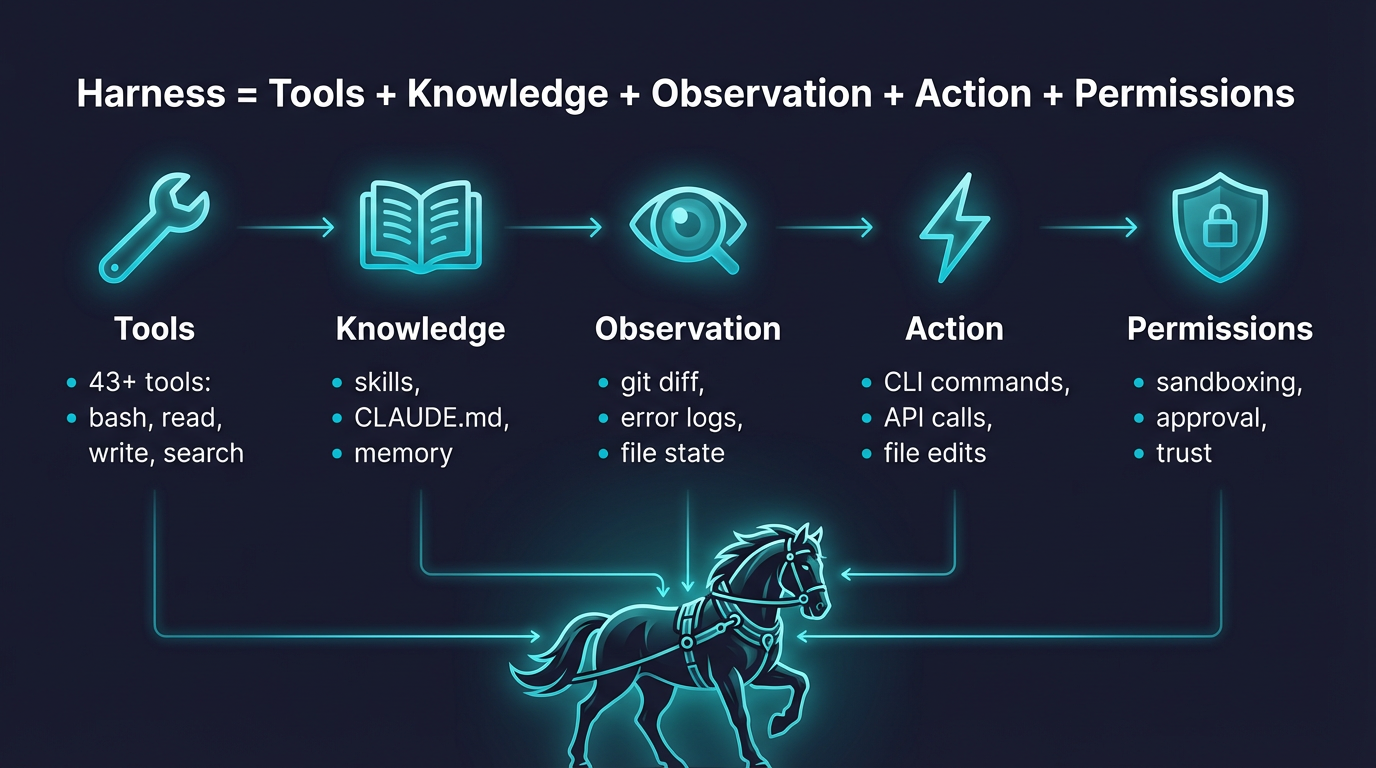
--- ## 🤔 What is an Agent Harness? An **Agent Harness** is the complete infrastructure that wraps around an LLM to make it a functional agent. The model provides intelligence; the harness provides **hands, eyes, memory, and safety boundaries**.

Harness = Tools + Knowledge + Observation + Action + Permissions

OpenHarness is an open-source Python implementation designed for **researchers, builders, and the community**: - **Understand** how production AI agents work under the hood - **Experiment** with cutting-edge tools, skills, and agent coordination patterns - **Extend** the harness with custom plugins, providers, and domain knowledge - **Build** specialized agents on top of proven architecture --- ## 📰 What's New - **Unreleased** 🔍 **Dry-run safe preview**: - `oh --dry-run` previews resolved runtime settings, auth state, skills, commands, tools, and configured MCP servers without executing the model, tools, or subagents. - Dry-run now reports a `ready` / `warning` / `blocked` readiness verdict with concrete next-step suggestions such as fixing auth, fixing MCP config, or running the prompt directly. - Prompt previews include likely matching skills and tools, while slash-command previews show whether the command is mostly read-only or stateful. - **2026-04-18** ⚙️ **v0.1.7** — Packaging & TUI polish: - Install script now links `oh`, `ohmo`, and `openharness` into `~/.local/bin` instead of prepending the virtualenv `bin` directory to `PATH`, which avoids clobbering Conda-managed shells. - React TUI now supports `Shift+Enter` to insert a newline while keeping plain `Enter` as submit. - Busy-state animation in the React TUI is quieter and less error-prone on Windows terminals, with conservative spinner frames and reduced flashing. - **2026-04-10** 🧠 **v0.1.6** — Auto-Compaction & Markdown TUI: - Auto-Compaction preserves task state and channel logs across context compression — agents can run multi-day sessions without manual compact/clear - Subprocess teammates run in headless worker mode; agent team creation stabilized - Assistant messages now render full Markdown in the React TUI - `ohmo` gains channel slash commands and multimodal attachment support - **2026-04-08** 🔌 **v0.1.5** — MCP HTTP transport & Swarm polling: - MCP protocol adds HTTP transport, auto-reconnect on disconnect, and tool-only server compatibility - JSON Schema types inferred for MCP tool inputs — no manual type mapping needed - `ohmo` channels support file attachments and multimodal gateway messages - Subprocess agents are now pollable in real runs; permission modals serialized to prevent input swallowing - **2026-04-08** 🌙 **v0.1.4** — Multi-provider auth & Moonshot/Kimi: - Native Moonshot/Kimi provider with `reasoning_content` support for thinking models - Auth overhaul: fixed provider-switching key mismatch, `OPENAI_BASE_URL` env override, profile-scoped credential priority - MCP gracefully handles disconnected servers in `call_tool` / `read_resource` - Security: built-in sensitive-path protection in PermissionChecker, hardened `web_fetch` URL validation - Stability: EIO crash recovery in Ink TUI, `--debug` logging, Windows cmd flash fix - **2026-04-06** 🚀 **v0.1.2** — Unified setup flows and `ohmo` personal-agent app: - `oh setup` now guides provider selection as workflows instead of exposing raw auth/provider internals - Compatible API setup is now profile-scoped, so Anthropic/OpenAI-compatible endpoints can keep separate keys - `ohmo` ships as a packaged app with `~/.ohmo` workspace, gateway, bootstrap prompts, and channel config flow - **2026-04-01** 🎨 **v0.1.0** — Initial **OpenHarness** open-source release featuring complete Harness architecture:

Start here: Quick Start · Provider Compatibility · Showcase · Contributing · Changelog

--- ## 🚀 Quick Start ### 1. Install #### Linux / macOS / WSL ```bash # One-click install curl -fsSL https://raw.githubusercontent.com/HKUDS/OpenHarness/main/scripts/install.sh | bash # Or via pip pip install openharness-ai ``` #### Windows (Native) ```powershell # One-click install (PowerShell) iex (Invoke-WebRequest -Uri 'https://raw.githubusercontent.com/HKUDS/OpenHarness/main/scripts/install.ps1') # Or via pip pip install openharness-ai ``` **Note**: Windows support is now native. In PowerShell, use `openh` instead of `oh` because `oh` can resolve to the built-in `Out-Host` alias. ### 2. Configure ```bash oh setup # interactive wizard — pick a provider, authenticate, done # On Windows PowerShell, use: openh setup ``` Supports **Claude / OpenAI / Copilot / Codex / Moonshot(Kimi) / GLM / MiniMax** and any compatible endpoint. ### 3. Run ```bash oh # On Windows PowerShell, use: openh ```
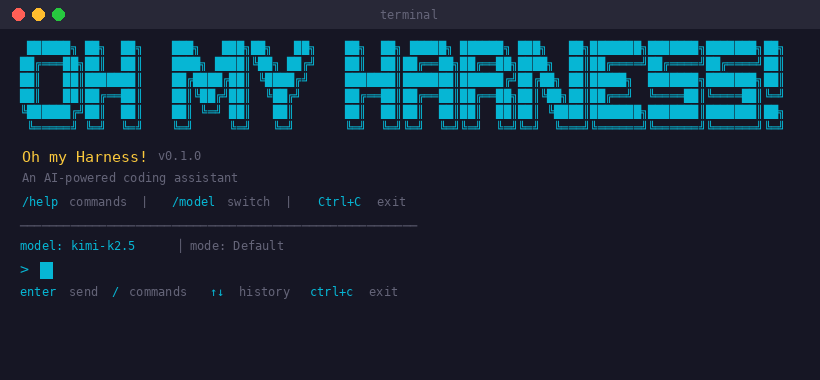
OpenHarness Landing Screen

### 4. Set up ohmo (Personal Agent) Want an AI agent that works for you from Feishu / Slack / Telegram / Discord? ```bash ohmo init # initialize ~/.ohmo workspace ohmo config # configure channels and provider ohmo gateway start # start the gateway — ohmo is now live in your chat app ``` ohmo runs on your existing **Claude Code subscription** or **Codex subscription** — no extra API key needed. ### Non-Interactive Mode (Pipes & Scripts) ```bash # Single prompt → stdout oh -p "Explain this codebase" # JSON output for programmatic use oh -p "List all functions in main.py" --output-format json # Stream JSON events in real-time oh -p "Fix the bug" --output-format stream-json ``` ### Dry Run (Safe Preview) Use `--dry-run` when you want to inspect what OpenHarness would use before any live execution starts. ```bash # Preview an interactive session setup oh --dry-run # Preview one prompt without executing the model or tools oh --dry-run -p "Review this bug fix and grep for failing tests" # Preview a slash command path oh --dry-run -p "/plugin list" # Get structured output for scripts or channels oh --dry-run -p "Explain this repository" --output-format json ``` Dry-run is intentionally static: - It does **not** call the model - It does **not** execute tools or spawn subagents - It does **not** connect to MCP servers - It **does** resolve settings, auth status, prompt assembly, skills, commands, tools, and obvious MCP config problems Readiness levels: - `ready`: configuration looks usable; the next suggested action is usually to run the prompt directly - `warning`: OpenHarness can resolve the session, but something important still looks wrong, such as broken MCP config or missing auth for later model work - `blocked`: the requested path will not run successfully as-is, for example an unknown slash command or a prompt that cannot resolve a runtime client `next actions` in the dry-run output tell you the shortest fix or follow-up step, such as: - run `oh auth login` - fix or disable broken MCP configuration - run the prompt directly with `oh -p "..."` or open the interactive UI with `oh` ## 🔌 Provider Compatibility OpenHarness treats providers as **workflows** backed by named profiles. In day-to-day use, prefer: ```bash oh setup oh provider list oh provider use ``` ### Built-in Workflows | Workflow | What it is | Typical backends | |----------|------------|------------------| | **Anthropic-Compatible API** | Anthropic-style request format | Claude official, Kimi, GLM, MiniMax, internal Anthropic-compatible gateways | | **Claude Subscription** | Claude CLI subscription bridge | Local `~/.claude/.credentials.json` | | **OpenAI-Compatible API** | OpenAI-style request format | OpenAI official, OpenRouter, DashScope, DeepSeek, SiliconFlow, Groq, Ollama, GitHub Models | | **Codex Subscription** | Codex CLI subscription bridge | Local `~/.codex/auth.json` | | **GitHub Copilot** | Copilot OAuth workflow | GitHub Copilot device-flow login | ### Compatible API Families #### Anthropic-Compatible API Typical examples: | Backend | Base URL | Example models | |---------|----------|----------------| | **Claude official** | `https://api.anthropic.com` | `claude-sonnet-4-6`, `claude-opus-4-6` | | **Moonshot / Kimi** | `https://api.moonshot.cn/anthropic` | `kimi-k2.5` | | **Zhipu / GLM** | custom Anthropic-compatible endpoint | `glm-4.5` | | **MiniMax** | custom Anthropic-compatible endpoint | `minimax-m1` | #### OpenAI-Compatible API Any provider implementing the OpenAI `/v1/chat/completions` style API works: | Backend | Base URL | Example models | |---------|----------|----------------| | **OpenAI** | `https://api.openai.com/v1` | `gpt-5.4`, `gpt-4.1` | | **OpenRouter** | `https://openrouter.ai/api/v1` | provider-specific | | **Alibaba DashScope** | `https://dashscope.aliyuncs.com/compatible-mode/v1` | `qwen3.5-flash`, `qwen3-max`, `deepseek-r1` | | **DeepSeek** | `https://api.deepseek.com` | `deepseek-chat`, `deepseek-reasoner` | | **GitHub Models** | `https://models.inference.ai.azure.com` | `gpt-4o`, `Meta-Llama-3.1-405B-Instruct` | | **SiliconFlow** | `https://api.siliconflow.cn/v1` | `deepseek-ai/DeepSeek-V3` | | **Google Gemini** | `https://generativelanguage.googleapis.com/v1beta/openai` | `gemini-2.5-flash`, `gemini-2.5-pro` | | **Groq** | `https://api.groq.com/openai/v1` | `llama-3.3-70b-versatile` | | **Ollama (local)** | `http://localhost:11434/v1` | any local model | ### Advanced Profile Management ```bash # List saved workflows oh provider list # Switch the active workflow oh provider use codex # Add your own compatible endpoint oh provider add my-endpoint \ --label "My Endpoint" \ --provider openai \ --api-format openai \ --auth-source openai_api_key \ --model my-model \ --base-url https://example.com/v1 ``` For custom compatible endpoints, OpenHarness can bind credentials per profile instead of forcing every Anthropic-compatible or OpenAI-compatible backend to share the same API key. ### Ollama (Local Models) Run local models through Ollama's OpenAI-compatible endpoint: ```bash # Add an Ollama provider profile oh provider add ollama \ --label "Ollama" \ --provider Ollama \ --api-format openai \ --auth-source openai_api_key \ --model glm-4.7-flash:q8_0 \ --base-url http://localhost:11434/v1 ``` ``` Saved provider profile: ollama ``` ```bash # Activate and verify oh provider use ollama ``` ``` Activated provider profile: ollama ``` ```bash oh provider list ``` ``` claude-api: Anthropic-Compatible API [ready] ... moonshot: Moonshot (Kimi) [missing auth] auth=moonshot_api_key model=kimi-k2.5 base_url=https://api.moonshot.cn/v1 * ollama: Ollama [ready] auth=openai_api_key model=glm-4.7-flash:q8_0 base_url=http://localhost:11434/v1 ``` ### GitHub Copilot Format (`--api-format copilot`) Use your existing GitHub Copilot subscription as the LLM backend. Authentication uses GitHub's OAuth device flow — no API keys needed. ```bash # One-time login (opens browser for GitHub authorization) oh auth copilot-login # Then launch with Copilot as the provider uv run oh --api-format copilot # Or via environment variable export OPENHARNESS_API_FORMAT=copilot uv run oh # Check auth status oh auth status # Remove stored credentials oh auth copilot-logout ``` | Feature | Details | |---------|---------| | **Auth method** | GitHub OAuth device flow (no API key needed) | | **Token management** | Automatic refresh of short-lived session tokens | | **Enterprise** | Supports GitHub Enterprise via `--github-domain` flag | | **Models** | Uses Copilot's default model selection | | **API** | OpenAI-compatible chat completions under the hood | --- ## 🏗️ Harness Architecture OpenHarness implements the core Agent Harness pattern with 10 subsystems: ``` openharness/ engine/ # 🧠 Agent Loop — query → stream → tool-call → loop tools/ # 🔧 43 Tools — file I/O, shell, search, web, MCP skills/ # 📚 Knowledge — on-demand skill loading (.md files) plugins/ # 🔌 Extensions — commands, hooks, agents, MCP servers permissions/ # 🛡️ Safety — multi-level modes, path rules, command deny hooks/ # ⚡ Lifecycle — PreToolUse/PostToolUse event hooks commands/ # 💬 54 Commands — /help, /commit, /plan, /resume, ... mcp/ # 🌐 MCP — Model Context Protocol client memory/ # 🧠 Memory — persistent cross-session knowledge tasks/ # 📋 Tasks — background task management coordinator/ # 🤝 Multi-Agent — subagent spawning, team coordination prompts/ # 📝 Context — system prompt assembly, CLAUDE.md, skills config/ # ⚙️ Settings — multi-layer config, migrations ui/ # 🖥️ React TUI — backend protocol + frontend ``` ### The Agent Loop The heart of the harness. One loop, endlessly composable: ```python while True: response = await api.stream(messages, tools) if response.stop_reason != "tool_use": break # Model is done for tool_call in response.tool_uses: # Permission check → Hook → Execute → Hook → Result result = await harness.execute_tool(tool_call) messages.append(tool_results) # Loop continues — model sees results, decides next action ``` The model decides **what** to do. The harness handles **how** — safely, efficiently, with full observability. ### Harness Flow ```mermaid flowchart LR U[User Prompt] --> C[CLI or React TUI] C --> R[RuntimeBundle] R --> Q[QueryEngine] Q --> A[Anthropic-compatible API Client] A -->|tool_use| T[Tool Registry] T --> P[Permissions + Hooks] P --> X[Files Shell Web MCP Tasks] X --> Q ``` --- ## ✨ Features ### 🔧 Tools (43+) | Category | Tools | Description | |----------|-------|-------------| | **File I/O** | Bash, Read, Write, Edit, Glob, Grep | Core file operations with permission checks | | **Search** | WebFetch, WebSearch, ToolSearch, LSP | Web and code search capabilities | | **Notebook** | NotebookEdit | Jupyter notebook cell editing | | **Agent** | Agent, SendMessage, TeamCreate/Delete | Subagent spawning and coordination | | **Task** | TaskCreate/Get/List/Update/Stop/Output | Background task management | | **MCP** | MCPTool, ListMcpResources, ReadMcpResource | Model Context Protocol integration | | **Mode** | EnterPlanMode, ExitPlanMode, Worktree | Workflow mode switching | | **Schedule** | CronCreate/List/Delete, RemoteTrigger | Scheduled and remote execution | | **Meta** | Skill, Config, Brief, Sleep, AskUser | Knowledge loading, configuration, interaction | Every tool has: - **Pydantic input validation** — structured, type-safe inputs - **Self-describing JSON Schema** — models understand tools automatically - **Permission integration** — checked before every execution - **Hook support** — PreToolUse/PostToolUse lifecycle events ### 📚 Skills System Skills are **on-demand knowledge** — loaded only when the model needs them: ``` Available Skills: - commit: Create clean, well-structured git commits - review: Review code for bugs, security issues, and quality - debug: Diagnose and fix bugs systematically - plan: Design an implementation plan before coding - test: Write and run tests for code - simplify: Refactor code to be simpler and more maintainable - pdf: PDF processing with pypdf (from anthropics/skills) - xlsx: Excel operations (from anthropics/skills) - ... 40+ more ``` **Compatible with [anthropics/skills](https://github.com/anthropics/skills)** — just copy `.md` files to `~/.openharness/skills/`. ### 🔌 Plugin System **Compatible with [claude-code plugins](https://github.com/anthropics/claude-code/tree/main/plugins)**. Tested with 12 official plugins: | Plugin | Type | What it does | |--------|------|-------------| | `commit-commands` | Commands | Git commit, push, PR workflows | | `security-guidance` | Hooks | Security warnings on file edits | | `hookify` | Commands + Agents | Create custom behavior hooks | | `feature-dev` | Commands | Feature development workflow | | `code-review` | Agents | Multi-agent PR review | | `pr-review-toolkit` | Agents | Specialized PR review agents | ```bash # Manage plugins oh plugin list oh plugin install oh plugin enable ``` ### 🤝 Ecosystem Workflows OpenHarness is useful as a lightweight harness layer around Claude-style tooling conventions: - **OpenClaw-oriented workflows** can reuse Markdown-first knowledge and command-driven collaboration patterns. - **Claude-style plugins and skills** stay portable because OpenHarness keeps those formats familiar. - **ClawTeam-style multi-agent work** maps well onto the built-in team, task, and background execution primitives. For concrete usage ideas instead of generic claims, see [`docs/SHOWCASE.md`](docs/SHOWCASE.md). ### 🛡️ Permissions Multi-level safety with fine-grained control: | Mode | Behavior | Use Case | |------|----------|----------| | **Default** | Ask before write/execute | Daily development | | **Auto** | Allow everything | Sandboxed environments | | **Plan Mode** | Block all writes | Large refactors, review first | **Path-level rules** in `settings.json`: ```json { "permission": { "mode": "default", "path_rules": [{"pattern": "/etc/*", "allow": false}], "denied_commands": ["rm -rf /", "DROP TABLE *"] } } ``` ### 🖥️ Terminal UI React/Ink TUI with full interactive experience: - **Command picker**: Type `/` → arrow keys to select → Enter - **Permission dialog**: Interactive y/n with tool details - **Mode switcher**: `/permissions` → select from list - **Session resume**: `/resume` → pick from history - **Animated spinner**: Real-time feedback during tool execution - **Keyboard shortcuts**: Shown at the bottom, context-aware ### 📡 CLI ``` oh [OPTIONS] COMMAND [ARGS] Session: -c/--continue, -r/--resume, -n/--name Model: -m/--model, --effort, --max-turns Output: -p/--print, --output-format text|json|stream-json Permissions: --permission-mode, --dangerously-skip-permissions Context: -s/--system-prompt, --append-system-prompt, --settings Advanced: -d/--debug, --mcp-config, --bare Subcommands: oh setup | oh provider | oh auth | oh mcp | oh plugin ``` ### 🧑‍💼 ohmo Personal Agent `ohmo` is a personal-agent app built on top of OpenHarness. It is packaged alongside `oh`, with its own workspace and gateway: ```bash # Initialize personal workspace ohmo init # Configure gateway channels and pick a provider profile ohmo config # Run the personal agent ohmo # Run the gateway in foreground ohmo gateway run # Check or restart the gateway ohmo gateway status ohmo gateway restart ``` Key concepts: - `~/.ohmo/` - personal workspace root - `soul.md` - long-term agent personality and behavior - `identity.md` - who `ohmo` is - `user.md` - user profile and preferences - `BOOTSTRAP.md` - first-run landing ritual - `memory/` - personal memory - `gateway.json` - selected provider profile and channel configuration `ohmo config` uses the same workflow language as `oh setup`, so you can point the personal-agent gateway at: - `Anthropic-Compatible API` - `Claude Subscription` - `OpenAI-Compatible API` - `Codex Subscription` - `GitHub Copilot` `ohmo init` creates the home workspace once. After that, use `ohmo config` to update provider and channel settings; if the gateway is already running, the config flow can restart it for you. Currently `ohmo init` / `ohmo config` can guide channel setup for: - Telegram - Slack - Discord - Feishu --- ## 📊 Test Results | Suite | Tests | Status | |-------|-------|--------| | Unit + Integration | 114 | ✅ All passing | | CLI Flags E2E | 6 | ✅ Real model calls | | Harness Features E2E | 9 | ✅ Retry, skills, parallel, permissions | | React TUI E2E | 3 | ✅ Welcome, conversation, status | | TUI Interactions E2E | 4 | ✅ Commands, permissions, shortcuts | | Real Skills + Plugins | 12 | ✅ anthropics/skills + claude-code/plugins | ```bash # Run all tests uv run pytest -q # 114 unit/integration python scripts/test_harness_features.py # Harness E2E python scripts/test_real_skills_plugins.py # Real plugins E2E ``` --- ## 🔧 Extending OpenHarness ### Add a Custom Tool ```python from pydantic import BaseModel, Field from openharness.tools.base import BaseTool, ToolExecutionContext, ToolResult class MyToolInput(BaseModel): query: str = Field(description="Search query") class MyTool(BaseTool): name = "my_tool" description = "Does something useful" input_model = MyToolInput async def execute(self, arguments: MyToolInput, context: ToolExecutionContext) -> ToolResult: return ToolResult(output=f"Result for: {arguments.query}") ``` ### Add a Custom Skill Create `~/.openharness/skills/my-skill.md`: ```markdown --- name: my-skill description: Expert guidance for my specific domain --- # My Skill ## When to use Use when the user asks about [your domain]. ## Workflow 1. Step one 2. Step two ... ``` ### Add a Plugin Create `.openharness/plugins/my-plugin/.claude-plugin/plugin.json`: ```json { "name": "my-plugin", "version": "1.0.0", "description": "My custom plugin" } ``` Add commands in `commands/*.md`, hooks in `hooks/hooks.json`, agents in `agents/*.md`. --- ## 🌍 Showcase OpenHarness is most useful when treated as a small, inspectable harness you can adapt to a real workflow: - **Repo coding assistant** for reading code, patching files, and running checks locally. - **Headless scripting tool** for `json` and `stream-json` output in automation flows. - **Plugin and skill testbed** for experimenting with Claude-style extensions. - **Multi-agent prototype harness** for task delegation and background execution. - **Provider comparison sandbox** across Anthropic-compatible backends. See [`docs/SHOWCASE.md`](docs/SHOWCASE.md) for short, reproducible examples. --- ## 🤝 Contributing OpenHarness is a **community-driven research project**. We welcome contributions in: | Area | Examples | |------|---------| | **Tools** | New tool implementations for specific domains | | **Skills** | Domain knowledge `.md` files (finance, science, DevOps...) | | **Plugins** | Workflow plugins with commands, hooks, agents | | **Providers** | Support for more LLM backends (OpenAI, Ollama, etc.) | | **Multi-Agent** | Coordination protocols, team patterns | | **Testing** | E2E scenarios, edge cases, benchmarks | | **Documentation** | Architecture guides, tutorials, translations | ```bash # Development setup git clone https://github.com/HKUDS/OpenHarness.git cd OpenHarness uv sync --extra dev uv run pytest -q # Verify everything works ``` Useful contributor entry points: - [`CONTRIBUTING.md`](CONTRIBUTING.md) for setup, checks, and PR expectations - [`CHANGELOG.md`](CHANGELOG.md) for user-visible changes - [`docs/SHOWCASE.md`](docs/SHOWCASE.md) for real-world usage patterns worth documenting --- ## 📄 License MIT — see [LICENSE](LICENSE). ---

OpenHarness
Oh my Harness!
The model is the agent. The code is the harness.

Star History Chart

Thanks for visiting ✨ OpenHarness!

Views