## Overview
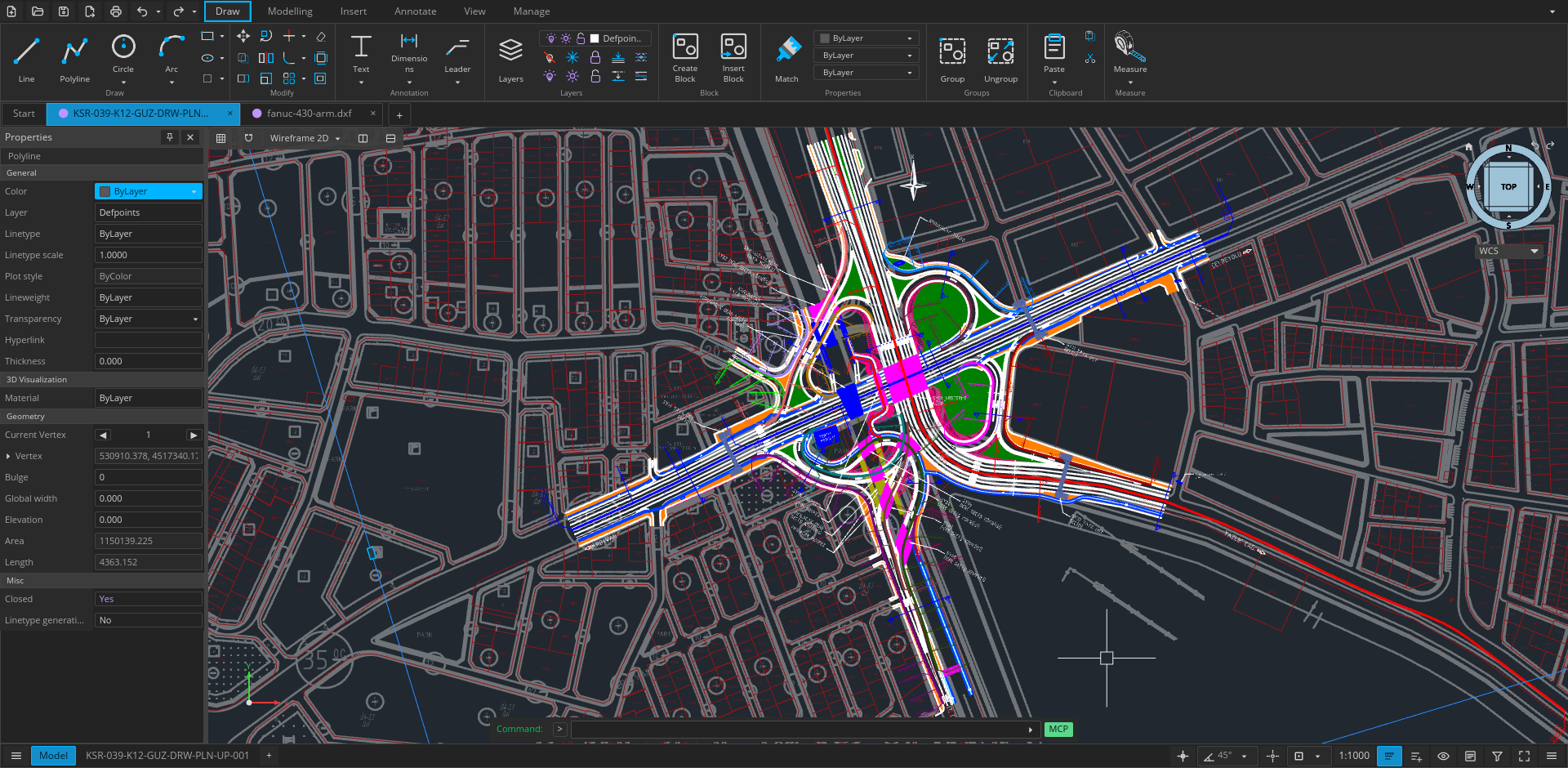
Open CAD Studio is a cross-platform application for technical drawing, layout work, and solid modeling. It reads and writes DWG and DXF drawings natively, with a shared editing core across the desktop and browser versions.
The project is under active development. Keep backups of important production drawings and report reproducible problems through [GitHub Issues](https://github.com/HakanSeven12/OpenCADStudio/issues).
## Highlights
- **Native drawing workflow** — open, edit, recover, and save DWG and DXF files without a conversion service.
- **Precise 2D drafting** — lines, polylines, curves, splines, hatches, object snaps, tracking, layers, blocks, and external references.
- **Documentation tools** — text, dimensions, leaders, tolerances, tables, model space, paper space, viewports, and plot styles.
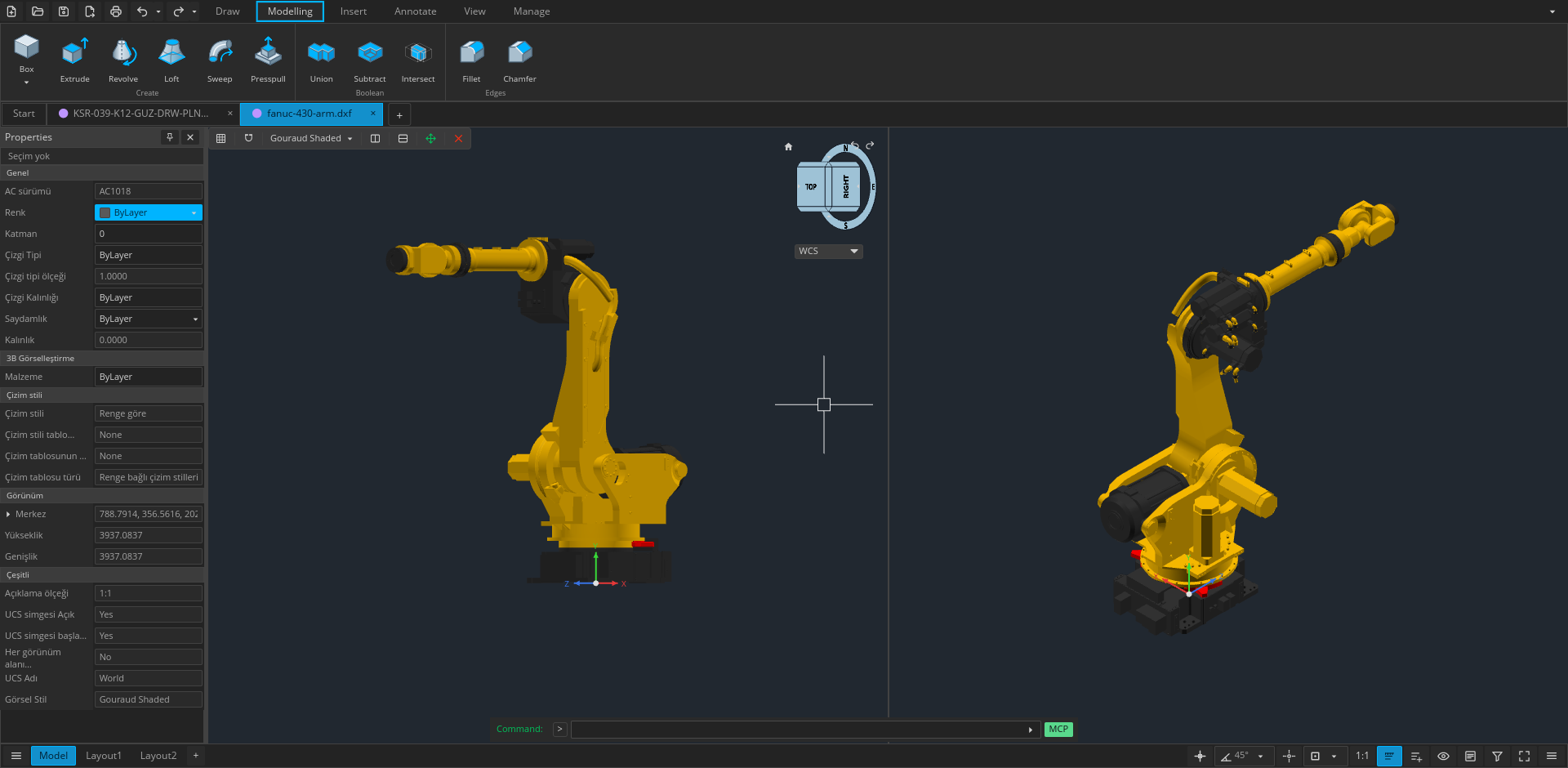
- **Kernel-backed 3D modeling** — solid primitives, extrusion, revolution, sweep, loft, Boolean operations, and ACIS entity tessellation.
- **GPU rendering** — accelerated 2D and 3D viewports through `wgpu`, with orthographic and perspective cameras.
- **Extensible workflows** — native plugins, command scripts, headless conversion, and a line-based JSON automation API.
## File workflows
| Format or workflow | Support |
| --- | --- |
| DWG | Read and write; versioned save targets from R14 through 2018 |
| DXF | Read and write; versioned save targets from R14 through 2018 |
| BAK / SV$ | Open drawing backups and autosave files |
| OBJ | Import polygon meshes |
| LandXML | Import `CgPoint` survey points |
| STL | Export 3D mesh data |
| STEP AP203 | Export 3D mesh data |
| PDF | Plot layouts and selected geometry on desktop |
| CSV | Extract entity property data |
| CTB / STB | Load and edit plot style tables |
## Desktop or web
Use the [web app](https://www.opencadstudio.com) for immediate access with no installation. Drawings are selected through the browser and saved as local downloads.
Use the desktop application for native file associations, file-manager thumbnails, system printing, PDF output, external plugins, command scripts, and headless automation. Release builds are available for Windows, Linux, and Apple Silicon macOS.
## Install
Download all current packages from the [latest release](https://github.com/HakanSeven12/OpenCADStudio/releases/latest).
### Windows
Choose one of these signed x86-64 packages:
- `OpenCADStudio-*-windows-x86_64-installer.msi` — recommended installer with Start Menu shortcuts, DWG/DXF file associations, and drawing thumbnails.
- `OpenCADStudio-*-windows-x86_64-portable.exe` — standalone application; no installation required.
### Linux
Download the x86-64 AppImage, make it executable, and run it:
```bash
chmod +x OpenCADStudio-*-linux-x86_64.AppImage
./OpenCADStudio-*-linux-x86_64.AppImage
```
Or install it as a Flatpak from [FlatPark](https://flatpark.org/apps/io.github.HakanSeven12.OpenCadStudio), which installs the official AppImage and follows new releases:
```bash
flatpak remote-add --if-not-exists flatpark https://dl.flatpark.org/flatpark.flatpakrepo
flatpak install flatpark io.github.HakanSeven12.OpenCadStudio
```
The Flatpak opens and saves drawings through the file chooser. External references and underlays that point at other files need home access:
```bash
flatpak override --user --filesystem=home io.github.HakanSeven12.OpenCadStudio
```
### macOS
The published macOS package supports Apple Silicon:
1. Download `OpenCADStudio-*-macos-arm64.dmg`.
2. Open the image and drag `OpenCADStudio.app` into **Applications**.
3. If Gatekeeper blocks the first launch, approve the app from **System Settings → Privacy & Security**.
The application is ad-hoc signed but is not currently notarized by Apple.
## Languages
Open CAD Studio can follow the system language or use any of these 21 interface languages:
> Arabic · Brazilian Portuguese · Bulgarian · Czech · Dutch · English · Finnish · French · German · Greek · Hindi · Hungarian · Italian · Japanese · Korean · Polish · Russian · Simplified Chinese · Spanish · Traditional Chinese · Turkish
Change the language from the application settings. The browser version also uses the browser's preferred locale when **System** is selected.
## Build from source
### Desktop
Requirements:
- Git
- Current stable Rust toolchain
- Platform graphics and font development libraries
On Ubuntu or Debian, install the native dependencies with:
```bash
sudo apt update
sudo apt install libgl1-mesa-dev libx11-dev libxcursor-dev libxi-dev \
libxrandr-dev libxkbcommon-dev libwayland-dev libfontconfig1-dev \
libfreetype6-dev
```
Then build and run:
```bash
git clone https://github.com/HakanSeven12/OpenCADStudio.git
cd OpenCADStudio
cargo build --release --bin OpenCADStudio
```
The resulting binary is written to `target/release/OpenCADStudio` (`OpenCADStudio.exe` on Windows).
### Web
Install the WebAssembly target and build tools once:
```bash
rustup target add wasm32-unknown-unknown
cargo install trunk wasm-bindgen-cli
```
Start the development server:
```bash
trunk serve
```
## Automation
The desktop binary supports one-shot conversion, a persistent headless server, and a client-neutral MCP endpoint for AI applications:
```bash
OpenCADStudio --export input.dwg output.dxf
OpenCADStudio --export input-r12.dxf output.dwg --target-version R14
OpenCADStudio --serve
OpenCADStudio --serve --port 4242
OpenCADStudio --mcp
```
The automation server exchanges one JSON object per line over standard input/output or a local TCP socket. The self-contained MCP endpoint exposes the live desktop editor through the same tools to every compatible client. Its `audit` and `save_verified` operations check an explicit DWG/DXF target version, lossy records, raw DXF handle references, reopen the output, compare its semantic manifest, and return a SHA-256 hash. To connect a client, configure it to launch `OpenCADStudio --mcp`. See the [MCP control guide](docs/automation/README.md).
## Plugins
Desktop plugins run in separate processes and communicate with the host through the versioned plugin API. The browser build does not load native plugins.
- [Plugin architecture](docs/plugin-architecture.md)
- [Plugin template](docs/plugin-template/README.md)
- [Plugin registry](plugins/README.md)
## Project documentation
- [Automation API](docs/automation/README.md)
- [Plugin architecture](docs/plugin-architecture.md)
- [Tessellation pipeline](docs/tessellation.md)
- [Security policy](SECURITY.md)
## Contributing
Bug reports, focused pull requests, translations, documentation improvements, and plugin contributions are welcome.
- Search existing [issues](https://github.com/HakanSeven12/OpenCADStudio/issues) before opening a new report.
- Use [Discussions](https://github.com/HakanSeven12/OpenCADStudio/discussions) for questions and ideas.
- Report vulnerabilities privately by following the [security policy](SECURITY.md).
Application translations live in `locales/*/opencadstudio.ftl`; source labels map through
`src/locale_catalog.rs`. After editing translations, run `python3 scripts/export-locales.py`
to refresh web and desktop packaging labels. Validate with `python3 scripts/test_site.py`
and `cargo test --lib i18n::tests`.
## Project growth
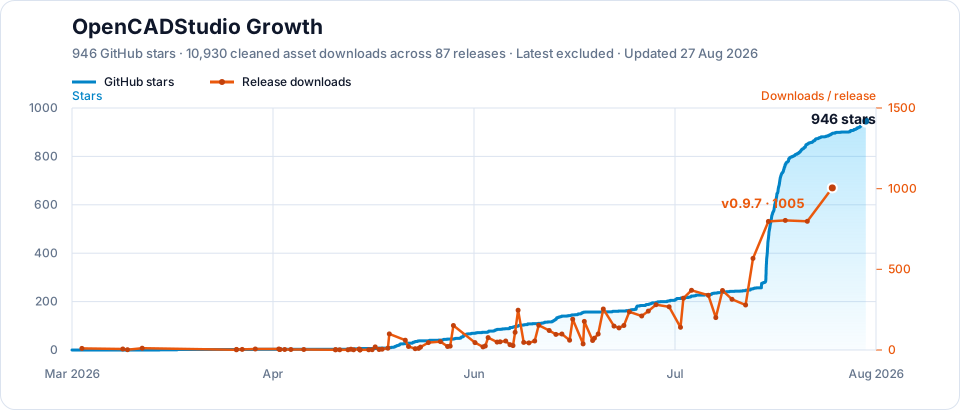
### Stars
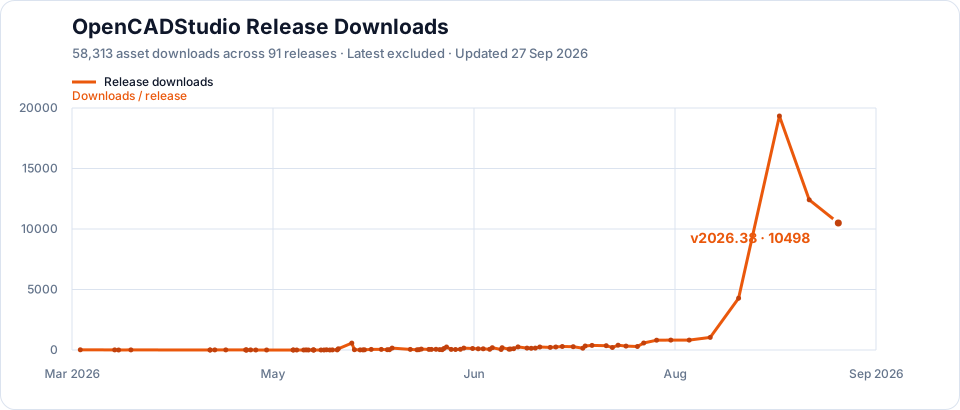
### Release downloads
## Support the project
If Open CAD Studio helps your work, support continued development through [GitHub Sponsors](https://github.com/sponsors/HakanSeven12) or [Patreon](https://www.patreon.com/HakanSeven12).
## License
Open CAD Studio is distributed under the [GNU General Public License v3.0](LICENSE).