# HypoMux

简体中文 | English





HypoMux is an open-source multi-adapter aggregation and split-routing utility for Windows. It distributes multi-connection download workloads across active network adapters, allowing Ethernet, Wi-Fi, mobile hotspots, and USB tethering to carry traffic at the same time.
HypoMux balances independent connections; it does not split one TCP connection across multiple paths. It works best with highly concurrent workloads such as Steam updates, IDM downloads, game launchers, and large browser downloads. A single-connection transfer remains limited by that connection.
## What's new in 2.5.2
Version 2.5.2 completes the desktop migration from the former Python/Qt and transitional WPF implementations to **Go + Wails v3 + React + Fluent UI**. The desktop runs as a standard user, while an independent Go Core/Windows service owns privileged TUN, WFP, routing, DNS, and network-recovery operations.
- **All-Go backend**: Desktop services and the network engine now use Go, with no Python, Qt, asyncio, or .NET/WPF runtime dependency.
- **Safer TUN lifecycle**: Adapters, DNS, the privileged service, Wintun, sing-box, WFP, and foreign TUNs are checked before startup. Failures are blocked before network changes or rolled back automatically.
- **Complete split routing**: Route by process, domain and subdomain, destination IP/CIDR, aggregation, direct connection, or a specific adapter. Multi-value legacy rules are expanded and preserved.
- **Third-party proxy compatibility**: Common local proxies and game accelerators are bypassed by executable path or listener PID to reduce loops and proxy-on-proxy failures.
- **Reliable recovery**: Windows system-proxy state is snapshotted and restored atomically. Recovery is retried after failed startup, abnormal exit, or the next launch.
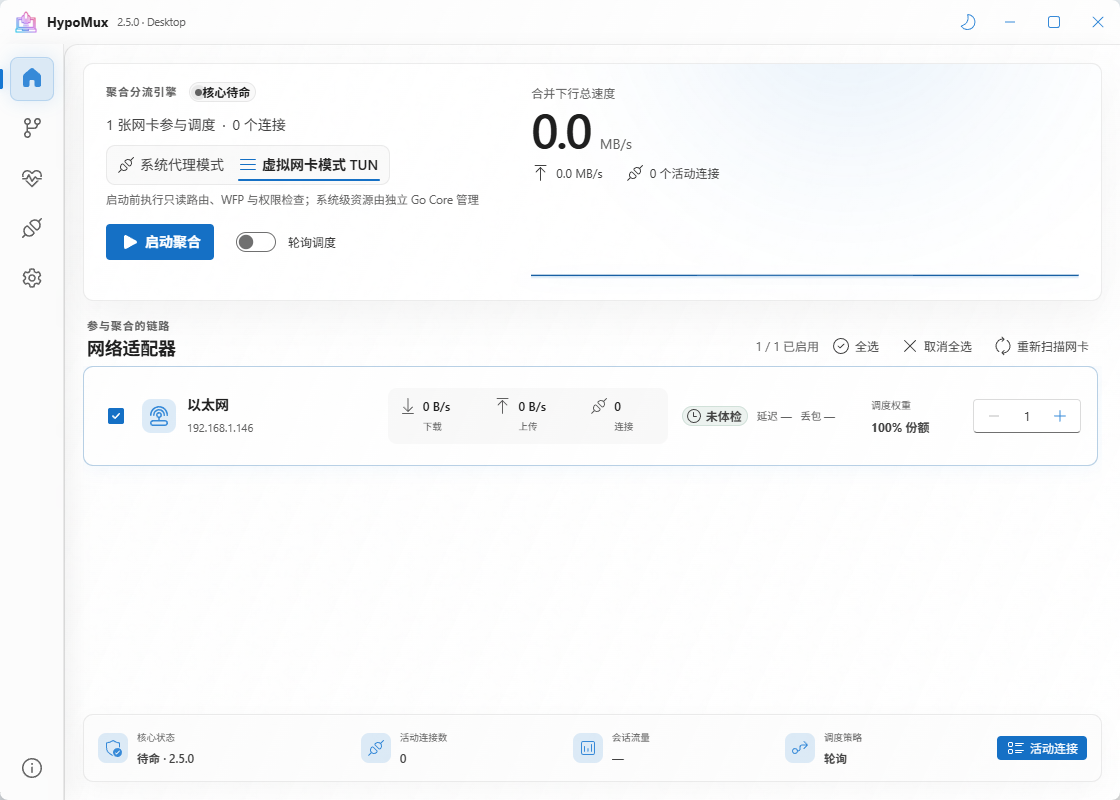
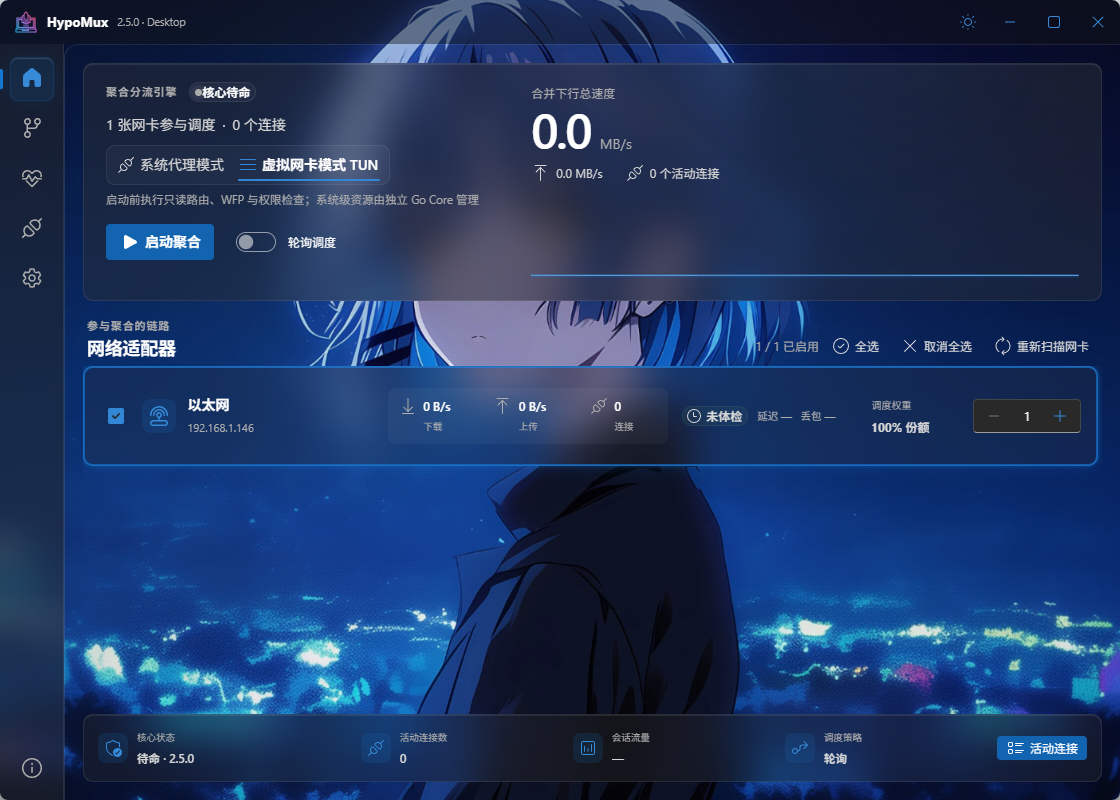
- **New personalization and diagnostics**: Fluent UI, light/dark themes, Mica/material effects, custom backgrounds, adapter health checks, live connections, support logs, and update checks.
## Sponsors
 Free code signing provided by SignPath.io, certificate by SignPath Foundation.
### Code Signing Policy
HypoMux is sincerely grateful to SignPath and the SignPath Foundation for supporting open-source software and helping us deliver a safer Windows download experience.
The official Windows releases of HypoMux are built from this repository through GitHub Actions and submitted to SignPath for code signing. Users should download installers only from the [official GitHub Releases page](https://github.com/Hypostasis-Cat/HypoMux/releases/latest) and verify that signed releases show **SignPath Foundation** as the publisher.
### Team roles
* **Committer and reviewer:** [Hypostasis-Cat](https://github.com/Hypostasis-Cat), the project maintainer. Pull requests from non-committers must be reviewed by a project maintainer before merging.
* **Approver:** [Hypostasis-Cat](https://github.com/Hypostasis-Cat). Each production signing request is manually approved in the SignPath UI before the signed artifact is retrieved.
### Privacy policy
HypoMux does not collect, sell, or upload personal data or telemetry. The program contacts other networked systems only to perform functionality requested by the user or the person operating it: forwarding the user's selected network traffic, checking or downloading an update from the official GitHub repository, and validating connectivity after Virtual NIC mode has been enabled.
---
## Download
> **Windows installer:** [Download the latest release from GitHub](https://github.com/Hypostasis-Cat/HypoMux/releases/latest)
>
> Download `HypoMux_Setup_*.exe` from the latest release's **Assets** section. Official releases are built by GitHub Actions and signed through SignPath.
## UI preview
### Default interface
### Custom theme
## Core features
- **System Proxy mode**: Starts local HTTP/HTTPS and SOCKS5 services and takes ownership of the Windows system proxy. It is lightweight and works with proxy-aware downloaders, launchers, and browsers.
- **Virtual NIC mode**: Uses Wintun and sing-box to capture a broader range of system traffic, with WFP, DNS, and routing rules for precise split tunneling.
- **Per-connection adapter scheduling**: Selects an outbound adapter for each new connection, combining source-address binding with `IP_UNICAST_IF` to pin sockets to physical links.
- **Advanced routing rules**: Route by process, domain, IP/CIDR, aggregation, direct connection, Ethernet, Wi-Fi, or one specific adapter.
- **Per-adapter blocked-domain handling**: Remembers domains unavailable through a particular link so later connections are not assigned to it again.
- **Live telemetry and diagnostics**: Shows adapter throughput, connection counts, and combined speed, with packet-loss, latency, jitter, DNS, gateway, and source-binding checks.
- **Least-privilege architecture**: The UI does not stay elevated. After a normal installation, only the independent Core service has the network-management permissions it needs.
### Choosing a mode
| Mode | Coverage | Privileges and compatibility | Recommended use |
| --- | --- | --- | --- |
| System Proxy | Applications that honor the Windows system proxy | Lightweight; no virtual adapter | IDM, browsers, Steam, and other proxy-aware downloads |
| Virtual NIC | Broader TCP/UDP and non-proxy-aware traffic | Requires the Core service and Wintun/WFP; cannot share the default route with another TUN | Game-launcher downloads, WeGame, advanced split routing, and broader capture |
## 📢 Important Notice & Compliance Disclaimer
HypoMux is a transparent, open-source network utility intended only for authorized use on the user's own devices and network connections. It is not designed or permitted for bypassing third-party access controls, network restrictions, platform rules, or any security measures without authorization.
Before using HypoMux, please be aware of the following behavior:
1. **System Changes**: While active, HypoMux may dynamically adjust Windows system proxy and/or routing-related settings so traffic can enter the acceleration core.
2. **Local Proxying**: Accelerated traffic is processed locally through the secure core for splitting, proxying, and multiplexing.
3. **Automatic Restoration**: Modified system proxy and network settings are restored automatically when the tool is stopped or uninstalled.
4. **Gaming & Split Tunneling**: HypoMux provides advanced split tunneling. For latency-sensitive applications such as competitive online games, users are strongly advised to add them to the **Direct/Bypass routing list** to preserve raw network latency, or suspend HypoMux during gameplay.
---
## Quick start
1. Connect the PC to at least two working networks, such as Ethernet + Wi-Fi or broadband + USB/mobile tethering.
2. Start HypoMux, refresh the Home page, and select the active adapters to include in the pool.
3. Run Network Health first and verify that every link has a valid IPv4 address, gateway, DNS, and working source binding.
4. Choose System Proxy or Virtual NIC mode. Add games, voice chat, and meeting applications to direct rules when latency matters.
5. Enable the aggregation engine, then start the download. If Steam was already running, restart it when prompted so the proxy change takes full effect.
6. Stop aggregation or exit normally when finished. HypoMux restores the system network settings it owned.
## Compatibility with third-party proxies and game accelerators
Version 2.5.2 adds dedicated bypass handling for common local proxies and game accelerators, including process families used by UU, Xunyou, Leigod, Qiyou, Clash/Mihomo, v2rayN, Hiddify, Shadowsocks, and Proxifier. Active products are detected by full executable path where possible, while local system-proxy listeners are resolved back to their owning PID instead of relying only on mutable process names.
The following boundaries still apply:
- If a third-party product only exposes a local HTTP/SOCKS proxy, HypoMux Virtual NIC mode attempts to bypass that product's process and listener to avoid a proxy loop.
- Two applications should not compete for the Windows system-proxy switch. Disable the other application's system-proxy takeover before enabling HypoMux System Proxy mode.
- If another product creates a TUN/VPN adapter and owns the default route, close it before starting HypoMux Virtual NIC mode. HypoMux detects this conflict and blocks startup before changing the system network.
- A proxy or accelerator update may change its process layout. Check HypoMux's compatibility notice and local support log before choosing another mode or closing the conflicting product.
## How it works
```text
Application connections
│
├─ System Proxy: HTTP/HTTPS 10801 · SOCKS5 10800
└─ Virtual NIC: Wintun + sing-box + WFP/DNS/routing rules
│
hypomux-engine.exe
│
Aggregation / direct / adapter route
┌─────────┼─────────┐
NIC 1 NIC 2 NIC 3
└─────────┴─────────┘
Combined throughput
```
System Proxy mode writes the local proxy chain to the current user's Windows Internet Settings. Virtual NIC mode asks the independent privileged service to create and manage TUN, WFP, DNS, and route resources. For every new connection, the Go engine chooses an outbound path and combines local source-address binding with the Windows interface index to keep different connections on their selected physical adapters.
## Supported scenarios and technical boundaries
- Suitable for multi-connection download workloads from IDM, Steam, Epic Games Launcher, EA App, Xbox, WeGame, Chrome, Edge, Firefox, and similar applications.
- Multi-adapter aggregation is **connection-level load distribution**. It cannot make one TCP connection exceed its original path speed, nor does it turn several providers into one bonded link with a single public IP.
- Aggregation targets throughput, not lower latency. Use direct rules or stop aggregation for competitive games, voice chat, and video meetings.
- HypoMux does not read game memory, inject DLLs, or modify private game-protocol packets. Platform and anti-cheat policies vary, so users must still follow the applicable terms of service.
- Use HypoMux only on devices and network connections you own or are authorized to manage. It is not intended to bypass unauthorized access controls, security measures, or platform restrictions.
## Real-world results
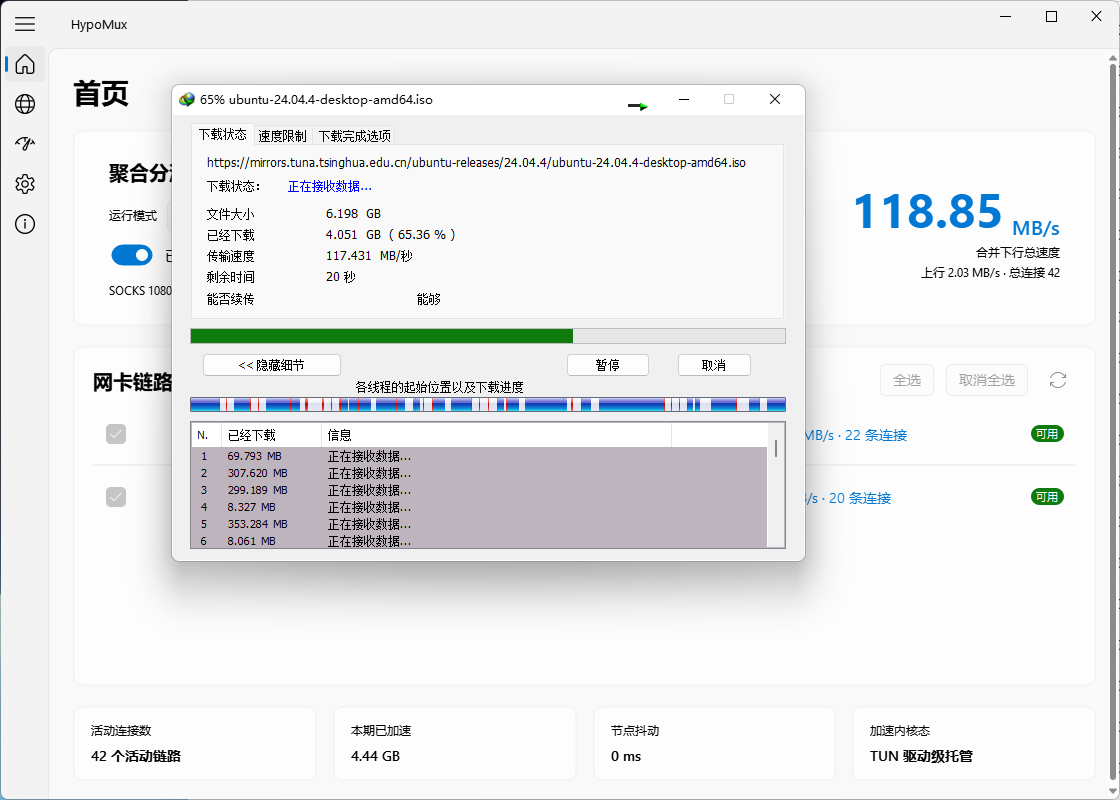
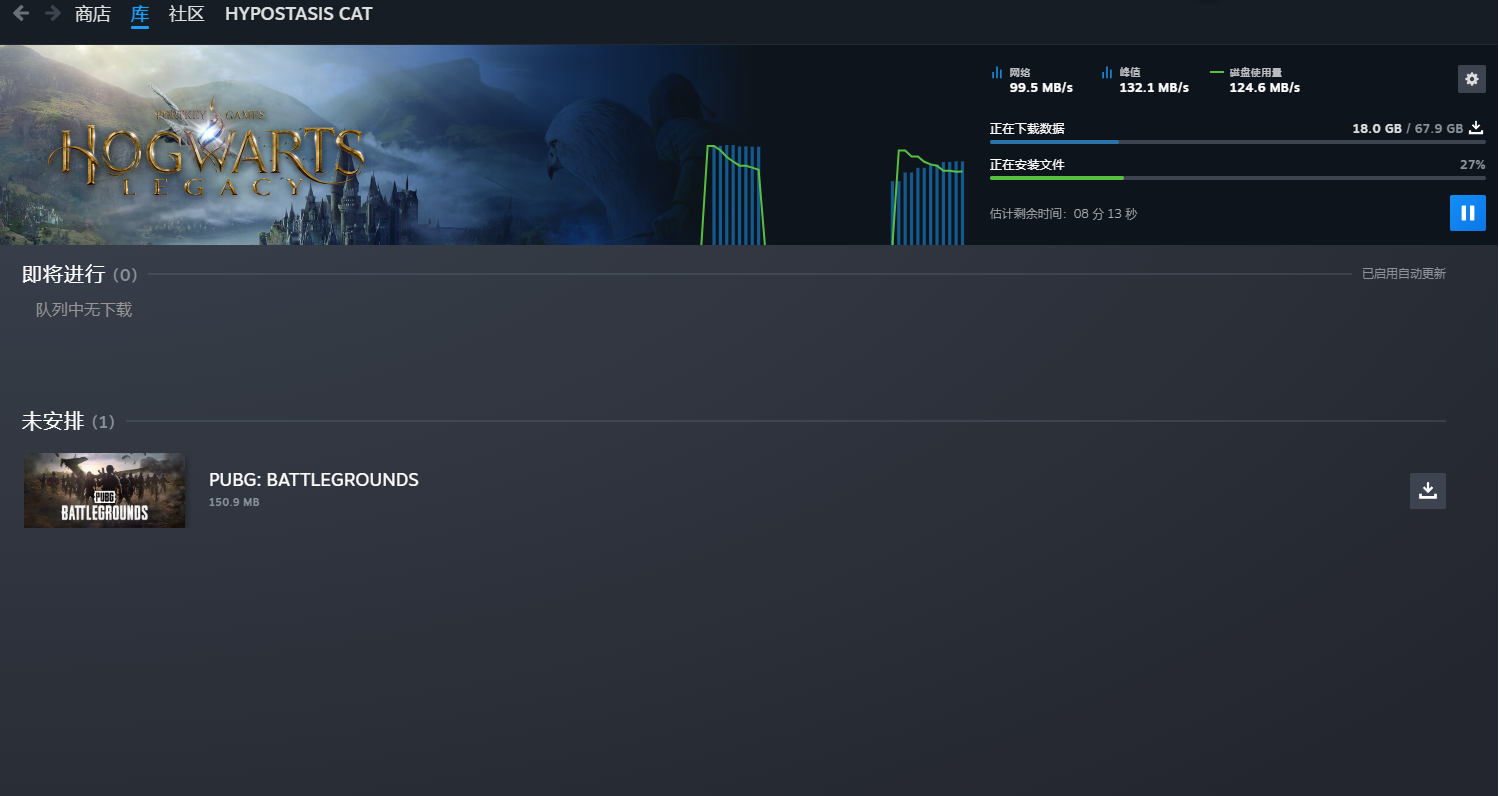
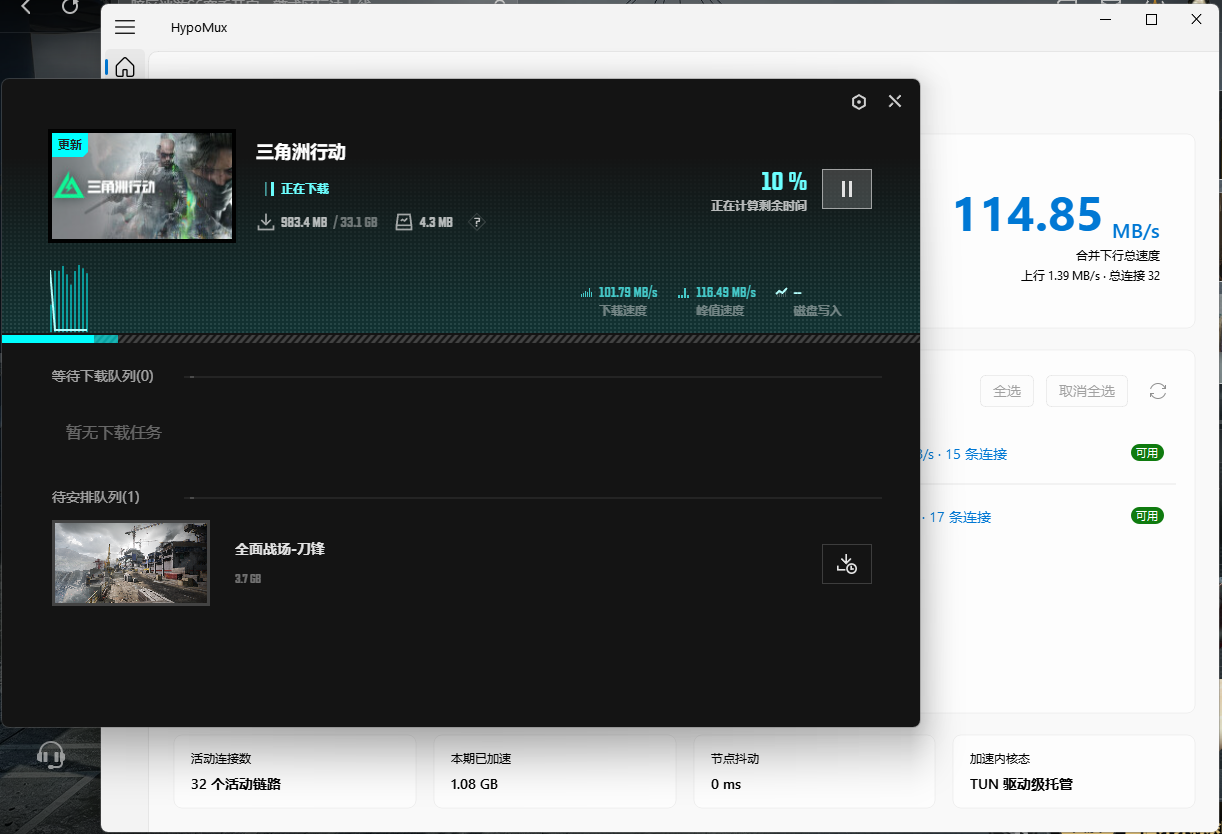
The following images are real multi-adapter, multi-connection tests captured with earlier builds. They demonstrate connection-level aggregation; actual results depend on each link, the download source, concurrency, storage, and CPU, and are not a performance guarantee.
### IDM multi-threaded download
### Steam game update
### WeGame game download
### Multiple adapters in Windows Task Manager
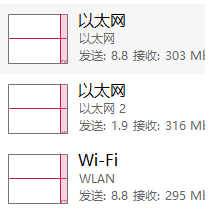
## Development and building
Recommended environment: Windows 10/11, Go 1.26, Node.js 22, pnpm 10, and Wails v3 CLI `v3.0.0-alpha2.119`. NSIS is also required to package the installer. The repository's `bin/` directory must contain the official runtime files `sing-box.exe`, `wintun.dll`, and `libcronet.dll`.
```powershell
go install github.com/wailsapp/wails/v3/cmd/wails3@v3.0.0-alpha2.119
pnpm --dir desktop/frontend install --frozen-lockfile
Push-Location desktop
wails3 generate bindings -clean=true -ts -i
Pop-Location
go -C engine test ./...
go -C desktop test ./...
pnpm --dir desktop/frontend build
Set-Location desktop
wails3 dev
# Or build the NSIS installer
wails3 task windows:package
```
See [`.github/workflows/build.yml`](.github/workflows/build.yml) for the complete release pipeline.
## Acknowledgments & Contributors
A special thanks to all the amazing developers who have contributed to the early core stability and engineering standardization of this project:
 If you're also interested in multi-NIC traffic distribution and low-level network scheduling, feel free to submit a Pull Request and help improve HypoMux!
---
## Support & Sponsorship
HypoMux is an open-source project driven purely by technical passion, independently developed and maintained by the author in their spare time. The author is currently a student, and the in-depth development and daily maintenance of the project (such as frequent use of AI tools for refactoring, API testing, etc.) involve certain real costs. If you find this tool genuinely solves your networking pain points, feel free to buy the author a coffee to support the continuous iteration of this project!
> **Note:** Give within your means. Sponsorship is purely voluntary, and you can always use HypoMux's core features for free, regardless of whether you sponsor!
>
> Please leave your nickname when sponsoring!
If you're also interested in multi-NIC traffic distribution and low-level network scheduling, feel free to submit a Pull Request and help improve HypoMux!
---
## Support & Sponsorship
HypoMux is an open-source project driven purely by technical passion, independently developed and maintained by the author in their spare time. The author is currently a student, and the in-depth development and daily maintenance of the project (such as frequent use of AI tools for refactoring, API testing, etc.) involve certain real costs. If you find this tool genuinely solves your networking pain points, feel free to buy the author a coffee to support the continuous iteration of this project!
> **Note:** Give within your means. Sponsorship is purely voluntary, and you can always use HypoMux's core features for free, regardless of whether you sponsor!
>
> Please leave your nickname when sponsoring!

WeChat Sponsorship (Please note: HypoMux Support)
|

Alipay Sponsorship (Please note: HypoMux Support)
|
### ️ Developer Statement
* **Regarding Feature Direction**: This project has a clear technical roadmap and architectural boundaries. All sponsorships are voluntary donations, and **sponsorship does not equate to commercial customization, nor can it directly determine or influence the direction of future feature development**.
* **Regarding Disclaimer**: This project is open-sourced under the **AGPL-3.0** license. The software is provided "as is", and the author assumes no liability for any direct or indirect damages resulting from the use of this tool.
### Individual Supporters
Thanks to all supporters who have injected energy into HypoMux:
 Thank you again for your respect and support for the open-source community and independent developers!
## Star History
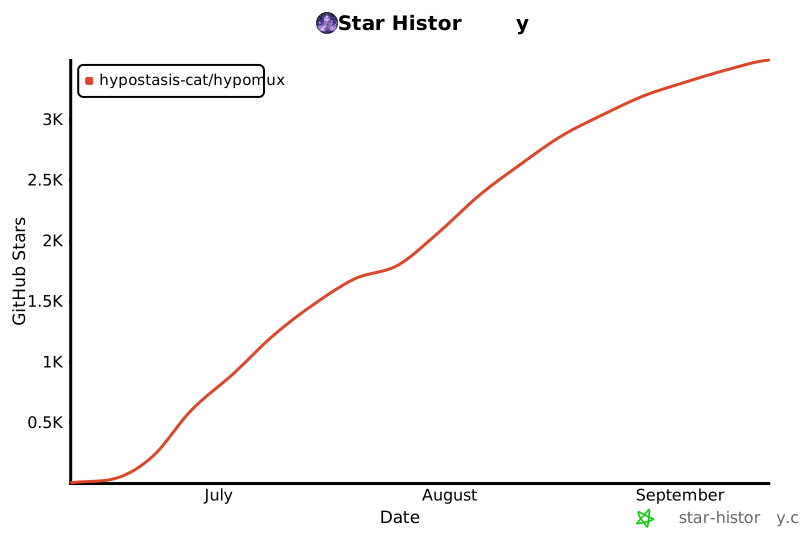
Join us on our journey to push Windows multi-adapter aggregation to its absolute limits!
[](https://star-history.com/#Hypostasis-Cat/HypoMux&Date)
## License
This project is licensed under the **AGPL-3.0** License.
Thank you again for your respect and support for the open-source community and independent developers!
## Star History
Join us on our journey to push Windows multi-adapter aggregation to its absolute limits!
[](https://star-history.com/#Hypostasis-Cat/HypoMux&Date)
## License
This project is licensed under the **AGPL-3.0** License.