
HypoMux v2.0 is a multi-network-adapter bandwidth aggregation and download acceleration tool built for Windows. It is designed for multi-connection download workloads where traffic can be distributed across several active network interfaces.
Version 2.0 adds a **Virtual NIC mode** alongside the original system proxy mode, giving HypoMux a more stable way to capture and split traffic across a wider range of applications. It also introduces **split tunneling rules**, so selected processes can be sent through the multi-NIC aggregation path or kept on a direct/bypass route for low-latency use cases.
In system proxy mode, HypoMux uses L3 socket binding (IP_UNICAST_IF) with a dual-protocol local proxy engine. In Virtual NIC mode, HypoMux temporarily adjusts Windows proxy and routing-related settings, sends accelerated traffic into the local core, and lets non-accelerated traffic pass directly through advanced split tunneling rules. This makes it useful for high-concurrency scenarios such as Steam updates, IDM large-file downloads, WeGame downloads, and browser-based transfers.
In simpler terms, as long as your computer is connected to multiple networks at the same time (for example, **being plugged into a school or home Ethernet cable while also connected to Wi-Fi, or using USB tethering from a phone**), HypoMux can distribute multi-threaded download connections across those networks. Single-connection downloads are still limited by the behavior of the download source.
---
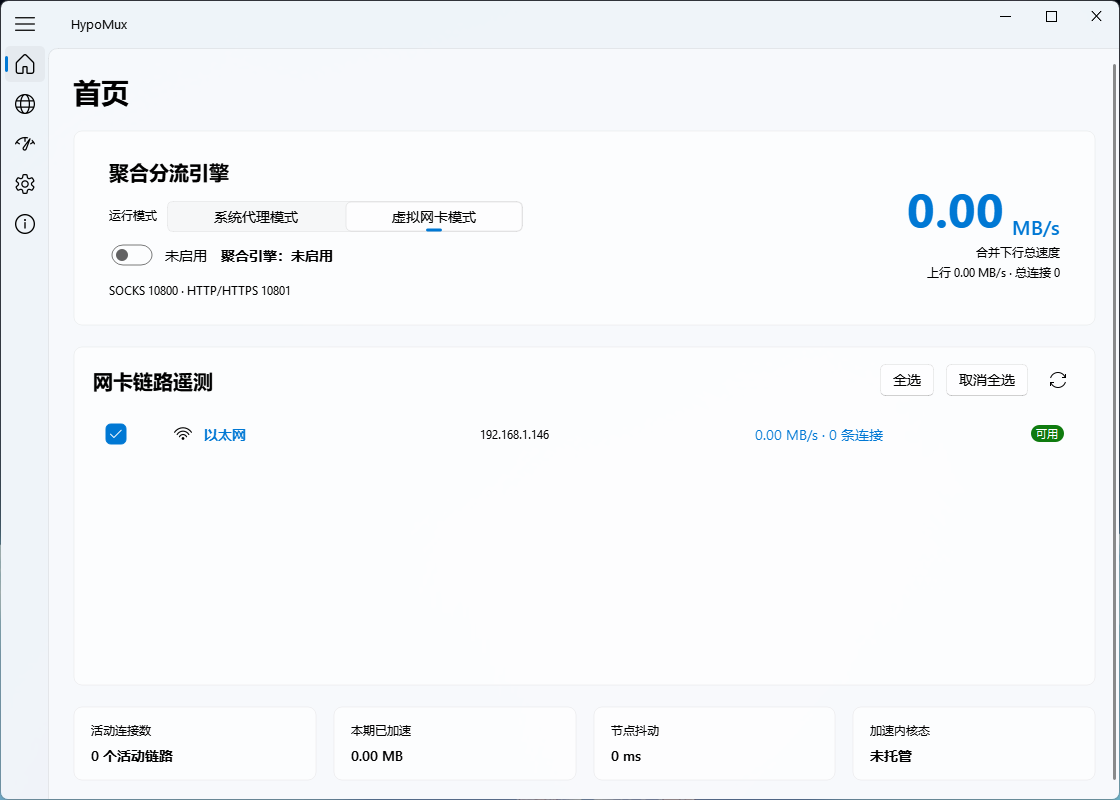
## UI Preview
---
## Key Technical Features
* **Virtual NIC Mode**: New in v2.0, TUN-based traffic capture improves acceleration stability across more application types.
* **Per-Process Split Tunneling**: Route selected apps directly/bypassed or through the multi-NIC aggregation path, making download clients, game launchers, browsers, and low-latency apps easier to mix.
* **Seamless Dual-Protocol Interception**: Starts asynchronous SOCKS5 and local HTTP forwarding services, then applies WinINet system proxy settings when acceleration begins.
* **Fail-Safe Proxy Restore**: Manual stop, startup failure, and window close paths all attempt to restore the system proxy cleanly.
* **5-Column Telemetry Matrix Grid**: Dynamically displays precise multi-path load distribution: [ Select | Adapter Alias | IPv4 Address | Real-time Speed (MB/s) | Active Connections ].
* ️ **Pure Async Groundwork**: All PowerShell network querying, background thread interface telemetry, and async DNS processing run entirely inside a detached event loop away from the main Qt UI thread.
---
## 📢 Important Notice & Compliance Disclaimer
HypoMux is a transparent, open-source network utility intended only for authorized use on the user's own devices and network connections. It is not designed or permitted for bypassing third-party access controls, network restrictions, platform rules, or any security measures without authorization.
Before using HypoMux, please be aware of the following behavior:
1. **System Changes**: While active, HypoMux may dynamically adjust Windows system proxy and/or routing-related settings so traffic can enter the acceleration core.
2. **Local Proxying**: Accelerated traffic is processed locally through the secure core for splitting, proxying, and multiplexing.
3. **Automatic Restoration**: Modified system proxy and network settings are restored automatically when the tool is stopped or uninstalled.
4. **Gaming & Split Tunneling**: HypoMux v2.0 introduces advanced split tunneling. For latency-sensitive applications such as competitive online games, users are strongly advised to add them to the **Direct/Bypass routing list** to preserve raw network latency, or suspend HypoMux during gameplay.
---
## How to Use
1. **Hardware Setup**: Hook up your PC to multiple unique lines (e.g., **Broadband Lan Wire + Mobile Phone 5G Tethering Hotspot**).
2. **Choose a Mode**: Use system proxy mode for lightweight proxy-aware acceleration, or Virtual NIC mode when you want broader and more stable traffic capture.
3. **Select Interfaces**: Start HypoMux, wait for the background scan worker to finish, and **check the adapters you wish to use**.
4. **Configure Split Rules**: For games, voice chat, meetings, or other latency-sensitive apps, add their processes to the direct/bypass rules.
5. **Engage Acceleration**: Click **Boost**. Once the status switches to running, start your downloads or game updates.
6. **Graceful Teardown**: Click **Stop** or close HypoMux when done; modified network settings are restored automatically.
---
## Supported Applications
Any multi-connection/multi-threaded client acknowledging standard Windows WinINet internet proxy server layouts will immediately benefit from concurrent aggregation:
* **Download Software**: **IDM (Internet Download Manager)**, Thunder (迅雷), Baidu NetDisk Client, etc.
* **Gaming Platforms**: **Steam Client Download Core**, Epic Games Launcher, EA App, Xbox Application.
* **Browsers**: Large file downloads via Chrome, Edge, Firefox, etc.
---
## Technical Architecture
HypoMux's core distribution mechanism combines **Layer-4 application-level scheduling**, **Layer-3 physical socket binding**, and the v2.0 **Virtual NIC split-tunneling capture path**. System proxy mode covers applications that honor WinINet/system proxy settings, while Virtual NIC mode extends coverage through a local network sidecar and advanced routing rules.
```text
[Multi-threaded Application Traffic (Steam / IDM)]
│
▼ WinINet Auto-Interception
Windows System Proxy / Virtual NIC Ingress
(http/https -> 10801 | socks -> 10800 | TUN)
│
▼
ProxyWorker Core Engine (Asyncio inside QThread)
│
▼ Round-Robin Connection Distribution
L3 Physical Layer Bidirectional Socket Binding
├── socket.bind((nic1_ip, 0)) + IP_UNICAST_IF ──► Physical NIC 1 ──┐
├── socket.bind((nic2_ip, 0)) + IP_UNICAST_IF ──► Physical NIC 2 ─┼─► Aggregated Throughput
└── socket.bind((nic3_ip, 0)) + IP_UNICAST_IF ──► Physical NIC 3 ──┘
```
1. **Dual Ingress Modes**: System proxy mode writes the local proxy chain to `HKCU\Software\Microsoft\Windows\CurrentVersion\Internet Settings`: `http=127.0.0.1:10801;https=127.0.0.1:10801;socks=127.0.0.1:10800`; Virtual NIC mode uses TUN capture and advanced split rules to cover more application traffic.
2. **Low-Level Dual Binding**: When the distribution engine receives a TCP connection from a download client, the scheduler pins the local NIC IPv4 address via `socket.bind()` and sends `setsockopt(socket.IPPROTO_IP, 31, ...)` to the system kernel to force-lock the physical interface index, stripping traffic away from the default gateway to achieve true physical multi-channel concurrency.
3. **Advanced Split Tunneling**: v2.0 can route processes through either the aggregation path or a direct path. Download workloads can use stacked bandwidth, while latency-sensitive apps can stay direct.
---
## Real-World Multi-NIC Benchmarks
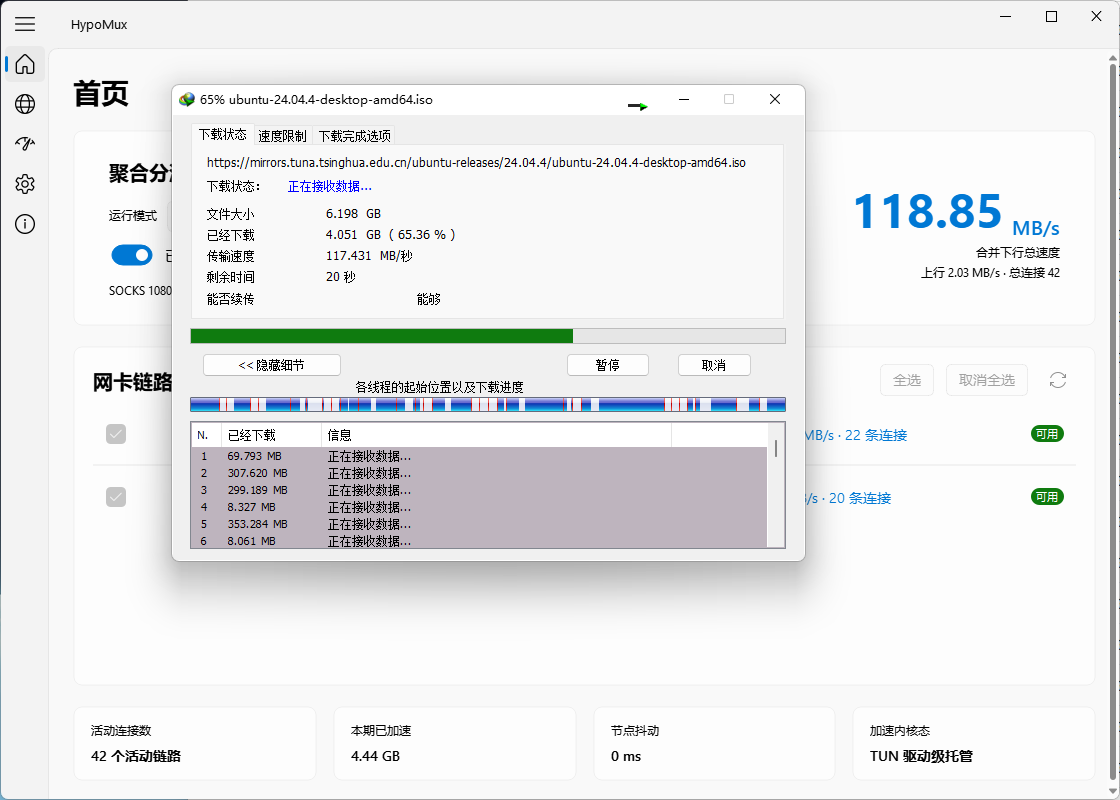
### Case A: IDM Multi-threaded Large File Aggregation (Ubuntu ISO Mirror)
> 190 active data channels handled simultaneously. Each adapter absorbs around **35~39 MB/s** evenly, pushing combined network throughput past **110.93 MB/s**!
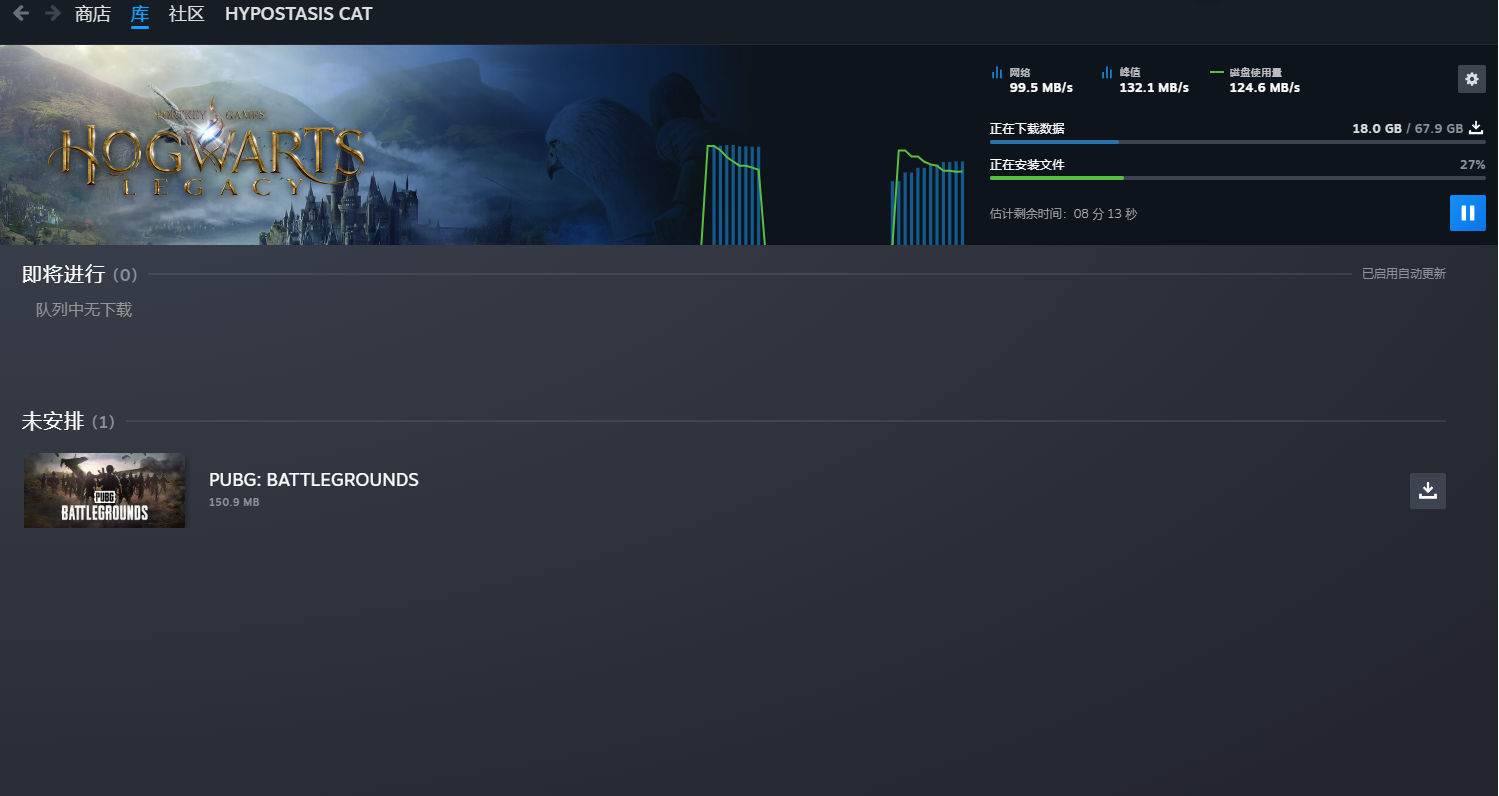
### Case B: Steam High-Throughput Game Installation (*Hogwarts Legacy*)
> Flawlessly matching SteamService's multi-connection architecture, running lines concurrently to max out at **98.26 MB/s** combined downloading speed.
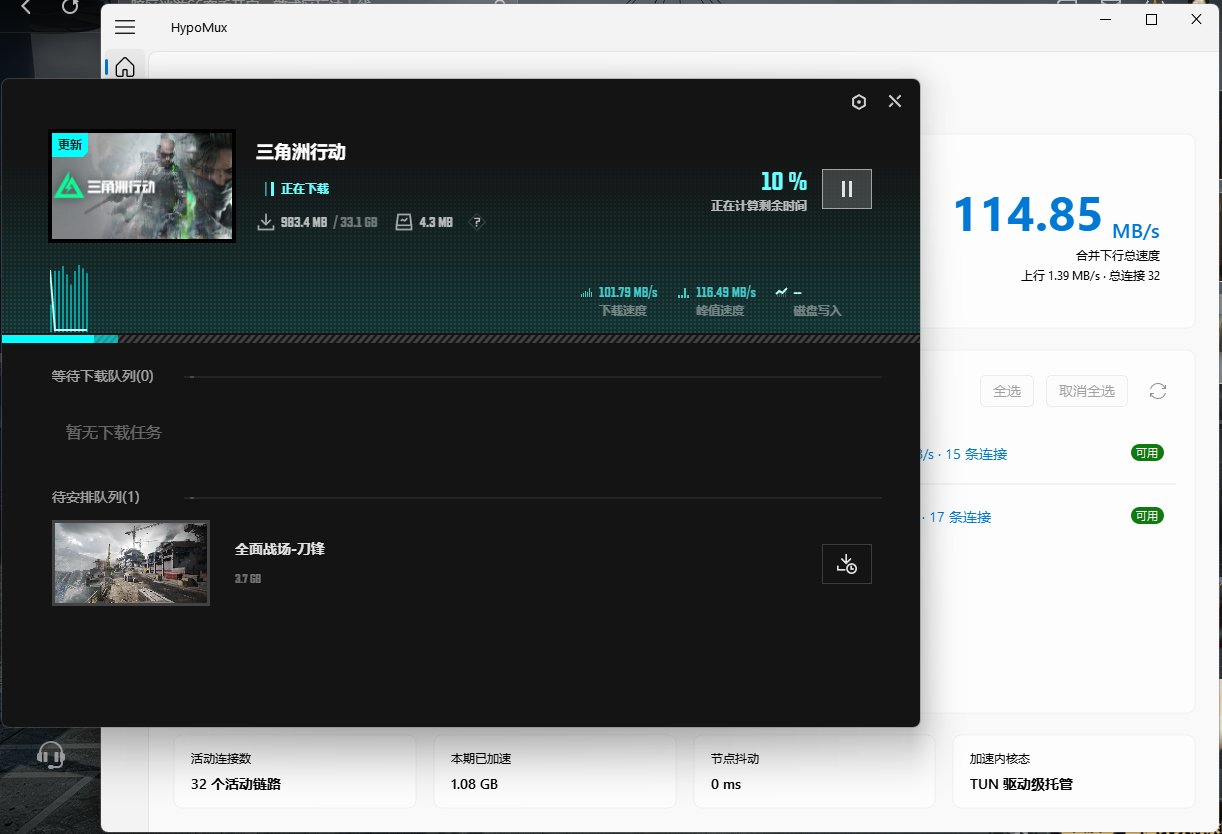
### Case C: WeGame Download Speed Showcase
> With v2.0 Virtual NIC mode and split tunneling, HypoMux can cover more game launcher download scenarios, allowing WeGame to benefit from higher aggregate throughput in multi-network environments.
### Windows Task Manager Throughput Panels
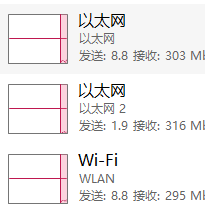
> Three unique hardware interfaces (Ethernet, Ethernet 2, Wi-Fi) pushing data at **~300 Mbps** apiece at the exact same second.
---
## Building the Executable (Nuitka)
```powershell
venv\Scripts\activate
pip install nuitka zstandard PySide6-Fluent-Widgets
nuitka --standalone --onefile --enable-plugin=pyside6 --windows-console-mode=disable --windows-uac-admin --windows-icon-from-ico=assets/icon.ico --include-package-data=qfluentwidgets --include-data-dir=assets=assets --python-flag=-O --lto=yes main.py
```
---
## ️ Security & Technical Boundaries
1. **Anti-Cheat Notice**: This tool operates at the standard application-layer proxy and network socket binding level. **It does not touch game memory, intercept or modify any game private network packets, or inject any DLL drivers**.
2. **Single-Thread Connection Limitation**: Multi-NIC concurrent aggregation is fundamentally **multi-connection load balancing**. If your download task is the extremely rare single-thread TCP connection, no multi-NIC aggregation tool can accelerate it.
3. **Low-Latency Gaming Advisory**: Multi-NIC distribution is optimized for download throughput. Before playing latency-sensitive competitive online games (e.g. *CS2*, *Valorant*, *GTA Online*), add the related process to the **Direct/Bypass routing list**, or click **Stop** so the PC returns to its normal network path.
---
## Acknowledgments & Contributors
A special thanks to all the amazing developers who have contributed to the early core stability and engineering standardization of this project:
If you're also interested in multi-NIC traffic distribution and low-level network scheduling, feel free to submit a Pull Request and help improve HypoMux!
---
## Support & Sponsorship
HypoMux is an open-source project driven purely by technical passion, independently developed and maintained by the author in their spare time. The author is currently a student, and the in-depth development and daily maintenance of the project (such as frequent use of AI tools for refactoring, API testing, etc.) involve certain real costs. If you find this tool genuinely solves your networking pain points, feel free to buy the author a coffee to support the continuous iteration of this project!
> **Note:** Give within your means. Sponsorship is purely voluntary, and you can always use HypoMux's core features for free, regardless of whether you sponsor!
>
> Please leave your nickname when sponsoring!
WeChat Sponsorship (Please note: HypoMux Support)
Alipay Sponsorship (Please note: HypoMux Support)
### ️ Developer Statement
* **Regarding Feature Direction**: This project has a clear technical roadmap and architectural boundaries. All sponsorships are voluntary donations, and **sponsorship does not equate to commercial customization, nor can it directly determine or influence the direction of future feature development**.
* **Regarding Disclaimer**: This project is open-sourced under the **AGPL-3.0** license. The software is provided "as is", and the author assumes no liability for any direct or indirect damages resulting from the use of this tool.
### Sponsors
Thanks to all supporters who have injected energy into HypoMux:
Thank you again for your respect and support for the open-source community and independent developers!
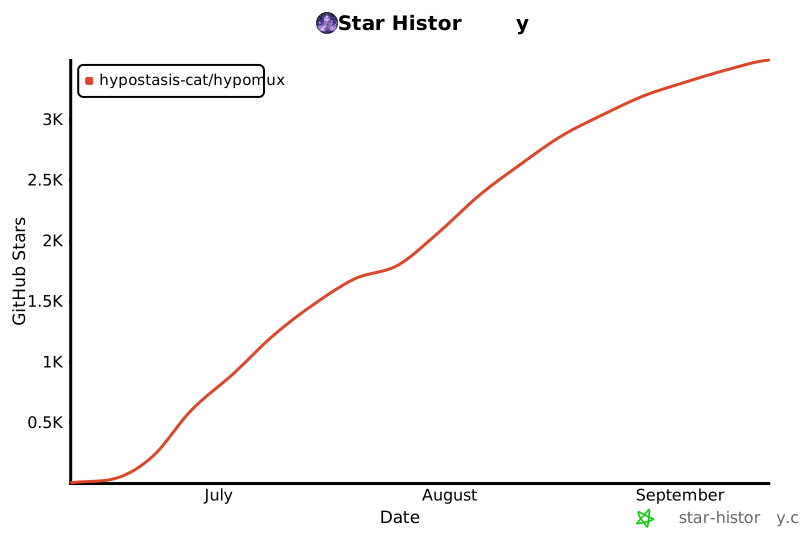
## Star History
Join us on our journey to push Windows multi-adapter aggregation to its absolute limits!
[](https://star-history.com/#Hypostasis-Cat/HypoMux&Date)
## License
This project is licensed under the **AGPL-3.0** License.