5.2.6. Trainee sub system
Trainee Subsystem
Request for Registration: contains the details required to into the FICS CORP System.
Navigation Process: By clicking on the Button on the Static Web page
Layout:
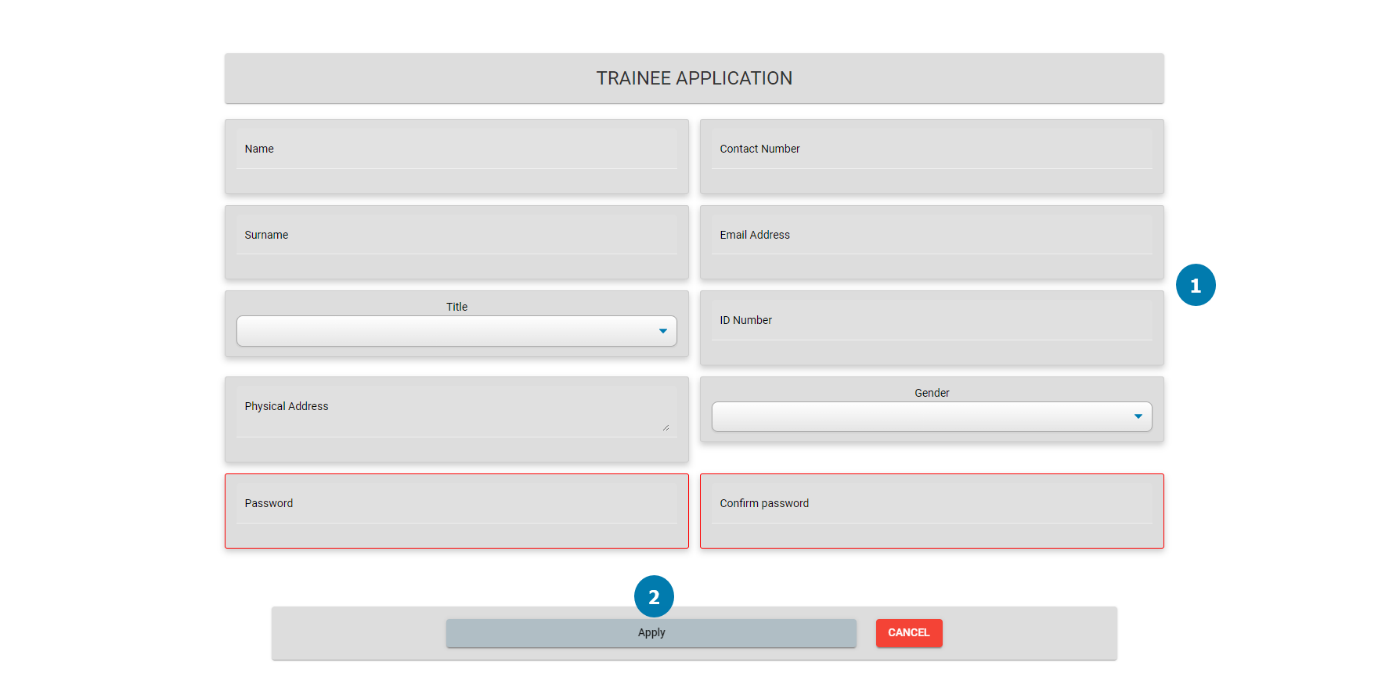
Controls Description:
|
Screen Name: Request for Registration |
||
|
Item Number: |
Item Name: |
Item Description: |
|
1 |
Input Fields |
This input fields capture the details of the Trainee. |
|
2 |
Apply Button |
This input refers to the last name of the trainee. |
Maintain Trainee Profile: contains the details required to into the FICS CORP System.
Navigation Process: By clicking on the Button on the Static Web page
Layout:
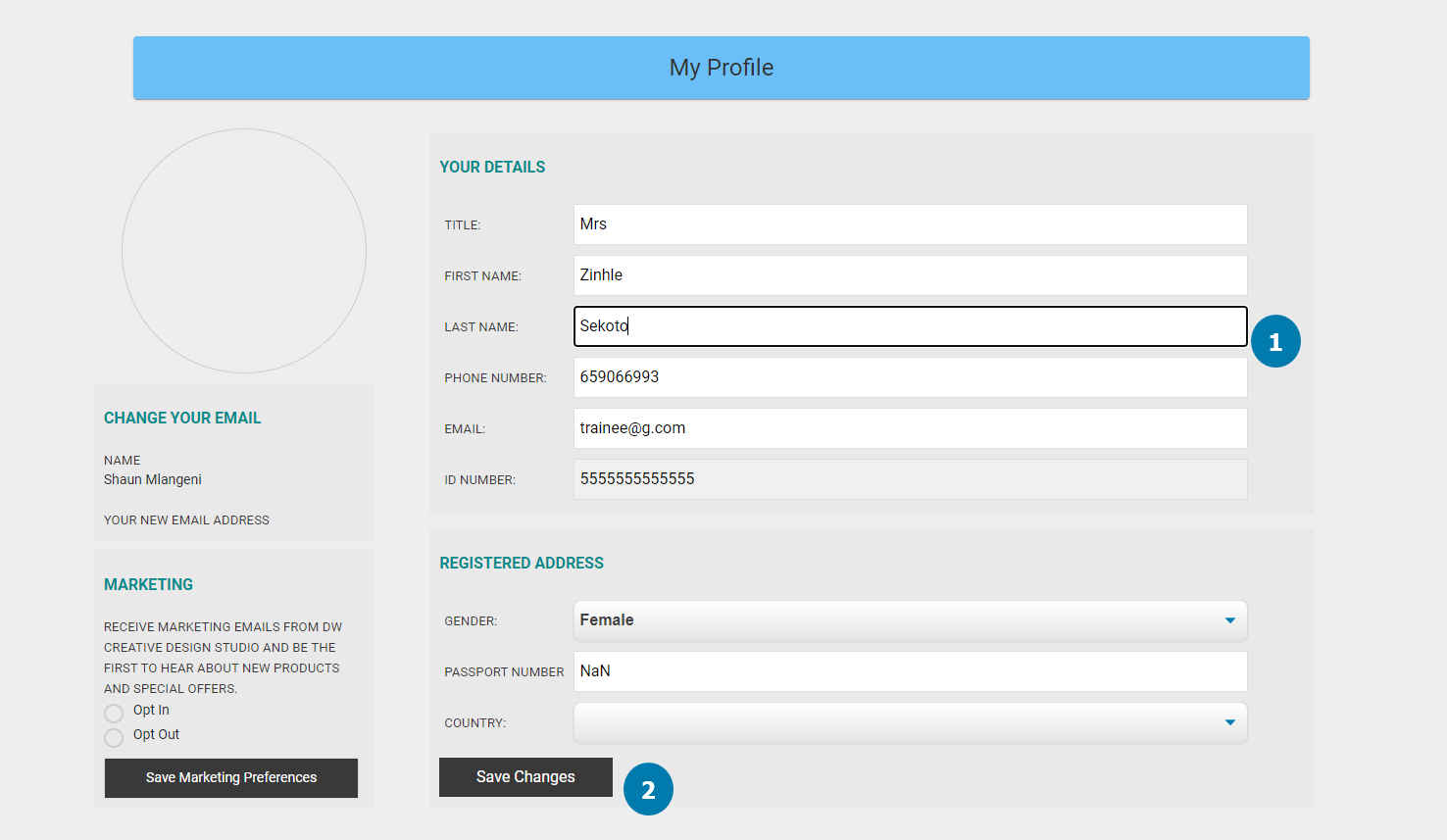
Controls Description:
|
Screen Name: Maintain Profile |
||
|
Item Number: |
Item Name: |
Item Description: |
|
1 |
Input Fields |
This input fields capture the details of the Trainee. |
|
2 |
Save Changes Button |
This button applies the changes made by the Trainee. |
Book Training Session: contains the details required to Book Training Session in the FICS CORP System.
Navigation Process: By clicking on the Button on the Static Web page
Layout:
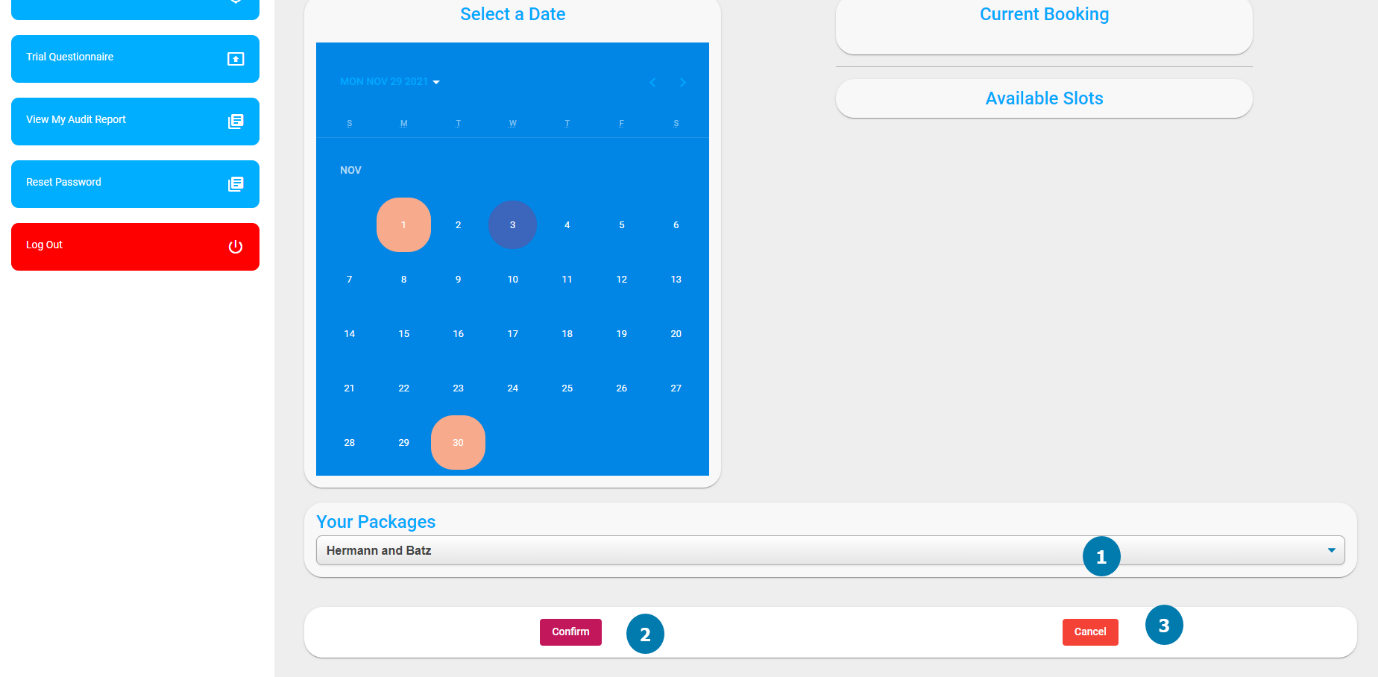
Controls Description:
|
Screen Name: Book Training Session |
||
|
Item Number: |
Item Name: |
Item Description: |
|
1 |
Package Drop- down |
This allows the Trainee to select which package they would like to book for. |
|
2 |
Confirm (Button) |
The trainee will confirm their selected day and time and the booking will be created. |
|
3 |
Cancel Button |
This Cancels the booking and returns the Trainee to the Dashboard. |
View Feedback Notes: contains the details required to into the FICS CORP System.
Navigation Process: By clicking on the Button on the Static Web page
Layout:
Controls Description:
|
Screen Name: View Feedback |
||
|
Item Number: |
Item Name: |
Item Description: |
|
1 |
Session Details (Label) |
The session name and number that has been selected is displayed. |
|
2 |
Search Bar (Search Bar) |
This search bar can be used to search for the session name or number to simplify the search. |
|
3 |
Search (Button) |
This will initiate the search and validate the feedback with the searched item. |
|
4 |
Feedback (Label) |
This will display the feedback from the session, written by the trainer or practitioner. |
|
5 |
Return (Button) |
This will return the user to the previous screen, view feedback. |
|
6 |
Cancel (Button) |
This will cancel the operation and will return the trainee to their main dashboard. |
|
7 |
Search (Menu Item) |
This will display a search bar for the trainee to search for a specific thing on the website. |
|
8 |
Tasks (Menu Item) |
This will display all the tasks that have been assigned to the trainee that is still due. |
|
9 |
Profile (Menu Item) |
The trainee can maintain their profile from this menu item. |
|
10 |
More (Menu Item) |
This menu item will display more options for the user. |
Upload Case Study Reports: contains the details required to into the FICS CORP System.
Navigation Process: By clicking on the Button on the Static Web page
Layout:
Controls Description:
|
Screen Name: Retrieve Questionnaire |
||
|
Item Number: |
Item Name: |
Item Description: |
|
1 |
Questionnaire (Label) |
This is the name of the questionnaire the trainee will be given to practice. |
|
2 |
Retrieve (Button) |
This will allow the user to download the selected questionnaire. |
|
3 |
Cancel (Button) |
The operation is canceled, and the user is returned to the previous screen. |
|
4 |
Search (Menu Item) |
This will display a search bar for the trainee to search for a specific thing on the website. |
Retrieve Questionnaire: contains the details required to into the FICS CORP System.
Navigation Process: By clicking on the Button on the Static Web page
Layout:
Controls Description:
|
Screen Name: Retrieve Questionnaire |
||
|
Item Number: |
Item Name: |
Item Description: |
|
1 |
Questionnaire (Label) |
This is the name of the questionnaire the trainee will be given to practice. |
|
2 |
Retrieve (Button) |
This will allow the user to download the selected questionnaire. |
|
3 |
Cancel (Button) |
The operation is canceled, and the user is returned to the previous screen. |
|
4 |
Search (Menu Item) |
This will display a search bar for the trainee to search for a specific thing on the website. |
|
5 |
Tasks (Menu Item) |
This will display all the tasks that have been assigned to the trainee that is still due. |
|
6 |
Profile (Menu Item) |
The trainee can maintain their profile from this menu item. |
|
7 |
More (Menu Item) |
This menu item will display more options for the user. |
Request Performance Report: contains the details required to Request Performance Report in the FICS CORP System.
Navigation Process: By clicking on the Button on the Static Web page
Layout:
Controls Description:
|
Screen Name: Request Performance Report |
||
|
Item Number: |
Item Name: |
Item Description: |
|
1 |
Request (Button) |
This button will allow the user to download their current progress report. |
|
2 |
Cancel (Button) |
The operation is cancelled, and the user is returned to the previous screen. |
|
3 |
Search (Menu Item) |
This will display a search bar for the trainee to search for a specific thing on the website. |
|
4 |
Tasks (Menu Item) |
This will display all the tasks that have been assigned to the trainee that is still due. |
|
5 |
Profile (Menu Item) |
The trainee can maintain their profile from this menu item. |
|
6 |
More (Menu Item) |
This menu item will display more options for the user. |
Created with the Personal Edition of HelpNDoc: Single source CHM, PDF, DOC and HTML Help creation