5.2.7 Reporting sub system
Generate Client Progress Report
Layout:
Controls Description:
|
Screen Name: Client Progress Report |
||
|
Item Number: |
Item Name: |
Item Description: |
|
1 |
Home Tab |
The User will be able to navigate to the Home Tab. |
|
2 |
Search Tab |
The User will be able to navigate to the Search Tab. |
|
3 |
Client Tab |
The User will be able to navigate to the Client Tab. |
|
4 |
Profile Tab |
The User will be able to navigate to the Profile Tab. |
|
5 |
More Tab |
The User will be able to navigate to the More Tab. |
|
6 |
Select Client |
The User will be able to select the client |
|
7 |
Select Time Period |
The User will be able to select the time from and to in which they wish to generate the report from. |
|
8 |
Generate |
The User will generate the report. |
|
9 |
Cancel |
The User wishes to cancel this operation |
Generate Trainee Performance Report
Layout:
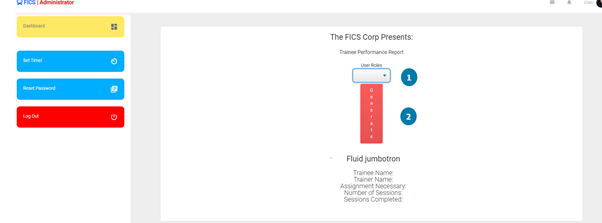
Controls Description:
|
Screen Name: Trainee Progress Report |
||
|
Item Number: |
Item Name: |
Item Description: |
|
1 |
Home Tab |
The User will be able to navigate to the Home Tab. |
|
2 |
Search Tab |
The User will be able to navigate to the Search Tab. |
Generate Registered User Report
Layout:
Controls Description:
|
Screen Name: Registered User Report |
||
|
Item Number: |
Item Name: |
Item Description: |
|
1 |
Home Tab |
The User will be able to navigate to the Home Tab. |
|
2 |
Search Tab |
The User will be able to navigate to the Search Tab. |
|
3 |
Client Tab |
The User will be able to navigate to the Client Tab. |
|
4 |
Profile Tab |
The User will be able to navigate to the Profile Tab. |
|
5 |
More Tab |
The User will be able to navigate to the More Tab. |
|
6 |
Select User |
The User will be able to select the user. |
|
7 |
Select Time Period |
The User will be able to select the time from and to in which they wish to generate the report from. |
|
8 |
Generate |
The User will generate the report. |
|
9 |
Cancel |
The User wishes to cancel this operation |
Generate Inactive User Report
Layout:
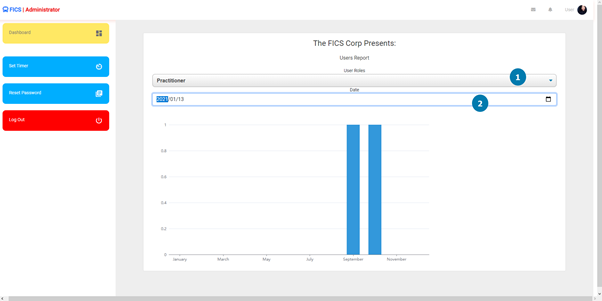
Controls Description:
|
Screen Name: Inactive User Report |
||
|
Item Number: |
Item Name: |
Item Description: |
|
1 |
Home Tab |
The User will be able to navigate to the Home Tab. |
|
2 |
Search Tab |
The User will be able to navigate to the Search Tab. |
Generate Client Audit Report
Layout:
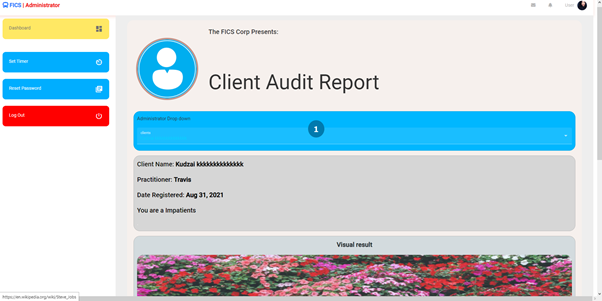
Controls Description:
|
Screen Name: Client Audit Report |
||
|
Item Number: |
Item Name: |
Item Description: |
|
1 |
Home Tab |
The User will be able to navigate to the Home Tab. |
Generate Package Sale Report
Layout:
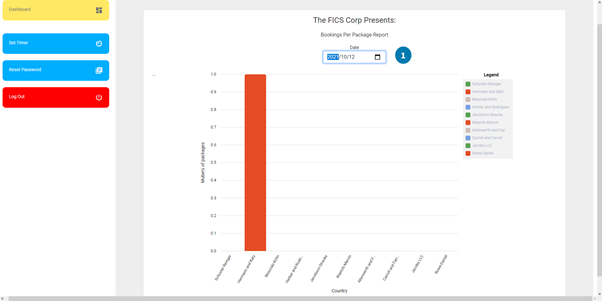
Controls Description:
|
Screen Name: Package Sale Report |
||
|
Item Number: |
Item Name: |
Item Description: |
|
1 |
Home Tab |
The User will be able to navigate to the Home Tab. |
Created with the Personal Edition of HelpNDoc: Qt Help documentation made easy