PicList Logo

PicList

A powerful cloud storage and image hosting management tool.

Code Style Downloads Release License

็ฎ€ไฝ“ไธญๆ–‡ | English


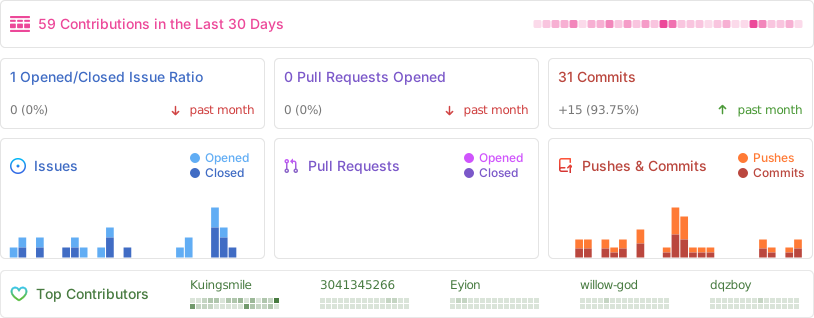
Repobeats analytics image
## ๐Ÿ“– Introduction **PicList** is an efficient cloud storage and image hosting management tool built upon the foundation of PicGo. It builds on PicGoโ€™s upload workflow with comprehensive cloud storage management capabilities, various practical functions, and a brand-new lightweight scripting system. Whether you need to organize your cloud files, sync markdown images, or manage multiple storage platforms effortlessly, PicList is designed to streamline your workflow with a beautiful interface and robust plugin system. ## โœจ Key Features - **๐Ÿ“‚ Cloud Management**: Browse, search, cloud-delete, and batch rename files in your cloud storage. - **๐Ÿ”„ Advanced Sync**: Cloud-sync album deletion and configuration/gallery synchronization across multiple devices (via WebDAV/Git). - **๐ŸŽจ Built-in Image Tools**: Watermark, compress, scale, rotate, and format conversion out of the box, controllable at individual image bed level. - **๐Ÿ“ Scripting System**: Customize lifecycle scripts to meet advanced user needs without requiring a `node` environment. - **๐ŸŒˆ Theme Support**: Multiple built-in themes, theme repository [PicList ThemeHub](https://github.com/Kuingsmile/piclist-themeHub), also supports custom themes and backgrounds. - **๐Ÿ”Œ Wide Compatibility**: Compatible with **Typora**, **Obsidian**, and most existing PicGo plugins. - **๐Ÿ› ๏ธ Power User Features**: Regex-based batch renaming, upload queues, local/sftp hosting, and more. - **๐ŸŒ Web & Mobile**: Support for form uploads and integration with the mobile app **PicHoro**. ## ๐Ÿ“ธ Screenshots
Upload Interface
Upload Interface
Image
More Views (Gallery, Settings, Task)
Gallery Cloud Storage
Settings Task
Settings Task
## ๐Ÿ“ฅ Download & Install ### ๐Ÿ’ป Desktop Applications | OS | Method | Command / Link | | :---------: | :-----------: | :----------------------------------------------------------------------------------------------- | | **Windows** | **Winget** | `winget install Kuingsmile.PicList` | | | **Scoop** | `scoop bucket add lemon https://github.com/hoilc/scoop-lemon`
`scoop install lemon/piclist` | | | **Installer** | [Download .exe](https://github.com/Kuingsmile/PicList/releases/latest) | | **macOS** | **Homebrew** | `brew install piclist --cask` | | | **DMG** | [Download .dmg](https://github.com/Kuingsmile/PicList/releases/latest) | | **Linux** | **Installer** | [Download AppImage/Snap/Deb](https://github.com/Kuingsmile/PicList/releases/latest) | ### ๐Ÿณ Docker / PicList-Core Docker runs the separate PicList-Core upload server. This repository contains the Electron desktop application and its build scripts. For container setup, see [PicList-Core](https://github.com/Kuingsmile/PicList-Core) and the [FAQ](FAQ_EN.md). ## ๐Ÿ”Œ Integrations PicList integrates seamlessly with your favorite markdown editors. ### VSCode Install the **[VS-PicList](https://marketplace.visualstudio.com/items?itemName=Kuingsmile.vs-piclist)** extension for full integration. ### Typora - **Version โ‰ฅ 1.6.0**: Select **PicList** directly in the Image settings. - **Version < 1.6.0**: Set 'Image Upload' -> 'PicGo(app)' and point the path to your PicList executable. ### Obsidian 1. Install **Image Auto Upload Plugin**. 2. Set Default Uploader to **PicGo(app)**. 3. API Endpoint: `http://127.0.0.1:36677/upload` ## โ˜๏ธ Supported Platforms Uploaders, gallery remote deletion, and cloud management have different capabilities. Uploaders come from PicList-Core and installed plugins; this table reflects the desktop deletion adapters and management clients. | Storage Provider | Gallery Remote Delete | Cloud Management | | :-------------------------- | :-------------------: | :---------------------------------------: | | **AWS S3** (and compatible) | โœ… | โœ… | | **Aliyun OSS** | โœ… | โœ… | | **Tencent COS** | โœ… | โœ… | | **Qiniu Kodo** | โœ… | โœ… | | **Upyun** | โœ… | โœ… | | **GitHub** | โœ… | โœ… | | **S.EE / Imgur** | โœ… | โœ… | | **WebDAV / SFTP** | โœ… | โœ… | | **Local File System** | โœ… | โœ… | | **Doge Cloud** | โœ… | Via the S3 API client's Doge Cloud option | | **Lsky Pro / Alist** | โœ… | โ€” | | **Huawei OBS** | โœ… | โ€” | | **Another PicList server** | โœ… | โ€” | โ€œโ€”โ€ means there is no dedicated management client. Deletion depends on the uploader ID, credentials, and remote-file metadata stored with the gallery record. Custom API hosts can implement deletion with an `onGalleryRemove` lifecycle script. Implementation: [deletion registry](src/main/apis/delete/allApi.ts) and [management clients](src/main/manage/manageApi.ts). See the [FAQ](FAQ_EN.md) for uploader availability and troubleshooting. ## ๐Ÿš€ Development The [contributor and development guide](CONTRIBUTING_EN.md) covers the source layout, complete script reference, JSON localization, plugin development, and packaging. See the [API guide](src/main/apis/README.md) for main-process services and RPC. ### Prerequisites - Node.js **22.x, at least 22.13.0** (required by the current core dependency; release CI uses 22.x). - **Yarn Classic 1.22.x** and Git. - Native dependencies may need platform build tools. Windows packaging and experimental plugin runtime preparation require Visual Studio C++ Build Tools. ### Run from source ```bash git clone https://github.com/Kuingsmile/PicList.git cd PicList yarn install --frozen-lockfile # Start Electron in development mode yarn dev # Compile production code without an installer, then preview it yarn prebuild yarn preview ``` Installation downloads themes, installs Husky hooks, and prepares Electron native dependencies. The development server uses the fixed address `127.0.0.1:30303`. `yarn build` packages with electron-builder; `yarn build:win`, `yarn build:mac`, and `yarn build:linux` select a platform. Follow the contributor guide's platform prerequisites first; Windows also needs `yarn prepare:7za`. Compiled output goes to `out/` and packaged artifacts to `dist_electron/`. ## ๐Ÿ”— Related Projects - **[PicList ThemeHub](https://github.com/Kuingsmile/piclist-themeHub)**: A theme repository for PicList. - **[PicList ScriptsHub](https://github.com/Kuingsmile/piclist-ScriptsHub)**: A script repository for PicList. - **[PicList-Core](https://github.com/Kuingsmile/PicList-Core)**: The CLI core of PicList. - **[PicHoro](https://github.com/Kuingsmile/PicHoro)**: Android mobile client. ## ๐Ÿ“„ License This project is licensed under the **MIT License**. Copyright (c) 2017-present Molunerfinn Copyright (c) 2023-present Kuingsmile ---

Star Me๏ผ โญ๏ธ

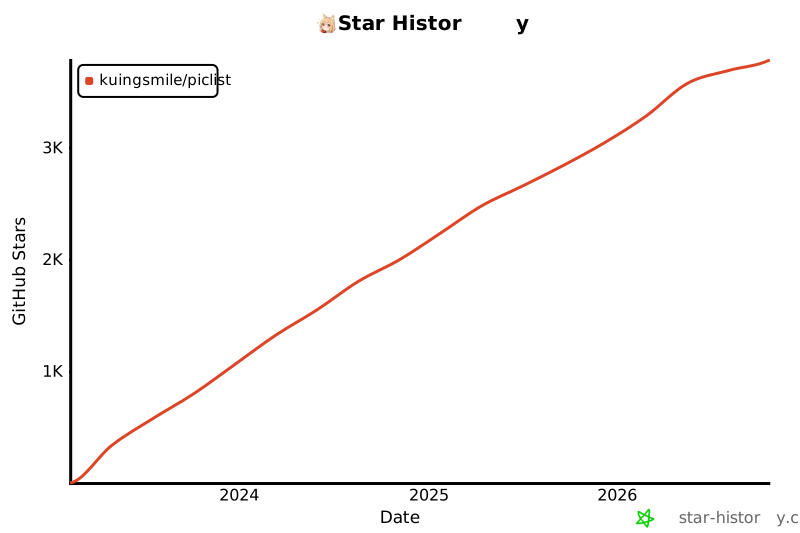
[![Star History Chart](https://api.star-history.com/svg?repos=Kuingsmile/PicList&type=Date)](https://star-history.com/#Kuingsmile/PicList&Date)