> **What it is:** a DeepSeek Harness (DSH) plugin to use the DSH on your computer from a phone browser: scan a QR code, then follow tasks, reply and approve. It goes through a free Cloudflare tunnel, so it works on mobile data too, with no app to install.
>
> **Use it for:** "I'm heading out and want to keep an eye on the task", "reply or approve while I'm away from the computer".
>
> **Install:** on the DSH Plugins page, click Add plugin and enter `@orderg-x/dsh-mobile` (an npm package), then restart DSH. Tested on macOS only so far.
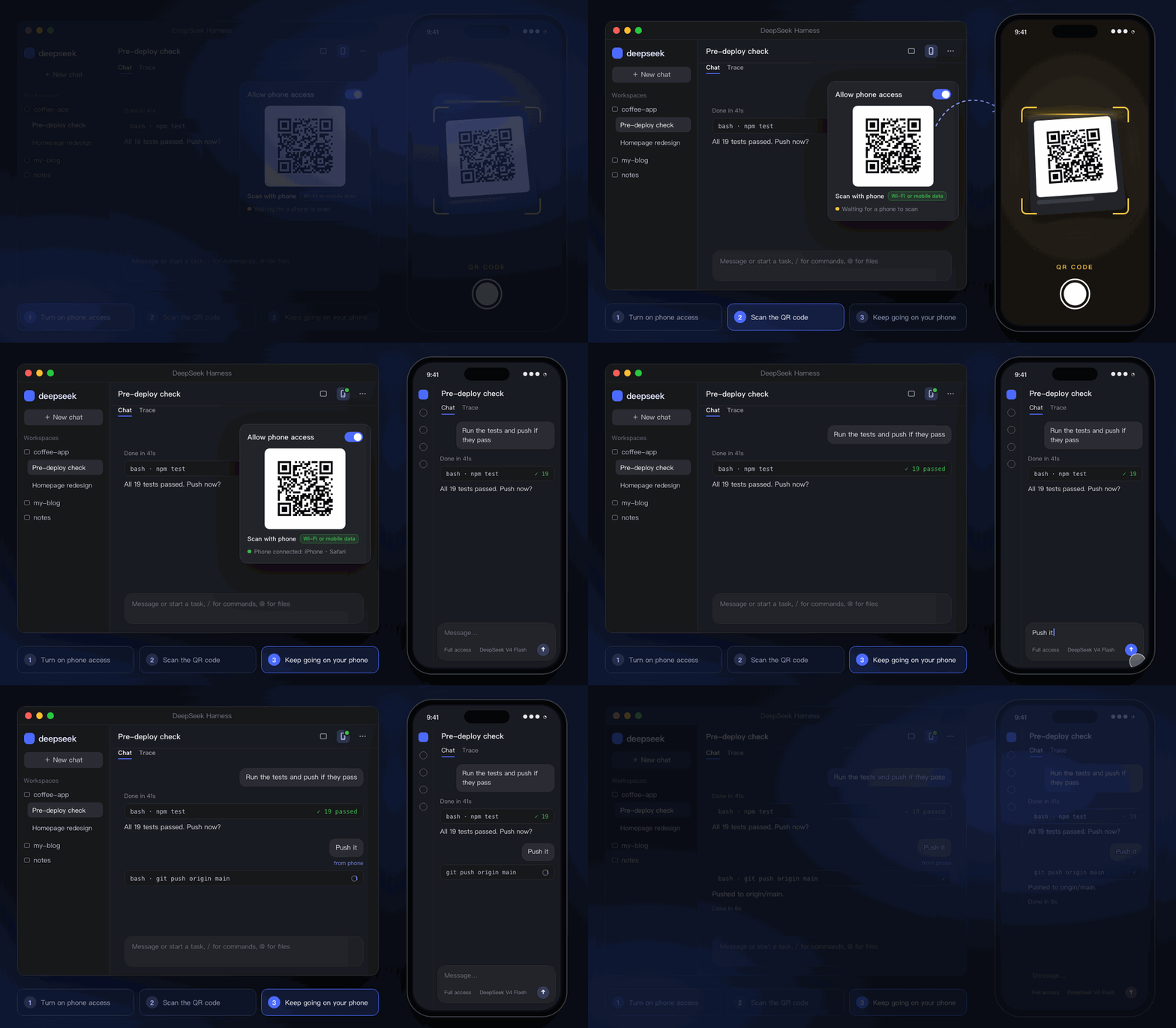
Animated demo with sample data.
## Why
| | |
|---|---|
| 📱 **Scan and go** | No app, no account. Point the phone camera at the QR code and the phone browser opens the same DSH as your computer. |
| 🔄 **Same sessions, live** | A message sent from the phone shows up on the computer at once; you see the model's progress on the phone as it happens. |
| 🌍 **Works anywhere** | Goes through a free Cloudflare tunnel (HTTPS): the same link at home or on mobile data outside. Set up automatically when you flip the switch. |
| 🔔 **Buzz when done or waiting** | Paste a Bark / ntfy / Telegram / chat-bot address and the phone buzzes when a task finishes or waits for your approval; tap the notification to open DSH. |
| 🔐 **Only your paired phones** | Each QR code works once and expires in 10 minutes; every phone gets its own credential, which you can revoke at any time. |
## Install
On the DSH Plugins page, click **Add plugin** and enter the package name:
```
@orderg-x/dsh-mobile
```
It is an npm package. When DSH installs by package name and can't reach the official npm registry, it falls back to the npmmirror mirror in China, so GitHub is never needed. You can also enter the release tarball `https://github.com/OrderG-X/dsh-mobile/releases/latest/download/dsh-mobile.tgz`, which needs GitHub access.
**Restart DSH** afterwards. It shows up as "Mobile" on the DSH Plugins page.
**Updating:** uninstall it on the Plugins page and add it again. A new version can be installed by package name about a day after release, because the pnpm that DSH uses skips brand-new versions by default. To get it right away, use the release tarball.
> **Upgrading from 0.2.x:** from 0.3.0 the package is called `@orderg-x/dsh-mobile` (`dsh-mobile` on npm is someone else's package). After installing it, remove the old "dsh-mobile" on the Plugins page and restart DSH. While the old one is still installed the new one stays off and only asks you to remove it. Your settings are kept; the internet address changes, so scan the QR code once more on the phone.
## Use
1. **On the computer**: click the phone button in the session header (or DSH → Plugins → Mobile) and turn on "Allow phone access".
2. **On the phone**: scan the QR code with the camera. It works at home and on the go.
3. **Later**: just open the same address on the phone (add it to the home screen, see the FAQ). It survives DSH restarts, so no rescan.
4. **Want the phone to buzz?** Add a push address, see "Phone notifications" below.
While a phone is connected, the phone button in the header shows a green dot. If you cannot scan, use "Copy link" and open it on the phone (works once, within 10 minutes).
## Phone notifications (optional)
Don't want to keep checking? Paste an address under "Push to phone" on the Mobile page and DSH pushes a message when:
- **a task finishes** (only runs longer than 30 seconds, so quick back-and-forth stays quiet; a run that stops with an error counts too)
- **DSH waits for your approval or answer** (the card still shows in DSH as usual; the notification never decides for you)
Tap "Send a test" and you're done once the phone buzzes. Each kind can be turned off. Notifications carry only the session title and status, never conversation content.
| Service | Where to get the address |
|---|---|
| **Bark** (iPhone) | Install Bark from the App Store; copy the `https://api.day.app/…` line it shows |
| **ntfy** (Android / iPhone) | Install ntfy, subscribe to a hard-to-guess topic, paste `https://ntfy.sh/` |
| **ServerChan** (WeChat) | Sign in at sct.ftqq.com and paste your SendKey (starts with `SCT`) |
| **Feishu / Lark, WeCom, DingTalk** | Add a custom bot to a group and copy its webhook URL |
| **Telegram** | `https://api.telegram.org/bot/sendMessage?chat_id=` |
Any other URL is treated as a generic webhook: it gets a JSON POST with `title`, `body` and `url`.
> The first time outside access is turned on, Cloudflare's official cloudflared (about 20 MB) is downloaded automatically, which takes about half a minute. Meanwhile a temporary code is shown and swapped when the tunnel is ready.
## How it works
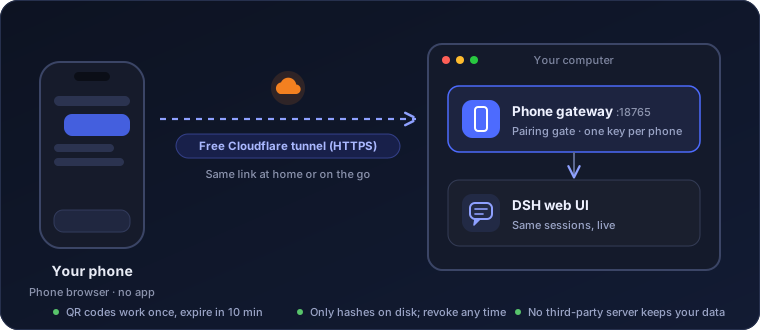
The plugin runs a small gateway inside DSH (port 18765 by default) and forwards the phone's requests to DSH's own web UI on the computer. The phone runs the official DSH web UI, so sessions and settings are exactly what you have on the computer.
Technical details
- DSH desktop's web UI requires a login. Inside the DSH process the gateway trades the launch token for a session cookie and attaches it for the phone; that cookie never reaches the phone.
- The phone's own credential is issued by the gateway (HttpOnly, SameSite=Strict). Only its hash is stored on disk. A credential only works on the path it was paired on: one paired over Wi-Fi (plain HTTP) is refused on the outside tunnel.
- The Mobile settings (switch, QR code, paired phones) can only be managed in DSH on the computer; a phone cannot read the pairing code.
- The local network is plain HTTP, which lacks some "secure context" browser APIs; the gateway adds the one DSH needs.
- When a live connection is idle, the gateway sends keepalive pings toward the phone so tunnels and carriers don't drop it.
- Outside access uses `cloudflared tunnel --url` (a trycloudflare.com quick tunnel): Cloudflare forwards HTTPS traffic to the gateway on your computer, and the gateway's pairing still guards the door.
- To keep the address, the tunnel keeps running in the background when DSH quits (it uses almost nothing) and is picked up again next time; turning off phone access stops it.
## Security
A paired phone can make DSH work on this computer, just like sitting at it. So:
| Situation | What to do |
|---|---|
| QR codes | Scan only with your own phone; never send the code to anyone or post a screenshot |
| Lost phone | Remove it under "Paired phones"; it is disconnected at once |
| Public Wi-Fi | Same-Wi-Fi mode is plain HTTP; use the outside code (HTTPS) instead |
| Not using it | Turn off "Allow phone access"; the gateway stops listening |
Data lives in `~/.dsh/dsh-mobile/`: `state.json` (switches), `devices.json` (paired phones, 0600), `mobile.log`, `tunnel.json` and `cloudflared.log` (outside tunnel), and `bin/cloudflared` if downloaded.
## FAQ
Do I need to install an app?
No. Scan with the phone camera and it opens in the phone browser.
Do I have to scan again after a restart?
Not after restarting DSH. After the computer restarts, phone access is turned off, or the plugin is disabled or uninstalled in DSH, the outside address changes and you scan once more.
Is it fast enough on mobile data in mainland China?
Yes for everyday use. Cloudflare's free network has no points of presence in mainland China, so requests travel abroad and back: the first load takes a second or two, after that watching tasks and sending messages feels fine. A weak signal makes it noticeably slower.
What if someone else gets my QR code?
A code works once and expires in 10 minutes, so a code you already scanned is useless. If someone did scan it first, the phone shows up under "Paired phones"; remove it.
Can I open it like an app from the home screen?
Yes. On iPhone open the address in Safari, tap Share → Add to Home Screen; on Android open it in Chrome and choose Add to Home screen or Install app. Launched from the icon it runs full screen without the address bar.
Does it work while the computer sleeps?
No. Nothing works while the computer sleeps or DSH is closed.
## Limitations
- The phone shows DSH's web UI: the side panels slide over the page and close when you tap outside; nothing else is re-laid out for phones.
- Outside access uses Cloudflare's free quick tunnels, which have no uptime guarantee.
- Tested with DSH desktop on macOS only; the cloudflared download paths for Windows and Linux are written but untested.
## Development
```sh
npm test # script tests for the gateway, pairing, live connections and keepalive
```
## Feedback
Found a bug or want a feature? [Open an issue](https://github.com/OrderG-X/dsh-mobile/issues/new/choose). Including your DSH and plugin versions helps a lot.
## License
MIT