




# PasteMD

PasteMD

Release Downloads License AtomGitStars Python 3.12+ Platform

English | 简体中文 | 日本語

Featured|HelloGitHub RICHQAQ%2FPasteMD | Trendshift

## ❤️ Sponsors
Atlas Cloud Atlas Cloud is a full-modal AI inference platform that gives developers a single AI API to access video generation, image generation, and LLM APIs. Instead of managing multiple vendor integrations, you connect once and get unified access to 300+ curated models across all modalities.
Check out Atlas Cloud's new coding plan promotion for more budget-friendly API access: https://www.atlascloud.ai/console/coding-plan
APIMart Thanks to APIMart for sponsoring this project! APIMart is a low-cost API platform for AI image & video generation — GPT-Image-2 from $0.006/image, 160+ images per dollar. One async API covers both image and video: submit a task, get an ID, fetch results via polling or callback. Batch tens of thousands of images without timeouts, switch models without changing code. Pay-as-you-go with no monthly fee — sign up here to get started.
> When writing papers or reports, do formulas copied from AI tools (like ChatGPT or DeepSeek) turn into garbled text in Word? Do Markdown tables fail to paste correctly into Excel? **PasteMD was built specifically to solve these problems.** > > I am good A lightweight tray app: Reads **Markdown from the clipboard**, converts it to DOCX with **Pandoc**, and inserts it at the caret position in **Word/WPS**. **✨ Feature**: Smart Markdown table detection, one-click paste to **Excel**! **✨ Feature**: Smart HTML rich text detection, easy one-click paste of AI replies from the web into **Word/WPS**! **✨ New feature**: App extensions (HTML+Markdown/HTML/Markdown/LaTeX/File paste), match by app/window title (e.g., Yuque/QQ). **✨ New feature**: Conversion enhancements: configure Pandoc Filters by conversion type; auto-fix some LaTeX syntax and standalone `$...$` formula blocks. --- ## Feature Highlights ### Demo Videos #### Markdown → Word/WPS
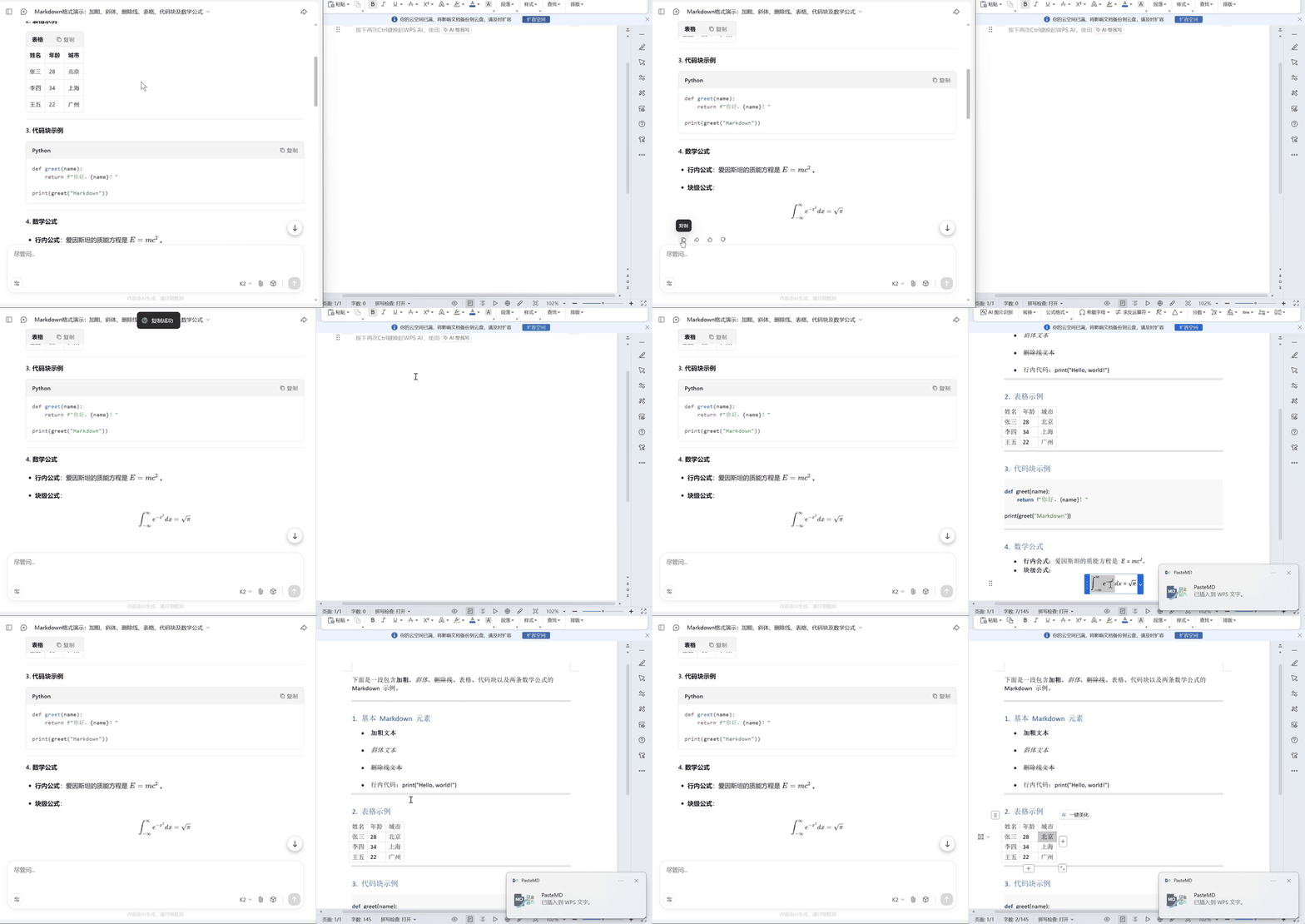
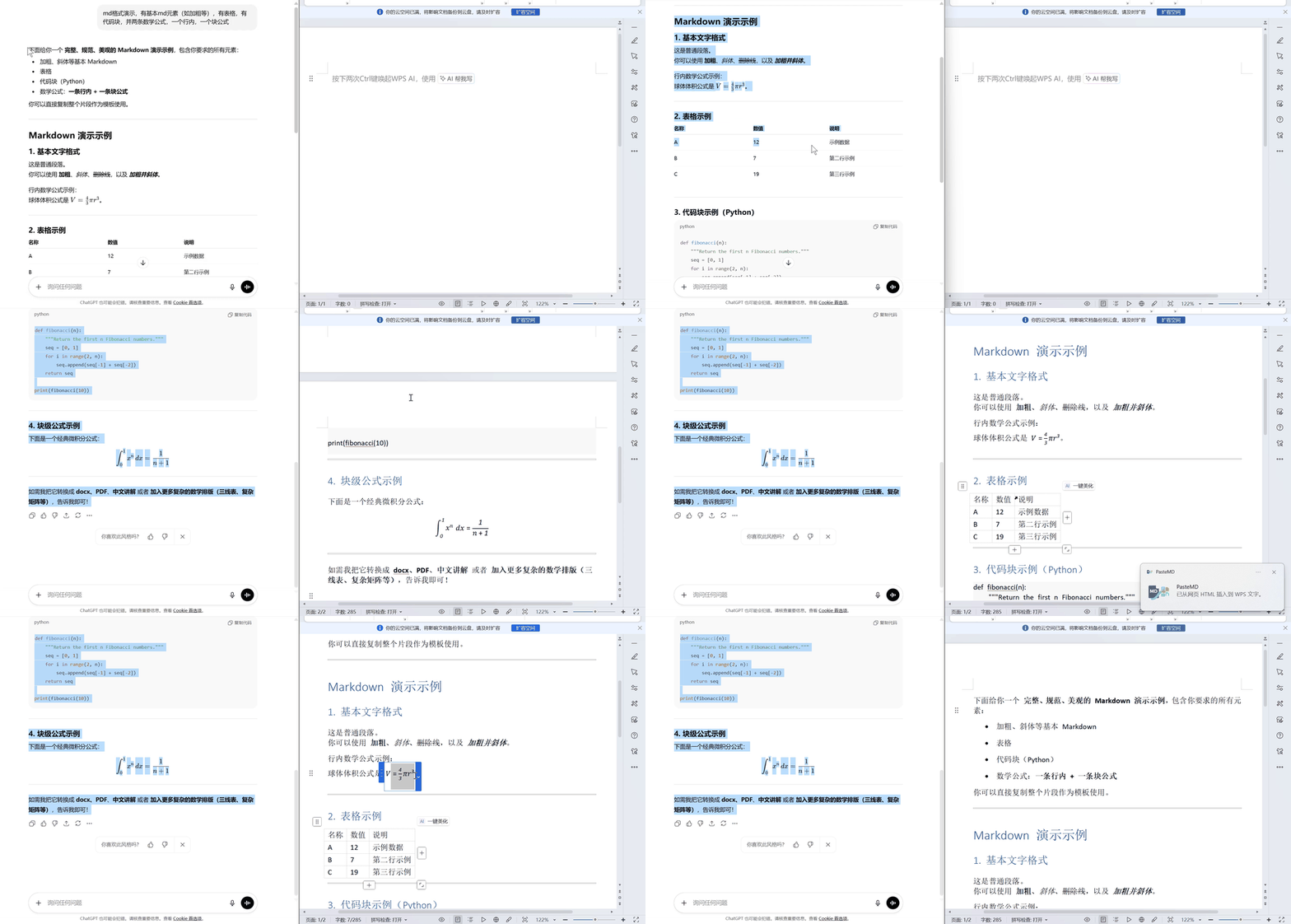
Markdown to Word demo

#### Copy AI web reply → Word/WPS

HTML rich text demo

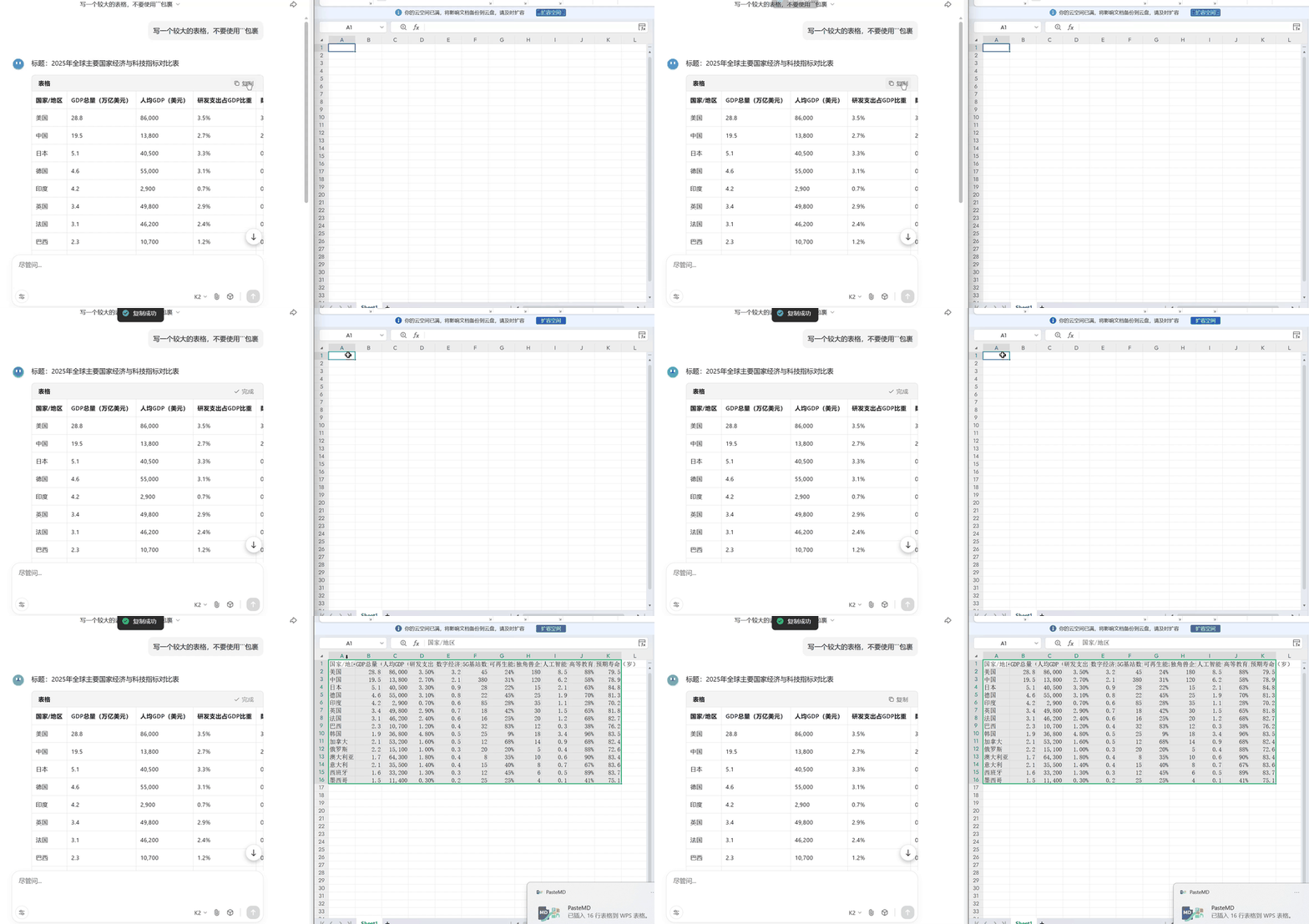
#### Markdown tables → Excel

Markdown table to Excel demo

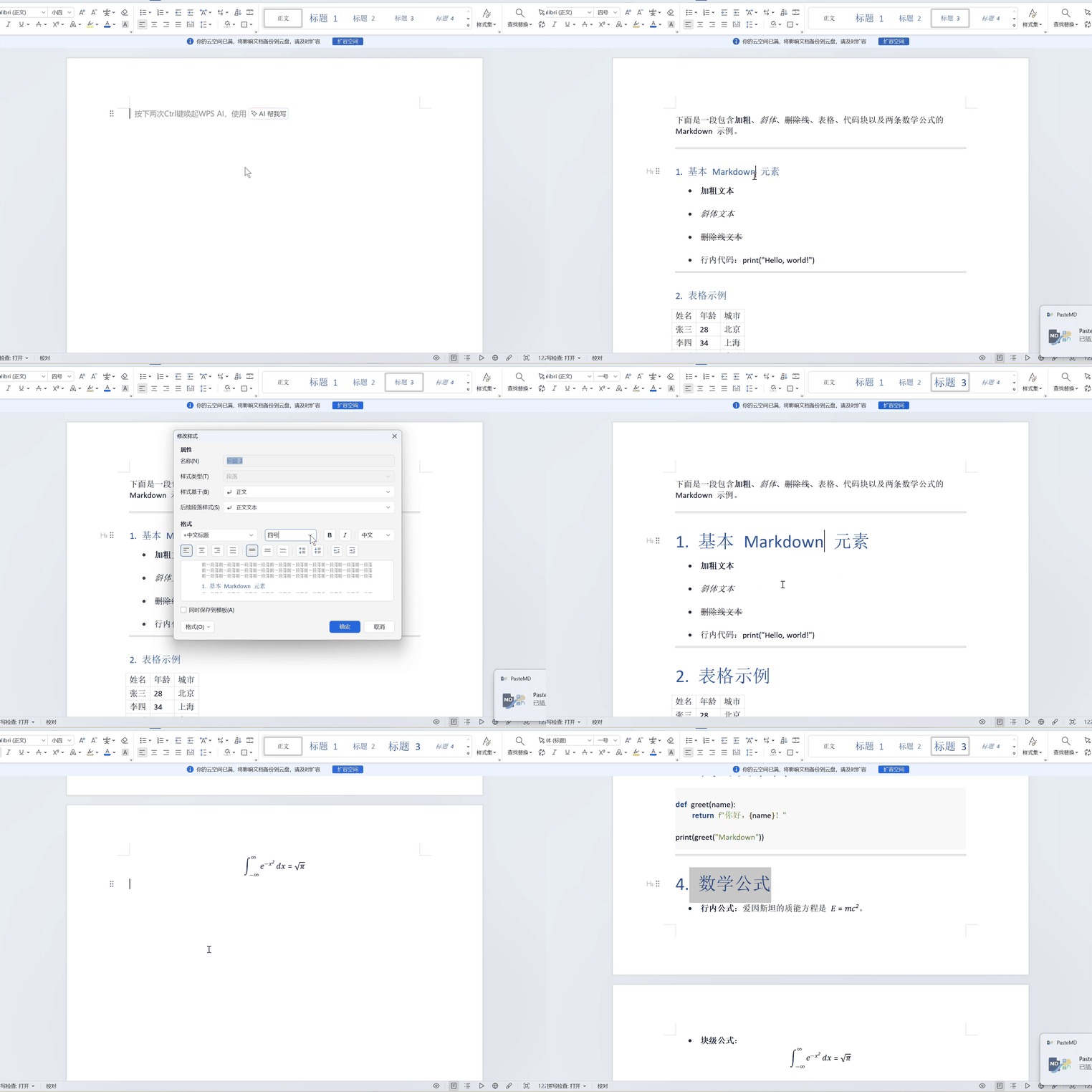
#### Apply formatting presets

Formatting demo

* Global hotkey (default `Ctrl+Shift+B`) to paste Markdown → DOCX with one key. * **✨ Smart Markdown table detection** and paste into Excel. * **✨ App extensions**: configure HTML+Markdown/HTML/Markdown/LaTeX/File paste modes per app, with window-title matching. * **✨ Conversion enhancements**: add Pandoc Filters by conversion type, auto-fix some LaTeX syntax and standalone `$...$` formula blocks. * Auto-detect the active app: Word or WPS. * Smartly open the required app (Word/Excel). * Tray menu: keep files, view logs/config, etc. * System notifications. * No console window, non-blocking, stable. --- ## 📊 AI Website Compatibility The following table summarizes compatibility when copying content from major AI chat sites: | AI Service | Copy Markdown (no formulas) | Copy Markdown (with formulas) | Copy page content (no formulas) | Copy page content (with formulas) | |---------|:----------------------------:|:----------------------------:|:---------------------------:|:---------------------------:| | **Kimi** | ✅ Perfect | ✅ Perfect | ✅ Perfect | ⚠️ Formulas missing | | **DeepSeek** | ✅ Perfect | ✅ Perfect | ✅ Perfect | ✅ Perfect | | **Tongyi Qianwen** | ✅ Perfect | ✅ Perfect | ✅ Perfect | ⚠️ Formulas missing | | **Doubao\*** | ✅ Perfect | ✅ Perfect | ✅ Perfect | ✅ Perfect | | **Zhipu Qingyan
/ChatGLM** | ✅ Perfect | ✅ Perfect | ✅ Perfect | ✅ Perfect | | **ChatGPT** | ✅ Perfect | ⚠️ Rendered as code | ✅ Perfect | ✅ Perfect | | **Gemini** | ✅ Perfect | ✅ Perfect | ✅ Perfect | ✅ Perfect | | **Grok** | ✅ Perfect | ✅ Perfect | ✅ Perfect | ✅ Perfect | | **Claude** | ✅ Perfect | ✅ Perfect | ✅ Perfect | ✅ Perfect | **Legend:** - ✅ **Perfect**: formatting, style, and formulas are displayed correctly - ⚠️ **Rendered as code**: formulas appear as LaTeX code; use Word/WPS equation editor to fix - ⚠️ **Formulas missing**: formulas are removed; re-enter them with the equation editor - **Doubao**: before copying web content (with formulas), enable “Allow clipboard read” in the browser (via the icon left of the URL) **Test method:** 1. **Copy Markdown**: click the “Copy” button in an AI reply (usually Markdown, some sites include HTML) 2. **Copy page content**: select the AI reply content directly and copy (HTML rich text) --- ## 🚀 Getting Started 1. Download an executable from the [Releases page](https://github.com/RICHQAQ/PasteMD/releases/): * ~~**PasteMD_vx.x.x.exe** — **portable build**; requires Pandoc installed and available in command line. If not installed, download from the [Pandoc website](https://pandoc.org/installing.html).~~ (No longer provided. Build from source if needed.) * **PasteMD_pandoc-Setup.exe** — **all-in-one installer** bundled with Pandoc. 2. Open Word, WPS, or Excel and place the caret where you want to insert. 3. Copy **Markdown** or **web content** into the clipboard, then press **Ctrl+Shift+B**. 4. The result will be inserted automatically: - **Markdown tables** → paste into Excel automatically (if Excel is open) - **Regular Markdown/web content** → convert to DOCX and insert into Word/WPS 5. A success/failure notification appears at the bottom right. --- ## ⚙️ Configuration The first run creates `config.json` in the user data directory (Windows: `%APPDATA%\\PasteMD\\config.json`, MacOS: `~/Library/Application Support/PasteMD/config.json`). You can edit it manually: ```json { "hotkey": "++b", "pandoc_path": "pandoc", "reference_docx": null, "save_dir": "%USERPROFILE%\\Documents\\pastemd", "keep_file": false, "notify": true, "startup_notify": true, "enable_excel": true, "excel_keep_format": true, "paste_delay_s": 0.3, "no_app_action": "open", "md_disable_first_para_indent": true, "html_disable_first_para_indent": true, "html_formatting": { "strikethrough_to_del": true }, "move_cursor_to_end": true, "Keep_original_formula": false, "enable_latex_replacements": true, "fix_single_dollar_block": true, "language": "zh-CN", "pandoc_request_headers": [ "User-Agent: Mozilla/5.0 (Windows NT 10.0; Win64; x64) AppleWebKit/537.36 (KHTML, like Gecko) Chrome/120.0.0.0 Safari/537.36" ], "pandoc_filters": [], "pandoc_filters_by_conversion": { "md_to_docx": [], "html_to_docx": [], "html_to_md": [], "md_to_html": [], "md_to_rtf": [], "md_to_latex": [] }, "extensible_workflows": { "html": { "enabled": true, "apps": [], "keep_formula_latex": true }, "md": { "enabled": true, "apps": [], "html_formatting": { "css_font_to_semantic": true, "bold_first_row_to_header": true } }, "latex": { "enabled": true, "apps": [] }, "file": { "enabled": true, "apps": [] } } } ``` Fields: * `hotkey`: global hotkey syntax, e.g. `++v`. * `pandoc_path`: Pandoc executable path. * `reference_docx`: optional Pandoc reference template. * `save_dir`: output directory when keeping files. * `keep_file`: keep generated DOCX files or delete them. * `notify`: show system notifications. * `startup_notify`: show a notification on startup. * **`enable_excel`**: enable smart Markdown table detection and paste into Excel (default true). * **`excel_keep_format`**: keep Markdown formatting (bold/italic/code, etc.) when pasting into Excel (default true). * `paste_delay_s`: delay in seconds before pasting (Windows may need a short delay for clipboard updates). * **`no_app_action`**: default action when no target app (Word/Excel) is detected (default `"open"`). Options: `open`=auto open, `save`=save only, `clipboard`=copy file to clipboard, `none`=no action. * **`md_disable_first_para_indent`**: disable special formatting for the first paragraph when converting Markdown (default true). * **`html_formatting`**: formatting options for HTML rich text conversion. * **`strikethrough_to_del`**: convert ~~ strikethrough to `` for correct rendering (default true). * **`html_disable_first_para_indent`**: disable special formatting for the first paragraph when converting HTML rich text (default true). * **`move_cursor_to_end`**: move the caret to the end after inserting (default true). * **`Keep_original_formula`**: keep original math formulas (LaTeX code form). * `enable_latex_replacements`: auto-fix some incompatible LaTeX syntax (e.g. replace `{\\kern 10pt}` with `\\qquad`). * `fix_single_dollar_block`: auto-detect and fix standalone `$ ... $` formula blocks (convert to `$$ ... $$`). * `language`: UI language. `zh-CN` (Simplified Chinese), `en-US` (English), `ja-JP` (Japanese). * `pandoc_request_headers`: request headers for Pandoc when downloading remote resources (one `Header: Value` per line). * **`pandoc_filters`**: custom Pandoc Filter list. Add `.lua` scripts or executable paths; filters run in list order. Extends conversion functions (custom formatting, special syntax transforms, etc.). Default empty. Example: `["%APPDATA%\\npm\\mermaid-filter.cmd"]` enables Mermaid diagrams. * `pandoc_filters_by_conversion`: configure Filters per conversion type (e.g. `md_to_docx`, `html_to_md`, etc.). * `extensible_workflows`: app extension settings (match by app/window title and choose paste mode). See below. Apply changes via the tray menu **“Reload config/hotkey”**. --- ## 🔧 Advanced: Custom Pandoc Filters ### What are Pandoc Filters? Pandoc Filters are plugin programs that process content during conversion. PasteMD supports configuring multiple filters that execute sequentially to extend functionality. ### Use Case Example: Mermaid Diagram Support To use Mermaid diagrams in Markdown and convert them properly to Word, you can use [mermaid-filter](https://github.com/raghur/mermaid-filter). **1. Install mermaid-filter** ```bash npm install --global mermaid-filter ``` *Prerequisite: [Node.js](https://nodejs.org/) must be installed*
⚠️ Troubleshooting: Chrome Download Failure Installing mermaid-filter requires downloading Chromium. If automatic download fails, you can download it manually: **Step 1: Find Required Chromium Version** Check the file: `%APPDATA%\npm\node_modules\mermaid-filter\node_modules\puppeteer-core\lib\cjs\puppeteer\revisions.d.ts` Find content like: ```typescript chromium: "1108766"; ``` Or in the error message, e.g.: ```bash npm error Error: Download failed: server returned code 502. URL: https://npmmirror.com/mirrors/chromium-browser-snapshots/Win_x64/1108766/chrome-win.zip ``` Find version like `Win_x64/1108766`. Note down this version number (e.g., `1108766`). **Step 2: Download Chromium** Based on the version number from Step 1, download the corresponding Chromium: ``` https://storage.googleapis.com/chromium-browser-snapshots/Win_x64/1108766/chrome-win.zip ``` (Replace `1108766` in the URL with your version number) **Step 3: Extract to Designated Directory** Extract the downloaded `chrome-win.zip` to: ``` %USERPROFILE%\.cache\puppeteer\chrome\win64-1108766\chrome-win ``` (Replace `1108766` in the path with your version number) After extraction, `chrome.exe` should be located at: `%USERPROFILE%\.cache\puppeteer\chrome\win64-1108766\chrome-win\chrome.exe`
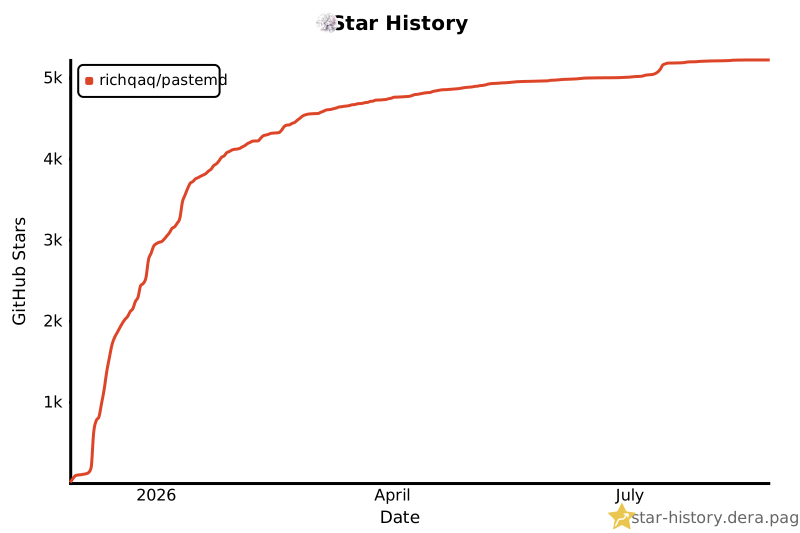
**2. Configure in PasteMD** Option 1: Via Settings UI - Open PasteMD Settings → Conversion Tab → Pandoc Filters - Click "Add..." button - Select filter file: `%APPDATA%\npm\mermaid-filter.cmd` - Save settings Option 2: Edit config file ```json { "pandoc_filters": [ "%APPDATA%\\npm\\mermaid-filter.cmd" ] } ``` **3. Test It Out** Copy the following Markdown and convert with PasteMD: ~~~markdown ```mermaid graph LR A[Start] --> B[Process] B --> C[End] ``` ~~~ The Mermaid diagram will be rendered as an image and inserted into Word. ### More Filter Resources - [Official Pandoc Filters List](https://github.com/jgm/pandoc/wiki/Pandoc-Filters) - [Lua Filters Documentation](https://pandoc.org/lua-filters.html) --- ## 🧩 App Extensions (Custom Paste Workflows) In Settings → **App Extensions**, you can configure paste modes per app and match by window title (regex supported): * **HTML** / **Markdown** / **LaTeX** / **File**: choose the most suitable paste mode for each target app - HTML/Markdown suit rich-text note apps (e.g., Yuque) - LaTeX suits academic sites like Overleaf - File suits apps like QQ/WeChat that accept file attachments > Tip: for the same app, configure only one workflow to avoid conflicts; use “window title matching” when needed. Example config (excerpt): > On Windows, `id` is usually the app's exe path; on macOS it's the bundle id (recommended to add via the settings UI for auto-fill). ```json { "extensible_workflows": { "html": { "enabled": true, "apps": [ { "name": "Yuque", "id": "/path/yuque.exe", "window_patterns": [] } ], "keep_formula_latex": true }, "latex": { "enabled": true, "apps": [ { "name": "chrome", "id": "/path/chrome.exe", "window_patterns": [ ".*overleaf.*" ] } ] }, "file": { "enabled": true, "apps": [ { "name": "QQ", "id": "/path/qq.exe", "window_patterns": [] } ] } } } ``` --- ## Tray Menu * Quick view: current global hotkey (read-only). * Enable hotkey: toggle global hotkey. * Popup notifications: toggle system notifications. * No app action: default action when Word/WPS/Excel is not detected (auto open / save only / copy to clipboard / none). * Move cursor to end: move caret to end after insertion. * HTML formatting: toggle **strikethrough ~~ to ``** and other HTML cleanup for correct conversion. * Set hotkey: record and save a new global hotkey in the UI (takes effect immediately). * Keep generated files: when enabled, DOCX files are saved to `save_dir`. * Open save directory, view logs, edit config, reload config/hotkey. * Version: show current version; check for updates; when available, show item and open download page. * Quit: exit the app. --- ## 📦 Run From Source / Build Recommended: Python 3.12 (64-bit). ```bash pip install -r requirements.txt python main.py ``` Using PyInstaller: ```bash pyinstaller --clean -F -w -n PasteMD ^ --icon assets\icons\logo.ico ^ --add-data "assets\icons;assets\icons" ^ --add-data "pastemd\i18n\locales\*.json;pastemd\i18n\locales" ^ --add-data "pastemd\lua;pastemd\lua" ^ --hidden-import plyer.platforms.win.notification ^ main.py ``` The executable will be generated at `dist/PasteMD.exe`. --- ## ⭐ Star Thanks for every star — please share PasteMD with more users. I am aiming for 4096 stars and will keep working hard! like you [![Star History Chart](https://star-history.dera.page/svg?repos=RICHQAQ/PasteMD&type=date&legend=top-left)](https://star-history.dera.page/#RICHQAQ/PasteMD&type=date&legend=top-left) ## ☕ Support & Donation If you have ideas or suggestions, feel free to open an issue! 🤯🤯🤯 You are also welcome to join the **PasteMD user group** to chat with others:
PasteMD QQ group QR code
Scan to join the PasteMD QQ group
If this tool helps you, you can buy the author a coffee ☕. Your support motivates ongoing fixes, enhancements, and more scenarios. Thanks for every bit of support! flower | Alipay | WeChat | | --- | --- | | ![Alipay](../../docs/pay/Alipay.jpg) | ![WeChat](../../docs/pay/Weixinpay.png) | --- ## License This project is released under the [GNU Affero General Public License v3.0](../../LICENSE). Third-party licenses are listed in [THIRD_PARTY_NOTICES.md](../../THIRD_PARTY_NOTICES.md).