
Grok App
Desktop workbench for local Grok Build
Sessions, projects, media, automations — for the real grok CLI
English ·
中文









---
> [!NOTE]
> ## Note
>
> **Grok App is not an official xAI product.** It wraps the local [Grok Build](https://x.ai) CLI (`grok agent stdio`) into a desktop workbench: sessions, projects, permissions, media previews, and scheduled tasks.
>
> Real agent power needs a working **Grok Build CLI** installed and signed in. Without CLI you can install from the first-run wizard, or use `GROK_APP_ACP=mock` for UI-only development.
---
## Contents
1. [Overview](#overview)
2. [Features](#features)
3. [Screenshots](#screenshots)
4. [Install & first run](#install--first-run)
5. [macOS “damaged” / Gatekeeper](#macos-damaged--gatekeeper)
6. [Config paths](#config-paths)
7. [Develop & build](#develop--build)
8. [Docs & contributing](#docs--contributing)
9. [Contributors](#contributors)
10. [Follow the author](#follow-the-author)
---
## Overview
The `grok` CLI is powerful in a terminal. Day-to-day work still needs multi-project sessions, a permission bar, rich previews, scheduled jobs, and bilingual UI.
**Grok App** is that workbench:
1. Install the app and prepare Grok Build CLI
2. Add a project / new session
3. Connect the agent; chat under Ask or YOLO
4. Preview artifacts, schedule automations, manage account & relays in Settings
**Stack:** Tauri 2 + Rust · React + TypeScript + Vite · Tailwind CSS
---
## Features
| Area | What you get |
|------|----------------|
| **Real Build sessions** | Default `grok agent stdio` (ACP); host-owned session FSM; optional remote ACP |
| **Projects & sessions** | Trusted dirs, virtualized sidebar, archive / orphan, fork & rewind; **import / open CLI sessions** (path clarity in independent mode) |
| **Multi-session stream** | Keep busy turns streaming after switching chats; process limits & idle recycle |
| **Git worktrees** | Project chip lists linked worktrees; switch cwd in one click (hidden for non-git) |
| **Permissions** | Default Ask; allow once / session / deny; YOLO; **per-project** permission tier |
| **Plan / Goal** | Sticky execution progress; resource-pane Markdown review + steps; Goal entry |
| **Slash · Extensions** | Slash palette, Skills; Settings → Extensions for MCP / Plugins |
| **Composer** | Follow-up send queue while busy; paste screenshots; context usage chip |
| **Media & files** | Image / video / PDF / Office / code preview; **edit & save** text in Resources; Changes (session diffs + workspace git) |
| **Agent runtime** | Stall cancel; structured error deck; **diagnostic zip** export; no early “ready” while tools/permissions open |
| **Automations** | Scheduled list; natural-language create-from-chat (silent fence, no JSON in UI) |
| **Account & quota** | Multi-account switcher, official login, SuperGrok quota + heatmap, custom-provider local usage |
| **Custom relays** | Independent `GROK_HOME` agent profile (keeps `~/.grok` clean when desired) |
| **Security** | Optional OS keychain for API keys (default `secrets.json` 0600); store write locks; in-app confirms only |
| **i18n** | Simplified Chinese / Traditional Chinese / English + tray |
| **Packaging** | macOS ARM / Intel · Windows x64 (setup + portable) · Linux x64 (AppImage / deb / rpm) |
---
## Screenshots
> From the current macOS development build.
| Workbench · SuperGrok | Account & quota |
|:---:|:---:|
| 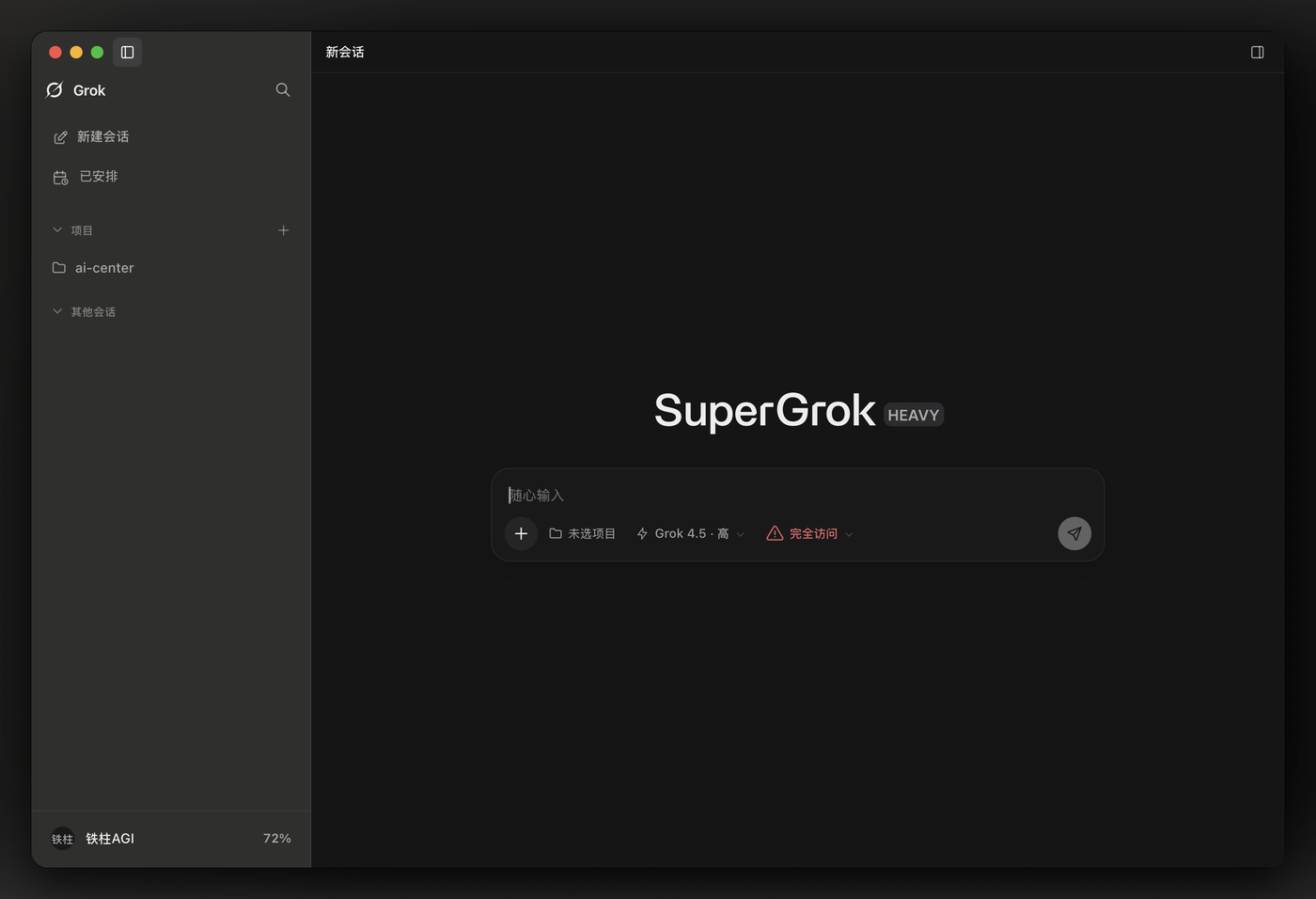 | 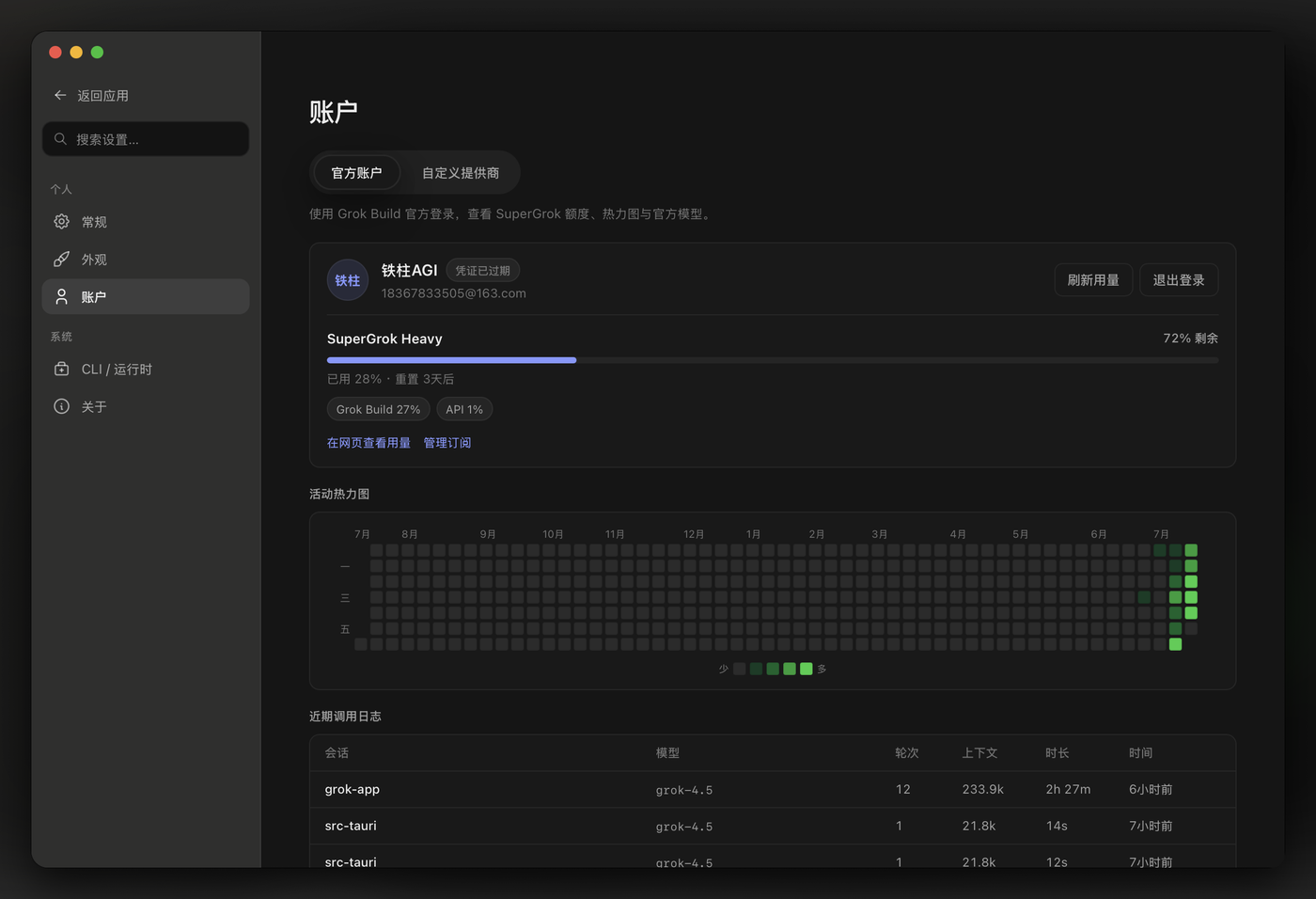 |
| Light theme | Session & media |
|:---:|:---:|
| 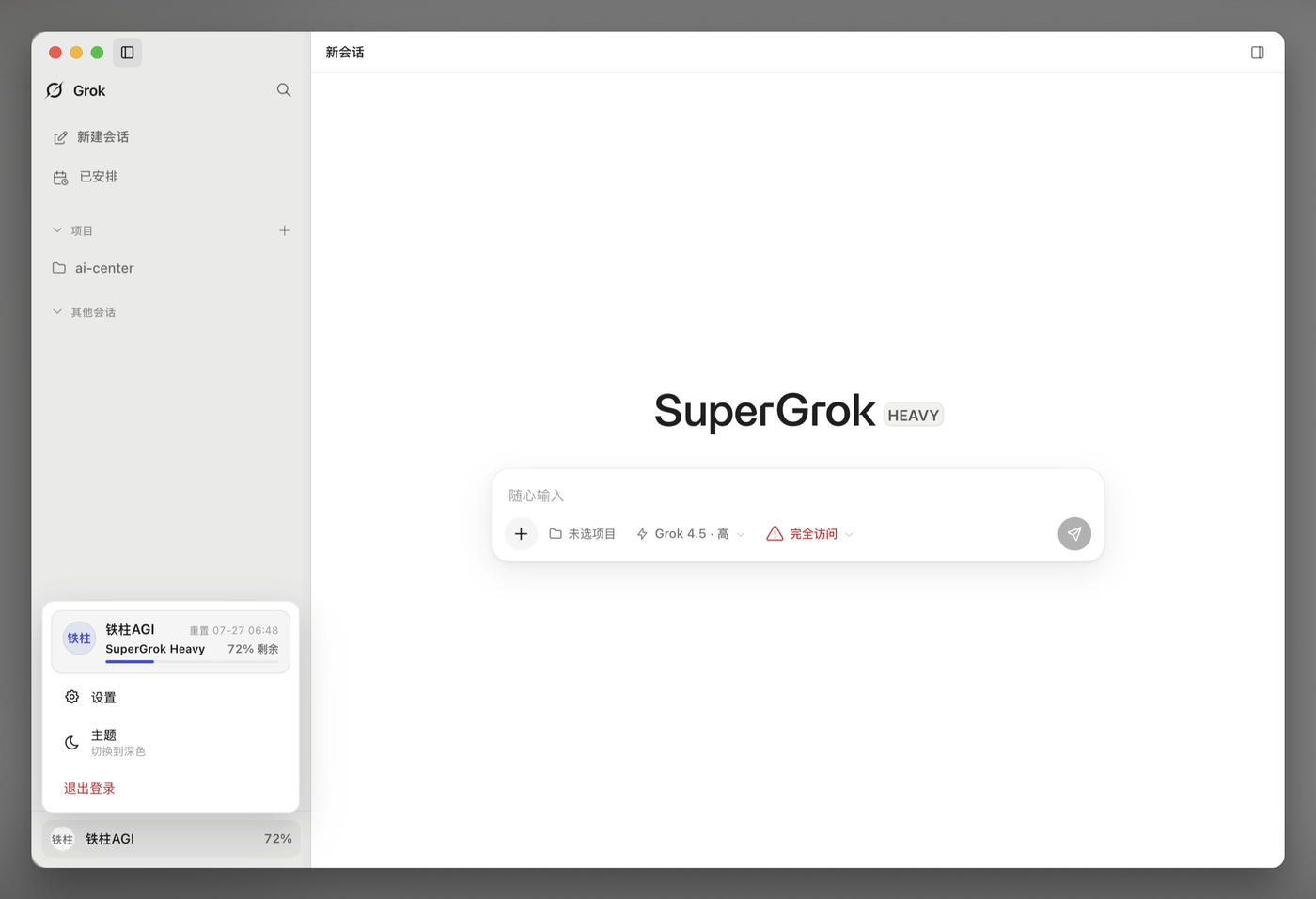 | 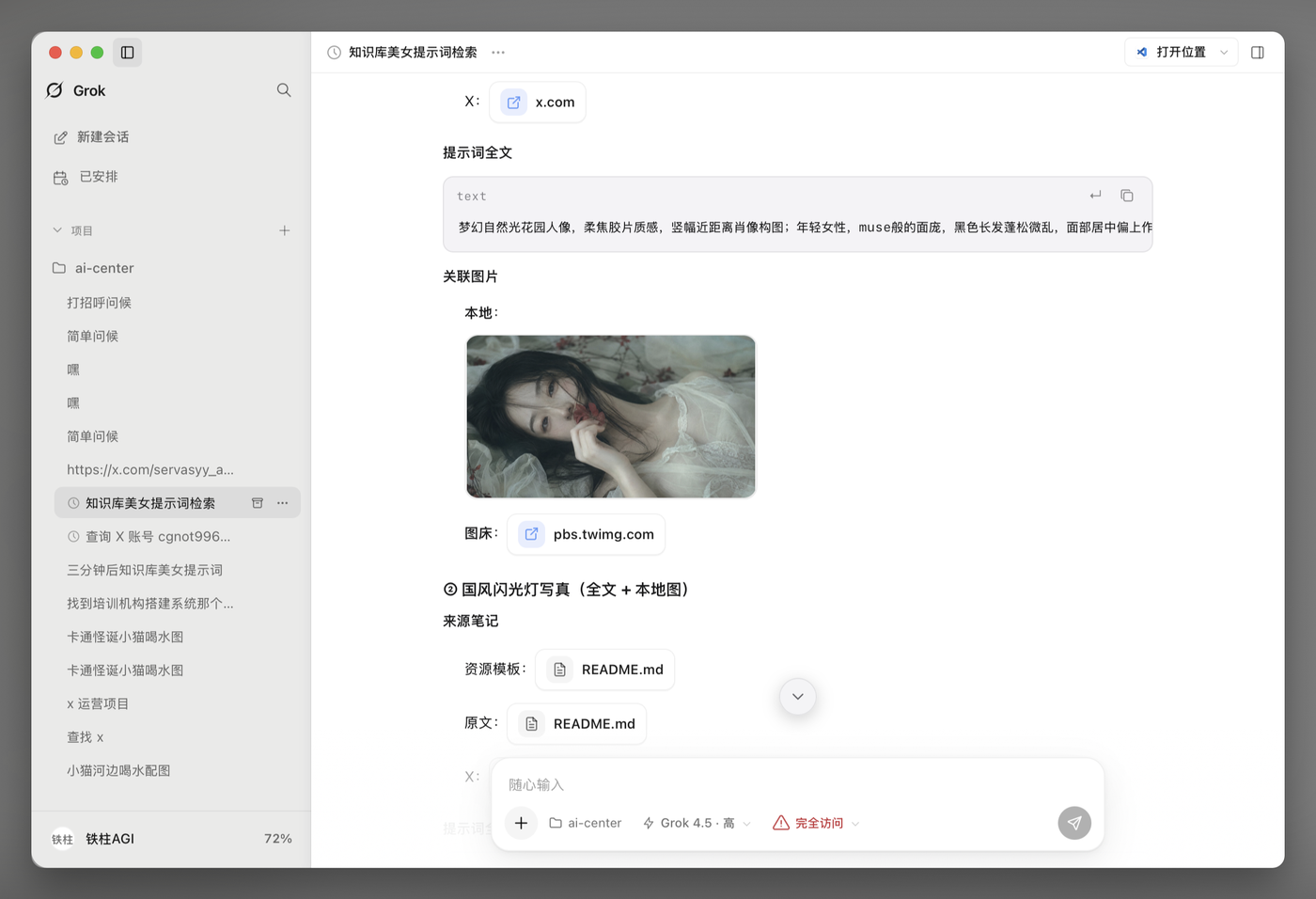 |
---
## Install & first run
### 1. Download
Get installers from [Releases](https://github.com/RongleCat/grok-app/releases):
| Platform | Artifact |
|----------|----------|
| macOS Apple Silicon | `Grok_*_aarch64.dmg` |
| macOS Intel | `Grok_*_x64.dmg` |
| Windows x64 | `*-setup.exe` installer + `*-portable.zip` |
| Linux x64 | AppImage / `.deb` / `.rpm` |
The bundle product name is **Grok** (matches the window title).
**Arch / Manjaro / EndeavourOS:** prefer the **AppImage** (`chmod +x` then run). Official CI does not publish a separate AUR package; AppImage is distro-agnostic.
> **Prebuilt packages need no build tools.** Node / pnpm / Rust are only required if you [build from source](#develop--build) — do not run `pnpm install && tauri build` just to use the app.
#### Verify your download
Each release ships a `SHA256SUMS` file. After downloading:
```bash
# macOS / Linux
shasum -a 256 -c SHA256SUMS --ignore-missing
# Windows (PowerShell)
Get-FileHash .\Grok_*_x64-setup.exe -Algorithm SHA256
```
Compare the PowerShell hash against the matching line in `SHA256SUMS`.
#### Windows SmartScreen
Windows builds are **not code-signed** (no Authenticode certificate yet), so SmartScreen shows “Windows protected your PC / Unknown publisher” on first run. This is expected for this project’s unsigned builds: click **More info → Run anyway**. Verify the checksum above if in doubt.
### 2. First run
1. Launch → **Setup wizard** ensures CLI is installed (multi-mirror install supported)
2. (Optional) Official login / API key / custom relay — skippable. If your local `grok` CLI is already signed in, pick **Use existing CLI sign-in** — no re-authorization needed
3. **Add project** → trust a folder
4. **Connect agent** → chat when Ready
5. Permission bar defaults to **Ask**; use YOLO only when you want unattended runs
### 3. Requirements
- Local **Grok Build CLI** (`grok`) **0.2.112 or newer**, often `~/.grok/bin/grok` or on `PATH` — older CLIs reject flags the app depends on (run `grok update` once after installing, then fully restart the app)
- Windows: `%USERPROFILE%\.grok\bin\grok.exe` or `PATH`; **WebView2 Runtime** (preinstalled on Windows 11; the installer bootstraps it otherwise)
### 4. Restricted networks (e.g. mainland China)
Grok backends (`auth.x.ai` / `grok.com` / `cli-chat-proxy.grok.com`) may be unreachable by direct connection. If sign-in hangs or every message times out with `NETWORK_PROVIDER`:
1. **Settings → Runtime → Network**: set the proxy (System / Manual, e.g. `http://127.0.0.1:7890`), then use **Test connection** to verify all three endpoints
2. If your `grok` CLI is already signed in, reuse it via the setup wizard (or switch **Session data mode** to *shared*) instead of Browser OAuth
3. No launcher scripts or manually exported `HTTP_PROXY` variables are needed — the app injects the configured proxy into all agent processes
---
## macOS “damaged” / Gatekeeper
Release builds are **not Apple-notarized** (paid Developer ID required). Gatekeeper may block downloads — that is expected.
**Recommended:**
```bash
xattr -cr /Applications/Grok.app
open /Applications/Grok.app
```
**Also works:**
- Finder: **right-click** → **Open** → confirm
- **System Settings → Privacy & Security** → **Open Anyway**
Only download from this repo’s official [Releases](https://github.com/RongleCat/grok-app/releases).
---
## Config paths
Default data root (override with **`GROK_APP_HOME`**):
| Platform | Typical path |
|----------|----------------|
| macOS | `~/Library/Application Support/com.grokapp.grok-app/` |
| Windows | `%APPDATA%\grokapp\grok-app\` |
| Fallback | `~/.grok-app/` |
```text
/
projects.json
sessions_index.json
settings.json
secrets.json # metadata (+ API-key fallback); keys prefer OS keychain
automations.json
projects/
sessions/
logs/
agent-home/ # independent-mode GROK_HOME
```
API keys prefer the OS secret store (macOS Keychain / Windows Credential Manager /
Linux Secret Service) with a `secrets.json` (mode `0600`) fallback when the OS store
is unavailable. Do not commit secrets.
Grok Build’s own config remains under **`~/.grok`** (CLI login, `auth.json`, …).
**shared** session mode can use `~/.grok`; **independent** mode uses `agent-home/`.
---
## Develop & build
```bash
# Needs: Node 22+, pnpm 9, Rust stable, Xcode CLT (macOS)
pnpm install
pnpm dev # full app (real CLI by default)
pnpm dev:ui # frontend only
GROK_APP_ACP=mock pnpm dev
pnpm typecheck && pnpm test
cd src-tauri && cargo test
pnpm build
```
Cross-compile and release notes: [docs/BUILD.md](./docs/BUILD.md).
Release (write the matching `CHANGELOG.md` section first):
```bash
./scripts/release-tag.sh 0.1.1
./scripts/release-tag.sh 0.1.1 --push
```
---
## Docs & contributing
| Audience | Link |
|----------|------|
| AI agents / product rules | [`docs/llm-wiki/`](./docs/llm-wiki/) |
| Build & release | [docs/BUILD.md](./docs/BUILD.md) |
| Changelog | [CHANGELOG.md](./CHANGELOG.md) |
| Contributing | [CONTRIBUTING.md](./CONTRIBUTING.md) |
| Code of conduct | [CODE_OF_CONDUCT.md](./CODE_OF_CONDUCT.md) |
| Security | [SECURITY.md](./SECURITY.md) |
Issues and PRs are welcome.
## Contributors
Thanks to everyone who has contributed to Grok App. All human GitHub contributors (by commit count, updated 2026-08-04).


[Full contributors graph →](https://github.com/RongleCat/grok-app/graphs/contributors)
## License
[MIT](./LICENSE) © RongleCat
---
## Follow the author
| Channel | Link |
|---------|------|
| **X / Twitter** | [铁柱AGI @cgnot996](https://x.com/cgnot996) |
| **WeChat Official Account** | Search **「铁柱AGI」** (QR at top left) |
| **WeChat community group** | Scan the QR at top right |
[linux.do](https://linux.do/) 学AI,上L站
If Grok App helps you, please star the repo ⭐