# InnoClaw
A self-hostable AI research workspace for grounded chat, paper study, scientific skills, and research execution.

%20%7C%2025%20Current-339933?logo=node.js&logoColor=white)


English · 简体中文 · 日本語 · Français · Deutsch
Documentation · Quick Start · Community
**InnoClaw turns server-side folders into AI-native workspaces where you can chat over your own files, study papers, and run experiments — all in one place.**
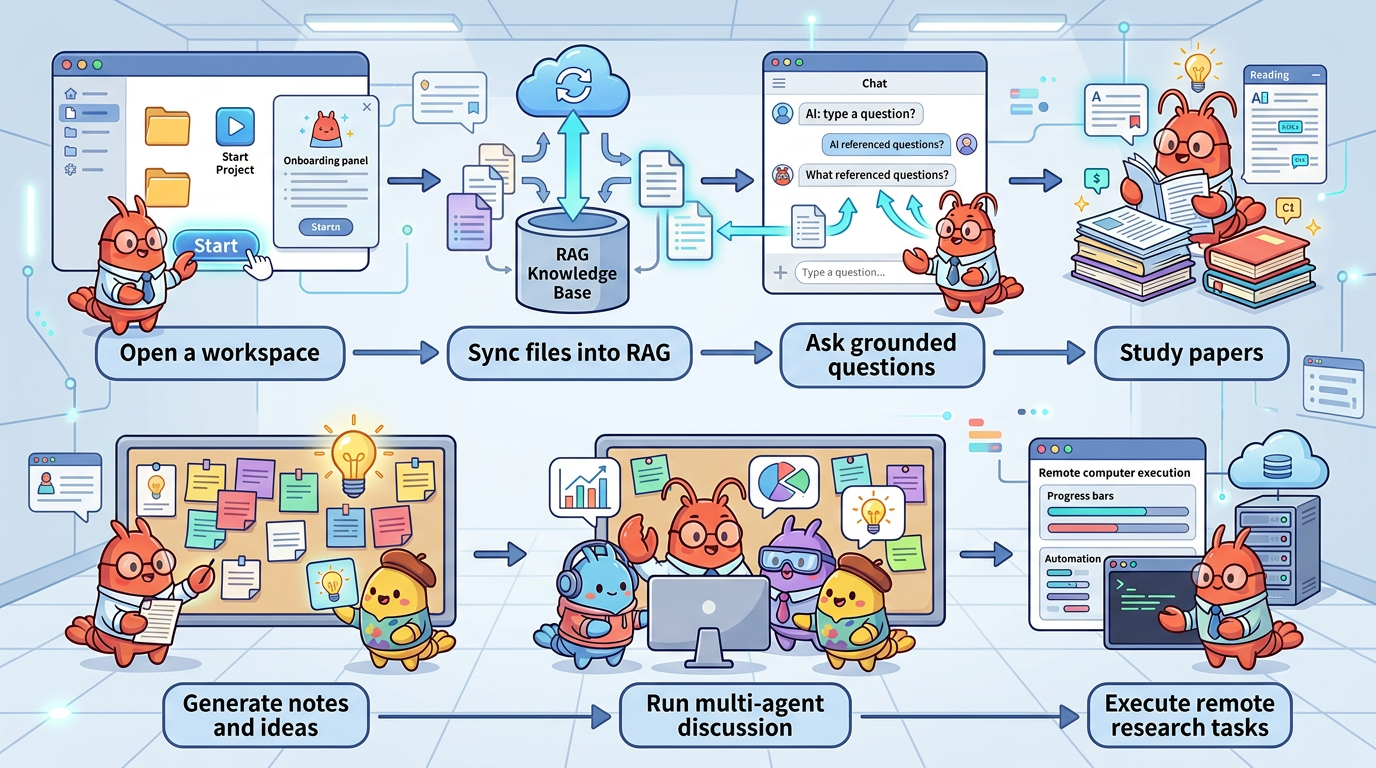
Instead of juggling separate tools for literature, notes, code, and automation, you open a folder, sync it, and work: cited answers over real documents, structured paper reviews, reusable scientific skills, and a path from reading to remote execution.
---
## Who This Is For
- **Researchers** who read papers, run experiments, and want cited AI answers grounded in their own files
- **ML / AI engineers** who need a workspace for code, data, and agent-assisted execution on remote clusters
- **Lab teams** who want a shared, self-hosted research hub instead of scattered SaaS tools
- **Self-hosters** who want full control over their data, models, and infrastructure
---
## 3-Minute Quick Start
Requires **Node.js 24+** (`package.json` is the source of truth). If you use `nvm`: `nvm install && nvm use`.
```bash
git clone https://github.com/SpectrAI-Initiative/InnoClaw.git
cd InnoClaw
npm install
cp .env.example .env.local # then edit: set WORKSPACE_ROOTS and at least one API key
mkdir -p ./data
npx drizzle-kit migrate
npm run dev # open http://localhost:3000
```
After the UI opens: **Settings** → configure a model provider → open a workspace → click **Sync** → start chatting.
### Optional CLI
```bash
npm link
innoclaw
innoclaw run --prompt "Summarize the current workspace"
```
The CLI uses the same local app runtime as the web UI. When auth is enabled, it auto-starts the app, opens the browser login page on `localhost`, and stores a dedicated CLI session after sign-in. For trusted headless automation, start the app with authentication disabled.
Headless local run mode:
```bash
npm run dev:no-auth
```
> **Security**: InnoClaw includes shell execution and remote job submission capabilities. See [SECURITY.md](SECURITY.md) for deployment hardening and trust boundary documentation.
Environment variables, upgrade flow, and advanced setup
Set `WORKSPACE_ROOTS` in `.env.local` to one or more absolute paths where your research folders live:
```ini
WORKSPACE_ROOTS=/absolute/path/to/workspaces
OPENAI_API_KEY=sk-...
```
- `WORKSPACE_ROOTS` directories must already exist before startup
- `npx drizzle-kit migrate` creates or upgrades the SQLite schema at `./data/innoclaw.db`
- If the repo lives on NFS/CIFS or another mount without local file locking, InnoClaw now disables Next's dist-dir lock automatically so `npm run dev` can start. You should still set `DATABASE_URL` to a local disk path for SQLite. `NEXT_BUILD_DIR`, if used, must stay inside the repo (for example `.next-local`).
**Upgrading:**
```bash
git fetch --tags
git checkout vX.Y.Z # or: git pull (if tracking main)
npm install
npx drizzle-kit migrate
npm run build
```
Check `CHANGELOG.md` before every upgrade. Compare `.env.local` against `.env.example` for new variables.
For OS-specific prerequisites and production deployment: see [Installation](docs/getting-started/installation.md) and [Deployment](docs/getting-started/deployment.md).
### Docker Deployment
```bash
git clone https://github.com/SpectrAI-Initiative/InnoClaw.git && cd InnoClaw
cp .env.production.example .env.production.local # edit: set API key + WORKSPACE_ROOTS
docker compose up -d # open http://localhost:3000
```
See the full [Docker Deployment Guide](docs/docker.md) for volumes, reverse proxy, backups, and upgrades.
---
## Choose Your Path
InnoClaw supports three primary workflows. Pick the one that matches what you need today — you can always explore the others later.
### 1. Read & Study Papers
Search literature across ArXiv, PubMed, bioRxiv, and Semantic Scholar. Summarize papers, run structured multi-role discussions (moderator, skeptic, librarian, reproducer, scribe), and generate research ideation from what you read.
**Start here:** open Paper Study in any workspace.
### 2. Work in a Research Workspace
Open a server folder as a persistent workspace. Chat over your files with RAG-backed citations. Browse, edit, and sync files. Use the agent panel to run multi-step tasks with tool calling. Import reusable scientific skills across domains like drug discovery, genomics, and protein science.
**Start here:** create a workspace, click Sync, and ask a question.
### 3. Run Remote Experiments
Go from code inspection to job submission and result analysis. Review repositories with agent assistance, gate high-risk steps with approval checkpoints, submit jobs through Shell, Slurm, or `rjob`, and monitor execution across clusters.
**Start here:** open Deep Research in a workspace with remote profiles configured.
---
## What's New
#### 2026-07-03
- **Generic Kubernetes Job Scheduler**: Enable AI agents to define, validate, and execute containerized workloads on Kubernetes clusters with configurable job profiles
#### 2026-06-26
- **CLI Runtime Support**: Interactive command-line interface with REPL, batch operations, and agent integration for terminal-based workflows
Show earlier updates
#### 2026-06-12
- **Disabled Auth Mode**: Run the application without authentication for single-user or development deployments
#### 2026-05-12
- **Local User Authentication**: Added built-in account registration, sign-in, sign-out, and persistent session support.
- **Admin User Management**: Added an admin users page to create accounts and manage roles, access, passwords, and ownership.
- **CLI Login Handoff**: `innoclaw` now supports interactive terminal mode, one-shot `run`, JSON `batch`, and browser-to-CLI session handoff.
#### 2026-04-17
- **InnoClaw CLI**: Run the app, manage workspaces, and create/run/export Deep Research sessions from the terminal
- **Deep Research Checkpoints**: Research now pauses at review points so you can continue, revise, branch, reject, or stop runs
- **Role Studio**: New Deep Research tab to inspect specialist roles and send targeted instructions to the Researcher or workers
#### 2026-04-12
- **Docker Deployment Support**: Self-host InnoClaw with Docker and docker-compose, with guides for setup, volumes, and upgrades
- **200+ Built-in Skills**: Massive expansion of ready-to-use scientific skills across bioinformatics, chemistry, genomics, and physics
- **Skill Creator Framework**: New meta-skill for creating, evaluating, benchmarking, and validating custom skills
#### 2026-04-02
- **Docker Deployment Support**: Added Dockerfile, docker-compose.yml, and full Docker deployment guide for self-hosted production setups
- **200+ New Built-in Skills**: Expanded skill library with bioinformatics, cheminformatics, genomics, physics, and drug discovery pipelines
- **Skill Creator Framework**: New meta-skill with evaluation, benchmarking, and validation tooling for building and testing custom skills
#### 2026-04-01
- **Text-to-CAD Skill**: New agent skill that converts natural language descriptions into 3D CAD models (STL/STEP) using CadQuery, with automatic environment setup
- **Workspace Image Picker**: New dialog UI in the agent panel for browsing and selecting images from the workspace to attach to conversations
#### 2026-03-31
- **Pasted Image Support**: Users can now paste images directly into the chat input for multimodal AI conversations
- **Deep Research Role Studio**: New Role Studio panel lets users configure and manage custom researcher roles in the deep research workflow
- **Expanded Paper Search Sources**: Added BioRxiv, PubMed, and PubChem as searchable paper sources in Paper Study
#### 2026-03-26
- **Dynamic Model Discovery**: Agent panel now auto-fetches available models from each configured AI provider, merging live results with built-in model lists
- **Per-Model Base URL Routing**: Chinese AI providers (shlab, qwen, moonshot, deepseek, minimax, zhipu) now support per-model `__BASE_URL` env vars for flexible endpoint routing
- **Runtime Tool-Calling Override**: Tool support can now be toggled per provider via `_TOOLS_ENABLED=true/false` without code changes
---
## Feature Snapshot
| Feature | What it enables |
|---------|------------------|
| Workspace Management | Map server folders into persistent AI workspaces |
| File Browser | Browse, upload, create, edit, preview, and sync files |
| RAG Chat | Ask grounded questions over indexed files with citations |
| Paper Study | Search, summarize, and inspect papers from ArXiv, PubMed, bioRxiv, and more |
| Discussion Mode | Run structured multi-role paper discussions |
| Research Ideation | Generate new directions and cross-disciplinary ideas |
| Skills System | Import reusable scientific and workflow skills |
| Deep Research | AI-driven multi-phase research with workflow graph and role-based execution |
| Research Execution | Orchestrate remote experiment loops with monitoring and approval gates |
| Multi-Agent Sessions | Keep separate execution contexts across tabs and projects |
| Multi-LLM Support | Use OpenAI, Anthropic, Gemini, and compatible endpoints |
---
## Architecture
| Layer | Role |
|-------|-----------------------|
| **Workspace** | Files, notes, session context, and project state |
| **Knowledge** | RAG index over synced files for grounded answers |
| **Paper Workbench** | Literature search, summary, discussion, and ideation |
| **Skills** | Reusable domain workflows and tool-guided capabilities |
| **Execution** | Remote jobs, experiment loops, and result collection |
---
## Documentation
- **Start here** — [Overview](docs/getting-started/overview.md), [Installation](docs/getting-started/installation.md)
- **Configure and deploy** — [Deployment](docs/getting-started/deployment.md), [Environment Variables](docs/getting-started/environment-variables.md), [Configuration](docs/usage/configuration.md)
- **Use the product** — [Features](docs/usage/features.md), [API Reference](docs/usage/api-reference.md)
- **Troubleshoot and contribute** — [Troubleshooting](docs/troubleshooting/faq.md), [Development Guide](docs/development/contributing.md)
---
## Community & Support
- **Need setup or usage help?** Start with the [docs](https://SpectrAI-Initiative.github.io/InnoClaw/)
- **Found a bug or want a feature?** [Open an issue](https://github.com/SpectrAI-Initiative/InnoClaw/issues)
- **Want direct discussion?** Join the Feishu or WeChat communities below


Scan to join our community · 扫码加入飞书/微信体验群
---
## Project Info
- **License** — Apache-2.0, see `LICENSE`
- **Repository** — https://github.com/SpectrAI-Initiative/InnoClaw
- **Docs** — https://SpectrAI-Initiative.github.io/InnoClaw/