


```text
███████ ██ ██████ ███████ ██████ ██████ █████ ██████
██ ██ ██ ██ ██ ██ ██ ██ ██ ██ ██ ██
█████ ██ ██████ █████ ██ ██████ ███████ ██████
██ ██ ██ ██ ██ ██ ██ ██ ██ ██ ██ ██
██ ██ ██ ██ ███████ ██████ ██ ██ ██ ██ ██████
```
An open-source microVM platform for apps and AI agents on your own server.
English ·
한국어 ·
日本語 ·
中文 ·
Bahasa Indonesia

[DeepWiki](https://deepwiki.com/SteelCrab/firecrab)
## Overview
Purpose
Create and manage Firecracker microVMs on your own server.
Deploy application images and manage updates and rollbacks.
Run AI agents in isolated MicroVM environments.
Manage the platform through a browser dashboard, CLI, or REST API.
Key features
- **VMs** — create, start, stop, and delete microVMs; access a browser serial console.
- **[App deployment](public-docs/guides/microservices.md)** — deploy OCI images, manage replicas and health checks, and [update or roll back](public-docs/guides/deploy.md) running apps.
- **[AI agents](public-docs/guides/ai-sandbox.md)** — run coding agents and project tasks in isolated MicroVM workspaces.
- **Images and disks** — M2Image templates, OCI image imports, and MicroStorage disk locations.
- **Networks** — MicroNetwork subnets and per-VM internet or isolated egress.
- **Host platforms** — Linux directly; macOS and Windows through microManager (Windows Preview).
Platform comparison
| Key point | **Firecrab** | [KVM + libvirt](https://libvirt.org/) | [OpenStack](https://docs.openstack.org/nova/latest/) |
| --- | --- | --- | --- |
| Focus | Single-host microVMs | General-purpose VMs | Private cloud |
| Virtualization | Firecracker + KVM | QEMU/KVM | Usually QEMU/KVM |
| Management | Dashboard, CLI, REST | libvirt API, CLI; separate GUI | Horizon, CLI, REST |
| Deployment | One host | Per-host management | Controller and compute services |
## Architecture
[Detailed architecture](public-docs/reference/architecture.md): OS-specific microManager layers, VM startup, image/kernel supply, guest features, and CLI updates.
### Firecrab at a glance
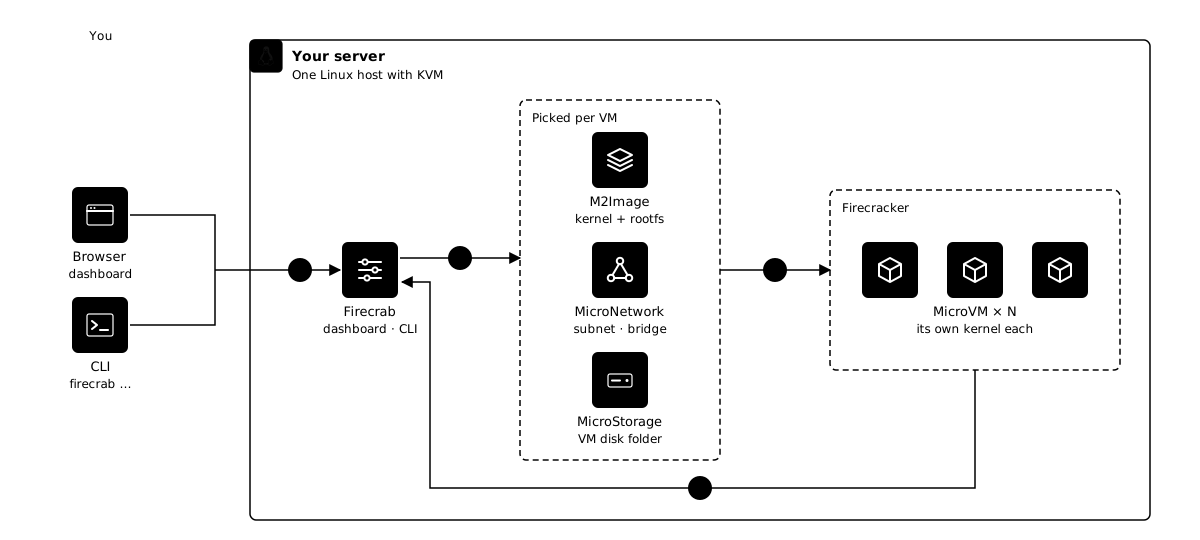
1. Ask from the browser or the CLI. Pick an M2Image, a MicroNetwork, and a MicroStorage to create a MicroVM.
2. Firecrab verifies the M2Image, prepares the MicroNetwork, and creates the VM’s own disk in the MicroStorage.
3. It starts one Firecracker process per MicroVM, so each one boots its own kernel.
4. When the guest reports that its network is ready, the MicroVM is running.
### Runs anywhere
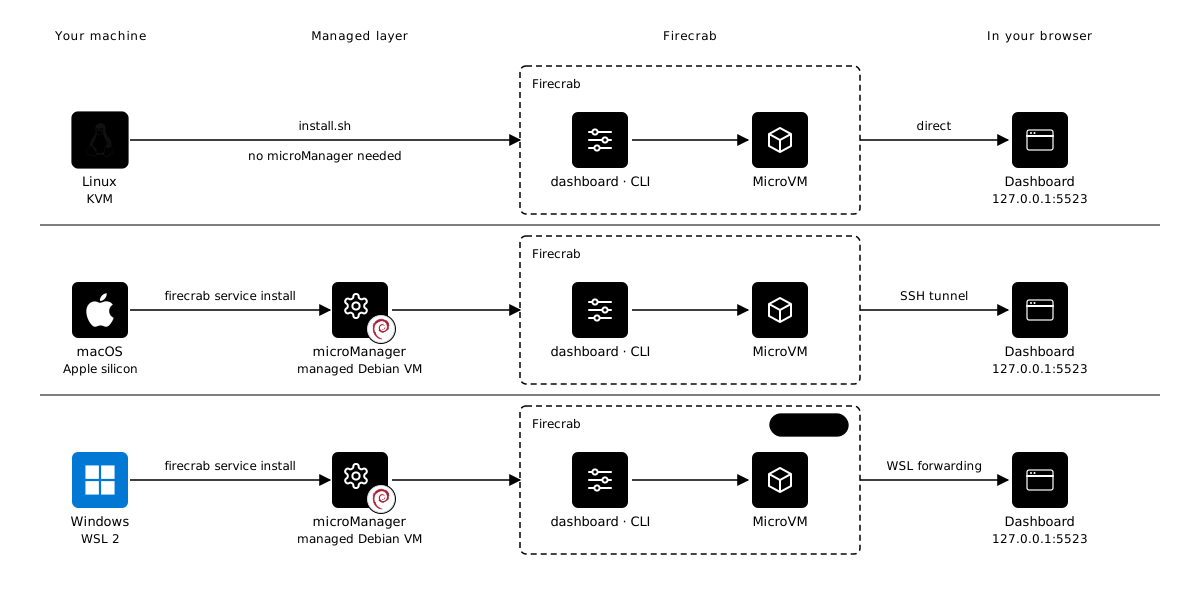
On Linux, one `install.sh` is enough. On macOS and Windows, `firecrab service install` creates a managed Debian VM that runs the same Firecrab, and you open the same dashboard at `localhost:5523`.
macOS needs Apple silicon M3 or later and is validated on an Apple M5. Windows is marked Preview because microVMs cannot start on WSL2 yet.
Logos: Linux, Apple, and Debian from simple-icons (CC0); the gear icon from Lucide (ISC). All logos and trademarks belong to their respective owners.
## Installation
Install on Linux, macOS, or Windows
### Linux
Requires Linux x86_64 or ARM64, usable `/dev/kvm`, network access, and a regular user with `sudo`. Run the installer as that user, without a `sudo` prefix. Enable hardware or nested virtualization first if KVM is unavailable.
```sh
curl -fsSL https://github.com/SteelCrab/firecrab/releases/latest/download/install.sh | bash
```
Installer diagnostics and uninstall options are in the [installation guide](public-docs/getting-started/installation.md). To install only the remote CLI on Linux, use the verified `install-cli.sh` procedure below; it selects GNU or musl and installs to `~/.local/bin`.
### macOS
Requires Apple silicon, macOS 15+, and runtime support for nested virtualization (M3 or later; full validation on M5/macOS 26.6.2). First install the CLI and helper, verifying the installer checksum:
```sh
curl -fLO https://github.com/SteelCrab/firecrab/releases/latest/download/install-cli.sh
curl -fLO https://github.com/SteelCrab/firecrab/releases/latest/download/SHA256SUMS
grep ' install-cli.sh$' SHA256SUMS > install-cli.sh.sha256
if command -v sha256sum >/dev/null; then
sha256sum -c install-cli.sh.sha256
else
shasum -a 256 -c install-cli.sh.sha256
fi && sh install-cli.sh
```
Then check host capability and provision the managed Debian environment:
```sh
firecrab service doctor
firecrab service install
```
The CLI installer alone does not install the VM. microManager uses `Virtualization.framework`, a separate persistent data disk, and a resident launchd service. See [microManager on macOS](public-docs/getting-started/macos.md).
### Windows
Requires x86_64 or ARM64 Windows, Microsoft Store WSL2, and nested KVM. In a regular PowerShell session, download and verify the CLI installer:
```powershell
Invoke-WebRequest https://github.com/SteelCrab/firecrab/releases/latest/download/install-cli.ps1 -OutFile install-cli.ps1
Invoke-WebRequest https://github.com/SteelCrab/firecrab/releases/latest/download/SHA256SUMS -OutFile SHA256SUMS
$expected = ((Get-Content SHA256SUMS | Where-Object { $_ -match ' install-cli\.ps1$' }) -split '\s+')[0]
if ((Get-FileHash install-cli.ps1 -Algorithm SHA256).Hash -ne $expected) { throw 'installer checksum mismatch' }
& ./install-cli.ps1
```
Open a new PowerShell session if `firecrab` is not yet on `PATH`, then run the capability check and install. ARM64 installation has not been validated end to end. See [microManager on Windows](public-docs/getting-started/windows.md).
```powershell
firecrab service doctor
firecrab service install
```
**Windows:** installation selects the latest stable Firecrab guest. Run `firecrab update --apply` to upgrade an existing managed guest. Nested KVM is required; see the [Windows guide](public-docs/getting-started/windows.md).
## Run
Start and stop on Linux, macOS, or Windows
### Linux
The installer starts both systemd services. To start, inspect, or stop them later:
```sh
sudo systemctl start firecrab-helper firecrab-api
systemctl status firecrab-helper firecrab-api
sudo systemctl stop firecrab-api firecrab-helper
```
### macOS
microManager starts the resident management VM and localhost API tunnel:
```sh
firecrab service start
firecrab service status
firecrab service debug --logs --tail 100
firecrab service stop
```
### Windows
microManager keeps the managed WSL2 distribution running through a per-user scheduled task:
```powershell
firecrab service start
firecrab service status
firecrab service debug --logs --tail 100
firecrab service stop
```
**Windows:** installation selects the latest stable Firecrab guest. Run `firecrab update --apply` to upgrade an existing managed guest. Nested KVM is required; see the [Windows guide](public-docs/getting-started/windows.md).
When healthy, open `http://127.0.0.1:5523/`. Create a MicroNetwork, choose an installed image, create and start a VM, then open Terminal after `running`. For a remote host, configure a [CLI host profile](public-docs/reference/cli.md#host-profiles).
On Windows and macOS, `firecrab service settings` opens the microManager settings editor. Enable Sleepy to shut down an idle management VM and wake it automatically for work requests. After the first save, run `firecrab service start` to activate the resident controller. See [settings and Sleepy](public-docs/guides/micromanager-settings.md) for resource limits and activation requirements.
## Run from source
Linux API and dashboard / macOS and Windows CLI
From the repository root, use the pinned [Rust toolchain](rust-toolchain.toml), Node.js 22+, and npm. Full VM execution also needs Linux KVM and the [host prerequisites](public-docs/getting-started/installation.md).
### Linux
Use three terminals. The helper runs privileged; the API runs as your regular user. Local data paths are relative to the repository root.
```sh
# 1
cargo build -p firecrab-helper --locked
sudo -u root -g "$(id -gn)" FIRECRAB_NET_HELPER_ALLOWED_UID="$(id -u)" \
./target/debug/firecrab-helper
# 2
cargo run -p firecrab-api --locked
# 3
npm ci --prefix firecrab-frontend
FIRECRAB_DEV_API_PORT=5523 npm run dev --prefix firecrab-frontend
# http://localhost:8080/
```
For a build served by the API, stop the development API and run:
```sh
npm run build --prefix firecrab-frontend
FIRECRAB_STATIC_ROOT="$PWD/firecrab-frontend/dist" cargo run -p firecrab-api --locked
# http://127.0.0.1:5523/
```
### macOS
Build the checkout CLI and signed native helper, then install the managed service (use `service start` if already installed):
```sh
cargo build -p firecrab-cli --locked
scripts/build-micromanager-macos.sh target/debug/firecrab-micromanager-macos
./target/debug/firecrab service install
./target/debug/firecrab service status
```
### Windows
Build the checkout CLI in PowerShell, then install the managed service (use `service start` if already installed):
```powershell
cargo build -p firecrab-cli --locked
.\target\debug\firecrab.exe service install
.\target\debug\firecrab.exe service status
```
On macOS and Windows, these commands run the checkout CLI/helper with the installed guest API. They do **not** rebuild edited `firecrab-api` source inside Debian. Develop the full API/net-helper runtime on Linux; see the platform guides above for managed-service development.
## Tests
Checks, coverage, and browser E2E
Workspace checks from the repository root on Linux:
```sh
cargo fmt --all -- --check
cargo clippy --workspace --all-targets -- -D warnings
cargo test --workspace --locked
npm ci --prefix firecrab-frontend
npm run lint --prefix firecrab-frontend
npm run build --prefix firecrab-frontend
python3 scripts/check-doc-links.py
python3 scripts/check-changelog.py
```
Optional local coverage (requires `cargo-llvm-cov`):
```sh
cargo llvm-cov --workspace --locked --lcov --output-path lcov.info
```
Browser E2E without guest boot:
```sh
npm ci --prefix firecrab-e2e
npm run install-browsers --prefix firecrab-e2e
FIRECRAB_E2E_SKIP_GUEST_BOOT=1 npm test --prefix firecrab-e2e
```
In PowerShell, set `$env:FIRECRAB_E2E_SKIP_GUEST_BOOT="1"` before `npm test --prefix firecrab-e2e`. This skips guest boot, so it does not validate KVM or nginx HTTP. Guest execution and all installer checks are covered in [TEST.md](public-docs/development/testing.md), [한국어 체크리스트](public-docs/development/testing.ko.md), and the [E2E guide](firecrab-e2e/README.md).
Windows source runtime E2E (requires WSL2 nested KVM):
```powershell
cargo build -p firecrab-cli --locked
.\scripts\ci-qa-windows-e2e.ps1 -Phase browser -Cli .\target\debug\firecrab.exe -Source .
```
This runs Chromium inside managed WSL with real guest boot enabled.
See the [CI guide](public-docs/development/ci.md) for all phases and the [Windows source QA continuation](public-docs/development/validation-history.md#windows-source-qa-continuation-2026-10-04) for guest/browser passes and validation limits.
## Usage: nginx
Import nginx, create a microVM, and access HTTP
Use a supported Linux host or macOS microManager with a running API and CLI. The commands below use a POSIX shell on Linux/macOS. The dashboard offers the same flow under Images → OCI Import, Networks, and MicroVM.
1. Inspect and import the image, then repeat the status command until the job succeeds and `nginx-1.27` is installed:
```sh
firecrab image inspect nginx:1.27
firecrab image import nginx:1.27
firecrab image import-status nginx-1.27
```
2. Create a network. Replace `NETWORK_ID` below with the UUID returned by the first command (choose a non-overlapping subnet):
```sh
firecrab network create --name nginx-net --subnet-cidr 172.31.20.0/24
firecrab vm create --name nginx-demo --template nginx-1.27 --network NETWORK_ID
```
3. Replace `VM_ID` with the UUID returned by VM creation, start it, and wait for `running` in the VM list:
```sh
firecrab vm start VM_ID
firecrab vm list
```
4. Add TCP host port `8081` → guest port `80` with the REST API, then check nginx. This PUT replaces the VM’s complete port-forward list; keep any other rules you need in the request.
```sh
curl -fsS -X PUT http://127.0.0.1:5523/api/vms/VM_ID/port-forwards \
-H 'Content-Type: application/json' \
-d '{"portForwards":[{"hostPort":8081,"guestPort":80,"protocol":"tcp"}]}'
```
On Linux, run the HTTP check from another machine using `http://FIRECRAB_HOST_IP:8081/`; DNAT does not provide a host-loopback shortcut. On macOS, the TCP relay provides `http://127.0.0.1:8081/`. Allow host port 8081 through the host/router firewall when accessing it remotely.
```sh
curl -I http://FIRECRAB_HOST_IP:8081/
# macOS
curl -I http://127.0.0.1:8081/
```
OCI import builds a bootable rootfs with `/etc/firecrab/busybox` as PID 1 and runs nginx’s entrypoint as a service. `EXPOSE 80` does not create a host port forward. See [OCI images](public-docs/guides/oci.md) and [networking](public-docs/guides/networking.md).
To stop the example VM:
```sh
firecrab vm stop VM_ID
```
Dashboard screens
The left navigation splits daily work into **MicroVM**, a per-VM **Terminal**,
**Networks**, and **Images**.
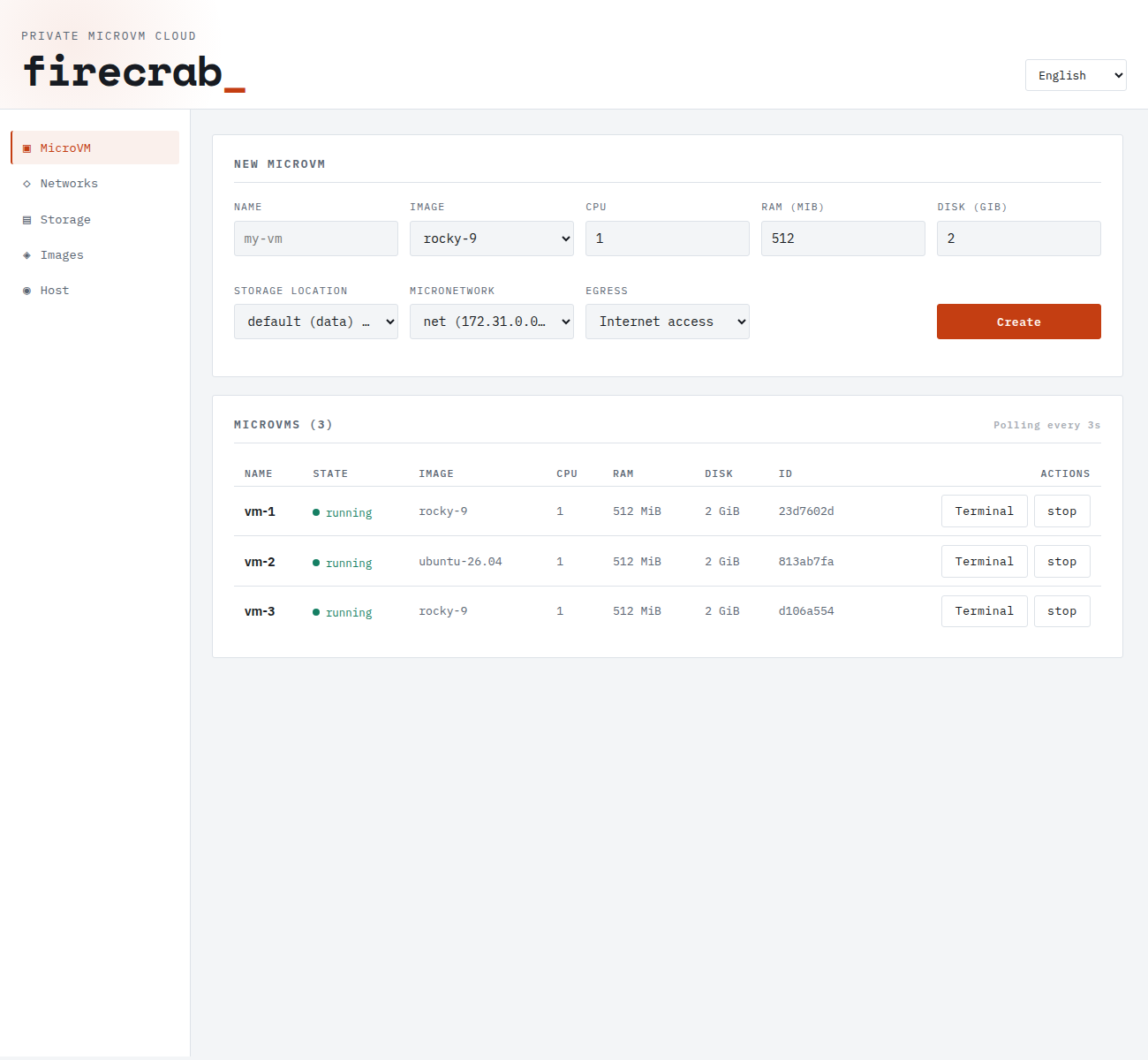
### MicroVM
Create a VM from its name, image, CPU, RAM, disk, storage location, MicroNetwork, and
egress policy. The list refreshes state, image, resources, and ID every three seconds;
running VMs expose **Terminal** and **stop**. Select a VM name for startup progress,
logs, network, and storage detail.
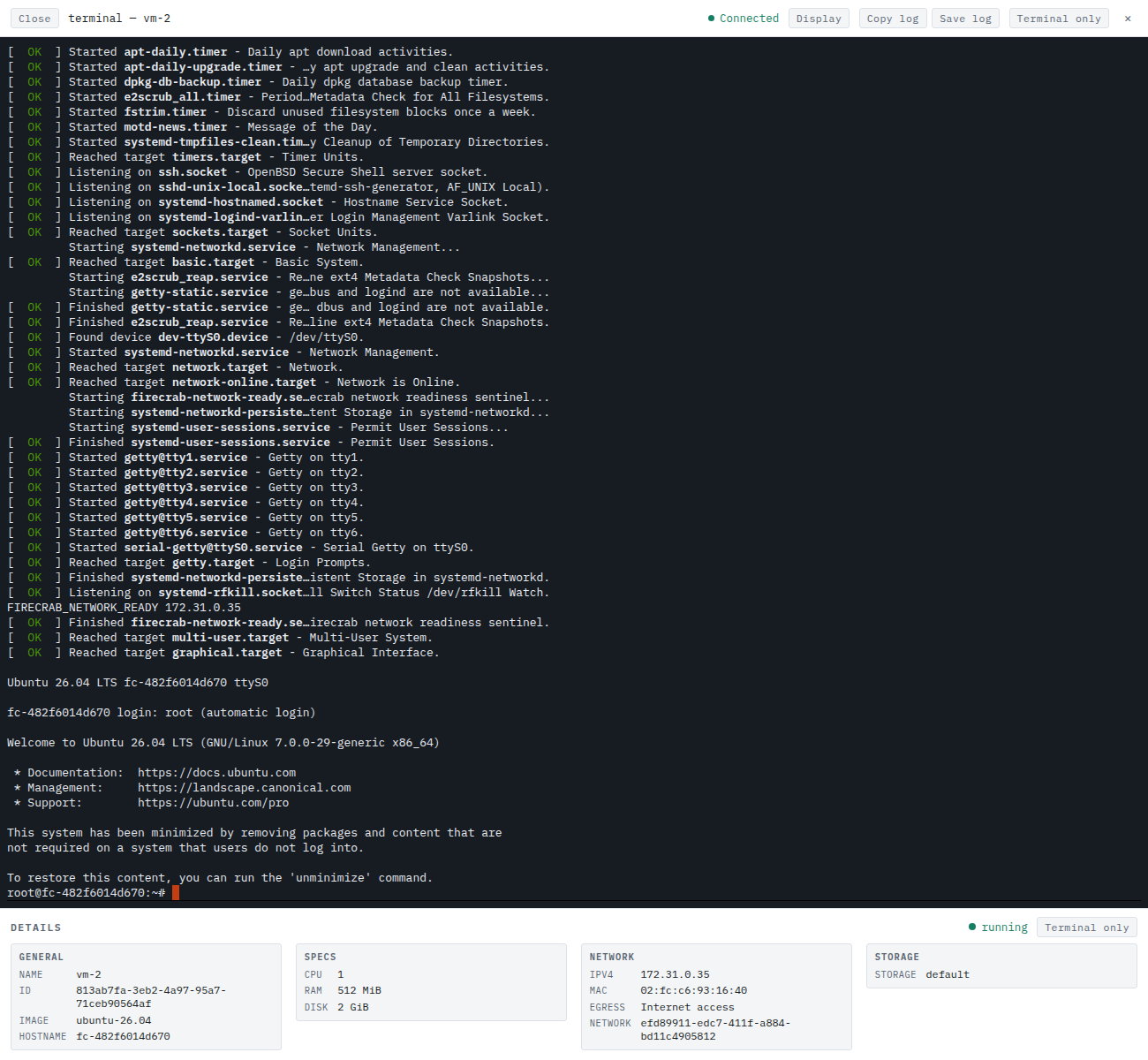
### Terminal
**Terminal** opens a running VM's serial console in a separate tab, streaming boot
output and the login prompt in real time. The toolbar adjusts display settings, copies
or saves console logs, and switches to a terminal-only view.
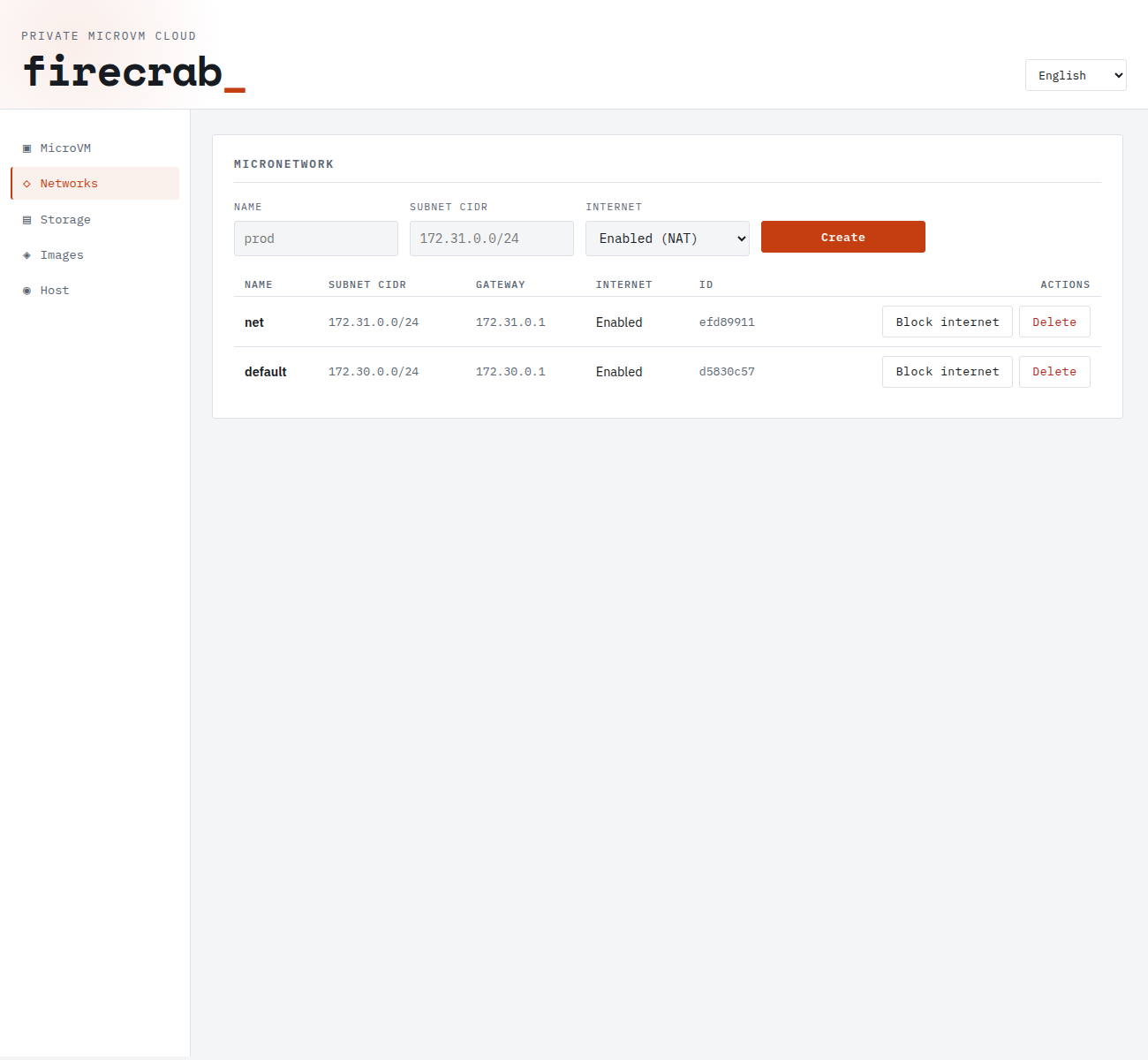
### Networks
Create a **MicroNetwork** from its name, subnet CIDR, and internet policy. **Block
internet** and **Enable internet** change NAT-backed outbound access for the whole
network. Selecting a row reveals subnet address use, bridge/TAP, NAT, firewall, and
member VMs.
### Images
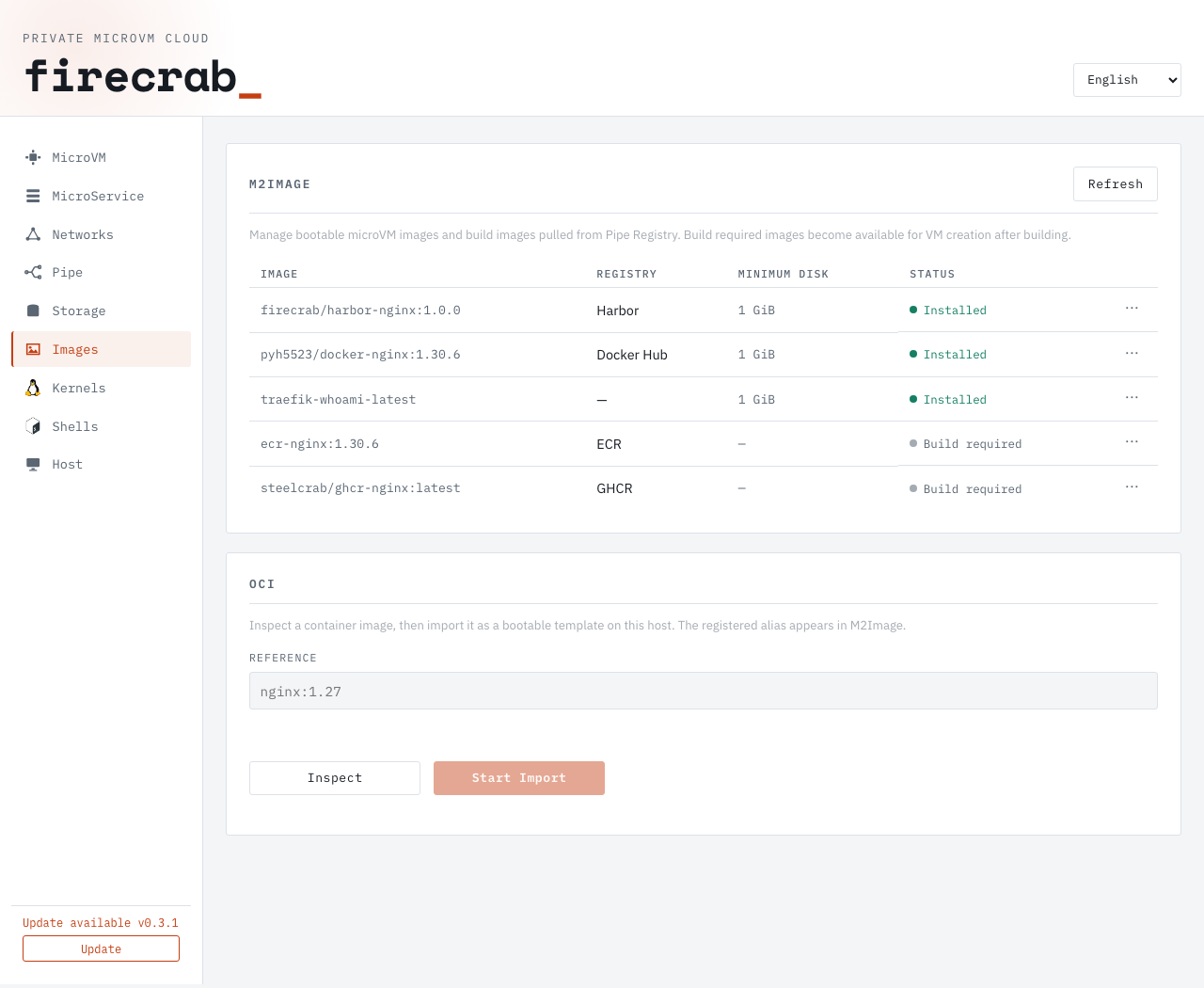
The **M2Image** list shows each image's size and state, such as `Package ready` or
`Installed`. The `…` menu offers state-appropriate package install, bootstrap, or
delete actions. Only installed images can create VMs.
The same screen inspects an OCI reference (`nginx:1.27`) for this host's architecture
and imports it as a registered template. Import runs as a background job with
progress, errors, and the resulting alias.
See the [image guide](public-docs/guides/images.md), the [OCI image guide](public-docs/guides/oci.md),
and the [API guide](public-docs/reference/api.md).
## Documentation and contributing
English is the default documentation language; the README links above offer Korean, Japanese, Chinese, and Indonesian. The dashboard supports English and Korean.
- [public-docs/](public-docs/README.md): Installation, API, operations, and troubleshooting
- [CONTRIBUTING.md](CONTRIBUTING.md): Maintainer’s note, development, and pull request checks
Licensed under [Apache License, Version 2.0](LICENSE).