---
## Table of Contents
- [Features](#features)
- [Preview](#preview)
- [Requirements](#requirements)
- [Installation](#installation)
- [First Run](#first-run)
- [Usage](#usage)
- [Update / Rollback / Uninstall](#update--rollback--uninstall)
- [Data & Privacy](#data--privacy)
- [Project Structure](#project-structure)
- [Development & Testing](#development--testing)
- [Troubleshooting](#troubleshooting)
- [License](#license)
---
## Features
### 🐋 The Mascot
- Floats on screen by default (200px) and can be dragged with the mouse;
- While dragging, she switches to the "picked up" artwork and sways naturally with the cursor's direction;
- **Drag inertia**: on release she glides a short distance according to her velocity and spins back upright, grabbing the screen edge when she reaches it; a gentle release only triggers a small rebound, and her position is saved after the glide ends;
- While idle she keeps a calm expression and randomly performs small daily actions — sipping coffee, stretching, snacking;
- Transitions between idle and working states use a "squash → swap → bounce" motion cut, so there is no ghosting or flashing;
- If you turn her off in settings, a small summon button (🐋) stays in the bottom-left corner — click it to bring her back; she never "vanishes without a trace".
### 💼 Work-State Integration
- Detects running tools (`data-running` / `data-state="ongoing"`) and automatically switches to the "working with her laptop" pose;
- While working she gains a soft blue glow and a "working" label;
- Clicking her while working randomly triggers a "shy laptop hug" or "sneaking a bite of the RAM stick" reaction, without interrupting the work state; the running pose stays stable instead of randomly switching to idle skits;
- **Tool-type poses**: commands, file edits, search, tests, reviews, deployments and debugging each have their own pose (all reusing existing work artwork — no new assets). Unrecognized tools fall back to the generic working pose instead of guessing.
### 🪙 Balance Care
- New "Balance" group shows the current account balance, with a one-line comment from her (five tiers: comfortable / normal / tight / critical / empty, 29 lines);
- Data comes from a **local** balance proxy (`127.0.0.1:3020`, the `dsh-statusbar` balance-proxy). The proxy only listens on 127.0.0.1, never echoes keys, and performs upstream requests server-side — so the browser still only talks to localhost and the "no external requests" promise holds;
- **Off by default**; when enabled it polls every 60 seconds (aligned with the proxy cache). If the proxy is down or returns nothing, it fails silently — no errors, no log spam;
- Keeps the "never intrude while busy" rule: announcements only happen while idle. When the balance is comfortable she barely mentions it; when it's tight she reminds you more often;
- Worried about the amount being visible? Turn off "Show balance number" and she only speaks in tiers — screenshots never leak your balance.
### 🎨 Artwork & Expressions (90+)
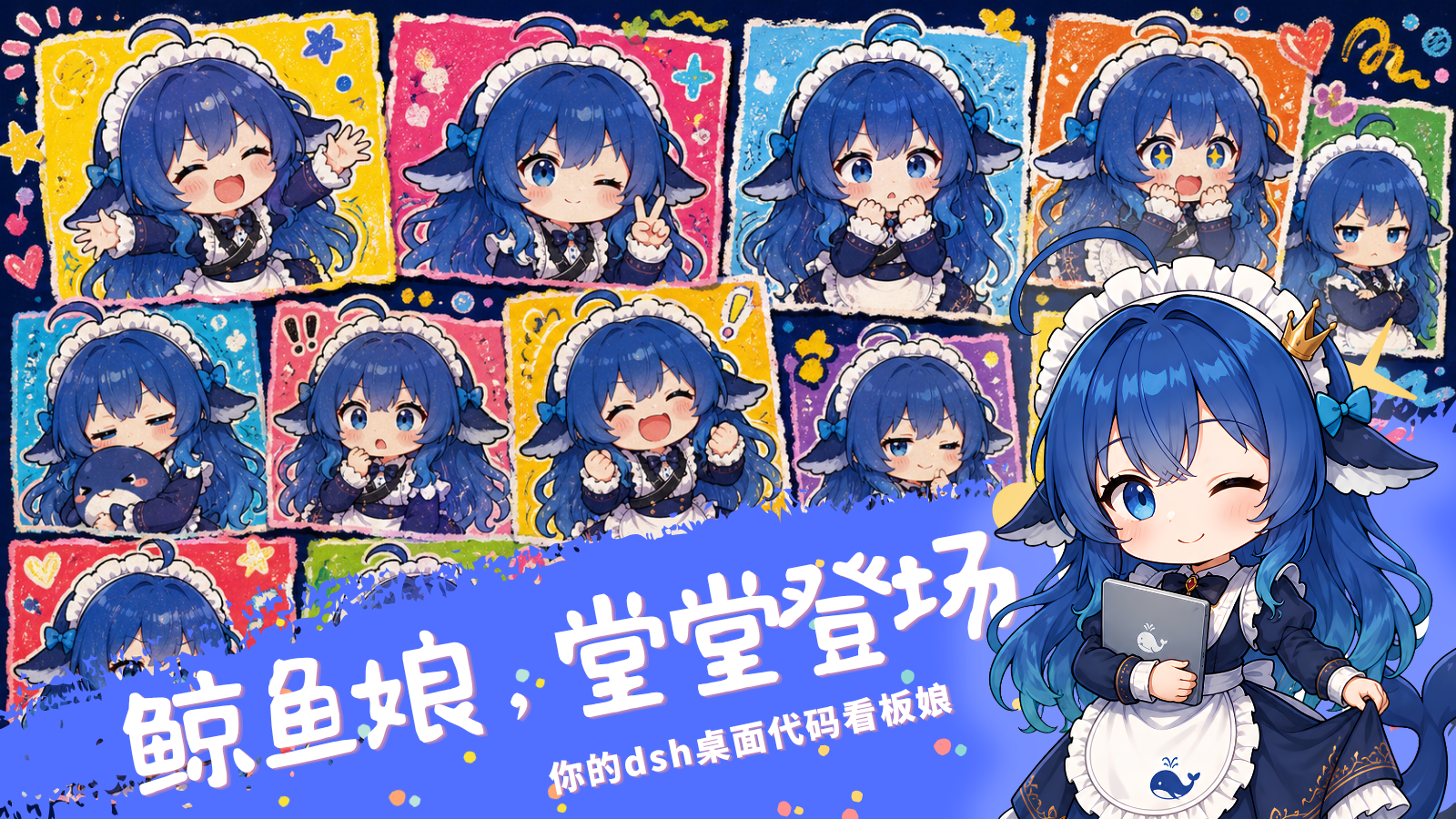
- Full-scene artwork: idle, working, thinking, away, plus zone interactions for headpat / belly poke / tail poke;
- Growth artwork: level-up, achievement unlocked, daily quest completed, tail wag;
- Four game poses (thinking / pleased / victory / narrow defeat) and three weather poses (umbrella / cold / snowy);
- Automatic festival costumes on Christmas / Halloween / Mid-Autumn / Spring Festival / Valentine's Day;
- 13 meme keyword reactions: kyun, OMG, doge, sike, bowing, peace, doubting life, waku waku and more — matching a keyword transforms her into a reaction image on the spot.
### 💬 Meme Chat & Weather Companion
- 530+ voice lines covering every scenario: cute first, seasoned with safe memes — office grind, slacking off, deadlines, pie-in-the-sky promises, unhinged literature;
- Proactive small talk every 5–8 minutes, classified locally from the current task so it stays on topic; never interrupts while working;
- Time-of-day greetings: morning / late morning / noon / afternoon / evening with caring words; she stays quiet between 23:00 and 5:59;
- Mood-layered lines: gentle when her mood is low, energetic when high; Bond levels unlock exclusive lines (Lv3 / Lv5 / Lv7);
- Weather companion: Settings → Mascot → Weather, enter a city (API key optional) and test the connection; Open-Meteo is free and needs no key, and leaving the city empty means zero networking;
- Weather visual effects: full-screen ambient effects (rain / snow / lightning / wind / fog / heat wave / frost), switching with the real weather, automatically toned down while working, and toggleable in settings.
### 💗 Proactive Care
- Four proactive care lines: sitting-too-long reminder (busy for 25 minutes straight), late-night rest nudge (still busy after 23:00), stuck companion (same state for 8 minutes), welcome-back greeting (away for over 3 minutes);
- The iron rule is "keep you company, never command" — she **never interrupts while working**, and her lines remind rather than push (19 lines in total);
- Care events are at least 15 minutes apart so they never become noise; the whole feature can be turned off in settings.
### ♿ Accessibility Mode
- By default the mascot is pure decoration (`aria-hidden`); with accessibility mode enabled she can be focused with Tab, headpatted with Enter/Space, and nudged with the arrow keys (Shift accelerates), with state changes announced via `aria-live`;
- Uses `role="button"` with a dynamic aria-label (including your custom name for her) and a visible focus outline;
- **Off by default**: it adds no burden to the default experience, but keeps a path open for those who need it.
### 🎀 Interactions & Effects
- Single-click headpat: blushing artwork + floating hearts/stars emoji;
- Zone interactions: clicking different parts of her (head / belly / tail) has dedicated artwork, effects and voice lines;
- Keyword expressions: when the chat hits one of the 13 meme keywords, Whale Musume transforms into a reaction image live;
- Triple-click: starry-eyed celebration + particle effects + spin animation;
- Right-click menu: feed / poke / praise / mini-game: bubble pop / back to home position / open mascot settings;
- Click reactions switch instantly, with no sluggish transitions.
### 🫧 Mini-Game "Bubble Pop · Bubble Party"
- 4×4 bubble grid with normal / star / bomb bubbles, combo scoring, and three-tier results per 30-second round;
- Playable by mouse click or keyboard (arrow keys to move the cursor, Enter to pop, Esc to quit);
- Daily growth rewards are capped at 3 rounds; extra rounds only count score without farming affection;
- Playable while working or with the settings page open; only pauses when the page is hidden;
- New records, combos and first wins each have dedicated achievements.
### 📈 Growth & Achievements
- Mood, Affinity, Fullness, Level, check-in streak and total companionship time;
- Daily quests: 3 quest slots refreshed daily, with Affinity rewards on completion;
- Weekly check-in: a 7-slot weekly board with milestone rewards at 1 / 3 / 7 days;
- Bond-level unlocks: Lv3 new idle action, Lv5 title "Guardian of the Whale Tides", Lv7 hidden easter egg;
- 39 achievements across interaction, companionship, DSH usage, mini-games and quests;
- A built-in **achievement wall** in the settings panel — unlocked ones highlighted, locked ones greyed out;
- **Growth diary**: key moments (Bond level-ups, achievement unlocks) recorded by time, shown in reverse order in the settings panel (latest 12 with relative time); only one entry per event type per day, capped at 80 entries, all kept locally.
### 🌗 Theme Adaptation
- Follows the host light/dark theme: detects DSH's `data-theme` / `dark` class, falling back to the system `prefers-color-scheme`;
- Only affects UI elements like the bubble and menus — **artwork is never filtered** and the art style never changes;
- Writes only on theme changes; no per-frame probing.
### ⚙️ Settings Panel
- Mascot settings are integrated into the DSH settings page;
- Collapsible groups: Companion / Weather / Balance / Daily & Growth / Achievement Wall / Growth Diary / Data & Reset, with the overview card and group cards aligned to equal width;
- Pill toggles: mascot / speech bubble / line narration (shown when MiMo TTS is detected) / particles / mini-games / keyword awareness / slack-off reminder / late-night mode / weather effects / tool-type poses / drag inertia / proactive care / accessibility / balance care / show balance number;
- Off by default: line narration, keyword awareness (involves reading chat content), accessibility, balance care, show balance number (involves your account balance);
- With `dsh-xiaomi-tts` installed and enabled, you can optionally narrate lines triggered by head, belly, and tail clicks or a triple click; a missing, unconfigured, or failed TTS service never affects existing interactions;
- Daily & Growth uses tabs: Today's Quests / Weekly Check-in / Titles, managed alongside the achievement wall;
- The overview card lets you edit "How to address me" and **"her self-name"** — leave the latter empty and she defaults to "Whale Musume"; every self-reference in her 363-line dialogue library is replaced consistently;
- Growth data is displayed as compact horizontal cards with sensible information density.
### 🧩 Engineering
- Pure frontend injection; never modifies DSH business DOM;
- Every change is backed up and rollback-able;
- Asset files carry version numbers, forcing a cache refresh after upgrades;
- **Artwork preloading**: only 5 frequently-used poses load on first paint; the other 90+ are fetched one at a time every 120ms during idle (preferring `requestIdleCallback`), so cold-start pose switches never stutter and preload failures are completely silent;
- The core state machine is separated from the presentation layer, making it easy to extend.
---
## Preview
> Real screenshots of the plugin running inside DSH. Artwork overview boards live in `docs/images/`.
### Running Screenshots
| Scene | Description |
| --- | --- |
| 





-0078D4)



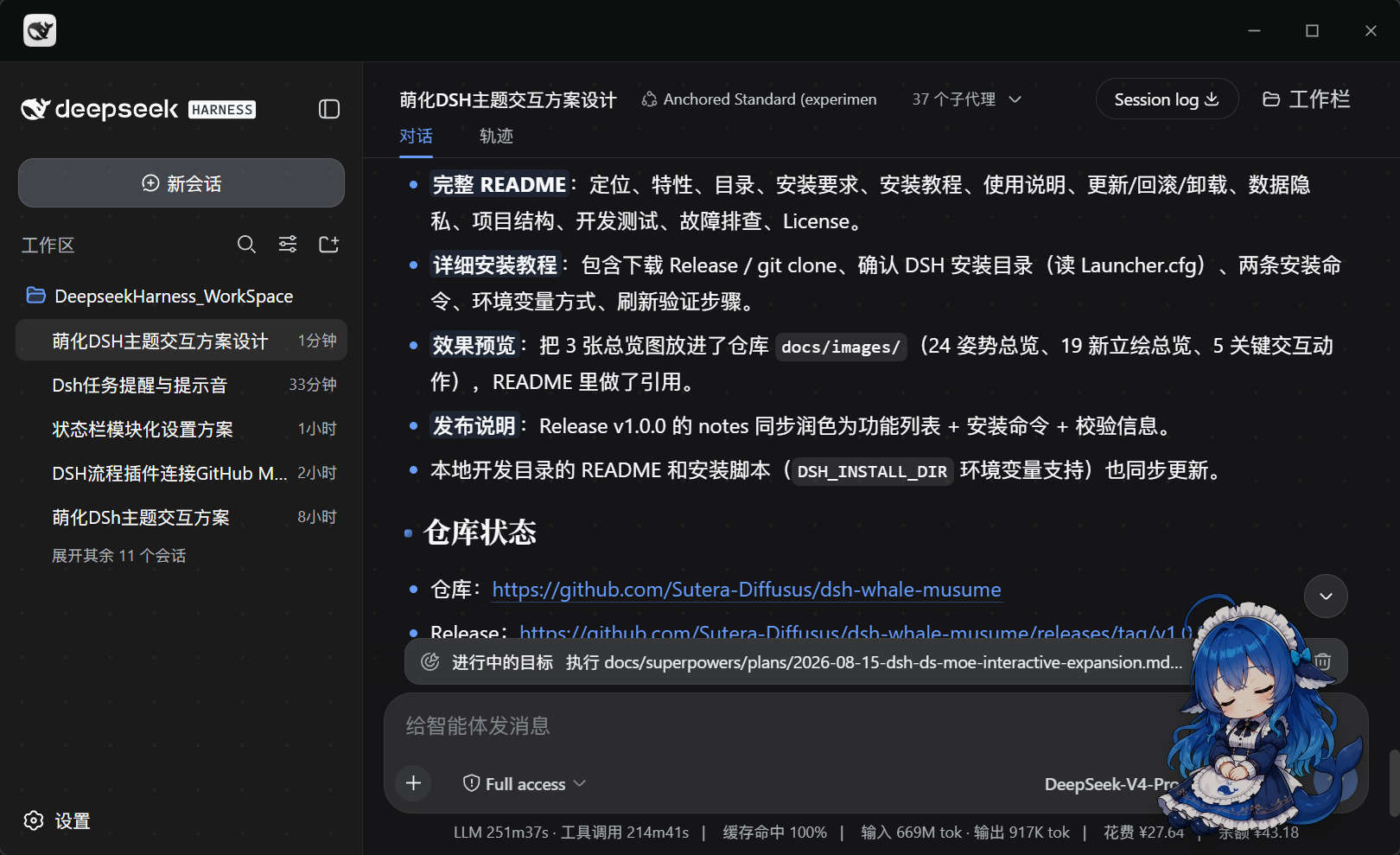 | **Idle companion**: floats in the bottom-right corner by default, quiet and unobtrusive; random daily actions like sipping coffee or stretching while idle. [View full image](docs/images/preview-idle-coffee.png) |
|
| **Idle companion**: floats in the bottom-right corner by default, quiet and unobtrusive; random daily actions like sipping coffee or stretching while idle. [View full image](docs/images/preview-idle-coffee.png) |
| 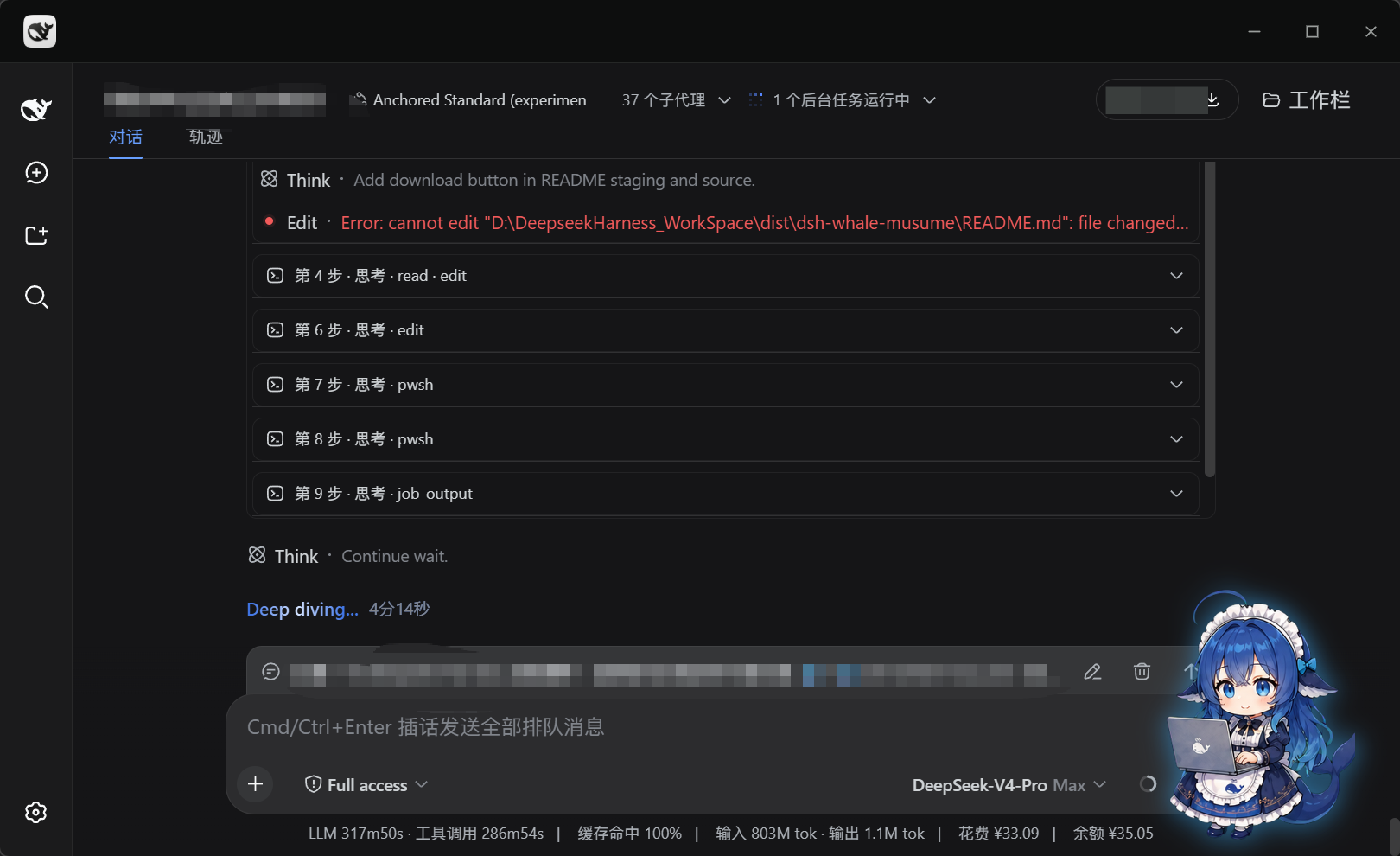 | **Work-state integration**: automatically switches to "working with her laptop" when tools run, with a soft blue glow; no chatter and no interruptions while working. [View full image](docs/images/preview-working.png) |
|
| **Work-state integration**: automatically switches to "working with her laptop" when tools run, with a soft blue glow; no chatter and no interruptions while working. [View full image](docs/images/preview-working.png) |
| 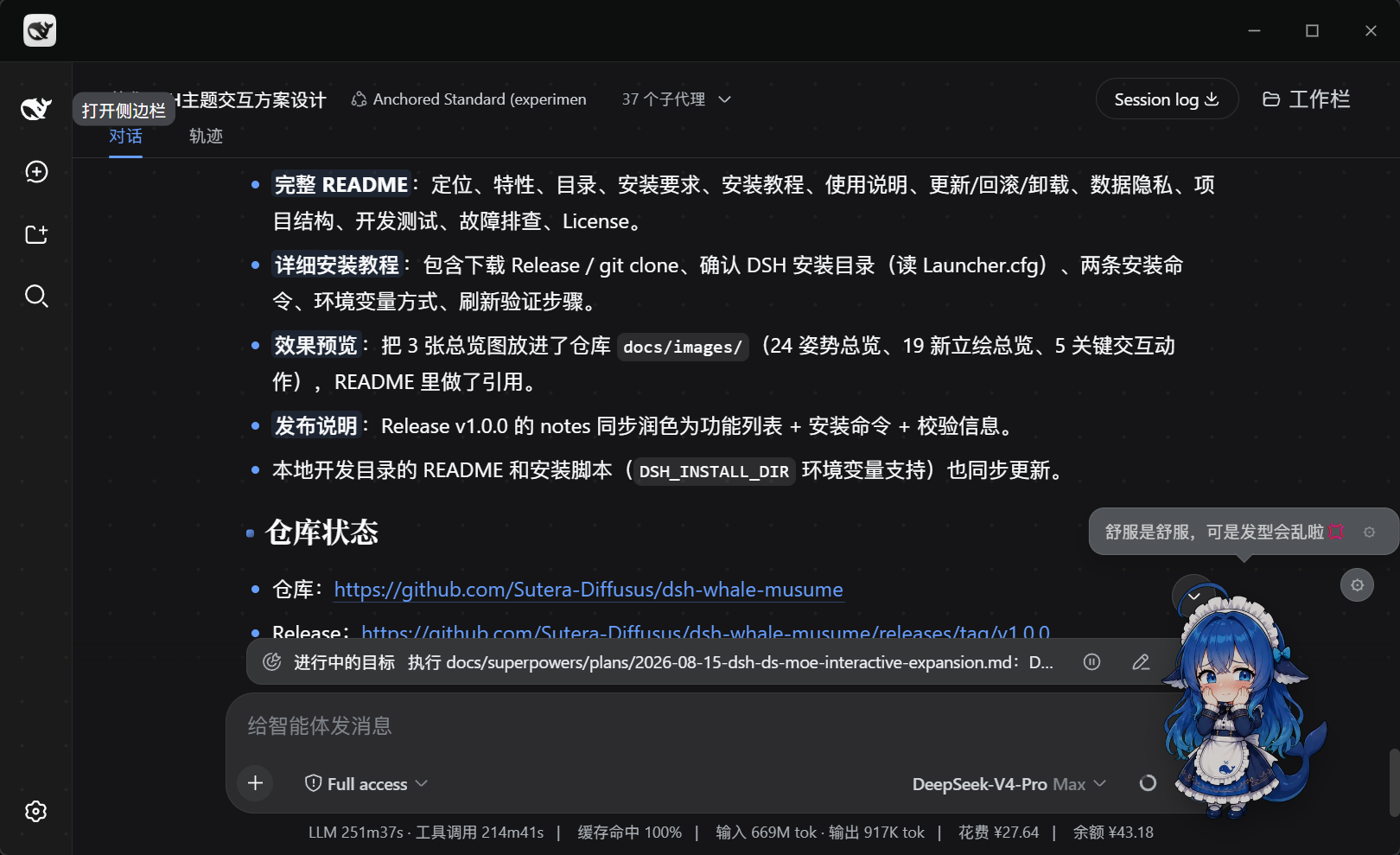 | **Headpat**: a single click triggers dedicated artwork and a speech bubble — "It feels nice, but you'll mess up my hair💢". [View full image](docs/images/preview-headpat.png) |
|
| **Headpat**: a single click triggers dedicated artwork and a speech bubble — "It feels nice, but you'll mess up my hair💢". [View full image](docs/images/preview-headpat.png) |
| 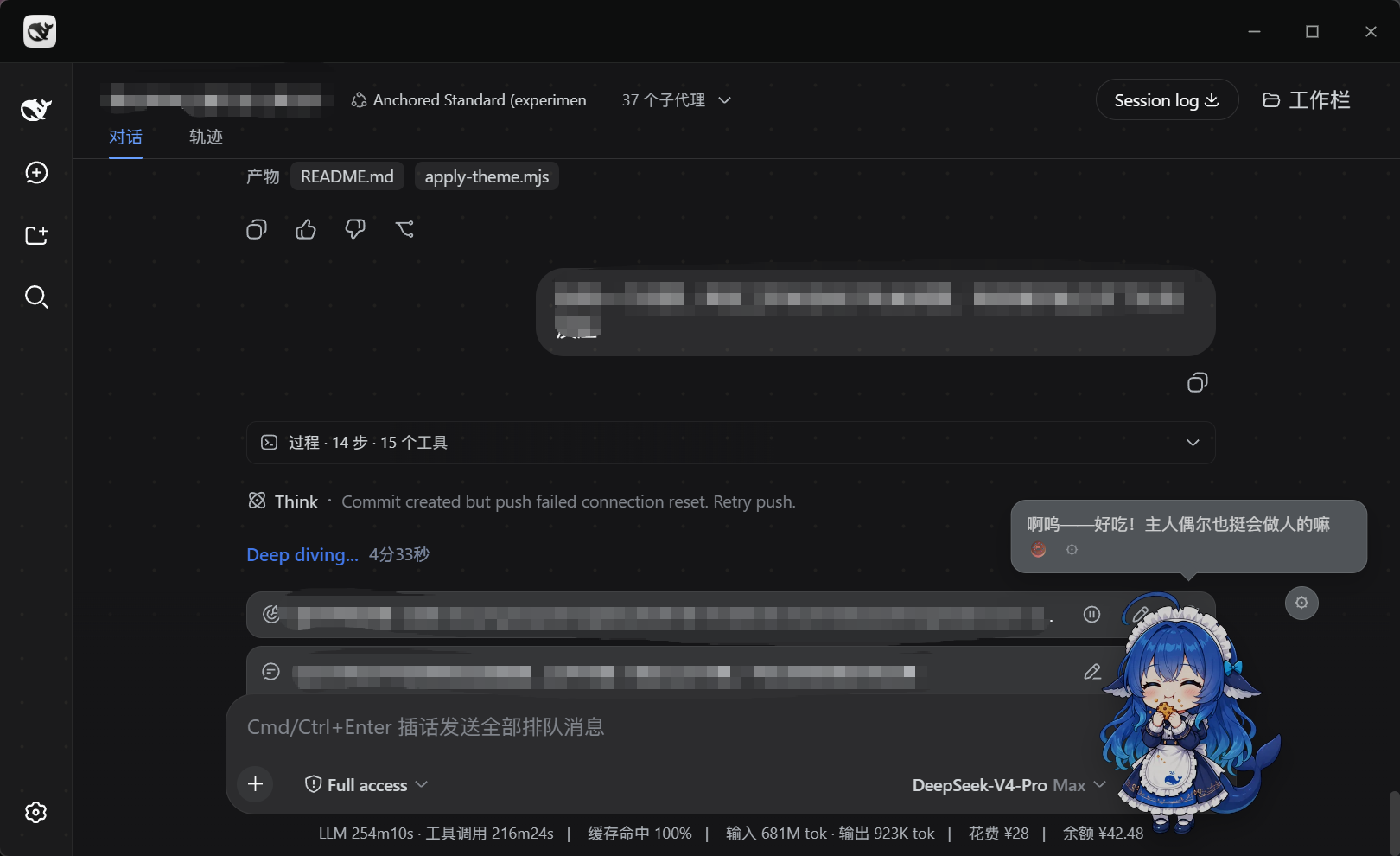 | **Feeding**: right-click → feed a snack to raise Fullness and Affinity, triggering the eating artwork — "Nom — delicious!" [View full image](docs/images/preview-feeding.png) |
|
| **Feeding**: right-click → feed a snack to raise Fullness and Affinity, triggering the eating artwork — "Nom — delicious!" [View full image](docs/images/preview-feeding.png) |
| 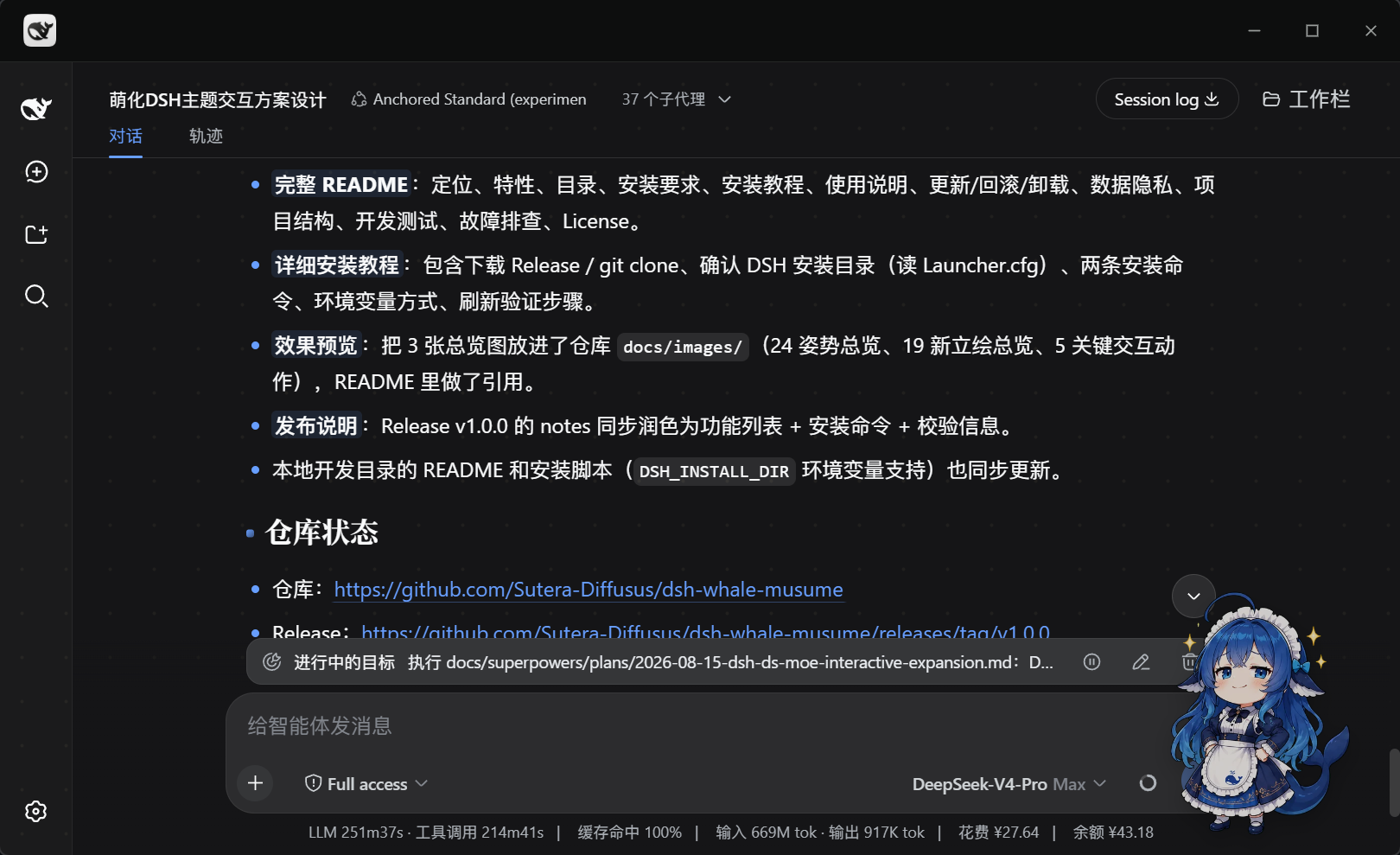 | **Floating form**: 200px default size, freely draggable with auto-saved position; right-click → back to home position in one click. [View full image](docs/images/preview-idle-sparkle.png) |
### Artwork & Poster Boards
| Type | File |
| --- | --- |
| 24-pose showcase | `docs/images/showcase-board.png` |
| New artwork showcase (19) | `docs/images/new-poses-board.png` |
| Key interaction actions | `docs/images/actions-board.png` |
| Official posters v1–v4 | `docs/images/promo-poster-v1.png` ~ `promo-poster-v4.png` |
---
## Requirements
| Item | Requirement |
| --- | --- |
| Operating system | Windows 10 / 11 (development and test environment) |
| Node.js | 18+ (needed to run the install scripts; not needed for the bundle install) |
| DeepSeek Harness | `0.1.0-rc.6` and above; the settings panel is adapted to and tested on `0.1.1-rc.2` |
| Browser | Latest Edge / Chrome |
> The script install modifies frontend asset files inside the DSH installation directory. The script always makes backups, but it is still recommended to close the DSH page before installing and note down your current DSH version. For a fully non-invasive install, use the bundle method.
---
## Installation
Whale Musume offers two installation methods. **Pick one — do not mix them:**
| Method | How it works | Best for |
| --- | --- | --- |
| **A. Bundle install (recommended)** | A standard DSH bundle declaring `dsh.bundle.patch`; the settings panel is registered through the `settings.section` slot; no built-in package files are rewritten | Regular users; DSH 0.1.1-rc.2 and above |
| **B. Script install** | An install script injects the frontend assets and settings panel, with automatic backup and rollback | Theme-integration scenarios; older DSH versions |
### Method A: Bundle Install (non-invasive, recommended)
Whale Musume also ships as a standard DSH bundle that can be installed directly via `dsh plugin` or a plugin marketplace (e.g. mydsh.dev):
```powershell
dsh plugin --profile web add github:Sutera-Diffusus/dsh-whale-musume
```
After installing, restart `dsh web` and hard-refresh the page (`Ctrl+F5`) — Whale Musume appears automatically. This mode:
- The host plugin only registers a read-only static asset route `/api/dsh-whale-musume/assets`, serving styles/scripts/artwork to the browser;
- The browser plugin injects the mascot itself; all assets come from the local machine — no external requests, no telemetry;
- Toggles and mode preferences live in the mascot's own gear menu (localStorage, `whale-moe:*` keys);
- The "Mascot" settings panel (pill toggles / growth data / achievement wall / weather) is registered into the DSH settings page by the browser plugin through the `settings.section` slot — **no built-in package files are rewritten**, so it works on 0.1.1-rc.2 and above;
- Compatibility fallback: if the `slots` service is missing or a sub-slot fails to render, the settings panel falls back to its built-in renderer and the mascot itself is unaffected.
### Method B: Script Install
#### Step 1: Get the plugin
**Download a Release (recommended)**
1. Open [Releases](https://github.com/Sutera-Diffusus/dsh-whale-musume/releases);
2. Download the latest `dsh-whale-musume-plugin-vX.Y.Z.zip`;
3. Extract it anywhere, e.g. `D:\dsh-whale-musume`.
**Or clone the repository**
```powershell
git clone https://github.com/Sutera-Diffusus/dsh-whale-musume.git
cd dsh-whale-musume
```
#### Step 2: Locate the DSH install directory
The DSH installation directory usually contains `DeepSeekHarness-Launcher.exe` and `node_modules`. If unsure, check the launcher config:
```powershell
Get-Content "
| **Floating form**: 200px default size, freely draggable with auto-saved position; right-click → back to home position in one click. [View full image](docs/images/preview-idle-sparkle.png) |
### Artwork & Poster Boards
| Type | File |
| --- | --- |
| 24-pose showcase | `docs/images/showcase-board.png` |
| New artwork showcase (19) | `docs/images/new-poses-board.png` |
| Key interaction actions | `docs/images/actions-board.png` |
| Official posters v1–v4 | `docs/images/promo-poster-v1.png` ~ `promo-poster-v4.png` |
---
## Requirements
| Item | Requirement |
| --- | --- |
| Operating system | Windows 10 / 11 (development and test environment) |
| Node.js | 18+ (needed to run the install scripts; not needed for the bundle install) |
| DeepSeek Harness | `0.1.0-rc.6` and above; the settings panel is adapted to and tested on `0.1.1-rc.2` |
| Browser | Latest Edge / Chrome |
> The script install modifies frontend asset files inside the DSH installation directory. The script always makes backups, but it is still recommended to close the DSH page before installing and note down your current DSH version. For a fully non-invasive install, use the bundle method.
---
## Installation
Whale Musume offers two installation methods. **Pick one — do not mix them:**
| Method | How it works | Best for |
| --- | --- | --- |
| **A. Bundle install (recommended)** | A standard DSH bundle declaring `dsh.bundle.patch`; the settings panel is registered through the `settings.section` slot; no built-in package files are rewritten | Regular users; DSH 0.1.1-rc.2 and above |
| **B. Script install** | An install script injects the frontend assets and settings panel, with automatic backup and rollback | Theme-integration scenarios; older DSH versions |
### Method A: Bundle Install (non-invasive, recommended)
Whale Musume also ships as a standard DSH bundle that can be installed directly via `dsh plugin` or a plugin marketplace (e.g. mydsh.dev):
```powershell
dsh plugin --profile web add github:Sutera-Diffusus/dsh-whale-musume
```
After installing, restart `dsh web` and hard-refresh the page (`Ctrl+F5`) — Whale Musume appears automatically. This mode:
- The host plugin only registers a read-only static asset route `/api/dsh-whale-musume/assets`, serving styles/scripts/artwork to the browser;
- The browser plugin injects the mascot itself; all assets come from the local machine — no external requests, no telemetry;
- Toggles and mode preferences live in the mascot's own gear menu (localStorage, `whale-moe:*` keys);
- The "Mascot" settings panel (pill toggles / growth data / achievement wall / weather) is registered into the DSH settings page by the browser plugin through the `settings.section` slot — **no built-in package files are rewritten**, so it works on 0.1.1-rc.2 and above;
- Compatibility fallback: if the `slots` service is missing or a sub-slot fails to render, the settings panel falls back to its built-in renderer and the mascot itself is unaffected.
### Method B: Script Install
#### Step 1: Get the plugin
**Download a Release (recommended)**
1. Open [Releases](https://github.com/Sutera-Diffusus/dsh-whale-musume/releases);
2. Download the latest `dsh-whale-musume-plugin-vX.Y.Z.zip`;
3. Extract it anywhere, e.g. `D:\dsh-whale-musume`.
**Or clone the repository**
```powershell
git clone https://github.com/Sutera-Diffusus/dsh-whale-musume.git
cd dsh-whale-musume
```
#### Step 2: Locate the DSH install directory
The DSH installation directory usually contains `DeepSeekHarness-Launcher.exe` and `node_modules`. If unsure, check the launcher config:
```powershell
Get-Content "