# Berth
Berth makes the programs on your PC take turns with the GPU's memory, so they stop crashing each
other, and tells you who is holding it.
Berth decides who gets your GPU. Chat models, image pipelines, voice engines, games and GPU apps
lease the card instead of grabbing it, so two of them never load at once and crash each other
with an out-of-memory error. One Go binary, no cloud account, nothing else to install.
```sh
berth daemon & # one broker per card
berth run --as llama -- llama-server -m model.gguf # this engine now takes turns
berth status # who holds the card, who waits, and why
```
## How it works
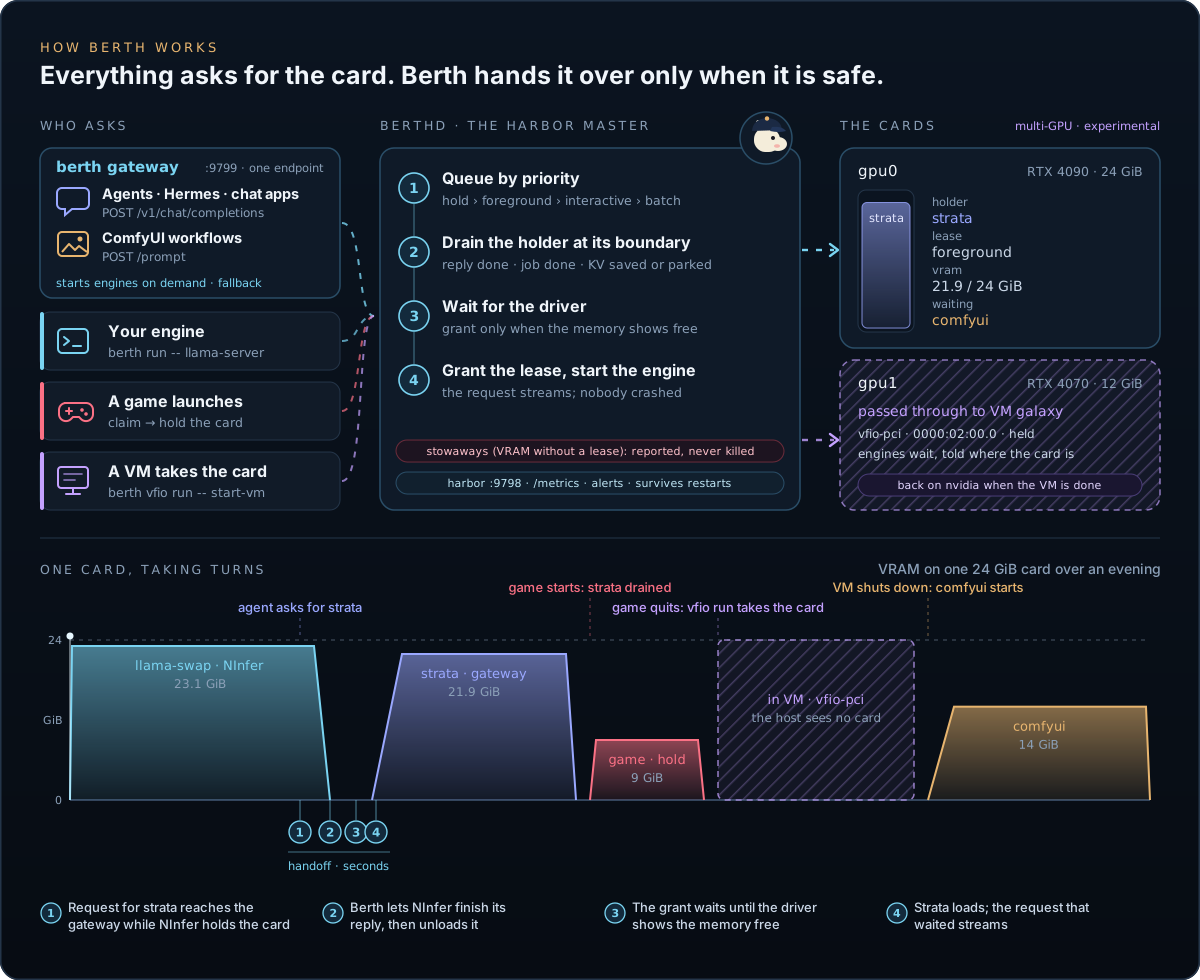
Every engine asks berthd for the card: through `berth run`, the gateway, ComfyUI's API or a game
claim. When another engine holds it, Berth:
1. queues the request by priority: `hold`, `foreground`, `interactive`, `batch`;
2. lets the holder finish its reply or image job, then unloads it;
3. waits until the driver shows the memory free;
4. grants the lease and starts the next engine, and the request that waited streams.
The numbered markers on the timeline are those four steps. A process that holds VRAM without a lease
shows up as a stowaway: Berth reports its PID and memory and leaves it running.
> **Status: alpha, v0.3.6.** Runs daily on an RTX 4090 workstation beside llama-swap, NInfer,
> Strata, ComfyUI and games, and testers run it on Windows. The [docs](docs/README.md) cover what works and has tests; the
> [roadmap](docs/roadmap.md) lists the phases and what is still missing.
### Berth and llama-swap
Use both. llama-swap swaps the models in its own config, and does it well. Berth governs the
whole card: llama-swap's models, ComfyUI, Ollama, vLLM, games, and any process that holds VRAM,
including the ones neither tool started. With Berth beside it, llama-swap's next model waits
for ComfyUI or the engine before it to give the memory back, and when a crashed process still
holds part of the card, Berth names its PID and how much it holds, so you aren't hunting
through `nvidia-smi` while a load fails. `berth wire llama-swap` adds the lease to every model
in your config in one pass. An upstream integration with llama-swap is planned, so the wrapper
line goes away.
## What Berth does
**Shares one card between everything**
- **Engines take turns.** You start each one through `berth run`. When another needs the
card, Berth waits for the holder's current reply to end, unloads it (its own unload, then
SIGTERM, then SIGKILL) and lets the next one in only after the driver shows the memory free.
- **Priorities.** `foreground`, `interactive`, `batch`, and `hold` above them all. A lower
request waits and gets a reason naming the holder, never an OOM crash.
- **No ping-pong.** When two clients ask for different engines at once, a ranking picks one
and the other waits, so the card stays put.
- **ComfyUI at a job boundary.** Berth waits for the running image job to finish before the handoff.
- **A minimum turn.** `min_turn = "5m"` keeps an engine on the card for five minutes after it
gets it, whatever asks next; only a hold takes it out sooner.
- **Engines in containers.** `berth run --container NAME -- docker run ...` puts a Docker or
Podman engine under its lease, and the drain stops it through `docker stop`.
- **Survives restarts.** Upgrade or restart the daemon and your running engines stay up and
re-attach. The gateway's engines survive it too: it starts each one as its own `berth run`
process (in its own systemd scope on Linux) and adopts them again on its next start.
**Faster switches, and a way out** *(v0.3)*
- **Park in RAM.** An engine that can offload itself (ComfyUI, vLLM, SGLang, or any engine that
serves the [park protocol](contrib/PARK-PROTOCOL.md)) moves its weights to system memory on a
drain and resumes from there instead of reloading from disk. Berth parks only when the RAM it
measures covers the engine plus a floor, and stops parked engines first when memory runs short.
- **A way out of every lease state.** `berth stop ENGINE` drains an engine on purpose,
`berth resume ENGINE` puts a parked one back, and `berth reclaim` stops what a stuck release
left behind, once you confirm.
- **A place in the queue.** Every wait reason starts with the waiter's place ("2nd in line
(behind interactive comfyui)"), and `berth status` adds a start estimate from measured switches.
**Games and other apps**
- **Games take the card while you play.** Launch a Steam, Lutris or gamescope game on Linux,
or a Steam, Epic, GOG, EA, Ubisoft, Xbox or Battle.net game on Windows, and Berth drains your
AI engines until you quit.
- **Creative apps keep their memory.** Berth names what Blender, DaVinci Resolve, OBS,
Kdenlive, Premiere and After Effects hold and counts it against the card, without a
stowaway report.
- **Your own rules.** `[[claim]]` in `berth.toml` covers anything else: a training run, a
render farm job, a cracking session, by name, command line or launcher.
- **`berth hold`** frees the card for a call or a game you start yourself. Ctrl-C gives it back.
- **`berth run --pinned`** for an app that must never be stopped mid-work.
**One API for your engines** *(preview)*
- **`berth gateway`**: one OpenAI-compatible port. Name a model and Berth starts its engine,
unloads whatever holds the card, waits for the load and streams the answer.
- It proxies ComfyUI's workflow API too, so an image request queues behind the same lease.
- **Wake pages** (`--gui-listen`): a bookmark to a stopped engine's web UI shows who holds the
card and a Launch button, says what the start waits for, and opens the UI once it answers.
- Bearer key on every API route, loopback only, browser origins refused.
**Models**
- **`berth pull hf:org/repo:Q4_K_M`** downloads from Hugging Face, resumes where it stopped,
and checks every file against the size and sha256 the Hub publishes before using it.
- **`berth pull civitai:VERSION_ID`** does the same from CivitAI, with the hash the site
publishes, and **`berth models`** shelves what it finds as chat, image or audio so a
machine reading a shared root knows what a folder is.
- **`berth storage`** shows each model root's filesystem, free space against its floor, and
the other operating systems it is shared with.
- **`berth verify`** re-checks pulled models offline and names any file that changed.
- **`berth models`** lists every model on the machine (GGUF, safetensors, the Hugging Face
cache, LM Studio and Ollama's stores) with quant, size, parameters, context and when each
was last used, so you can see what earns its disk space.
- **`berth models export ollama`** turns a GGUF you already have into an Ollama model.
**Keeps itself current**
- **`berth update`** asks the release page whether a newer berth exists and,
when one does, downloads this machine's binary and the release's SHA256SUMS,
checks the hash, and replaces the running binary in place after you confirm.
It then names what to restart; it never restarts anything itself.
- **Update check.** The harbor asks GitHub at most once every 24 h, one GET to
the API's releases/latest, cached in the state directory, and shows "Update
available" in its header when the answer is a newer release. `[update]
check = false` in `berth.toml` turns the check off, and with it off Berth
never contacts GitHub on its own. `berth update` and `berth update --check`
ask GitHub every time you type them and never read the harbor's cached answer.
**Sees everything on the card**
- **Finds your engines.** Berth reads llama.cpp, llama-swap, Ollama, vLLM, SGLang, ComfyUI,
Kokoro, LM Studio, KoboldCpp, TabbyAPI, LocalAI and more on their default ports, plus any
OpenAI-compatible or custom server you name.
- **Stowaways.** Berth reports any process holding VRAM without a lease, with its PID, name
and memory, and leaves it running.
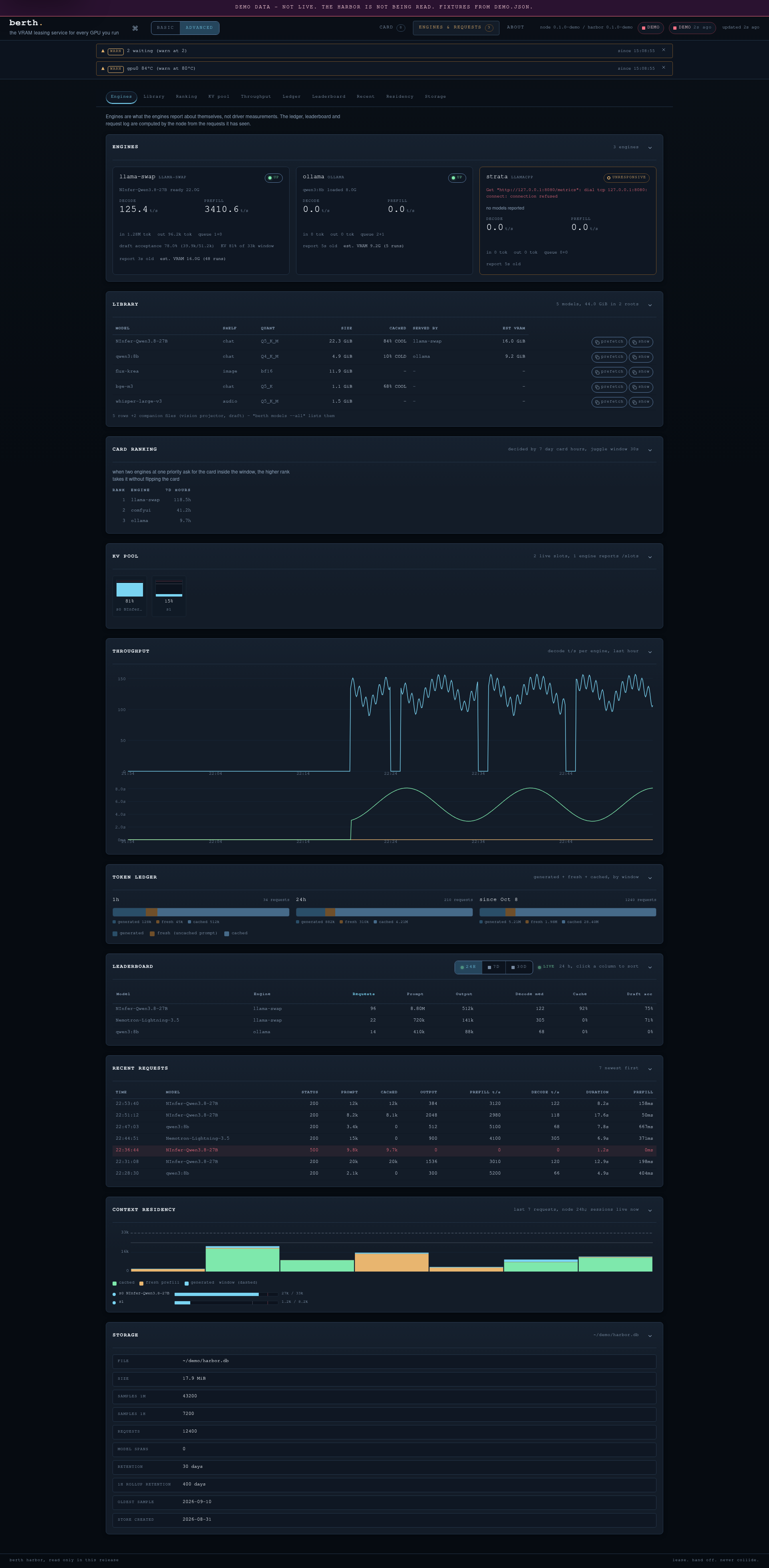
- **Built-in telemetry.** Per-card memory, load, temperature, power and clocks; tokens per
second, queue, latency percentiles, KV cache use, a token ledger and a per-model
leaderboard; 30 days of history on disk.
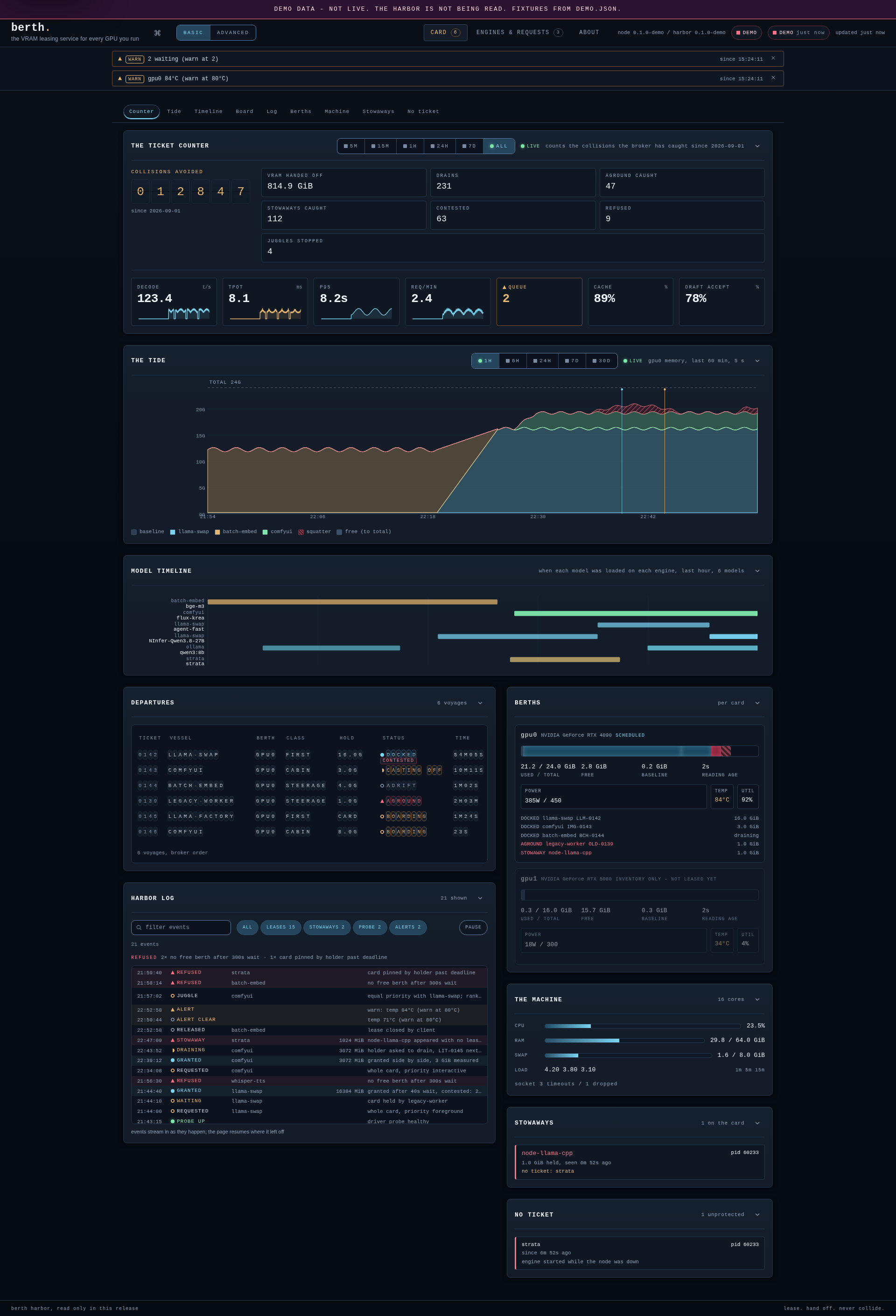
- **The harbor web UI** (`berth harbor`): a departures board of leases, a collisions-avoided
counter, charts and the event log. Read-only, loopback by default.
- **Alerts** to the desktop or a webhook, `/metrics` for Prometheus, and `berth export` for
CSV or JSON.
**Built for agents and scripts**
- **`berth skill install`** teaches Claude Code, Codex, OpenCode, Hermes Agent and other agents to ask Berth
for the card instead of killing GPU processes, and to set up and run ComfyUI image generation through Berth.
- Every reporting command takes `--format json|yaml`. All of them keep results on stdout and
diagnostics on stderr, and exit 0, 1 or 2 by one rule.
**Runs on** Linux with an NVIDIA GPU (supported), Linux with AMD RDNA3/RDNA4 discrete
GPUs or a Phoenix APU such as the 780M (experimental), and Windows 10/11 with an NVIDIA
GPU (experimental). Apache-2.0.
### AMD on Linux
Select the AMD probe explicitly (or let `auto` select it on an AMD-only host):
```sh
berth daemon --gpu-backend amd --gpu 0
# Or install the user service with that selection:
berth service install --harbor --gpu-backend amd --gpu 0
```
For AMD, `--gpu N` means Linux DRM **cardN**, not a HIP/ROCm ordinal. The probe matches
processes by PCI address, not PID alone. When `nvidia-smi` is installed, `auto` keeps the
NVIDIA probe, so on a machine with both vendors pass `--gpu-backend amd` to govern the AMD
card. This selects what Berth observes,
not where the engine loads: configure the engine's GPU placement separately.
The AMD adapter reads kernel sysfs and DRM `fdinfo`; no ROCm installation, `amd-smi`,
root privileges, or extra monitoring service is required. Phoenix APUs keep reserved
UMA VRAM and shared-RAM GTT separate; use exclusive leases (omit `--needs-mib`). New
APU admissions require host RAM above `--headroom-mib` (default 2048 MiB); parking is
not yet supported on APUs, so engines use the normal drain. Other APU generations and
AMD Windows are not supported. See [scope and validation](contrib/amd/README.md).
### Multiple GPUs (experimental)
Today each card gets its own berthd, with its own socket and state files. Name the card by its PCI
address, so berthd keeps the right card when `nvidia-smi` renumbers them:
```sh
berth daemon --gpu 0000:02:00.0 --socket "$XDG_RUNTIME_DIR/berth-gpu1.sock" ... # state flags in the guide
```
Engines for that card take `BERTH_SOCKET` set to its socket, and `CUDA_VISIBLE_DEVICES` set to the
card's UUID so they never open the other card. A berthd named by address starts while its card is in a
VM and takes it over when it comes back. [Two NVIDIA cards](docs/vfio.md#two-nvidia-cards) has the full
setup, state files included.
Planned for v0.4 as preview tags: one berthd and one gateway for every card, cards named `gpu0` and
`gpu1` (or a name you pick), an engine pinned to one card or holding two at once under one lease, and
then "any card that fits".
## Quick start
```sh
go install github.com/T-Crypt/berth/cmd/berth@latest # or a release binary, see Install
berth service install --harbor # berthd and the harbor, as user services
berth status # the card, leases, the engines and their estimated VRAM
berth run --as llama --priority foreground -- llama-server -m model.gguf --port 8080
```
On Linux the services are systemd user units; on Windows they are Task
Scheduler logon tasks that need no admin and run in your session, where
your GPU apps are. The harbor answers on http://127.0.0.1:9798/. `berth
service status` shows them and `berth service uninstall` removes them; the
manual steps in Install do the same by hand.
The harbor and gateway take their addresses from berth.toml when their
`--listen` flags are not given: `[harbor] listen` and `[gateway] listen`,
so a port change is a config edit and a restart of the service, not a
reinstall. On Windows, installing also starts the tasks it creates, and
each task appends its output to a log file under the state directory,
which `berth service status` prints.
## Preview
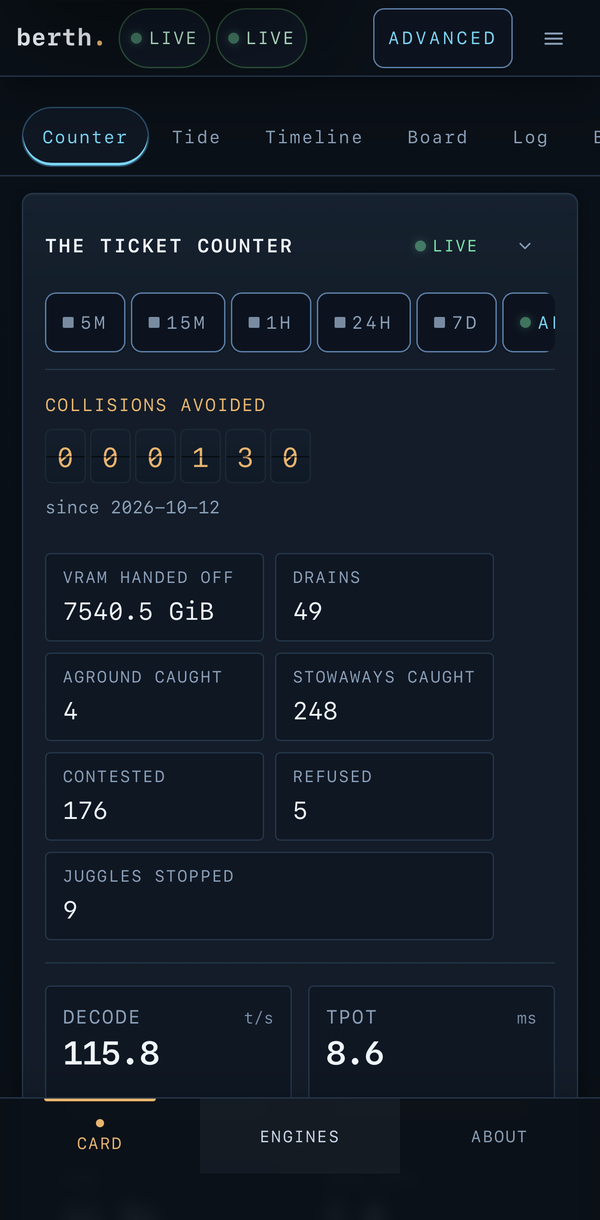
The first two screenshots show the harbor web UI with its built-in demo data, on the CARD tab and on
the Engines tab in advanced mode. The third shows the CARD tab of a live node on an iPhone.
[The harbor and telemetry](docs/harbor.md) explains every panel and shows how to add the harbor to an
iPhone's Home Screen.
## Install
`berth service install --harbor` in the quick start sets up the daemon and the harbor as user
services. To install from a release binary instead, check it against the release's SHA256SUMS:
```sh
curl -fLO https://github.com/T-Crypt/berth/releases/latest/download/berth-linux-amd64
curl -fLO https://github.com/T-Crypt/berth/releases/latest/download/SHA256SUMS
sha256sum --check --ignore-missing SHA256SUMS
install -Dm755 berth-linux-amd64 ~/.local/bin/berth
```
[Install](docs/install.md) has a prompt that hands the whole install to your coding agent, the manual
steps, the configuration file and how to uninstall.
## Documentation
The same pages are a site with search at .
| Page | What it covers |
|---|---|
| [Install](docs/install.md) | The agent prompt, manual install, `berth.toml`, uninstall |
| [Engines](docs/engines.md) | Every engine Berth reads, API keys, ComfyUI as a suite |
| [Leasing, games and holds](docs/leasing.md) | Priorities, drains, stuck releases, the juggle guard, minimum turns, claims and `berth hold` |
| [VFIO passthrough](docs/vfio.md) (experimental, Linux) | `berth vfio status`, `berth vfio run`, the IOMMU requirements, an example switch script, a box with two NVIDIA cards |
| [Models](docs/models.md) | `berth pull`, integrity checks, shelves, `berth storage`, the page cache and `berth prefetch` |
| [Gateway](docs/gateway.md) | One OpenAI-compatible port, cold starts, fallbacks, KV snapshots, switch costs, wake pages, park in RAM |
| [Hermes Agent](docs/hermes.md) | Hermes on the gateway, auxiliary models, cold starts, the skill |
| [The harbor and telemetry](docs/harbor.md) | Stowaways, the collisions board, alerts, every harbor panel, what Berth measures |
| [Interfaces](docs/interfaces.md) | The CLI's output contract and exit codes, the harbor's options, Prometheus |
| [Benchmarks](docs/benchmarks.md) | Tested hardware and measured swap times |
| [Roadmap](docs/roadmap.md) | Phases, what each release shipped, what comes next |
| [FAQ](docs/faq.md) | Common questions, Docker engines included |
## Support matrix
| Platform | Status |
|---|---|
| Linux + NVIDIA | Supported |
| Windows 10/11 + NVIDIA | Experimental: leases, process attribution, job-object drains and game claims work, and the test suite runs on Windows in CI. Per-process VRAM comes from the GPU Process Memory counter (Task Manager's source), which also lists graphics apps and games nvidia-smi omits; host RAM and the page file come from GlobalMemoryStatusEx, and root space from GetDiskFreeSpaceEx. `berth service install` sets the node up as logon tasks; still no packaged installer and no locked-down control pipe. `contrib/windows/check.ps1` compares Berth's per-process VRAM with Task Manager's and writes a report for the drain report form. |
| AMD on Linux | Experimental: discrete RDNA3/RDNA4 and Phoenix APUs through amdgpu sysfs/DRM. W7900 and 780M bounded allocation/handoff validated; RDNA4 fixture-tested, hardware validation pending. APU leases are exclusive, with independent UMA/GTT accounting and host-RAM admission checks. [Scope and checks](contrib/amd/README.md). |
| Intel, Apple | Not supported yet |
| Multiple GPUs | Experimental: one berthd per card, each named by its PCI address. One card can be passed through to a VM while the other keeps serving ([two NVIDIA cards](docs/vfio.md#two-nvidia-cards)). One berthd for every card, and one lease across two cards, are planned for v0.4. |
## Tested hardware
The table of cards Berth has run on, and how to add yours, is in
[Benchmarks](docs/benchmarks.md#tested-hardware).
## Swap numbers
On the reference RTX 4090 with 62.5 GiB of RAM, one chat request through llama-swap, from the
request to the reply, lease included (2026-10-23):
| Switch | Time |
|---|---|
| A 21 GB chat model, file in the page cache | 5.6 s |
| ComfyUI parks in RAM | under 1 s |
| ComfyUI to a 27B chat model | 13.6 to 16.3 s |
Strata's numbers and the method are in [Benchmarks](docs/benchmarks.md#swap-numbers).
## Roadmap
The phases, the shipped releases and what comes next are in the [roadmap](docs/roadmap.md).
## What Berth never does
- Kill a process it did not start, or any process by default.
- Grant a card because a process exited, before the driver shows the memory free.
- Claim memory is reserved when it is only estimated to be free.
- Take a card from another user's machine without their consent (on one machine, only the
priorities you set decide).
- Require a cloud account, telemetry upload, or any other software to work.
## Contributing
Issues and pull requests are welcome. [AGENTS.md](AGENTS.md) has the one command that proves a
change (build, format, vet, tests, lint, as CI runs them) and the invariants a change must
keep.
## Star History
## License
[Apache License 2.0](LICENSE). Copyright 2026 Trevin Tindall (T-Crypt), who created Berth and
maintains it here. Forks are welcome: keep the [NOTICE](NOTICE) file and the copyright header in
each source file, mark the files you change, and release your fork under its own name. The
Berth name, the Pilot mascot and the artwork in `assets/` are not covered by the license.
Third-party components: [THIRD_PARTY_NOTICES](THIRD_PARTY_NOTICES).


-e8b56f?labelColor=0a1017)