# tabularis
Tabularis 是一款开源的桌面 SQL 工作台,支持 PostgreSQL、MySQL/MariaDB、SQLite 以及 DuckDB、ClickHouse、Redis 和 Firestore 等 15+ 种数据库。
其内置的 MCP 服务器可让 Claude、Cursor 和 Devin(原 Windsurf)在你日常使用的同一款应用中读取数据库结构并执行查询。
README:
English |
Italiano |
Español |
中文 |
Français |
Deutsch |
日本語 |
Русский |
Tagalog |
한국어 |
Português (Brasil)




[](https://discord.com/invite/K2hmhfHRSt)
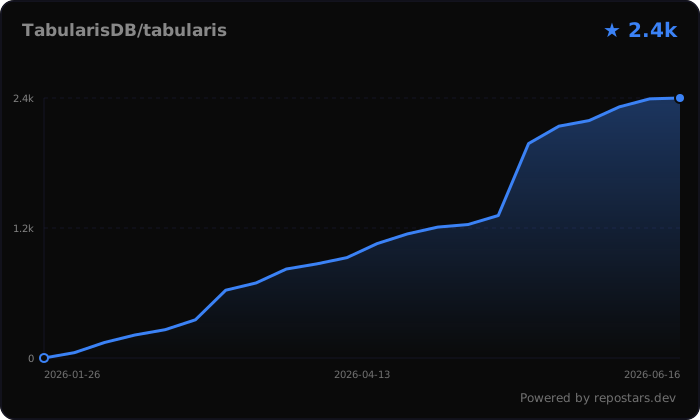
[](https://gitster.dev/repo/TabularisDB/tabularis)




**Discord** - [加入社区](https://discord.com/invite/K2hmhfHRSt),与维护者交流、提交反馈并获取帮助。
> 这是翻译版文档。若需最新且权威的说明,请同时参考[英文 README](./README.md)。
## 下载
```bash
winget install Debba.Tabularis # Windows
brew tap TabularisDB/tabularis && brew install --cask tabularis # macOS
sudo snap install tabularis # Linux
```
或直接下载安装包:
[](https://github.com/TabularisDB/tabularis/releases/download/v0.17.0/tabularis_0.17.0_x64-setup.exe) [](https://github.com/TabularisDB/tabularis/releases/download/v0.17.0/tabularis_0.17.0_aarch64.dmg) [](https://github.com/TabularisDB/tabularis/releases/download/v0.17.0/tabularis_0.17.0_x64.dmg) [](https://github.com/TabularisDB/tabularis/releases/download/v0.17.0/tabularis_0.17.0_amd64.AppImage) [](https://github.com/TabularisDB/tabularis/releases/download/v0.17.0/tabularis_0.17.0_amd64.deb) [](https://github.com/TabularisDB/tabularis/releases/download/v0.17.0/tabularis-0.17.0-1.x86_64.rpm)
应用界面支持英语、意大利语、西班牙语、简体中文、法语、德语、日语、俄语和他加禄语。
## 为什么选择 tabularis?
| | **tabularis** | DBeaver CE | TablePlus | Beekeeper Studio |
|---|---|---|---|---|
| 许可证 | Apache 2.0,免费 | Apache 2.0,免费(Pro 版收费) | 商业软件 | GPLv3(付费版本) |
| SQL 笔记本(SQL + Markdown 单元、跨单元变量、图表) | ✅ | ❌ | ❌ | ❌ |
| 面向 AI 代理的内置 MCP 服务器 | ✅ | ❌ | ❌ | ❌ |
| 支持**任意语言**编写插件(基于 stdio 的 JSON-RPC) | ✅ | Java/Eclipse 插件 | JavaScript 插件 | ❌ |
| 支持**本地模型**(Ollama)的 AI text-to-SQL | ✅ | 基于云端的 AI 助手 | ❌ | ❌ |
| 带交互式计划图的可视化 EXPLAIN | ✅ | ✅ | ❌ | ❌ |
| 开箱即用支持的数据库 | 3 种内置 + 15 个官方插件 | 100+ | 20+ | 约 10 种 |
> 对比数据截至 2026 年 6 月,其他工具的功能此后可能已有变化。如果你需要几十种驱动,请使用 DBeaver——tabularis 专注于把少数几种数据库做好。
### 数据库支持
PostgreSQL、MySQL/MariaDB 和 SQLite 为内置支持。其余均为插件——下面列出每个集成当前的状态,与网站上的[驱动与插件覆盖](https://tabularis.dev/#driver-coverage)保持一致。
ClickHouse(已发布)、Cloudflare D1(已发布)、DuckDB(已发布)、Firestore(已发布)、IBM Db2(已发布)、IBM Informix(已发布)、Redis(已发布)、CSV Folder(已发布)、Google Sheets(已发布)、HackerNews(已发布)、Google BigQuery(已认领)、LibSQL / Turso(已认领)、Meilisearch(已认领)、MongoDB(已认领)、Oracle(已认领)、SQL Server(已认领)、Amazon Redshift(已规划)、CockroachDB(已规划)、TiDB(已规划)、DynamoDB(即将推出)、Snowflake(即将推出)、Cassandra(开放中)、Elasticsearch(开放中)、Etcd(开放中)、Firebird(开放中)、ScyllaDB(开放中)、SQL Anywhere(开放中)、SurrealDB(开放中)、Trino / Presto(开放中)。
> 标记为**已发布**的驱动可从[插件注册表](https://tabularis.dev/plugins)安装。其余均在[悬赏看板](https://tabularis.dev/plugins/bounties)上——你可以认领、赞助,或[申请新数据库](https://github.com/TabularisDB/tabularis/discussions)。
## 安装
### Windows
```bash
winget install Debba.Tabularis
```
也可以直接从 [Releases 页面](https://github.com/TabularisDB/tabularis/releases)下载安装程序。
### macOS
```bash
brew tap TabularisDB/tabularis
brew install --cask tabularis
```
从 **v0.13.1** 起,构建版本已由 Apple 签名并公证,直接打开即可,无需任何额外步骤。
以下说明仅适用于直接下载的旧版本(v0.13.1 之前):
- 你需要在“隐私与安全性”中授予 tabularis 应用辅助功能(Accessibility)访问权限。如果你是升级安装,并且 tabularis 已在允许列表中,请先手动将其移除,然后才能为新版本授予辅助功能访问权限。
- 将应用复制到“应用程序”目录后,可能还需要执行:
```bash
xattr -c /Applications/tabularis.app
```
### Linux
Snap:
```bash
sudo snap install tabularis
```
Flatpak:
```bash
flatpak remote-add --if-not-exists flatpark https://dl.flatpark.org/flatpark.flatpakrepo
flatpak install flatpark dev.tabularis.Tabularis
```
AppImage:
```bash
chmod +x tabularis_x.x.x_amd64.AppImage
./tabularis_x.x.x_amd64.AppImage
```
Arch Linux:
```bash
yay -S tabularis-bin
```
## 更新
- 应用启动时会自动检查更新。
- 也可以通过 GitHub Releases 手动获取最新版。
## 画廊
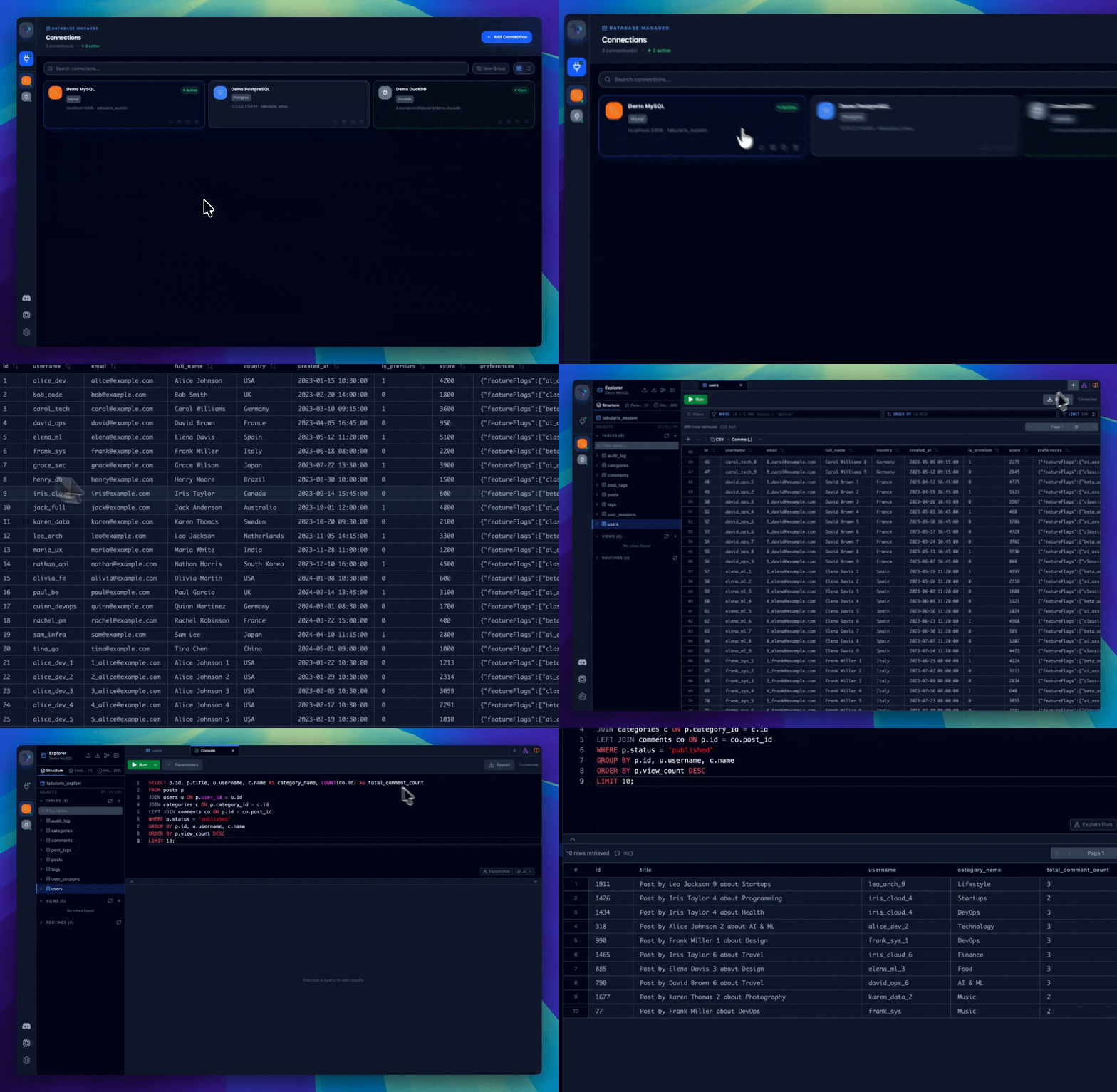
完整截图和演示请查看 [tabularis.dev](https://tabularis.dev)。
## 功能
### 连接管理
- 支持 PostgreSQL、MySQL/MariaDB 和 SQLite。
- 本地保存连接配置。
- 支持 SSH 隧道和系统钥匙串密码存储。
- 连接页面支持网格/列表视图与实时搜索。
- 每个连接可单独自定义外观:自选图标(Lucide、Emoji 或自定义图片)和强调色。
### 数据库浏览器
- 浏览表、列、键、索引、视图和例程。
- 支持部分 schema 元素的行内编辑。
- 交互式 ER 图。
- 右键快捷操作。
### SQL 编辑器
- 使用 Monaco Editor,支持高亮和自动补全。
- 多标签页与隔离连接。
- 多语句执行,结果分开展示。
- 支持保存查询和编辑器内 AI 辅助。
### SQL 笔记本
- 同一文档中混合 SQL 与 Markdown 单元。
- 单元下方直接显示结果和图表。
- 支持跨单元变量和全局参数。
- 支持顺序执行全部单元。
### 可视化查询构建器
- 拖拽式构建查询。
- 支持可视化 JOIN、过滤、聚合、排序和限制。
- 实时生成 SQL。
### 可视化 EXPLAIN
- 将执行计划显示为可导航图结构。
- 支持表格、原始输出和可选 AI 分析视图。
- 兼容 PostgreSQL、MySQL/MariaDB 和 SQLite。
### 数据网格
- 行内编辑与批量编辑。
- 创建、选择和删除行。
- 导出为 CSV 或 JSON。
- 初步支持空间数据。
### 日志
- 在设置中查看实时日志。
- 可按级别过滤。
- 支持导出 `.log` 文件。
- CLI 调试模式:`tabularis --debug`。
### 插件系统
- 通过 stdin/stdout 上的 JSON-RPC 2.0 扩展应用。
- 无需重启即可安装社区驱动。
- 官方注册表位于 [`plugins/registry.json`](./plugins/registry.json)。
- 开发指南位于 [`plugins/PLUGIN_GUIDE.md`](./plugins/PLUGIN_GUIDE.md)。
## 配置
配置文件默认保存在:
- Linux:`~/.config/tabularis/`
- macOS:`~/Library/Application Support/tabularis/`
- Windows:`%APPDATA%\\tabularis\\`
主要文件:
- `connections.json`
- `saved_queries.json`
- `config.json`
- `themes/`
- `preferences/`
- `connection-icons/`(连接图标的自定义图片)
`config.json` 中的 `language` 字段支持 `auto`、`en`、`it`、`es`、`zh`、`fr`、`de`、`ja`、`ru`、`tl`。
## AI
可选的 text-to-SQL 与查询解释支持以下提供商:
- OpenAI
- Anthropic
- MiniMax
- OpenRouter
- Ollama
- 兼容 OpenAI 的 API
模型列表会动态获取,并在本地缓存。
## MCP
内置 MCP 服务器启动方式:
```bash
tabularis --mcp
```
支持的客户端:
- Claude Desktop
- Cursor
- Windsurf
可用工具:
- `list_connections`
- `list_databases`
- `list_tables`
- `describe_table`
- `run_query`
## 技术栈
- 前端:React 19、TypeScript、Tailwind CSS v4
- 后端:Rust、Tauri v2、SQLx
## 开发
启动开发环境:
```bash
pnpm install
pnpm tauri dev
```
构建:
```bash
pnpm tauri build
```
## 路线图
- Remote Control
- Command Palette
- JSON/JSONB 编辑与查看
- SQL Formatting / Prettier
- Data Compare / Diff Tool
- Team Collaboration
## 贡献
欢迎贡献——参阅 [CONTRIBUTING.md](./CONTRIBUTING.md)。不错的切入点:
- [SQL Server 驱动——实现路线图与贡献者招募](https://github.com/TabularisDB/tabularis/issues/150)
- [UI 设计系统与视觉识别——贡献者招募](https://github.com/TabularisDB/tabularis/issues/195)
- 用任意语言编写驱动插件——参阅[插件指南](./plugins/PLUGIN_GUIDE.md)
## 项目起源
Tabularis 始于一次实验:AI 辅助开发能在多大程度上从零构建出一款可用的工具?结果超出预期——如今它已是一个持续维护的项目,定期发布新版本,并拥有自己的插件生态。
## 许可证
Apache License 2.0
---
喜欢 tabularis?欢迎为仓库点个 Star ⭐——这对项目帮助很大。