# MrRSS

English | 简体中文
[](https://github.com/WCY-dt/MrRSS/releases)
[](LICENSE)
[](https://go.dev/)
[](https://wails.io/)
[](https://vuejs.org/)
## ✨ Features
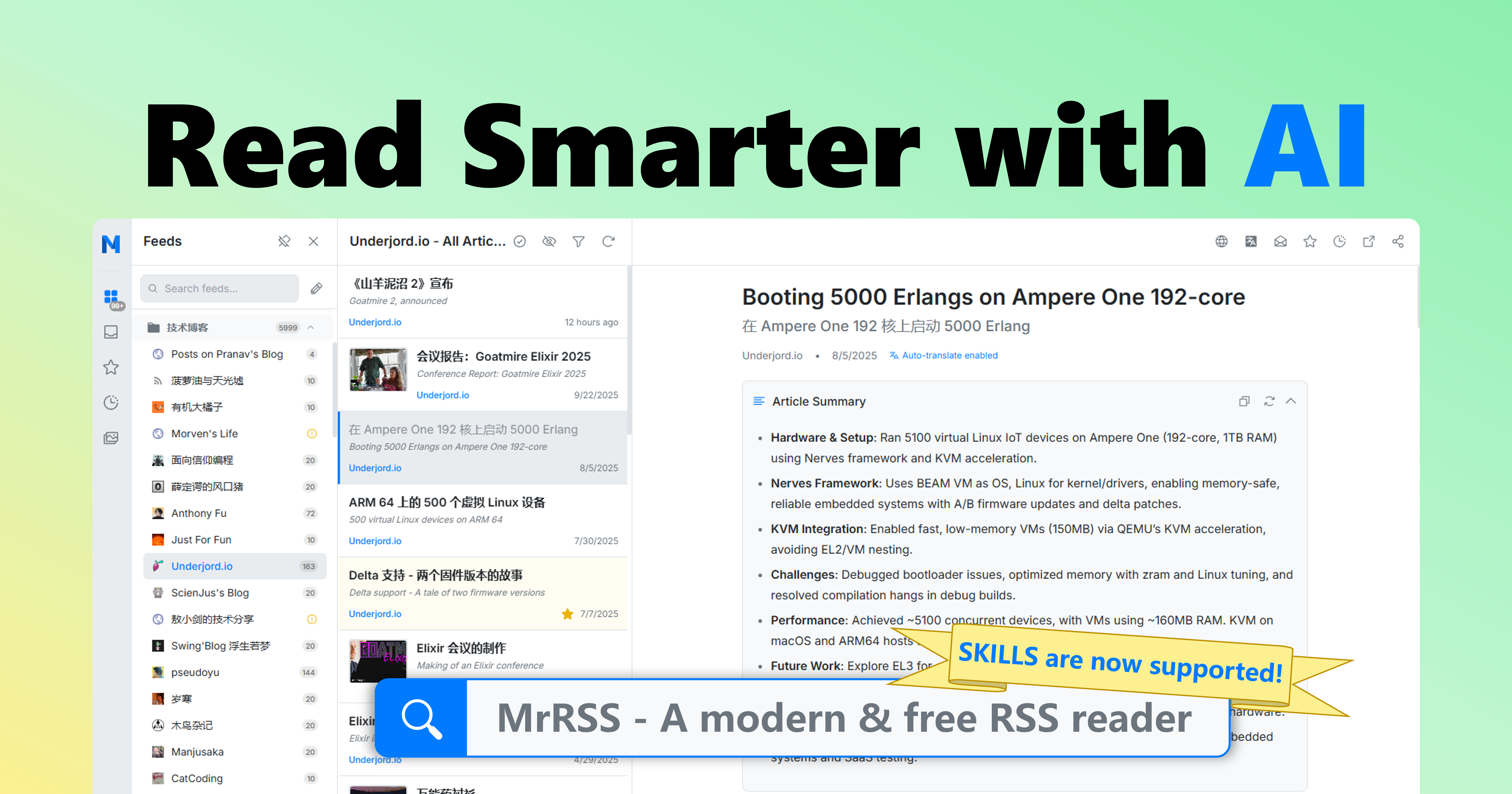
- 🌐 **Auto-Translation & Summarization**: Automatically translate article titles and content, and generate concise summaries to help you get information quickly
- 🤖 **AI-Enhanced Features**: Integrated advanced AI technology for translation, summarization, recommendations, and more. Reading and performing operations through skills are also supported
- 🔌 **Rich Plugin Ecosystem**: Supports integration with mainstream tools like Obsidian, Notion, FreshRSS, and RSSHub for easy feature extension
- 📡 **Diverse Subscription Methods**: Supports URL, XPath, scripts, newsletters, and other feed types to meet different needs
- 🏭 **Custom Scripts & Automation**: Built-in filters and scripting system supporting highly customizable automation workflows
## 🚀 Quick Start
### Download and Install
#### Option 1: Download Pre-built Installer (Recommended)
Download the latest installer for your platform from the [Releases](https://github.com/WCY-dt/MrRSS/releases/latest) page.
Click to view the list of available installers
**Standard Installation:**
- **Windows:** `MrRSS-{version}-windows-amd64-installer.exe` / `MrRSS-{version}-windows-arm64-installer.exe`
- **macOS:** `MrRSS-{version}-darwin-universal.dmg`
- **Linux:** `MrRSS-{version}-linux-amd64.AppImage` / `MrRSS-{version}-linux-arm64.AppImage`
**Portable Version** (no installation required, all data in one folder):
- **Windows:** `MrRSS-{version}-windows-{arch}-portable.zip`
- **Linux:** `MrRSS-{version}-linux-{arch}-portable.tar.gz`
- **macOS:** `MrRSS-{version}-darwin-{arch}-portable.zip`
**AI Agent Skills:**
- **Codex:** `MrRSS-{version}-skills.zip` ([usage guide](docs/SKILLS.md))
#### Option 2: Build from Source
Click to expand the build from source guide
### Prerequisites
Before you begin, ensure you have the following installed:
- [Go](https://go.dev/) (1.25 or higher)
- [Node.js](https://nodejs.org/) (20 LTS or higher with npm)
- [Wails v3](https://v3alpha.wails.io/getting-started/installation/) CLI
**Platform-specific requirements:**
- **Linux**: GTK4, WebKitGTK 6.0, libsoup 3.0, GCC, pkg-config
- **Windows**: MinGW-w64 (for CGO support), NSIS (for installers)
- **macOS**: Xcode Command Line Tools
For detailed installation instructions, see [Build Requirements](docs/BUILD_REQUIREMENTS.md)
```bash
# Quick setup for Linux (Ubuntu 24.04+):
sudo apt-get install libgtk-4-dev libwebkitgtk-6.0-dev libsoup-3.0-dev gcc pkg-config
```
### Installation
1. **Clone the repository**
```bash
git clone https://github.com/WCY-dt/MrRSS.git
cd MrRSS
```
2. **Install frontend dependencies**
```bash
cd frontend
npm install
cd ..
```
3. **Install Wails v3 CLI**
```bash
go install github.com/wailsapp/wails/v3/cmd/wails3@v3.0.0-alpha2.117
```
4. **Build the application**
```bash
# Using Task (recommended)
task build
# Or using Makefile
make build
# Or directly with wails3
wails3 build
```
The executable will be created in the `build/bin` directory.
5. **Run the application**
- Windows: `build/bin/MrRSS.exe`
- macOS: `build/bin/MrRSS.app`
- Linux: `build/bin/MrRSS`
### Data Storage
Click to expand data storage details
**Normal Mode** (default):
- **Windows:** `%APPDATA%\MrRSS\` (e.g., `C:\Users\YourName\AppData\Roaming\MrRSS\`)
- **macOS:** `~/Library/Application Support/MrRSS/`
- **Linux:** `~/.local/share/MrRSS/`
**Portable Mode** (when `portable.txt` exists):
- All data stored in `data/` folder
This ensures your data persists across application updates and reinstalls.
## 🛠️ Development Guide
Click to expand the development guide
### Running in Development Mode
Start the application with hot reloading:
```bash
# Using Wails v3
wails3 dev
# Or using Task
task dev
```
### Code Quality Tools
#### Using Make
We provide a `Makefile` for handling common development tasks (available on Linux/macOS/Windows):
```bash
# Show all available commands
make help
# Run full check (lint + test + build)
make check
# Clean build artifacts
make clean
# Setup development environment
make setup
```
### Pre-commit Hooks
This project uses pre-commit hooks to ensure code quality:
```bash
# Install hooks
pre-commit install
# Run on all files
pre-commit run --all-files
```
### Running Tests
```bash
make test
```
### Server Mode (API-only)
For server deployments and API integration, use the headless server version:
```bash
# Using Docker (recommended)
docker run -p 1234:1234 mrrss-server:latest
# Or build from source
go build -tags server -o mrrss-server .
./mrrss-server
```
Pre-built server images based on ghcr.io are also available:
```bash
docker run -d -p 1234:1234 ghcr.io/wcy-dt/mrrss:latest-amd64
docker run -d -p 1234:1234 ghcr.io/wcy-dt/mrrss:latest-arm64
```
Please refer to the [Server Mode API Documentation](docs/SERVER_MODE/swagger.json) for a complete API reference.
To let Codex operate MrRSS through this API, install the release skill package described in [MrRSS Skills](docs/SKILLS.md).
## 🤝 Contributing
We welcome contributions! Please see our [Contributing Guidelines](CONTRIBUTING.md) for details.
Click to expand the contributing guidelines
Before contributing:
1. Read the [Code of Conduct](CODE_OF_CONDUCT.md)
2. Check existing issues or create a new one
3. Fork the repository and create a feature branch
4. Make your changes and add tests
5. Submit a pull request
## 🔒 Security
If you discover a security vulnerability, please follow our [Security Policy](SECURITY.md).
## 📝 License
This project is licensed under the GPL-3.0 License - see the [LICENSE](LICENSE) file for details.
## 📮 Contact & Support
- **Issues**: [GitHub Issues](https://github.com/WCY-dt/MrRSS/issues)
- **Discussions**: [GitHub Discussions](https://github.com/WCY-dt/MrRSS/discussions)
- **Repository**: [github.com/WCY-dt/MrRSS](https://github.com/WCY-dt/MrRSS)
---

Made with ❤️ by the MrRSS Team
⭐ Star us on GitHub if you find this project useful!