DSH Browser
Headless-first, isolated browser automation for DeepSeek Harness. Managed Chromium Sessions • Semantic References • Scoped Observation • Bounded Evidence
Package: @zseven-w/dsh-browser · Version: 0.1.0-rc.1 · Prerelease
English 简体中文
Each Agent gets its own temporary Chrome/Edge/Chromium user-data directory, short-lived semantic references, deterministic high-risk rejection, and bounded evidence. Install it with `npm install @zseven-w/dsh-browser`; this is a prerelease, so the contract (v9) can still change between rc versions.
[Quick start](#quick-start) · [Tools](#tools) · [Safety](#safety-and-evidence-boundaries) · [Development](#develop-locally) · [Documentation](#documentation)
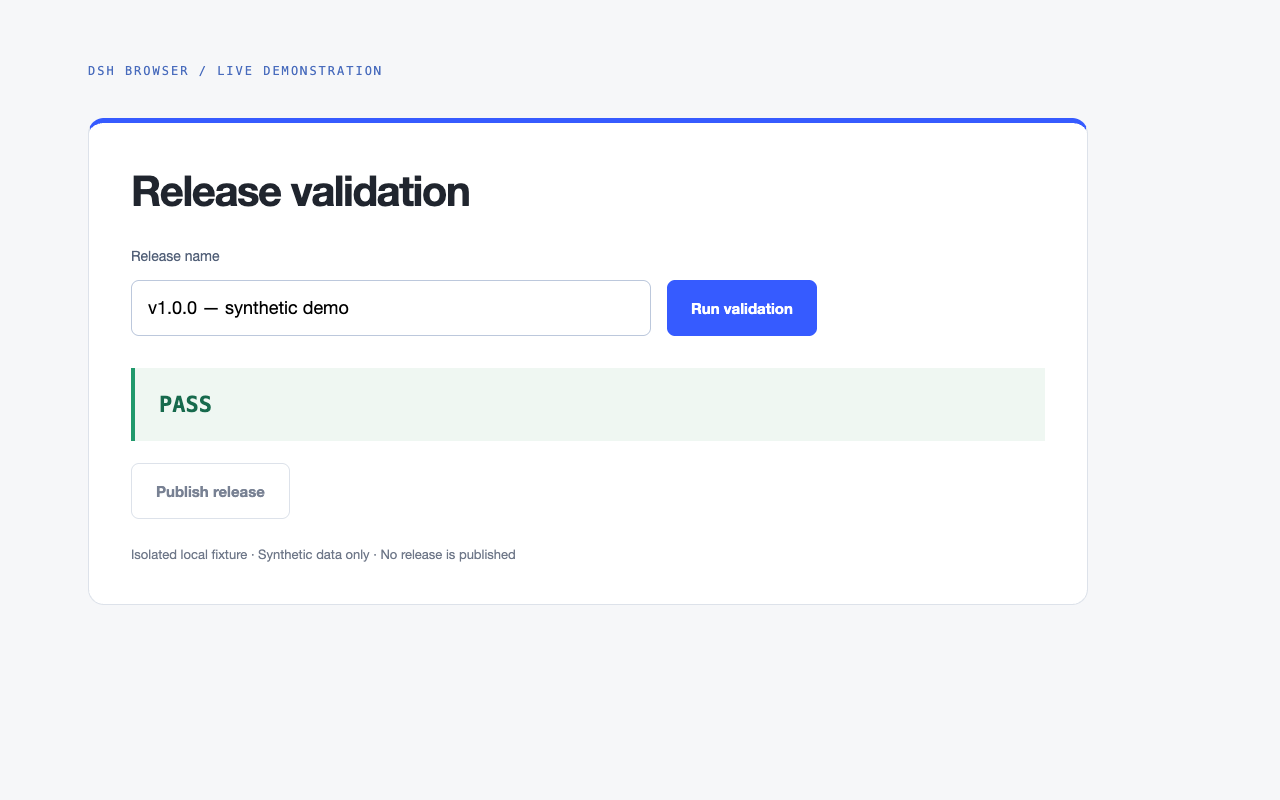
Real Browser driver execution on a styled local test fixture: fill → click → re-observe. Synthetic data only; this is the page under test, not a built-in plugin dashboard.
## Why DSH Browser
`dsh-browser` does not attach to your personal browser or expose CSS selectors to the model. A tool call is always scoped by `exec.agent.id`; an Agent can only observe and act in the browser context it owns.
```text
Agent A ── ephemeral Chromium context A ── opaque refs A
Agent B ── ephemeral Chromium context B ── opaque refs B
└──── bounded console/network evidence
```
The exported `zsevenBrowserDriver` service is the stable orchestration surface intended for `dsh-qa`.
## Quick start
Requirements: Node.js `>=24.11.0`, pnpm, and an installed Google Chrome, Microsoft Edge, or Chromium. The default path is headless; no personal browser profile is used.
Install DSH separately, then build this checkout from the repository root:
```sh
npm install -g @deepseek-ai/dsh@latest
pnpm install
pnpm run build
```
Link the built checkout into a DSH Web profile, replacing the placeholder with its absolute path, then restart DSH:
```sh
dsh plugin --profile web add link:/path/to/dsh-browser
dsh web
```
Set an operator-owned [navigation allowlist](#operator-navigation-policy) before running against production or QA targets. Start with `browser_session_start`, call `browser_observe`, act using a fresh ref, then observe again to check the result. Finish with `browser_session_stop`. A `confirmed` action receipt proves dispatch, not the application's business outcome.
## Tools
| Tool | Purpose |
| --- | --- |
| `browser_session_start` | Discover installed Chrome/Edge/Chromium and start one isolated context. |
| `browser_observe` | Return a bounded semantic view — whole-page, or scoped to one element's subtree via `within` — with opaque epoch/fingerprint/expiry-bound refs. |
| `browser_act` | `click`, `fill`, `press`, `navigate`, `scroll`, `select`, or `hover` after live re-resolution and target checks. |
| `browser_evidence` | Return bounded, redacted console and network metadata. |
| `browser_session_stop` | Close the context and delete its exact temporary profile directory. |
Every `browser_act` result is a receipt with one of four states:
- `confirmed`: the browser completed the validated dispatch. This does **not** claim the application's business outcome succeeded.
- `unknown`: dispatch may have happened, but cancellation/navigation/runtime failure made the resulting page state uncertain.
- `rejected`: policy, stale-ref, semantic-change, expiry, or hit-test checks stopped dispatch.
- `failed`: the browser could not dispatch the action.
`scroll` reaches off-viewport controls (by ref, centering the target) or pages the viewport (`direction` + optional `amount`); `select` chooses a native `` option by accessible label first and exact value second, failing rather than guessing; `hover` holds the pointer over an element so a later observe sees hover-revealed content. Any dispatched action — including `scroll` — invalidates the observation, so observe again after acting.
## Scoped observation (v8)
The whole-page projection is clamped to 100 nodes and a 48 KiB emission budget, so a target deep in DOM order (a navbox link, a footer control) may never appear no matter what the viewport shows. `browser_observe` accepts an optional `within` ref from the latest observation (including a scoped observation's own `scope.rootRef`): the driver resolves it exactly like an action ref (same staleness/expiry rules, same rejection vocabulary) and collects semantic nodes from the flattened subtree rooted at that element instead of the whole page — same selector, same flattened-slot/open-shadow-root walk, same atomic handle capture. `maxNodes`, the byte ceiling, the 500-match scan window, and the iframe truncation marker all become subtree-relative, so a subtree that fits reports `truncated: false` with no reasons: absence inside a container becomes provable. The result's `scope` echoes the root (`{ ref, role, name, tag, rootRef }`; `null` for a whole-page observe) while each node's `inViewport` keeps its whole-page viewport meaning. Refusals fail closed and are never a whole-page fallback: `REF_INVALID` (malformed), `OBSERVATION_REQUIRED` (observation consumed), `REF_UNKNOWN` (unknown or consumed ref), `REF_EXPIRED`, `PAGE_CHANGED`, `TARGET_CHANGED` (detached or replaced), `TARGET_UNBINDABLE` (no live binding), `WITHIN_NOT_ELEMENT` (non-element root), and `SCOPE_UNAVAILABLE` (a retained scope root is missing or was released by navigation or by the next observation).
## Identity and ancestry (v9)
The projection is of OBSERVABLE semantic nodes: selector matches skipped by the visibility gate (`visibility:hidden`, `display:none`, `opacity:0`, zero/no client rects) are never emitted, and `node-absent` means "no observable node". Every observation reports `hiddenMatches` — the count of gate-skipped matches inside the scanned range — plus `hiddenMatchesPartial` (`true` whenever the scan window, node budget, or byte budget stopped collection early, i.e. the count is a lower bound). It is a diagnostic, never a truncation reason.
Every node carries `parentRef`: the ref of the nearest ANCESTOR — in the composed tree: light-DOM parents, through slot assignment to the slot's flattened parent, and crossing a shadow root to its host — that is itself an emitted node in the SAME observation; `null` at the top (the first whole-page node and every scoped root have none). Ancestors always precede their descendants in emission order, so a node's `parentRef` always names an earlier node of the same observation. Refs are re-minted per observation: compare ancestry as a RELATIONSHIP (the parent's index within the same view, or null), never as raw ref strings.
Every node also carries `nameSource`, computed in the same single page-side evaluation as its `name`: `label` when the accessible name is an authored label (`aria-label`, `aria-labelledby`, an associated ``, `alt`, `title`, or another authored attribute/value such as `placeholder` or an input-button's value), and `content` when it is derived from descendant text aggregation (or empty). A content-named node with a container role — `search`, `region`, `list`, `listbox`, `group`, `navigation`, `main`, `form`, `table`, `menu` (mirroring the QA layer's `CONTENT_NAMED_CONTAINER_ROLES`) — has its `name` EXCLUDED from the `within` / retained scope-root identity check: its aggregated name changes whenever a descendant's text changes (Wikipedia's "Part of a series on the History of China" sidebar — role `navigation`, tag `table`, a ~180-character concatenation of its descendants' text including the hide/show toggles — is the canonical case) while the element is still the same node, so `observe({ within: })` resolves instead of refusing `TARGET_CHANGED` and reports the change informationally via `scope.nameChanged: true` (with `scope.name` carrying the new aggregated name). Label-named nodes, non-container nodes, and `act` targets keep the full strict fingerprint — an `act` on a content-named container whose text changed still refuses `TARGET_CHANGED` with `changed: ['name']` and the before/after snapshots.
The collection walk is the flattened tree: light-DOM children slotted into an OPEN shadow root are collected exactly once, at the slot position they RENDER in (`HTMLSlotElement.assignedElements({flatten: true})` resolves nested slots; a slot with nothing assigned renders its fallback children); unassigned light children of a shadow host have no flattened render position and are not emitted; a slot whose assignment cannot be resolved marks the view truncated with reason `slot-unresolved`. Assignment into a CLOSED shadow root is invisible in-page (`assignedSlot` is null there by spec) and is left to the Phase C CDP coverage probe.
A scoped observation's `scope` carries `rootRef`, a ref minted in THAT observation for the root element. When the root is emitted it is `nodes[0]` and `rootRef` equals its ref; when the visibility gate excludes it the root may be absent from `nodes` while `rootRef` still binds it — a follow-up `observe({ within: scope.rootRef })` keeps resolving through the same staleness/expiry vocabulary.
A dispatched action invalidates the observation that minted the refs, and after it exactly TWO bindings survive. One is the acted element: `observe({ anchorLastAction: true })` reports an identity anchor for the element the driver last dispatched an action on — the ORIGINAL handle used for dispatch, never a re-matched node. The driver retains that handle per session (replaced on every dispatched act, cleared by acts without an element target, released on navigation/dispose) and verifies IN-PAGE whether the element is still connected and whether it lies inside the `within` subtree by composed containment (parent/host/assignedSlot chain). `anchor: { ref, connected, contained }` — `ref` is the element's fresh ref in the current observation when it was emitted (`null` when the gate or a budget excluded it, while `connected`/`contained` stay truthful), and `contained` is `null` for a whole-page observe. With no retained target the call rejects with `ANCHOR_UNAVAILABLE` — never a silent null.
The other survivor is the scope root: when the observation a dispatched action consumed was scoped, the driver retains its scope root per session (with the observation's `scope` metadata and the fresh `rootRef` it minted). Until the next observe, `observe({ within: })` — or the literal alias `within: 'last-scope'` — resolves through the retained handle and re-scopes the projection to the SAME root, so the outcome of a scroll acted from a scoped view can be PROVEN inside that scope on a long page. The retained root passes the same fail-closed checks as a live `within` ref (`isConnected`, element node, identity — `TARGET_CHANGED` / `WITHIN_NOT_ELEMENT`) and works together with `anchorLastAction` (anchor containment is measured against this root). The retention is replaced by the next dispatched act, released and disposed on navigation/dispose, and consumed (fully released) by the next successful observe; a missing or released retention — and every OTHER ref, a plain node ref from the consumed observation included — refuses with `SCOPE_UNAVAILABLE` / the ordinary vocabulary above, never a whole-page fallback.
## Verified boundaries (v9, Phase C)
`observe({ verifyCoverage: true })` runs a bounded CDP probe after collection, over the observed subtree (the `within` root's subtree, or the whole document for a whole-page observe), to detect CLOSED shadow roots among ALL element descendants — non-semantic hosts included. Closed roots are invisible in-page (`Element.shadowRoot` is null), so content they render is missing from the projection even when the light tree looks complete. The probe walks the CDP DOM tree (`DOM.getDocument`/`DOM.describeNode` with depth -1 and `pierce:true`; open roots pierced, closed roots detected on their hosts, embedded frame documents walked too) under hard caps of 5,000 DOM nodes and 250 ms, reusing one lazily created CDP session per managed session. Every observation carries `coverage: { verified, closedShadowRoots, probedNodes, reason? }`:
- `closedShadowRoots > 0` → truncation reason `closed-shadow-root`, `truncated: true` (content is missing from the projection).
- The probe did not run to completion — `over-budget` (node or time cap), `cdp-unavailable` (session creation failed), `root-unresolved` (the within handle could not be mapped to a CDP backend node), or `error` → `verified: false` with that `reason`, plus truncation reason `shadow-coverage-unverified`. A skipped, failed, or over-budget probe is reported as its own reason — never treated as verified.
- The probe completed and found none → `verified: true`. Only then may a consumer read `truncated: false` as "every semantic node of the subtree is in the projection": with `verifyCoverage`, `coverage.verified:true` means no closed shadow root exists in the observed subtree; the projection is of observable semantic nodes (light tree + open roots + flattened slots + tracked closed roots: none — closed roots are never pierced, only detected).
- Without `verifyCoverage` the observation carries `coverage: { verified: false, reason: 'skipped', closedShadowRoots: 0, probedNodes: 0 }` and NO extra truncation reason: ordinary polls are unchanged in cost and in `truncated` semantics. Use `verifyCoverage` only on the terminal absence-proof path, never on settle polls.
## Operator navigation policy
> **Important:** `allowedOrigins` defaults to unrestricted top-level HTTP(S) navigation. Production and QA profiles should set an exact allowlist owned by the operator. It is never a model argument.
Example profile row:
```yaml
- id: dsh-browser
name: '@zseven-w/dsh-browser'
config:
allowedOrigins:
- https://staging.example.com
- http://127.0.0.1:4173
idleTimeoutMs: 900000
```
The allowlist is enforced before start/navigation, at Chromium's document-request interception layer for redirects, and after top-level page changes. An empty list allows only `about:blank`. It constrains top-level documents, not CDN/API subresources loaded by an allowed page.
Injected `storageState` is validated the same way: every `localStorage` origin must be exactly allowlisted, and every cookie's host must map onto the host of an allowlisted origin (leading-dot domains and IP literals are checked). Cookies are host-scoped by the browser: once injected they are sent to **every port and scheme** of that host — including subresource requests to origins outside the allowlist — so the allowlist cannot narrow cookie delivery; inject cookies only for operator-owned hosts.
## Safety and evidence boundaries
- Live target semantics—not a model-provided “sensitive” flag—reject destructive, financial, send/publish, security-change, password, upload, and download actions.
- Refs are opaque HMAC-derived values and only the latest unexpired observation is actionable.
- The driver re-collects live semantics and requires the same fingerprint, then center-point hit-tests before target actions. A `TARGET_CHANGED` refusal carries `changed` (the identity fields that differ, e.g. `['name']`, `['visible']`, or `['detached']`) plus `before`/`after` snapshots for the safe subset (`role`, `name`, `tag`, `disabled`, `visible`) — never any value.
- Downloads are cancelled and JavaScript dialogs are dismissed.
- Console text is bounded and common credential patterns are redacted.
- Network evidence contains method, status/failure, resource type, and a URL without credentials/query/fragment; it never includes headers or bodies.
- Cancellation closes the isolated browser context so a timed-out action cannot continue behind a newer action.
## Develop locally
Requirements: Node.js `>=24.11.0`, pnpm, and an installed Google Chrome, Microsoft Edge, or Chromium. `DSHPLUGIN_BROWSER_EXECUTABLE_PATH` is an operator-only override for a non-standard executable location.
```sh
pnpm install
pnpm run build
pnpm run typecheck
pnpm test
pnpm run smoke:pack
```
Use the [quick-start local link](#quick-start) to load the built checkout into DSH. Build and test commands do not publish a registry package.
## Exported driver contract
```ts
import {
BROWSER_DRIVER_SERVICE, // "zsevenBrowserDriver"
BROWSER_DRIVER_CONTRACT_VERSION, // 9
type ZSevenBrowserDriver,
} from '@zseven-w/dsh-browser/driver'
```
The service advertises `kind: "browser"` and `contractVersion: 9` (v9: every node carries `parentRef` — its nearest emitted composed ancestor; a scoped `scope` carries a fresh `rootRef` that keeps binding a gate-excluded root; `observe({ anchorLastAction: true })` returns the last acted element's identity anchor or rejects `ANCHOR_UNAVAILABLE`; a dispatched action retains the consumed scoped observation's scope root, so `observe({ within: scope.rootRef })` or `within: 'last-scope'` keeps re-scoping to that root until the next observe and refuses `SCOPE_UNAVAILABLE` once the retention is gone; the walk follows flattened slot assignment and marks `slot-unresolved` when assignment cannot be resolved; observations report `hiddenMatches`/`hiddenMatchesPartial`; Phase C adds `observe({ verifyCoverage: true })`, a bounded CDP closed-shadow-root probe whose per-observation `coverage` evidence is the only basis for reading `truncated:false` as a complete projection. v8: `observe` accepts an optional `within` ref that scopes the projection to one element's subtree with subtree-relative budgets, and every observation reports its `scope`; v7 added the `bindable` node flag, and every node carries `nameSource` — `label` for authored names, `content` for descendant-text aggregation — whose content-named container roles have `name` excluded from the `within`/retained scope-root identity check, reporting a changed aggregated name informationally as `scope.nameChanged` — see `BrowserSemanticNode`). Its `visualObserve` method captures a bounded PNG plus Set-of-Mark labels for the latest observation; it returns pixels and boxes only — no understanding, OCR, or diffing. Consumers should obtain it with Cordis injection (`ctx.inject([BROWSER_DRIVER_SERVICE], ...)`) and must not import manager internals or share model refs between Agents. `disposeScope(ownerId)` drains a late start as well as an active session; the plugin invokes it from the structural `agent/disposed` lifecycle hook.
## Verified scope and current limitations
The local integration gate starts installed Chrome headlessly, runs two isolated Agent contexts against a local HTTP fixture, verifies semantic fill/click, stale and cross-Agent ref rejection, deterministic dangerous-action rejection, origin policy, evidence redaction, temporary-profile cleanup, and the atomic observe capture contract (one page-side selection + serialization, per-node handle materialization bounded by maxNodes, no full-page handle queries, observation soundness under 20ms DOM churn, open-shadow-root refs collected and actable). The packed smoke performs a real clean npm install and starts the installed package's managed browser.
Initial limitations are intentional and should not be read as claims:
- Chromium-family browsers only; Firefox and WebKit are not implemented.
- Main-document semantic DOM projection. Any `