
The world's first open-source AI-native vector design tool.
Concurrent Agent Teams • Design-as-Code • Built-in MCP Server • Multi-model Intelligence
English · 简体中文 · 繁體中文 · 日本語 · 한국어 · Français · Español · Deutsch · Português · Русский · हिन्दी · Türkçe · ไทย · Tiếng Việt · Bahasa Indonesia



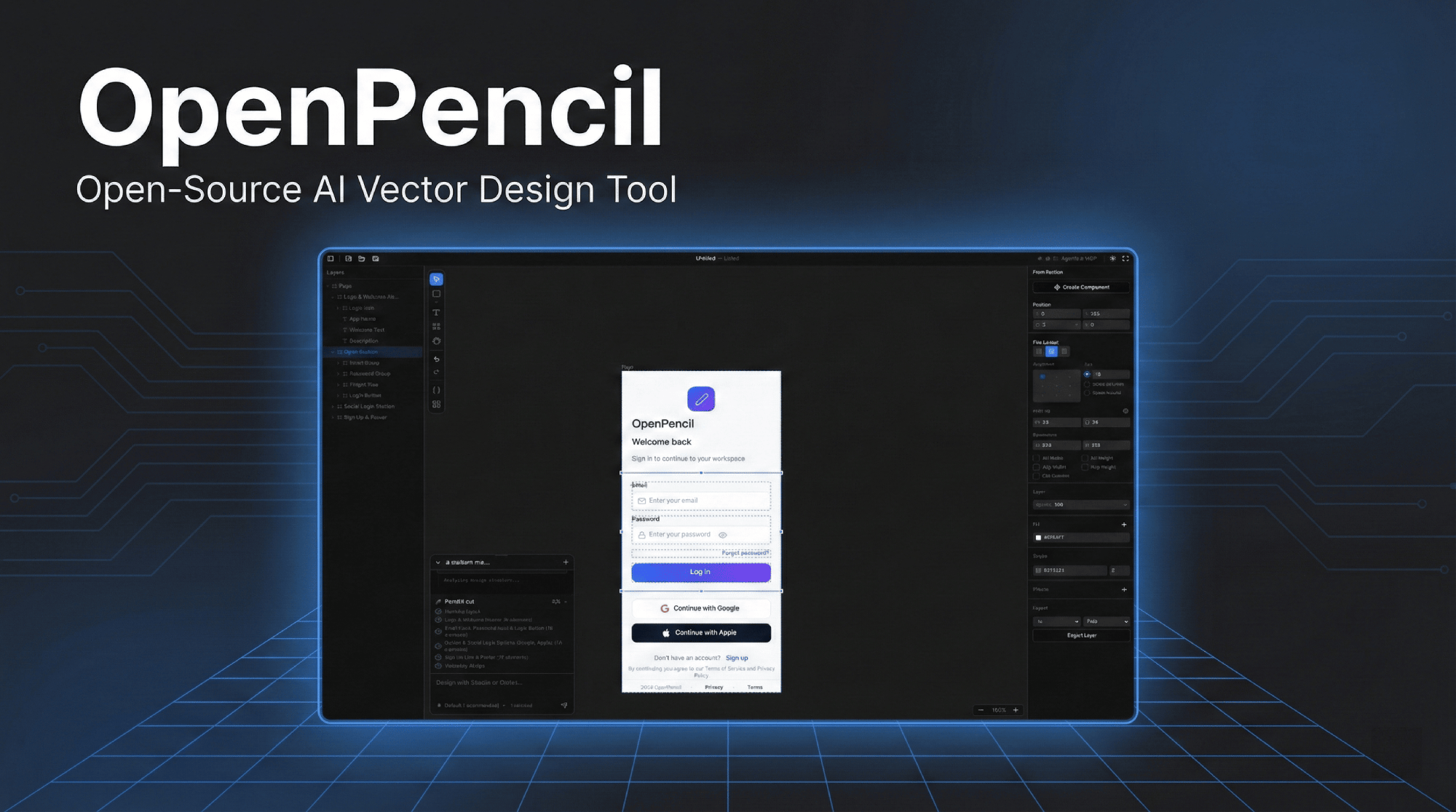
Click the image to watch the demo video
| ### 🎨 Prompt → Canvas Describe any UI in natural language. Watch it appear on the infinite canvas in real-time with streaming animation. Modify existing designs by selecting elements and chatting. | ### 🤖 Concurrent Agent Teams The orchestrator decomposes complex pages into spatial sub-tasks. Multiple AI agents work on different sections simultaneously — hero, features, footer — all streaming in parallel with per-member canvas indicators. |
| ### 🧠 Multi-Model Intelligence Automatically adapts to each model's capabilities. Claude gets full prompts with thinking; GPT-4o/Gemini disable thinking; smaller models (MiniMax, Qwen, Llama) get simplified prompts for reliable output. | ### 🔌 MCP Server One-click install into Claude Code, Codex, Gemini, OpenCode, Kiro, or Copilot CLIs. Design from your terminal — read, create, and modify `.op` files through any MCP-compatible agent. |
| ### 🎨 Style Guides Built-in style guide library with tag-based fuzzy matching. Apply visual styles (glassmorphism, brutalist, retro, etc.) to AI-generated designs. MCP tools for external agent access. | ### 📦 Design-as-Code `.op` files are JSON — human-readable, Git-friendly, diffable. Design variables generate CSS custom properties. Code export to React + Tailwind or HTML + CSS. |
| ### 🖥️ Runs Everywhere Web app + native desktop on macOS, Windows, and Linux — one Rust core, a single self-contained binary, no browser engine. `.op` file association — double-click to open. | ### ⌨️ CLI — `op` Control the design tool from your terminal. `op design`, `op insert` — batch design DSL, node manipulation. Pipe in from files or stdin. Works with desktop app or web server. |
| ### 🎯 Multi-Platform Code Export Export to React + Tailwind, HTML + CSS, Vue, Svelte, Flutter, SwiftUI, Jetpack Compose, React Native — all from one `.op` file. Design variables become CSS custom properties. | ### 🧩 Embeddable SDK `op-web-sdk` (vanilla) + `op-web-sdk-react` / `op-web-sdk-vue` adapters — embed a read-only `.op` viewer in your own app, powered by the same wasm renderer the editor ships. |
| ### 🛡️ Design System Kit Manage reusable UIKits with style switching and component composition. Import/export kits from `.pen` files. Built-in registry with MCP tools for external access. |
 **[Zode](https://github.com/ZSeven-W/zode)** | Open-source, AI-native coding assistant for your terminal — a fast Rust TUI (`ratatui`) that reads your code, runs commands, searches files, and manages git. Drives OpenPencil over MCP. |
| **[agent-rs](https://github.com/ZSeven-W/agent-rs)** | A pure-Rust async runtime for shipping LLM agents — multi-provider, tool-capable end-to-end, structured permissions, real MCP, zero `unsafe`. Powers OpenPencil's built-in agent runtime (`vendor/agent`) and Zode. |
|
**[Zode](https://github.com/ZSeven-W/zode)** | Open-source, AI-native coding assistant for your terminal — a fast Rust TUI (`ratatui`) that reads your code, runs commands, searches files, and manages git. Drives OpenPencil over MCP. |
| **[agent-rs](https://github.com/ZSeven-W/agent-rs)** | A pure-Rust async runtime for shipping LLM agents — multi-provider, tool-capable end-to-end, structured permissions, real MCP, zero `unsafe`. Powers OpenPencil's built-in agent runtime (`vendor/agent`) and Zode. |
|  **[jian](https://github.com/ZSeven-W/jian)** | Pure-Rust, GPU-Skia UI framework — widgets, layout, events, and hot reload in one stack. Turns a declarative `.op` document into a native, AI-controllable app with no JS runtime, no DOM, no Electron. OpenPencil's UI framework (`vendor/jian`). |
|
**[jian](https://github.com/ZSeven-W/jian)** | Pure-Rust, GPU-Skia UI framework — widgets, layout, events, and hot reload in one stack. Turns a declarative `.op` document into a native, AI-controllable app with no JS runtime, no DOM, no Electron. OpenPencil's UI framework (`vendor/jian`). |
|  **[noema](https://github.com/ZSeven-W/noema)** | Local-first, non-vector memory system for coding agents. Durable memory as inspectable files, a review queue for new entries, and lexical (embedding-free) recall — works across Zode, Codex, Claude Code, and MCP runtimes. |
## Why Rust
OpenPencil was rewritten from the ground up in **Rust** ([#129](https://github.com/ZSeven-W/openpencil/issues/129)). The rewrite is complete — the TypeScript + Electron editor was retired at `v0.7.5`, and the Rust workspace in this repo is the product: one native core that is dramatically smaller and faster, and runs on more platforms from a single codebase.
| | TypeScript + Electron (retired, `v0.7.5`) | Rust (today) |
| --------------------- | ---------------------------------------------- | ------------------------------------------------------------------- |
| **Desktop runtime** | Electron — bundles Chromium + Node.js | Native window (`winit` + GPU Skia), no browser engine |
| **Desktop footprint** | Full Chromium runtime per install | Single self-contained binary — **55.5 MB** |
| **Web payload** | JS + WASM bundle | **8.2 MB** wasm / **2.18 MB** gzip over the wire |
| **Rendering** | CanvasKit/Skia on web | One GPU-accelerated Skia backend on **every** target |
| **Memory** | JavaScript GC pauses | No GC — Rust ownership, predictable latency |
| **Codebase** | Web stack + Electron | One Rust workspace: editor · CLI · MCP · AI · codegen · Figma · Git |
| **Targets** | Web + desktop, two separate stacks | Desktop (macOS/Win/Linux) · mobile (iOS/Android) · browser — one core |
**Measured improvements**
- **Tiny footprint** — the whole desktop app is one **55.5 MB** native binary instead of a bundled browser engine plus a Node runtime. The web build is **8.2 MB** raw / **2.18 MB** gzip after splitting the icon catalog (−48% over the wire).
- **Scales to large documents** — a **10,000-node** live canvas (nested auto-layout, four levels deep) writes, reads, and snapshots layout with **no panics and ~0% idle CPU**; a full layout snapshot of all 10k nodes returns in **~0.68 s**.
- **Fast interaction** — pan/zoom no longer re-serializes the document every frame (a single hot-path fix cut wheel-zoom CPU from **~69% to ~0%**); drags patch the scene incrementally, text measurement is cached, and repaints coalesce to one per frame.
- **One core, every screen** — the same editor state and the same render backend compile to native desktop, mobile, and the browser via WASM — no parallel reimplementations to keep in sync.
- **GPU Skia everywhere** — native renders through `skia-safe` on a GL context; the browser renders through CanvasKit on WebGL2 — the same drawing code, the same output.
- **Native accessibility** — AccessKit on macOS, Windows, and Linux, plus a DOM mirror on web, instead of leaning on a browser's a11y tree.
- **One type-checked workspace** — the MCP host, CLI, AI providers, code generation, Figma import, and Git integration all live in a single Rust workspace, with `cargo-deny` supply-chain gating in CI.
> **Status:** the TypeScript editor was retired at `v0.7.5` and lives only in git history; this repository is the Rust workspace. The Rust product is under active development (see the Roadmap below).
## Project Structure
```text
openpencil/
├── crates/ Rust workspace — the product
│ ├── op-editor-core/ Canonical `.op` (PenDocument) editor state + EditorCommand + design variables
│ ├── op-editor-ui/ Platform-free widgets + RenderBackend facade (wasm32-clean)
│ ├── op-editor-host-core/ Transport-free host state machines shared by all hosts
│ ├── op-host-native/ Native host lib — winit + skia-safe GL (desktop + mobile)
│ ├── op-host-web/ Browser bundle — wasm32 cdylib, CanvasKit renderer
│ ├── op-host-desktop/ Desktop binary `openpencil-desktop`; also the `--serve-web` daemon
│ ├── op-host-services/ Headless serve-web / MCP daemon lib
│ ├── op-host-web-server/ Thin GL-free web-server binary
│ ├── op-cli/ CLI tool — `op` command
│ ├── op-mcp/ MCP server — tools, batch design, layered workflow
│ ├── op-ai/ AI providers, chat runtime, streaming
│ ├── op-ai-skills/ AI prompt skill engine (phase-driven prompt loading)
│ ├── op-orchestrator/ Concurrent agent-team orchestration
│ ├── op-codegen/ Code generators (React, HTML, Vue, Flutter, ...)
│ ├── op-figma/ Figma .fig file parser and converter
│ ├── op-git/ Git integration — clone, branch, push/pull, merge
│ └── ... op-opmerge / op-pen-loader / op-design-lint / op-i18n /
│ op-config-store / op-process-io / op-acp / op-smoke / ...
├── packages/ Web SDK workspace (Bun)
│ ├── op-web-sdk/ Read-only `.op` web viewer SDK (wraps the wasm bundle)
│ ├── op-web-sdk-react/ React 19 adapter
│ └── op-web-sdk-vue/ Vue 3 adapter
├── vendor/ Vendored subsystems (git submodules)
│ ├── jian/ GPU-Skia UI framework — widgets/render/events
│ ├── casement/ winit fork
│ └── agent/ Cross-product Rust agent runtime (agent-rs)
└── .githooks/ Pre-commit version drift check
```
## Keyboard Shortcuts
| Key | Action | | Key | Action |
| ----------- | ----------------- | --- | ------------- | ------------------------- |
| `V` | Select | | `Cmd+S` | Save |
| `R` | Rectangle | | `Cmd+Z` | Undo |
| `O` | Ellipse | | `Cmd+Shift+Z` | Redo |
| `L` | Line | | `Cmd+C/X/V/D` | Copy/Cut/Paste/Duplicate |
| `T` | Text | | `Cmd+G` | Group |
| `F` | Frame | | `Cmd+Shift+G` | Ungroup |
| `P` | Pen tool | | `Cmd+Shift+P` | Export (PNG/JPG/WEBP/PDF) |
| `H` | Hand (pan) | | `Cmd+Shift+C` | Code panel |
| `Del` | Delete | | `Cmd+Shift+V` | Variables panel |
| `[ / ]` | Reorder | | `Cmd+J` | AI chat |
| Arrows | Nudge 1px | | `Cmd+,` | Agent settings |
| `Cmd+Alt+U` | Boolean union | | `Cmd+Alt+S` | Boolean subtract |
| `Cmd+Alt+I` | Boolean intersect | | `Cmd+Shift+S` | Save As |
## Scripts
```bash
# Product (Rust — run from the repo root)
cargo build --workspace # Build all crates (add --release for prod)
cargo test --workspace # Run all tests
cargo check --workspace # Type check
cargo clippy --workspace --all-targets -- -D warnings # Lint
cargo fmt --all # Format
bash scripts/start-web-rust.sh # Web dev server (wasm bundle + headless host)
cargo run -p op-host-desktop # Desktop app (binary: openpencil-desktop)
cargo run -p op-cli --
**[noema](https://github.com/ZSeven-W/noema)** | Local-first, non-vector memory system for coding agents. Durable memory as inspectable files, a review queue for new entries, and lexical (embedding-free) recall — works across Zode, Codex, Claude Code, and MCP runtimes. |
## Why Rust
OpenPencil was rewritten from the ground up in **Rust** ([#129](https://github.com/ZSeven-W/openpencil/issues/129)). The rewrite is complete — the TypeScript + Electron editor was retired at `v0.7.5`, and the Rust workspace in this repo is the product: one native core that is dramatically smaller and faster, and runs on more platforms from a single codebase.
| | TypeScript + Electron (retired, `v0.7.5`) | Rust (today) |
| --------------------- | ---------------------------------------------- | ------------------------------------------------------------------- |
| **Desktop runtime** | Electron — bundles Chromium + Node.js | Native window (`winit` + GPU Skia), no browser engine |
| **Desktop footprint** | Full Chromium runtime per install | Single self-contained binary — **55.5 MB** |
| **Web payload** | JS + WASM bundle | **8.2 MB** wasm / **2.18 MB** gzip over the wire |
| **Rendering** | CanvasKit/Skia on web | One GPU-accelerated Skia backend on **every** target |
| **Memory** | JavaScript GC pauses | No GC — Rust ownership, predictable latency |
| **Codebase** | Web stack + Electron | One Rust workspace: editor · CLI · MCP · AI · codegen · Figma · Git |
| **Targets** | Web + desktop, two separate stacks | Desktop (macOS/Win/Linux) · mobile (iOS/Android) · browser — one core |
**Measured improvements**
- **Tiny footprint** — the whole desktop app is one **55.5 MB** native binary instead of a bundled browser engine plus a Node runtime. The web build is **8.2 MB** raw / **2.18 MB** gzip after splitting the icon catalog (−48% over the wire).
- **Scales to large documents** — a **10,000-node** live canvas (nested auto-layout, four levels deep) writes, reads, and snapshots layout with **no panics and ~0% idle CPU**; a full layout snapshot of all 10k nodes returns in **~0.68 s**.
- **Fast interaction** — pan/zoom no longer re-serializes the document every frame (a single hot-path fix cut wheel-zoom CPU from **~69% to ~0%**); drags patch the scene incrementally, text measurement is cached, and repaints coalesce to one per frame.
- **One core, every screen** — the same editor state and the same render backend compile to native desktop, mobile, and the browser via WASM — no parallel reimplementations to keep in sync.
- **GPU Skia everywhere** — native renders through `skia-safe` on a GL context; the browser renders through CanvasKit on WebGL2 — the same drawing code, the same output.
- **Native accessibility** — AccessKit on macOS, Windows, and Linux, plus a DOM mirror on web, instead of leaning on a browser's a11y tree.
- **One type-checked workspace** — the MCP host, CLI, AI providers, code generation, Figma import, and Git integration all live in a single Rust workspace, with `cargo-deny` supply-chain gating in CI.
> **Status:** the TypeScript editor was retired at `v0.7.5` and lives only in git history; this repository is the Rust workspace. The Rust product is under active development (see the Roadmap below).
## Project Structure
```text
openpencil/
├── crates/ Rust workspace — the product
│ ├── op-editor-core/ Canonical `.op` (PenDocument) editor state + EditorCommand + design variables
│ ├── op-editor-ui/ Platform-free widgets + RenderBackend facade (wasm32-clean)
│ ├── op-editor-host-core/ Transport-free host state machines shared by all hosts
│ ├── op-host-native/ Native host lib — winit + skia-safe GL (desktop + mobile)
│ ├── op-host-web/ Browser bundle — wasm32 cdylib, CanvasKit renderer
│ ├── op-host-desktop/ Desktop binary `openpencil-desktop`; also the `--serve-web` daemon
│ ├── op-host-services/ Headless serve-web / MCP daemon lib
│ ├── op-host-web-server/ Thin GL-free web-server binary
│ ├── op-cli/ CLI tool — `op` command
│ ├── op-mcp/ MCP server — tools, batch design, layered workflow
│ ├── op-ai/ AI providers, chat runtime, streaming
│ ├── op-ai-skills/ AI prompt skill engine (phase-driven prompt loading)
│ ├── op-orchestrator/ Concurrent agent-team orchestration
│ ├── op-codegen/ Code generators (React, HTML, Vue, Flutter, ...)
│ ├── op-figma/ Figma .fig file parser and converter
│ ├── op-git/ Git integration — clone, branch, push/pull, merge
│ └── ... op-opmerge / op-pen-loader / op-design-lint / op-i18n /
│ op-config-store / op-process-io / op-acp / op-smoke / ...
├── packages/ Web SDK workspace (Bun)
│ ├── op-web-sdk/ Read-only `.op` web viewer SDK (wraps the wasm bundle)
│ ├── op-web-sdk-react/ React 19 adapter
│ └── op-web-sdk-vue/ Vue 3 adapter
├── vendor/ Vendored subsystems (git submodules)
│ ├── jian/ GPU-Skia UI framework — widgets/render/events
│ ├── casement/ winit fork
│ └── agent/ Cross-product Rust agent runtime (agent-rs)
└── .githooks/ Pre-commit version drift check
```
## Keyboard Shortcuts
| Key | Action | | Key | Action |
| ----------- | ----------------- | --- | ------------- | ------------------------- |
| `V` | Select | | `Cmd+S` | Save |
| `R` | Rectangle | | `Cmd+Z` | Undo |
| `O` | Ellipse | | `Cmd+Shift+Z` | Redo |
| `L` | Line | | `Cmd+C/X/V/D` | Copy/Cut/Paste/Duplicate |
| `T` | Text | | `Cmd+G` | Group |
| `F` | Frame | | `Cmd+Shift+G` | Ungroup |
| `P` | Pen tool | | `Cmd+Shift+P` | Export (PNG/JPG/WEBP/PDF) |
| `H` | Hand (pan) | | `Cmd+Shift+C` | Code panel |
| `Del` | Delete | | `Cmd+Shift+V` | Variables panel |
| `[ / ]` | Reorder | | `Cmd+J` | AI chat |
| Arrows | Nudge 1px | | `Cmd+,` | Agent settings |
| `Cmd+Alt+U` | Boolean union | | `Cmd+Alt+S` | Boolean subtract |
| `Cmd+Alt+I` | Boolean intersect | | `Cmd+Shift+S` | Save As |
## Scripts
```bash
# Product (Rust — run from the repo root)
cargo build --workspace # Build all crates (add --release for prod)
cargo test --workspace # Run all tests
cargo check --workspace # Type check
cargo clippy --workspace --all-targets -- -D warnings # Lint
cargo fmt --all # Format
bash scripts/start-web-rust.sh # Web dev server (wasm bundle + headless host)
cargo run -p op-host-desktop # Desktop app (binary: openpencil-desktop)
cargo run -p op-cli --  Thanks to **[MrQyun](https://github.com/mrqyun)** — want your name here too? **[Become a sponsor →](https://github.com/sponsors/ZSeven-W)**
## Community
Thanks to **[MrQyun](https://github.com/mrqyun)** — want your name here too? **[Become a sponsor →](https://github.com/sponsors/ZSeven-W)**
## Community
 Join our Discord
— Ask questions, share designs, suggest features.
**Recognized community: [LINUX DO](https://linux.do/)**
## Star History
Join our Discord
— Ask questions, share designs, suggest features.
**Recognized community: [LINUX DO](https://linux.do/)**
## Star History