# Intelligent Business Analysis Agent
English


[](https://sage-agent.online/)






> An AI Agent built for business analysis scenarios.
> After connecting a data source, users simply ask questions in natural language — the system automatically handles:
>
> - Data schema discovery
> - SQL generation & execution
> - Chart generation
> - Business insight analysis
> © 2026 Zafer-Liu · Chinese software copyright registration applied (Acceptance No. 2026R11S0817877, Software: Natural-Language Interactive Business Data Analysis Software V1.0) · Licensed under CC BY-NC 4.0. **Unauthorized commercial use is prohibited; contact the author for commercial licensing.**
> 💬 **Official Community:** QQ Group `991636855` · [Telegram Group](https://t.me/+cdRNfS68u9BlYjJl) · [Discord](https://discord.gg/EEG4Sw7tde)
🌐 Website ·
📝 Changelog ·
✨ Highlights ·
🧩 Agent Manager ·
⚙️ Installation ·
📈 Examples ·
🤖 LLM Setup ·
❓ FAQ
📚 Full Table of Contents
- [📝 Changelog](#changelog)
- [🙏 Sponsors](#sponsors)
- [✨ Project Highlights](#features)
- [🧠 Core Capabilities](#capabilities)
- [⚙️ Installation](#install)
- [🛠 Slash Commands](#commands)
- [📈 Usage Examples](#examples)
- [🤖 LLM Configuration](#llm-config)
- [❓ FAQ](#faq)
- [🤝 Contribution Guide](#contributing)
- [📄 License](#license)
- [⭐ Project Goal](#goal)
---
# 📝 Changelog
> **Current development version [`v1.3.0 LTS`](https://github.com/Zafer-Liu/Data-Analysis-Agent/releases/latest)** · August 21, 2026 · Until a release installer is published, use the source version and changelog as the reference.
v1.3.0 enters the Feishu AI Skills Hackathon, adds a Feishu bot and built-in Bitable analysis, and delivers targeted feature improvements:
1. **Feishu bot and Bitable loop**: Mention the bot in a group to read a Feishu Bitable, load records into DuckDB / SQL analysis, and reply in the same group. Creating result tables or changing records always requires an explicit request.
2. **More dependable long-term memory**: Fixes extraction failures caused by thinking-model output, JSON formatting, and scope detection; adds result notices, 24-hour consolidation, safer session restore, and a global memory switch.
3. **Trustworthy knowledge-retrieval status**: Repairs local Embedding model download/compatibility and makes cloud retrieval status an explicit real check. The former Hash mode is now labelled **Basic** in the UI.
4. **Clearer settings and reading experience**: Unifies settings headers, cards, and spacing; fixes LLM provider-row inset, hover, spacing, and long-content clipping; wide chat layouts now use available space more effectively.
5. **Compatibility and delivery reliability**: Clarifies SQL Server connection/error boundaries and workflow observability. GPU compute is labelled **Planned** until end-to-end validation is complete; existing implementation and configuration remain preserved.
## 📖 Detailed Changelog
- [Version Update Log (中文)](./Information/Version_Update_Log.md)
- [Version Update Log (English)](./Information/Version_Update_Log_EN.md)
---
# 🙏 Sponsors
Thank you to the following sponsors for supporting this project!
## ☁️ Sponsored by APIMart

Thanks to APIMart for sponsoring this project! APIMart is a low-cost API platform for AI image & video generation — GPT-Image-2 from $0.006/image, 160+ images per dollar. One async API covers both image and video: submit a task, get an ID, fetch results via polling or callback. Batch tens of thousands of images without timeouts, switch models without changing code. Pay-as-you-go with no monthly fee — sign up here to get started.
👉 **[Sign up for APIMart](https://go.apimart.ai/gh-data-analysis-agent)**
---
## ☁️ Sponsored by DolOffer

Thank you to DolOffer for supporting this project! DolOffer is a platform focused on digital product recommendations and deal sharing, helping users quickly discover useful tools, services, and limited-time offers. The platform provides popular subscription services such as YouTube Premium, Claude, ChatGPT Plus, Spotify, Apple Music, and more, with prices as low as 30% of the official price or even lower. All services are genuine, stable, and backed by reliable after-sales support. Register through our exclusive link and use the coupon code **AI8888** when topping up to enjoy an additional 10% discount.
👉 **[Learn more](https://github.com/Doloffer-g/guide)**
---
## ☁️ Sponsored by Atlas Cloud
Thank you to Atlas Cloud for supporting this project! Atlas Cloud is an all-modal AI inference platform that provides developers with a unified AI API interface, covering video generation, image generation, and large language model APIs. Instead of integrating multiple providers separately, you can connect once and access more than 300 carefully selected all-modal models through a single interface. Check out Atlas Cloud’s newly launched coding plan promotion to get more cost-effective API access.
👉 **[Learn more](https://www.atlascloud.ai/?utm_source=github&utm_medium=link&utm_campaign=data-analysis-agent)**
---
# ✨ Project Highlights
Business Analyst Agent is a conversational business data analysis system, designed to let non-technical users perform data analysis just by chatting.
After uploading an Excel/CSV file or connecting a database, users can ask questions directly:
```text
What is the sales trend for the last three months?
Which region has the highest profit?
Generate a user growth chart for me
```
The system will automatically:
1. Understand the intent of the question
2. Analyze the data structure (Schema)
3. Auto-generate SQL
4. Execute the query
5. Recommend a chart type
6. Output business insights
All delivered via **SSE (Server-Sent Events) streaming**, showing the analysis process in real time.
---
## 🎬 Product Demo
> One demonstration is worth a thousand screenshots.
https://github.com/user-attachments/assets/4cc6f9d7-52d9-42c5-b3e7-059019f67275
Product demo — Chinese
---
# 🧩 Recommended Management: Agent Manager
Business Analytics Agent can run independently or with **Agent Manager** for a more convenient desktop management experience.
Learn how Agent Manager manages this project
**Agent Manager** is a unified control center for local AI Agent projects. After adding Business Analytics Agent, you can:
* Start or stop the Agent with one click
* View logs and port status in real time
* Open the web analysis interface inside the desktop app
* Ask the Manager Agent to start or open this project in natural language
* Create a temporary public sharing link for demos
```text
Example:
Start Business Analytics Agent and open its interface.
```
This is especially useful when you frequently demonstrate, debug, or run multiple Agent projects.
👉 Project: [Agent Manager](https://github.com/Zafer-Liu/Agent_Manager)
---
# 🧠 Core Capabilities
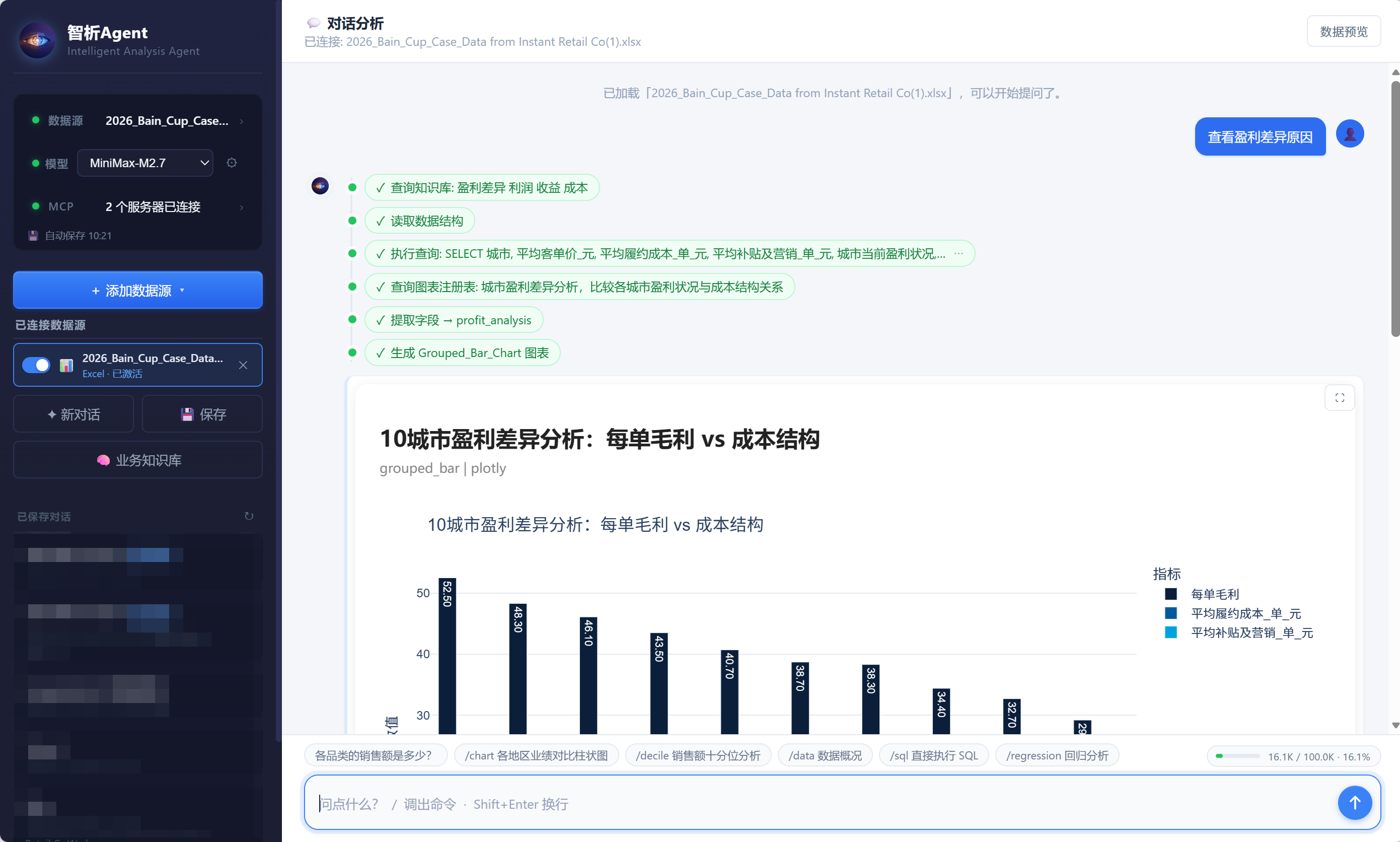
## 1️⃣ Natural Language Data Analysis
No SQL required — just type in plain language:
```text
Monthly order volume trend for this year
```
The system will automatically:
- Generate SQL
- Query the data
- Recommend a chart
- Summarize the analysis
## 2️⃣ Multi-Source Data Support
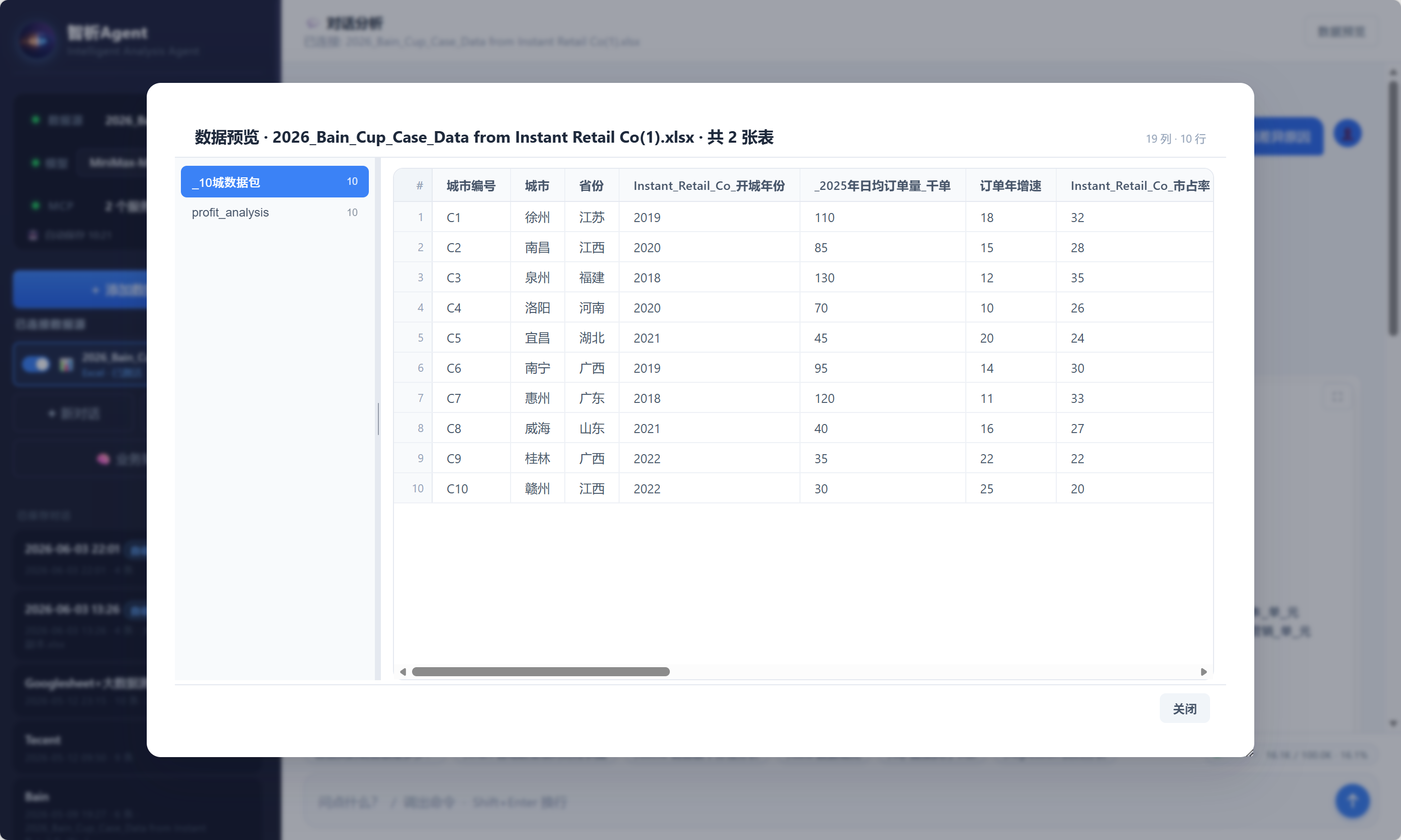
Supports uploading and connecting to multiple data sources:
- **Files**: Excel / CSV
- **Databases**: SQLite, MySQL, PostgreSQL, SQL Server
- **Planned**: DuckDB, Spark
## 3️⃣ Intelligent Chart System
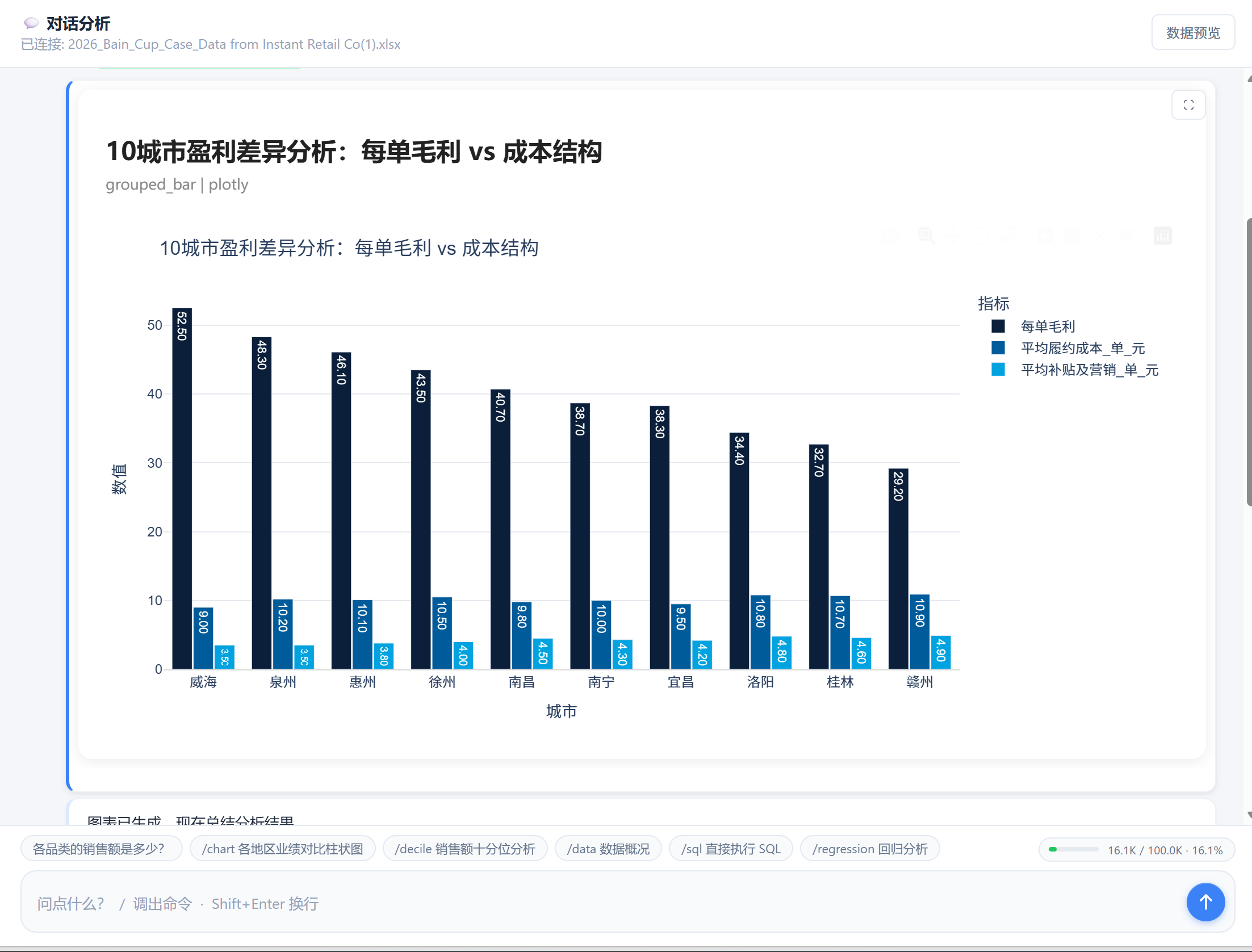
Based on your query results, the system automatically recommends the most appropriate chart from 6 major categories:
| Category | Chart Types |
|---|---|
| **COMPARING** | Marimekko_ABS, Marimekko_PCT, Bar_Chart, Grouped_Bar_Chart, Stacked_Bar_Chart, Diverging_Bar_Chart, Dot_Plot, Waffle, Bullet_Chart, Sankey_Chart, Heatmap, Waterfall |
| **TIME** | Line_Chart, Circular_Line_Chart, Slope_Chart, Sparkline, Bump_Chart, Cycle_Chart, Area_Chart, Stacked_Area_Chart, Horizon_Chart, Connected_Scatter |
| **DISTRIBUTION** | Histogram_Pareto_chart, Pyramid_Chart, Error_Bar_Chart, Box-and-Whisker_Plot, Violin_Chart, Ridgeline_Plot, Beeswarm_Plot, stem_leaf |
| **GEOSPATIAL** | Flow_Map, Dot_Density_Map, Choropleth_Map |
| **RELATIONSHIP** | Scatter_Plot, Bubble_Plot, Radar_Charts, Chord_Diagram, Arc_Chart, Network_Diagram, Parallel_Coordinates_Plot |
| **PART-TO-WHOLE** | Treemap, Sunburst_Diagram, Nightingale_Chart, Pie_Chart |
## 4️⃣ SSE Streaming Analysis Experience
The analysis process is visible in real time:
```text
[1/4] Reading data structure...
[2/4] Generating SQL...
[3/4] Executing query...
[4/4] Generating chart and insights...
```
More transparent and interactive than traditional BI tools.
## 5️⃣ Multi-Model Compatibility
Supports the following model providers:
- DeepSeek
- OpenAI
- AtlasCloud
- Any OpenAI SDK-compatible API
Supports custom `base_url`, `model`, and `api_key`. Default configurations:
| Provider | Default Model |
|---|---|
| DeepSeek | `deepseek-v4-flash` |
| OpenAI | `gpt-4o-mini` |
| AtlasCloud | `deepseek-v4-pro` |
## 6️⃣ Data Analysis
Currently supported analysis features:
- Outlier handling (trimming and winsorizing)
- Decile grouping analysis
- K-Means clustering
- Decision tree modeling
- And more...
## 7️⃣ Report Generation
Supports exporting:
- Formatted Excel spreadsheets
- Reports in `.docx` format
- Built-in styled PowerPoint presentations
## 8️⃣ MCP Extensions
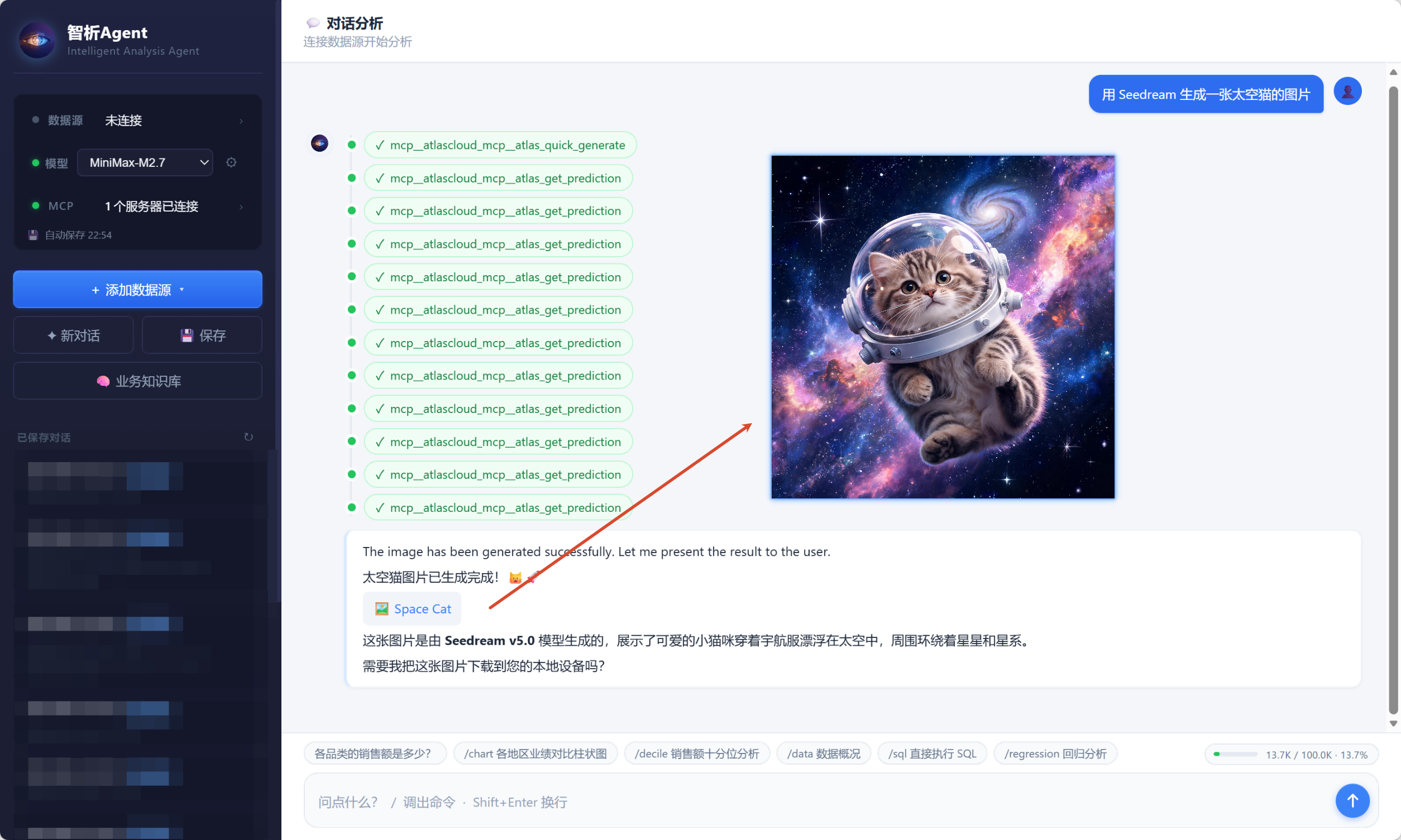
Supports connecting to local or remote MCP servers to expand the Agent's capabilities.
- Tutorial: [MCP_tutorial](./Information/MCP_tutorial.md)
## 9️⃣ Knowledge Base Input
Supports uploading business knowledge to help the Agent better understand your data.
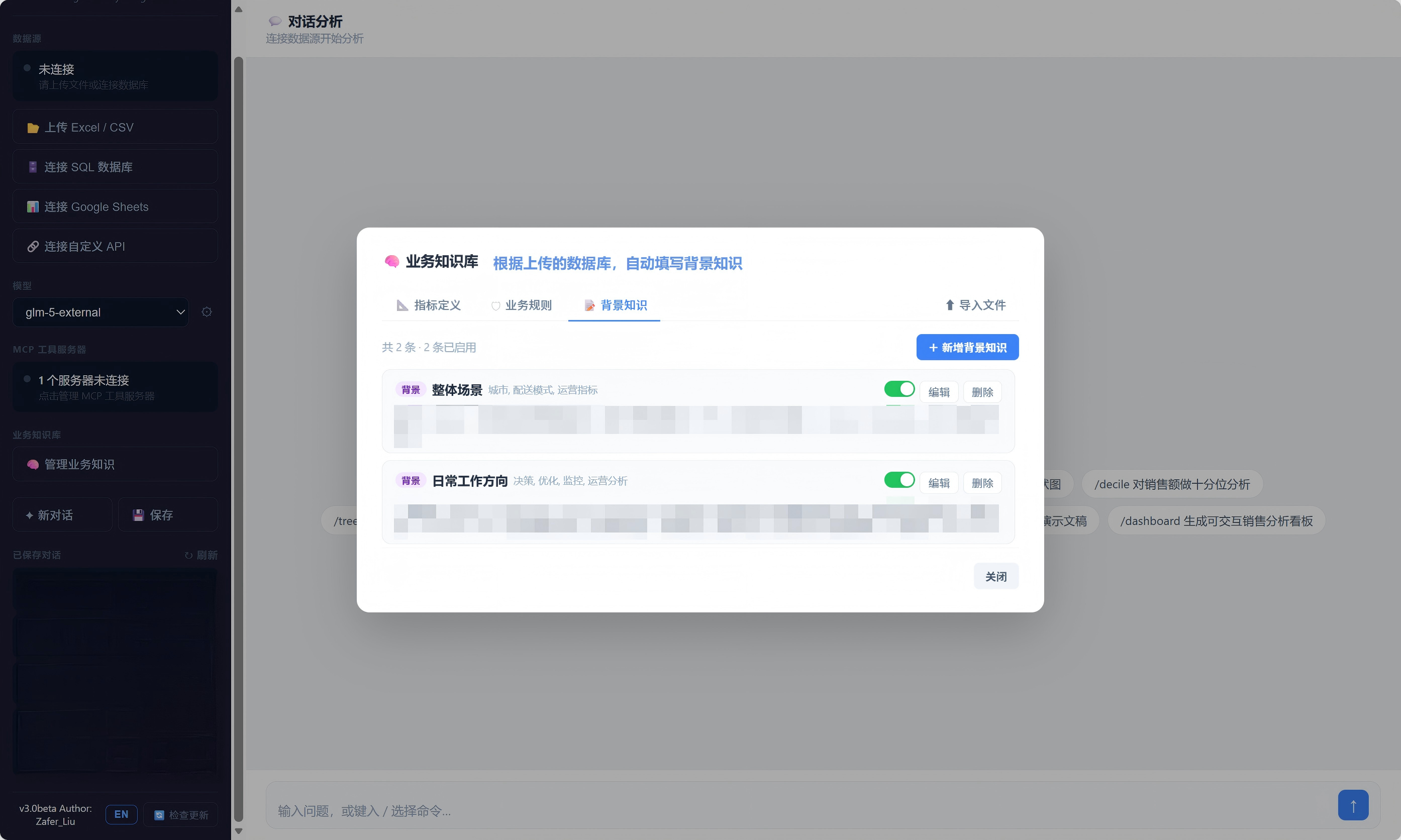
- Tutorial: [repository_tutorial](./Information/repository_tutorial.md)
---
# ⚙️ Installation
### 🖥️ Option 1: Windows Installer (Easiest — Recommended)
Download the latest version from [GitHub Releases](https://github.com/Zafer-Liu/Data-Analysis-Agent/tree/main/Releases):
| Platform | File |
|---|---|
| Windows | `BusinessAnalyticsAgent_v1.0.0_LTS.exe` |
> **Prerequisites: Python 3.10+ and 64-bit Windows 10 / 11.**
Run the installer and follow the setup wizard. After installation, launch **Business Analytics Agent** from the desktop or Start Menu.
---
### Option 2: Download the ZIP (Recommended for Beginners, Cross-Platform)
> **Prerequisite: Python 3.10+**
> Don't have it? [Download here](https://www.python.org/downloads/) (Windows: check **"Add Python to PATH"** during install)
**Step 1: Download and extract**
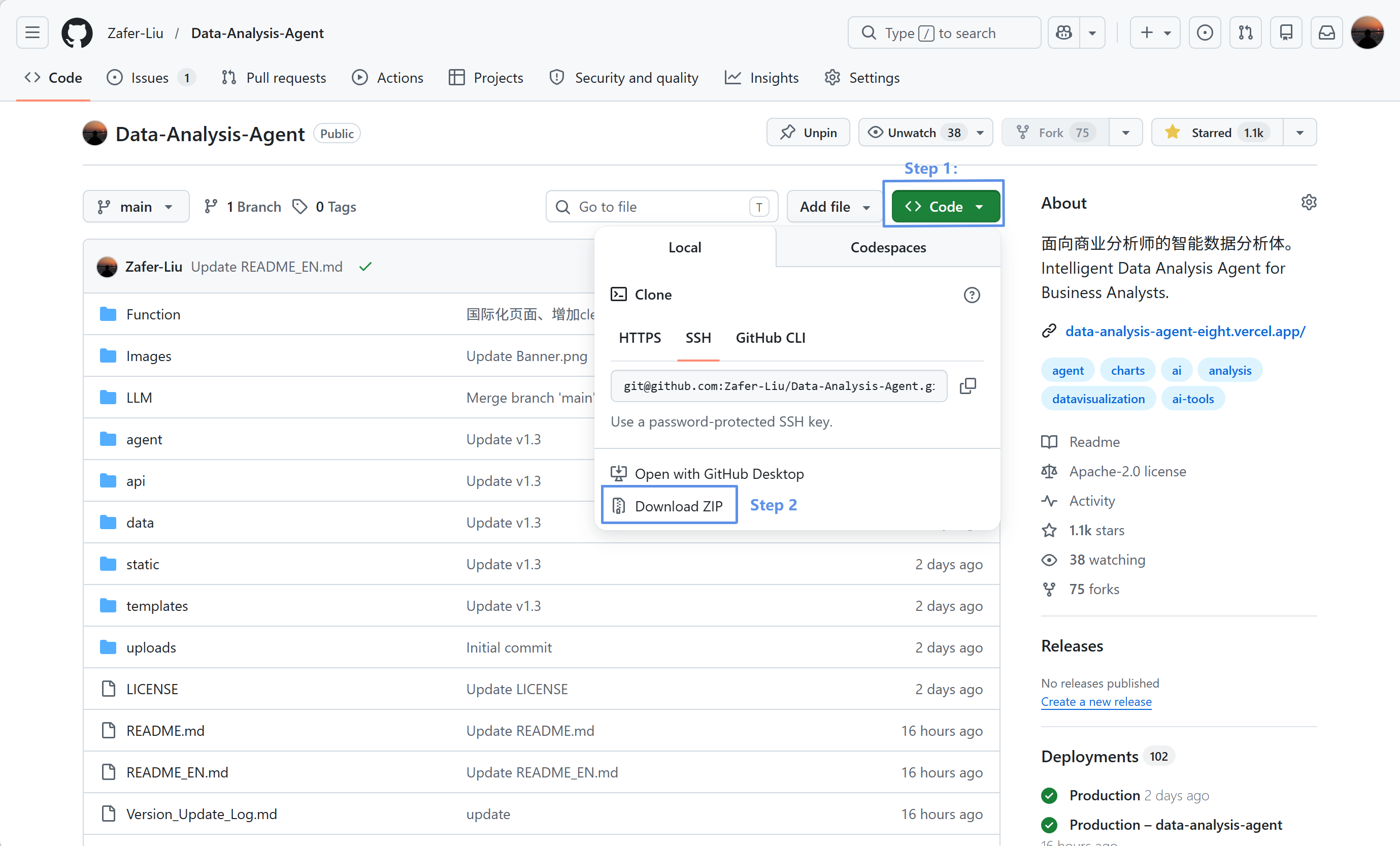
**Step 2: Double-click to launch**
| OS | Action |
|---|---|
| **Windows** | Double-click `start.bat` |
| **macOS** | ① Open Terminal (Command + Space → type Terminal → Enter) ② Run the following (replace the path with your actual extraction location): `chmod +x ~/Downloads/Data-Analysis-Agent/start.command` then `xattr -d com.apple.quarantine ~/Downloads/Data-Analysis-Agent/start.command` ③ Double-click `start.command` |
> **First launch** will automatically create a virtual environment and install dependencies — this takes about 3–5 minutes. **Subsequent launches are instant.**
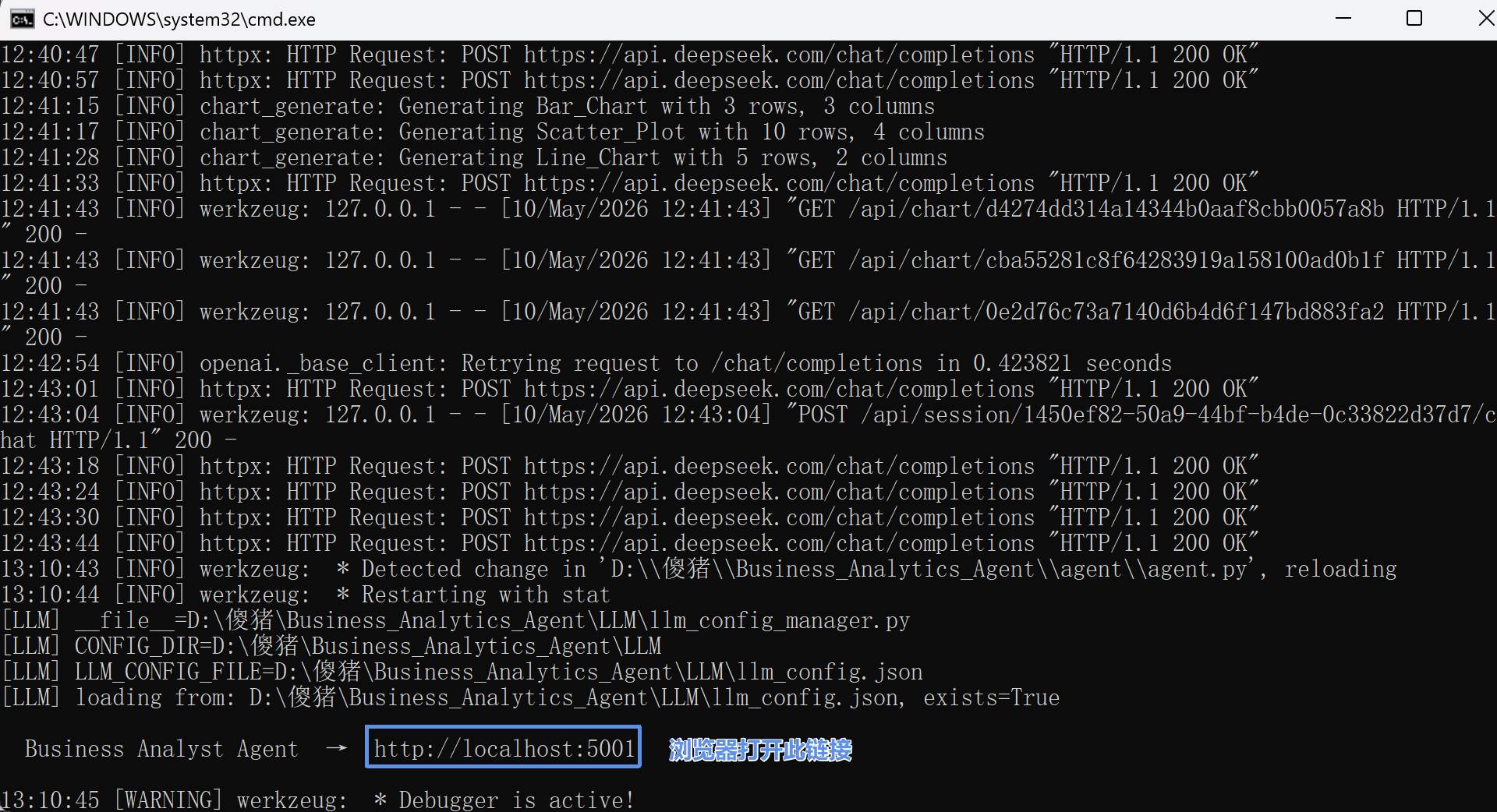
**Step 3: Browser auto-opens** at `http://localhost:5001`
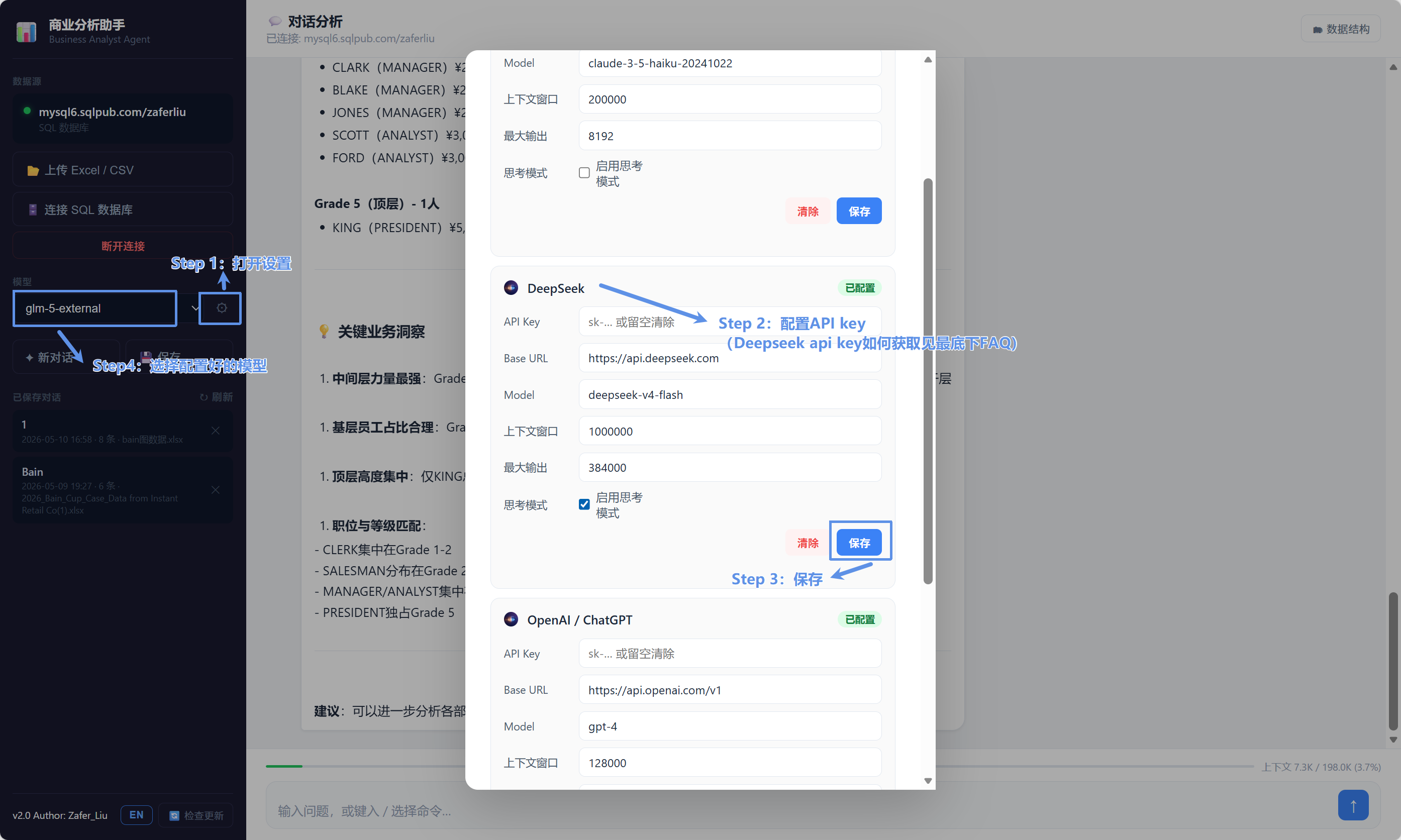
**Step 4: Configure your API Key**
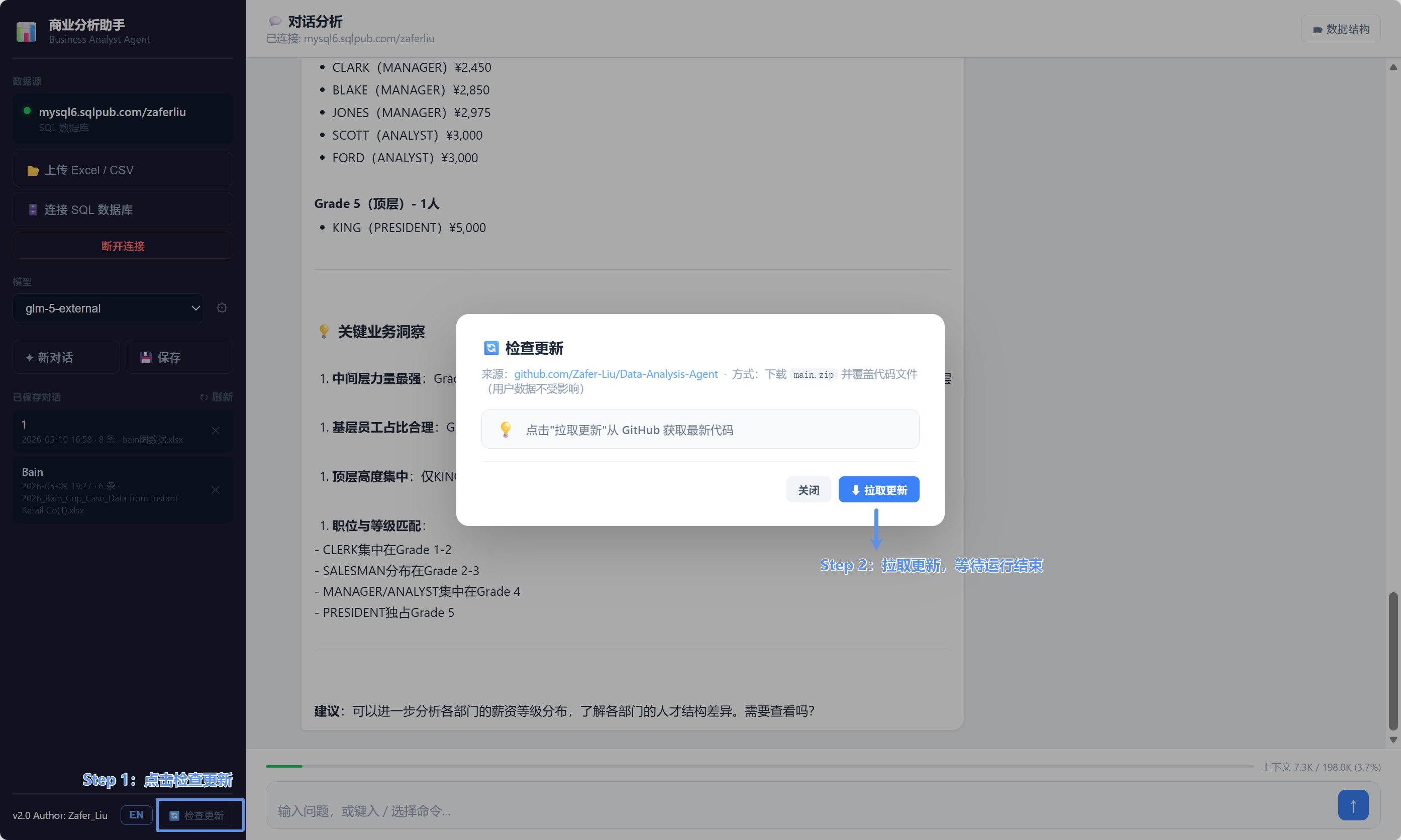
**Step 5: Future updates**
---
### Option 3: One-Click Online Install
**Windows (run in PowerShell):**
```powershell
iwr -useb https://raw.githubusercontent.com/Zafer-Liu/Data-Analysis-Agent/main/install.ps1 | iex
```
After installation, double-click `data-analysis-agent.bat` on your desktop, or run:
```powershell
cd $env:USERPROFILE\.data-analysis-agent\Data-Analysis-Agent
.\.venv\Scripts\activate
python app.py
```
**macOS / Linux (run in Terminal):**
```bash
curl -fsSL https://raw.githubusercontent.com/Zafer-Liu/Data-Analysis-Agent/main/install.sh | sh
```
After installation, run:
```bash
data-analysis-agent
```
If you see `command not found`, add the following to `~/.zshrc` or `~/.bashrc`, then restart Terminal:
```bash
export PATH="$HOME/.local/bin:$PATH"
```
---
### Option 4: Clone from GitHub
```bash
git clone https://github.com/Zafer-Liu/Data-Analysis-Agent.git
cd Data-Analysis-Agent
pip install -r requirements.txt
python app.py
```
Open `http://localhost:5001` in your browser and configure your API Key.
---
# 🛠 Slash Commands
| Command | Status | Description |
|---|---|---|
| `/chart` | ✅ | Force chart generation as the priority output |
| `/sql` | ✅ | Execute SQL directly |
| `/analyze` | ✅ | Deep statistical analysis |
| `/tree` | ✅ | Decision tree analysis |
| `/kmeans` | ✅ | K-Means clustering analysis |
| `/data` | ✅ | Data exploration and preview |
| `/inset` | ✅ | Missing value imputation |
| `/winsorize` | ✅ | Winsorizing (replace extreme values) |
| `/trimming` | ✅ | Trimming (remove extreme values) |
| `/export` | ✅ | Export data file |
| `/report` | ✅ | Export Word/PDF report |
| `/ppt` | ✅ | Export PowerPoint presentation |
| `/status` | ✅ | View task status |
---
# 📈 Usage Examples
## Example 1: Trend Analysis
User input:
```text
Sales trend for the last 12 months
```
System output:
- SQL query
- Trend line chart
- Sales growth analysis
---
## Example 2: Regional Analysis
User input:
```text
Which region has the highest profit?
```
System output:
- Regional profit rankings
- Bar chart
- Regional business insights
---
## Example 3: Chart-First Mode
User input:
```text
/chart User growth overview
```
The system will prioritize generating a visualization.
---
# 🤖 LLM Configuration
In the sidebar ⚙, fill in:
```text
API Key
Base URL
Model
```
to switch between models.
---
# ❓ FAQ
📦 Installation & Startup
Network timeout while installing dependencies?
The script will automatically switch to the Tsinghua mirror and retry.
If it still fails, run manually:
```bash
pip install -r requirements.txt -i https://pypi.tuna.tsinghua.edu.cn/simple
```
pip install error / dependency installation failed?
The script automatically retries using a domestic mirror (Tsinghua).
If it still fails, specify the mirror manually:
```bash
pip install -r requirements.txt -i https://pypi.tuna.tsinghua.edu.cn/simple
```
Also ensure at least **2 GB** of free disk space is available.
Wrong Python version (requires 3.10+)?
Check your current version:
```bash
python --version
```
If below 3.10, download the latest version at:
https://www.python.org/downloads/
Double-clicking start.bat does nothing or flashes briefly?
Python is not correctly added to the system PATH.
Reinstall Python and check **"Add Python to PATH"**, then restart your computer and try again.
macOS blocks start.command from running?
Run this in Terminal to remove the restriction:
```bash
xattr -d com.apple.quarantine /your/path/to/start.command
```
If you see:
> "Cannot be opened because the developer cannot be verified"
You can:
1. Right-click `start.command`
2. Select "Open"
3. Click "Open" again
---
🔑 API Configuration
Prompted that LLM is not configured?
Enter your API Key in the sidebar ⚙ and save.
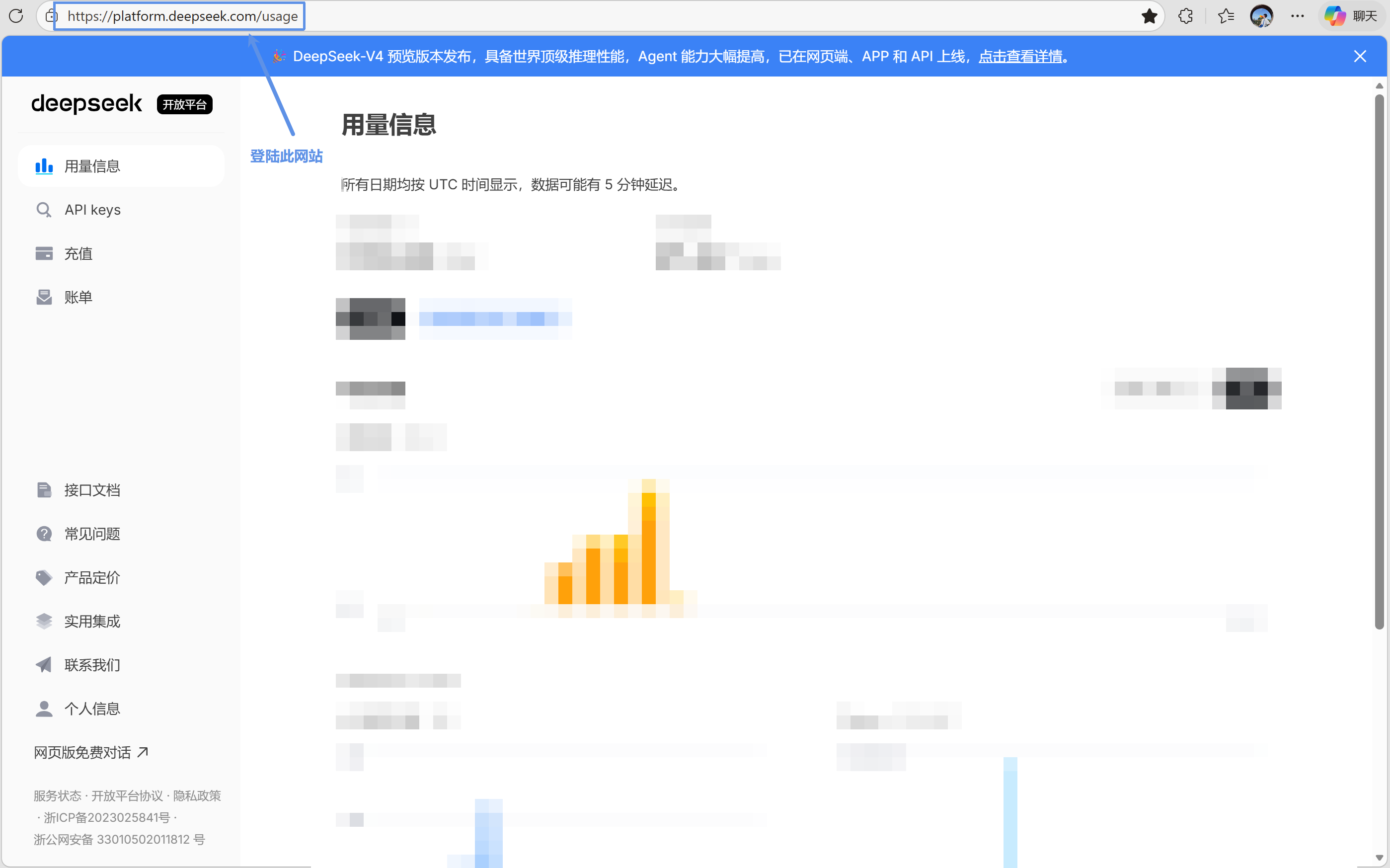
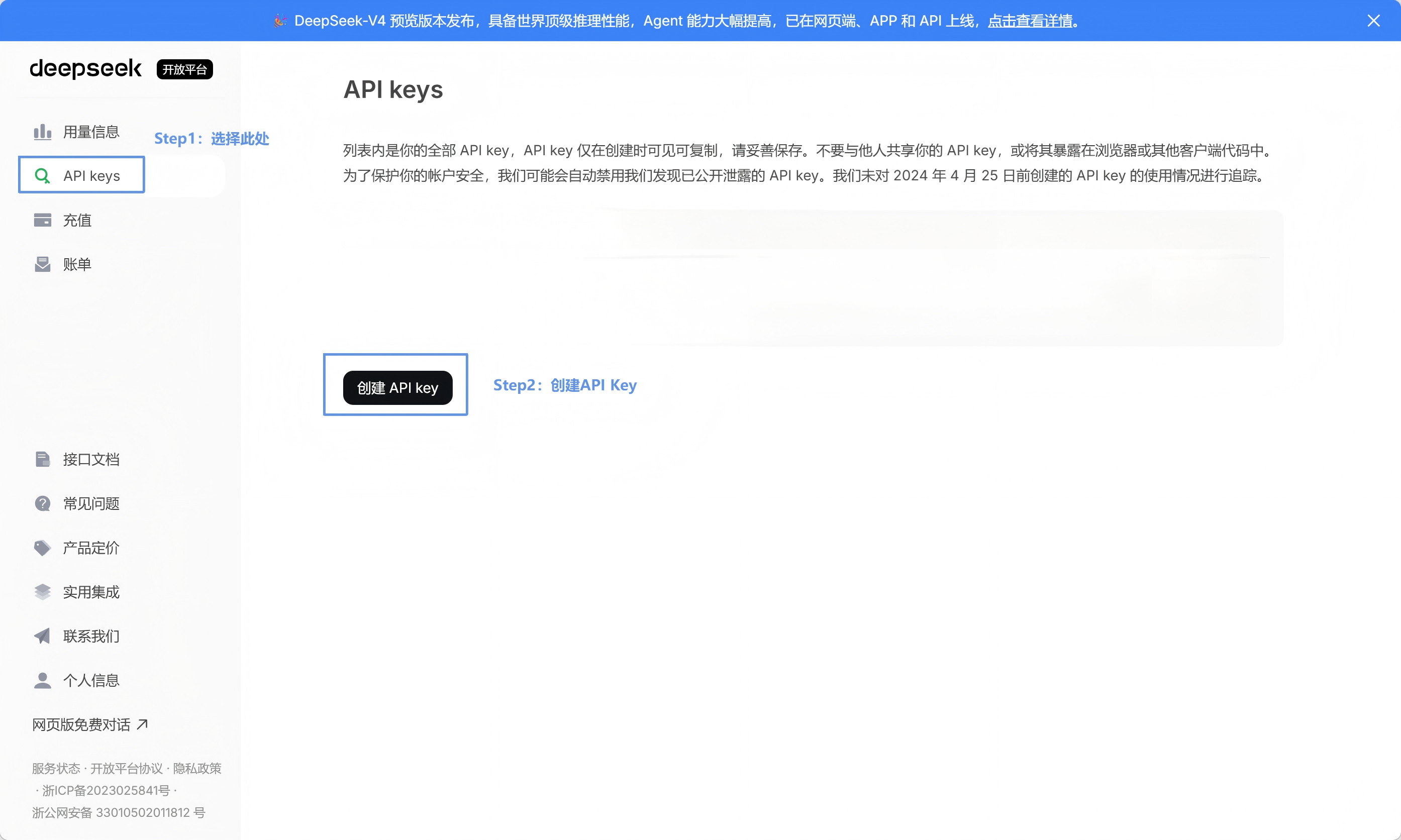
How do I get an API Key?
Using DeepSeek as an example:

---
🗄️ Database Connection
How do I connect to a SQL database?
Use the following connection format:
```text
mysql+pymysql://username:password@host:port/database_name
```
Example:
❌ Wrong:
```text
mysql://user:pass@host:3306/dbname
```
✅ Correct:
```text
mysql+pymysql://user:pass@host:3306/dbname
```
---
📊 Charts & Files
Chart links broken after restart?
Generated charts are saved locally at:
```text
outputs/charts
```
You can open the corresponding HTML files directly in your browser.
---
# 🤝 Contribution Guide
We welcome every kind of contribution, whether you are fixing a bug, improving documentation, or adding a feature.
### Contribution Workflow
1. **Fork this repository**
2. **Create a feature branch**
```bash
git checkout -b feature/your-feature-name
```
3. **Commit your changes**
```bash
git add .
git commit -m "feat: add your feature"
```
We recommend following the [Conventional Commits](https://www.conventionalcommits.org/) specification.
4. **Push your branch**
```bash
git push origin feature/your-feature-name
```
5. **Open a Pull Request**
- Describe your changes
- Include screenshots or a recording for new UI features
- Link related issues, if any
### Code Standards
- Follow [PEP 8](https://pep8.org/) for Python code
- Run `flake8` before submitting changes
- Add relevant tests for new features
- Keep commit messages clear and concise
### Reporting Bugs
Report bugs through [GitHub Issues](https://github.com/Zafer-Liu/Data-Analysis-Agent/issues) and include:
- 📋 Steps to reproduce
- 🎯 Expected behavior
- ⚠️ Actual behavior
- 📸 Screenshots, when applicable
- 💻 Environment details, including OS and Python version
---
## 🚀 Looking for Contributors
A great open-source project is never a solo act.
We're building a **data tool that can genuinely handle complex business scenarios** — one that races through massive datasets, navigates multi-table logic with ease, and surfaces insights on visual dashboards.
We've hit a few deeply challenging, high-value problems. If you love solving hard technical problems, we need you:
---
### Key challenges we'd love your help with:
- **Multi-sheet inter-table logic optimization** — How do you intelligently map dependencies and calculations across dozens of sheets?
- **Visualization dashboard interactivity & performance** — Making data stories flow more smoothly, intuitively, and powerfully.
- **Model capability enhancement for specialized business scenarios** — The edge cases that general-purpose tools can't handle.
- **Remote server invocation** — Building a framework for remote GPU calls.
---
### Why is it worth joining?
- You'll tackle **real, deep, non-toy technical challenges**
- Your code will directly impact the productivity of **front-line business users**
- Contribute freely, collaborate flexibly — submit a PR or reach out directly, entirely up to you
- Outstanding contributors may be invited to become project Committers
---
### How to join?
- Open a **Pull Request** directly — we review within 24 hours
- Or contact us at: `rusboldtshanti34@gmail.com` (please note "Contributor + area of expertise")
- Join the official community: QQ Group `991636855` or [Telegram Group](https://t.me/+cdRNfS68u9BlYjJl) or [Discord](https://discord.gg/EEG4Sw7tde)
---
# 📄 License
This software is licensed under **CC BY-NC 4.0** and a Chinese software copyright registration has been applied for (Acceptance No. 2026R11S0817877, Software: Natural-Language Interactive Business Data Analysis Software V1.0).
See the [LICENSE](./LICENSE) file for the full terms.
> Unauthorized commercial use is prohibited; contact the author for a separate commercial license.
---
# ⭐ Project Goal
Leave the process to Business Analytics Agent, and save your time for thinking.
---
⭐️ If this project helps you, please give it a star!
Made with ❤️ by [Zafer-Liu](https://github.com/Zafer-Liu)
� by [Zafer-Liu](https://github.com/Zafer-Liu)